Hunter Email Lookup: How It Works and What It Costs
A neutral 2026 breakdown of Hunter email lookup — how the search works, what the confidence score really means, where credits disappear fastest, and which alternatives beat it on price per verified contact.
TL;DR
- Hunter email lookup is a domain-and-name search that predicts a company's email pattern, then scores each result with a confidence percentage — it is a probability engine, not a directory of confirmed inboxes.
- A 90%+ confidence score means the pattern is well-evidenced and the SMTP check passed. Anything between 50-80% is a coin flip you should verify before it enters a sequence.
- Free tier gives you 25 searches and 50 verifications a month; paid plans start at $49/mo for 500 searches. Credits burn fastest on catch-all domains, where a "found" result tells you almost nothing.
- The three things that decide cost-per-usable-contact are catch-all handling, whether verification is bundled or billed separately, and how many searches return nothing at all.
- If you run high-volume outbound, compare Hunter against Tomba, Findymail and Apollo on price per verified contact — not per search. The gap is often 2-3x.
What is Hunter email lookup?#
Hunter email lookup is a search that takes a person's name and a company domain and returns the most probable work email address, along with a confidence score and the public sources that support it. Think of it like a locksmith who has seen a thousand locks from the same manufacturer: they do not have your key, but they know the pattern well enough to cut one that usually works.
That distinction matters more than most buying guides admit. Hunter does not maintain a warehouse of confirmed inboxes for every professional on earth. It crawls the public web, records every email address it sees tied to a domain, infers the dominant pattern (first.last@, flast@, first@), and then applies that pattern to the name you typed. The SMTP layer then asks the receiving mail server whether the address exists.
There are three lookup modes people mean when they say "Hunter email lookup":
- Email Finder — one name plus one domain, returns one address with a score. This is the classic lookup.
- Domain Search — one domain, returns every address Hunter has recorded for it, plus job titles and departments. Useful when you do not know who you want yet.
- Email Verifier — takes an address you already have and checks syntax, MX records, SMTP response and disposable/role status.
Most teams use all three in a chain: domain search to map the org, finder to target the individual, verifier to protect the sending domain. Skipping step three is the single most common reason a well-researched list still torches sender reputation.
How does the confidence score actually work?#
The score is a blend of pattern evidence and deliverability signals — and the two contribute unevenly.
Hunter's own documentation describes the score as reflecting how confident it is the address exists and is deliverable. In practice, the number moves on four inputs:
- Pattern strength — how many distinct addresses on that domain follow the same format. Twelve confirmed
first.last@acme.comaddresses is strong evidence. Two is not. - Direct sightings — whether that exact address was seen on a public page (a press release, a GitHub commit, an author byline). A direct sighting is worth far more than an inferred pattern.
- SMTP result — whether the mail server accepted the recipient during a handshake.
- Recency — how long ago the supporting sources were crawled. A 2019 conference PDF is weak support in 2026.
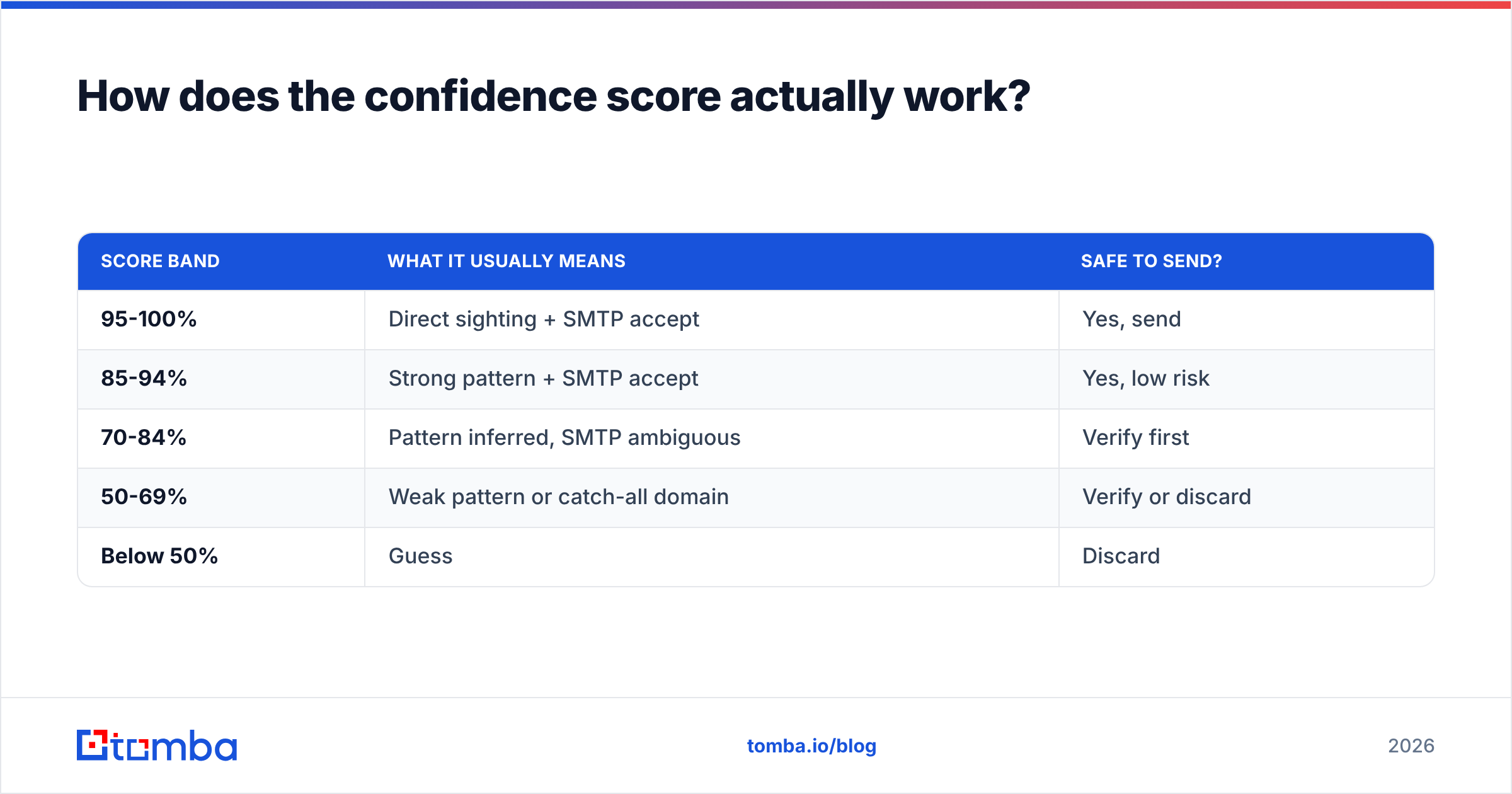
Here is how to read the bands without over-trusting them:
| Score band | What it usually means | Safe to send? |
|---|---|---|
| 95-100% | Direct sighting + SMTP accept | Yes, send |
| 85-94% | Strong pattern + SMTP accept | Yes, low risk |
| 70-84% | Pattern inferred, SMTP ambiguous | Verify first |
| 50-69% | Weak pattern or catch-all domain | Verify or discard |
| Below 50% | Guess | Discard |

The trap is the catch-all domain. A catch-all server accepts mail for every address at the domain, including asdkjh@company.com. Hunter will often return a result and a middling score because the SMTP check technically passed. That result carries almost no information. If a meaningful share of your target accounts are catch-all — common in enterprise, education, and anything behind Microsoft 365 with a wildcard rule — you need a dedicated catch-all verifier that uses secondary signals rather than a plain handshake.

What does Hunter email lookup cost in 2026?#
Hunter prices on monthly credits, and the important detail is that a search credit and a verification credit are counted separately on most plans. A "500 searches" plan is not 500 ready-to-send contacts — it is 500 attempts, of which some return nothing, some return a low score, and the survivors still need verifying.
Run the arithmetic on your own funnel before comparing sticker prices:
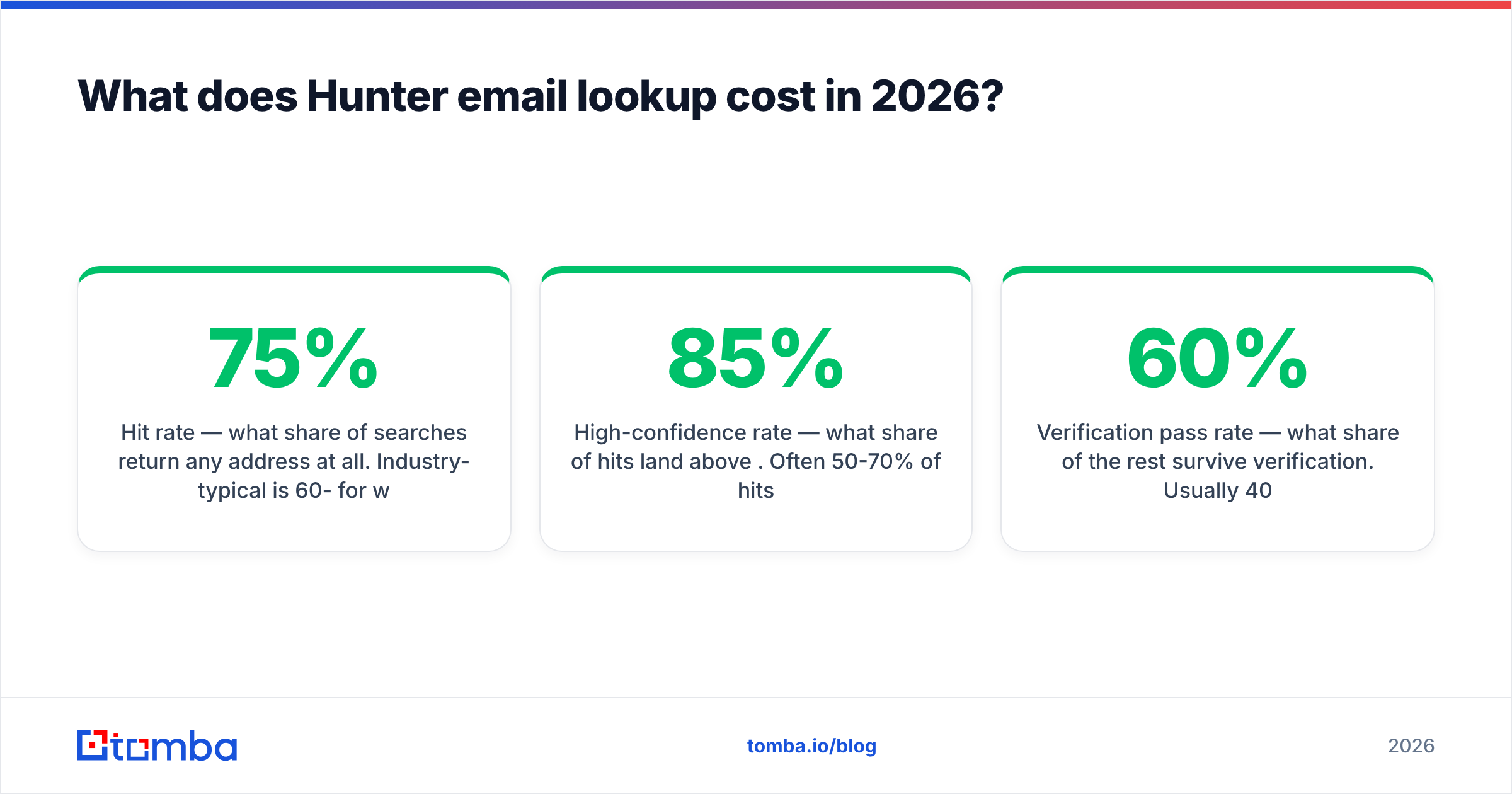
- Hit rate — what share of searches return any address at all. Industry-typical is 60-75% for well-known domains, lower for SMBs and non-English markets.
- High-confidence rate — what share of hits land above 85%. Often 50-70% of hits.
- Verification pass rate — what share of the rest survive verification. Usually 40-60%.
Multiply those and a 1,000-search plan frequently yields 350-500 contacts you would actually put in a sequence. That is the number your cost-per-contact should be based on.
How does Hunter compare to the main alternatives?#
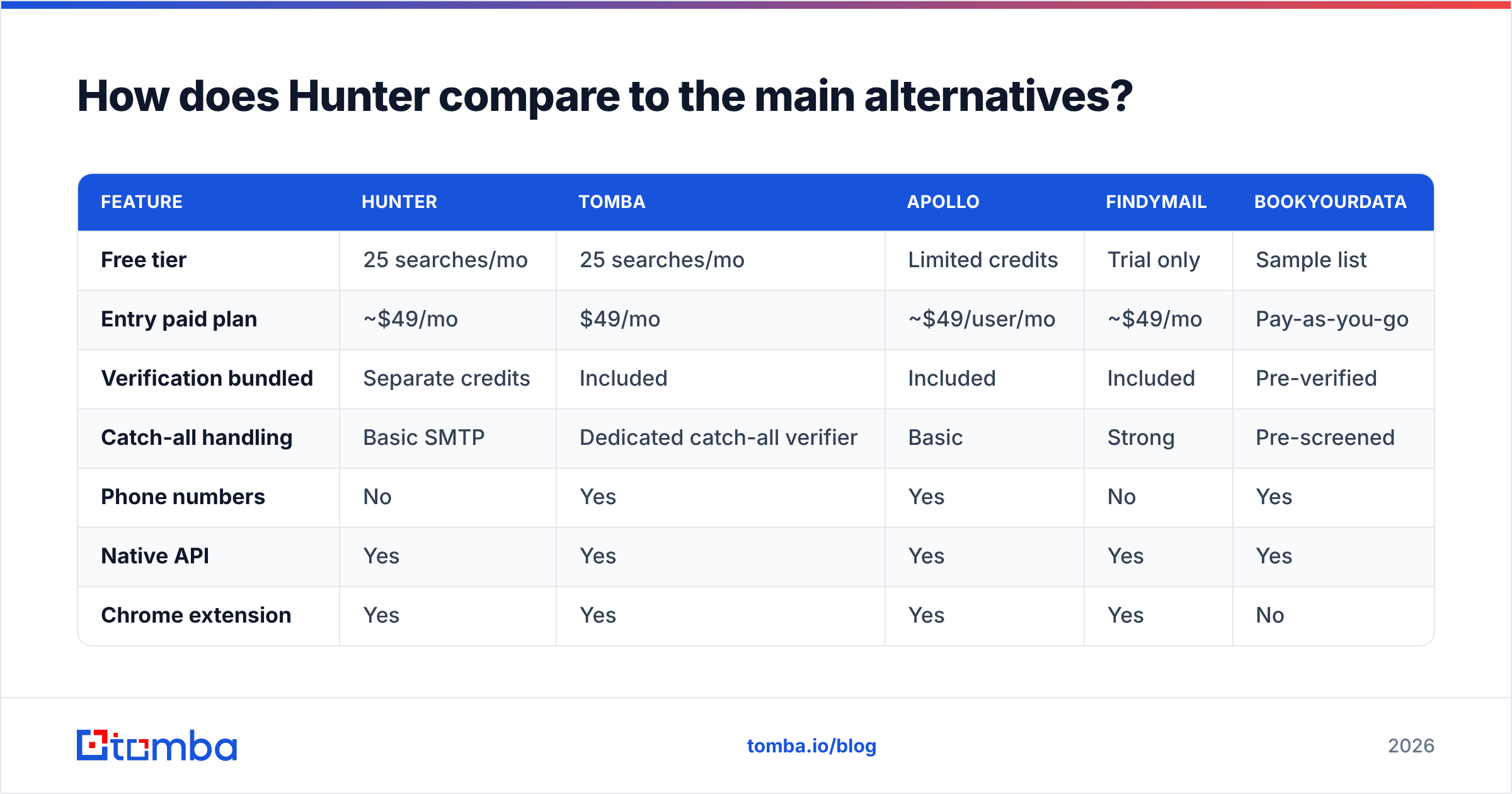
Below is a like-for-like comparison at the entry paid tier. Verify current numbers on each vendor's pricing page before you commit — all five change plans regularly.
| Feature | Hunter | Tomba | Apollo | Findymail | BookYourData |
|---|---|---|---|---|---|
| Free tier | 25 searches/mo | 25 searches/mo | Limited credits | Trial only | Sample list |
| Entry paid plan | ~$49/mo | $49/mo | ~$49/user/mo | ~$49/mo | Pay-as-you-go |
| Verification bundled | Separate credits | Included | Included | Included | Pre-verified |
| Catch-all handling | Basic SMTP | Dedicated catch-all verifier | Basic | Strong | Pre-screened |
| Phone numbers | No | Yes | Yes | No | Yes |
| Native API | Yes | Yes | Yes | Yes | Yes |
| Chrome extension | Yes | Yes | Yes | Yes | No |
| Best fit | Small teams, simple lookups | API-first + verification-heavy workflows | All-in-one prospecting + sequencing | Agencies, high catch-all volume | Buying static verified lists |

A few honest reads on that table:
Hunter is the cleanest single-purpose tool in the category. The UI is uncluttered, the domain search is genuinely good at mapping an org's email format, and the free tier is enough to evaluate properly. Its weakness is that verification is a separate line item, and catch-all results are treated generously.
Tomba bundles the email verifier with the finder at the same tier, which changes the cost math for verification-heavy workflows, and adds a phone finder that Hunter does not offer. Plans run Free (25 searches/mo), Starter $49/mo, Growth $99/mo, Pro $249/mo, Enterprise custom — see full Tomba pricing for credit allocations.
Apollo is a different product class. You are buying a database plus a sequencer plus a dialer; the email finder is one module. If you already own an outbound stack you like, you are paying for overlap.
Findymail built its reputation on refusing to return junk — it will often say "not found" where others return a 55% guess. That is a feature if your reply rate matters more than your list size.
BookYourData sells pre-verified lists rather than live lookups, with an accuracy guarantee attached. It solves a different problem: you are not searching, you are buying a vetted segment outright. For teams that want volume without building a scraping-and-verifying pipeline, that is a legitimate and often faster route.
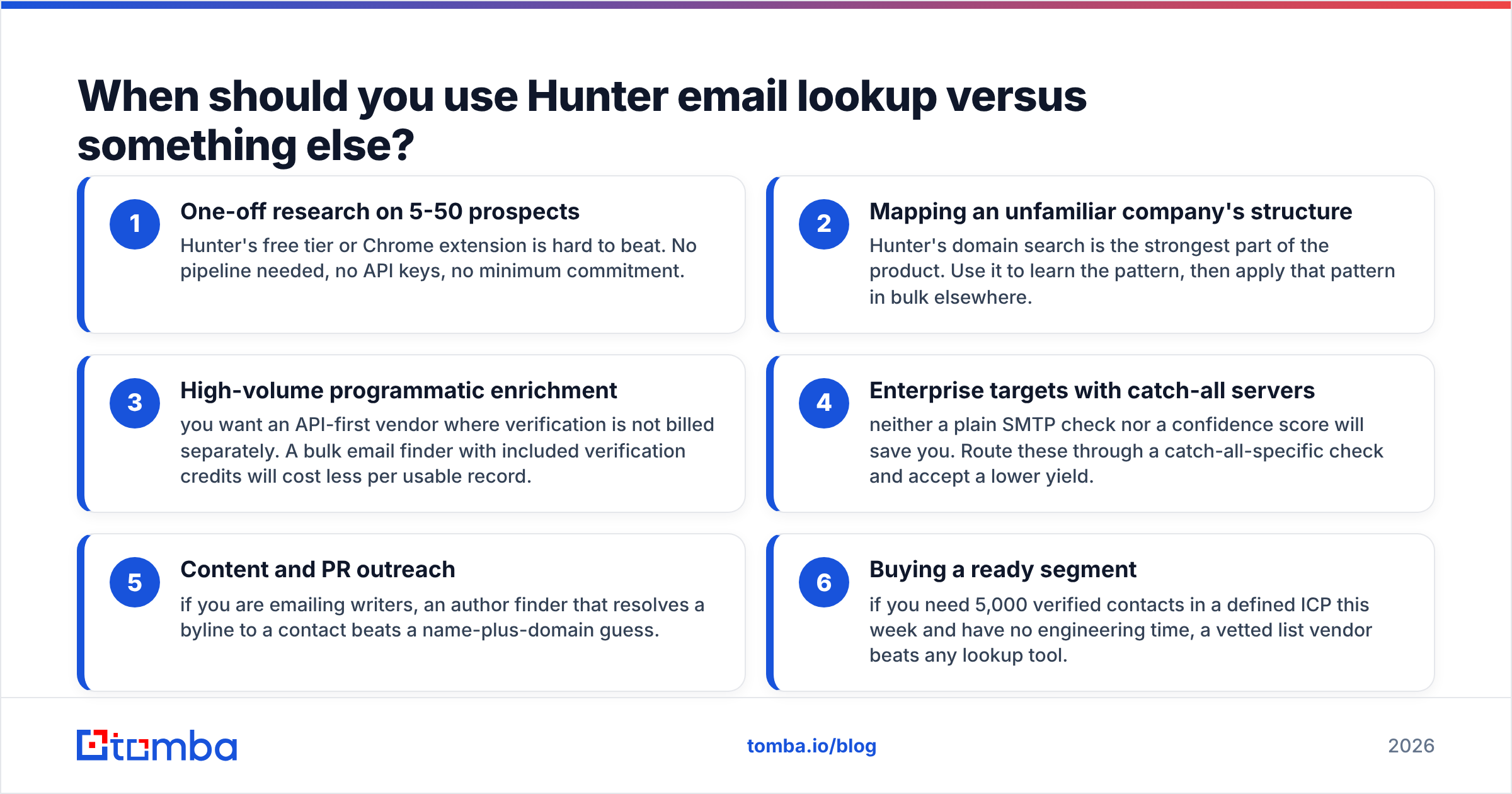
When should you use Hunter email lookup versus something else?#
Match the tool to the shape of the job rather than the review scores.
- One-off research on 5-50 prospects — Hunter's free tier or Chrome extension is hard to beat. No pipeline needed, no API keys, no minimum commitment.
- Mapping an unfamiliar company's structure — Hunter's domain search is the strongest part of the product. Use it to learn the pattern, then apply that pattern in bulk elsewhere.
- High-volume programmatic enrichment — you want an API-first vendor where verification is not billed separately. A bulk email finder with included verification credits will cost less per usable record.
- Enterprise targets with catch-all servers — neither a plain SMTP check nor a confidence score will save you. Route these through a catch-all-specific check and accept a lower yield.
- Content and PR outreach — if you are emailing writers, an author finder that resolves a byline to a contact beats a name-plus-domain guess.
- Buying a ready segment — if you need 5,000 verified contacts in a defined ICP this week and have no engineering time, a vetted list vendor beats any lookup tool.

How do you get more out of any email lookup tool?#
The tool is maybe half the outcome. The rest is process.
Verify at send time, not at build time. B2B email data decays roughly 2-2.5% per month as people change jobs. A list you verified in March is measurably worse by September. Re-verify anything older than 60 days before it enters a sequence.
Treat "not found" as information. If a domain returns nothing across ten searches, it is usually one of three things: a privacy-hardened company, a domain that routes everything through a form, or a non-standard TLD your tool crawls poorly. Move on rather than burning credits.
Segment by score before you segment by persona. Send your highest-confidence tranche first from a warmed domain. If bounce rate stays under 2%, release the next tranche. This is basic risk-staging and it protects email deliverability far better than any single verification vendor.
Cross-check the pattern manually on high-value accounts. For a target worth six figures, spend four minutes confirming the format from a press release or a support ticket signature. Automation is for volume; your top 20 accounts deserve manual eyes.
Watch the role-account trap. info@, sales@, support@ and hello@ will verify perfectly and reply almost never. Most tools flag these; make sure your filter actually excludes them rather than counting them toward your contact total. Independent review sites like G2 are useful here — filter reviews by company size, since accuracy complaints cluster heavily in the SMB segment where public data is thinnest.
Feed results back into your CRM with source attribution. Store the confidence score and the lookup date alongside the address. Six months later, when you are diagnosing a deliverability dip, you will know exactly which batch to suspect. Most vendors offer a HubSpot integration or similar that writes these fields automatically — see how HubSpot recommends structuring contact-source properties if you are building this from scratch.
Is Hunter email lookup worth it in 2026?#
Yes, for a specific profile: small teams doing moderate-volume, research-led outreach who value a clean interface over per-record economics. The free tier is real, the domain search is best-in-class, and the confidence score — read with appropriate skepticism about catch-alls — is a genuinely useful signal.
It becomes the wrong choice when volume climbs. Once you are running thousands of lookups a month, the separate verification billing and the generous scoring on catch-all domains push your true cost per sequence-ready contact well above the sticker price. At that point an API-first vendor with bundled verification, or a pre-verified list provider, will do the same job for meaningfully less.
The test to run is simple. Take 200 real prospects from your ICP. Run them through two tools. Verify both outputs with the same third-party verifier. Compare the count of addresses that survive, divide each tool's cost by that count, and buy on that number. Sticker price comparisons across email finders are almost always misleading; survival-rate comparisons almost never are.
Ready to compare on your own data?#
If you want to run that 200-prospect test without paying for the privilege, the Tomba Email Finder includes 25 free searches a month with verification bundled in — enough to benchmark hit rate, confidence accuracy and catch-all behaviour against whatever you use today. Start with a domain search on three accounts you know well, check the patterns against addresses you can already confirm, and let the survival rate decide your stack.
Related guides#
// get started
Find, verify and enrich your first contacts today
Start on the free plan with 25 searches a month, then scale when your team is ready.
Free plan · No credit card required · GDPR & CCPA
// about the author