Hunter Pricing in 2026: Real Costs, Limits & Alternatives
Hunter.io lists four paid tiers, but the sticker price hides how credits are actually consumed. Here is what each plan really costs per verified contact — and when a cheaper tool wins.

TL;DR
- Hunter.io sells four paid tiers — roughly $34, $104, $349 and $499/mo on annual billing — plus a free plan capped at 25 monthly searches and 50 verifications.
- The published price is not the real price. What matters is cost per usable contact after you subtract unfound emails, risky results, and catch-all domains you still can't confirm.
- Hunter's credit model counts a search and a verification separately, so a single "find + verify" contact consumes two credits from two different buckets on lower tiers.
- Team seats are generous on paid plans, but API rate limits and monthly rollover rules are where teams get squeezed mid-quarter.
- If you mostly need find + verify volume, Tomba's Starter at $49/mo and Growth at $99/mo undercut Hunter's equivalent tiers on effective cost per verified contact.
What is Hunter.io actually charging for?#
Hunter.io is an email-finding and verification tool. You give it a domain or a name-plus-company, it returns a likely professional email address with a confidence score, and it can verify whether that address accepts mail.
The pricing question sounds simple — pick a tier, get credits — but Hunter's billing has three moving parts that most comparison posts flatten into one number:
- Search credits — consumed by Domain Search, Email Finder, and similar lookups.
- Verification credits — consumed by Email Verifier, billed from a separate pool.
- Seats and API access — included on paid tiers, but with request-rate ceilings that matter for automation.
Think of it like a phone plan that bills minutes and texts separately. The headline number tells you almost nothing about what your actual usage will cost until you know your ratio of finds to verifications.

What are the Hunter pricing tiers in 2026?#
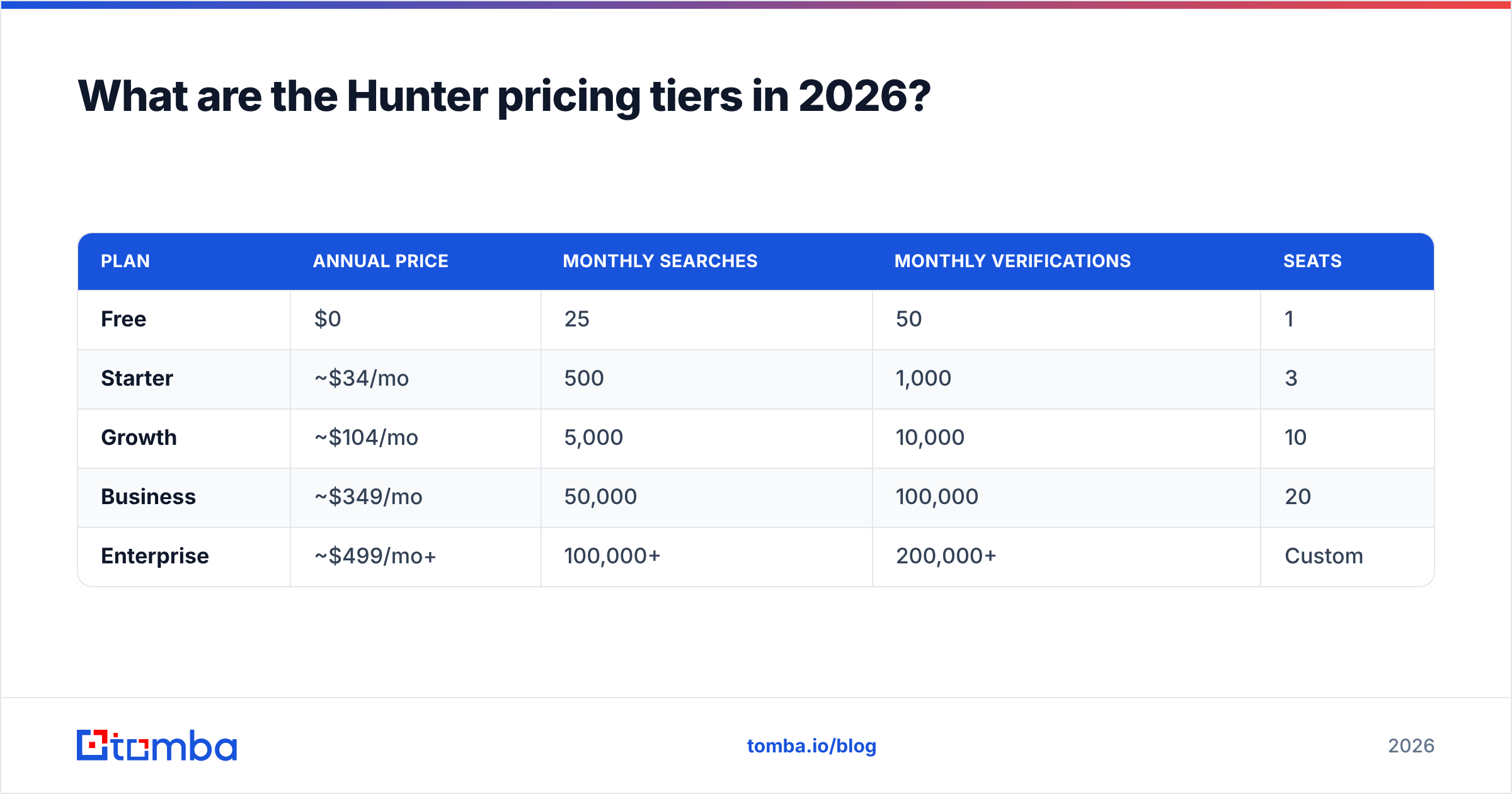
Here are the published plans as of 2026. Monthly billing runs roughly 30% higher than the annual figures below; always check Hunter's own pricing page before you commit, since vendors adjust credit allocations more often than they adjust prices.
| Plan | Annual price | Monthly searches | Monthly verifications | Seats |
|---|---|---|---|---|
| Free | $0 | 25 | 50 | 1 |
| Starter | ~$34/mo | 500 | 1,000 | 3 |
| Growth | ~$104/mo | 5,000 | 10,000 | 10 |
| Business | ~$349/mo | 50,000 | 100,000 | 20 |
| Enterprise | ~$499/mo+ | 100,000+ | 200,000+ | Custom |
Two things to notice. First, verifications are always granted at 2× the search allowance — Hunter assumes you verify more than you find, which is true if you're importing lists but false if you're prospecting from scratch. Second, the jump from Starter to Growth is 3× the price for 10× the searches, which makes Starter the worst value per credit in the lineup.
How much does Hunter really cost per verified contact?#
Divide, then discount. That's the whole method.
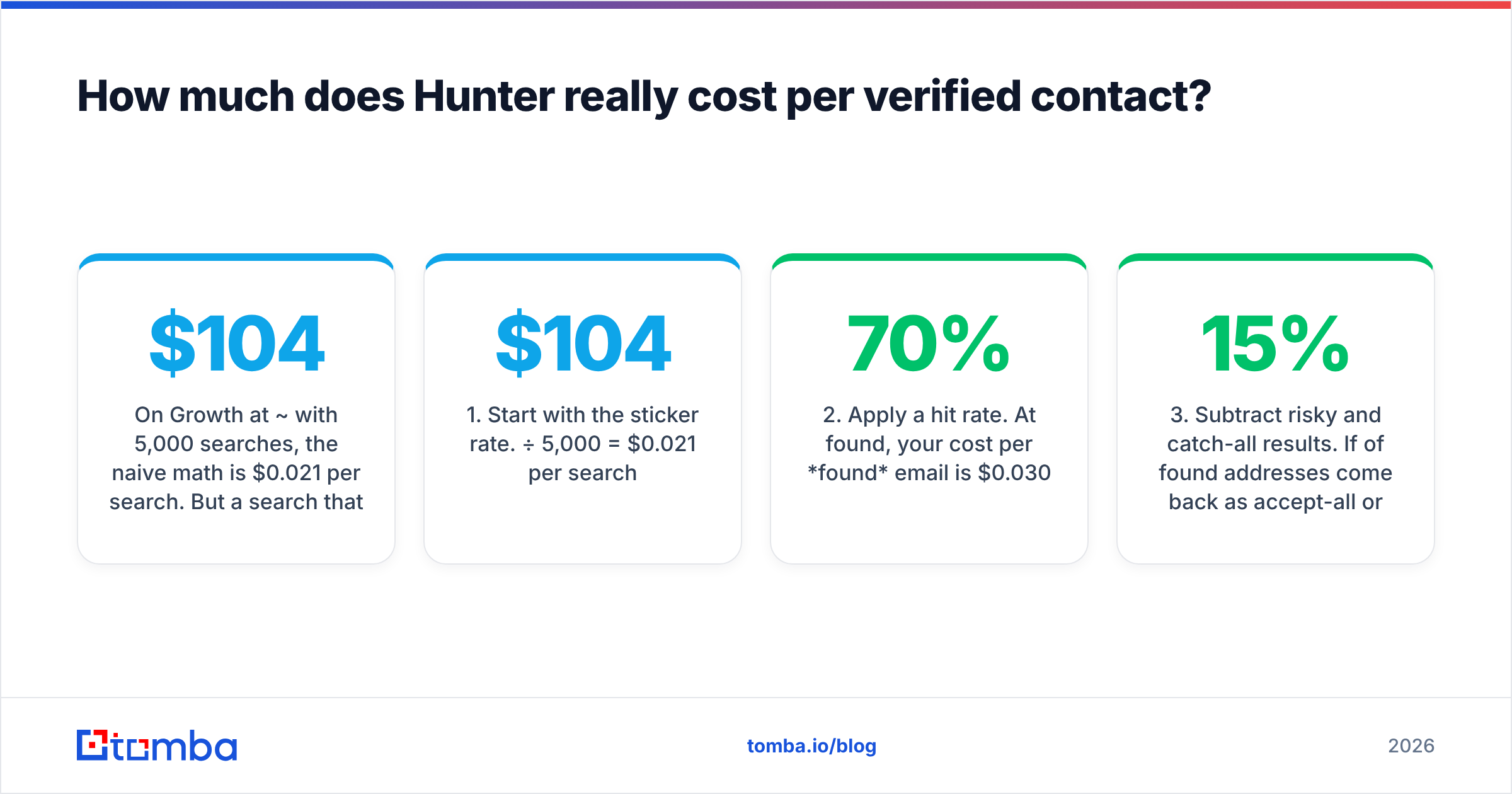
On Growth at ~$104/mo with 5,000 searches, the naive math is $0.021 per search. But a search that returns nothing still burns a credit on most email-finding platforms, and industry-wide hit rates on B2B domains sit somewhere between 60% and 80% depending on company size and region. Small companies and non-US domains pull that down hard.
Run the realistic version:
- Start with the sticker rate. $104 ÷ 5,000 = $0.021 per search.
- Apply a hit rate. At 70% found, your cost per found email is $0.030.
- Subtract risky and catch-all results. If 15% of found addresses come back as accept-all or risky, usable drops again to roughly $0.035 per contact.
- Add the verification cost. Verifications come from the separate pool, so they're effectively free until you exceed 10,000 — then you're buying another tier.
- Divide by actual sends. If your team only emails 2,000 of those contacts because of ICP filtering, your real cost per outreach-ready contact is closer to $0.052.
That last number is the one to compare across vendors. Nobody's marketing page shows it.

Accuracy is the multiplier on every price you see. A tool that costs 20% more per credit but returns 20% more valid addresses is the cheaper tool. This is why raw credit pricing is a trap — check how a vendor sources and refreshes its records before you compare rates. Tomba publishes its data sources for exactly this reason.
Is Hunter's free plan enough to start?#
For evaluation, yes. For production, no.
Hunter's free tier gives you 25 searches and 50 verifications per month, with one seat and no API access on some configurations. That's enough to test whether the tool finds emails at your target companies — run 25 lookups against accounts you already have verified contacts for and score the hit rate yourself.
It is not enough to build a pipeline. A single SDR working a normal week burns 25 searches before Tuesday lunch. Treat the free plan as a 20-minute due-diligence exercise, not a growth channel.
If you want a free comparison baseline, Tomba's free tier also grants 25 searches per month, and free standalone utilities like the free email checker and company email pattern tools let you sanity-check formats without spending credits at all.
How does Hunter pricing compare to alternatives?#
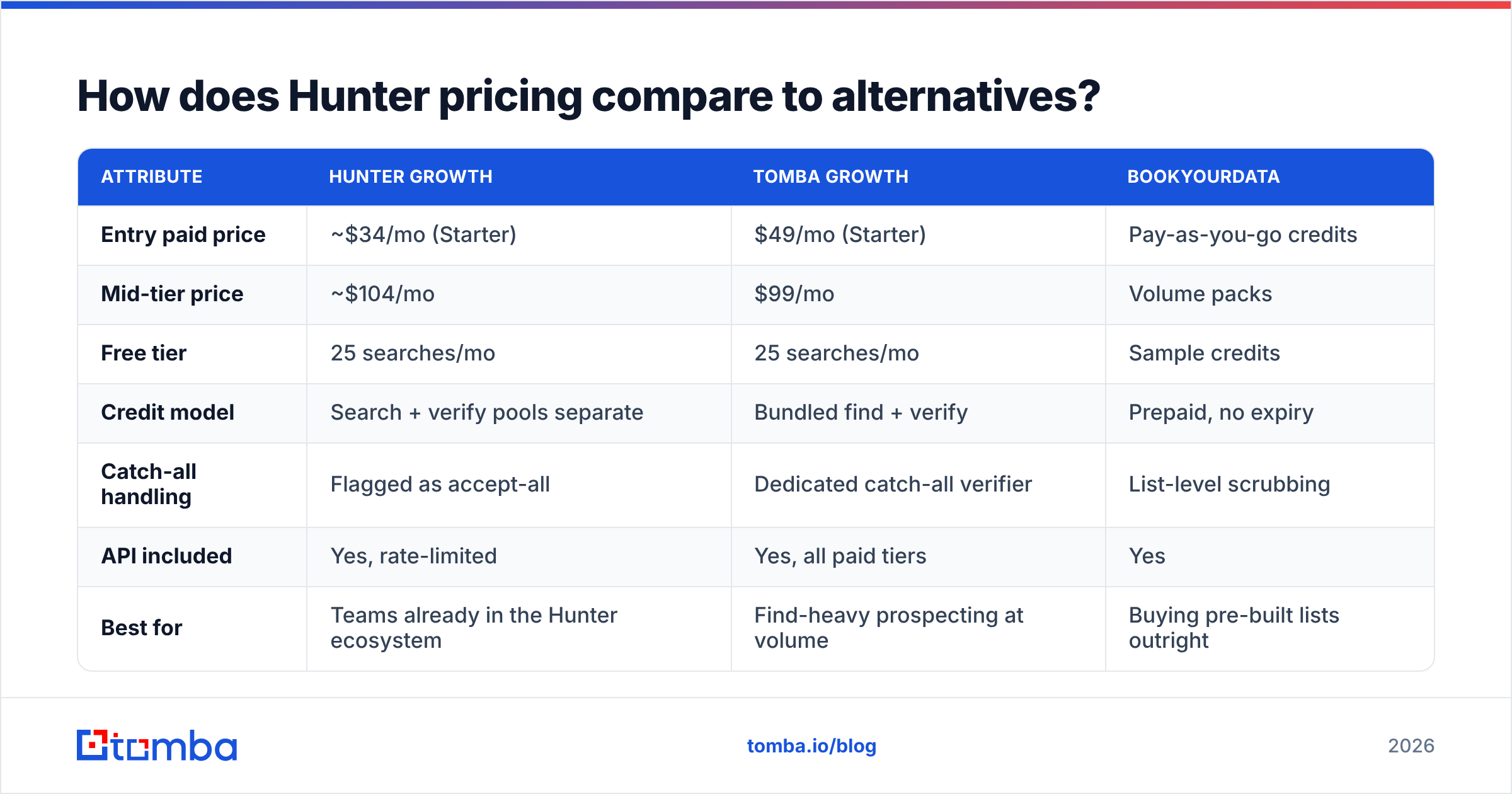
Here's the honest head-to-head on the tiers most teams actually buy.
| Attribute | Hunter Growth | Tomba Growth | BookYourData |
|---|---|---|---|
| Entry paid price | ~$34/mo (Starter) | $49/mo (Starter) | Pay-as-you-go credits |
| Mid-tier price | ~$104/mo | $99/mo | Volume packs |
| Free tier | 25 searches/mo | 25 searches/mo | Sample credits |
| Credit model | Search + verify pools separate | Bundled find + verify | Prepaid, no expiry |
| Catch-all handling | Flagged as accept-all | Dedicated catch-all verifier | List-level scrubbing |
| API included | Yes, rate-limited | Yes, all paid tiers | Yes |
| Best for | Teams already in the Hunter ecosystem | Find-heavy prospecting at volume | Buying pre-built lists outright |

Three fair conclusions from that table:
- Hunter's Starter is cheaper than Tomba's Starter on paper ($34 vs $49), but grants 500 searches against Tomba's larger allocation and separates the credit pools. Run your own ratio before assuming the lower number wins.
- At the Growth tier the two converge — roughly $104 vs $99 — and the decision comes down to hit rate on your specific ICP and how you handle catch-all domains.
- BookYourData plays a different game entirely. It's a solid choice when you want to buy a finished, filtered list with credits that don't expire monthly, rather than run lookups yourself. If your motion is "give me 3,000 verified CTOs in fintech" rather than "enrich this CRM export," prepaid list purchasing is often the cleaner path, and BookYourData's no-expiry credits remove the use-it-or-lose-it pressure that subscription credits create.

What do the credit rules actually cost you?#
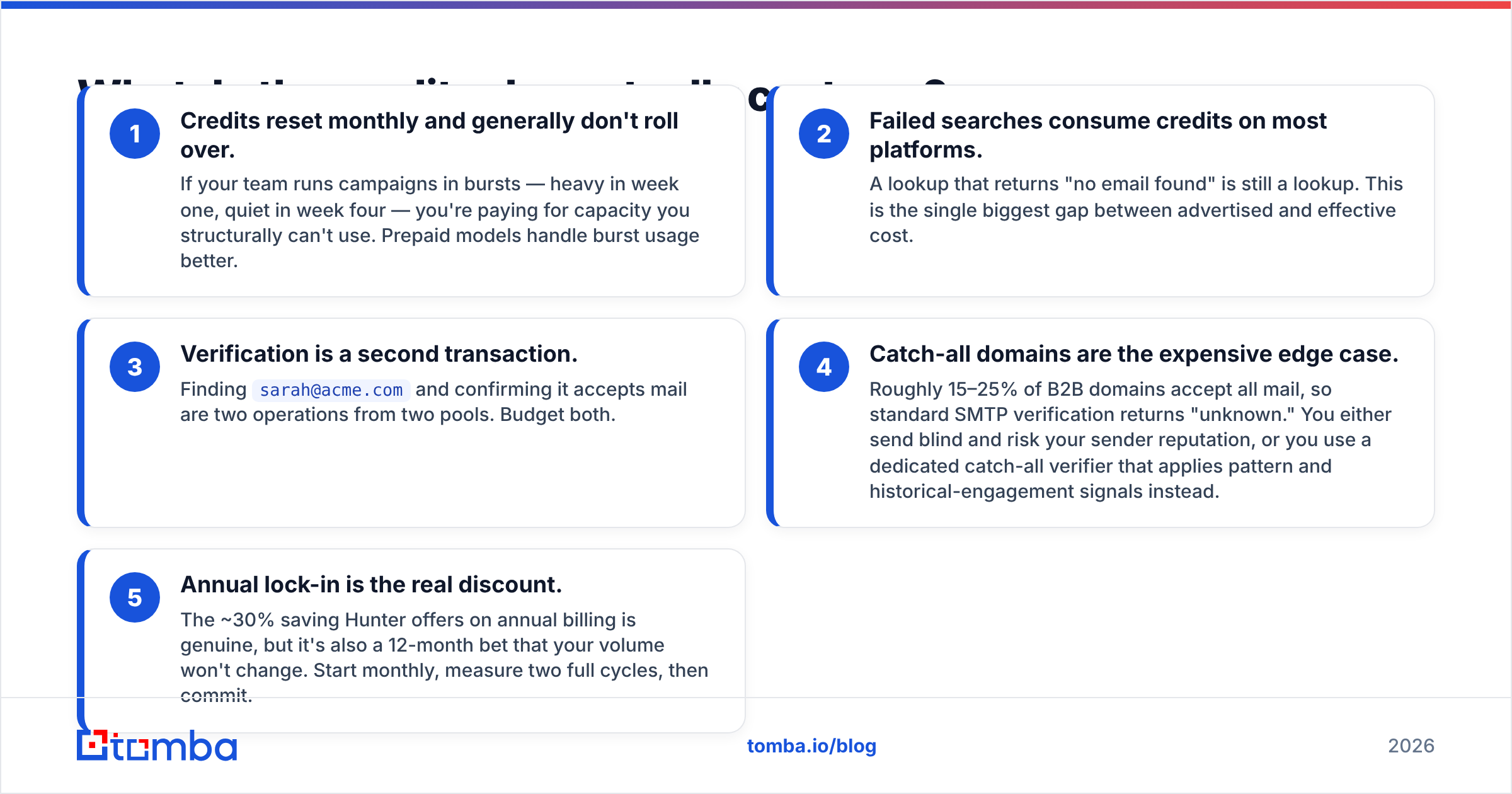
Four billing details that don't appear in the pricing table but show up on your invoice:
- Credits reset monthly and generally don't roll over. If your team runs campaigns in bursts — heavy in week one, quiet in week four — you're paying for capacity you structurally can't use. Prepaid models handle burst usage better.
- Failed searches consume credits on most platforms. A lookup that returns "no email found" is still a lookup. This is the single biggest gap between advertised and effective cost.
- Verification is a second transaction. Finding
sarah@acme.comand confirming it accepts mail are two operations from two pools. Budget both. - Catch-all domains are the expensive edge case. Roughly 15–25% of B2B domains accept all mail, so standard SMTP verification returns "unknown." You either send blind and risk your sender reputation, or you use a dedicated catch-all verifier that applies pattern and historical-engagement signals instead.
- Annual lock-in is the real discount. The ~30% saving Hunter offers on annual billing is genuine, but it's also a 12-month bet that your volume won't change. Start monthly, measure two full cycles, then commit.
When is Hunter worth the money?#
Hunter is worth it when three things are true: you're already using its Campaigns feature, your prospecting is domain-first (you know the company, you need the people), and your volume sits comfortably inside a tier rather than straddling two.
It's a mature product with a clean API, well-documented endpoints, and a long track record — reviewers on G2 consistently rate its interface and the Chrome extension highly. If your team already lives in it, the switching cost of moving to a marginally cheaper tool rarely pays for itself.
Where it stops making sense:
- You straddle tiers. Needing 7,000 searches on a 5,000-credit plan means buying the $349 Business tier for 2,000 extra lookups. That's the worst outcome in any credit model — check whether a competitor's tier boundaries fit your actual volume better.
- Your ICP is outside the US/Western Europe. Hit rates fall on regional domains, and every point of hit-rate loss multiplies your effective cost.
- You need phone numbers too. Hunter is email-first. If your motion is multichannel, paying separately for a phone finder plus an email tool costs more than a platform that bundles both.
- You're enriching, not prospecting. If your job is filling gaps in an existing CRM export, per-record data enrichment pricing usually beats search-credit pricing.
How should you run the comparison yourself?#
Don't trust anyone's table, including this one. Run a 100-row bakeoff:
- Build a control list. Take 100 contacts you already have confirmed, working emails for — past customers, current pipeline, anyone whose address has actually replied.
- Strip the emails. Keep only first name, last name, and company domain.
- Run the list through each tool. Same input, same day, no manual assists.
- Score three numbers per tool: hit rate (% returned), accuracy (% matching your known-good address), and credits consumed (including failed lookups).
- Compute cost per correct email. Price ÷ correct results. This is the only number that matters.
- Repeat on a second list from a different region or company size. Hit rates vary enormously by segment, and one sample will mislead you.
A hundred rows fits inside most free tiers or a single month of a Starter plan. Two hours of work saves you from a twelve-month annual commitment to the wrong tool. You can run the same test in bulk using a bulk email finder and compare the export side by side.
What's the verdict on Hunter pricing?#
Hunter is fairly priced for what it is — a well-built, email-first finder with a mature API and one of the better free tiers for evaluation. Its Starter plan is genuinely cheap. Its Growth plan is competitive. Its weakness is structural, not commercial: two separate credit pools, no rollover, and tier boundaries that force expensive upgrades for modest volume increases.
The teams that overpay for Hunter aren't the ones who picked it — they're the ones who never re-measured after their volume, ICP, or channel mix changed. Set a calendar reminder for two months after purchase and re-run the bakeoff. Compare against your own numbers, and cross-check the Tomba pricing tiers while you're at it, since the Starter at $49/mo and Growth at $99/mo sit right on top of Hunter's equivalent bands.
If your bottleneck is finding accurate addresses at volume rather than sending sequences, start with the Tomba Email Finder. It bundles find and verify in one flow, flags catch-all domains explicitly instead of returning a shrug, and the free tier gives you 25 searches to run the exact bakeoff described above before you spend a dollar. Test it against your control list, score the cost per correct email, and let the number decide.
Related guides#
// get started
Find, verify and enrich your first contacts today
Start on the free plan with 25 searches a month, then scale when your team is ready.
Free plan · No credit card required · GDPR & CCPA
// about the author