Hunter vs RemoveBounce: Email Finder and Verifier Compared
Hunter finds emails at scale; RemoveBounce cleans lists cheaply. They solve different halves of the same problem — here is which one your pipeline actually needs, and what it costs in 2026.
TL;DR
- Hunter and RemoveBounce are not really competitors. Hunter is an email finder with verification bolted on; RemoveBounce is a bulk verifier with no discovery layer at all.
- If you already own a list and just need bounces stripped, RemoveBounce is the cheaper line item — pay-as-you-go credits, no monthly floor.
- If you need to build the list in the first place, RemoveBounce can't help you. You need Hunter, Tomba, or a similar discovery tool.
- Buying both means paying twice for overlapping verification. Platforms that bundle finding + verifying (Tomba at $49/mo, Hunter at its Starter tier) usually land cheaper per usable contact.
- Our pick for most B2B teams: one platform that does discovery and verification, with a separate bulk verifier only if you're cleaning legacy lists over 100k rows.
What are Hunter and RemoveBounce, actually?#
Think of it like building a house. Hunter is the crew that sources the lumber. RemoveBounce is the inspector who checks each board for rot. You need both jobs done — but you'd never hire the inspector and expect a house.
Hunter (hunter.io) is one of the oldest names in email discovery. Its core loop is domain search: give it stripe.com, get back a list of published and inferred email addresses with confidence scores, source URLs, and detected email patterns. It layers on a verifier, a small CRM-ish "Leads" store, and a lightweight campaign sender.
RemoveBounce is a bulk email verification service. You upload a CSV, it runs syntax checks, MX lookups, SMTP handshakes, role-account detection, and disposable-domain filtering, then hands back a segmented file: valid, invalid, catch-all, unknown. There is no finder. There is no prospecting database. It does one job.
That distinction drives every decision below. The question isn't "which tool is better" — it's "which half of the problem do you actually have?"
How do their core jobs differ?#
Here's the split by function, so you can see where each tool starts and stops:
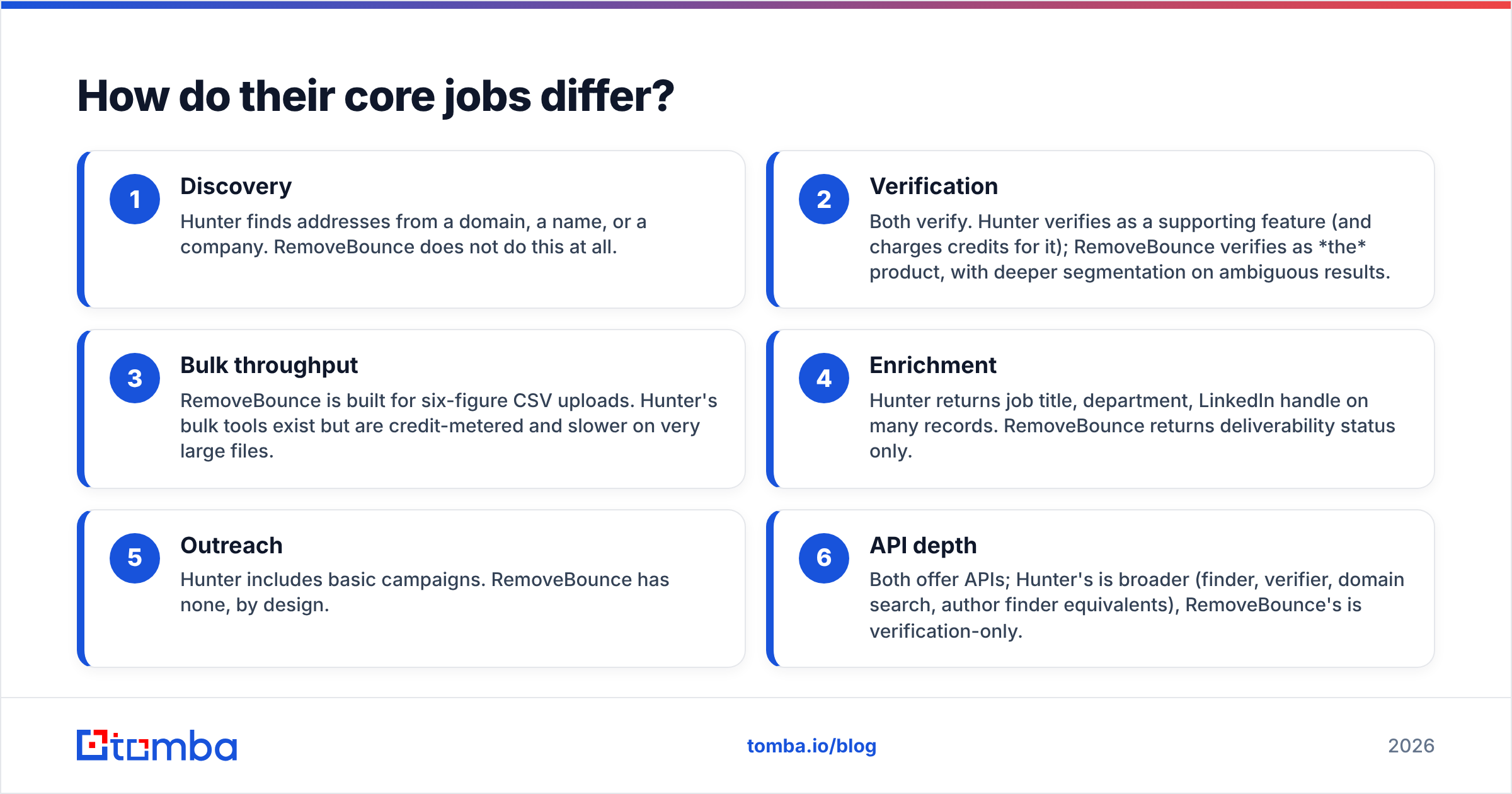
- Discovery — Hunter finds addresses from a domain, a name, or a company. RemoveBounce does not do this at all.
- Verification — Both verify. Hunter verifies as a supporting feature (and charges credits for it); RemoveBounce verifies as the product, with deeper segmentation on ambiguous results.
- Bulk throughput — RemoveBounce is built for six-figure CSV uploads. Hunter's bulk tools exist but are credit-metered and slower on very large files.
- Enrichment — Hunter returns job title, department, LinkedIn handle on many records. RemoveBounce returns deliverability status only.
- Outreach — Hunter includes basic campaigns. RemoveBounce has none, by design.
- API depth — Both offer APIs; Hunter's is broader (finder, verifier, domain search, author finder equivalents), RemoveBounce's is verification-only.
If your workflow reads "I have 40,000 emails from a 2023 event and half of them are dead," you want a verifier. If it reads "I need 400 heads of marketing at Series B fintechs," a verifier is useless to you.

How accurate is each one in practice?#
Accuracy means two different things here, and vendors love to blur them.
For a finder, accuracy is: of the addresses returned, what share actually deliver? Hunter publishes a confidence score per result, and in practice scores above 90 tend to deliver reliably while anything in the 50–70 band is a pattern guess dressed up as data. That's not a knock on Hunter specifically — every finder that infers first.last@domain.com from a pattern is guessing, and honest tools tell you so.
For a verifier, accuracy is: how often does "valid" actually mean valid, and how honestly does it label the uncertain cases? RemoveBounce's real differentiator is its handling of catch-all domains — the servers that accept everything and confirm nothing. Most verifiers dump these into an "unknown" bucket and let you decide. Whether a verifier tries to resolve catch-alls or just flags them is the single biggest quality difference between vendors, and it's worth testing on your own data before committing.
Three things to test before you buy either:
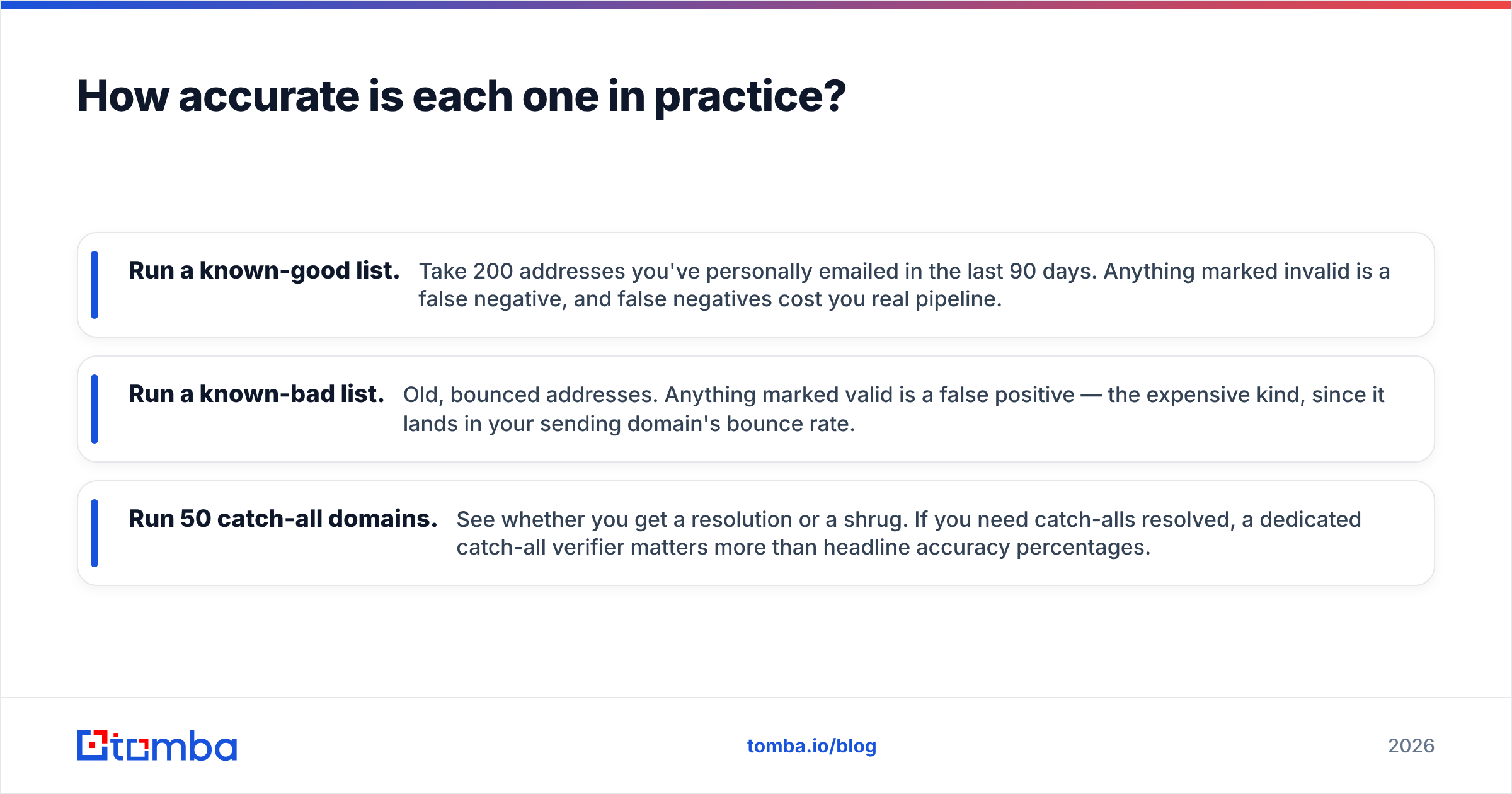
- Run a known-good list. Take 200 addresses you've personally emailed in the last 90 days. Anything marked invalid is a false negative, and false negatives cost you real pipeline.
- Run a known-bad list. Old, bounced addresses. Anything marked valid is a false positive — the expensive kind, since it lands in your sending domain's bounce rate.
- Run 50 catch-all domains. See whether you get a resolution or a shrug. If you need catch-alls resolved, a dedicated catch-all verifier matters more than headline accuracy percentages.

Correction on that image path — here it is properly:
Hunter vs RemoveBounce: how do they compare head to head?#
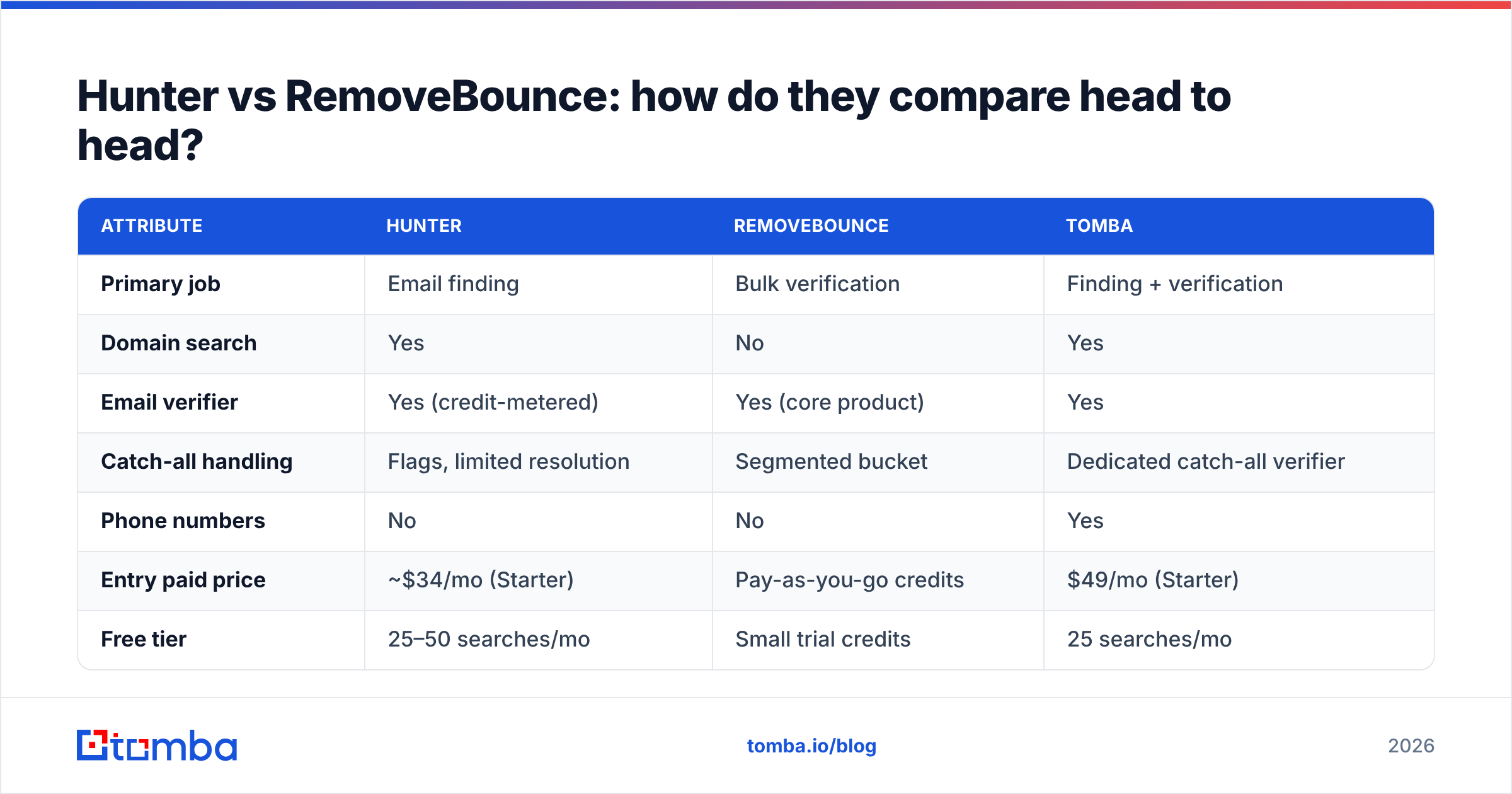
| Attribute | Hunter | RemoveBounce | Tomba |
|---|---|---|---|
| Primary job | Email finding | Bulk verification | Finding + verification |
| Domain search | Yes | No | Yes |
| Email verifier | Yes (credit-metered) | Yes (core product) | Yes |
| Catch-all handling | Flags, limited resolution | Segmented bucket | Dedicated catch-all verifier |
| Phone numbers | No | No | Yes |
| Entry paid price | ~$34/mo (Starter) | Pay-as-you-go credits | $49/mo (Starter) |
| Free tier | 25–50 searches/mo | Small trial credits | 25 searches/mo |
| Bulk CSV upload | Yes, credit-metered | Yes, built for scale | Yes, bulk tools |
| API | Full suite | Verification only | Full suite + CLI/MCP |
| Chrome extension | Yes | No | Yes |
| Best for | Building lists from domains | Cleaning legacy lists | Teams needing both in one bill |

Read that table as three columns, not two winners. Hunter's row of "yes" values in discovery is exactly where RemoveBounce is blank — and RemoveBounce's pay-as-you-go pricing is exactly where subscription finders get expensive for occasional cleanup work.
Which is cheaper for real workloads?#
Pricing comparisons between a subscription finder and a credit-based verifier are apples-to-hammers unless you anchor them to a job. So here are three jobs.
Job A: clean a 50,000-row legacy list, once. RemoveBounce wins outright. Pay-as-you-go credits for a one-time clean cost less than a month of any finder subscription, and you're not on the hook next month. Hunter would burn most of a mid-tier plan's credits on verification alone.
Job B: build 1,000 new prospect emails per month. RemoveBounce can't do this. Hunter's Starter tier covers a modest volume; Tomba pricing starts at $49/mo for Starter and $99/mo for Growth, both of which include verification against the same credit pool rather than billing it separately.
Job C: both — build 1,000/mo and clean quarterly. This is where stacking two vendors hurts. You're paying a finder subscription plus verifier credits, and paying for verification twice, since your finder already verifies on the way out. A single platform with an integrated email verifier removes the duplicate line item. That's not a Tomba-specific argument — it applies to Hunter's bundled verifier too.
One honest caveat in Hunter's favor: its free tier is generous enough that solo founders and early-stage teams can genuinely operate on it for months. Very few finders can say that.
When should you skip both?#
Skip the finder if you're purely inbound. If your leads arrive through demo forms and content downloads, you don't need discovery — you need form-time validation. A free email checker at the point of signup stops the typo'd gmial.com addresses before they ever enter your CRM.
Skip the verifier if your finder already returns SMTP-verified results and your bounce rate sits under 2%. Verifying a freshly-found, already-verified address is a solved problem you're paying to re-solve. Google's own Postmaster Tools will tell you whether your bounce rate is actually a problem — check there before buying a fix for it. If it's under 2%, your money is better spent on volume.
Skip both if you're buying a list. No verifier rescues a purchased list from being a purchased list; you'll clean it to technical validity and still land in spam because the recipients never opted in. Clean data and permission are different problems, and only one of them has a SaaS solution.
What do the review sites actually say?#
Worth a sanity check before you trust any single comparison — including this one.
Hunter carries a large, long-running review base on G2, where the recurring praise is ease of use and the recurring complaint is credit consumption relative to result quality on smaller or non-US domains. That pattern shows up across most finders; coverage thins outside North America and Western Europe for nearly every vendor.
RemoveBounce has a much smaller review footprint, which cuts both ways: fewer data points, but also fewer of the enterprise-scale complaints that come with heavier products. For a single-purpose verifier, a thin review base is less alarming than it would be for a platform you'd build a workflow around.
Cross-check pricing on the vendors' own pages before committing — both change tiers more often than review sites update, and Capterra listings frequently lag by a quarter or more.
How do you choose in under five minutes?#
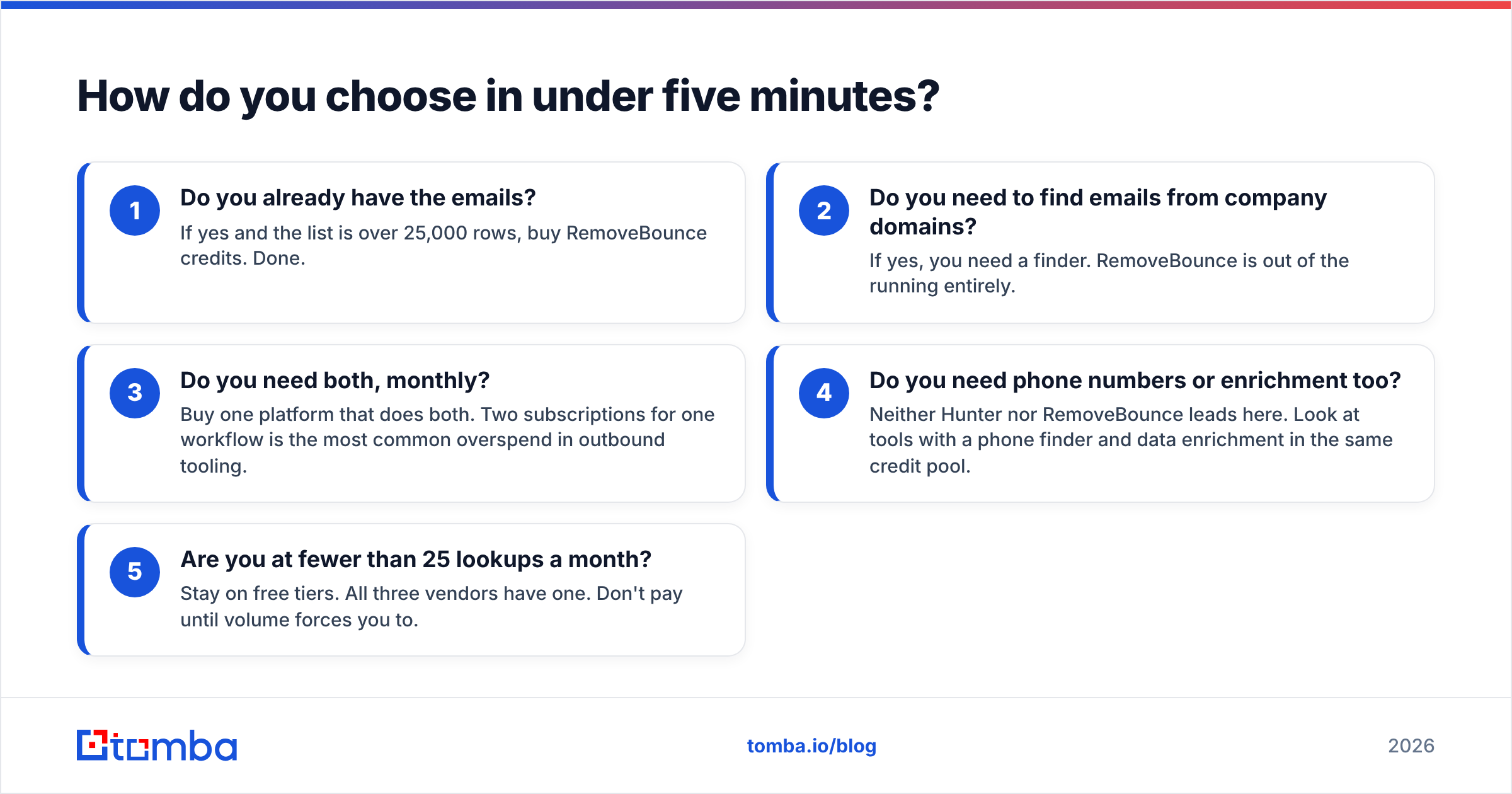
Answer these in order and stop at your first yes:
- Do you already have the emails? If yes and the list is over 25,000 rows, buy RemoveBounce credits. Done.
- Do you need to find emails from company domains? If yes, you need a finder. RemoveBounce is out of the running entirely.
- Do you need both, monthly? Buy one platform that does both. Two subscriptions for one workflow is the most common overspend in outbound tooling.
- Do you need phone numbers or enrichment too? Neither Hunter nor RemoveBounce leads here. Look at tools with a phone finder and data enrichment in the same credit pool.
- Are you at fewer than 25 lookups a month? Stay on free tiers. All three vendors have one. Don't pay until volume forces you to.
The bad outcome isn't picking the "wrong" tool — both do their stated job competently. The bad outcome is paying two vendors for one workflow because nobody audited the overlap.
What's the verdict?#
For list cleaning only: RemoveBounce. Pay-as-you-go, no monthly floor, purpose-built for the job. If cleaning is genuinely all you do, a dedicated verifier will beat a finder's bundled verification on both price and depth.
For list building: Hunter. It's mature, the domain search is fast, and the free tier is real. Its weak spots — credit burn on low-confidence guesses, thinner non-Western coverage — are shared by most of the category rather than unique to it.
For teams doing both every month: one integrated platform. That's where the double-paying stops. Tomba's Starter plan at $49/mo covers finding, verification, and domain search from a single credit pool, plus a Tomba API if you're wiring this into your own stack rather than clicking through a dashboard.
Test all three on your own 200-address sample before you commit to any annual plan. Vendor-published accuracy numbers are measured on vendor-chosen datasets, and your ICP's domains are the only benchmark that predicts your bounce rate.
Ready to stop paying two vendors for one workflow? Start with the Tomba Email Finder — 25 free searches a month, verification included in the same credit pool, and a domain search that returns patterns and confidence scores alongside every address. If it doesn't beat your current stack on your own test list, you've lost nothing but ten minutes.
Related guides#
// get started
Find, verify and enrich your first contacts today
Start on the free plan with 25 searches a month, then scale when your team is ready.
Free plan · No credit card required · GDPR & CCPA
// about the author