Hunter vs Salesbot: Which Sales Tool Actually Fits Your Team?
Hunter finds and verifies B2B email addresses. Salesbot automates the conversations that follow. Here is how they differ on data, pricing, and workflow, and which one an outbound team should buy first.
TL;DR
- Hunter and Salesbot are not really competitors. Hunter supplies contact data (emails, domains, verification). Salesbot automates conversations once you already have someone to talk to.
- If your pipeline problem is "we do not have enough qualified contacts," a data tool solves it. If your problem is "leads go cold before a rep replies," a bot solves it.
- Hunter's paid plans start at $49/mo and climb to $149/mo (Growth) and $499/mo (Business), which gets expensive once several reps need seats and credits.
- Salesbot-style automation is usually priced per user inside a CRM (Kommo's Salesbot, for example, ships with plans in the $15–$45/user/mo range), so cost scales with headcount, not with data volume.
- Most teams end up buying both, or buying one data source that is cheaper per credit and pointing the savings at automation. That is the practical case for a Tomba pricing comparison later in this post.
What are Hunter and Salesbot, exactly?#
They sit at opposite ends of the outbound workflow, which is why "hunter vs salesbot" is a slightly unfair matchup until you define the terms.
Hunter is an email-finding and verification platform. You give it a company domain or a first name, last name and domain, and it returns the most likely professional email address plus a confidence score and the public sources it was seen on. It also runs bulk verification, domain-wide searches, a Chrome extension, and a light cold-email sender called Campaigns. Its centre of gravity is data: who works there, what their address is, and whether that address will bounce. You can see the current product line on hunter.io.
Salesbot is a name used by more than one product, so be precise about which one you are evaluating. The most widely deployed is the Salesbot inside Kommo, a messenger-first CRM. It is a no-code conversational automation builder: it greets inbound leads on WhatsApp, Instagram, Telegram or a website widget, asks qualifying questions, tags and routes the lead, books a call, and hands off to a human when the script runs out. Several standalone "SalesBot" AI-SDR products also exist under similar branding, and they follow the same pattern: conversation first, data second.
So the honest framing is this. Hunter answers who do I contact and is the address real. Salesbot answers what happens automatically when a contact starts talking. Buying one because you were sold on the other is the most common mistake in this comparison.
How do Hunter and Salesbot compare head-to-head?#
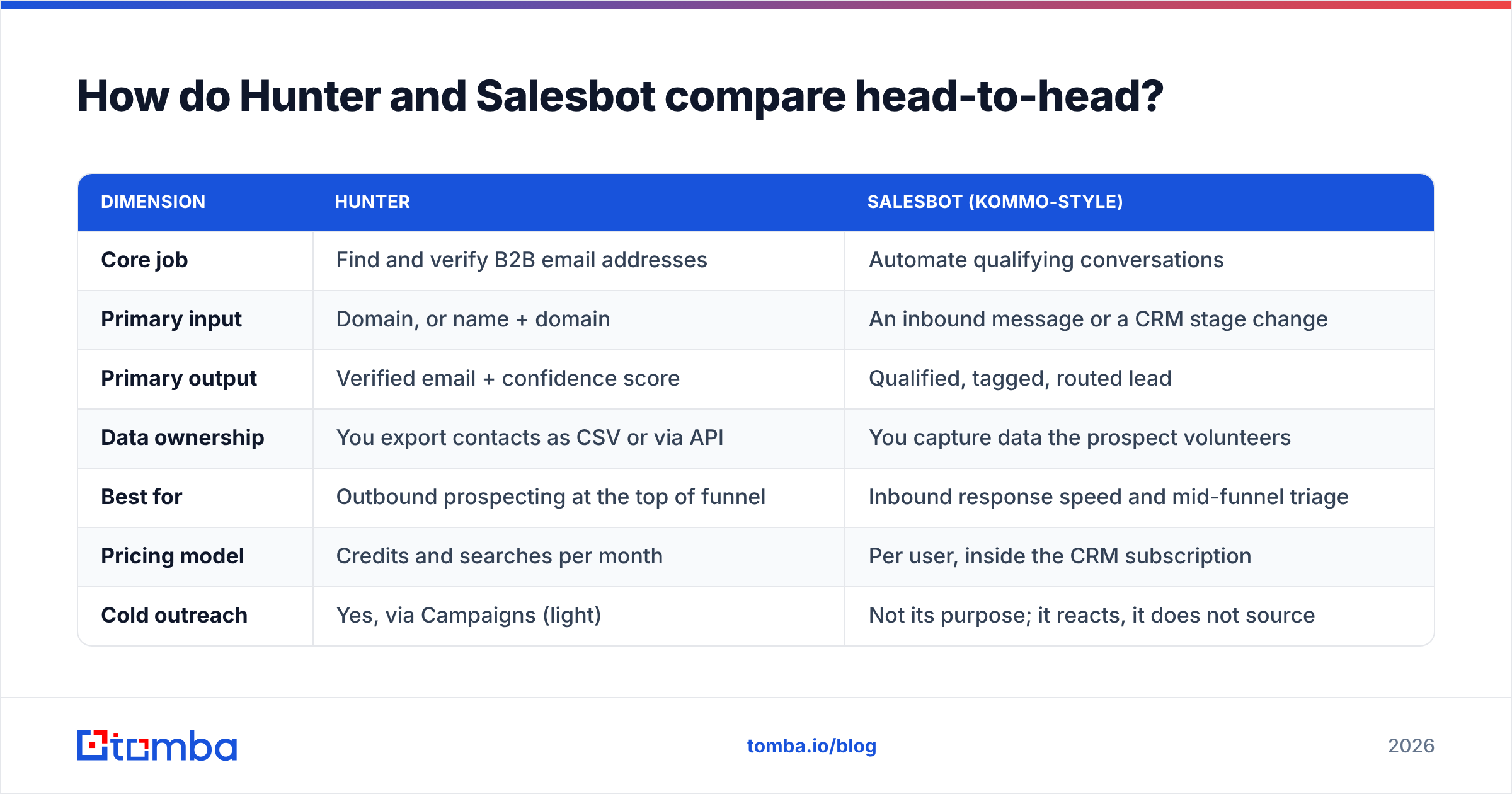
| Dimension | Hunter | Salesbot (Kommo-style) |
|---|---|---|
| Core job | Find and verify B2B email addresses | Automate qualifying conversations |
| Primary input | Domain, or name + domain | An inbound message or a CRM stage change |
| Primary output | Verified email + confidence score | Qualified, tagged, routed lead |
| Data ownership | You export contacts as CSV or via API | You capture data the prospect volunteers |
| Best for | Outbound prospecting at the top of funnel | Inbound response speed and mid-funnel triage |
| Pricing model | Credits and searches per month | Per user, inside the CRM subscription |
| Cold outreach | Yes, via Campaigns (light) | Not its purpose; it reacts, it does not source |
| Learning curve | Low, an hour to be productive | Medium, you are building branching logic |
| Fails when | Domains are catch-all or role-based | Nobody is messaging you yet |
Read the last row twice. A conversational bot with no inbound volume and no outbound list is an expensive empty room. A data tool with no follow-up motion is a spreadsheet that ages badly. The dimension that decides your purchase is which of those two failure modes you are living in right now.

What does Hunter actually do well?#
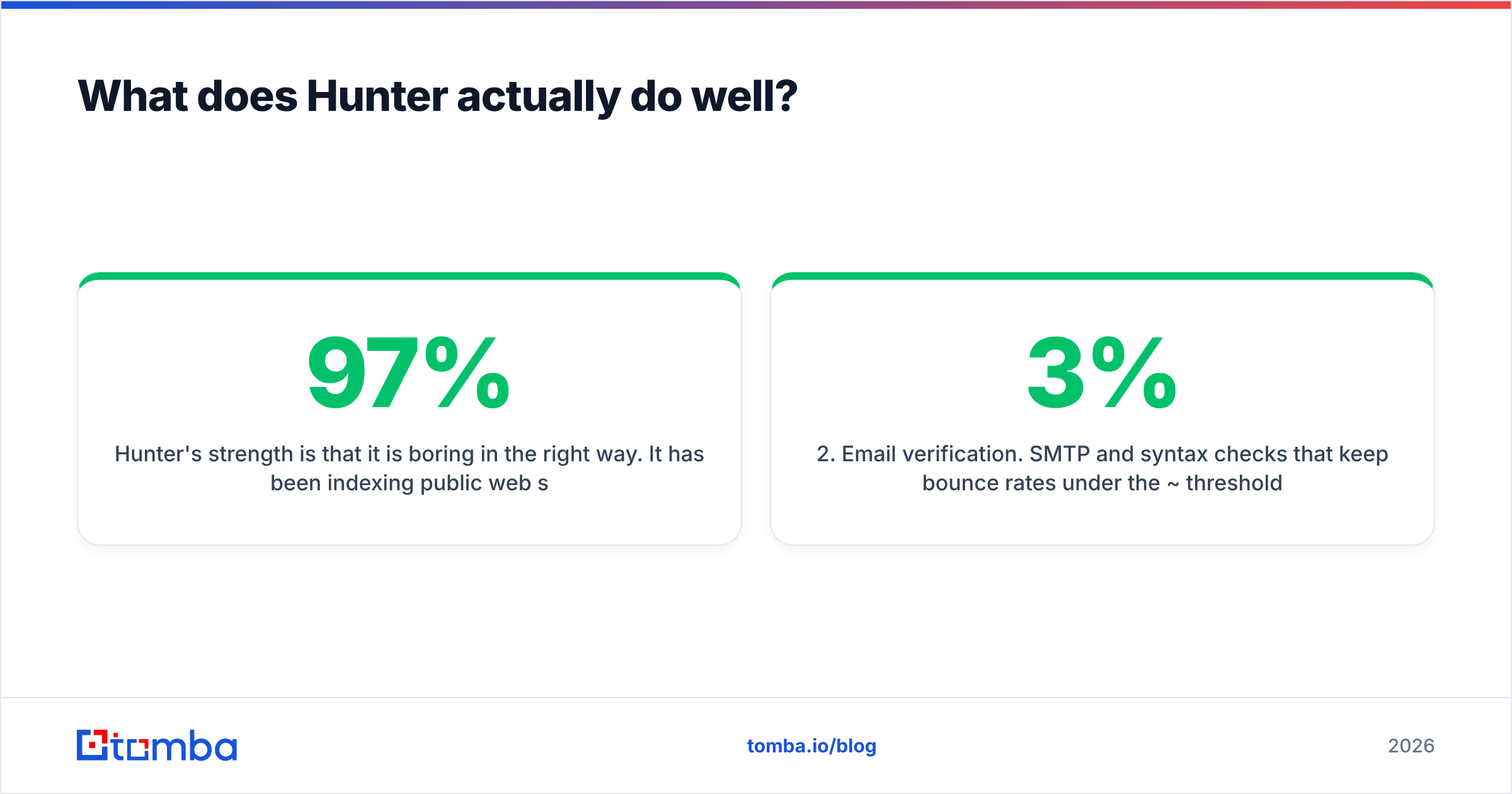
Hunter's strength is that it is boring in the right way. It has been indexing public web sources since 2015, it explains where each address came from, and it does not pretend to know things it does not know. The confidence score is genuinely useful: a 97% result on a pattern-consistent domain is a safe send, and a 55% result tells you to verify manually or skip.
Specific things it handles well:
- Domain search. Give it
stripe.comand get back the addresses it has indexed plus the dominant email pattern for that company. This is the fastest way to sanity-check a target account before you build a list. If you want the concept explained in isolation, see what is domain search. - Email verification. SMTP and syntax checks that keep bounce rates under the ~3% threshold most inbox providers punish you for crossing.
- The browser extension. One click on a company site or LinkedIn profile, address in the clipboard, no tab switching.
- A usable free tier. 25 monthly searches and 50 verifications is enough to test the accuracy claim on your own accounts before paying anything.
- A clean API. Documented, predictable, and easy to wire into an enrichment job.
Where Hunter gets thin: catch-all domains, which accept every address and therefore cannot be verified by SMTP alone; smaller companies with no public web footprint; and phone numbers, which it does not do at all. Its Campaigns sender is fine for a solo founder and underpowered for a team running sequences at scale, which is why most Hunter users pair it with a dedicated sending tool.
What does Salesbot actually do well?#
Speed to first reply, which is the metric that quietly decides most inbound deals. Research summarized across vendor benchmarks and G2 reviews keeps landing on the same finding: response time is the single biggest lever on inbound conversion, and the drop-off after the first few minutes is brutal. A bot that answers at 2am on WhatsApp beats a rep who answers at 9am, every time.
What a Salesbot does well:
- Instant acknowledgment across the channels buyers actually use, not just email.
- Qualification scripting so the human rep inherits a lead with budget, timeline and use case already captured.
- Routing and tagging into the right CRM pipeline stage without manual data entry.
- Follow-up nudges on a schedule, so the lead that went quiet on Thursday gets a message on Monday.
- Handoff rules that escalate to a human on intent keywords instead of trapping the buyer in a loop.
Where it gets thin: it is reactive by design. It does not source anyone. It also breaks character on anything off-script, and a bot that fumbles a technical question in front of a serious buyer costs more than the meeting it saved. Rules-based bots need constant script maintenance; LLM-backed ones need guardrails so they do not invent pricing.
What do the two actually cost?#
This is where the comparison gets concrete, because the pricing models are structurally different and that difference matters more than the headline numbers.
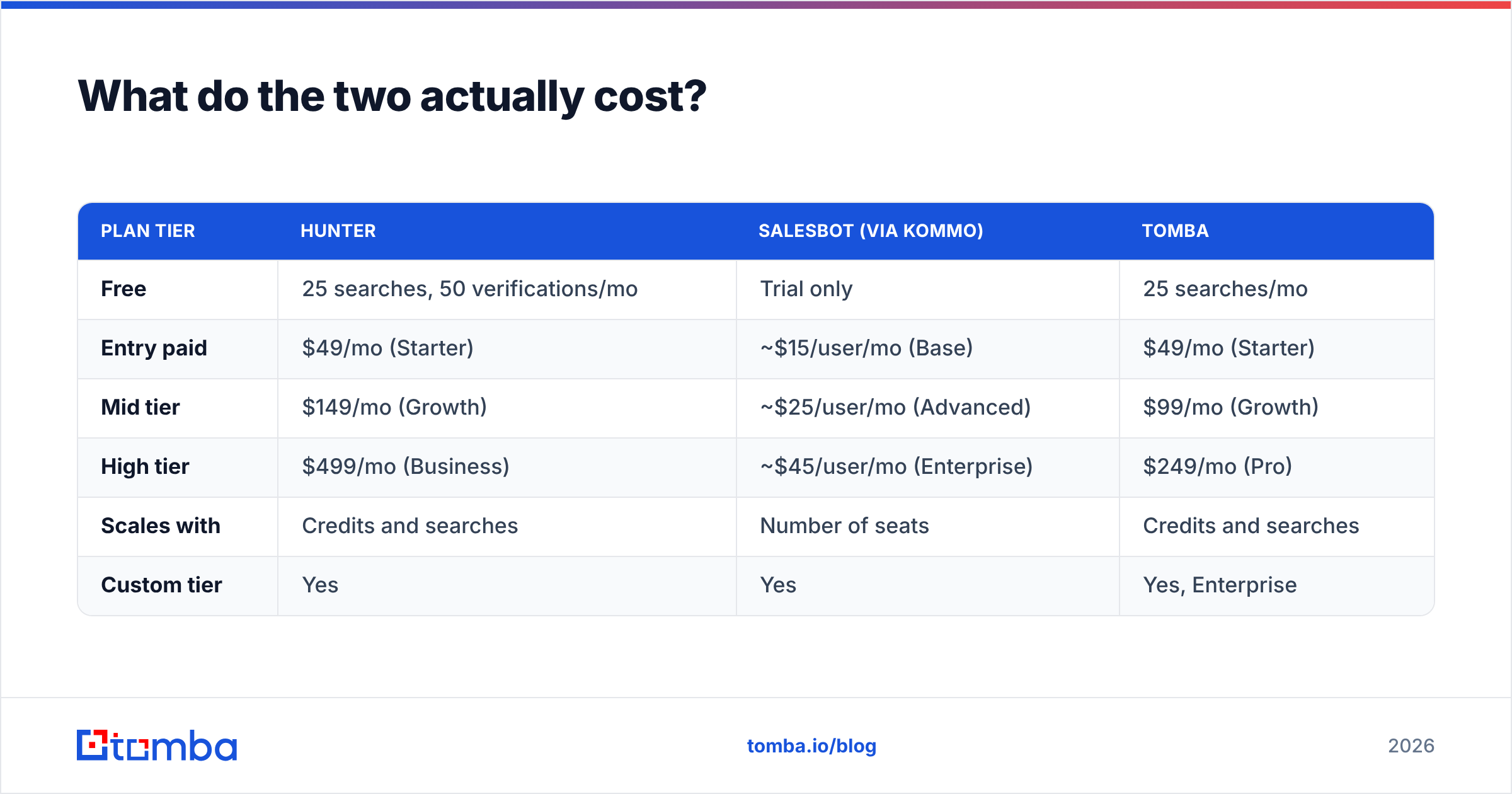
| Plan tier | Hunter | Salesbot (via Kommo) | Tomba |
|---|---|---|---|
| Free | 25 searches, 50 verifications/mo | Trial only | 25 searches/mo |
| Entry paid | $49/mo (Starter) | ~$15/user/mo (Base) | $49/mo (Starter) |
| Mid tier | $149/mo (Growth) | ~$25/user/mo (Advanced) | $99/mo (Growth) |
| High tier | $499/mo (Business) | ~$45/user/mo (Enterprise) | $249/mo (Pro) |
| Scales with | Credits and searches | Number of seats | Credits and searches |
| Custom tier | Yes | Yes | Yes, Enterprise |
Two practical consequences.
First, Hunter's jump from Starter to Growth is 3x for a step up in monthly credits. Teams routinely hit that wall in month two, and it is the most common reason people go looking for alternatives. Note that the Tomba Growth tier sits at $99/mo against Hunter's $149/mo Growth, which is roughly a third less for the same slot in the ladder. Verify current numbers on both vendors' pages before you budget, since pricing pages move.
Second, per-seat bot pricing looks cheap at three users and stops looking cheap at twenty. A 20-rep team on a $25/user plan is $500/mo before anyone has found a single new contact. Budget the two line items separately and you will make a saner decision than if you compare a $49 data plan to a $15 seat and conclude the bot is cheaper.

Do you actually have to choose between them?#
No, and pretending you do is the trap. The two tools sit in sequence, not in opposition.
A realistic 2026 stack looks like this:
- Source target accounts from your ICP definition and intent signals.
- Enrich those accounts with verified contact data, so you have a real address for a real decision maker. This is the layer where an email finder lives.
- Verify before sending, because bounces damage domain reputation faster than bad copy does. Run the list through an email verifier and drop anything risky.
- Send the sequence from a dedicated sending tool with proper warmup, SPF, DKIM and DMARC in place.
- Catch the replies and inbound traffic with the conversational bot, which qualifies and routes them while the rep is asleep.
- Close in the CRM, with the bot handling the mechanical follow-ups between meetings.
Hunter and Tomba compete for step 2 and 3. Salesbot owns step 5 and part of 6. If someone tells you a conversational bot removes the need for a contact database, ask them where the bot gets its first conversation from.
Where does Tomba fit in this comparison?#
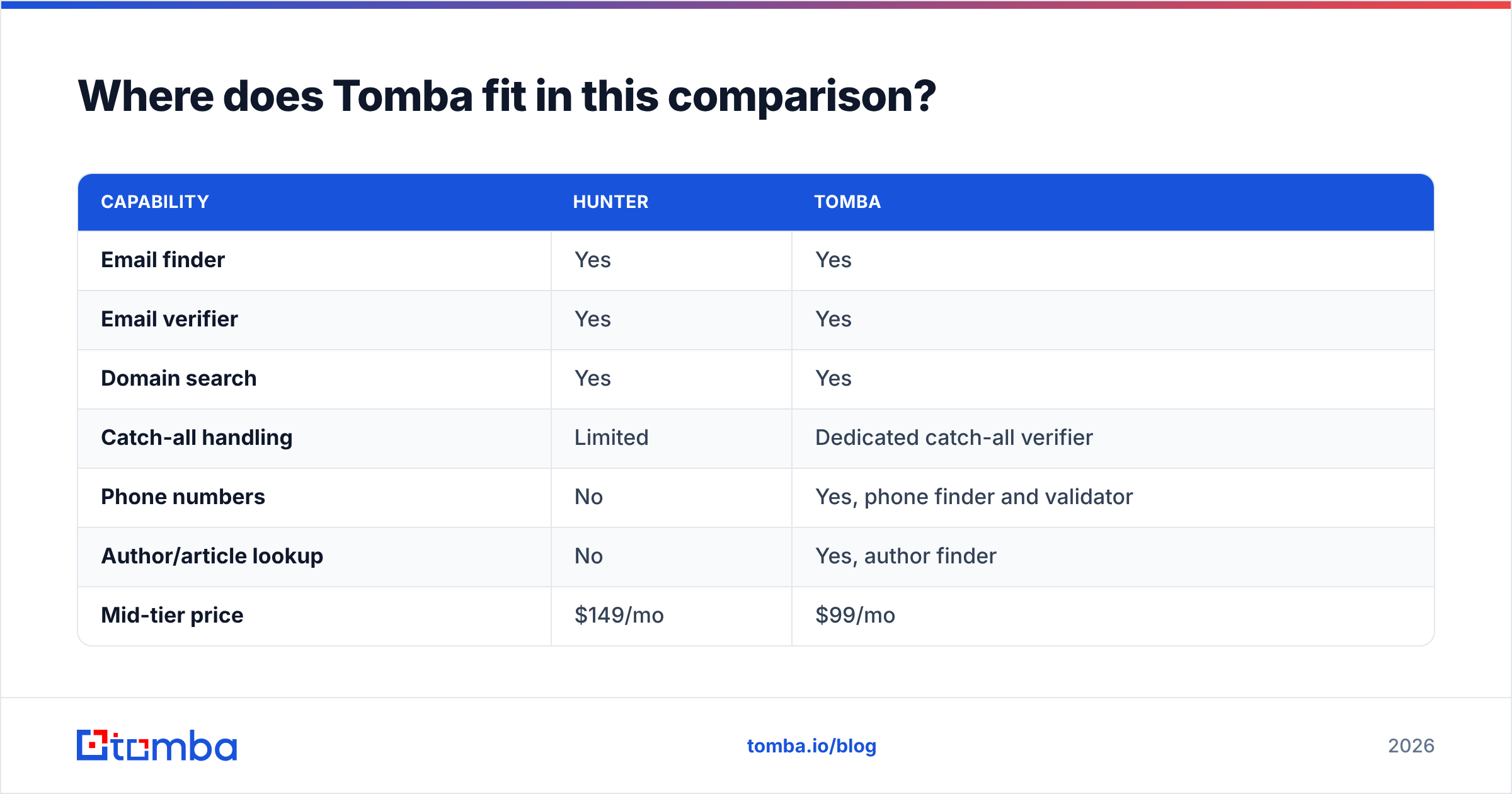
If you got here because Hunter's Growth price is uncomfortable, the relevant comparison is not really Hunter vs Salesbot at all. It is Hunter vs the other data providers.
Tomba covers the same job as Hunter with a wider surrounding toolset and a cheaper mid tier:
| Capability | Hunter | Tomba |
|---|---|---|
| Email finder | Yes | Yes |
| Email verifier | Yes | Yes |
| Domain search | Yes | Yes |
| Catch-all handling | Limited | Dedicated catch-all verifier |
| Phone numbers | No | Yes, phone finder and validator |
| Author/article lookup | No | Yes, author finder |
| Mid-tier price | $149/mo | $99/mo |
| API + CLI + MCP | API only | Tomba API, CLI and MCP server |
| Free tier | 25 searches | 25 searches |
The catch-all row is the one worth arguing about. A large share of enterprise domains are catch-all, which means a plain SMTP check returns "accepted" for every address including nonsense ones. Tools that stop there hand you a list that looks 98% valid and bounces at 15%. Dedicated catch-all logic is not a nice-to-have if you sell into mid-market and up.
The honest counterpoint for Hunter: it has the longer track record, a larger public index for well-known Western companies, and an ecosystem of integrations built up over a decade. If your ICP is US SaaS companies with strong web footprints, Hunter's hit rate is excellent and switching purely to save $50/mo may not be worth the migration.
Which one should you buy first?#
Pick by the constraint you actually have, not the demo you enjoyed most.
- Buy the data tool first if your reps spend more than an hour a day hunting for addresses, your bounce rate is above 3%, or your CRM is full of
info@catch-alls. Nothing downstream works without contactable humans at the top. - Buy the bot first if you already have inbound volume on messaging channels, your median first-response time is measured in hours, and leads say "I went with whoever replied first."
- Buy both if you are running outbound and inbound simultaneously with three or more reps. The overlap is zero, so there is no waste.
- Buy neither yet if you have not written the ICP down. Both tools amplify a targeting decision. Amplifying a bad one just gets you to the wrong answer faster.
One more thing that gets skipped: whichever data tool you choose, deliverability is a separate discipline. Verified addresses reduce bounces, but they do not fix a cold domain, a missing SPF record, or a sequence that reads like a template. Data quality is necessary and not sufficient.
The verdict#
Hunter and Salesbot are complements wearing competitor costumes. Hunter wins if the question is "who do I email and will it land." Salesbot wins if the question is "who answers my inbound at midnight." Neither wins the other's category, and any comparison that declares an outright winner is comparing a hammer to a saw.
Where a real decision does exist is inside the data layer, and there the argument is about accuracy per dollar. Hunter is proven and priced accordingly. If the Growth tier at $149/mo is where your budget breaks, run the same 200 test contacts through both providers, measure the bounce rate yourself, and let the numbers decide.
Start with the free tier of the Tomba Email Finder — 25 searches a month, no card, enough to benchmark hit rate on your own target accounts. If the accuracy holds up on your ICP, the Growth plan gives you finder, verifier, catch-all handling and phone data for $99/mo, and you can put the difference toward whichever bot answers your inbound.
Related guides#
// get started
Find, verify and enrich your first contacts today
Start on the free plan with 25 searches a month, then scale when your team is ready.
Free plan · No credit card required · GDPR & CCPA
// about the author