Hunter vs SalesQL (2026): Which Email Finder Actually Wins?
Hunter is a domain-first email finder. SalesQL is a LinkedIn-first contact extractor. They solve different halves of the same problem — here is which one belongs in your stack, and when neither is enough.
Hunter vs SalesQL is really a question about where your list starts. Hunter starts from a company domain. SalesQL starts from a LinkedIn profile. Below is the Hunter vs SalesQL comparison on accuracy, pricing, coverage, and API access — plus when neither tool is enough.
TL;DR
- Hunter is domain-first. Give it a company domain. It returns the people and the email pattern. Best for account-based lists built from a target-company spreadsheet.
- SalesQL is LinkedIn-first. It runs as a Chrome extension on LinkedIn and Sales Navigator. It pulls personal and work emails plus phone numbers from profiles and search results.
- Hunter vs SalesQL is not a fair fight. They are two entry points into the same data problem. Teams that run both do so because neither covers the other's workflow.
- Verification is the real differentiator. Raw "found" counts mean nothing if 15% bounce. Budget for a verification step either way.
- Want one API-first platform for both entry points? A consolidated tool like Tomba starting at $49/mo is usually cheaper than stacking a finder, a scraper, and a verifier.
What is Hunter and what is SalesQL?#
Hunter started as a domain search engine. You type stripe.com. It returns the email addresses it has indexed for that domain, the naming pattern it inferred (first.last@, flast@), and a confidence score for each address.
The Email Finder takes a first name, last name, and domain. It then builds and validates the most likely address. Everything else orbits that core: the verifier, the bulk tools, the Chrome extension, and the Google Sheets add-on.
SalesQL starts from the opposite end. It is a browser extension. It activates on LinkedIn profiles, LinkedIn search results, Sales Navigator lists, and group member pages. You click, and it tries to surface work emails, personal emails, and direct or mobile numbers for that person. Bulk extraction runs against a LinkedIn search result set, not against a domain.
That starting point drives everything else in the Hunter vs SalesQL comparison: pricing model, data coverage, failure modes, and who on your team uses the tool day to day.
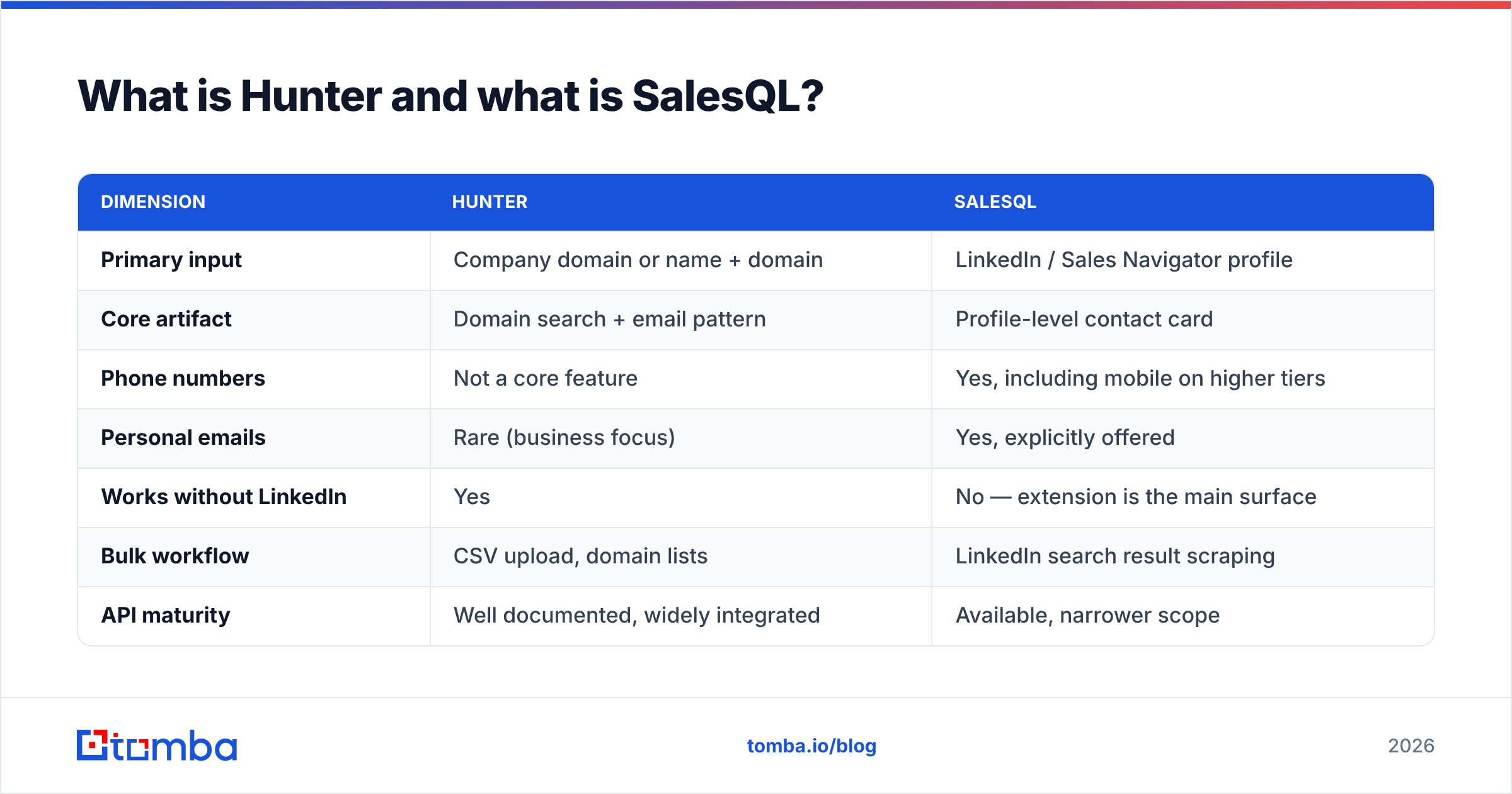
| Dimension | Hunter | SalesQL |
|---|---|---|
| Primary input | Company domain or name + domain | LinkedIn / Sales Navigator profile |
| Core artifact | Domain search + email pattern | Profile-level contact card |
| Phone numbers | Not a core feature | Yes, including mobile on higher tiers |
| Personal emails | Rare (business focus) | Yes, explicitly offered |
| Works without LinkedIn | Yes | No — extension is the main surface |
| Bulk workflow | CSV upload, domain lists | LinkedIn search result scraping |
| API maturity | Well documented, widely integrated | Available, narrower scope |
Hunter vs SalesQL: which one finds more valid emails?#
Neither vendor's marketing number is the one that matters. The number that matters is valid deliverable addresses per 100 rows of your list. That is a function of your ICP, not of a global benchmark.
Here is the pattern most teams report once they measure it:
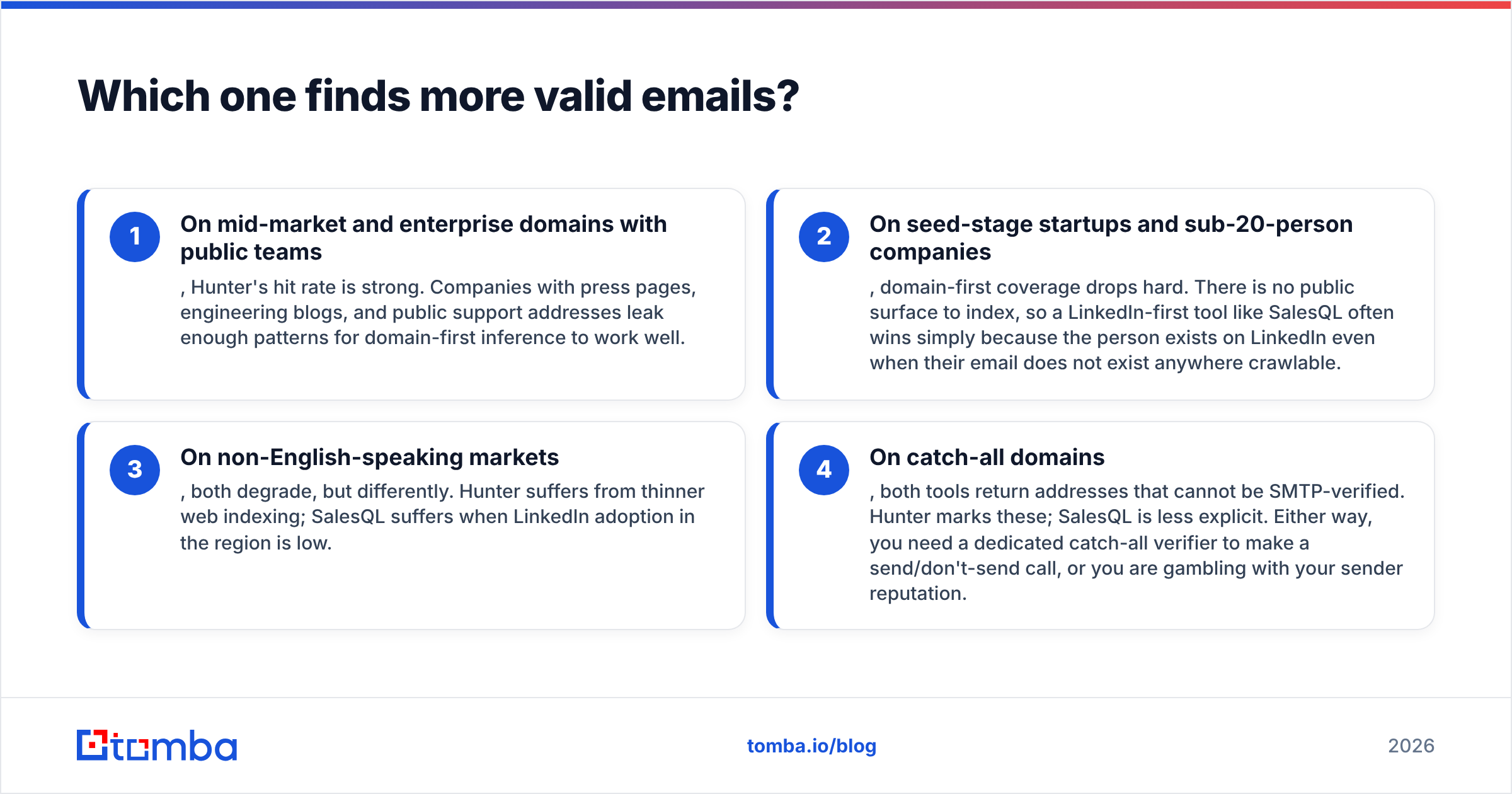
- On mid-market and enterprise domains with public teams, Hunter's hit rate is strong. These companies have press pages, engineering blogs, and public support addresses. They leak enough patterns for domain-first inference to work.
- On seed-stage startups and sub-20-person companies, domain-first coverage drops hard. There is no public surface to index. A LinkedIn-first tool like SalesQL often wins here.
- On non-English-speaking markets, both degrade, but differently. Hunter suffers from thinner web indexing. SalesQL suffers where LinkedIn adoption is low.
Catch-all domains are the fourth case, and they break both tools. Each one returns addresses that cannot be SMTP-verified. Hunter marks these. SalesQL is less explicit. Either way, you need a dedicated catch-all verifier to make the send call. Otherwise you are gambling with your sender reputation.

The honest takeaway: run a 200-row bakeoff on your own ICP before you commit to an annual plan. Take one list. Run it through both trials. Then push all results through an independent email verifier with no stake in the outcome. Score on verified-deliverable, not on "found."
Anything else is vendor-graded homework.
Hunter vs SalesQL pricing: how do the plans compare?#
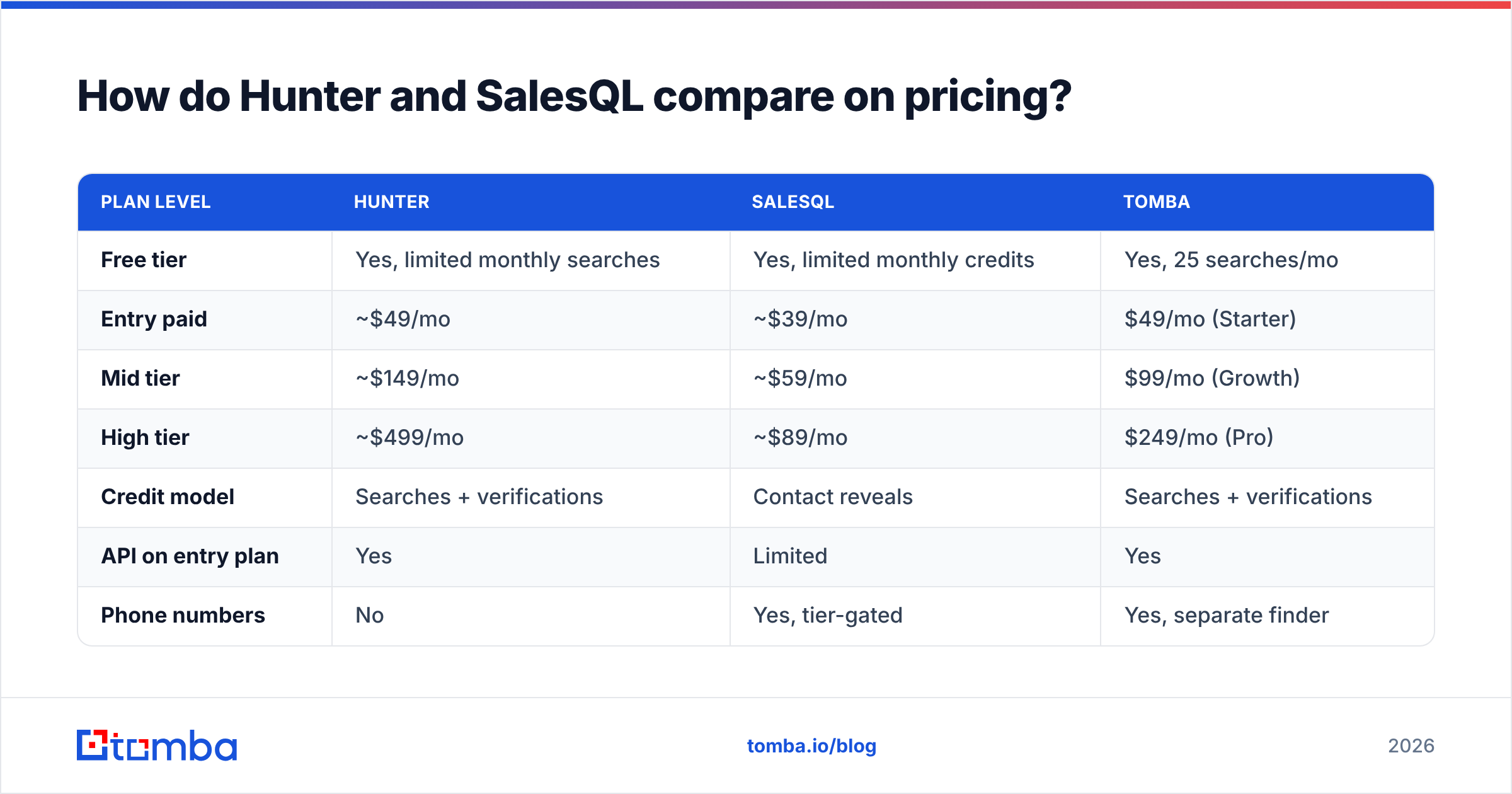
Pricing changes often. Treat the table below as a shape, not a quote, and check each vendor's page before you buy. What stays stable is the model. Hunter charges by search and verification credits. SalesQL charges by contact-reveal credits, with phone numbers gated to higher tiers.

| Plan level | Hunter | SalesQL | Tomba |
|---|---|---|---|
| Free tier | Yes, limited monthly searches | Yes, limited monthly credits | Yes, 25 searches/mo |
| Entry paid | ~$49/mo | ~$39/mo | $49/mo (Starter) |
| Mid tier | ~$149/mo | ~$59/mo | $99/mo (Growth) |
| High tier | ~$499/mo | ~$89/mo | $249/mo (Pro) |
| Credit model | Searches + verifications | Contact reveals | Searches + verifications |
| API on entry plan | Yes | Limited | Yes |
| Phone numbers | No | Yes, tier-gated | Yes, separate finder |
Two things people miss in a Hunter vs SalesQL price comparison.
First, credit accounting is not comparable across vendors. A Hunter "search" that returns 40 addresses for one domain counts as one unit. A SalesQL "reveal" that returns one person's email is also one unit. Building account-based lists? Hunter's unit is far more generous. Working profile by profile off a Sales Navigator list? SalesQL's unit maps better to what you consume.
Second, verification is usually a separate line item. Most teams that buy a finder end up buying a verifier too. That second invoice is where "cheap" plans stop being cheap. Consolidating both into one platform removes a vendor relationship and a reconciliation headache — see Tomba pricing for how a combined finder-plus-verifier plan is structured.
Is SalesQL better for LinkedIn prospecting?#
Yes — if LinkedIn is genuinely where your list lives. SalesQL's design assumes you have already built a Sales Navigator search that defines your ICP. You now want that search turned into rows with contact details. For that job it beats exporting a company list and reverse-engineering domains.
Two constraints are worth naming before you build a process around it.
- You depend on LinkedIn's tolerance. Any extension that reads profile data at volume sits in a grey zone against LinkedIn's terms. Rate limits, account warnings, and breakage after UI changes are recurring realities. Read the G2 reviews for any LinkedIn scraping tool and the same complaints appear.
- Personal emails are a compliance question, not just a data question. Gmail and Yahoo addresses pulled from profiles may fall under stricter consent rules, depending on jurisdiction. Business email to a business role is a different legal posture than a personal inbox. Decide this with your legal team, not your SDR team.
The third constraint is architectural. SalesQL is a human-in-the-loop tool. The extension needs a live browser session, so it does not slot into a nightly enrichment job. If RevOps wants contact data flowing into the CRM automatically, an extension is the wrong layer.
That is where the Hunter vs SalesQL debate usually ends for RevOps teams. Tomba's LinkedIn finder takes the same input — a profile URL — without an open browser tab. That matters once you enrich thousands of rows.

Where does Hunter still win?#
Hunter's advantage is that it is boring, in the best sense. It has been around long enough that integrations, documentation, and edge-case behaviour are all well understood.
- Domain-first list building. If your motion starts with "here are 800 companies we want to sell to," a domain search workflow is the natural fit. SalesQL has no clean analogue.
- Email pattern discovery. Knowing a company uses
f.last@lets you construct addresses for people the index has never seen. - Ecosystem depth. Sheets add-on, Chrome extension, Zapier, most sequencers. You will rarely be told "we don't integrate with that."
- Transparency on confidence. Hunter shows a score and the sources it saw an address on. Showing a rep why an address is probably right raises trust, which raises usage.
Where Hunter is weaker: no real phone number product, thin coverage on very small companies, and pricing that escalates once you outgrow the entry plan. That jump from entry to mid-tier is where many teams start shopping for an alternative — and where the Hunter vs SalesQL question first comes up.
What about phone numbers and enrichment?#
This is the cleanest split in the Hunter vs SalesQL matchup. SalesQL sells phone numbers as a first-class feature. Hunter effectively does not.
If cold calling is part of your motion, that alone may decide it. But be realistic about mobile accuracy across this whole category. Direct dials sourced from third-party aggregation age fast. A number that was correct 18 months ago may now route to a former employee. Validate before your reps burn a dial. A phone validator step costs less than a rep's wasted hour.
Neither tool is a full enrichment platform. For firmographics, tech stack, headcount, or funding, both give you contact points, not company intelligence. If your scoring model needs more attributes, you are looking at a third vendor — or at a platform with data enrichment built alongside the finder. Contact databases decay continuously. That is why enrichment is a subscription, not a one-time purchase.
Hunter vs SalesQL: which should you choose in 2026?#
Pick based on where your list originates, not on which brand you have heard of.
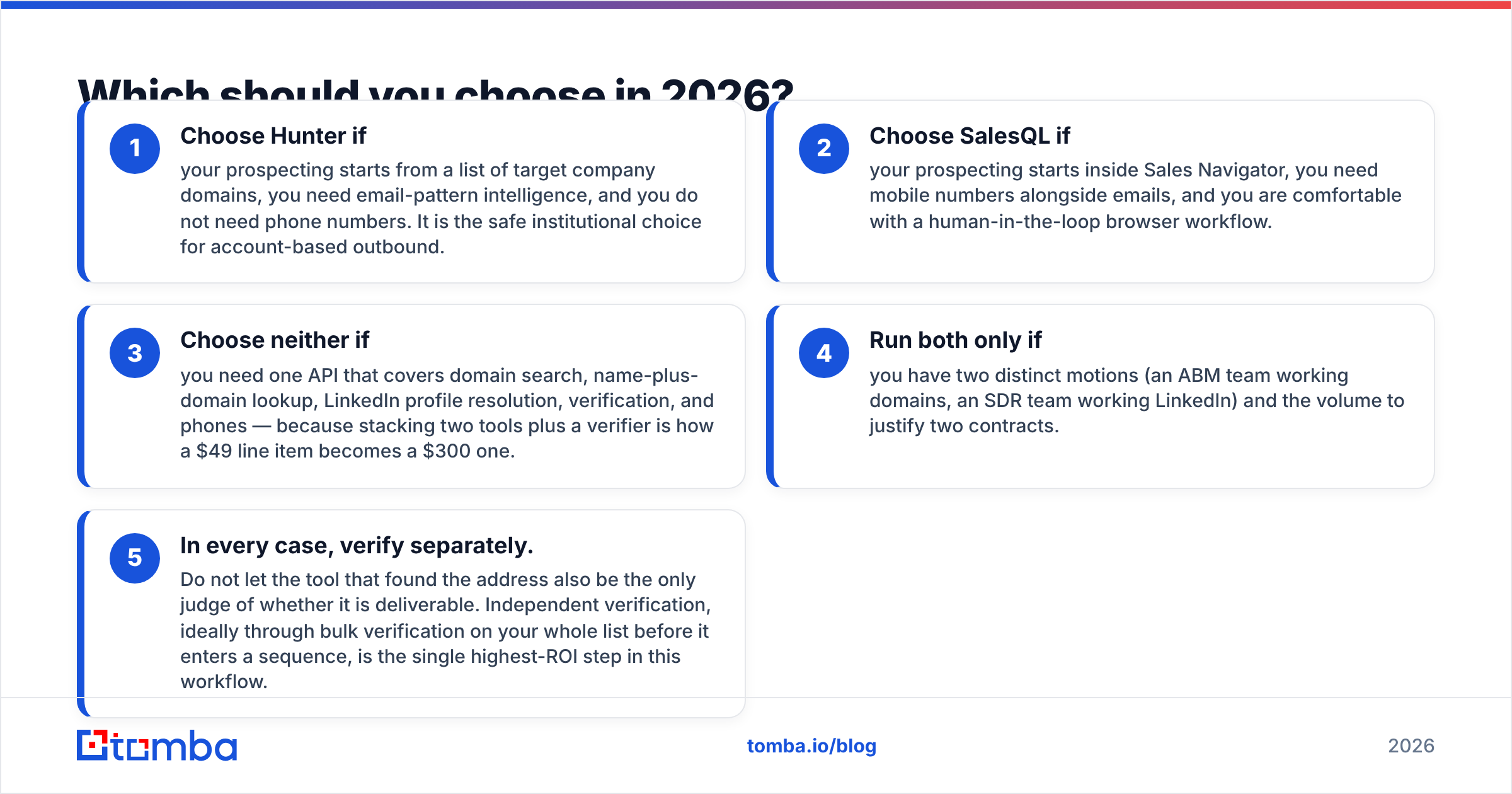
- Choose Hunter if your prospecting starts from a list of target company domains, you need email-pattern intelligence, and you do not need phone numbers.
- Choose SalesQL if your prospecting starts inside Sales Navigator, you need mobile numbers alongside emails, and a browser workflow is fine.
- Choose neither if you need one API covering domain search, name-plus-domain lookup, LinkedIn profile resolution, verification, and phones.
- Run both only if you have two distinct motions — an ABM team on domains, an SDR team on LinkedIn — and the volume to justify two contracts.
Stacking two tools plus a verifier is how a $49 line item becomes a $300 one. And in every case, verify separately. Do not let the tool that found the address also judge whether it is deliverable. Independent bulk verification on your whole list, before it enters a sequence, is the highest-ROI step in this workflow.
The comparison people should actually run is not Hunter vs SalesQL. It is cost per verified, deliverable, correctly-attributed contact across your real ICP. That number frequently favours whichever platform lets you skip the second and third vendor.
What does a consolidated alternative look like?#
If both tools feel like half a solution, that is because they are. Hunter answers "who works at this domain." SalesQL answers "what is this LinkedIn person's contact info." Real outbound needs both, plus verification, plus phones, plus an API that runs without a browser tab open.
That is the gap Tomba is built for. The Tomba Email Finder handles name-plus-domain and domain-wide lookups. The verifier and catch-all checks run on the same credits. LinkedIn profile resolution and phone lookup sit in the same account. The Tomba API is available from the $49/mo Starter plan, not gated behind an enterprise conversation.
Start on the free tier with 25 searches. Run the same 200-row bakeoff you would run for Hunter vs SalesQL, and let verified deliverability — not marketing copy — pick the winner.
Related guides#
// get started
Find, verify and enrich your first contacts today
Start on the free plan with 25 searches a month, then scale when your team is ready.
Free plan · No credit card required · GDPR & CCPA
// about the author