Hunter vs SalesRipe (2026): Which Email Data Tool Wins?
Hunter finds and verifies emails one domain at a time. SalesRipe sells you a filtered contact list. They solve different problems — here's which one your outbound motion actually needs in 2026.
TL;DR
- Hunter is a domain-first email finder and verifier. You bring a company or a name, it returns an address with a confidence score and sources.
- SalesRipe is a list-building database. You filter by industry, title, geography and headcount, then export contacts in bulk.
- They are not the same product. Comparing them on "who has more emails" misses the point — the real question is whether you prospect account-by-account or segment-by-segment.
- Hunter wins on verification transparency and per-lookup accuracy. SalesRipe wins on speed-to-list when you need 5,000 rows by Friday.
- If you want both — targeted lookups and bulk enrichment with live SMTP verification — a combined platform like Tomba covers the overlap starting at $49/mo with a free tier to test first.
What are Hunter and SalesRipe, exactly?#
Different tools, different jobs.
Hunter is the best-known email finder on the market. Its core loop is simple: give it a domain, it returns the email addresses it has indexed for that company, the detected format pattern (first.last@, flast@), a confidence score, and — this is the part competitors rarely match — the public web sources where each address was seen. It also ships a verifier, a campaign sender, and a Chrome extension.
SalesRipe sits in a different category: a B2B contact database. You do not start from a domain. You start from a filter set — "VP of Operations, manufacturing, 50–200 employees, Texas" — and the platform hands you a list of matching contacts with emails, phone numbers, and firmographics. It is closer in shape to a list vendor than to a lookup tool.
That distinction drives everything else in this comparison. Asking whether Hunter beats SalesRipe is like asking whether a scalpel beats a chainsaw. Depends entirely on what's on the table.
How do Hunter and SalesRipe actually source their data?#
This is where accuracy comes from, so it's worth understanding the mechanics before you look at a single price.
- Public web crawling (Hunter's primary method). Hunter indexes email addresses published on the open web — team pages, press releases, GitHub commits, conference bios — then reverse-engineers the company's email pattern. When it can't find your exact person, it generates the address from the pattern and scores its confidence.
- Pattern inference and SMTP checks. Once a pattern is known for
acme.com, any new name can be guessed at high probability. Good tools then validate that guess against the mail server rather than shipping the guess raw. - Compiled and licensed databases (SalesRipe's primary method). List providers assemble records from business registrations, directories, public filings, opt-in sources, and data partnerships, then normalize them into filterable rows. Coverage is broad; freshness varies by segment.
- User contribution and community data. Some platforms enrich their index from what customers upload or reveal through extensions. It boosts coverage fast, but provenance gets murky.
- Continuous re-verification. The differentiator in 2026 is not who has the biggest raw index — it's who re-checks records against live mail servers before they hand them to you. A three-year-old record that nobody re-validated is a bounce waiting to happen.
Neither approach is inherently better. Crawl-and-infer gives you defensible, source-cited addresses for a company you already care about. Compiled databases give you reach into companies you have never heard of. The failure modes are different too: crawl-based tools return "not found" more often; database tools return something more often, and some of that something is stale.
Which one has better data accuracy?#
Short answer: Hunter is more honest about what it doesn't know, and that usually produces cleaner sends.
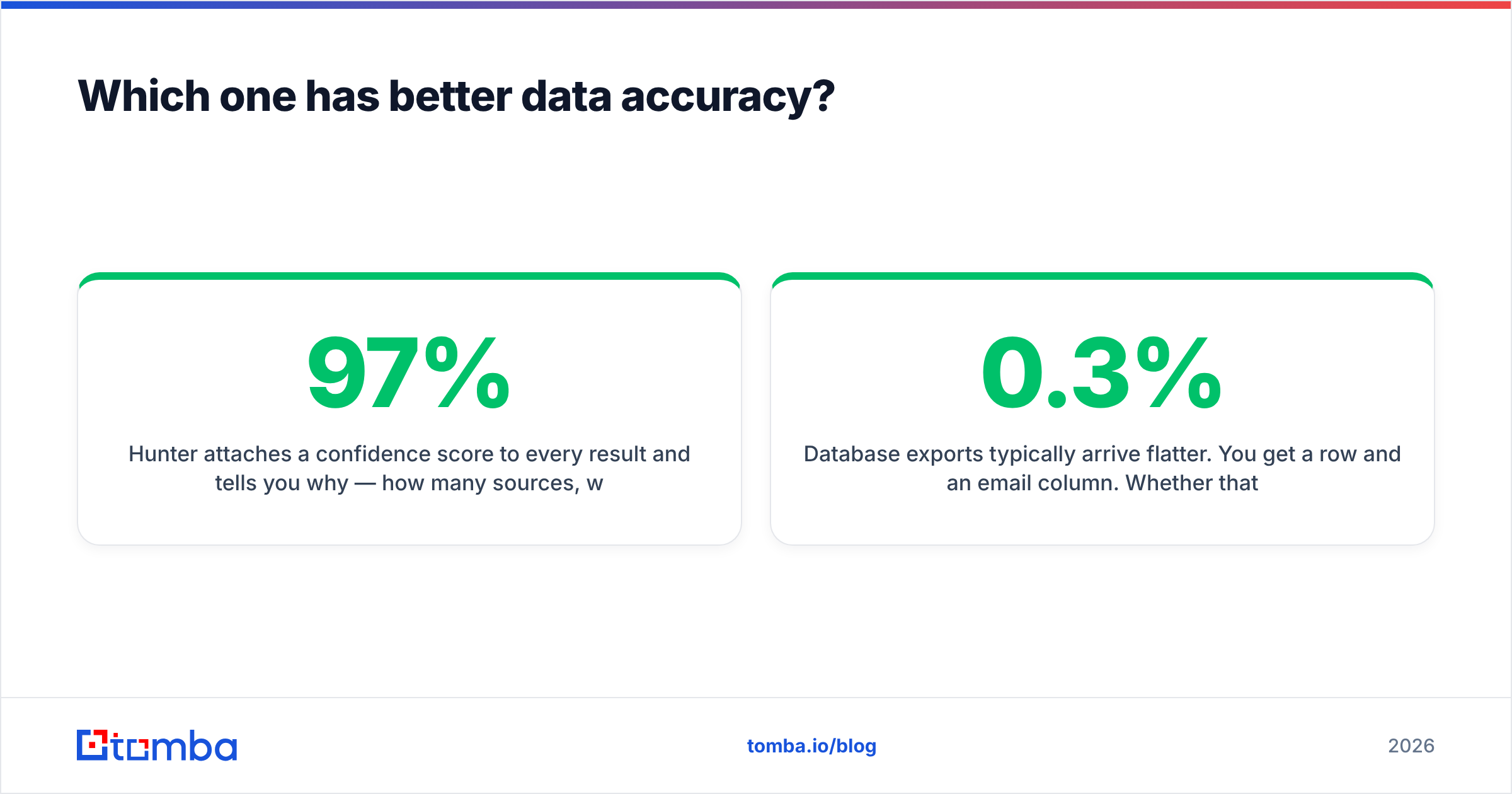
Hunter attaches a confidence score to every result and tells you why — how many sources, what type, when last seen. A 97% score with four public sources behaves very differently from a 62% pattern guess with zero. That transparency lets you set a threshold and drop everything below it before it ever reaches your sequencer.
Database exports typically arrive flatter. You get a row and an email column. Whether that address was validated last week or last year is often not visible in the export, which means the burden of verification moves to you. If you pull 5,000 contacts from any compiled database and send without re-verifying, expect a bounce rate that will get your domain throttled. Google and Microsoft both tightened bulk-sender enforcement in 2024, and the practical ceiling most teams work to is a spam-complaint rate under 0.3% and bounces under 2%.

The operational rule, regardless of which vendor you choose: never send to an unverified list. Run every export through an email verifier before it touches your sending domain. Catch-all domains deserve special handling — they accept everything at the SMTP layer, so a naive "valid" result means nothing without a dedicated catch-all verifier.
How do Hunter and SalesRipe compare on pricing and features?#
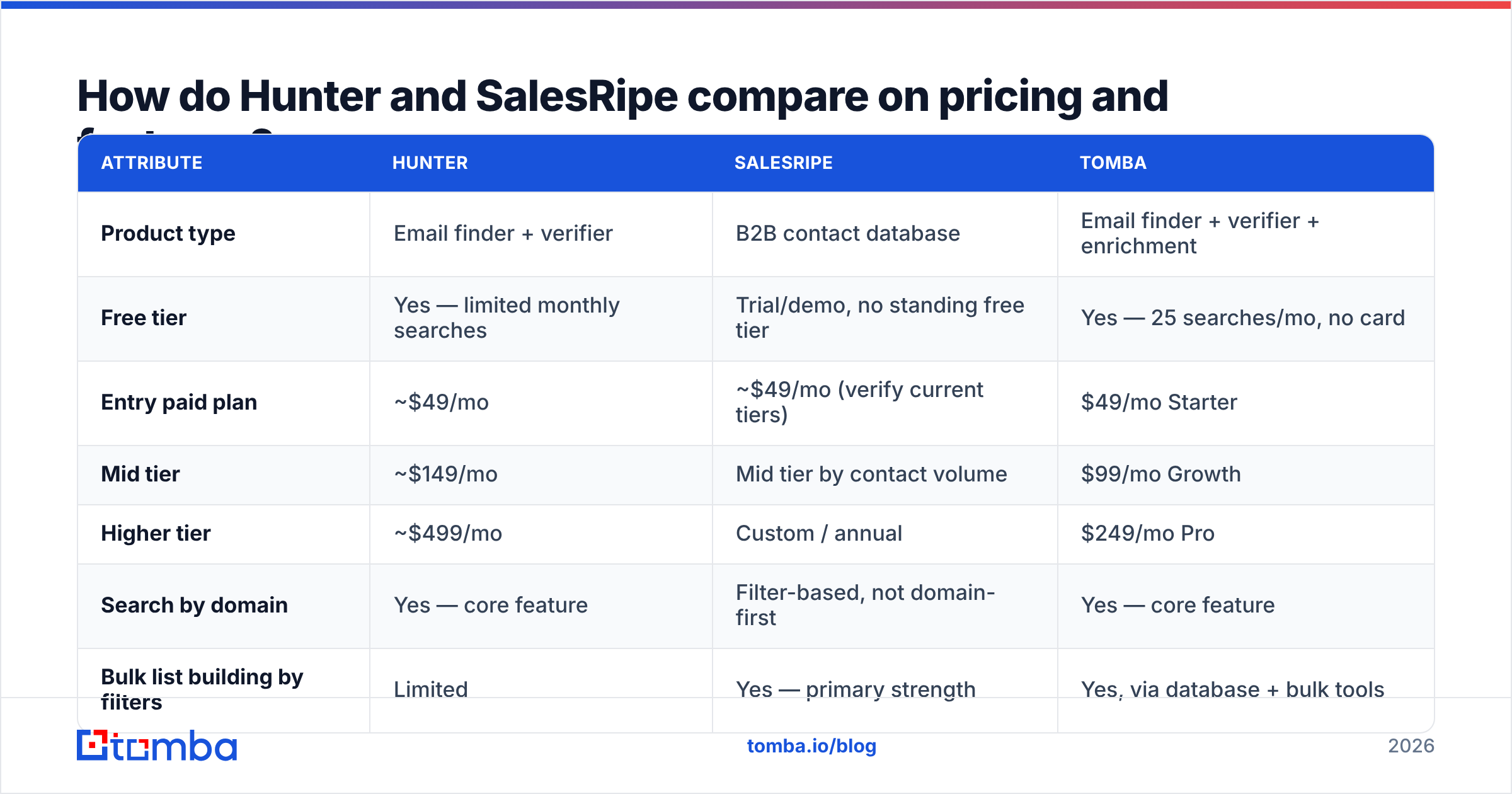
Pricing structures differ enough that a straight per-credit comparison is misleading — Hunter meters searches, list databases meter contact downloads. Both vendors adjust tiers periodically, so treat the figures below as directional and confirm on the live pricing pages before you buy.
| Attribute | Hunter | SalesRipe | Tomba |
|---|---|---|---|
| Product type | Email finder + verifier | B2B contact database | Email finder + verifier + enrichment |
| Free tier | Yes — limited monthly searches | Trial/demo, no standing free tier | Yes — 25 searches/mo, no card |
| Entry paid plan | ~$49/mo | ~$49/mo (verify current tiers) | $49/mo Starter |
| Mid tier | ~$149/mo | Mid tier by contact volume | $99/mo Growth |
| Higher tier | ~$499/mo | Custom / annual | $249/mo Pro |
| Search by domain | Yes — core feature | Filter-based, not domain-first | Yes — core feature |
| Bulk list building by filters | Limited | Yes — primary strength | Yes, via database + bulk tools |
| Confidence score per result | Yes, with sources | Not exposed per record | Yes |
| Built-in verification | Yes | Limited | Yes, incl. catch-all handling |
| Phone numbers | No | Yes | Yes |
| Public API | Yes | Limited / plan-dependent | Yes, full REST API |
| Cold email sending | Yes (Campaigns) | No | No — integrates instead |

Two things stand out. First, Hunter bundles a sender, which is convenient for solo founders and redundant for anyone already paying for Instantly, Smartlead, or Outreach. Second, list databases include phone numbers where pure email finders historically do not — if your motion is multichannel, that gap matters more than a $20/mo price delta. Compare it against Tomba pricing if you want per-credit math on a plan that includes both.
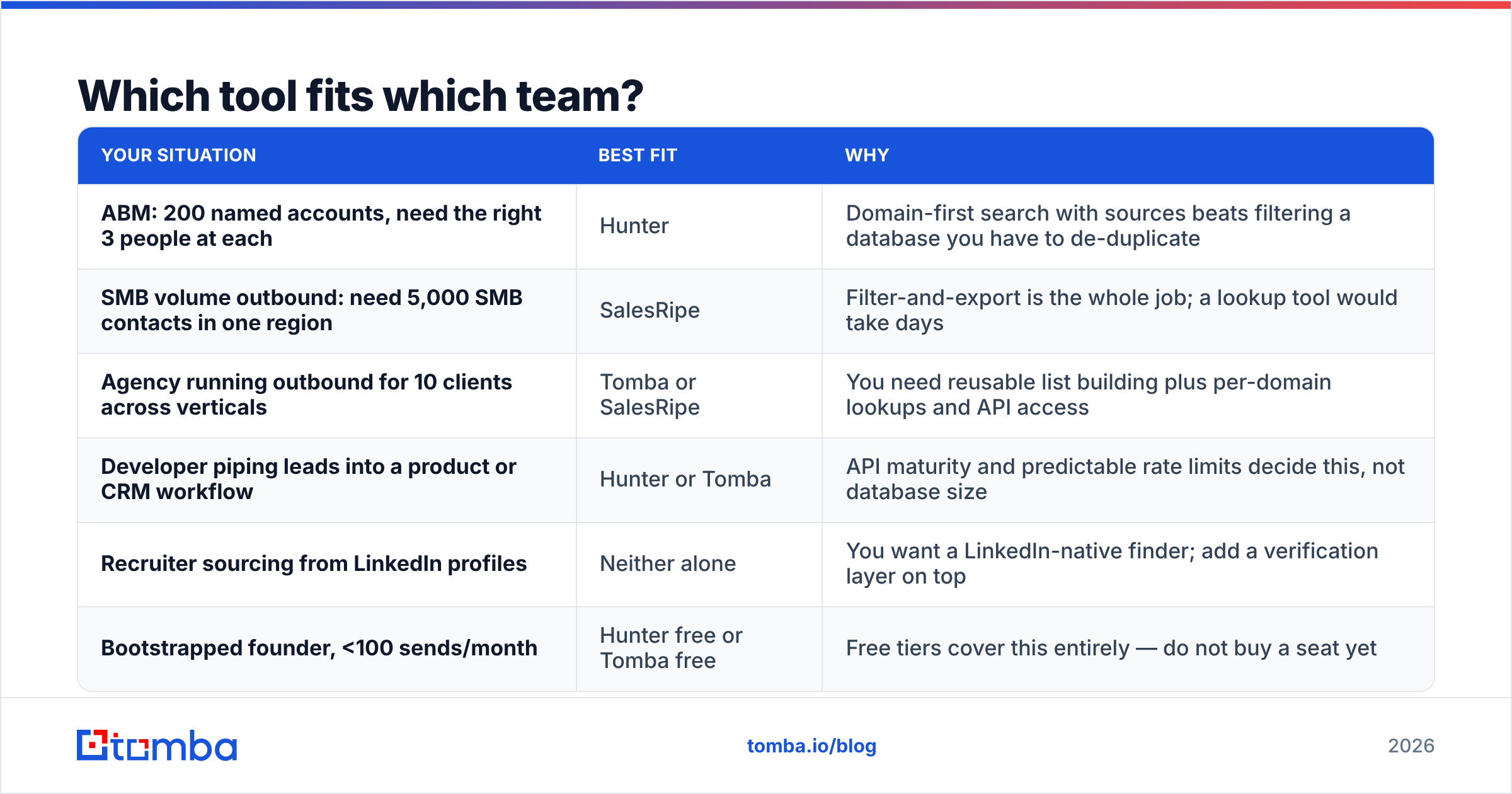
Which tool fits which team?#
| Your situation | Best fit | Why |
|---|---|---|
| ABM: 200 named accounts, need the right 3 people at each | Hunter | Domain-first search with sources beats filtering a database you have to de-duplicate |
| SMB volume outbound: need 5,000 SMB contacts in one region | SalesRipe | Filter-and-export is the whole job; a lookup tool would take days |
| Agency running outbound for 10 clients across verticals | Tomba or SalesRipe | You need reusable list building plus per-domain lookups and API access |
| Developer piping leads into a product or CRM workflow | Hunter or Tomba | API maturity and predictable rate limits decide this, not database size |
| Recruiter sourcing from LinkedIn profiles | Neither alone | You want a LinkedIn-native finder; add a verification layer on top |
| Bootstrapped founder, <100 sends/month | Hunter free or Tomba free | Free tiers cover this entirely — do not buy a seat yet |
Notice how often the answer is "it depends on the shape of your target list, not on the vendor's feature count." That's the honest read. Vendor comparison pages will not tell you this because it doesn't sell seats.
What do both tools leave you to solve yourself?#
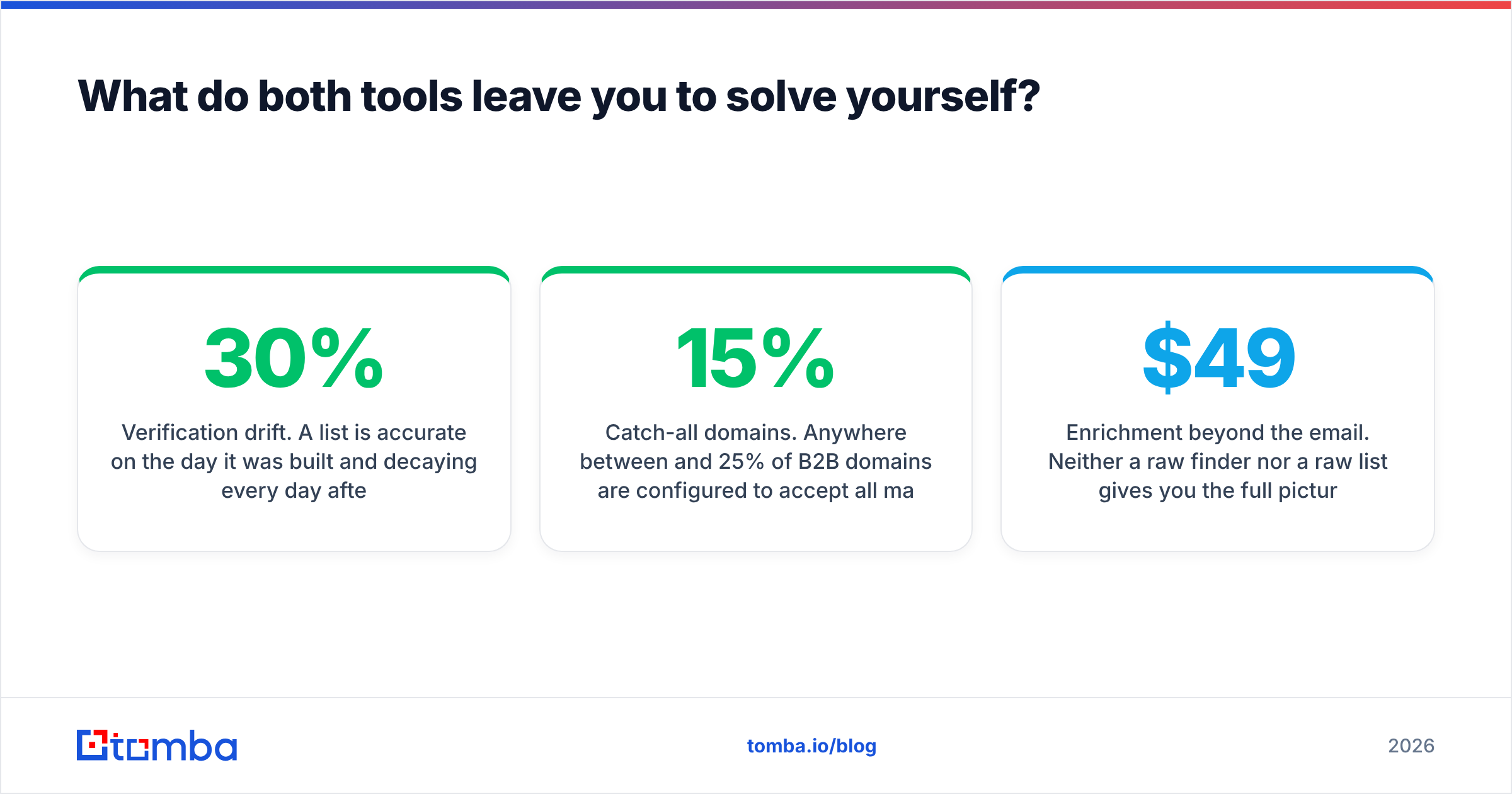
Three gaps show up in nearly every real deployment.
Verification drift. A list is accurate on the day it was built and decaying every day after. B2B contact data churns roughly 25–30% per year as people change jobs — a number G2 reviewers and data vendors have repeated consistently. Whatever you buy, plan for a re-verification pass before each campaign, not once at import.
Catch-all domains. Anywhere between 15% and 25% of B2B domains are configured to accept all mail. Standard verification returns "accept" and you learn nothing. Without a dedicated catch-all path you are guessing, and guesses land in spam traps.
Enrichment beyond the email. Neither a raw finder nor a raw list gives you the full picture — job change signals, technographics, company size deltas. You end up bolting on a second tool for data enrichment anyway, which is where the "cheap" $49 plan quietly becomes a $200 stack.
Is there a better option than choosing one?#
For a lot of teams, yes — because the Hunter-vs-SalesRipe framing forces a choice between two halves of the same workflow.
What most outbound teams actually need is a single layer that does all four of these:
- Find — by domain, by name, by company, or in bulk from a list you already have
- Verify — including catch-all domains, before anything hits the sequencer
- Enrich — phones, company data, social profiles attached to the same record
- Automate — an API or spreadsheet add-on so nobody is exporting CSVs by hand at 6pm
That's the argument for a consolidated platform. Tomba's email finder handles the domain-first lookups Hunter is good at, domain search covers company-wide discovery, and the bulk email finder handles the list-scale work you'd otherwise buy a database subscription for — with verification built into the same pipeline rather than bolted on after. The Tomba API covers the developer case at every tier, not just enterprise.
To be fair to both incumbents: Hunter's source citations remain best-in-class, and if you only ever prospect into companies you've already researched, its free tier plus a Starter plan may be all you need forever. And list databases genuinely solve a problem lookup tools cannot — if your ICP is "any HVAC company in Ohio with 20+ employees," no amount of domain search gets you there efficiently. Peers in this space, including specialist list vendors like BookYourData, have built real businesses on that exact strength.
How do you test either tool before you pay?#
Run the same 50-contact benchmark against every candidate. This takes an afternoon and saves months of bad data.
- Build a control list. Pick 50 real contacts you can independently confirm — customers, LinkedIn connections, people who have emailed you. You know the ground truth.
- Strip the emails. Keep only name + company domain. That's your input file.
- Run each tool. Measure three numbers: match rate (how many returned anything), accuracy (how many matched the known-correct address), and false-confidence rate (how many wrong answers came back with a high score). The third metric is the one nobody measures and the one that burns domains.
- Send a real test. Take 200 net-new addresses from each tool, verify them, send a genuine campaign from a warmed domain, and record the hard-bounce rate. Under 2% is healthy.
- Test the API, not just the UI. If automation is part of your plan, check rate limits and response schemas during the trial. Discovering a 60-requests-per-minute cap after you've built the integration is an expensive surprise.
- Price the whole stack. Add the verifier, the enrichment tool, and the sender you'll need alongside each option. The cheapest finder is rarely the cheapest workflow.
Do this with free tiers before you spend anything. Hunter's free plan, Tomba's 25 free monthly searches, and a SalesRipe demo will all take the same benchmark.
What's the verdict on Hunter vs SalesRipe?#
Choose Hunter if you prospect into a defined set of accounts, value source-cited results, and want the verifier and sender in one bill. It is the more precise instrument.
Choose SalesRipe if your bottleneck is list volume — you know the segment, you don't know the companies, and you need thousands of rows with phone numbers this week. Budget time and money for re-verification on top.
Choose neither, and consolidate, if you keep paying for a finder and a database and a verifier to do one job. That's the case where a combined platform is cheaper and produces cleaner data, because verification happens inside the same pipeline that found the address instead of three tools downstream.
Start with the Tomba Email Finder — 25 free searches a month, no card required, and the same catch-all-aware verification that runs on the paid tiers. Run the 50-contact benchmark above against it alongside Hunter and SalesRipe, and let your own match-rate numbers pick the winner instead of anyone's comparison page. If it clears your bar, Starter is $49/mo and includes the API from day one.
Related guides#
// get started
Find, verify and enrich your first contacts today
Start on the free plan with 25 searches a month, then scale when your team is ready.
Free plan · No credit card required · GDPR & CCPA
// about the author