Hunter vs Thomson Data (2026): Which B2B Email Source Wins?
Hunter finds emails on demand; Thomson Data sells you a list. One protects your domain, the other fills your CRM fast. Here's the honest 2026 breakdown of pricing, accuracy, and which model actually fits your outbound motion.
TL;DR
- Hunter and Thomson Data are not the same category of product. Hunter is a self-serve search-and-verify engine you query per prospect or per domain. Thomson Data is a list broker that sells you a file of records, usually after a sales call and a custom quote.
- Pick Hunter if your outbound is targeted, your ICP changes often, and you need data that was verified this week rather than last quarter.
- Pick Thomson Data if you need volume in one shot for a specific vertical (healthcare, technology installs, industry associations) and you have the deliverability infrastructure to survive a cold file.
- Pricing models are opposite. Hunter publishes tiers starting around $49/mo; Thomson Data quotes per record after a scoping call, so the real cost is invisible until you talk to a rep.
- The deciding factor is bounce risk. Any static list decays roughly 2-3% per month. Any search tool is only as good as its verification layer. Whichever you buy, run the file through an email verifier before it touches your sending domain.
What are Hunter and Thomson Data, exactly?#
Hunter is one of the oldest self-serve email-finding tools on the market. You give it a domain and it returns the email addresses it has discovered or inferred for that company, along with a confidence score and, in most cases, the public sources it crawled. You can also feed it a first name, last name, and domain to get a single address, or upload a CSV for bulk processing. Everything happens in your browser or through an API key, on demand, with no salesperson in the loop.
Thomson Data sits in a different tradition entirely: the B2B mailing-list business. It sells pre-built and custom-built contact files segmented by industry, job function, technology installed, geography, company size, and dozens of other attributes. You describe your target audience, a rep scopes the count, you receive a sample, and then you buy the file. Delivery is a spreadsheet, not an API call.
That distinction matters more than any feature checkbox. One tool answers "who is the head of marketing at this specific company I care about?" The other answers "give me 40,000 IT directors at mid-market manufacturers." Confusing the two is the single most common reason teams end up disappointed with whichever one they bought.
How do the two data models actually differ?#
The mechanics behind the data explain almost every downstream difference in price, freshness, and bounce rate:
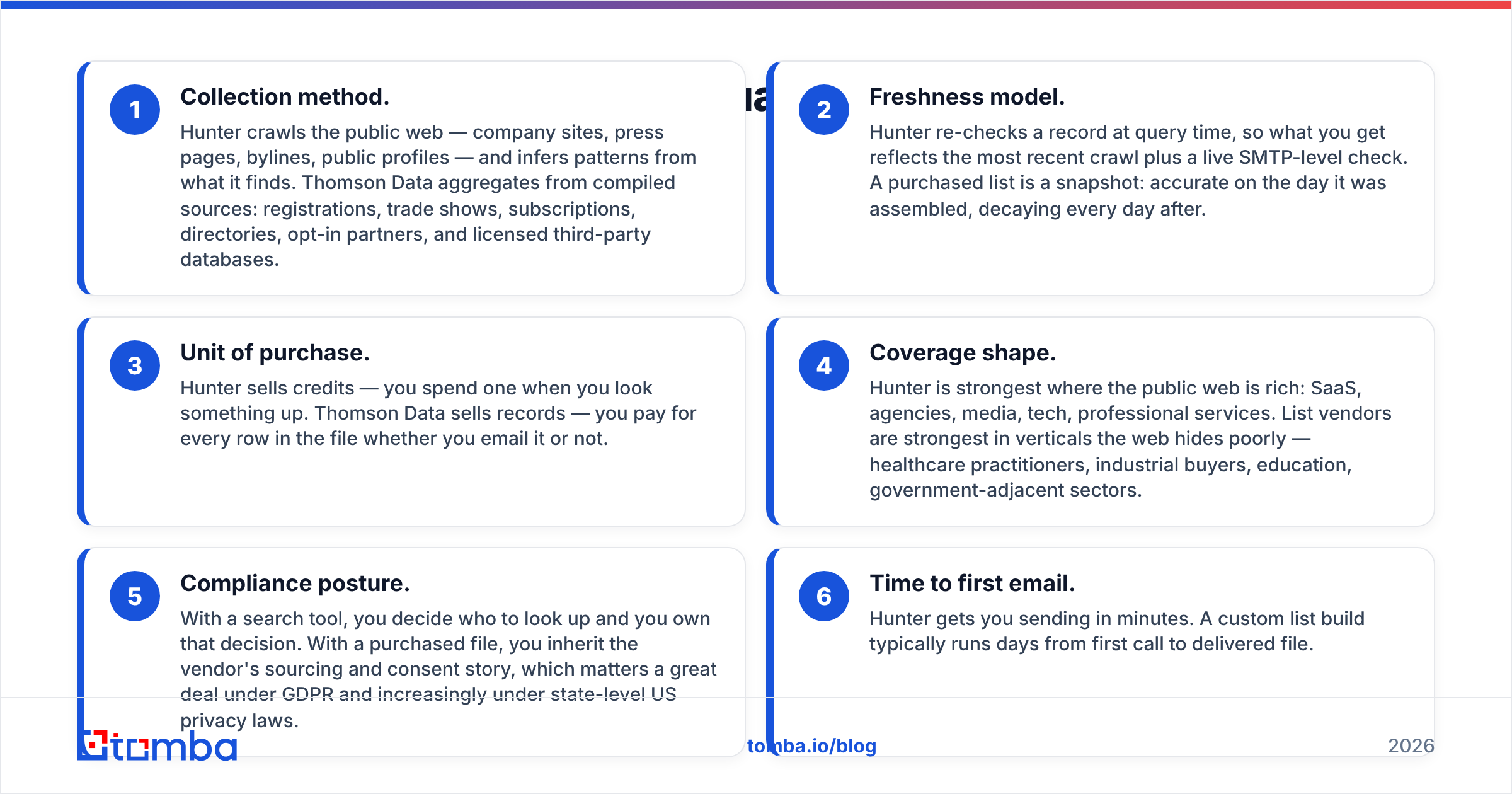
- Collection method. Hunter crawls the public web — company sites, press pages, bylines, public profiles — and infers patterns from what it finds. Thomson Data aggregates from compiled sources: registrations, trade shows, subscriptions, directories, opt-in partners, and licensed third-party databases.
- Freshness model. Hunter re-checks a record at query time, so what you get reflects the most recent crawl plus a live SMTP-level check. A purchased list is a snapshot: accurate on the day it was assembled, decaying every day after.
- Unit of purchase. Hunter sells credits — you spend one when you look something up. Thomson Data sells records — you pay for every row in the file whether you email it or not.
- Coverage shape. Hunter is strongest where the public web is rich: SaaS, agencies, media, tech, professional services. List vendors are strongest in verticals the web hides poorly — healthcare practitioners, industrial buyers, education, government-adjacent sectors.
- Compliance posture. With a search tool, you decide who to look up and you own that decision. With a purchased file, you inherit the vendor's sourcing and consent story, which matters a great deal under GDPR and increasingly under state-level US privacy laws.
- Time to first email. Hunter gets you sending in minutes. A custom list build typically runs days from first call to delivered file.
How do Hunter and Thomson Data compare feature by feature?#
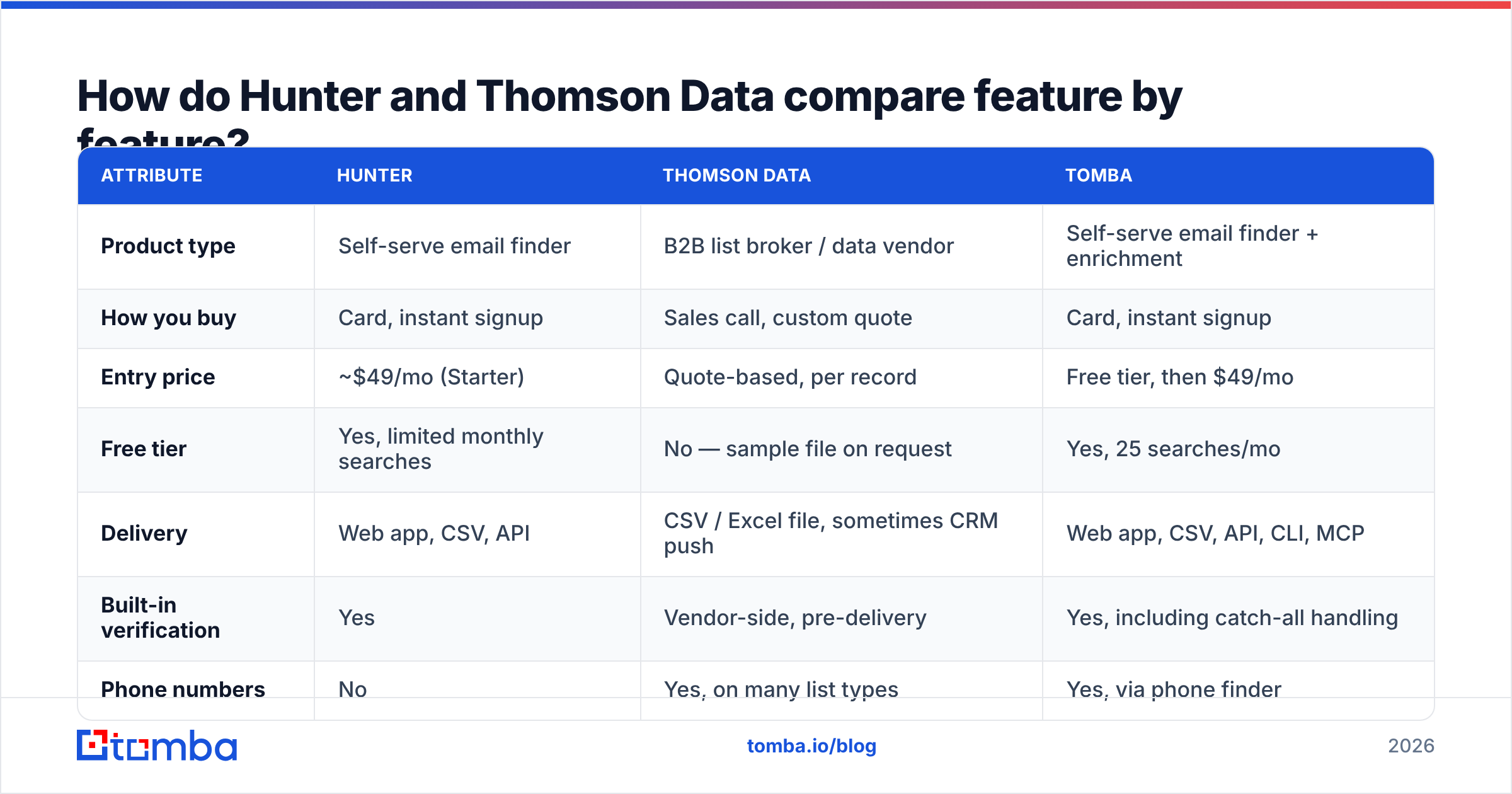
Here is the head-to-head on the attributes that actually change your workflow. Pricing reflects publicly listed plans at the time of writing; always confirm on the vendor's own page before you budget.
| Attribute | Hunter | Thomson Data | Tomba |
|---|---|---|---|
| Product type | Self-serve email finder | B2B list broker / data vendor | Self-serve email finder + enrichment |
| How you buy | Card, instant signup | Sales call, custom quote | Card, instant signup |
| Entry price | ~$49/mo (Starter) | Quote-based, per record | Free tier, then $49/mo |
| Free tier | Yes, limited monthly searches | No — sample file on request | Yes, 25 searches/mo |
| Delivery | Web app, CSV, API | CSV / Excel file, sometimes CRM push | Web app, CSV, API, CLI, MCP |
| Built-in verification | Yes | Vendor-side, pre-delivery | Yes, including catch-all handling |
| Phone numbers | No | Yes, on many list types | Yes, via phone finder |
| Best coverage | Tech, SaaS, agencies, media | Healthcare, industrial, tech-install lists | Tech, SaaS, agencies, mid-market global |
| Data ownership | You query what you need | You own the delivered file | You query what you need |
| Refresh cadence | On demand, per query | At purchase, then static | On demand, per query |

Two things jump out. First, the buying friction is wildly different — one is a credit card, the other is a pipeline stage in someone else's CRM. Second, the refresh column is the whole ballgame. A file that is static from the moment of purchase is a depreciating asset, and you paid for every row up front.
Which one has more accurate data?#
The honest answer: neither is categorically more accurate, but they fail in different ways, and one failure mode is far more expensive.
Search tools fail by returning nothing. You look up a contact, the tool has no confident answer, and you move on. That is a coverage miss — annoying, but harmless to your domain.
Purchased lists fail by returning something wrong. A record that was valid eighteen months ago now belongs to someone who left the company, and the mailbox has been converted to a catch-all or a spam trap. You do not find out until your bounce rate crosses 5% and your sending reputation is already damaged. Recycled spam traps in aged files are the classic way a healthy domain gets blocklisted overnight.

The practical takeaway is to distrust every accuracy claim, including the ones on this blog, and test instead. Take 200 records from each source, run them through independent verification, and count three buckets: valid, invalid, and catch-all/unknown. If a vendor sells you on "95% accuracy," a 200-row sample will tell you inside an hour whether that number survives contact with reality.
Also, watch how each source handles catch-all domains. A catch-all server accepts every address at the domain, so a naive SMTP check marks it valid. Vendors that count catch-alls as verified are inflating their accuracy number by definition. This is why a dedicated catch-all verifier matters more than a headline percentage.
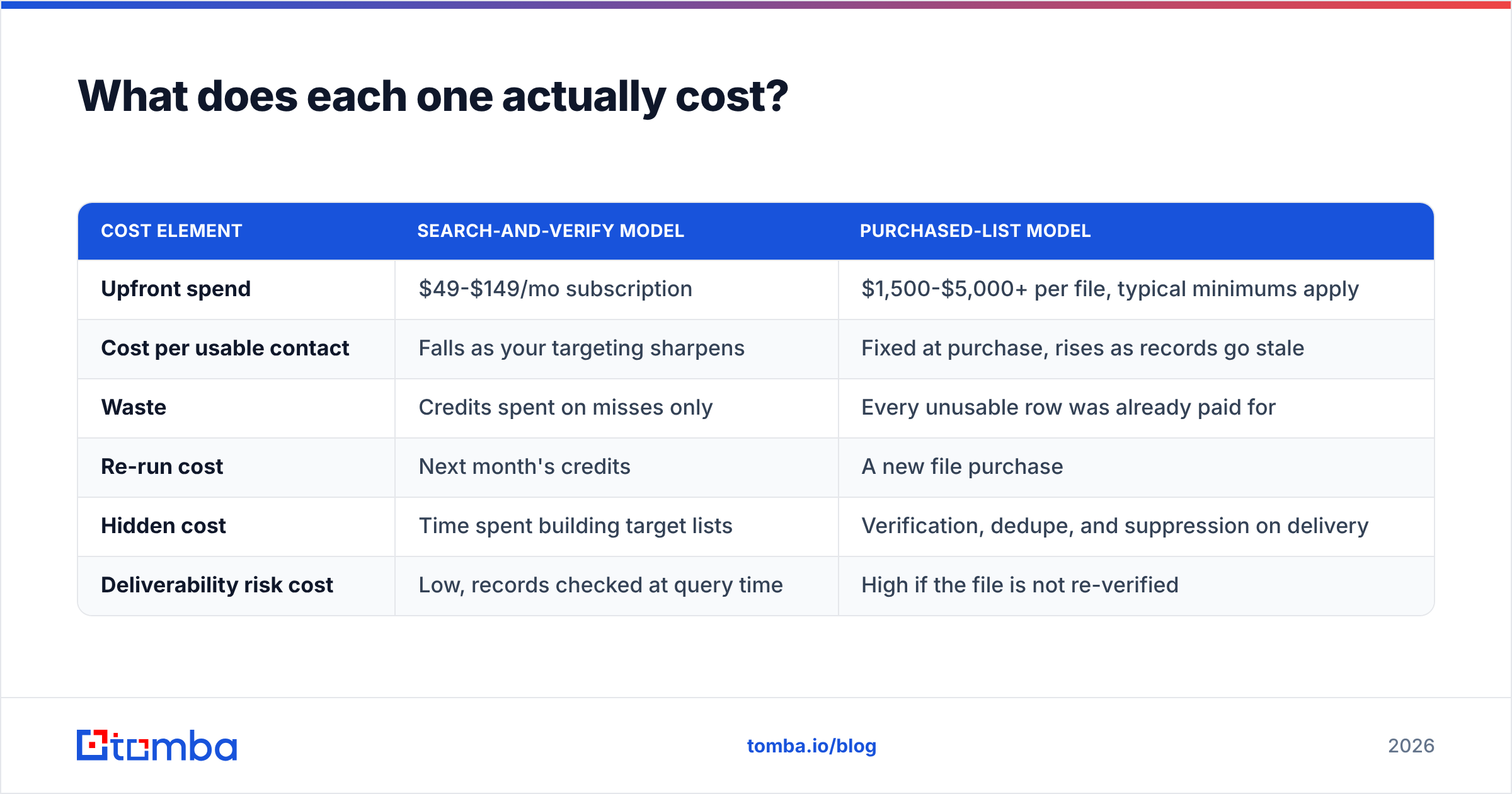
What does each one actually cost?#
Cost comparison is genuinely hard here because the units do not line up. Hunter charges per lookup; Thomson Data charges per delivered record. Here is a rough model for a team that wants to reach 5,000 net-new contacts in a quarter.
| Cost element | Search-and-verify model | Purchased-list model |
|---|---|---|
| Upfront spend | $49-$149/mo subscription | $1,500-$5,000+ per file, typical minimums apply |
| Cost per usable contact | Falls as your targeting sharpens | Fixed at purchase, rises as records go stale |
| Waste | Credits spent on misses only | Every unusable row was already paid for |
| Re-run cost | Next month's credits | A new file purchase |
| Hidden cost | Time spent building target lists | Verification, dedupe, and suppression on delivery |
| Deliverability risk cost | Low, records checked at query time | High if the file is not re-verified |
Thomson Data does not publish rates, and per-record pricing in the list-broker market generally moves with how narrow your selects are, whether you want phones, and whether it is a one-time license or unlimited use. Ask about license terms specifically — some list purchases restrict you to a single deployment, which changes the economics of a multi-touch sequence entirely.
By contrast, self-serve tools are easy to model. Tomba pricing runs free at 25 searches/mo, $49/mo on Starter, $99/mo on Growth, and $249/mo on Pro, with Enterprise quoted. Hunter's ladder is comparable at the entry point and steepens faster at scale. You can put either number in a spreadsheet without a discovery call.

Which is better for your specific use case?#
Match the tool to the motion, not to the review score.
- Targeted account-based outbound (10-200 accounts). Search-and-verify wins outright. You already know the companies; you just need the right humans inside them. Run a domain search per account, pull the roles you need, verify, send. A 40,000-row file is pure overhead here.
- Vertical volume plays (healthcare, manufacturing, education). This is where list vendors earn their fee. If your ICP is "practice managers at dental clinics in the Midwest," the public web will not hand that to you efficiently. Buy the file, then re-verify every row before your first send.
- Recruiting and partner outreach. Search tools, again. These are person-first workflows, and you need a current address rather than a segment.
- Event and conference follow-up. Neither, mostly. You already have the contacts; you need enrichment to fill in titles, company size, and phone. That is a data enrichment job.
- High-volume, low-ACV outbound. Honestly, reconsider the whole plan. In 2026, volume-first cold email into stale purchased data is the fastest way to lose a domain. Google and Microsoft's bulk-sender rules make bounce and complaint thresholds unforgiving.
- API-driven workflows and product enrichment. Search tools only. A CSV cannot answer a webhook. Look at the Tomba API or Hunter's API depending on which coverage tests better on your accounts.
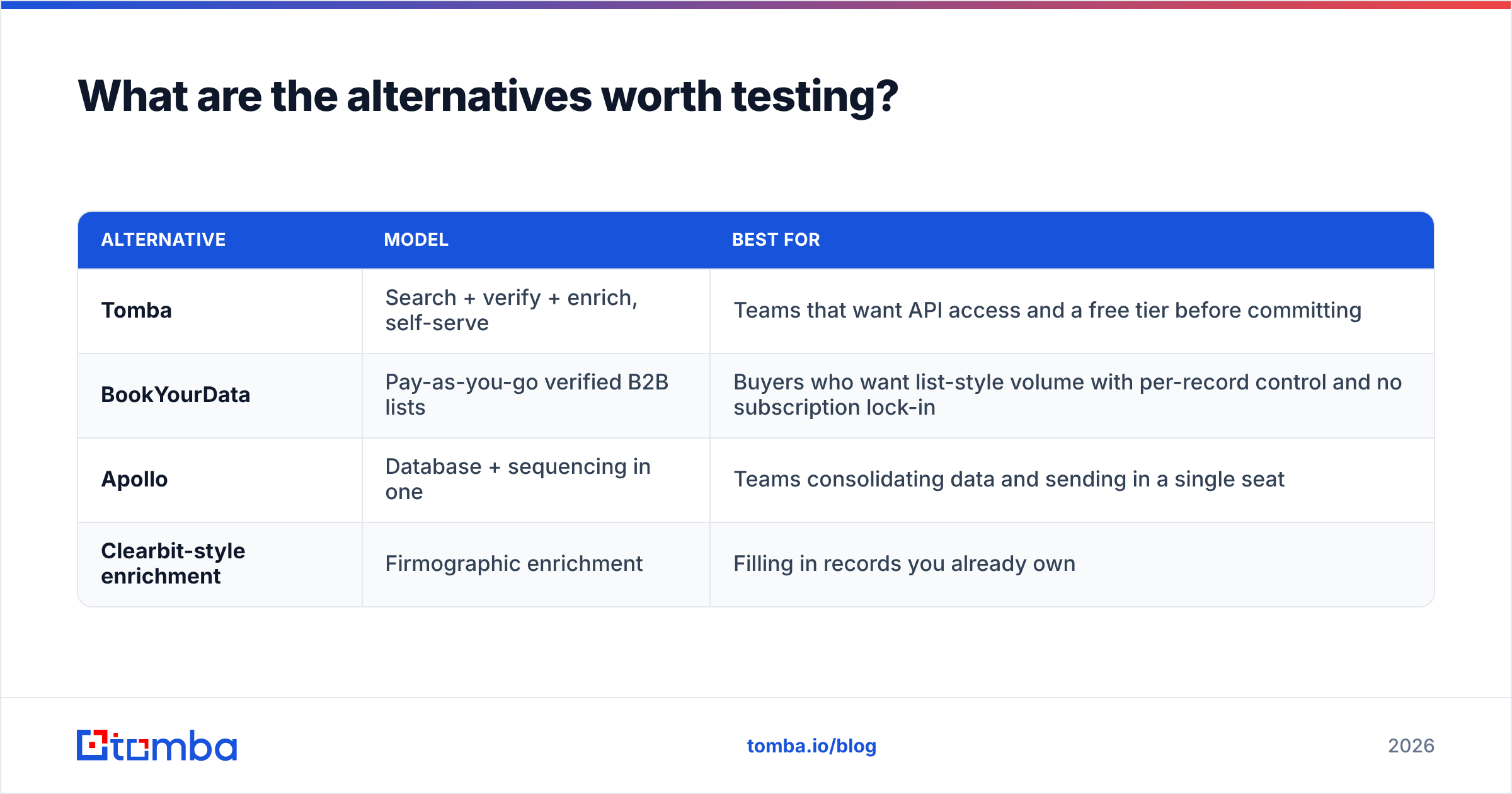
What are the alternatives worth testing?#
Do not treat this as a binary. The market has usefully distinct options, and testing three sources against the same 200-account sample costs less than committing to the wrong one.
| Alternative | Model | Best for |
|---|---|---|
| Tomba | Search + verify + enrich, self-serve | Teams that want API access and a free tier before committing |
| BookYourData | Pay-as-you-go verified B2B lists | Buyers who want list-style volume with per-record control and no subscription lock-in |
| Apollo | Database + sequencing in one | Teams consolidating data and sending in a single seat |
| Clearbit-style enrichment | Firmographic enrichment | Filling in records you already own |
BookYourData is worth a specific mention because it splits the difference cleanly: you get the volume and vertical targeting of a list purchase, but with pay-as-you-go pricing and per-record verification rather than a quoted minimum order. If your objection to Thomson Data is the sales cycle rather than the list model itself, that is the shape of tool to look at. Independent reviews on G2 are useful for spotting support and billing complaints that vendor sites will never surface, though take star ratings with the usual skepticism about review incentives.
If you want to test coverage across several sources at once without buying seats everywhere, run the same account list through each provider's trial and compare hit rate on the accounts you actually sell to — not on Fortune 500 logos, which every vendor covers well.
How do you protect your domain whichever source you pick?#
Five rules, in priority order:
- Re-verify everything on arrival. Yes, even data that came pre-verified. Verification has a shelf life measured in weeks. Push the file through a bulk verify run before import.
- Segment by confidence. Send to valid-only first. Park catch-alls and unknowns in a separate, slower sequence with lower volume.
- Suppress aggressively. Dedupe against existing CRM records, past unsubscribes, and competitor domains before the first send.
- Warm up and ramp. New domain or new volume level means weeks of gradual ramp, not a 5,000-send blast on day one.
- Watch bounce rate per batch, not per campaign. If a purchased segment bounces above 3%, stop the send and re-verify the remainder. Do not let one bad file take the domain down.
Teams that skip step one and blame the vendor when the numbers go sideways are extremely common. The list was probably fine when it was built. It just was not built today.
So what is the verdict on Hunter vs Thomson Data?#
If your outbound is targeted, iterative, and account-based, Hunter's model is the better fit — you pay for the lookups you need, you get a fresh answer per query, and you can start in ten minutes without a sales call. If you need vertical volume in a market the public web indexes badly, Thomson Data's list-building service does something a search tool structurally cannot, and the trade-off is that you take on the freshness and compliance risk of a static file.
For most B2B teams reading this, the search-and-verify side is the safer default, and the cheapest way to prove it is to run both against the same 200 accounts and count valid addresses.
Start that test with the Tomba Email Finder. The free tier gives you 25 searches a month with no card, verification is built in rather than sold separately, and if the hit rate on your real accounts beats what the other two return, you will know inside an afternoon instead of after a quarterly contract.
Related guides#
// get started
Find, verify and enrich your first contacts today
Start on the free plan with 25 searches a month, then scale when your team is ready.
Free plan · No credit card required · GDPR & CCPA
// about the author