Hunter vs Zintlr 2026: Which B2B Email Finder Actually Wins?
Hunter is the veteran domain-search tool. Zintlr is the newer database with personality profiles bolted on. We compare coverage, accuracy, pricing and export limits so you know which one your outbound team should actually pay for.
Hunter vs Zintlr comes down to one question: do you start from a company domain, or from a person? Hunter is domain-first. Zintlr is person-first. That single split explains most of the rest.
TL;DR
- Hunter is the safer default if your workflow starts with a company domain. Domain Search, a mature API and a huge crawled index make it predictable. Its confidence scores are honest about when they're unsure.
- Zintlr is the better fit if you start with a person. Its database and "personality intelligence" profiles are built for reps who want a talking point before the first line.
- On raw email discovery for mid-market and enterprise domains, Hunter usually returns more verified addresses per 100 lookups. Zintlr closes the gap on smaller and APAC-heavy accounts.
On cost and cleanup:
- Pricing is the real fork. Hunter's paid entry point sits near $49/mo for a few hundred searches. Zintlr sells credits far cheaper — but credits and verified emails are not the same unit.
- Whichever you pick, budget for a separate verification pass. Neither built-in check replaces a real SMTP-level email verifier before you send.
What are Hunter and Zintlr, exactly?#
They solve overlapping problems from opposite ends.
Hunter launched in 2015. It built its index by crawling the public web for email addresses, then working out each company's email pattern from what it found. Give it stripe.com and it returns the pattern ({first}@stripe.com), a list of known addresses, a source for each one, and a confidence score. It has since added a verifier, a small CRM ("Leads"), and a basic cold-email sender (Campaigns).
Zintlr is newer and database-first. It does not crawl for addresses and infer patterns on demand. Instead it sells access to a pre-built B2B contact database — people, titles, companies, emails, phone numbers — through a web app and a Chrome extension that overlays LinkedIn profiles. Its differentiator is Zintros: personality profiles drawn from a prospect's public footprint. Reps get a read on whether someone is analytical, driver, expressive, or amiable before they reach out.
That difference in design explains almost every practical gap between them:
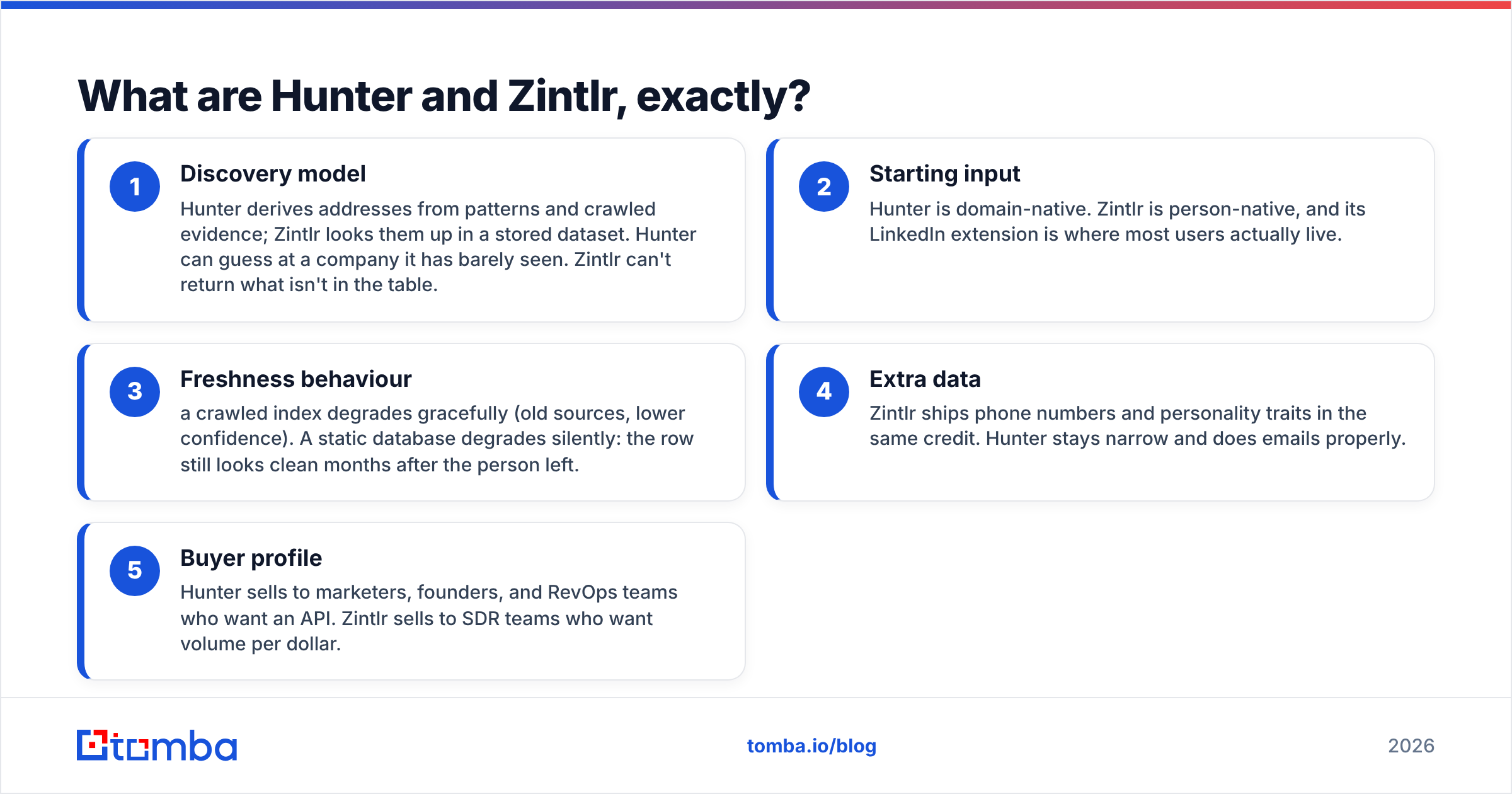
- Discovery model — Hunter derives addresses from patterns and crawled evidence. Zintlr looks them up in a stored dataset. Hunter can guess at a company it has barely seen. Zintlr can't return what isn't in the table.
- Starting input — Hunter is domain-native. Zintlr is person-native, and its LinkedIn extension is where most users actually live.
- Freshness behaviour — a crawled index decays gracefully: old sources, lower confidence. A static database decays silently. The row still looks clean months after the person left.
- Extra data — Zintlr ships phone numbers and personality traits in the same credit. Hunter stays narrow and does emails properly.
- Buyer profile — Hunter sells to marketers, founders, and RevOps teams who want an API. Zintlr sells to SDR teams who want volume per dollar.
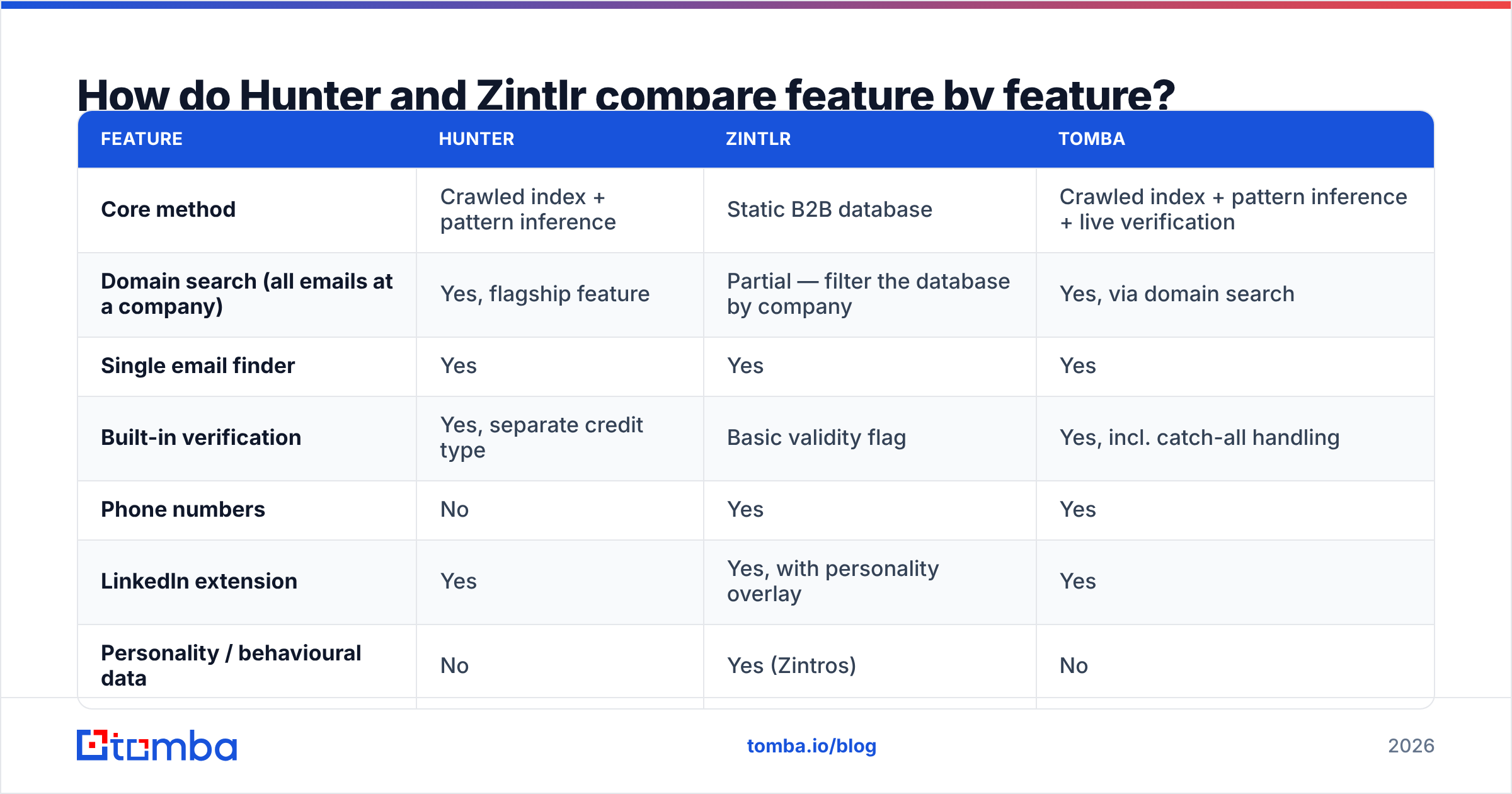
Hunter vs Zintlr: feature-by-feature comparison#
| Feature | Hunter | Zintlr | Tomba |
|---|---|---|---|
| Core method | Crawled index + pattern inference | Static B2B database | Crawled index + pattern inference + live verification |
| Domain search (all emails at a company) | Yes, flagship feature | Partial — filter the database by company | Yes, via domain search |
| Single email finder | Yes | Yes | Yes |
| Built-in verification | Yes, separate credit type | Basic validity flag | Yes, incl. catch-all handling |
| Phone numbers | No | Yes | Yes |
| LinkedIn extension | Yes | Yes, with personality overlay | Yes |
| Personality / behavioural data | No | Yes (Zintros) | No |
| Public API | Mature, well documented | Available, thinner docs | Full REST API + CLI + MCP |
| Free tier | 25 searches/mo | Limited free credits | 25 searches/mo |
| Best for | Domain-first prospecting, dev integrations | High-volume SDR list building | Mixed workflows needing verified output |
The honest read on Hunter vs Zintlr: Hunter wins on depth per domain and on engineering surface. Zintlr wins on breadth per dollar, and on giving a rep something to say. Neither one replaces the other.
Hunter vs Zintlr: which one finds more valid emails?#
This is the only question that matters. It is also the one both vendors answer with marketing numbers.
Run your own test — but know what you are measuring. Three different rates get mixed up:
- Hit rate — the tool returned something for the lookup.
- Deliverability rate — the returned address accepts mail without bouncing.
- Right-person rate — the address belongs to the human you actually targeted.
A tool can hit 90% and still be worthless. A third of those addresses may be role accounts (info@, sales@), or catch-all domains that accept everything and route nothing.

In practice, across mixed B2B lists:
- Hunter is strong on companies with a public web presence — SaaS, agencies, media, anything that publishes team pages or author bylines. Its confidence score is genuinely useful. Treat anything under 80 as a guess and send it to verification. Its weak spot is small private companies with no crawlable footprint, where it will still return a pattern-derived address on thin evidence.
- Zintlr behaves like a database vendor. It is excellent when the person is already in the dataset, and empty when they aren't. Coverage skews toward tech and IT services, with strong APAC representation. Because it is a lookup, there is no partial credit: you get a row or you don't.
Then there is the failure both tools share:
- Catch-all domains break both. Roughly one in five B2B domains accepts every address at the MX layer. A simple SMTP check then returns "valid" for a mailbox that does not exist. This is where a dedicated catch-all verifier earns its keep. It is the single biggest source of bounces on lists that "passed verification".
If you send at any real volume, assume you need a verification layer whichever finder you buy. A bounce rate above 3% starts costing you inbox placement. Google and Yahoo's bulk-sender rules made that limit much less forgiving.
What does each one actually cost?#
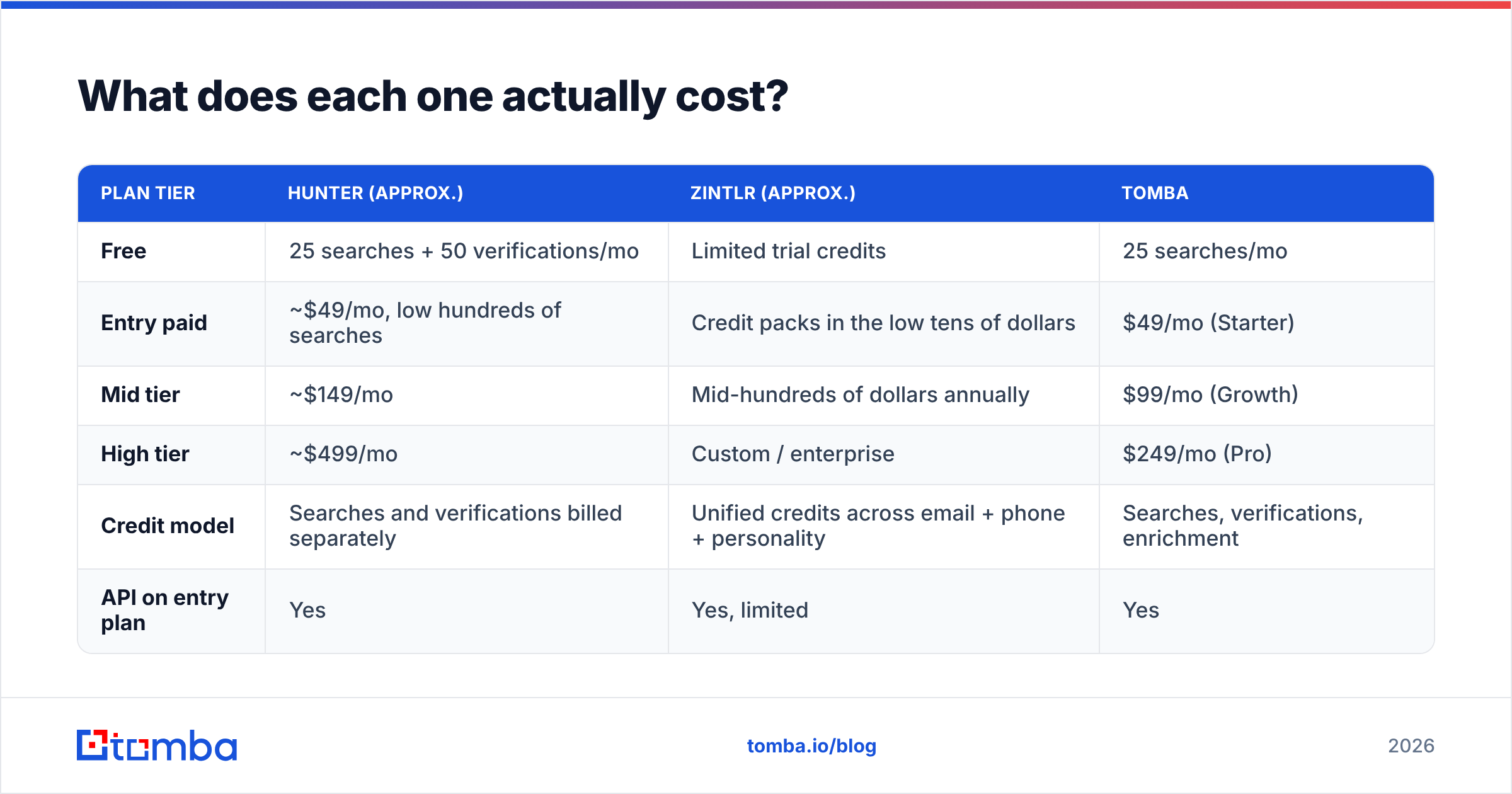
Published pricing moves, so check both vendor pages before you commit. The shape of the pricing is stable enough to reason about.
| Plan tier | Hunter (approx.) | Zintlr (approx.) | Tomba |
|---|---|---|---|
| Free | 25 searches + 50 verifications/mo | Limited trial credits | 25 searches/mo |
| Entry paid | ~$49/mo, low hundreds of searches | Credit packs in the low tens of dollars | $49/mo (Starter) |
| Mid tier | ~$149/mo | Mid-hundreds of dollars annually | $99/mo (Growth) |
| High tier | ~$499/mo | Custom / enterprise | $249/mo (Pro) |
| Credit model | Searches and verifications billed separately | Unified credits across email + phone + personality | Searches, verifications, enrichment |
| API on entry plan | Yes | Yes, limited | Yes |
Two traps to watch:
Trap one: the credit unit. Hunter charges you for a search, then again for a verification. Zintlr bundles more into one credit, but that credit may return an unverified row. Normalise to cost per verified, deliverable, right-person email. The headline prices then compress fast. A $10 credit pack that yields 30% usable contacts costs more than a $49 plan that yields 85%.
Trap two: export and seat limits. Database tools often gate bulk export behind higher tiers or annual contracts. Some also cap how many records you can pull per day, whatever your credit balance says. If your workflow is "build a 5,000-row list on Monday", ask about export ceilings before you sign. Compare that against transparent Tomba pricing, where bulk is part of the plan rather than an upsell.
Is Zintlr's personality intelligence actually useful?#
Sometimes — with a caveat most reviews skip.
Personality inference from public data is a probabilistic read, not a psychometric test. It works best as a tone dial. If the profile suggests an analytical buyer, lead with a number instead of a story. If it suggests a driver, cut your email to four lines and make the ask explicit. Used that way, it nudges you toward better email copywriting habits that good reps already have.
It works badly when treated as fact. Writing "I noticed you're a detail-oriented decision maker" in a cold email is the fastest way to sound like a bot that read a dossier. The data should change how you write. It should never change what you claim to know.
Hunter offers nothing like it, and doesn't pretend to. If personality data decides your evaluation, you have probably already chosen. Just be honest that you are buying a coaching aid, not better data.
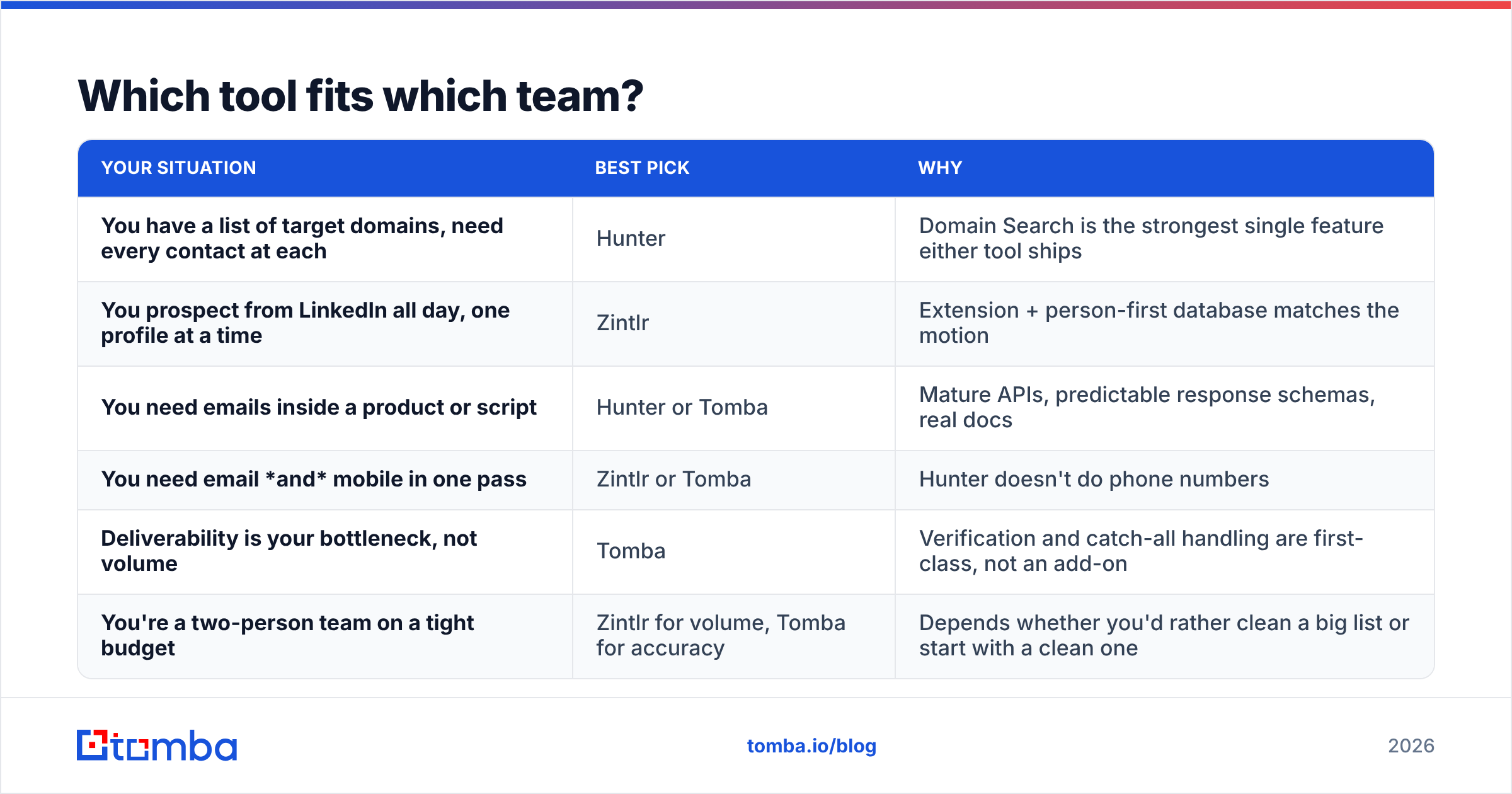
Which tool fits which team?#

| Your situation | Best pick | Why |
|---|---|---|
| You have a list of target domains, need every contact at each | Hunter | Domain Search is the strongest single feature either tool ships |
| You prospect from LinkedIn all day, one profile at a time | Zintlr | Extension + person-first database matches the motion |
| You need emails inside a product or script | Hunter or Tomba | Mature APIs, predictable response schemas, real docs |
| You need email and mobile in one pass | Zintlr or Tomba | Hunter doesn't do phone numbers |
| Deliverability is your bottleneck, not volume | Tomba | Verification and catch-all handling are first-class, not an add-on |
| You're a two-person team on a tight budget | Zintlr for volume, Tomba for accuracy | Depends whether you'd rather clean a big list or start with a clean one |
Where does Tomba land? It is closest to Hunter in method — index, pattern inference, and real-time checks. It bundles verification, catch-all handling, phone lookup and data enrichment into one stack, with a bulk email finder for list work. If your objection to Hunter is "I have to buy a verifier separately", that is the gap it closes. If your objection to Zintlr is "the rows go stale and I can't tell which ones", that is the same gap from the other side.
Where do both tools fall short?#
Four failure modes apply to both, and to every tool in this category:
- Personal-domain blind spots. Founders on
@gmail.com, consultants on vanity domains, and anyone at a company with no public web presence will be missing or wrong in every index. - Job-change decay. B2B contact data decays roughly 2–3% per month. A list built in January is measurably worse by June, whether or not the tool tells you.
- Role-account inflation.
contact@,hello@, andteam@inflate hit-rate stats and tank reply rates. Filter them out before you count anything. - Region skew. European coverage is limited by GDPR-driven data practices. Both tools are stronger in North America, and Zintlr is stronger across APAC.
Read the user reviews with those failure modes in mind. G2 is useful mainly for spotting which complaint repeats, not for the star average.
How should you run a fair 100-lead test?#
Don't trust anyone's benchmark, including this one. Run this in an afternoon:
- Pick 100 real targets from your ICP — named people at real target accounts, not a random sample. Mix company sizes and at least two regions.
- Run the same list through both tools on free or trial credits. Record found / not found, the address returned, and any confidence score.
- Verify everything with a neutral third tool, so neither vendor grades its own homework. A free email checker is enough for a sample this size.
- Score three columns: hit rate, verified rate, and right-person rate. Spot-check 20 by hand against LinkedIn.
- Divide plan cost by verified-and-correct count. That number, not the sticker price, is your answer.
- Send a 50-contact pilot and watch the bounce rate. Under 2% is healthy. Above 5% means your finder is guessing.
Teams that run this test usually find the ranking flips with their ICP. That is exactly why "best email finder" articles disagree with each other. Your list is the only benchmark that counts.
The verdict: Hunter vs Zintlr#
Choose Hunter if your prospecting starts with a company, you want a well-documented API, and you would rather have an honest confidence score than a confident guess. Choose Zintlr if your reps live on LinkedIn, you need phones and emails from the same credit, and cost per contact is the constraint. Accept that you will do more cleanup later.
Maybe you want one stack instead. Something that finds the address, verifies it against the mail server, handles catch-all domains rather than shrugging at them, and exposes all of it through an API you can script against. That is the Tomba Email Finder. The free tier gives you 25 searches a month. That is enough to run the 100-lead test above on a slice of your real list, and settle the argument with your own data instead of someone else's chart.
Related guides#
// get started
Find, verify and enrich your first contacts today
Start on the free plan with 25 searches a month, then scale when your team is ready.
Free plan · No credit card required · GDPR & CCPA
// about the author