Identifying Pain Points in B2B Sales: A 2026 Field Guide
Most reps ask about pain and get a polite complaint instead. Here is how to separate real, funded pain from noise — with the research signals, question sequences, and scoring rules that hold up in a 2026 buying committee.
TL;DR
- Identifying pain points is not asking "what keeps you up at night?" — that question produces a polite complaint, not a funded problem.
- Real pain has four markers: a cost you can quantify, an owner who feels it, a trigger event, and a consequence for doing nothing. Missing any one of them means you have an inconvenience, not a deal.
- Roughly 60–70% of the buying process now happens before a rep is involved, so most of your pain research has to be done from the outside — job posts, tech-stack changes, hiring patterns, earnings language, and review sites.
- Pre-call research is what makes discovery questions land. Generic questions get generic answers; a question anchored to a real signal ("I saw you posted three RevOps roles in Q3") gets a real answer.
- Score pain before you pitch. If it doesn't clear a simple 4-point bar, it goes back to nurture — not to a demo slot.
What Is a Pain Point, and Why Do Most Reps Get It Wrong?#
A pain point is a specific, recurring cost that a buyer already pays whether or not they buy from you. That is the whole definition, and the word doing all the work is cost.
Think of it like a leak in a ceiling. Everyone in the building notices the stain. Nobody calls a roofer until the water hits something expensive — the server rack, the boardroom table, the landlord's patience. Sales teams routinely mistake the stain for the leak. They hear "our data is messy," write it down as a pain point, and build a whole sequence around it. But messy data is a stain. The leak is the $180K of SDR salary burning on bounced sends and dead numbers, and the VP who has to explain the pipeline miss.
That distinction matters because of how B2B buying actually works now. Gartner's research on the B2B buying journey has consistently found that buyers spend a small minority of their total buying time with any single supplier's reps — most of the journey is independent research and internal debate. By the time you get a meeting, the committee has already argued about the problem. Your job in discovery is not to introduce pain. It is to name the pain they've already been arguing about, more precisely than they can, and attach a number to it.
Reps get this wrong in three predictable ways:
- They accept the first answer. The first thing a prospect says is the socially acceptable version of the problem. It's rehearsed. Dig one layer.
- They confuse pain with a feature gap. "We don't have X" is not pain. "We lose two days a week doing X manually, and our best analyst quit over it" is pain.
- They discover pain that nobody owns. Company-level pain with no individual owner never gets budget. Find the person whose quarter is worse because of it.

What Are the Four Types of B2B Pain Points?#
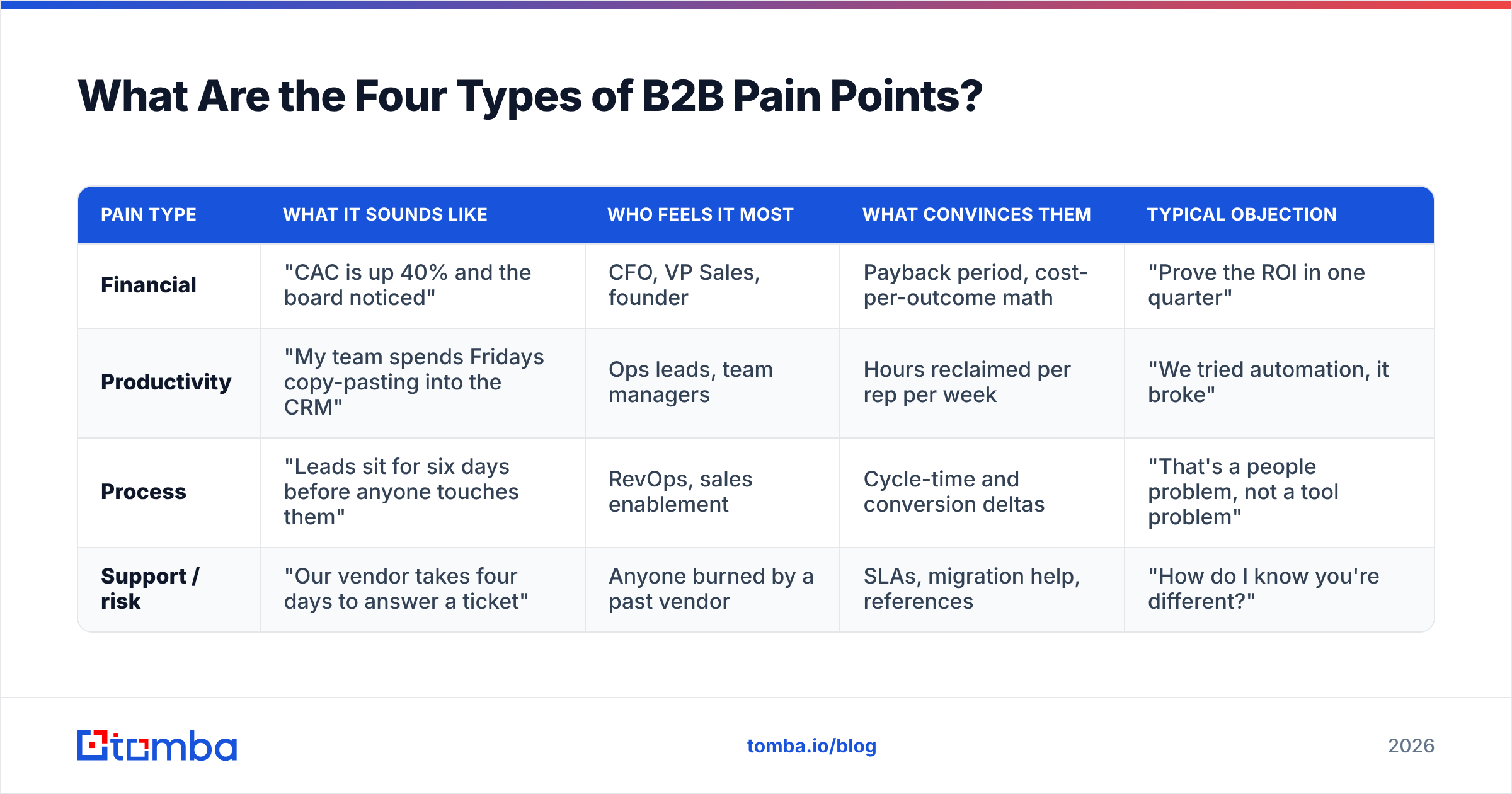
Most pain sorts into four buckets, and each bucket needs a different pitch, a different proof point, and often a different champion. Mapping the pain to a bucket before you write a single line of outreach is the highest-leverage five minutes in the whole process.
| Pain type | What it sounds like | Who feels it most | What convinces them | Typical objection |
|---|---|---|---|---|
| Financial | "CAC is up 40% and the board noticed" | CFO, VP Sales, founder | Payback period, cost-per-outcome math | "Prove the ROI in one quarter" |
| Productivity | "My team spends Fridays copy-pasting into the CRM" | Ops leads, team managers | Hours reclaimed per rep per week | "We tried automation, it broke" |
| Process | "Leads sit for six days before anyone touches them" | RevOps, sales enablement | Cycle-time and conversion deltas | "That's a people problem, not a tool problem" |
| Support / risk | "Our vendor takes four days to answer a ticket" | Anyone burned by a past vendor | SLAs, migration help, references | "How do I know you're different?" |
The reason this table earns its place: the same product solves different pains for different titles. A data enrichment tool is a financial purchase for a CFO (fewer wasted credits), a productivity purchase for an SDR manager (no manual list building), and a risk purchase for a compliance-minded RevOps lead (auditable sourcing). Pitch the wrong one and you'll get a polite "send me some info."
How Do You Identify Pain Points Before the First Call?#
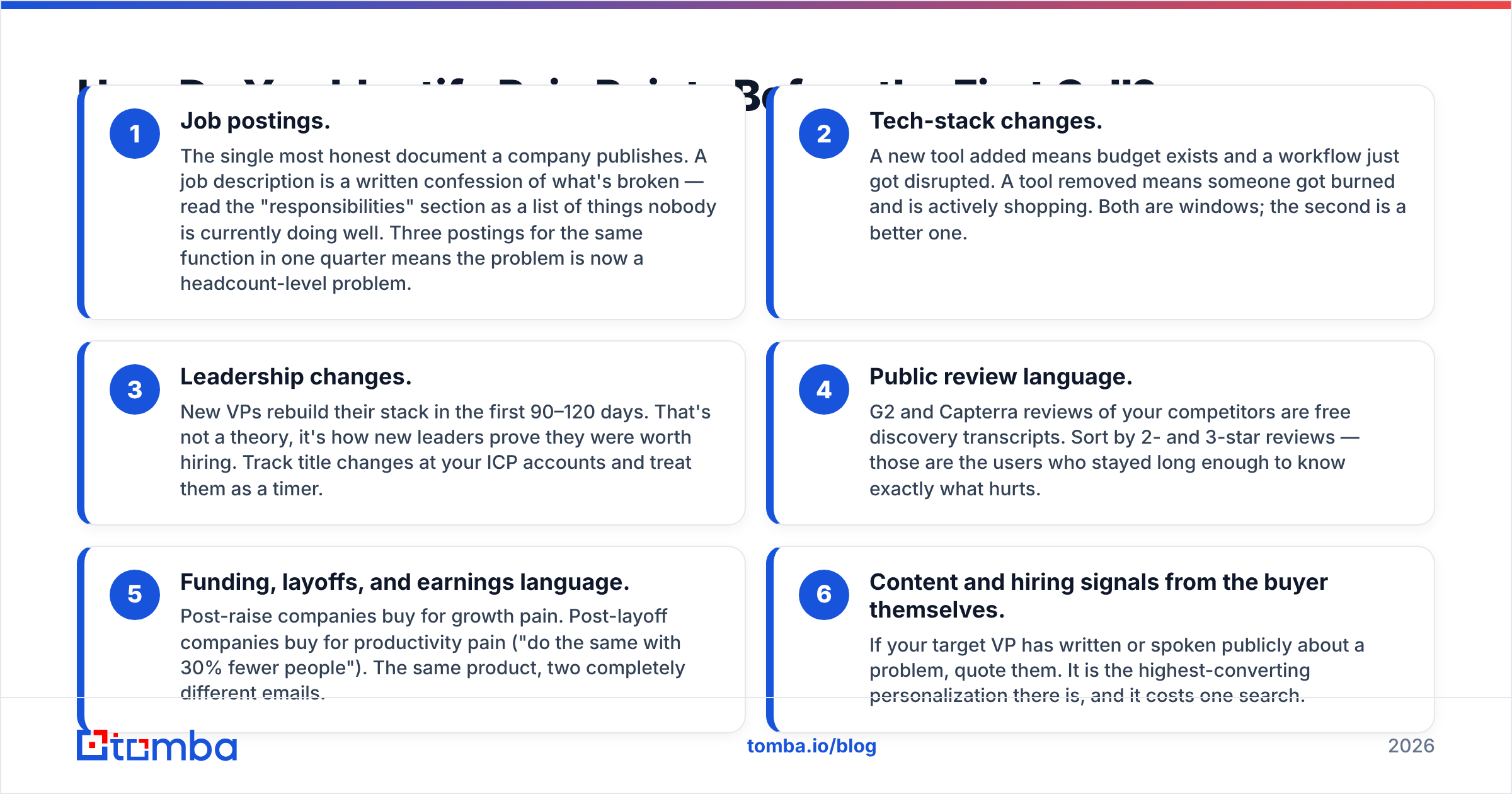
You research signals, not sentiment. Sentiment comes later, in the call. Signals are observable, timestamped, and free.
Here are the six that consistently predict funded pain:
- Job postings. The single most honest document a company publishes. A job description is a written confession of what's broken — read the "responsibilities" section as a list of things nobody is currently doing well. Three postings for the same function in one quarter means the problem is now a headcount-level problem.
- Tech-stack changes. A new tool added means budget exists and a workflow just got disrupted. A tool removed means someone got burned and is actively shopping. Both are windows; the second is a better one.
- Leadership changes. New VPs rebuild their stack in the first 90–120 days. That's not a theory, it's how new leaders prove they were worth hiring. Track title changes at your ICP accounts and treat them as a timer.
- Public review language. G2 and Capterra reviews of your competitors are free discovery transcripts. Sort by 2- and 3-star reviews — those are the users who stayed long enough to know exactly what hurts.
- Funding, layoffs, and earnings language. Post-raise companies buy for growth pain. Post-layoff companies buy for productivity pain ("do the same with 30% fewer people"). The same product, two completely different emails.
- Content and hiring signals from the buyer themselves. If your target VP has written or spoken publicly about a problem, quote them. It is the highest-converting personalization there is, and it costs one search.
The bottleneck here is rarely finding the signal. It's connecting the signal to a reachable human. That's the unglamorous middle step most "pain point" advice skips entirely: you identified that the new VP of RevOps at a 400-person SaaS company just posted two data-ops roles, and now you need her actual work email, not a info@ catch-all. Running a domain search against the company and filtering by department turns a signal into a named contact in about the time it takes to read this paragraph.
Which Discovery Questions Actually Surface Pain?#
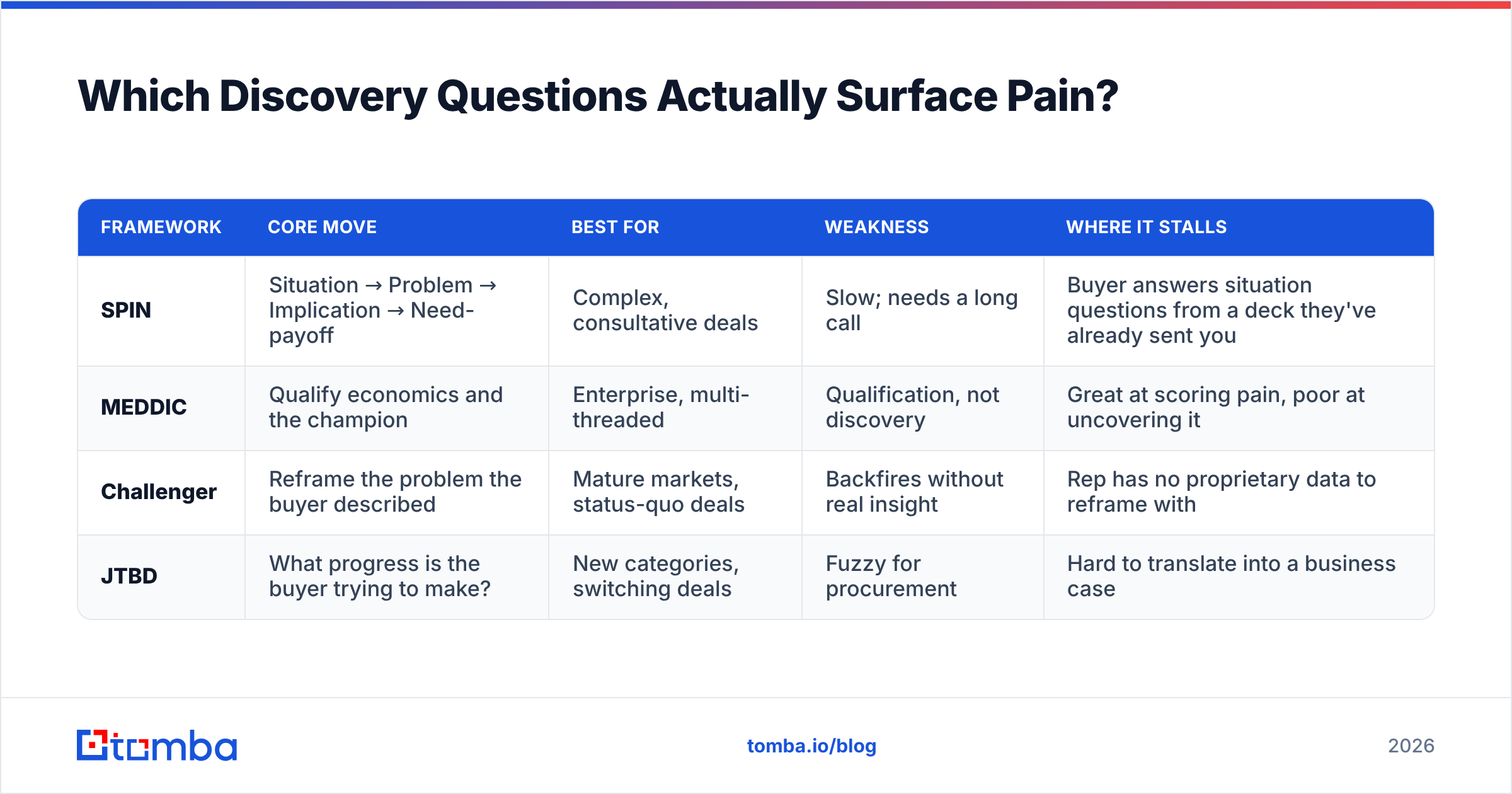
Frameworks are scaffolding, not scripts. The useful ones all do the same thing — they move the conversation from situation to implication — but they differ in where they put the weight.
| Framework | Core move | Best for | Weakness | Where it stalls |
|---|---|---|---|---|
| SPIN | Situation → Problem → Implication → Need-payoff | Complex, consultative deals | Slow; needs a long call | Buyer answers situation questions from a deck they've already sent you |
| MEDDIC | Qualify economics and the champion | Enterprise, multi-threaded | Qualification, not discovery | Great at scoring pain, poor at uncovering it |
| Challenger | Reframe the problem the buyer described | Mature markets, status-quo deals | Backfires without real insight | Rep has no proprietary data to reframe with |
| JTBD | What progress is the buyer trying to make? | New categories, switching deals | Fuzzy for procurement | Hard to translate into a business case |
In practice, the sequence that works is a three-question ladder, regardless of which framework you nominally use. SPIN selling formalized this in the 1980s and it hasn't aged much:
- Anchor: "You posted three data-ops roles in Q3 — what changed?" (specific, researched, impossible to answer with a platitude)
- Quantify: "How many hours a week is the team spending on that today, and who's doing it?"
- Implicate: "If nothing changes by Q1, what happens — does it stay annoying, or does it break something?"
That third question is the one most reps skip, and it is the only one that separates a nice-to-have from a budget line. If the honest answer is "it stays annoying," you have not found pain. You have found a preference. HubSpot's library of discovery questions is a solid place to build a longer bank, but the ladder above is the load-bearing part.
How Do You Tell Real Pain From a Polite Complaint?#
Score it. One point each, and be honest:
- Quantified — the buyer, not you, put a number on it (hours, dollars, headcount, churn %).
- Owned — a specific person's performance review is worse because of it.
- Triggered — something happened recently that made it urgent (a miss, a hire, a renewal, an audit).
- Consequential — there is a described cost to doing nothing in the next two quarters.
Four out of four: run the deal. Three: keep discovering, you're missing one thing and it's usually the trigger. Two or fewer: this is a nurture contact, not an opportunity, and forcing it into a demo is how forecasts rot.

The uncomfortable version of this is that most "pain" a rep writes into the CRM scores a 2. It's real, it's true, and it will never be funded this year. Being ruthless about the difference is what makes a pipeline forecastable — and it's why response rate is a worse health metric than most teams think. High replies with low scores means you're good at starting conversations about problems nobody is paid to solve.
What Does a Pain-Point Research Stack Look Like in 2026?#
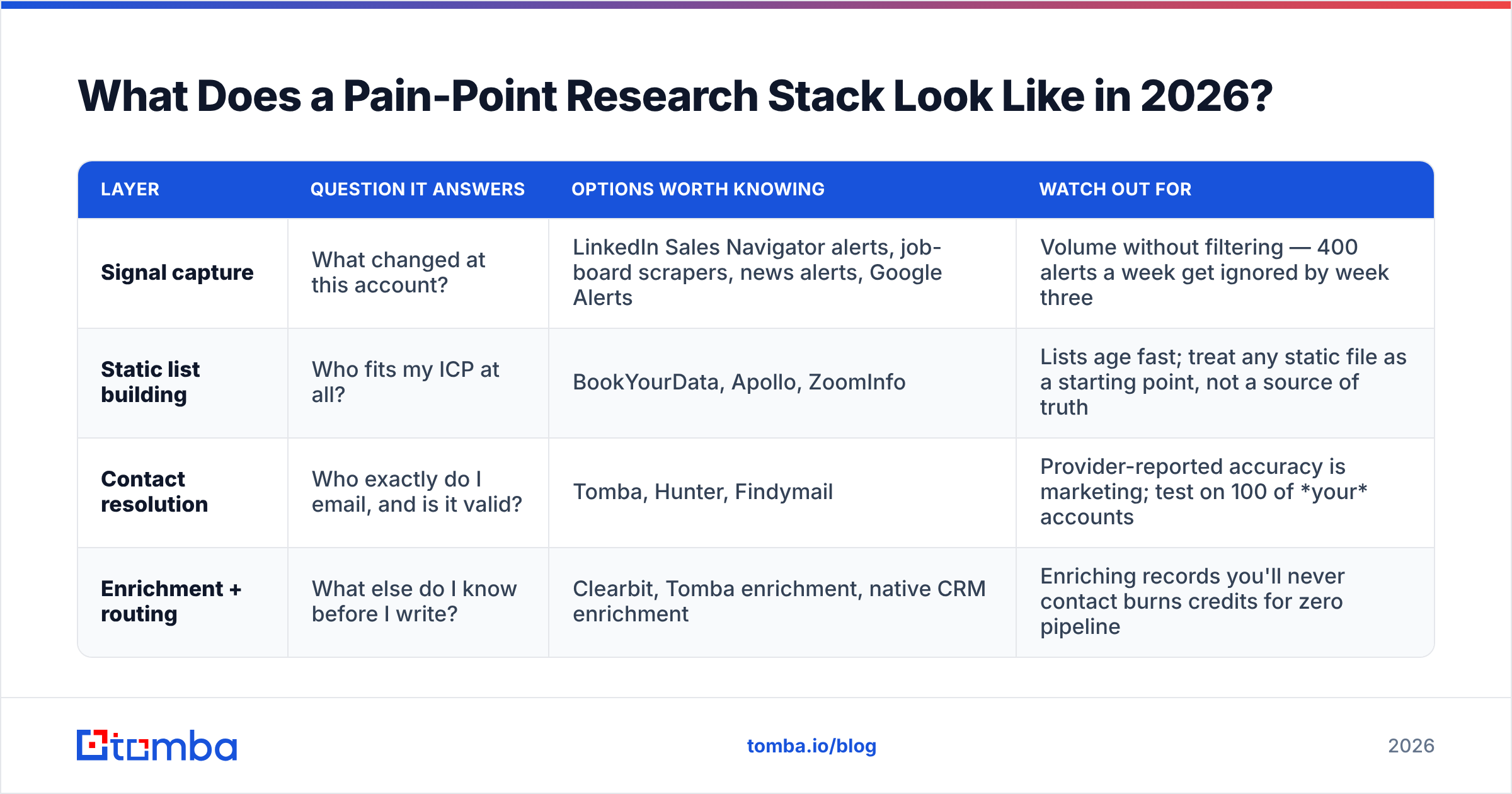
You need four layers. Buying a tool for a layer you haven't defined is the most common way to spend $500 a month on nothing.
| Layer | Question it answers | Options worth knowing | Watch out for |
|---|---|---|---|
| Signal capture | What changed at this account? | LinkedIn Sales Navigator alerts, job-board scrapers, news alerts, Google Alerts | Volume without filtering — 400 alerts a week get ignored by week three |
| Static list building | Who fits my ICP at all? | BookYourData, Apollo, ZoomInfo | Lists age fast; treat any static file as a starting point, not a source of truth |
| Contact resolution | Who exactly do I email, and is it valid? | Tomba, Hunter, Findymail | Provider-reported accuracy is marketing; test on 100 of your accounts |
| Enrichment + routing | What else do I know before I write? | Clearbit, Tomba enrichment, native CRM enrichment | Enriching records you'll never contact burns credits for zero pipeline |
A note on the second and third rows, because teams conflate them constantly. Static database vendors like BookYourData are genuinely good at what they do — they hand you a large, filterable, pay-as-you-go file of contacts that match a firmographic profile, which is exactly right when you're defining a market or building a first list. Contact resolution is a different job: you already know the company and the person from a signal, and you need their current, verified address right now. Most teams that run outbound seriously end up doing both, and the mistake is expecting either one to do the other's work.
For the resolution layer specifically, Tomba pricing starts with a free tier at 25 searches a month, then Starter at $49/mo, Growth at $99/mo, and Pro at $249/mo, with an API and bulk processing available across paid plans. The reason to care about the free tier is not the price — it's that 25 searches is enough to test resolution accuracy on your own ICP before you commit, which is the only accuracy benchmark that means anything.
How Do You Turn a Pain Point Into an Email That Gets a Reply?#
One pain point, one email, one ask. The structure that survives contact with a busy VP:
Line 1 — the signal. Not a compliment. A fact. "You've had a Marketing Ops role open since June."
Line 2 — the implication, as a question. "Usually that means someone on the demand team is doing attribution by hand — is that where you've landed?"
Line 3 — the proof, compressed. One customer, one number, one sentence. "A 300-person SaaS team we work with cut list-building from six hours a week to about forty minutes."
Line 4 — a small ask. "Worth fifteen minutes, or is this handled?"
That last clause matters more than it looks. Giving the recipient an easy, dignified "no" measurably increases replies, and a fast no is worth more to your quarter than a slow maybe.
What breaks this email is not the copy — it's the plumbing underneath. If your signal research is sharp but the address bounces, the entire chain wasted its effort, and repeated bounces damage the sending domain you'll need next quarter. Running addresses through an email verifier before a sequence starts is unglamorous and it protects everything upstream of it.
What Mistakes Kill Pain-Point Discovery?#
- Pitching at the first sign of pain. The moment a buyer names a problem, most reps start presenting. Ask two more questions first; the second layer is where the number lives.
- Discovering with one person. Committee deals die when the pain you found belongs to a user and the budget belongs to an exec who feels a different pain entirely. Multi-thread early.
- Recording pain in the CRM as a paraphrase. Write the buyer's exact words. Paraphrases lose the emotional and financial specifics that your proposal needs three weeks later.
- Treating pain as static. Pain from January is often solved, deprioritized, or reassigned by April. Re-discover on every re-engagement.
- Confusing volume with signal. Ten researched accounts with a scored pain point out-convert 500 generic sends, and they don't cost you a domain reputation.
Where Should You Start This Week?#
Pick twenty accounts that already match your ICP. For each one, spend four minutes finding a single signal — an open role, a stack change, a new leader, a bad competitor review. Write the pain in one sentence, score it out of four, and discard everything below a three. You'll be left with six or seven accounts and a genuinely specific reason to contact each one. That list will outperform whatever your team is sending today, by a margin that will feel unreasonable.
The step that stalls most people is turning "I found the signal and the right person" into "I have their verified work email." That's a solved problem, and it shouldn't cost you your research time. Start with the Tomba Email Finder — the free tier gives you 25 searches a month, enough to run this exact twenty-account exercise end to end and see whether pain-led outbound changes your reply rate before you pay anyone a dollar.
Related guides#
// get started
Find, verify and enrich your first contacts today
Start on the free plan with 25 searches a month, then scale when your team is ready.
Free plan · No credit card required · GDPR & CCPA
// about the author