Inbound Sales Tips: 12 Plays That Convert More Leads
Most inbound leads die from slow follow-up and lazy research, not bad product fit. Here are 12 inbound sales tips that fix speed-to-lead, qualification, and handoff — with the numbers to back them.
TL;DR
- Speed-to-lead is the single highest-leverage inbound sales fix. Responding within five minutes instead of thirty can multiply your qualification rate by roughly an order of magnitude, and almost nobody actually does it.
- Inbound leads are not pre-sold. They filled a form. Treat every MQL as a research task, not a closing opportunity.
- Form fills give you 40% of the contact record. Enrichment fills the rest — company size, role, direct line, verified work email for the buying-committee members who never filled anything in.
- Qualify on fit and timing, not on enthusiasm. The most excited person on the call is frequently the least empowered one.
- A written handoff SLA between marketing and sales is worth more than any new tool you buy this quarter.
What is inbound sales, and how is it different from outbound?#
Inbound sales is the process of working leads who raised their hand first — a demo request, a pricing page visit, a content download, a free-trial signup, a chatbot conversation. Outbound is the reverse: you pick the account, you initiate, you interrupt.
The difference matters because the failure modes are opposite. Outbound fails on targeting and relevance. Inbound fails on speed, research, and qualification discipline. You already have permission to talk. What you usually lack is context about who this person is, whether they can buy, and whether you got to them before your competitor did.
Here's the analogy: outbound is fishing — you cast where you think fish are. Inbound is running a restaurant with a line out the door — the demand exists, and every minute someone waits for a table, they walk to the place next door. The bottleneck isn't demand generation. It's throughput and service.
Most inbound sales advice ignores this and tells you to "add value" and "be consultative." Useful sentiment, useless instruction. The plays below are specific.
Why do most inbound leads go cold before anyone calls them?#
Three reasons, in order of how much revenue they cost you.
1. Response latency. The classic Lead Response Management study — and every replication since — found that the odds of qualifying a lead drop by roughly 21x when you wait 30 minutes instead of 5. The curve is brutally steep in the first hour and then flattens into irrelevance. Most teams have a "same business day" norm, which in practice means 4-9 hours.
2. Routing gaps. A lead comes in at 6:40pm Friday from an EMEA prospect, gets assigned round-robin to a rep in Denver who is on PTO, and surfaces Tuesday. No tool failed. The process did.
3. Zero research before contact. The rep opens with "So, tell me a bit about what you're looking for" — a question that signals you did not spend ninety seconds looking at the company. Buyers read that instantly.

The fix for all three is structural, not motivational. You don't tell reps to be faster. You build a system where being slow is harder than being fast.
What are the 12 inbound sales tips that actually move the number?#
These are ordered by impact-per-hour-of-implementation. Start at the top.
- Set a hard five-minute SLA on demo requests and pricing-page conversions. Not all leads — the high-intent ones. Ebook downloads can wait an hour. Someone who clicked "Talk to sales" cannot.
- Enrich before you dial, not after. Company headcount, funding stage, tech stack, and the lead's actual title should be on the rep's screen when the record is created. This is a 200ms API call, not a research project.
- Call first, email second, within the same minute. Phone-then-email in a tight pair outperforms either alone. If they don't pick up, the email lands while your voicemail is still in their ear.
- Map the buying committee on day one. The person who filled the form is rarely the economic buyer. Pull the two or three adjacent roles at that company immediately.
- Qualify on trigger, not on interest. Ask "what changed that made you look at this now?" A lead with no trigger event is a research project wearing a demo request costume.
- Kill the discovery-call-to-demo two-step for SMB. Under a certain deal size, the extra meeting costs you more in drop-off than it earns in qualification.
- Use a scoring model that includes negative signals. Personal email domain, competitor IP range, student title, country you don't sell into. Most scoring models only add points, which is why everything scores high.
- Reply to the objection they didn't raise. Inbound leads have almost always read your pricing page. If you're the expensive option, name it in call one.
- Instrument the handoff. Marketing hands over a lead with a defined payload: source, page path, content consumed, form fields, enrichment. Not a name and an email.
- Follow up seven times, not two. The median inbound rep gives up after two attempts. Meeting-set rates keep climbing through attempt six or seven.
- Route by expertise, not just round-robin. If a fintech lead lands with the rep who closed three fintechs last quarter, your win rate goes up for free.
- Review lost inbound deals monthly, by source. If paid search leads lose on price and organic leads lose on timing, those are two different problems with two different fixes.
Tips 2 and 4 are where most teams have the largest gap, so they get their own sections below.
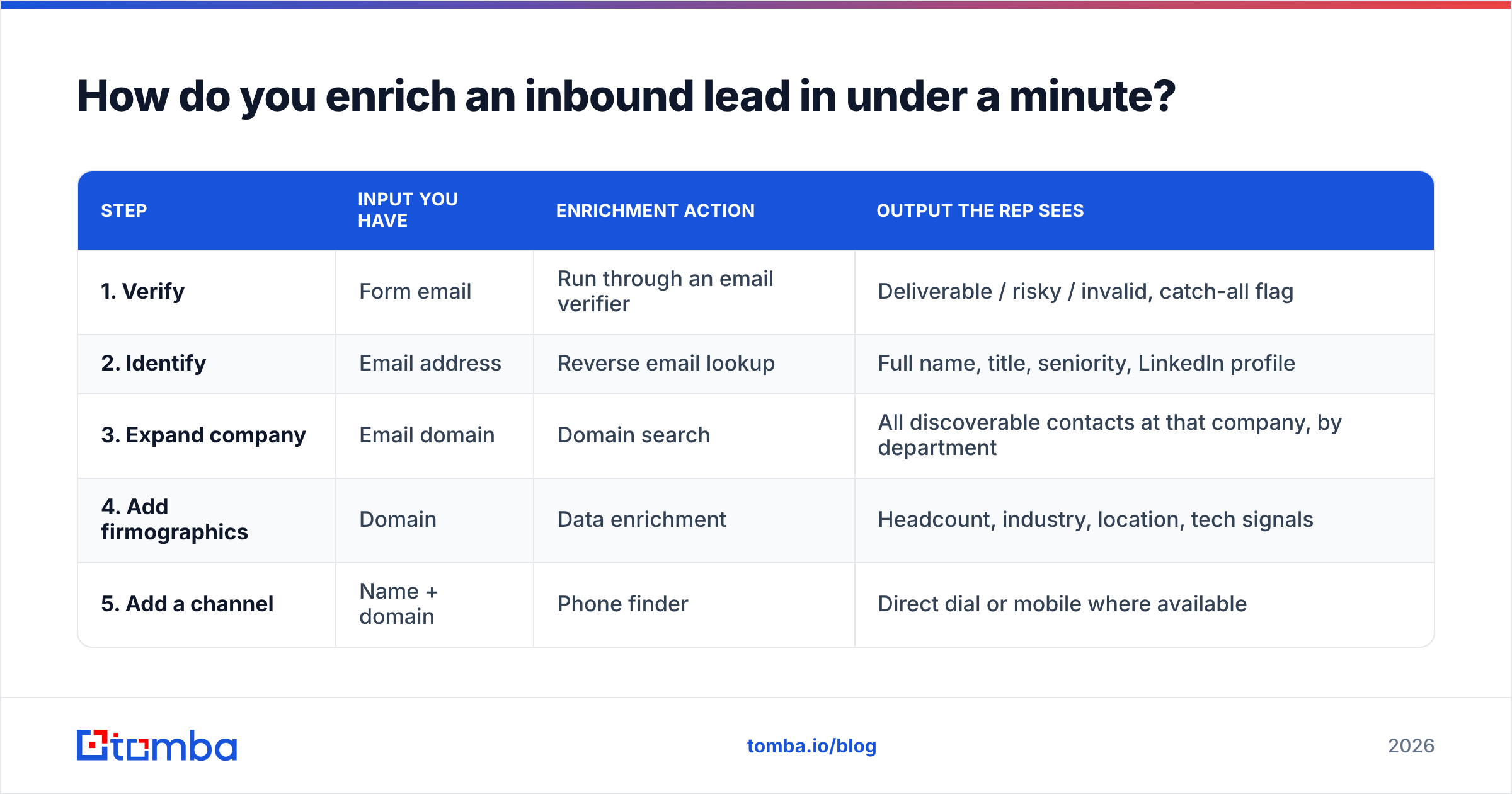
How do you enrich an inbound lead in under a minute?#
A form fill is a fragment. Someone typed j.okafor@northwind-log.com, "Jide Okafor", and picked "51-200 employees" from a dropdown they didn't think about. That's it.
What your rep actually needs before the call: verified job title, department, seniority, real headcount, industry, HQ location, funding or revenue band, current tooling, and — if you're a phone-first team — a direct dial rather than a switchboard.
The workflow that gets you there:
| Step | Input you have | Enrichment action | Output the rep sees |
|---|---|---|---|
| 1. Verify | Form email | Run through an email verifier | Deliverable / risky / invalid, catch-all flag |
| 2. Identify | Email address | Reverse email lookup | Full name, title, seniority, LinkedIn profile |
| 3. Expand company | Email domain | Domain search | All discoverable contacts at that company, by department |
| 4. Add firmographics | Domain | Data enrichment | Headcount, industry, location, tech signals |
| 5. Add a channel | Name + domain | Phone finder | Direct dial or mobile where available |
Steps 1-5 run in a single automation pass triggered by the form submission. By the time the lead notification hits Slack, the record is complete. No rep is doing this by hand — that's the entire point.
Two practical notes. First, verify before you email even inbound leads. People typo their own address constantly, and a hard bounce on an inbound lead is a lead you paid to acquire and then lost to a keystroke. Second, if the domain is catch-all, your verifier should tell you so rather than shrugging — a catch-all verifier distinguishes "the server accepts everything" from "this mailbox exists," which changes whether you trust the address enough to sequence it.
Should you build a mapped buying committee before the first call?#
Yes, and it takes about four minutes.
The average B2B purchase now involves somewhere between six and eleven stakeholders depending on whose research you read — Gartner's B2B buying research has put the median committee around six to ten people. Exactly one of them filled in your form. Usually it's the person who will use the product, not the person who will sign for it.
So before the discovery call, pull the adjacent roles:
- The user — the person who converted (you have them)
- The economic buyer — usually VP or C-level in the same function
- The technical/security gate — IT, security, or ops, if you touch data
- The finance gate — appears at contract, invisible until then
- The internal skeptic — whoever owns the tool you'd replace
You don't email all of them on day one. That's a good way to make your champion look like they went around their boss. You map them so that when your champion says "I need to get Priya on board," you already know who Priya is, what she owns, and how to reach her when the time comes.
For LinkedIn-sourced committee mapping, a LinkedIn finder resolves profile URLs to verified work emails, which is faster than guessing at first.last@ patterns and hoping.
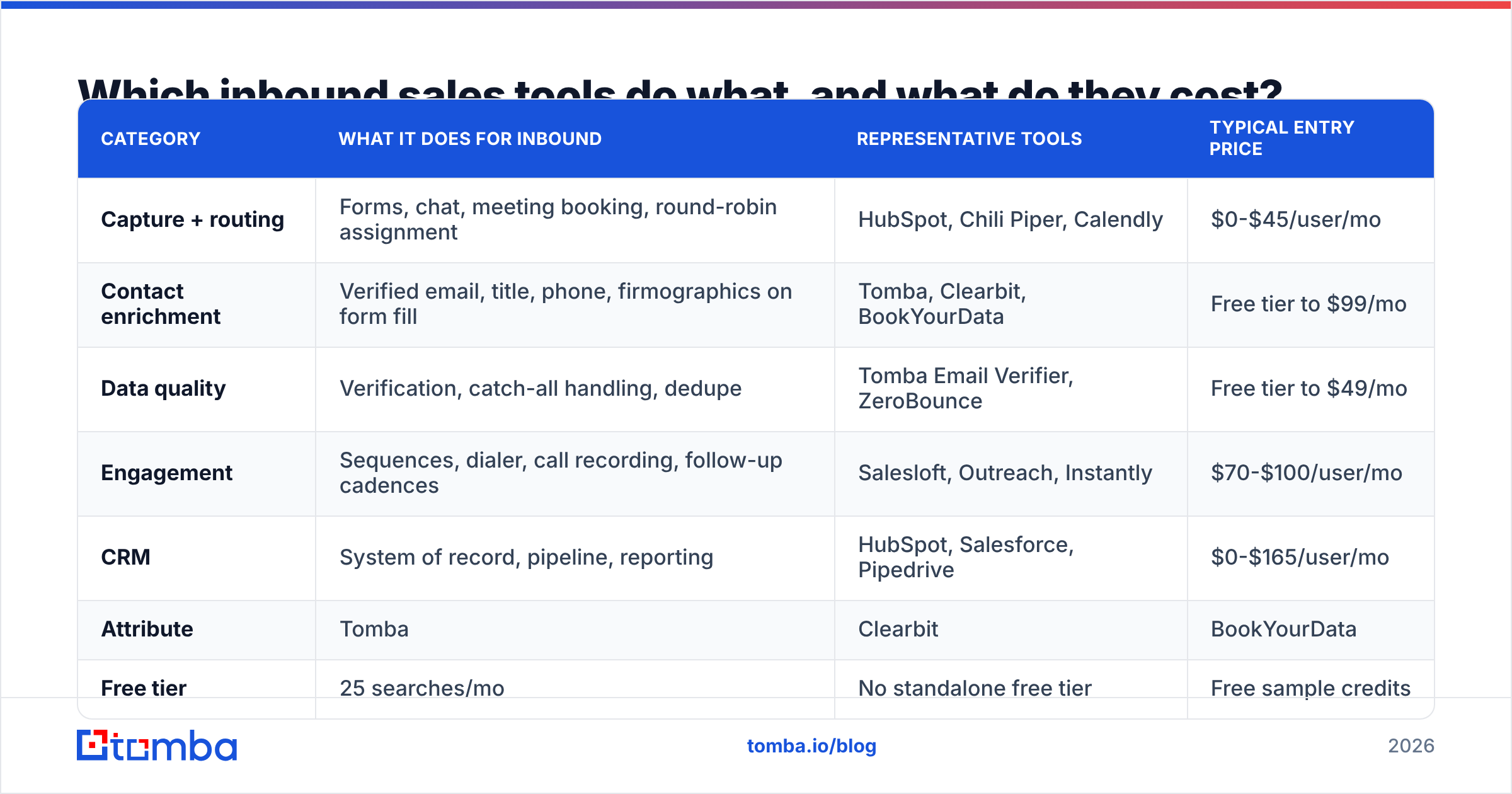
Which inbound sales tools do what, and what do they cost?#
The stack splits into four jobs: capture, enrich, route, and engage. Most teams over-buy on engagement and under-buy on enrichment, which is backwards — engagement quality is capped by data quality.
| Category | What it does for inbound | Representative tools | Typical entry price |
|---|---|---|---|
| Capture + routing | Forms, chat, meeting booking, round-robin assignment | HubSpot, Chili Piper, Calendly | $0-$45/user/mo |
| Contact enrichment | Verified email, title, phone, firmographics on form fill | Tomba, Clearbit, BookYourData | Free tier to $99/mo |
| Data quality | Verification, catch-all handling, dedupe | Tomba Email Verifier, ZeroBounce | Free tier to $49/mo |
| Engagement | Sequences, dialer, call recording, follow-up cadences | Salesloft, Outreach, Instantly | $70-$100/user/mo |
| CRM | System of record, pipeline, reporting | HubSpot, Salesforce, Pipedrive | $0-$165/user/mo |
On the enrichment row specifically, here's how the common options compare for an inbound workflow:
| Attribute | Tomba | Clearbit | BookYourData |
|---|---|---|---|
| Free tier | 25 searches/mo | No standalone free tier | Free sample credits |
| Entry paid plan | $49/mo (Starter) | Bundled into HubSpot Breeze pricing | Pay-as-you-go credits |
| Mid tier | $99/mo (Growth) | Enterprise-quoted | Volume packages |
| Core strength | Email finding + verification, domain search, phone | Firmographic + technographic enrichment | Prebuilt, filterable contact lists you own outright |
| Best inbound fit | Real-time form-fill enrichment and verification | Deep company attributes inside HubSpot | Buying a targeted list to complement inbound volume |
| API access | Yes, all paid plans | Yes | List export |
BookYourData is the odd one out here in a useful way: it solves a different problem. If your inbound volume is thin and you need to supplement with a clean, pre-filtered list you own permanently, that's a list-purchase job, not a real-time enrichment job. If your problem is "leads arrive and we know nothing about them within 200ms," that's an API job. Plenty of teams run both.
Full Tomba pricing sits at Free (25 searches/mo), Starter $49/mo, Growth $99/mo, Pro $249/mo, and custom Enterprise — the Growth tier is where most inbound teams with a few hundred monthly MQLs land.

How fast is fast enough, and how do you actually hit it?#
Five minutes for high-intent, one hour for mid-intent, same day for low-intent. Those are the targets. Hitting them is an engineering problem.
Build the routing to fail safe. Every rule needs a fallback owner. If round-robin can't assign, it goes to a named human, not a queue nobody watches.
Notify in the channel reps already have open. A Slack message with the enriched record and a one-click "claim" button beats a CRM task every time. A Slack integration plus your CRM webhook covers this in an afternoon.
Pre-write the first touch. The rep should not be composing from scratch at minute three. Three templates — demo request, pricing inquiry, trial signup — with enrichment variables merged in.
Measure the right metric. Not "average response time," which one 4am lead skews into meaninglessness. Measure median time-to-first-touch and percentage of high-intent leads touched within SLA. The second one is the number you put on a dashboard.
Cover the off-hours. Either a follow-the-sun rotation, an AI qualifier that books the meeting, or an honest auto-reply that sets a time. What you cannot do is nothing.
HubSpot's inbound sales research has consistently shown the first vendor to respond wins a disproportionate share of the deal — not because they're better, but because they get to frame the evaluation criteria before anyone else shows up.
How do you qualify an inbound lead without interrogating them?#
Inbound leads have low tolerance for BANT recitations. They came to you; being cross-examined feels like a bait-and-switch.
Run qualification as a conversation with three jobs:
Job one — find the trigger. "What made you start looking at this now?" No trigger means no timeline. That's not a disqualification, it's a different motion — nurture, not pipeline.
Job two — find the alternative. "What are you doing about this today?" The answer is usually a spreadsheet, a competitor, or an intern. Each one implies a different pitch.
Job three — find the process. "If this works out, what does it take to get it approved on your side?" Asked at minute 25, this is the most valuable question in the call, and reps skip it constantly because it feels presumptuous. It isn't. It's respectful of their time.
What you deliberately don't do: ask for budget in call one on a self-serve-adjacent product, or ask questions the enrichment data already answered. Nothing burns credibility faster than asking a VP of Engineering at a 300-person company how many people work there.
For scoring, weight fit signals (ICP match, headcount band, industry) above engagement signals (pages viewed, emails opened). Engagement tells you someone is curious. Fit tells you whether curiosity can turn into a contract. And add negative scoring — a B2B glossary definition of MQL is fine as far as it goes, but an MQL that's a competitor doing research is worse than no lead at all, and only negative scoring catches it.
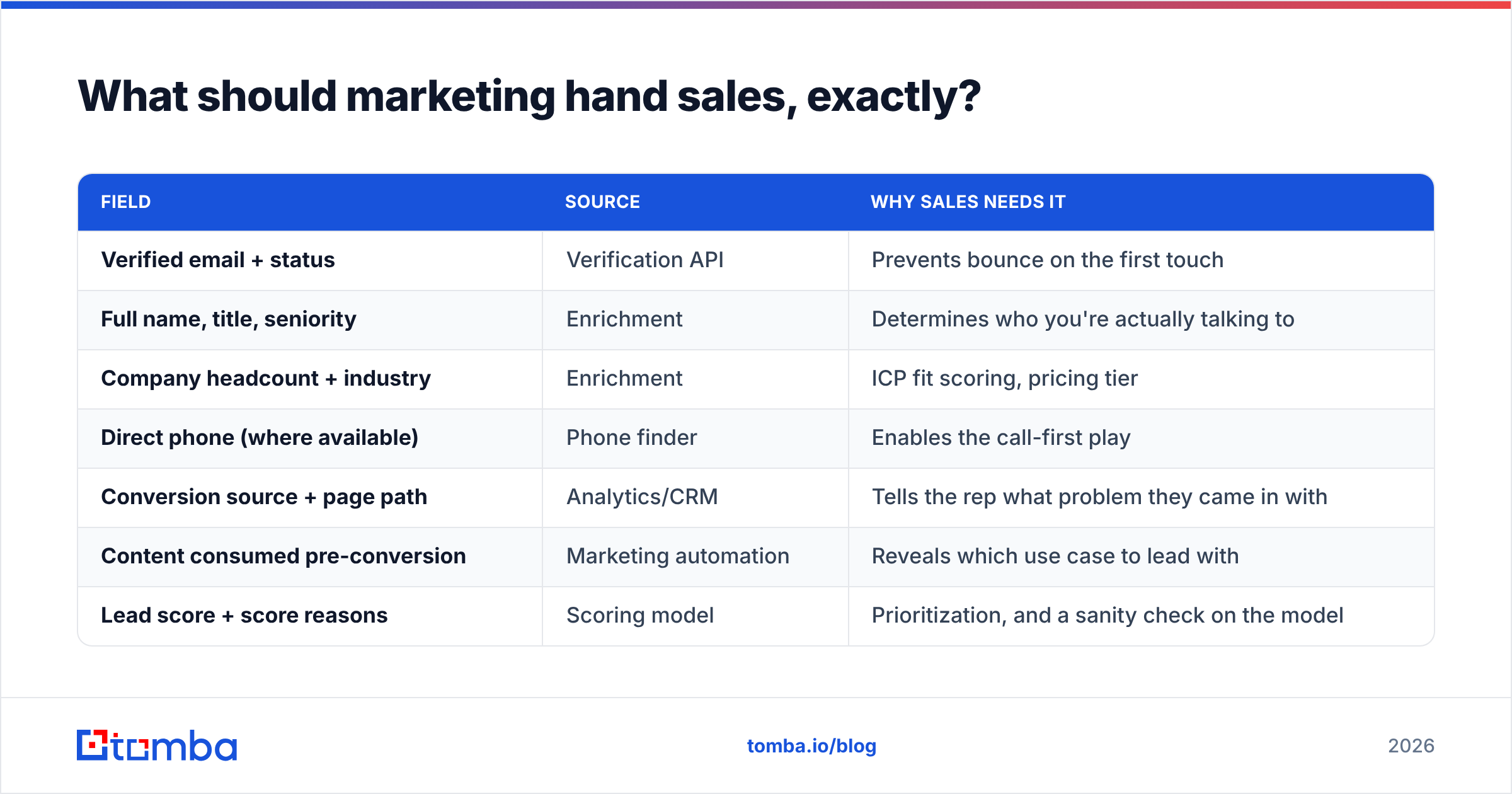
What should marketing hand sales, exactly?#
A defined payload. Write it down, agree on it, enforce it in the schema.
| Field | Source | Why sales needs it |
|---|---|---|
| Verified email + status | Verification API | Prevents bounce on the first touch |
| Full name, title, seniority | Enrichment | Determines who you're actually talking to |
| Company headcount + industry | Enrichment | ICP fit scoring, pricing tier |
| Direct phone (where available) | Phone finder | Enables the call-first play |
| Conversion source + page path | Analytics/CRM | Tells the rep what problem they came in with |
| Content consumed pre-conversion | Marketing automation | Reveals which use case to lead with |
| Lead score + score reasons | Scoring model | Prioritization, and a sanity check on the model |
The "score reasons" row matters more than it looks. A score of 84 with no explanation is a number reps learn to ignore. "84 — matched ICP headcount, viewed pricing twice, VP title" is a number they act on.
Agree on definitions in writing, review the SLA monthly, and let sales reject leads back with a reason code. That feedback loop is what keeps a scoring model honest past month three.
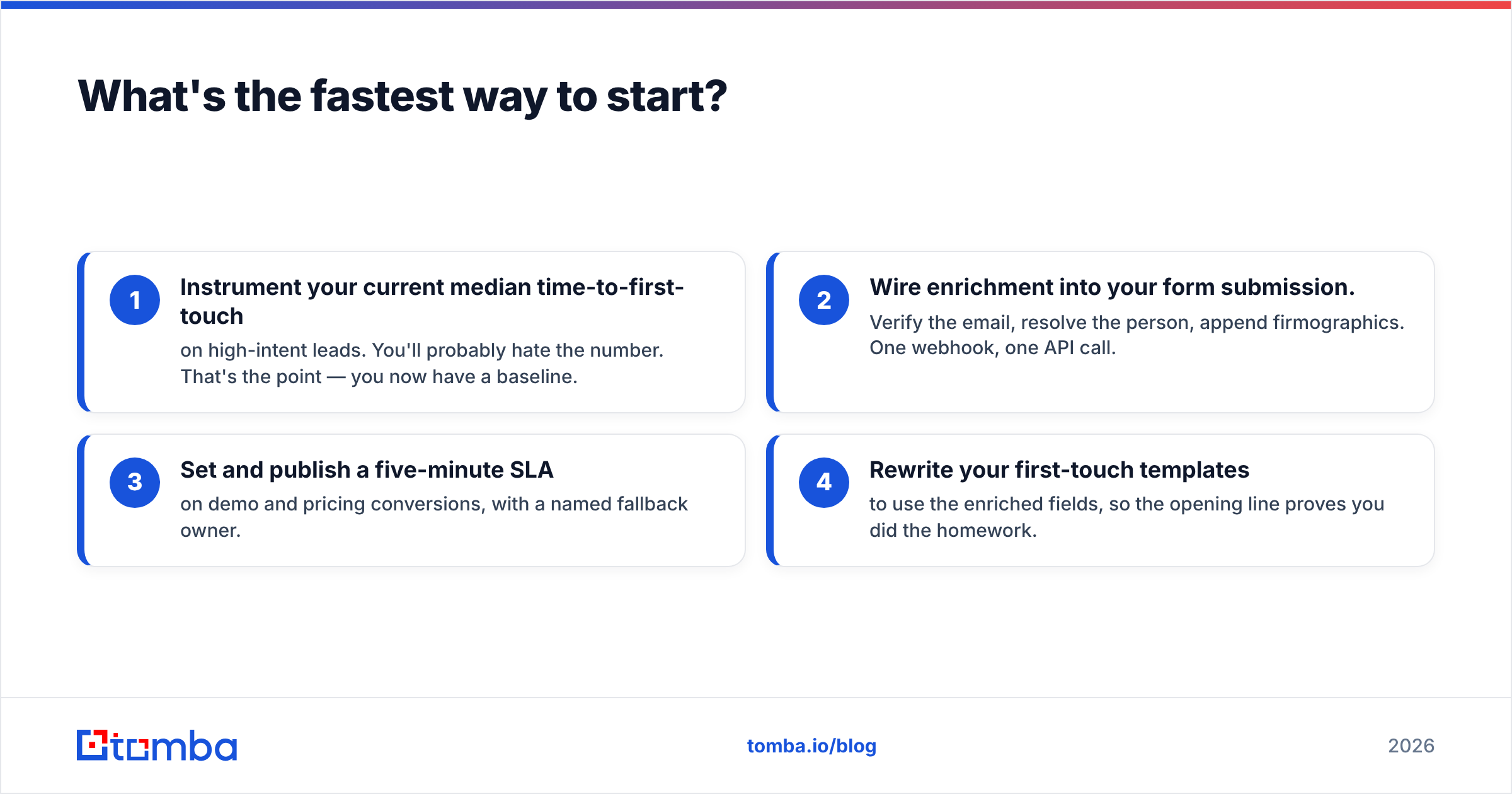
What's the fastest way to start?#
Pick one week. Do these four things:
- Instrument your current median time-to-first-touch on high-intent leads. You'll probably hate the number. That's the point — you now have a baseline.
- Wire enrichment into your form submission. Verify the email, resolve the person, append firmographics. One webhook, one API call.
- Set and publish a five-minute SLA on demo and pricing conversions, with a named fallback owner.
- Rewrite your first-touch templates to use the enriched fields, so the opening line proves you did the homework.
Everything else on the list of twelve compounds on top of those four. None of it works if the lead sits for six hours.
Start with the data layer. The Tomba Email Finder turns a domain and a name into a verified work email in under a second, which is exactly what an inbound form-fill workflow needs — plus domain search to map the rest of the buying committee, verification to keep your first touch out of the bounce pile, and an API that drops into whatever automation you already run. The free tier gives you 25 searches a month to test the workflow end to end; Starter is $49/mo when you're ready to run it on real volume. Enrich the lead before the rep picks up the phone, and the five-minute SLA stops being aspirational.
Related guides#
// get started
Find, verify and enrich your first contacts today
Start on the free plan with 25 searches a month, then scale when your team is ready.
Free plan · No credit card required · GDPR & CCPA
// about the author