Inbox Monster Pricing, Reviews, Pros and Cons (2026 Guide)
Inbox Monster doesn't publish a price list, so buyers negotiate blind. Here's what drives the quote, what reviewers actually praise and complain about, and when a cheaper stack does the same job.
TL;DR
- Inbox Monster does not publish public pricing. Every deal is a custom annual contract quoted after a demo, which means your cost depends on sending volume, number of sending domains, and which modules you turn on.
- Buyers consistently describe it as an enterprise-tier deliverability platform — the same budget conversation as Validity Everest, not the same as a $49/mo tool.
- The strongest reviews praise its inbox placement data, blocklist alerting, and the fact that a real deliverability consultant is attached to the account.
- The most common complaints: opaque pricing, an onboarding period measured in weeks, and features that overlap with what Google Postmaster Tools and your ESP already give you free.
- Monitoring tells you that you have a problem. It does not fix the most common cause of the problem — a dirty list. Verify contacts before you send and most placement dashboards get boring fast.
What is Inbox Monster?#
Inbox Monster is an email deliverability and inbox placement platform built for high-volume senders. Think of it as an air traffic control tower for your email program: it doesn't fly the plane, it tells you where every flight actually landed, which runways are closed, and who's about to get diverted.
Concretely, the platform sits between your ESP and the mailbox providers and reports on:
- Inbox placement — seed-list and panel-based measurement of whether a campaign landed in the inbox, the spam folder, or the Gmail Promotions tab.
- Blocklist and reputation monitoring — continuous checks against major DNSBLs plus IP and domain reputation signals, with alerting when something flips.
- Authentication and DMARC — SPF, DKIM, and DMARC aggregate report parsing so you can see which sources are failing alignment.
- Creative and rendering checks — how the message renders across clients, plus link and image validation before you press send.
- Deliverability advisory — access to human deliverability strategists, which is a meaningful part of what enterprise buyers are actually paying for.
The company positions itself as a modern replacement for legacy monitoring suites, and its own site at inboxmonster.com leans hard into that framing. That positioning matters when you evaluate the price: you are not buying a utility, you are buying a monitoring platform plus a service relationship.
How much does Inbox Monster pricing actually cost in 2026?#
Short answer: nobody outside the sales call knows for certain, and that is the single biggest complaint about it.
As of 2026, Inbox Monster publishes no pricing page, no tier names, and no starting price. There's no free trial button and no self-serve checkout. You book a demo, describe your sending program, and receive a custom annual proposal.
That is a deliberate enterprise motion, and it is common in this category — Validity does the same thing with Everest. But it has three practical consequences for you as a buyer:
- You cannot benchmark the quote against a public list price, so your leverage comes entirely from competitive quotes.
- Budget approval takes longer, because finance wants a number before you can get one.
- Small teams self-select out. If you send 40,000 emails a month, you will likely be told you're below the fit line — or quoted a number that makes that obvious.
What drives the number on your quote?#
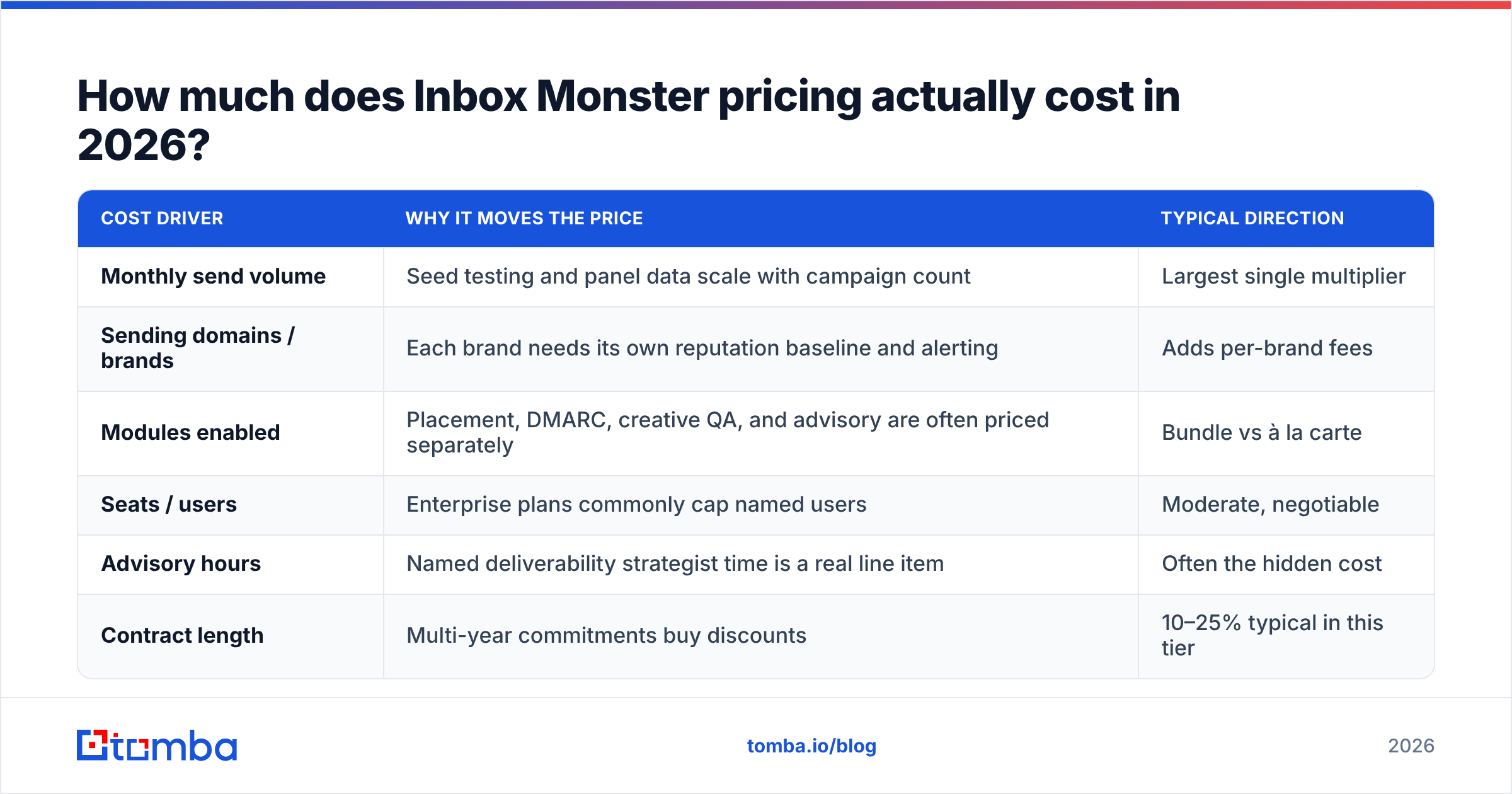
Based on how deliverability platforms in this tier structure contracts, these are the variables that move your price:
| Cost driver | Why it moves the price | Typical direction |
|---|---|---|
| Monthly send volume | Seed testing and panel data scale with campaign count | Largest single multiplier |
| Sending domains / brands | Each brand needs its own reputation baseline and alerting | Adds per-brand fees |
| Modules enabled | Placement, DMARC, creative QA, and advisory are often priced separately | Bundle vs à la carte |
| Seats / users | Enterprise plans commonly cap named users | Moderate, negotiable |
| Advisory hours | Named deliverability strategist time is a real line item | Often the hidden cost |
| Contract length | Multi-year commitments buy discounts | 10–25% typical in this tier |
Two things to push on in negotiation. First, ask whether advisory hours are included or billed — that's where "cheaper than expected" quotes turn expensive in year two. Second, ask what happens at renewal if your volume grows: uncapped volume-based escalators are the most common source of buyer regret in deliverability contracts.
What do Inbox Monster reviews say?#
Review coverage on G2 and similar directories is thinner than for older incumbents, which itself tells you something — this is a platform sold through direct enterprise sales rather than inbound self-serve, so the reviewer pool is smaller and skews toward large ESP-native teams.
The recurring themes in what buyers report:
What reviewers like
- Data granularity. Placement broken out by mailbox provider and tab, not a single averaged "inbox rate" that hides the Gmail problem inside a healthy Outlook number.
- Alerting that arrives before the campaign. Blocklist and reputation alerts land fast enough to pause a send, which is the entire value proposition.
- Human support. The most positive reviews are almost always about a person, not a feature — a strategist who diagnosed a DKIM alignment failure or a shared-IP neighbor problem.
- Consolidation. Replacing three point tools (seed testing, blocklist monitoring, DMARC parsing) with one contract simplifies the stack and the vendor review.
What reviewers criticize
- Pricing opacity. By far the most repeated complaint category for quote-only deliverability tools.
- Onboarding time. Reputation baselines need weeks of history before the dashboards are trustworthy. Expect a ramp, not a switch.
- Overlap with free tools. Google Postmaster Tools already gives you domain and IP reputation, spam rate, and authentication pass rates for Gmail — for free. If Gmail is 70% of your list, a chunk of what you're buying duplicates that.
- Seed-list limitations. Seed testing is a proxy, not truth. Seed accounts don't behave like humans, so placement scores can drift from what real recipients experience. This is an industry-wide caveat, not an Inbox Monster flaw, but it's worth knowing before you treat a number as gospel.
What are the pros and cons of Inbox Monster?#
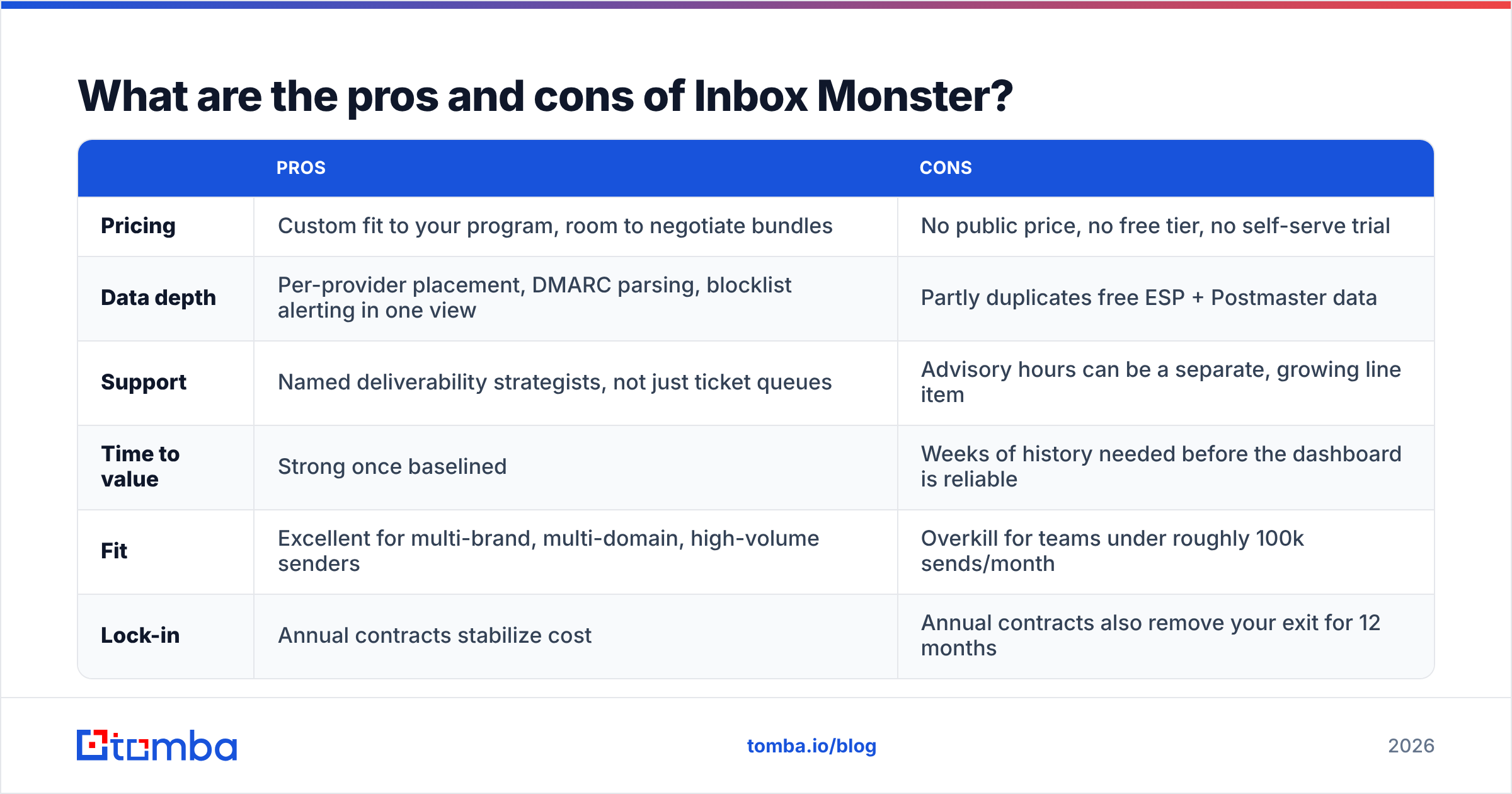
| Pros | Cons | |
|---|---|---|
| Pricing | Custom fit to your program, room to negotiate bundles | No public price, no free tier, no self-serve trial |
| Data depth | Per-provider placement, DMARC parsing, blocklist alerting in one view | Partly duplicates free ESP + Postmaster data |
| Support | Named deliverability strategists, not just ticket queues | Advisory hours can be a separate, growing line item |
| Time to value | Strong once baselined | Weeks of history needed before the dashboard is reliable |
| Fit | Excellent for multi-brand, multi-domain, high-volume senders | Overkill for teams under roughly 100k sends/month |
| Lock-in | Annual contracts stabilize cost | Annual contracts also remove your exit for 12 months |
Is Inbox Monster better than the alternatives?#
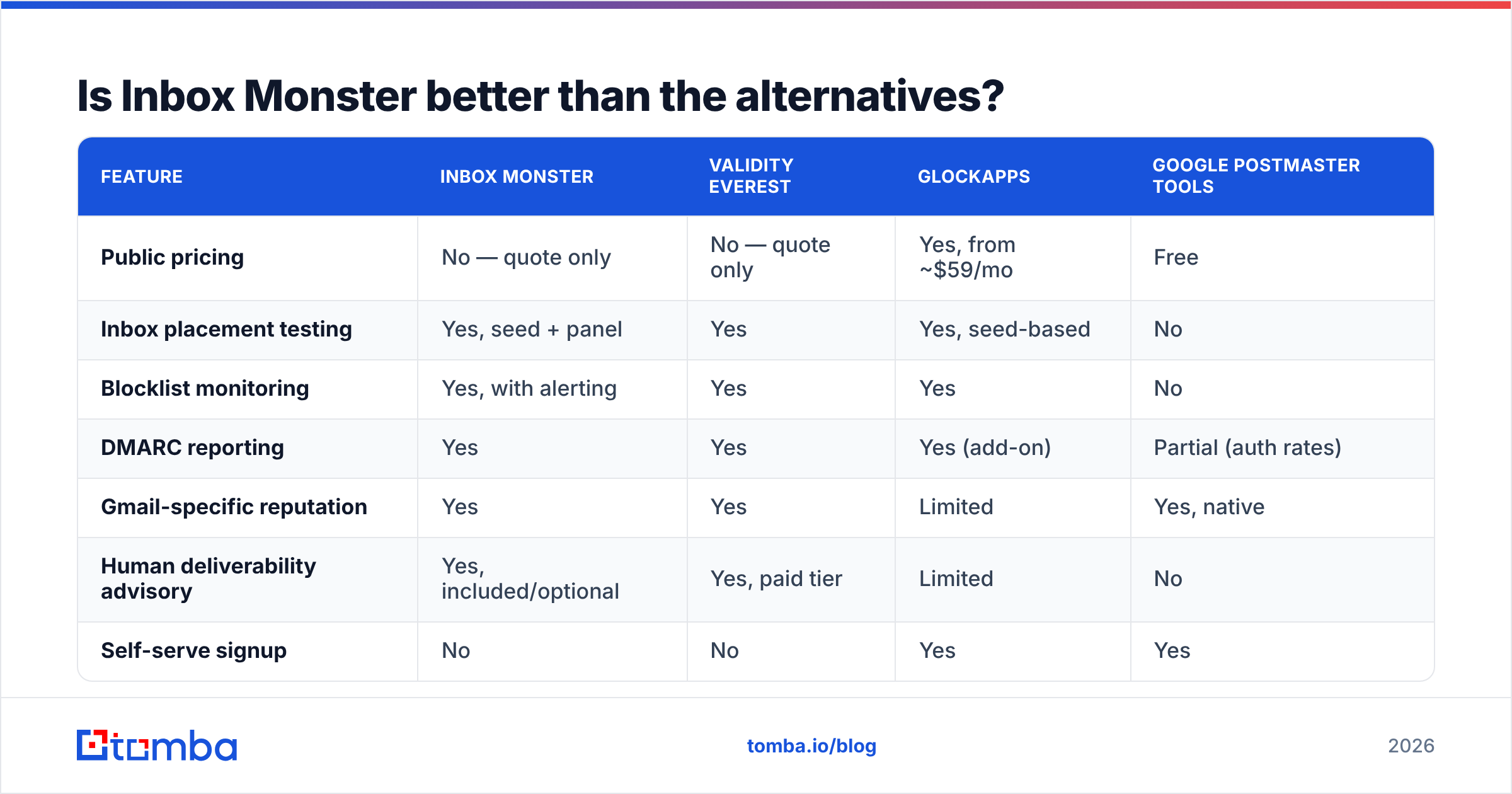
It depends entirely on your sending volume and whether you need advisory attached. Here's how the realistic option set compares:
| Feature | Inbox Monster | Validity Everest | GlockApps | Google Postmaster Tools |
|---|---|---|---|---|
| Public pricing | No — quote only | No — quote only | Yes, from ~$59/mo | Free |
| Inbox placement testing | Yes, seed + panel | Yes | Yes, seed-based | No |
| Blocklist monitoring | Yes, with alerting | Yes | Yes | No |
| DMARC reporting | Yes | Yes | Yes (add-on) | Partial (auth rates) |
| Gmail-specific reputation | Yes | Yes | Limited | Yes, native |
| Human deliverability advisory | Yes, included/optional | Yes, paid tier | Limited | No |
| Self-serve signup | No | No | Yes | Yes |
| Best fit | Enterprise ESP-native teams | Enterprise, legacy-heavy stacks | SMB and mid-market senders | Any Gmail-heavy sender |
The honest read: if you're an enterprise retail or media sender pushing millions of messages across several brands, Inbox Monster and Everest are the two names on the shortlist and the decision comes down to data quality, UI, and which strategist you like better. If you're a B2B outbound team sending tens of thousands of cold emails a month, you're comparing GlockApps-class tooling plus free Postmaster data — and spending the difference on list quality.
Does deliverability monitoring fix bad data?#
No — and this is the part the category quietly under-sells.
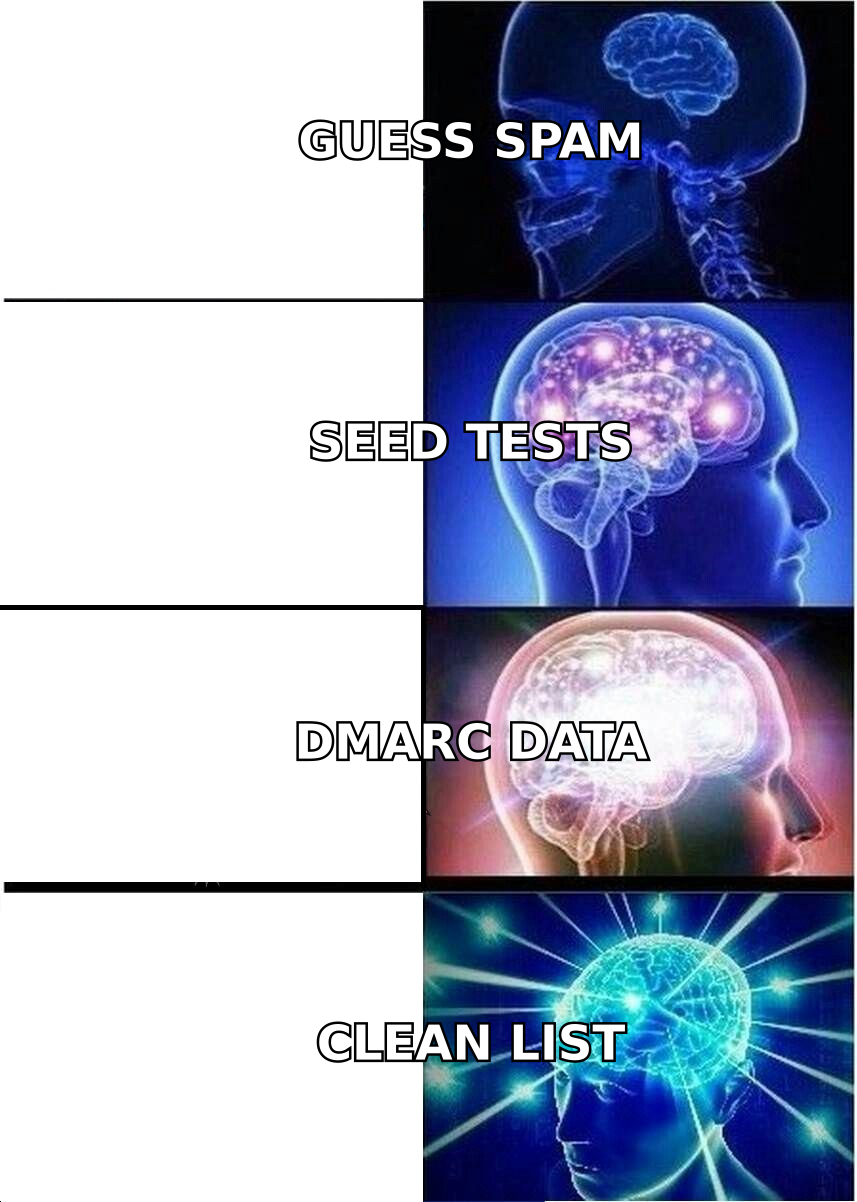
Monitoring is a smoke detector. It is genuinely useful and you should have one. But it does not stop the fire, and in B2B outbound the most common ignition source is a list full of addresses that never should have been mailed: role accounts, long-dead mailboxes, typo domains, and guessed permutations that bounce.
Mailbox providers weigh hard bounce rate and spam complaint rate heavily when calculating sender reputation. Push a 6% bounce rate through a warm domain and you'll watch your email deliverability collapse in a week — and your expensive monitoring dashboard will faithfully report the collapse it could not prevent.
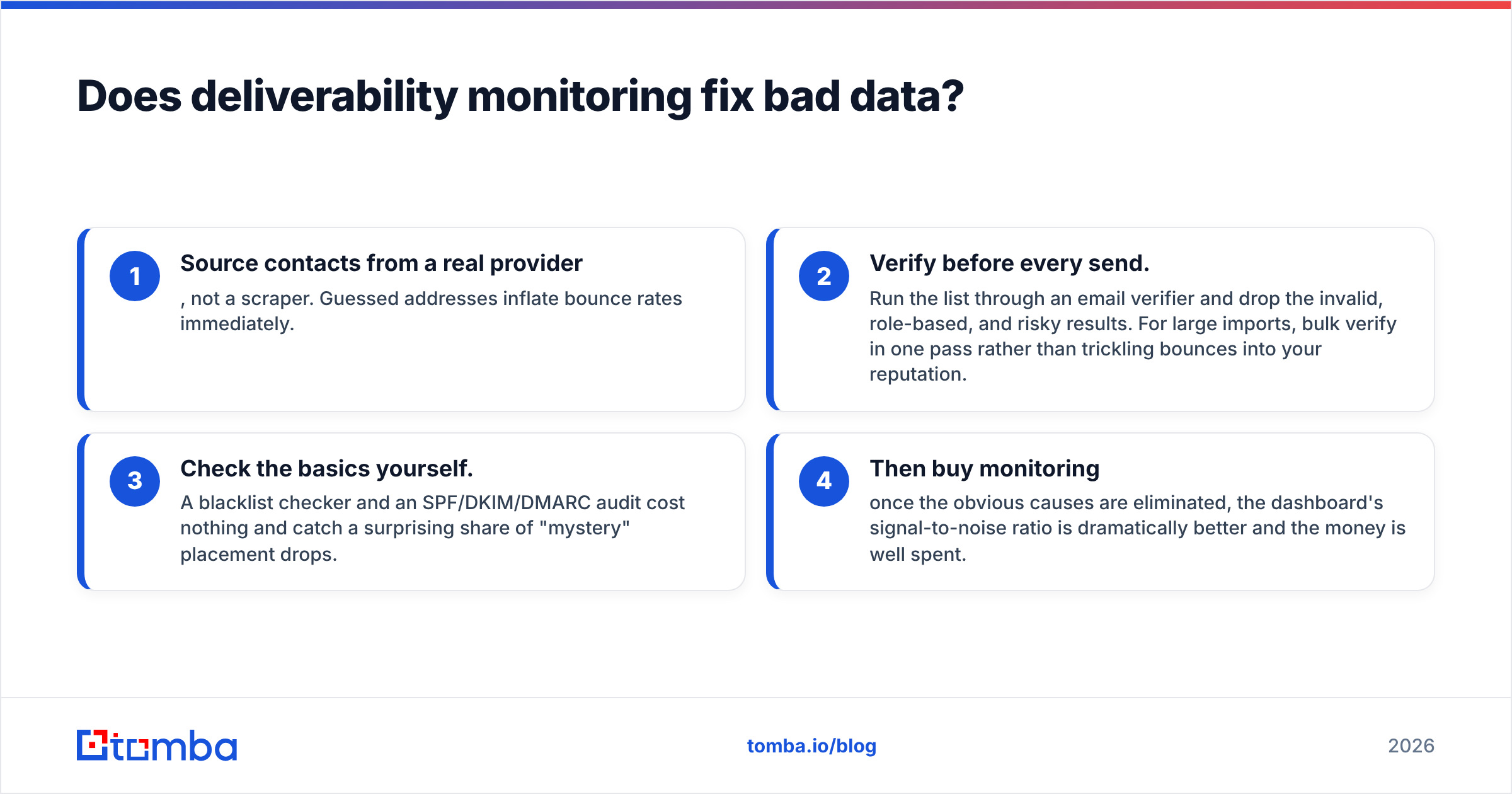
The order of operations that actually works:
- Source contacts from a real provider, not a scraper. Guessed addresses inflate bounce rates immediately.
- Verify before every send. Run the list through an email verifier and drop the invalid, role-based, and risky results. For large imports, bulk verify in one pass rather than trickling bounces into your reputation.
- Check the basics yourself. A blacklist checker and an SPF/DKIM/DMARC audit cost nothing and catch a surprising share of "mystery" placement drops.
- Then buy monitoring — once the obvious causes are eliminated, the dashboard's signal-to-noise ratio is dramatically better and the money is well spent.
Teams that reverse steps 2 and 4 end up paying enterprise prices to be told, in high resolution, that their list is bad.
Who should actually buy Inbox Monster?#
Good fit:
- Retail, media, travel, and fintech senders with millions of monthly messages and multiple sending brands
- Teams with a dedicated deliverability owner who will actually act on alerts
- Organizations already paying for Everest and looking for a modern alternative with a stronger advisory relationship
- Companies where a single blocked send costs more than the annual contract
Poor fit:
- Cold outbound teams under ~100k sends/month — the ROI math doesn't clear
- Startups without someone whose job includes reading the dashboard
- Anyone whose core problem is list quality rather than infrastructure or reputation
- Teams that need to buy this quarter without a procurement cycle
How should you run the evaluation?#
Treat the quote-only model as a negotiation, not an obstacle:
- Get two quotes minimum. Everest and Inbox Monster price against each other. Say so out loud.
- Ask for the volume escalator in writing. Know what year two costs before signing year one.
- Insist on a paid pilot. Sixty to ninety days with a real send program beats any demo environment.
- Define one success metric. "Gmail inbox placement above 92% by day 90" is testable. "Better deliverability" is not.
- Audit the overlap. List what your ESP and Postmaster Tools already report. Pay only for the delta.
- Baseline first. Verify and clean your list before the pilot starts, or you'll spend the pilot diagnosing data problems instead of evaluating the tool.
The bottom line on Inbox Monster pricing#
Inbox Monster is a credible enterprise deliverability platform whose biggest friction is the thing you noticed in the first thirty seconds: you can't see the price. That's a fair trade for large senders who need per-provider placement data and a strategist on speed dial. It's a bad trade for a mid-market outbound team whose inbox rate would recover on its own with a clean list and correct authentication records.
Before you book that demo, remove the variable you control. Source verified, deliverable contacts from the start with the Tomba Email Finder — it returns confidence-scored professional addresses with verification built in, so bounces never reach your sending domain in the first place. Start free with 25 searches a month, or move to Starter at $49/mo and Growth at $99/mo as your outbound scales; full Tomba pricing is public, which is more than most of this category can say. Fix the list first, then decide whether you still need the tower.
Related guides#
// get started
Find, verify and enrich your first contacts today
Start on the free plan with 25 searches a month, then scale when your team is ready.
Free plan · No credit card required · GDPR & CCPA
// about the author