InboxFlow Pricing, Reviews, Pros and Cons: 2026 Breakdown
A neutral teardown of InboxFlow pricing: what each tier actually costs once you add seats and sending volume, where reviewers push back, and the cheaper stack that covers the same ground.
TL;DR
- InboxFlow prices like a sales-engagement platform, not a utility: the sticker price is per seat, per month, and the number you actually pay scales with mailboxes, contacts, and enrichment credits — not with the tier name.
- The honest sweet spot is a 3–8 seat outbound team that already has clean data and wants sequencing, inbox rotation, and reply routing in one place.
- The most common complaint in reviews is not the product — it's the bill: annual-only discounts, per-mailbox add-ons, and enrichment credits that expire monthly.
- Pros: solid deliverability tooling, decent reporting, fast onboarding. Cons: thin native CRM sync on lower tiers, data quality you still have to verify yourself, and steep jumps between tiers.
- Cheaper path for most teams: keep a sending tool for sending, and buy contact data separately from a per-lookup provider like Tomba pricing starts at $49/mo instead of bundling it into a seat.
Pricing pages are written by the vendor. This one isn't. Below is what InboxFlow's tiers actually cost once you account for the line items that don't appear in the headline number, what reviewers consistently praise and complain about, and when a two-tool stack beats the all-in-one.
One note before the numbers: SaaS pricing moves, sometimes quarterly. Treat the figures here as the tier structure and the cost drivers — confirm the current per-seat rate on the vendor's own pricing page before you sign anything. The structure is what matters for budgeting, and structure changes far more slowly than the number.
What is InboxFlow and who is it actually for?#
InboxFlow sits in the sales-engagement category: multi-step email sequences, mailbox rotation across several sending domains, reply detection, task queues, and a reporting layer that ties activity to pipeline. It's the same functional shape as the tools you'll find in the G2 sales engagement category — the differentiation is in the details, not the feature list.
The buyer profile it fits best:
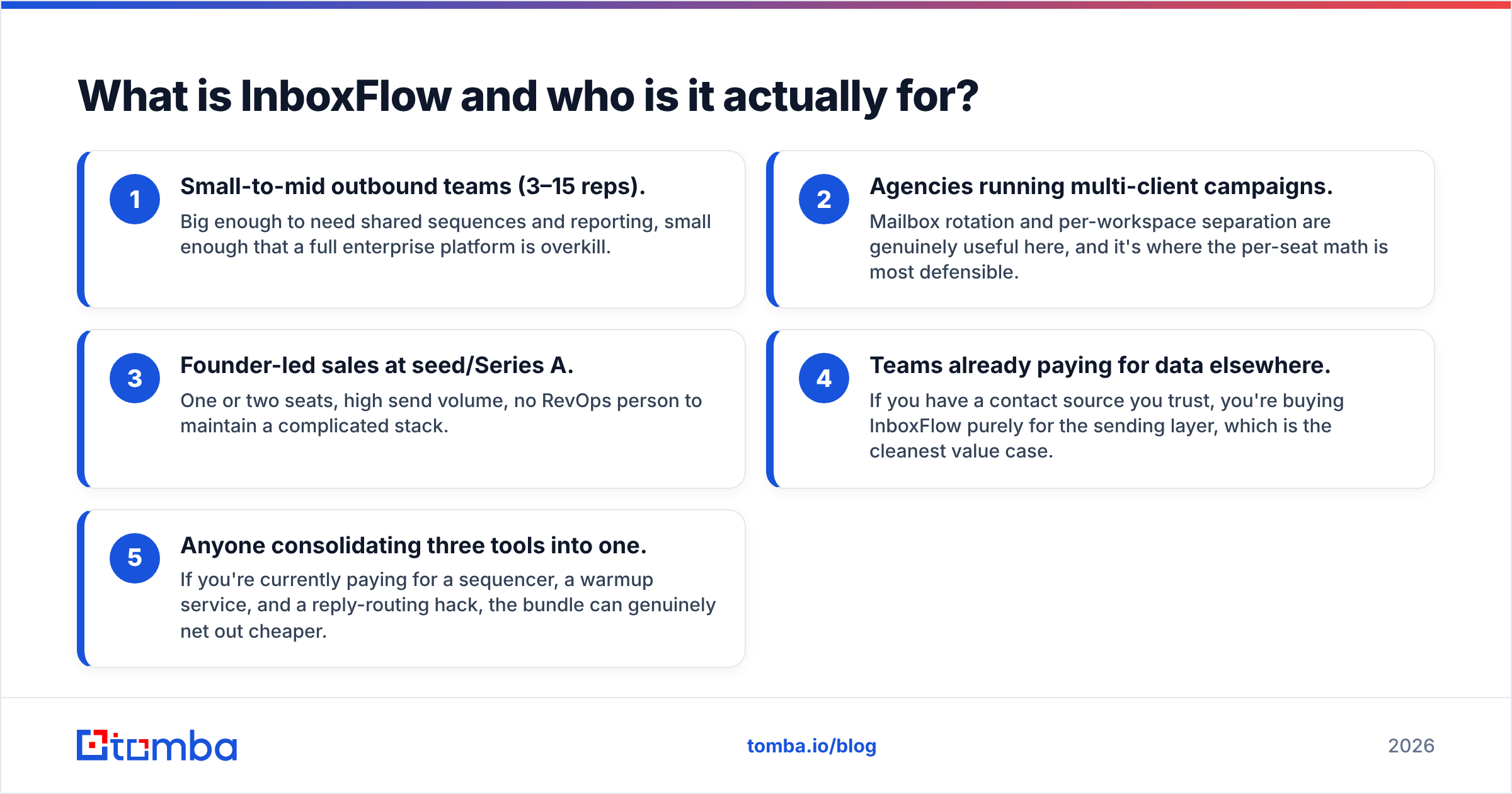
- Small-to-mid outbound teams (3–15 reps). Big enough to need shared sequences and reporting, small enough that a full enterprise platform is overkill.
- Agencies running multi-client campaigns. Mailbox rotation and per-workspace separation are genuinely useful here, and it's where the per-seat math is most defensible.
- Founder-led sales at seed/Series A. One or two seats, high send volume, no RevOps person to maintain a complicated stack.
- Teams already paying for data elsewhere. If you have a contact source you trust, you're buying InboxFlow purely for the sending layer, which is the cleanest value case.
- Anyone consolidating three tools into one. If you're currently paying for a sequencer, a warmup service, and a reply-routing hack, the bundle can genuinely net out cheaper.
Who it fits badly: teams that need deep CRM bidirectional sync on a starter plan, teams whose main problem is data quality rather than sending mechanics, and anyone with fewer than ~500 outbound touches a month — at that volume you're paying platform rent for a spreadsheet's worth of work.
How much does InboxFlow cost across its tiers?#
Sales-engagement pricing almost always follows the same three-lever pattern: seats × mailboxes × credits. The tier name gates features; the three levers set the invoice. Here's how InboxFlow's structure compares to the alternatives most buyers evaluate alongside it.
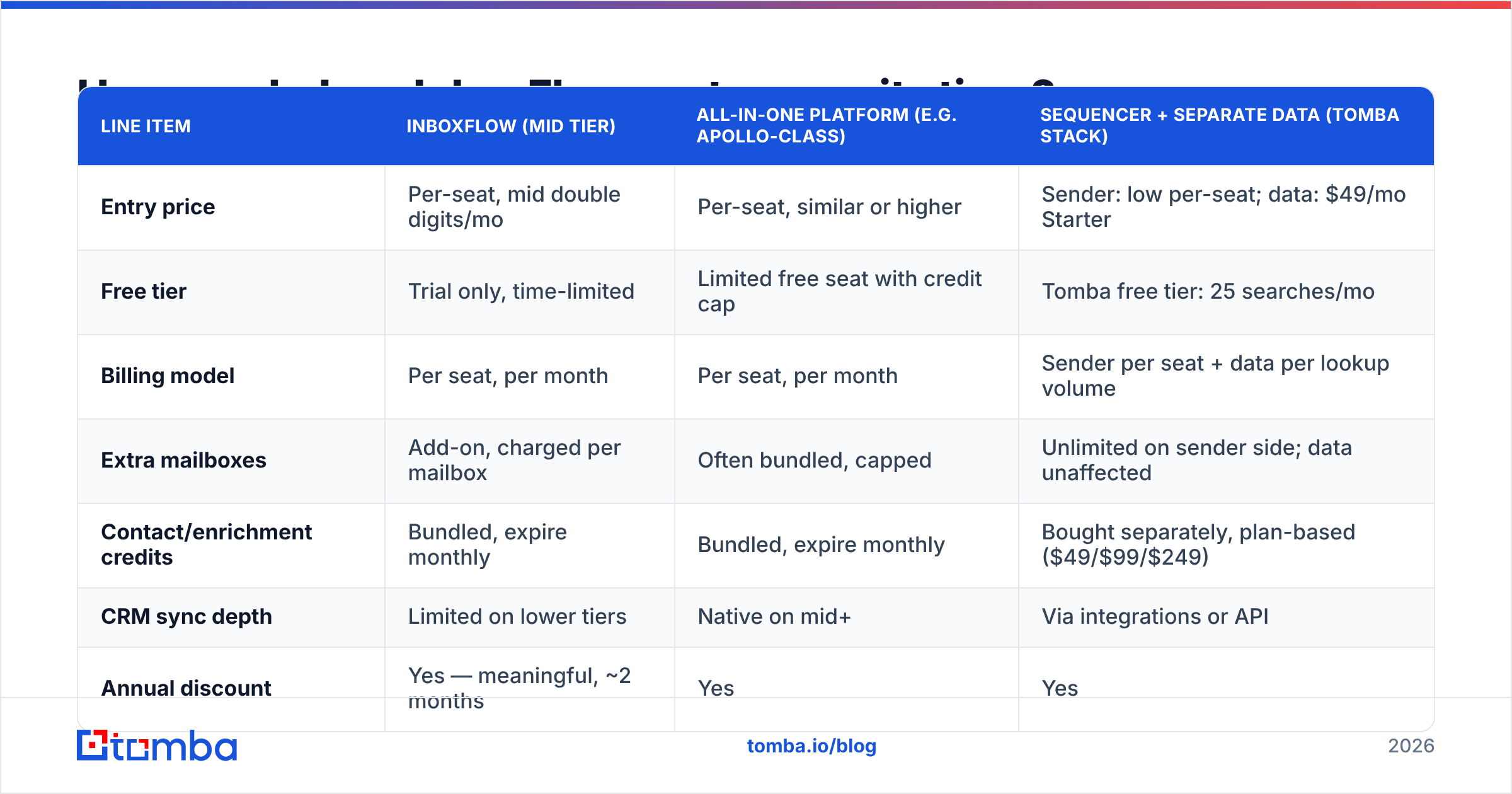
| Line item | InboxFlow (mid tier) | All-in-one platform (e.g. Apollo-class) | Sequencer + separate data (Tomba stack) |
|---|---|---|---|
| Entry price | Per-seat, mid double digits/mo | Per-seat, similar or higher | Sender: low per-seat; data: $49/mo Starter |
| Free tier | Trial only, time-limited | Limited free seat with credit cap | Tomba free tier: 25 searches/mo |
| Billing model | Per seat, per month | Per seat, per month | Sender per seat + data per lookup volume |
| Extra mailboxes | Add-on, charged per mailbox | Often bundled, capped | Unlimited on sender side; data unaffected |
| Contact/enrichment credits | Bundled, expire monthly | Bundled, expire monthly | Bought separately, plan-based ($49/$99/$249) |
| CRM sync depth | Limited on lower tiers | Native on mid+ | Via integrations or API |
| Annual discount | Yes — meaningful, ~2 months | Yes | Yes |
| Best for | 3–15 rep outbound teams | Teams wanting data + sending in one | Teams that want data quality control |
The two rows that decide your real cost are extra mailboxes and credits that expire monthly. A five-rep team running three sending domains each is not paying for five seats — it's paying for five seats plus roughly fifteen mailbox slots. Model that before you compare headline prices, or every comparison you run will be wrong by a factor of two.

Where the bill grows faster than your team#
- Mailbox add-ons. Deliverability best practice is more domains and fewer sends per mailbox. That practice is directly at odds with per-mailbox pricing. You get punished financially for doing the right thing.
- Credit expiry. Monthly-reset enrichment credits mean a slow month is money burned. Annual pooling, where offered, is worth negotiating for explicitly.
- Seat minimums on higher tiers. The tier that finally includes proper CRM sync often carries a 3- or 5-seat floor. A two-person team wanting one feature ends up buying three seats.
- Onboarding or migration fees. Usually waived if you ask during the annual negotiation. Ask.
What do InboxFlow reviews actually say?#
Read enough review-site entries — Capterra's sales engagement listings are a reasonable starting point — and the same clusters show up for nearly every tool in this class, InboxFlow included.
Consistent praise:
- Onboarding speed. Most reviewers get a first sequence live inside a day. That matters more than feature depth for teams without a RevOps function.
- Deliverability tooling. Warmup, rotation, and send-throttling in one place is genuinely convenient versus stitching together three vendors. If you're new to the topic, the fundamentals of email deliverability are worth reading before you evaluate any tool's claims here.
- Reply handling. Automatic sequence-stop on reply, with routing, is table stakes but frequently botched elsewhere.
Consistent criticism:
- Data quality inside the bundle. This is the loudest theme across the entire category, not just this vendor. Bundled contact data is convenience-priced, not accuracy-priced. Reviewers report bounce rates that only look acceptable until you compare them to a dedicated verification pass.
- Tier cliffs. The gap between "the plan I'm on" and "the plan with the feature I need" is frequently a 2x jump, not a 20% one.
- Support responsiveness at lower tiers. Chat-only support on entry plans, with SLA-backed support gated behind annual mid-tier commitments.
- Reporting rigidity. Good dashboards, limited custom fields. Teams with unusual pipeline stages end up exporting to a spreadsheet anyway.
None of this makes it a bad product. It makes it a normal product in a category where the marketing promises more integration than the pricing delivers.
Is InboxFlow worth it compared to running two tools?#
Here is the honest trade-off, stated plainly: all-in-one platforms sell you convenience and charge you in data quality. Split stacks sell you accuracy and charge you in setup time.
The math that decides it:
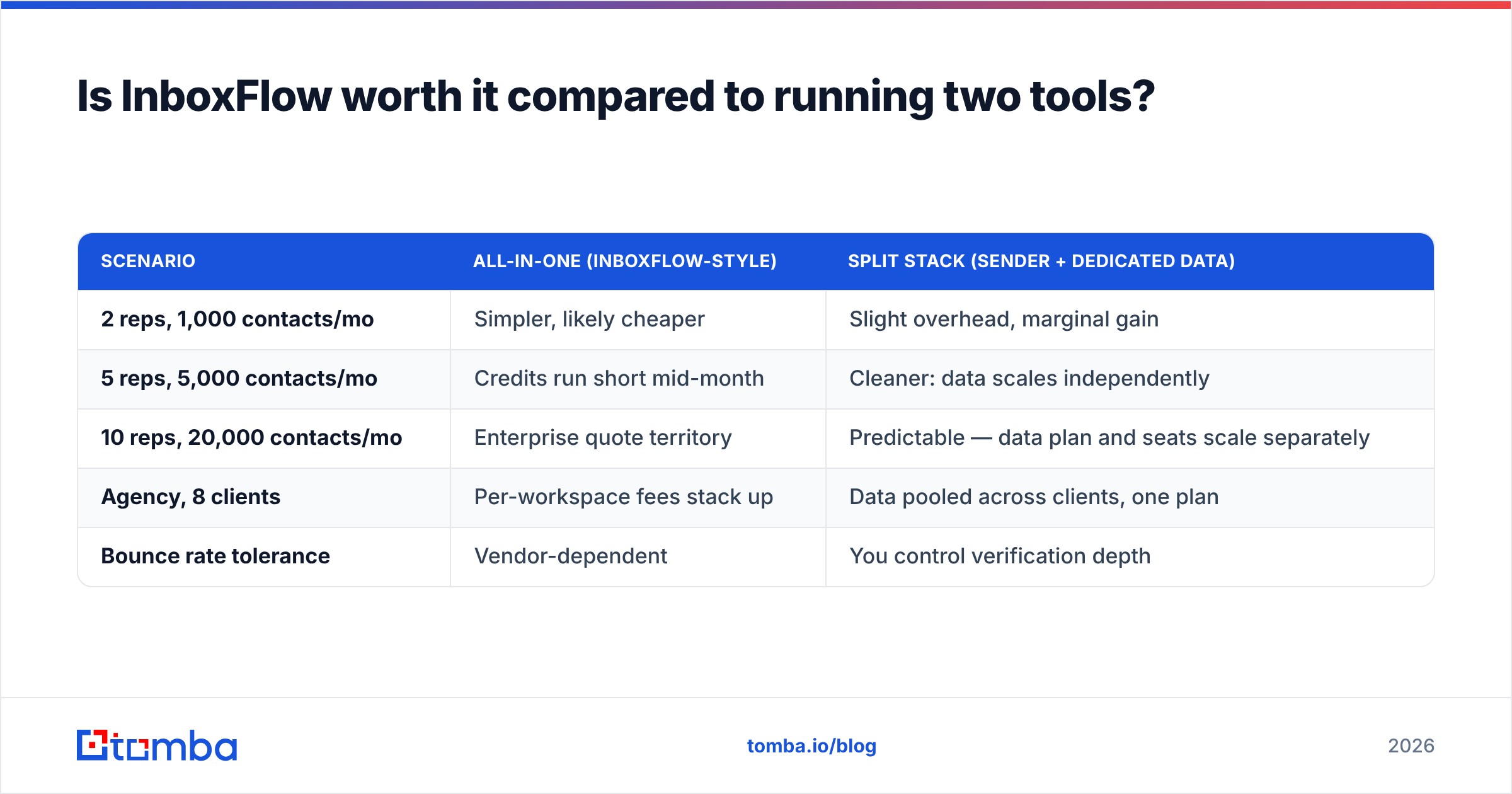
| Scenario | All-in-one (InboxFlow-style) | Split stack (sender + dedicated data) |
|---|---|---|
| 2 reps, 1,000 contacts/mo | Simpler, likely cheaper | Slight overhead, marginal gain |
| 5 reps, 5,000 contacts/mo | Credits run short mid-month | Cleaner: data scales independently |
| 10 reps, 20,000 contacts/mo | Enterprise quote territory | Predictable — data plan and seats scale separately |
| Agency, 8 clients | Per-workspace fees stack up | Data pooled across clients, one plan |
| Bounce rate tolerance | Vendor-dependent | You control verification depth |
At two reps and a thousand contacts a month, the bundle wins on simplicity and you should take it. Past roughly five reps or five thousand contacts a month, the split stack starts winning on both cost and results — because the single biggest driver of cold email performance isn't sequence copy, it's whether the address is real and the mailbox is warm.
That's the part bundled credits quietly under-deliver on. Running every list through a dedicated email verifier before it enters any sequencer typically cuts bounce rates to low single digits, which protects the sender reputation you're paying the sequencer to manage in the first place. It's a strange loop: you buy an all-in-one for deliverability, then undermine deliverability with the all-in-one's bundled data.

What are the real pros and cons of InboxFlow?#
Pros
- Fast time-to-first-sequence. Days, not weeks. Meaningful when the alternative is a platform with a mandatory implementation call.
- Deliverability features are bundled, not add-ons. Warmup and rotation included beats three separate subscriptions.
- Reporting is good enough for weekly pipeline reviews. You won't need a BI tool to answer "which sequence produced meetings."
- Annual discount is real. Roughly two months free is standard in this category and worth taking if you're confident past a quarter.
Cons
- Per-mailbox pricing conflicts with deliverability best practice. The more correctly you set up sending infrastructure, the worse the pricing gets.
- Bundled data is a convenience, not a data strategy. Budget for verification regardless.
- Tier cliffs are steep. Confirm exactly which tier contains the one feature you actually need before you buy the one below it.
- Credits expire monthly. Negotiate pooling or accept the waste.
- CRM sync depth is tier-gated. If Salesforce or HubSpot is your system of record, price the tier that syncs properly, not the one that "integrates."
How should you evaluate it before you buy?#
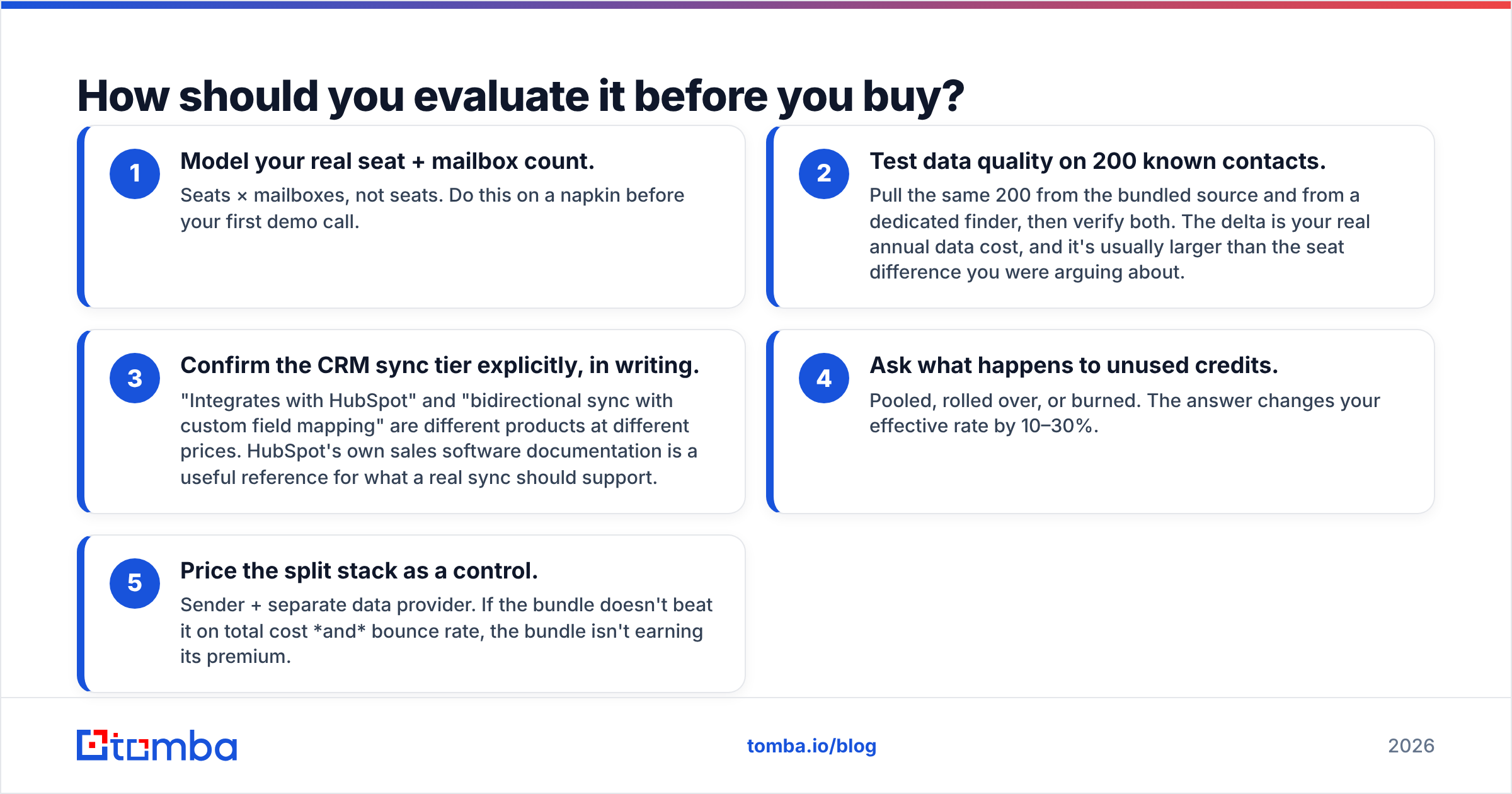
Run this sequence, in this order, during the trial:
- Model your real seat + mailbox count. Seats × mailboxes, not seats. Do this on a napkin before your first demo call.
- Test data quality on 200 known contacts. Pull the same 200 from the bundled source and from a dedicated finder, then verify both. The delta is your real annual data cost, and it's usually larger than the seat difference you were arguing about.
- Confirm the CRM sync tier explicitly, in writing. "Integrates with HubSpot" and "bidirectional sync with custom field mapping" are different products at different prices. HubSpot's own sales software documentation is a useful reference for what a real sync should support.
- Ask what happens to unused credits. Pooled, rolled over, or burned. The answer changes your effective rate by 10–30%.
- Price the split stack as a control. Sender + separate data provider. If the bundle doesn't beat it on total cost and bounce rate, the bundle isn't earning its premium.
Worth noting: several data vendors in this space — including partner-grade providers like BookYourData — price contact data independently of sending seats, which is exactly the decoupling that makes step 5 possible. Being able to scale data volume without buying another seat is a structural advantage, not a discount.
What's the verdict on InboxFlow pricing?#
Buy it if you're a 3–15 rep team that wants sequencing, warmup, and reply routing in one bill, you already have a contact data source you trust, and you're prepared to commit annually to get the discount and the support SLA.
Skip it if your core problem is data quality, you're running fewer than 500 touches a month, or you need deep CRM sync but can only justify the entry tier. In those cases you're paying platform rent for capability you won't use.
Split it if you're between five and fifty reps. Buy the sending tool on its merits, buy data on its accuracy, and stop letting one vendor's credit pool be the constraint on both. Your bounce rate will thank you, and so will your renewal negotiation — a vendor that only sells you sending has far less leverage than one that holds your data hostage too.
Get the data half right first. Whatever sequencer you land on, the single highest-leverage change to your outbound numbers is feeding it addresses that actually exist. Tomba's Email Finder finds professional emails by domain, name, or company, with verification built into the same workflow — free tier at 25 searches a month, Starter at $49/mo, and a Tomba API if you'd rather wire it straight into whatever platform you end up choosing. Verify the list, then let the sequencer do what you're paying it for.
Related guides#
// get started
Find, verify and enrich your first contacts today
Start on the free plan with 25 searches a month, then scale when your team is ready.
Free plan · No credit card required · GDPR & CCPA
// about the author