InboxLane Pricing, Reviews, Pros and Cons (2026 Guide)
A neutral breakdown of InboxLane pricing, reviews, pros and cons — how per-mailbox billing really adds up, what users praise, where it falls short, and when a cheaper stack wins.
TL;DR
- InboxLane sells cold-email infrastructure — provisioned sending domains, mailboxes, DNS records, and warmup — priced per mailbox per month, not per seat.
- The sticker price looks tiny (low single-digit dollars per mailbox). The real bill is
mailboxes × price × months, and most outbound teams need 20–100 mailboxes, so budget in the hundreds per month, not tens. - Reviews are consistently positive on setup speed and DNS correctness, and consistently negative on support latency, rigid annual/quarterly commitments, and the fact that infrastructure alone does not fix a bad list.
- The single biggest hidden cost is not InboxLane. It is the sending reputation you burn when you point clean mailboxes at unverified contact data.
- Verdict: worth it if you run 20+ mailboxes and value setup time over per-unit cost. Overkill if you send under 200 emails a day — a single well-configured Google Workspace domain plus verified data beats a rented fleet.
What is InboxLane, and who is it actually for?#
InboxLane sits in the "cold email infrastructure" category — the layer between your sequencer and the internet. You do not write emails in it. You do not build lists in it. You rent the pipes: secondary sending domains, mailboxes attached to them, correctly configured SPF/DKIM/DMARC records, and an automated warmup network that exchanges mail between accounts to build sending history.
The category exists because of a specific problem. Google and Microsoft tightened bulk-sender enforcement, spam-complaint thresholds got stricter, and burning your primary company domain on cold outreach became an unacceptable risk. So teams started sending from disposable lookalike domains — get-acme.com, acme-hq.com — spread across dozens of mailboxes at 15–30 emails per mailbox per day. Doing that by hand means registering domains, buying Workspace seats, and hand-editing DNS for each one. It is tedious, error-prone, and exactly the kind of work a vendor can automate.
That is the pitch. Whether it is worth the markup depends entirely on how many mailboxes you need and how much your time is worth.
Who gets real value:
- Outbound agencies running separate infrastructure for 5–20 clients, where every client needs isolated domains so one bad campaign cannot poison another.
- Scaling SDR teams that outgrew a single domain and need 30–100 mailboxes provisioned in an afternoon instead of a sprint.
- Non-technical founders who understand what a DMARC record does conceptually but do not want to debug a
p=quarantinepolicy at 11pm. - Teams recovering from a burn who need clean infrastructure fast while the old domain cools off.
- Anyone doing multi-region outbound where separate domains per market genuinely improve relevance and localization.
If you are not in one of those five buckets, keep reading — the "is it worth it" section has a cheaper answer for you.
How does InboxLane pricing actually work?#
Conclusion first: it is per-mailbox, per-month, with volume discounts that only kick in at scale — and the commitment terms matter more than the unit price.
Infrastructure vendors in this category price on five components. Understanding them tells you more than any published tier table, because the tiers just repackage these:
- Mailbox count — the primary meter. Every additional inbox is a line item, whether or not you send from it that month.
- Domain registration — sometimes bundled, sometimes billed at cost plus a handling fee. Three mailboxes per domain is the common default.
- Warmup — occasionally included, occasionally an add-on per mailbox. This is the most common source of "wait, that wasn't in the quote."
- Commitment length — monthly billing carries a meaningful premium over quarterly or annual. Discounts of 20–30% for prepaying are standard.
- Migration or setup fees — one-time charges for onboarding a large fleet or moving existing domains under management.
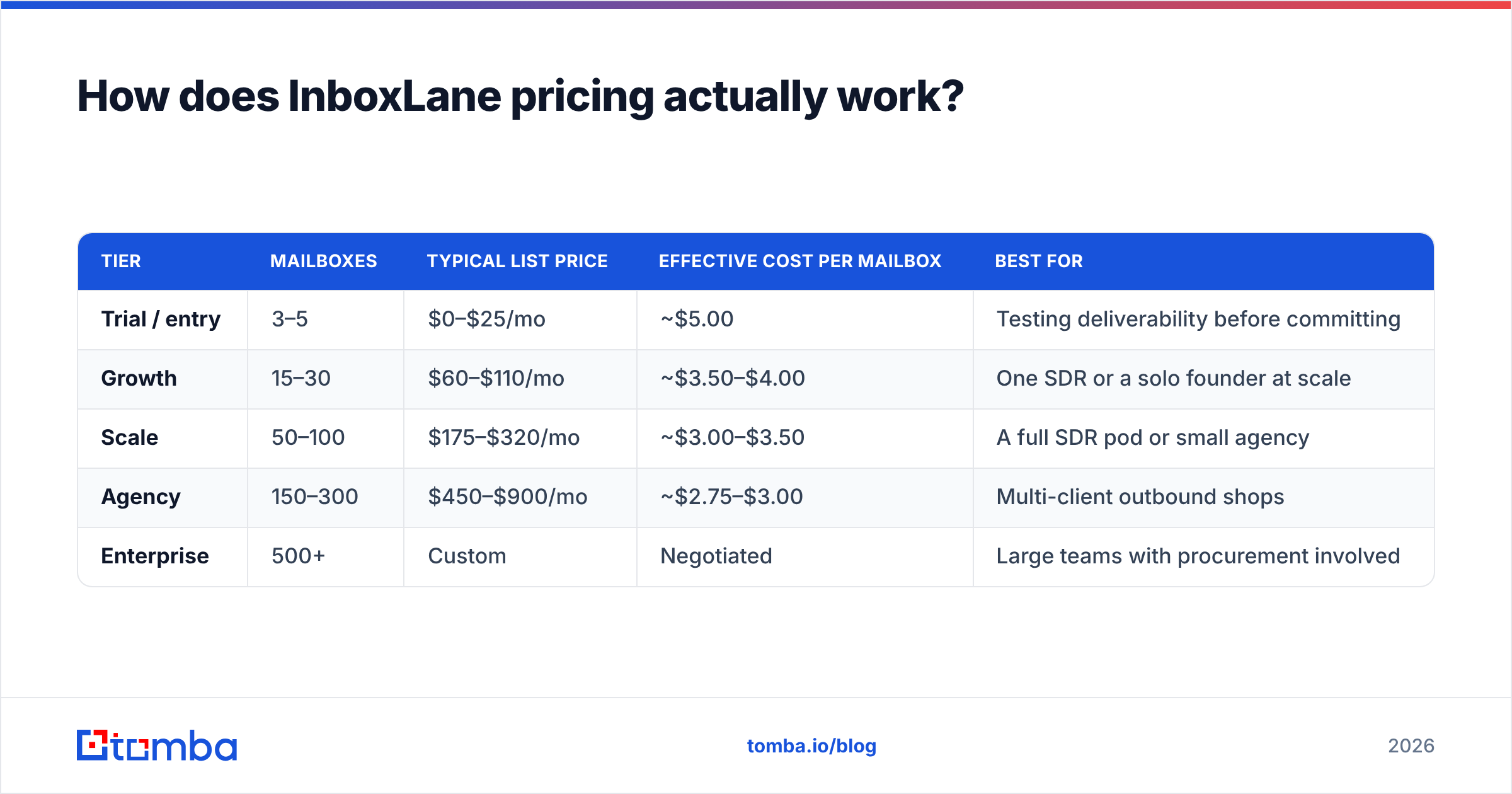
Here is how published list pricing tends to shake out. Treat these as directional and re-check the vendor's current page before you buy — infrastructure pricing in this category moved twice in the last 18 months.
| Tier | Mailboxes | Typical list price | Effective cost per mailbox | Best for |
|---|---|---|---|---|
| Trial / entry | 3–5 | $0–$25/mo | ~$5.00 | Testing deliverability before committing |
| Growth | 15–30 | $60–$110/mo | ~$3.50–$4.00 | One SDR or a solo founder at scale |
| Scale | 50–100 | $175–$320/mo | ~$3.00–$3.50 | A full SDR pod or small agency |
| Agency | 150–300 | $450–$900/mo | ~$2.75–$3.00 | Multi-client outbound shops |
| Enterprise | 500+ | Custom | Negotiated | Large teams with procurement involved |
The math that surprises people is not the per-unit price. It is the multiplication.

Sixty mailboxes at $3.25 is $195 a month, $2,340 a year, for infrastructure that sends zero emails on its own. Add your sequencer ($97–$297/mo), your data source, and a CRM seat, and a "cheap" outbound stack clears $600/month before anyone writes a subject line. That is not an argument against InboxLane — it is an argument for knowing the total number before you sign a quarterly commitment.
What do InboxLane reviews say?#
Reviews across G2 and practitioner communities cluster into predictable themes. The pattern is typical for infrastructure vendors: high satisfaction on the mechanical work, frustration on everything human.
What reviewers consistently praise:
- Setup speed. Provisioning that takes a day by hand takes minutes. This is the number-one repeated compliment and it is genuinely the product's core value.
- DNS correctness. SPF, DKIM, and DMARC configured right the first time. If you have ever chased a soft-fail SPF record across three DNS providers, you understand why people pay for this.
- Warmup that runs unattended. Set it and forget it, with reputation graphs that make progress legible to a manager who does not read email headers.
- Clean handoff to sequencers. IMAP/SMTP credentials export cleanly into the major sending platforms without manual per-mailbox entry.
What reviewers consistently criticize:
- Support response times. The most common complaint by a wide margin. Ticket turnaround measured in days, not hours, which is painful when a domain gets flagged mid-campaign.
- Commitment rigidity. Quarterly or annual terms with limited downgrade paths. If your outbound program shrinks, you keep paying for idle mailboxes.
- Opaque domain ownership. Some users report friction moving domains out from under the vendor's registrar account. Ask about this explicitly before you buy.
- Deliverability attributed to infrastructure alone. The most instructive negative reviews are from teams who bought 50 clean mailboxes, sent to a scraped list, and landed in spam within two weeks. The infrastructure did its job. The list did not.
That last point deserves its own section, because it is where most of the money gets wasted.
What are the real pros and cons?#
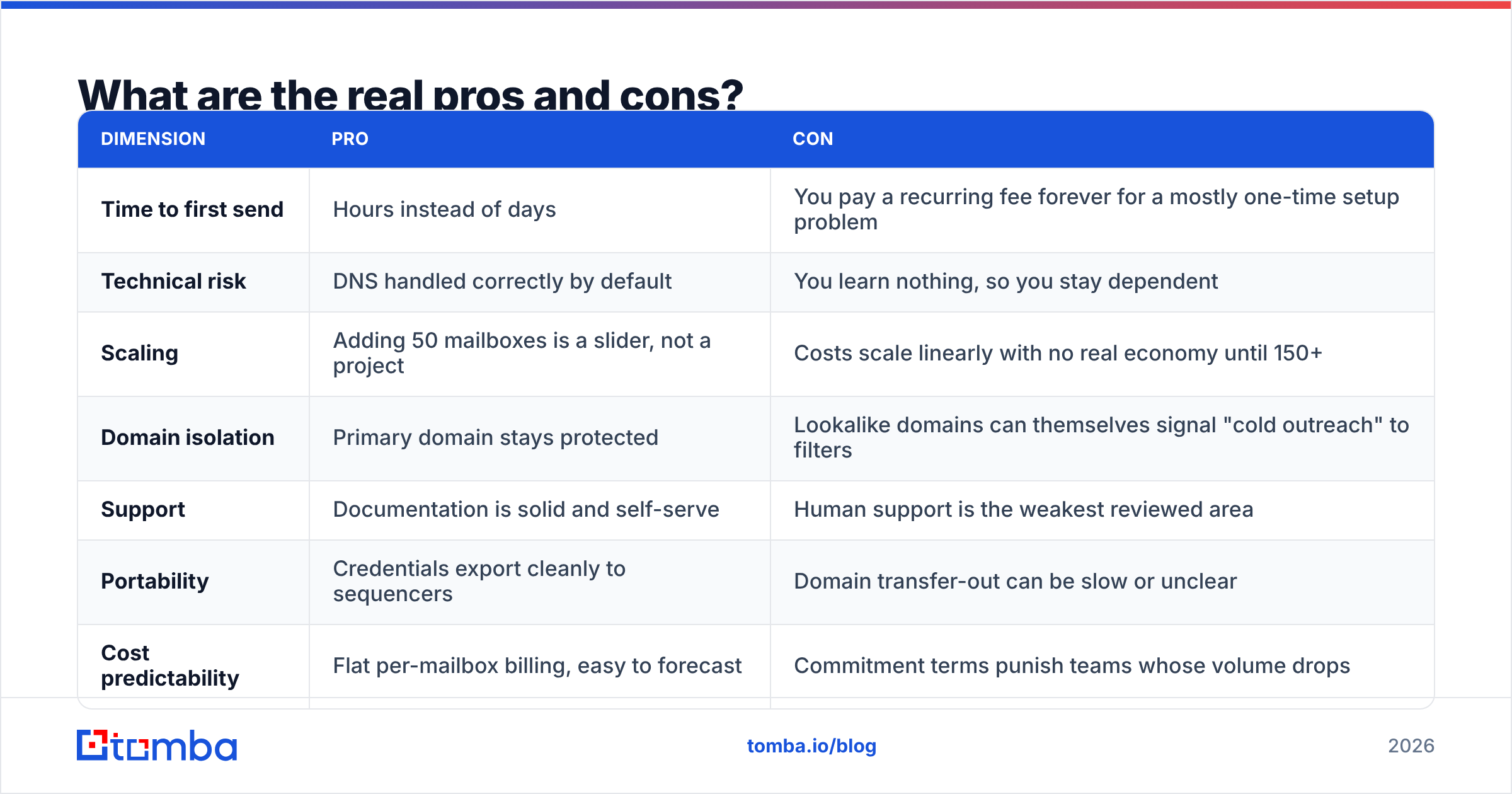
| Dimension | Pro | Con |
|---|---|---|
| Time to first send | Hours instead of days | You pay a recurring fee forever for a mostly one-time setup problem |
| Technical risk | DNS handled correctly by default | You learn nothing, so you stay dependent |
| Scaling | Adding 50 mailboxes is a slider, not a project | Costs scale linearly with no real economy until 150+ |
| Domain isolation | Primary domain stays protected | Lookalike domains can themselves signal "cold outreach" to filters |
| Support | Documentation is solid and self-serve | Human support is the weakest reviewed area |
| Portability | Credentials export cleanly to sequencers | Domain transfer-out can be slow or unclear |
| Cost predictability | Flat per-mailbox billing, easy to forecast | Commitment terms punish teams whose volume drops |
How does InboxLane compare to the alternatives?#
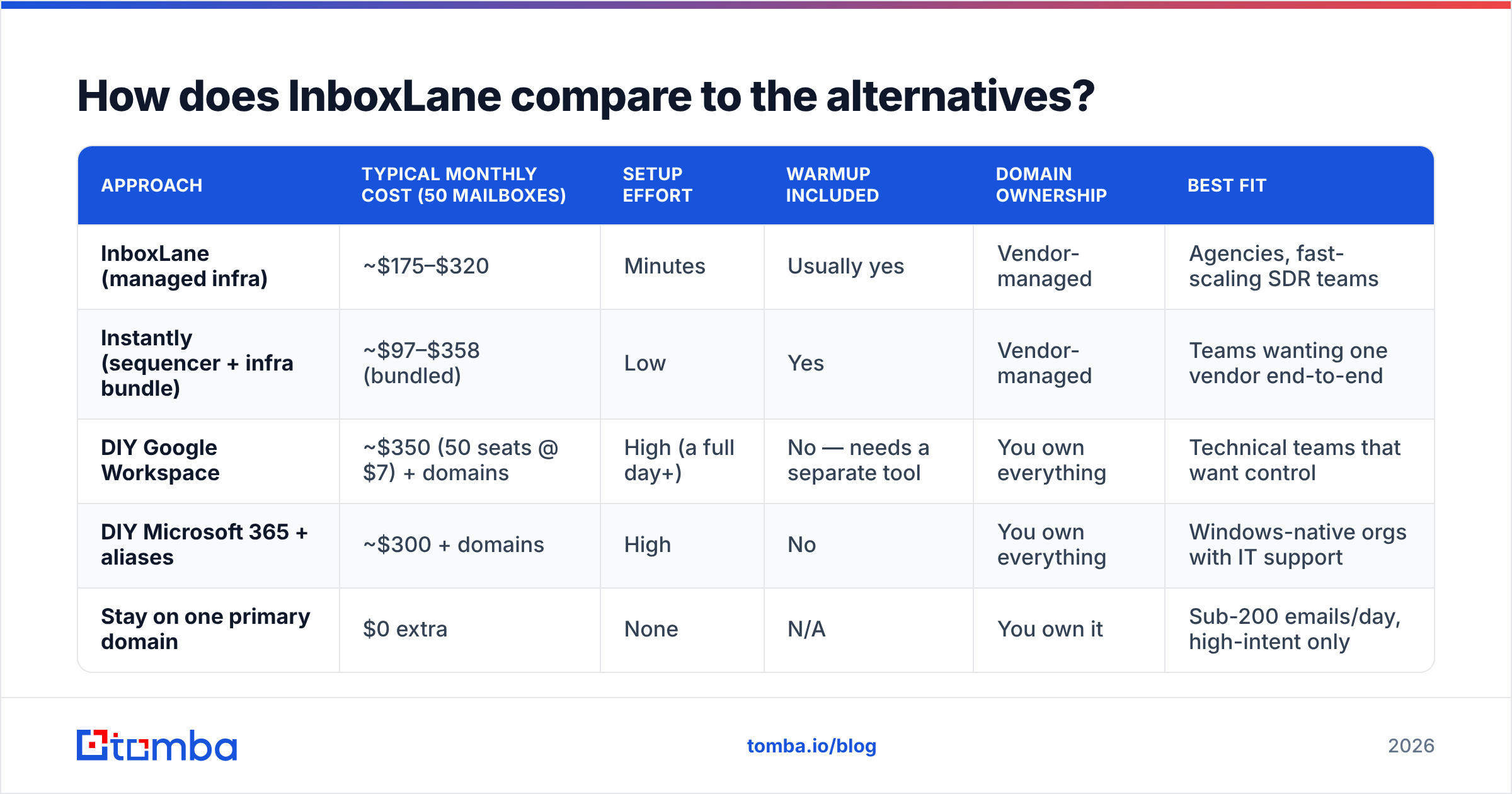
There are four realistic ways to solve this problem, and infrastructure-as-a-service is only one of them.
| Approach | Typical monthly cost (50 mailboxes) | Setup effort | Warmup included | Domain ownership | Best fit |
|---|---|---|---|---|---|
| InboxLane (managed infra) | ~$175–$320 | Minutes | Usually yes | Vendor-managed | Agencies, fast-scaling SDR teams |
| Instantly (sequencer + infra bundle) | ~$97–$358 (bundled) | Low | Yes | Vendor-managed | Teams wanting one vendor end-to-end |
| DIY Google Workspace | ~$350 (50 seats @ $7) + domains | High (a full day+) | No — needs a separate tool | You own everything | Technical teams that want control |
| DIY Microsoft 365 + aliases | ~$300 + domains | High | No | You own everything | Windows-native orgs with IT support |
| Stay on one primary domain | $0 extra | None | N/A | You own it | Sub-200 emails/day, high-intent only |
Two honest observations about this table.
First, DIY Google Workspace is not cheaper at 50 mailboxes. At $7 per seat it is more expensive than managed infrastructure. The reason people still do it is control — you own the domains, you can transfer out, and nobody else can shut off your sending. The savings only appear if you use alias-heavy configurations, which carry their own deliverability tradeoffs.
Second, bundled sequencer-plus-infrastructure products change the comparison entirely. If you were going to buy the sequencer anyway, the marginal cost of its bundled mailboxes may be lower than a standalone infrastructure vendor. Price the stack, not the component.
What hidden costs should you budget for?#
Four line items that never appear in the pricing table:
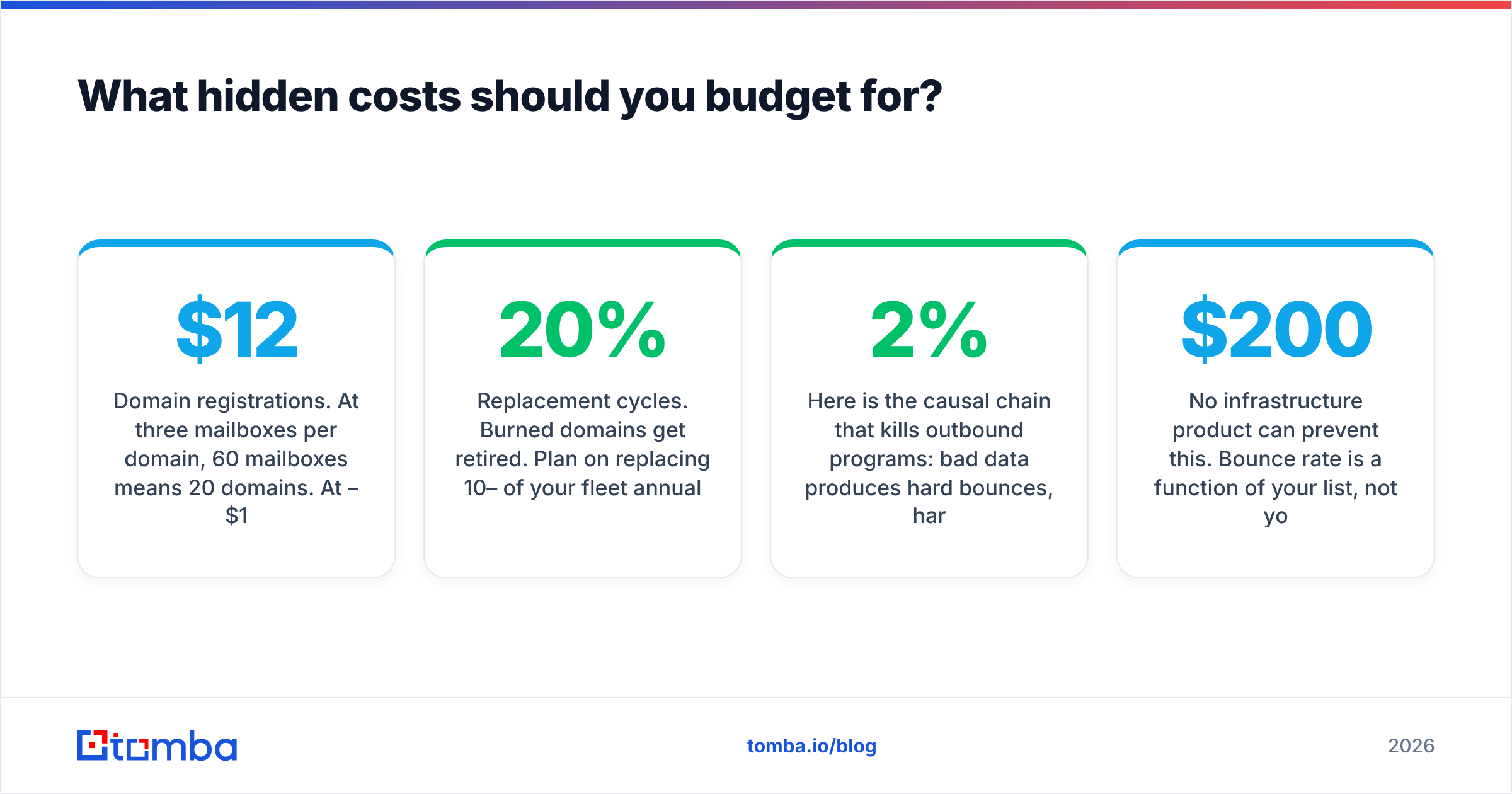
- Domain registrations. At three mailboxes per domain, 60 mailboxes means 20 domains. At $12–$15 per domain per year, that is another $250/year, often billed separately.
- Warmup ramp time. New mailboxes send at reduced volume for 2–4 weeks. You pay full price during the ramp and get partial capacity. Run the numbers with an email warmup calculator before you commit to a launch date.
- Replacement cycles. Burned domains get retired. Plan on replacing 10–20% of your fleet annually if you send aggressively.
- Data quality. This is the big one, and it is the cost most teams discover last.

Here is the causal chain that kills outbound programs: bad data produces hard bounces, hard bounces above roughly 2% signal to mailbox providers that you do not know who you are emailing, that signal damages sender reputation, and damaged reputation lands your mail in spam regardless of how perfectly your DKIM record is configured. You then blame the infrastructure vendor, buy more mailboxes, and repeat the cycle at higher cost.
No infrastructure product can prevent this. Bounce rate is a function of your list, not your DNS. Running your contacts through an email verifier before import costs a fraction of a cent per record and protects the entire investment sitting downstream of it. If you are spending $200/month on mailboxes and skipping a $30 verification pass, you have the priorities inverted.
The same applies at the sourcing stage. Contacts pulled from a stale export or a scraped directory decay at roughly 22–30% annually as people change jobs. Sourcing from a live, continuously validated dataset and verifying at send time is the only combination that keeps bounce rates under control at volume. This is what email deliverability actually means in practice — not a warmup score, but the compound result of clean data, correct authentication, and restrained sending volume.
Is InboxLane worth it in 2026?#
It depends on exactly one variable: mailbox count.
- Under 10 mailboxes: No. Configure one secondary domain yourself, use a standalone warmup tool, and spend the difference on better data. The setup work is a single afternoon and you will understand your own stack.
- 10–30 mailboxes: Marginal. Managed infrastructure saves real time here, but DIY is still tractable. Decide based on whether anyone on your team wants to own DNS.
- 30–100 mailboxes: Yes. This is the sweet spot. Manual provisioning at this scale is genuinely a project, and per-mailbox pricing is still competitive with Workspace seats.
- 100+ mailboxes or multi-client: Yes, but negotiate. At this volume you have leverage on commitment terms, transfer-out rights, and support SLAs. Ask for all three in writing.
The failure mode to avoid is buying infrastructure as a substitute for strategy. Fifty clean mailboxes pointed at a mediocre list of 20,000 contacts will underperform five mailboxes pointed at 500 well-researched, verified accounts. Infrastructure removes a ceiling; it does not create demand.
If your reply rates are already healthy and volume is the only constraint, managed infrastructure is a rational purchase. If your reply rates are under 2%, more mailboxes will only help you fail faster and more expensively.
Where should you spend the money instead?#
Rank your outbound budget in this order: data quality first, infrastructure second, sequencer third, everything else fourth. Most teams do the reverse and wonder why the stack underperforms.
Start at the top of that list. Tomba's Email Finder sources verified professional email addresses by domain, name, or company, with confidence scoring on every result — so the contacts entering your sequencer are ones that actually exist. Pair it with bulk verification before every launch and your bounce rate stops being the thing that decides your deliverability. The free tier covers 25 searches a month, and paid plans start at $49/mo; see Tomba pricing for the full breakdown across Starter, Growth, and Pro.
Buy the mailboxes when you need the capacity. Buy the data quality before you need anything else.
Related guides#
// get started
Find, verify and enrich your first contacts today
Start on the free plan with 25 searches a month, then scale when your team is ready.
Free plan · No credit card required · GDPR & CCPA
// about the author