Influencersclub vs Jet Leads Pro: Which Lead Data Wins?
One tool is built for creator and influencer contacts, the other for classic B2B lead lists. Here is where each one actually earns its price, and where a plain email finder beats both.
TL;DR
- They are not really the same product. Influencers Club is a creator/influencer contact database. Jet Leads Pro is positioned as a general B2B lead-list and contact-finding tool. Picking between them is mostly a question of who you sell to, not which UI you like.
- If your buyers are creators, podcasters, YouTubers or Shopify-adjacent brands, Influencers Club's audience filters (follower count, engagement rate, niche, platform) are the differentiator. No generic B2B database replicates that.
- If your buyers are companies with a website and a job title, a creator database is the wrong shape of data, and you will pay a premium for filters you never touch.
- Both are list-first tools. Neither replaces a per-lookup email finder with a real-time verification step, which is where most bounce problems actually get solved.
- Cheapest honest stack for most B2B teams: a targeted source for discovery plus a verified email finder at $49/mo for the contact layer, instead of a $400+/mo seat you use twice a week.
What is the real difference in Influencersclub vs Jet Leads Pro?#
The short version: Influencersclub vs Jet Leads Pro is a creator-data versus business-data decision, not a feature bake-off. Both sell you contact records. They source those records from completely different worlds.
Influencers Club indexes social profiles first. Its record starts as a creator — an Instagram, TikTok or YouTube account — and then attaches an email, a location, an audience size, an engagement rate and sometimes an e-commerce link. You search the way a brand-partnerships manager thinks: "US beauty creators, 25k–150k followers, 3%+ engagement, with a contact email."
Jet Leads Pro sits in the classic B2B lane. The record starts as a person at a company — name, title, company domain, sometimes phone — and you filter the way an SDR thinks: industry, headcount, seniority, geography, technology used. That is the same shape of data you get from the broader lead intelligence category on G2, where dozens of vendors compete on coverage and refresh rate rather than on audience metrics.
That difference cascades into everything else: pricing model, refresh cadence, accuracy profile, and which of your campaigns will actually work.

How do Influencers Club and Jet Leads Pro compare head-to-head?#
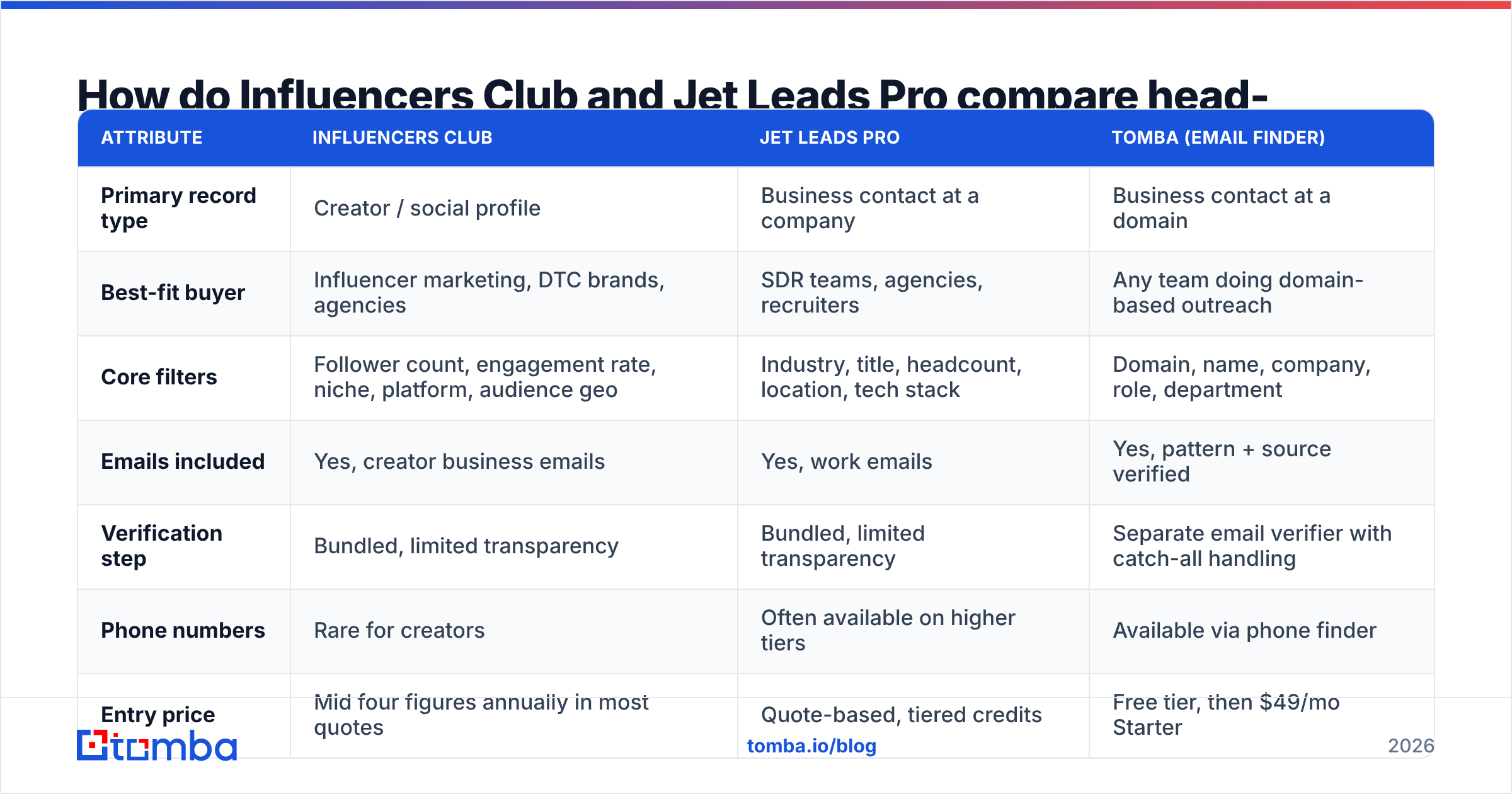
Here is the honest side-by-side, with a general-purpose email finder in the third column so you can see what you are paying extra for.
| Attribute | Influencers Club | Jet Leads Pro | Tomba (email finder) |
|---|---|---|---|
| Primary record type | Creator / social profile | Business contact at a company | Business contact at a domain |
| Best-fit buyer | Influencer marketing, DTC brands, agencies | SDR teams, agencies, recruiters | Any team doing domain-based outreach |
| Core filters | Follower count, engagement rate, niche, platform, audience geo | Industry, title, headcount, location, tech stack | Domain, name, company, role, department |
| Emails included | Yes, creator business emails | Yes, work emails | Yes, pattern + source verified |
| Verification step | Bundled, limited transparency | Bundled, limited transparency | Separate email verifier with catch-all handling |
| Phone numbers | Rare for creators | Often available on higher tiers | Available via phone finder |
| Entry price | Mid four figures annually in most quotes | Quote-based, tiered credits | Free tier, then $49/mo Starter |
| API access | Yes, higher tiers | Yes, higher tiers | Yes on all paid plans (Tomba API) |
| Export model | Credit-based CSV/API | Credit-based CSV/API | Credit-based, plus bulk and integrations |
Two caveats before you screenshot that table. First, both vendors change packaging often and negotiate annual deals, so treat the pricing row as a shape, not a quote — ask for current numbers in writing. Second, "verification included" means different things at different vendors. Ask specifically whether the vendor re-verifies at export time or serves a cached result from the last crawl. That single question predicts your bounce rate better than any marketing page.
Which tool has better data accuracy?#
Neither wins outright, because they are measured against different denominators.
Influencers Club's accuracy question is "is this the email the creator actually reads?" Creators publish business emails in bios and link-in-bio pages, which is genuinely public, high-intent data. The failure mode is staleness: a creator swaps management, moves to a new agency inbox, and the bio email keeps resolving to a dead Gmail alias for months. Deliverability looks fine on paper — the mailbox exists — but the reply rate quietly collapses.
Jet Leads Pro's accuracy question is "does this work email still exist at this company?" The failure mode there is job change. B2B contact data decays somewhere around 25–30% per year, and the tools that look best in a demo are usually the ones with the largest, oldest index — which is exactly the index most likely to hand you a contact who left in 2024.

The practical takeaway: run your own bounce test before you sign anything. Pull 200 records from each vendor's trial, push them through an independent email verifier, and compare. If a vendor's own "valid" flag disagrees with an independent check on more than 10% of rows, you have found your answer. Watch catch-all domains especially — many vendors mark them "valid" because the server accepts everything, which is why a dedicated catch-all verifier is worth the extra step on enterprise domains.
Also check where the data comes from. Vendors that publish their sourcing methodology, the way Tomba does on its data sources page, are easier to audit for GDPR and CCPA exposure than vendors who describe their pipeline as "proprietary."
What does each one actually cost?#
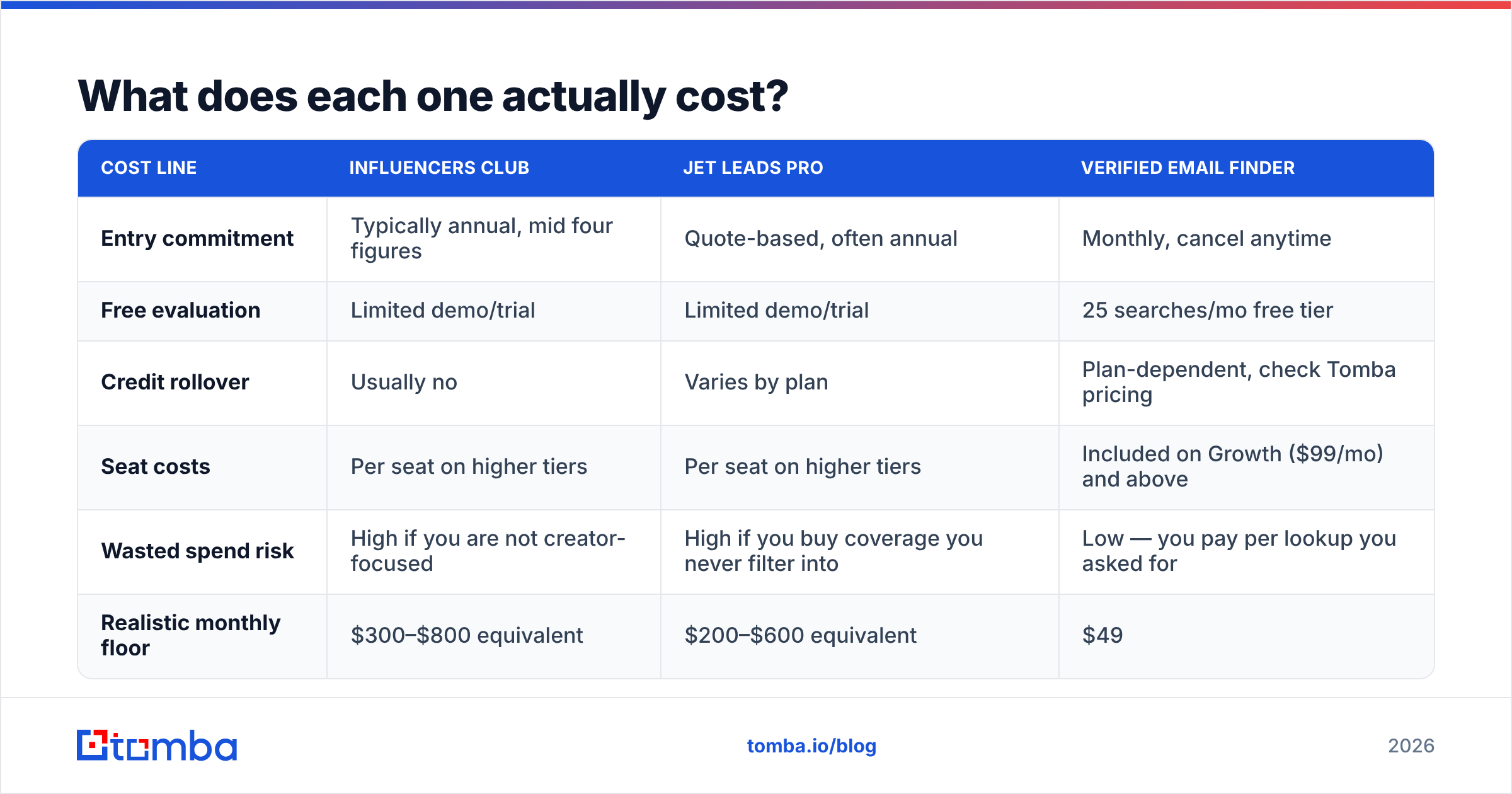
Sticker price is the least interesting number. Cost per usable, replied-to contact is the one that decides your ROI.
| Cost line | Influencers Club | Jet Leads Pro | Verified email finder |
|---|---|---|---|
| Entry commitment | Typically annual, mid four figures | Quote-based, often annual | Monthly, cancel anytime |
| Free evaluation | Limited demo/trial | Limited demo/trial | 25 searches/mo free tier |
| Credit rollover | Usually no | Varies by plan | Plan-dependent, check Tomba pricing |
| Seat costs | Per seat on higher tiers | Per seat on higher tiers | Included on Growth ($99/mo) and above |
| Wasted spend risk | High if you are not creator-focused | High if you buy coverage you never filter into | Low — you pay per lookup you asked for |
| Realistic monthly floor | $300–$800 equivalent | $200–$600 equivalent | $49 |
Run the math on a normal month. If you send 1,500 cold emails and 22% bounce, you did not send 1,500 emails — you sent 1,170 and damaged your sender reputation doing it. A $400/mo database that produces a 22% bounce rate is more expensive than a $49/mo finder producing a 2% bounce rate, even before you count the domain you had to retire.
The other hidden line is utilization. Annual database contracts are sold on total records. Most teams touch a fraction of them. If you export 3,000 contacts a month from a plan sized for 50,000, you are subsidising someone else's enterprise usage.
Who should choose Influencers Club?#
Pick Influencers Club when the audience metric is the qualification criterion.
- Brand partnership and influencer marketing teams. If "3%+ engagement rate on TikTok, US audience, beauty niche" is your ICP definition, no B2B database can express that query. This is the one job where Influencers Club is straightforwardly the right tool.
- DTC and e-commerce brands running creator seeding. Filtering by platform, audience geography and follower band saves hours of manual scrolling, and the influencer marketing workflow lives or dies on that filtering.
- Agencies pitching creator campaigns. Being able to produce a credible shortlist inside a pitch deck is worth real money, independent of email accuracy.
- Affiliate and ambassador program recruiters. Volume matters more than precision here, and creator business emails are genuinely public contact points.
Do not buy it because you liked the demo. Buy it because at least two of those four bullets describe your week.
Who should choose Jet Leads Pro?#
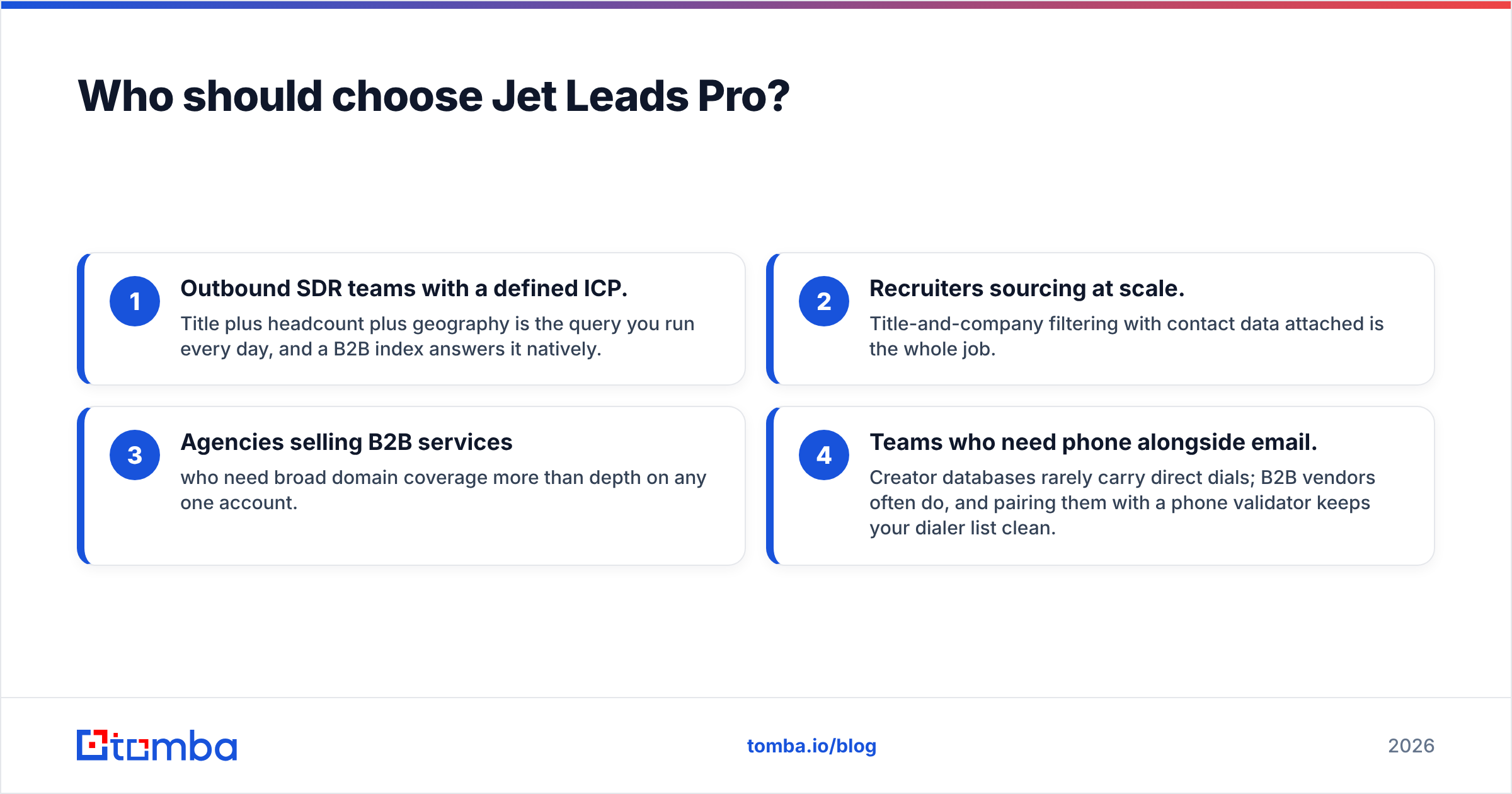
Pick Jet Leads Pro when your qualification criteria are firmographic — company, title, size, stack.
- Outbound SDR teams with a defined ICP. Title plus headcount plus geography is the query you run every day, and a B2B index answers it natively.
- Recruiters sourcing at scale. Title-and-company filtering with contact data attached is the whole job.
- Agencies selling B2B services who need broad domain coverage more than depth on any one account.
- Teams who need phone alongside email. Creator databases rarely carry direct dials; B2B vendors often do, and pairing them with a phone validator keeps your dialer list clean.
If you fall here, also price the alternatives before committing. Established B2B list vendors like BookYourData compete hard on verified-list guarantees, and it is worth putting two or three quotes side by side rather than signing the first one that demos well.

Do you actually need a database at all?#
This is the question most comparison posts skip, and it is the one that saves the most money.
A database is worth paying for when discovery is the hard part — when you genuinely do not know which companies or creators to target and you need filters to build the universe. If you already know your targets (a conference attendee list, a G2 category, a portfolio page, a set of accounts from your CRM), you are not buying discovery. You are buying contact details for a list you already have.
That second job is much cheaper. Feed a domain into domain search, get the people and the company email pattern, verify, done. For a known list of names and companies, a bulk email finder run costs a fraction of a database seat and returns fresher data, because it resolves at query time instead of serving a row that was crawled eight months ago.

A reasonable hybrid many teams land on: keep a discovery source for the top of funnel, then resolve and verify contacts on demand. You stop paying for 40,000 records you will never export.
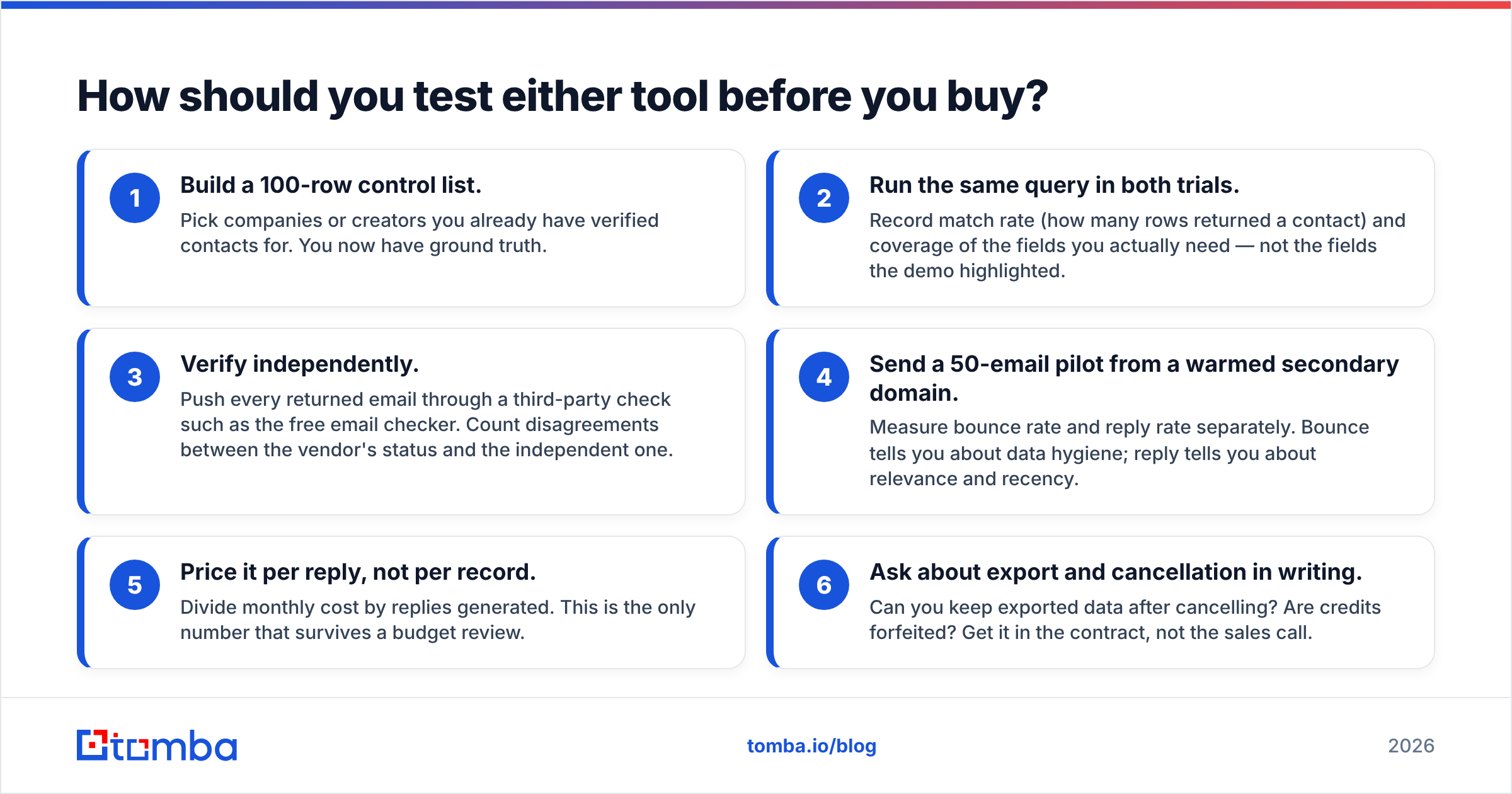
How should you test either tool before you buy?#
Do this in an afternoon. It costs nothing and it will contradict at least one thing a salesperson told you.
- Build a 100-row control list. Pick companies or creators you already have verified contacts for. You now have ground truth.
- Run the same query in both trials. Record match rate (how many rows returned a contact) and coverage of the fields you actually need — not the fields the demo highlighted.
- Verify independently. Push every returned email through a third-party check such as the free email checker. Count disagreements between the vendor's status and the independent one.
- Send a 50-email pilot from a warmed secondary domain. Measure bounce rate and reply rate separately. Bounce tells you about data hygiene; reply tells you about relevance and recency.
- Price it per reply, not per record. Divide monthly cost by replies generated. This is the only number that survives a budget review.
- Ask about export and cancellation in writing. Can you keep exported data after cancelling? Are credits forfeited? Get it in the contract, not the sales call.
If a vendor will not give you enough trial credits to run step 1, that is information too.
What is the verdict on Influencersclub vs Jet Leads Pro?#
Choose Influencers Club if creators are your buyers. Choose Jet Leads Pro if companies are. If neither describes you cleanly, buy neither and buy a verified email finder instead.
Most teams reading a versus post like this one are not actually torn between two products — they are trying to fix a bounce rate, a thin pipeline, or a data bill that grew faster than the pipeline did. In that situation the expensive database is rarely the fix. A cleaner contact layer, verified at the moment of send, usually is. It also protects the asset that no vendor can sell back to you: your sending domain's reputation and your email deliverability.
Whichever way you go, keep discovery and contact resolution as separate line items in your budget. Bundling them is how teams end up paying enterprise prices for a spreadsheet.
Ready to cut the contact-data line of your budget? Start with the Tomba Email Finder — find verified professional emails by domain, name or company, with real-time verification instead of a stale cached row. The free tier gives you 25 searches a month to run the control-list test above, and paid plans start at $49/mo with the full API included. Test it against whatever quote is sitting in your inbox, then decide.
Related guides#
// get started
Find, verify and enrich your first contacts today
Start on the free plan with 25 searches a month, then scale when your team is ready.
Free plan · No credit card required · GDPR & CCPA
// about the author