Infofree Pricing, Reviews, Pros and Cons: An Honest 2026 Look
Infofree sells unlimited B2B and consumer leads for a flat monthly fee. Here is what that actually costs, what reviewers complain about, and when a pay-per-verified-contact tool beats a flat-rate list subscription.
TL;DR
- Infofree sells unlimited access to a large US business and consumer database for a flat monthly fee — roughly $50–$100/month per user depending on the plan and promo, billed annually in most cases.
- The value proposition is volume, not precision. You get records, a light CRM, and mailing-list exports; you do not get freshly verified work emails at the quality bar most cold-email programs need in 2026.
- Reviews cluster around two themes: reasonable price for the volume, and frustration with stale contact data and cancellation friction.
- Infofree fits list-based marketing — direct mail, local SMB telemarketing, territory planning. It fits modern email outbound poorly.
- If your channel is email, the cheaper math is usually a pay-per-verified-contact stack: find the specific people you want, verify before send, and skip the 200-million-record subscription entirely.
What is Infofree, exactly?#
Infofree is a flat-rate sales lead subscription. You pay monthly, you get search access to a US database of roughly 14 million businesses and 200+ million consumers, and you can pull lists by geography, SIC code, employee count, revenue, homeowner status, and similar firmographic and demographic filters.
The company comes out of the same lineage as infoUSA and Salesgenie — founder Vin Gupta built the original compiled-database business, and Infofree is the low-cost, self-serve descendant of it. That heritage matters because it tells you what the data is: a compiled database, assembled from phone directories, public filings, business registrations, and third-party licensing — not a real-time, web-crawled, verification-on-demand index.
Think of it like a phone book that got a database schema. Enormous coverage, genuinely useful for "show me every HVAC contractor in three counties with 10–50 employees," and progressively less reliable the closer you get to a specific named human's current work email.
Bundled with the subscription you typically get:
- Unlimited searches and views — the headline feature; no per-record credit meter.
- Downloadable lists — capped per month on lower tiers, larger or unlimited on higher ones.
- CRM101 — a bare-bones built-in CRM for logging calls and notes.
- A mobile app — find nearby businesses while you are driving a territory.
- Mailing-list output — postal addresses formatted for direct mail campaigns.
How much does Infofree pricing cost in 2026?#
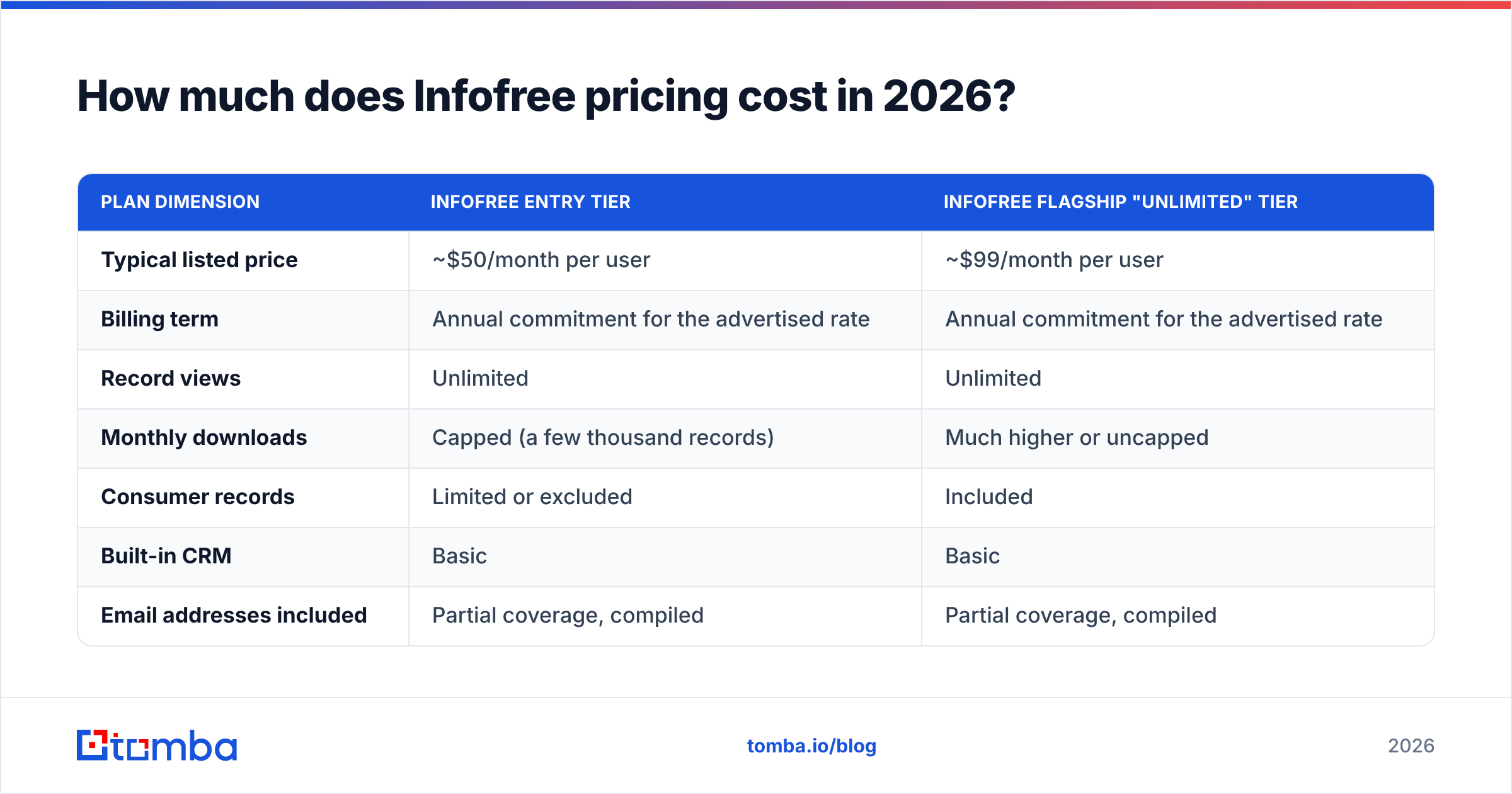
Infofree publishes tiered monthly pricing and runs promotional rates constantly, so treat the numbers below as the shape of the offer rather than a quote. Verify current rates on the vendor's own pricing page before you commit — and read the term length carefully, because the advertised monthly price usually assumes an annual commitment.
| Plan dimension | Infofree entry tier | Infofree flagship "unlimited" tier |
|---|---|---|
| Typical listed price | ~$50/month per user | ~$99/month per user |
| Billing term | Annual commitment for the advertised rate | Annual commitment for the advertised rate |
| Record views | Unlimited | Unlimited |
| Monthly downloads | Capped (a few thousand records) | Much higher or uncapped |
| Consumer records | Limited or excluded | Included |
| Built-in CRM | Basic | Basic |
| Email addresses included | Partial coverage, compiled | Partial coverage, compiled |
| Verification at time of export | No | No |
| API access | Not a core offering | Not a core offering |
| Free trial | Short trial, card required | Short trial, card required |
Three things drive the real cost above the sticker:
Per-seat multiplication. The price is per user. A five-rep team on the flagship tier is close to $500/month, which puts Infofree in the same budget bracket as far more modern sales-intelligence platforms.
The annual lock. The attractive monthly number is generally the annualized rate. Month-to-month, if offered, costs more. Several reviewers report that cancellation requires a phone call or written notice rather than a button in the dashboard — check the terms before your card is charged.
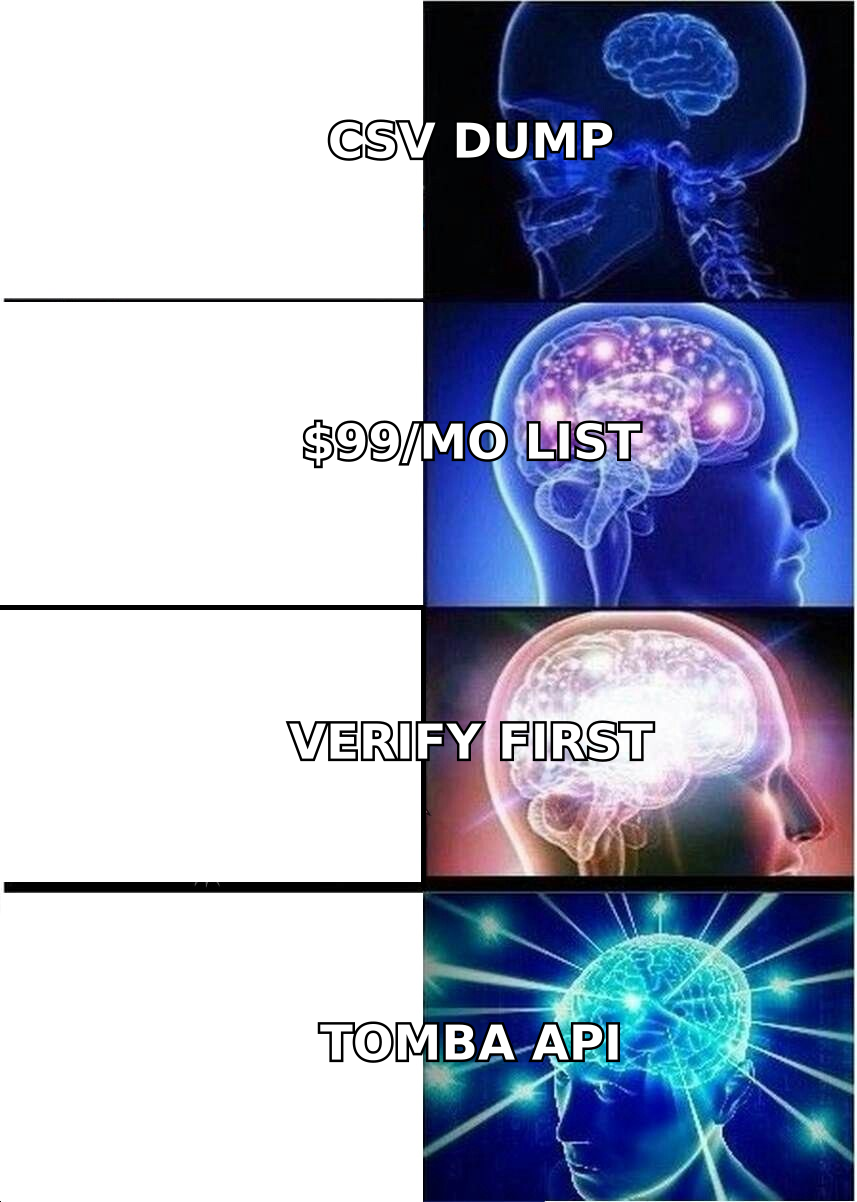
The verification tax. Compiled email data needs cleaning before it touches a sending domain. If you export 10,000 records and 30–40% of the emails are undeliverable or belong to people who left in 2023, you are paying a second time — in verification credits, in deliverability damage, or in rep hours.
What do Infofree reviews actually say?#
Public review profiles on G2 and Capterra are relatively thin for Infofree compared with the major sales-intelligence vendors, which is itself a signal — this is a long-tail SMB product, not an enterprise standard. Read enough of them and the same clusters appear.
What reviewers like:
- Price per record is unbeatable for anyone who needs breadth. Nobody else hands you unlimited local-business search for double digits per month.
- Territory and local prospecting work well. Filtering by radius, SIC code, and employee count to build a canvassing route is genuinely fast.
- It is simple. No onboarding project, no data-ops team, no seat negotiation.
- Phone data holds up better than email data — main business lines are usually correct even when the named contact is not.
What reviewers complain about:
- Stale contacts. The most common single complaint. Titles, direct dials, and especially email addresses lag reality.
- Email deliverability problems. Exports sent cold produce elevated bounce rates unless cleaned first.
- Billing and cancellation friction. Annual terms, auto-renewal, and support-mediated cancellation come up repeatedly.
- Dated interface. Functional, but it looks and moves like software from a previous decade.
- The CRM is a checkbox, not a product. Nobody is migrating off HubSpot or Pipedrive for CRM101.
The honest synthesis: Infofree delivers roughly what it promises at the price it charges. The disappointment reported in reviews mostly comes from buyers who expected a modern contact-data platform and got a compiled list vendor with a subscription wrapper.
What are the real pros and cons?#
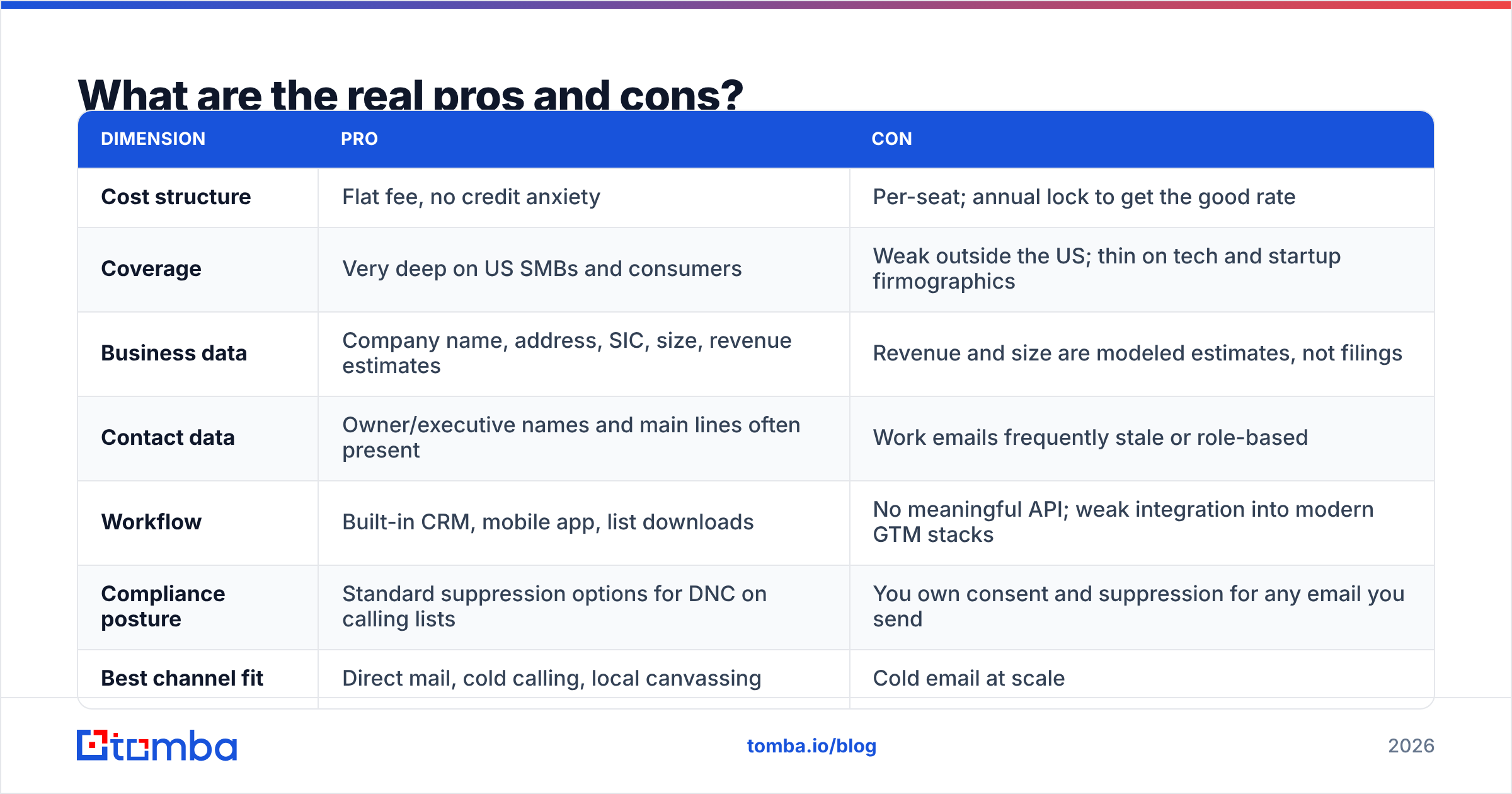
| Dimension | Pro | Con |
|---|---|---|
| Cost structure | Flat fee, no credit anxiety | Per-seat; annual lock to get the good rate |
| Coverage | Very deep on US SMBs and consumers | Weak outside the US; thin on tech and startup firmographics |
| Business data | Company name, address, SIC, size, revenue estimates | Revenue and size are modeled estimates, not filings |
| Contact data | Owner/executive names and main lines often present | Work emails frequently stale or role-based |
| Workflow | Built-in CRM, mobile app, list downloads | No meaningful API; weak integration into modern GTM stacks |
| Compliance posture | Standard suppression options for DNC on calling lists | You own consent and suppression for any email you send |
| Best channel fit | Direct mail, cold calling, local canvassing | Cold email at scale |
Is "unlimited leads" actually a good deal?#
It depends entirely on whether your bottleneck is quantity or accuracy. For most teams in 2026, it is accuracy.
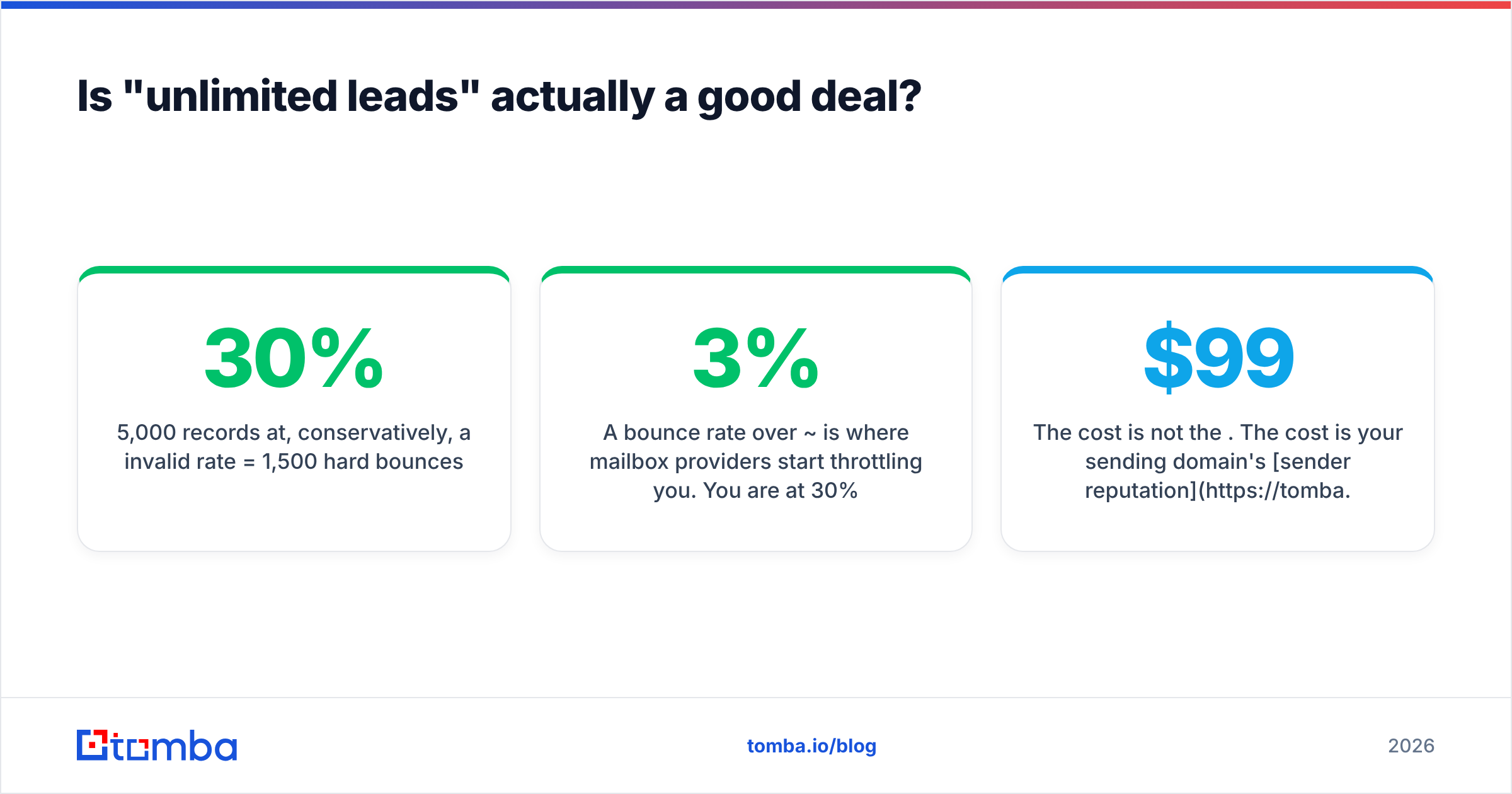
Run the math on a single campaign. Say you export 5,000 records from a flat-rate list subscription and send cold email without cleaning:
- 5,000 records at, conservatively, a 30% invalid rate = 1,500 hard bounces.
- A bounce rate over ~3% is where mailbox providers start throttling you. You are at 30%.
- The cost is not the $99. The cost is your sending domain's sender reputation, which takes weeks to rebuild and quietly suppresses every campaign you run in the meantime.
Now run it the other way. You identify 400 companies that actually match your ICP, find the specific decision-makers, verify each address before it enters a sequence, and send 400 emails that land. Fewer records, dramatically more meetings, and no reputation damage.
That is the core trade. Unlimited access to a compiled database solves a problem — "I don't know who exists in my territory" — that most B2B sellers no longer have. What they have instead is "I know exactly who I want and I can't reliably reach them."

How does Infofree compare to other B2B data options?#
Different tools solve different halves of the problem. Here is the honest positioning, including two vendors that do this better than a flat-rate list subscription for email-first teams.
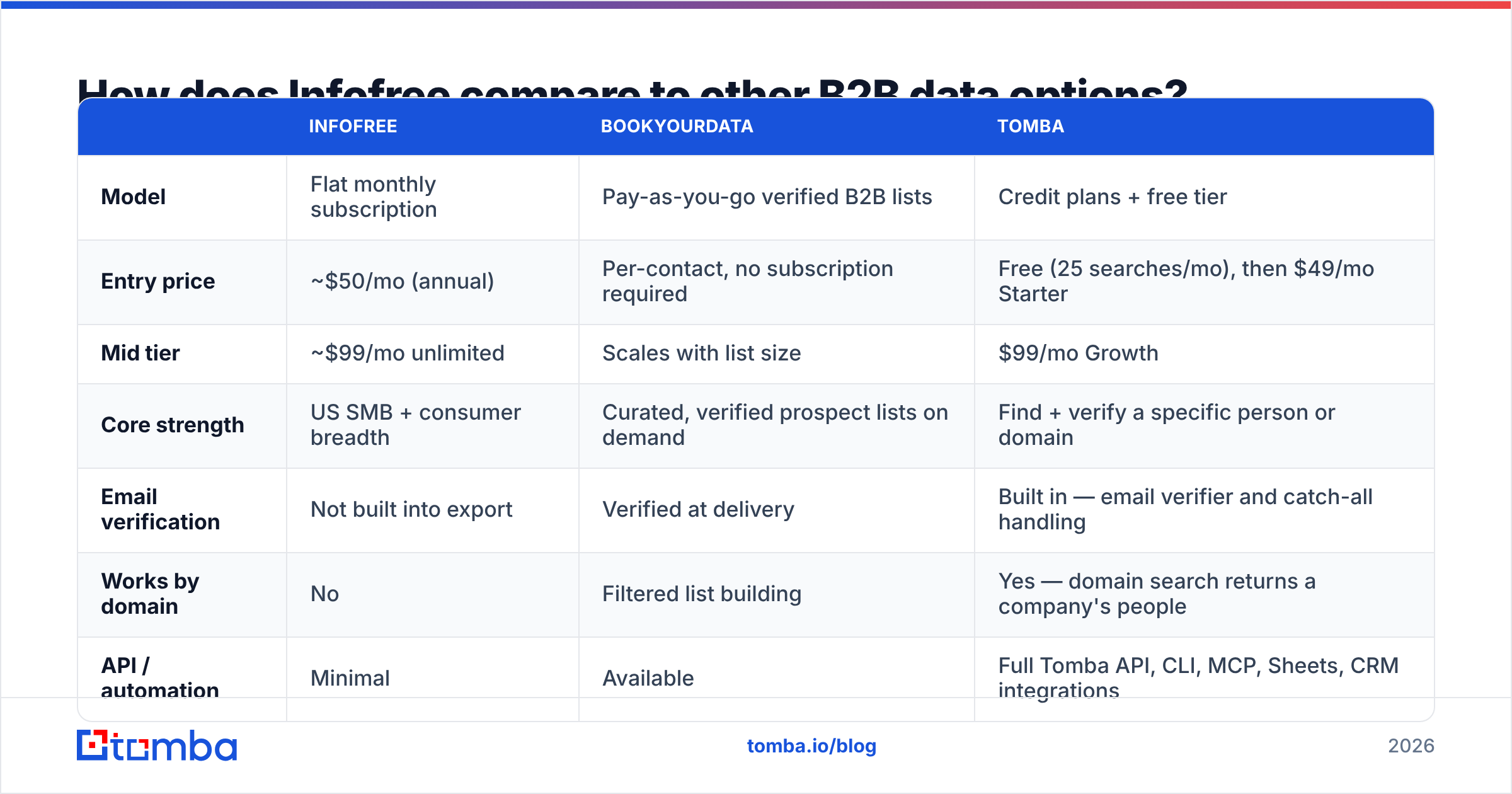
| Infofree | BookYourData | Tomba | |
|---|---|---|---|
| Model | Flat monthly subscription | Pay-as-you-go verified B2B lists | Credit plans + free tier |
| Entry price | ~$50/mo (annual) | Per-contact, no subscription required | Free (25 searches/mo), then $49/mo Starter |
| Mid tier | ~$99/mo unlimited | Scales with list size | $99/mo Growth |
| Core strength | US SMB + consumer breadth | Curated, verified prospect lists on demand | Find + verify a specific person or domain |
| Email verification | Not built into export | Verified at delivery | Built in — email verifier and catch-all handling |
| Works by domain | No | Filtered list building | Yes — domain search returns a company's people |
| API / automation | Minimal | Available | Full Tomba API, CLI, MCP, Sheets, CRM integrations |
| Geographic focus | US-heavy | Global B2B | Global |
| Best for | Direct mail, local calling | Buying a clean list without a subscription | Ongoing outbound where accuracy per contact matters |
BookYourData is a genuinely good fit if what you want is a clean, verified list handed to you without committing to a platform — it is a list product done properly, and the pay-as-you-go model means you are not carrying a subscription between campaigns.
Tomba sits in a different spot: it is built for teams who already know the accounts and need the specific humans, verified, on a repeatable basis. You search a domain, get the people and their patterns, verify before send, and push to your CRM. Tomba pricing starts free at 25 searches/month, with Starter at $49/month, Growth at $99/month, and Pro at $249/month — the same budget as one or two Infofree seats, aimed at a different failure mode.
Who should buy Infofree — and who should not?#
Buy it if:
- You run direct mail. Postal addresses on compiled databases age far more slowly than email addresses. This is Infofree's strongest use case.
- You cold call local SMBs. Main business lines and owner names are usually good enough to start a conversation.
- You need territory maps, not contact precision. Counting how many qualifying businesses sit in a ZIP code is exactly what a compiled database is for.
- You are a one-person operation where a single seat at a flat fee beats any per-credit model on pure volume.
Skip it if:
- Cold email is your primary channel. The bounce math does not work without a separate verification layer.
- You sell to tech, SaaS, or startups. Compiled SMB databases are weakest exactly where those companies live.
- You sell outside the US. Coverage drops sharply.
- You need automation. Without a real API, the data cannot flow into a modern enrichment pipeline — you are living in CSV exports.
- You need job-change signals or current titles. Compiled data is a snapshot, not a stream.
How do you cut wasted list spend regardless of vendor?#
Whatever you buy, these five habits protect the money:
- Verify before every send, not once at purchase. B2B email data decays roughly 2–3% per month through job changes alone. A list verified in January is measurably worse by April.
- Deduplicate and suppress first. Merge duplicates, strip existing customers, strip anyone who opted out. Do it before the list reaches your sequencer.
- Segment by confidence, not just by ICP. Send to verified-valid addresses on your primary domain; route catch-all and risky addresses to a separate warmed domain or a different channel.
- Enrich narrow, not wide. Pull 300 correct contacts rather than 10,000 approximate ones. Contact enrichment on a tight account list outperforms a mass export nearly every time.
- Measure cost per meeting, not cost per record. A $99 unlimited plan that produces one meeting is more expensive than a $249 plan that produces twelve.
What is the verdict on Infofree pricing?#
Infofree is fairly priced for what it is: broad, compiled, US-centric list data with a light CRM attached, at a flat fee that undercuts every credit-based platform on raw volume. If you are mailing postcards or dialing local businesses, it is a reasonable line item and the reviews reflect that.
If your pipeline runs on email, the flat fee is misleading. The subscription is cheap and the consequences are expensive — bounced sends, throttled domains, reps working lists that decayed a year ago. That is where the pros-and-cons ledger tips.
The practical move for most email-first teams is to stop buying access to everything and start paying for accuracy on the contacts that matter. Point Tomba Email Finder at the companies already in your ICP, get the decision-makers with verified addresses and confidence scores, and push them straight into your sequencer or CRM. Start on the free tier with 25 searches a month, confirm the hit rate against a list you already trust, and scale up only when the data has earned it.
Related guides#
// get started
Find, verify and enrich your first contacts today
Start on the free plan with 25 searches a month, then scale when your team is ready.
Free plan · No credit card required · GDPR & CCPA
// about the author