Infofree vs Salesbot: Which B2B Sales Tool Wins in 2026?
Infofree sells unlimited B2B lead lists. Salesbot automates conversations. They solve opposite halves of the same pipeline problem, and picking the wrong one costs you a quarter. Here is the honest breakdown.
TL;DR
- Infofree is a flat-rate B2B/B2C list database. You pay a monthly fee and pull business and consumer records by filter — industry, geography, headcount, SIC code — plus a light bundled CRM.
- Salesbot is the no-code conversational bot that ships inside the Kommo CRM. It answers inbound messages on WhatsApp, Instagram, and web chat, qualifies the lead, and moves the deal card down your pipeline.
- They are not really competitors. Infofree fills the top of the funnel with names. Salesbot handles the middle of the funnel with replies. Comparing them is comparing a quarry to a conveyor belt.
- Pick Infofree if you run high-volume outbound into SMB or local markets. Pick Salesbot if inbound messages are piling up and your reps answer in hours, not seconds.
- Neither one verifies deliverability at the contact level. That gap — bad emails, dead domains, bounced sends — is what actually torpedoes most campaigns, and it needs a third tool.
What are Infofree and Salesbot, exactly?#
Start here, because the name similarity fools people into thinking these are two versions of the same product. They are not.
Infofree is a business data subscription founded by Vin Gupta, the same person behind InfoUSA and Salesgenie. The pitch has been consistent for over a decade: unlimited sales leads for one flat monthly price. You log in, set filters (industry, revenue band, employee count, radius around a ZIP code), and export records. Plans typically bundle a basic CRM, business credit-style reports, and a mobile app for field reps knocking on doors.
Salesbot is a feature, not a standalone platform. It lives inside Kommo (the CRM formerly known as amoCRM) and lets you build branching chat flows with a visual editor. When a prospect messages your Instagram account at 11 p.m., Salesbot answers, asks three qualifying questions, books a call, and creates the deal in your pipeline. No human touches it until the lead is warm.
So one sells you raw contact volume. The other sells you response speed. Your bottleneck decides which one matters.
How do Infofree and Salesbot compare side by side?#
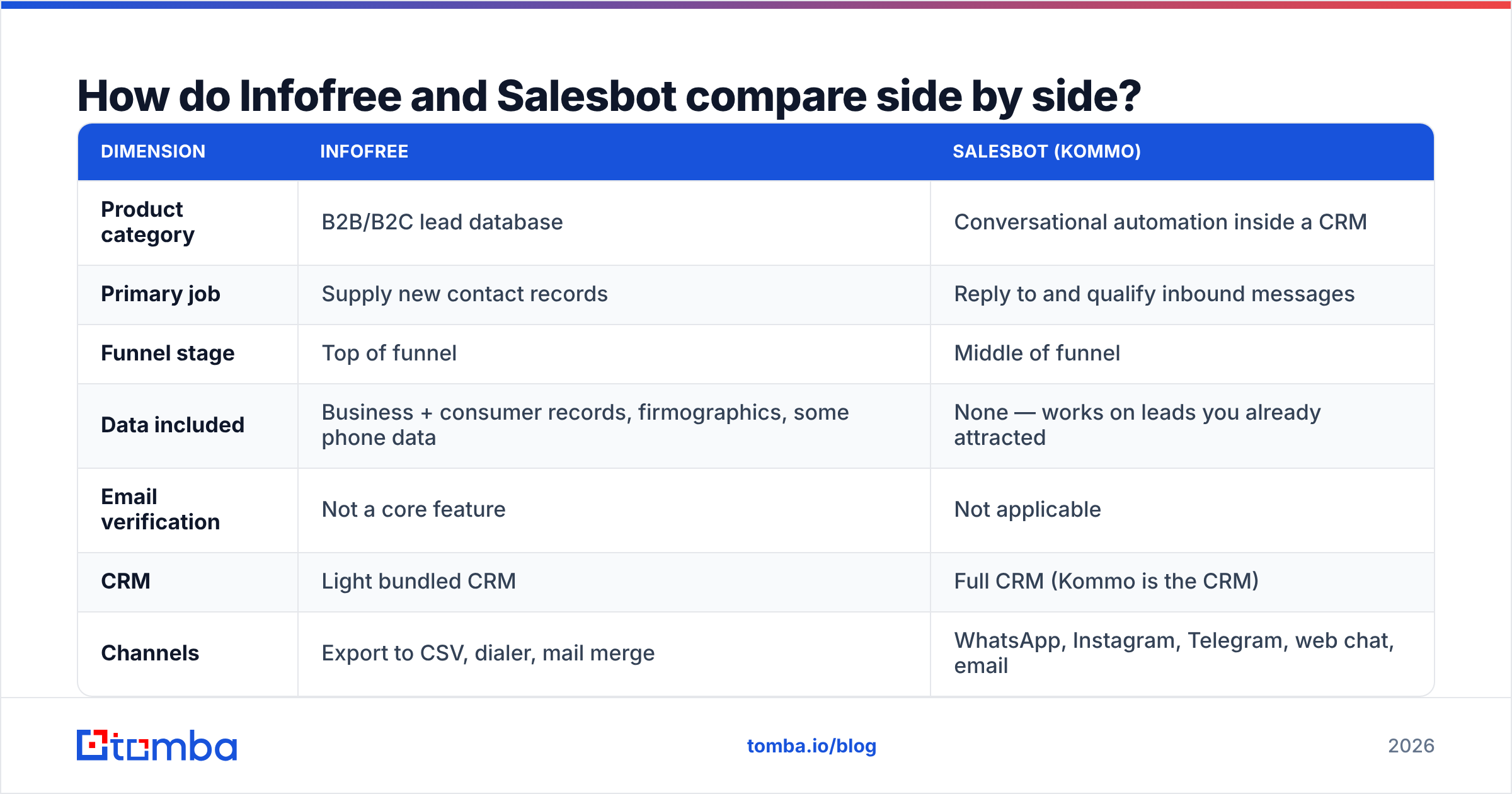
| Dimension | Infofree | Salesbot (Kommo) |
|---|---|---|
| Product category | B2B/B2C lead database | Conversational automation inside a CRM |
| Primary job | Supply new contact records | Reply to and qualify inbound messages |
| Funnel stage | Top of funnel | Middle of funnel |
| Data included | Business + consumer records, firmographics, some phone data | None — works on leads you already attracted |
| Email verification | Not a core feature | Not applicable |
| CRM | Light bundled CRM | Full CRM (Kommo is the CRM) |
| Channels | Export to CSV, dialer, mail merge | WhatsApp, Instagram, Telegram, web chat, email |
| Setup time | Minutes — filter and export | Hours to days — flows must be mapped |
| Best fit | Local services, insurance, SMB outbound, field sales | E-commerce, agencies, high-inbound DTC and service brands |
| Weak spot | Data freshness and email accuracy | Useless without existing inbound traffic |
If that table reads like an apples-to-bicycles comparison, good. That is the honest finding. The real question is not "which is better" but "which half of my funnel is actually broken."
What does Infofree actually do well — and where does it hurt?#
Infofree's strength is predictable cost. Most B2B data vendors charge per credit, which means a bad month of prospecting is also an expensive month. A flat-rate subscription flips that: your data cost stops scaling with your ambition. For a 10-rep insurance agency working a three-county radius, that model is genuinely hard to beat.
The filtering is also built for a specific kind of seller. SIC and NAICS codes, years in business, credit rating proxies, owner name, square footage of the location — this is field-sales and local-services ammunition, not enterprise SaaS ammunition. If your ICP is "HVAC companies with 5–20 employees within 40 miles of Tulsa," Infofree will produce that list faster than most modern GTM platforms.
Where it hurts:
Email quality is the recurring complaint. Compiled databases built from directories, public filings, and phone records are excellent at company-level facts and weak at individual inbox-level facts. Check the review pattern on G2 and elsewhere and you will see the same theme repeatedly: the company exists, the address is right, the email bounces. A B2B record can be 90% accurate on firmographics and still be useless for a cold email send.
Unlimited is a volume promise, not a quality promise. More records at a flat fee sounds like leverage until you realize that sending to 10,000 unverified addresses damages your sending domain far more than sending to 1,000 verified ones.
Contact-level depth is thin. You often get a business phone and a generic address rather than a named decision-maker with a direct line. That is fine for canvassing. It is not fine for a targeted named-account play.
What does Salesbot actually do well?#
Salesbot solves a measurable, unsexy problem: response latency. Inbound leads decay fast — the industry rule of thumb is that contacting a lead within five minutes dramatically outperforms contacting them an hour later, and most teams miss that window every single evening and weekend.
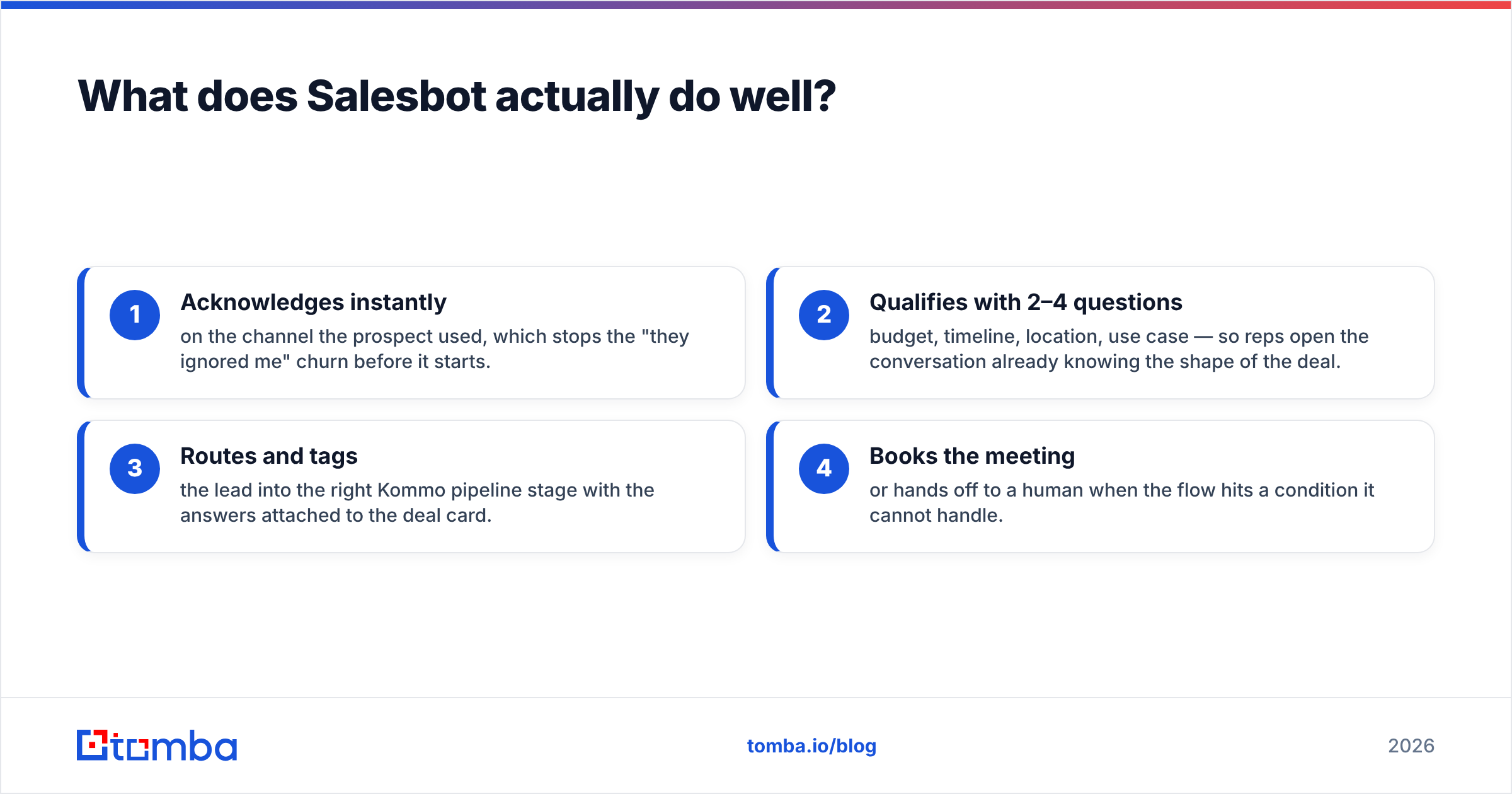
A well-built Salesbot flow does four things:
- Acknowledges instantly on the channel the prospect used, which stops the "they ignored me" churn before it starts.
- Qualifies with 2–4 questions — budget, timeline, location, use case — so reps open the conversation already knowing the shape of the deal.
- Routes and tags the lead into the right Kommo pipeline stage with the answers attached to the deal card.
- Books the meeting or hands off to a human when the flow hits a condition it cannot handle.
The catch is equally clear. Salesbot has zero ability to create demand. It is a multiplier on inbound volume you already have. If your website gets 200 visits a month and three chat opens, a chatbot is not your problem — pipeline is. And because it is bundled into Kommo, adopting Salesbot effectively means adopting Kommo as your CRM. That is a migration decision, not a tool purchase, and teams already standardized on HubSpot, Pipedrive, or Salesforce should price that switching cost honestly.
Which one fits your team?#
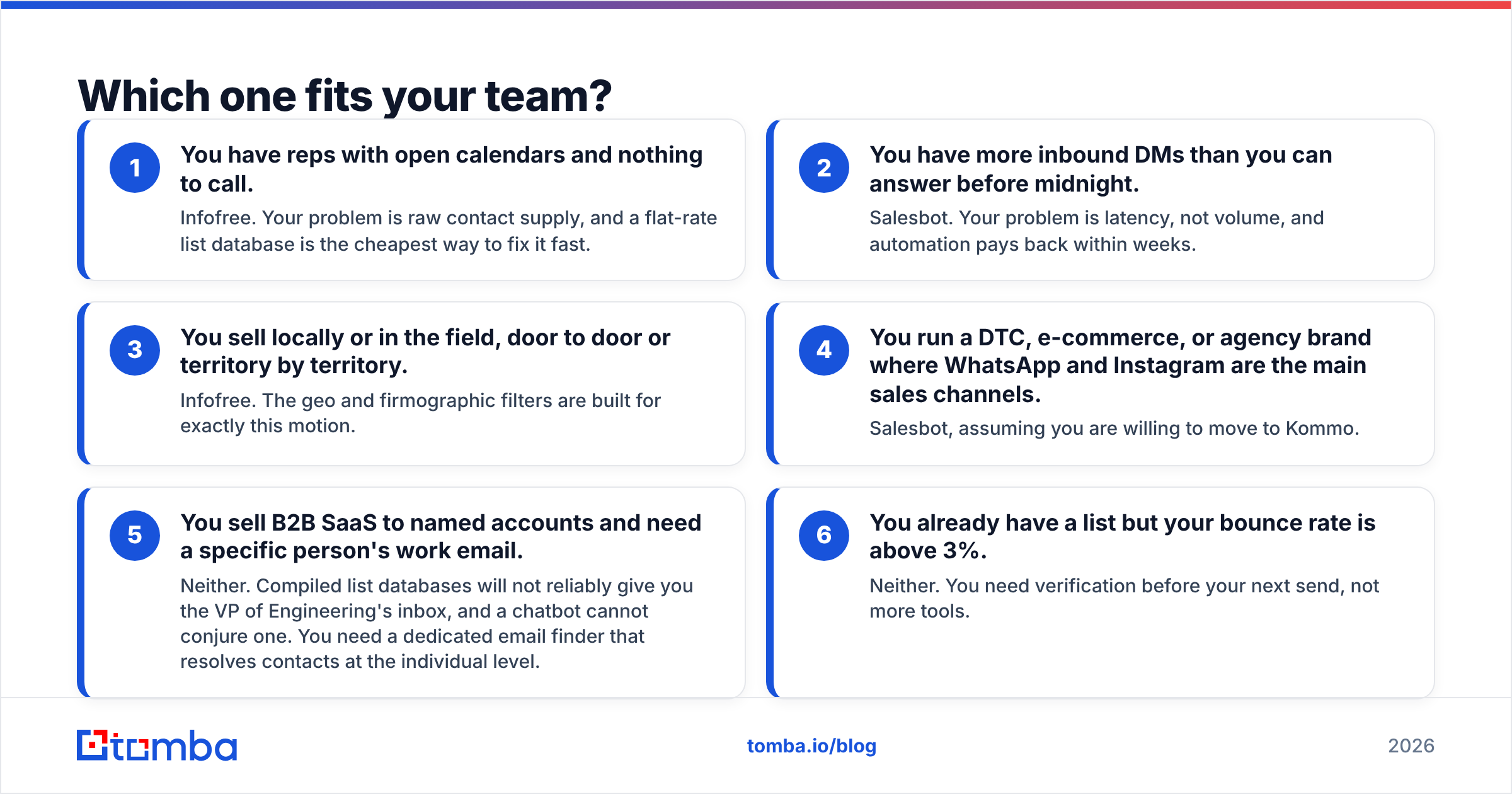
Run this list top to bottom and stop at the first line that describes you.
- You have reps with open calendars and nothing to call. Infofree. Your problem is raw contact supply, and a flat-rate list database is the cheapest way to fix it fast.
- You have more inbound DMs than you can answer before midnight. Salesbot. Your problem is latency, not volume, and automation pays back within weeks.
- You sell locally or in the field, door to door or territory by territory. Infofree. The geo and firmographic filters are built for exactly this motion.
- You run a DTC, e-commerce, or agency brand where WhatsApp and Instagram are the main sales channels. Salesbot, assuming you are willing to move to Kommo.
- You sell B2B SaaS to named accounts and need a specific person's work email. Neither. Compiled list databases will not reliably give you the VP of Engineering's inbox, and a chatbot cannot conjure one. You need a dedicated email finder that resolves contacts at the individual level.
- You already have a list but your bounce rate is above 3%. Neither. You need verification before your next send, not more tools.
What does neither Infofree nor Salesbot solve?#
Contact data decay. This is the quiet killer, and it sits underneath both products.
B2B contact records rot at roughly 25–30% per year. People change jobs, companies rebrand, domains migrate, and role-based addresses get retired. A record that was accurate when it entered a compiled database in 2023 has a coin-flip chance of being wrong today. Neither a flat-rate list subscription nor a chat automation layer does anything about that, because neither one is in the business of validating individual mailboxes.
The consequence shows up on your side of the ledger:
- Bounce rates above 3–5% start degrading sender reputation, and Google and Microsoft both tightened bulk-sender enforcement in the last two years.
- Spam-trap hits from recycled addresses on old compiled lists can blacklist a sending domain outright.
- Reps burn calendar time on dead numbers and unmonitored inboxes, and your cost per meeting quietly doubles.
The fix is boring and it works: never send to a record you have not verified, and enrich records at the point of use rather than trusting the date they were compiled. An email verifier that checks syntax, domain, MX, and mailbox status — plus catch-all handling — turns a 10,000-row raw export into a 6,000-row list you can actually send to without setting fire to your domain.

How much do they really cost in 2026?#
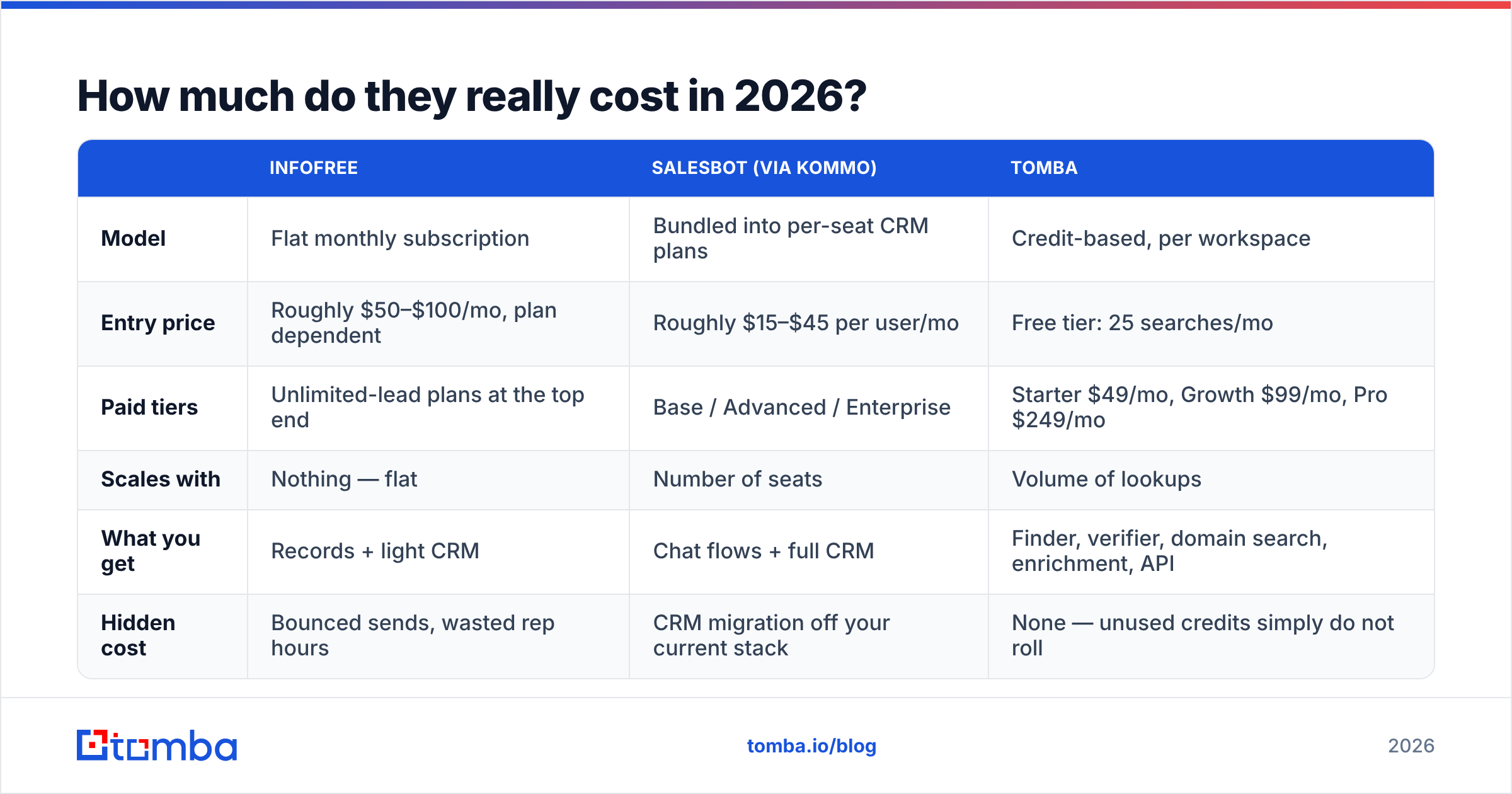
Treat all published pricing as a starting point and confirm on the vendor site — both companies have changed packaging more than once.
| Infofree | Salesbot (via Kommo) | Tomba | |
|---|---|---|---|
| Model | Flat monthly subscription | Bundled into per-seat CRM plans | Credit-based, per workspace |
| Entry price | Roughly $50–$100/mo, plan dependent | Roughly $15–$45 per user/mo | Free tier: 25 searches/mo |
| Paid tiers | Unlimited-lead plans at the top end | Base / Advanced / Enterprise | Starter $49/mo, Growth $99/mo, Pro $249/mo |
| Scales with | Nothing — flat | Number of seats | Volume of lookups |
| What you get | Records + light CRM | Chat flows + full CRM | Finder, verifier, domain search, enrichment, API |
| Hidden cost | Bounced sends, wasted rep hours | CRM migration off your current stack | None — unused credits simply do not roll |
The pattern worth noticing: Infofree's flat fee looks cheapest per record, and that is true right up until you count deliverability damage. Kommo's per-seat price looks cheapest at two users and gets expensive at twenty. See Tomba pricing for the third model — you pay for the lookups you actually run, and verification is included rather than sold as a separate product.
What does a better 2026 stack look like?#
Stop thinking about it as Infofree versus Salesbot and start thinking in layers. Most teams that actually hit number run three:
Layer 1 — Supply. Something that produces net-new target accounts and named contacts. A compiled database like Infofree works for local and SMB motions. A B2B database with contact-level resolution works better for named-account B2B, because you need the person, not just the business.
Layer 2 — Validation. Every record passes through verification before it enters a sequence or a dialer. This is non-negotiable in 2026 given how aggressive inbox providers have become about bulk senders. Verification plus data enrichment at the point of import is the single highest-ROI step in the whole chain, and it is the one most teams skip.
Layer 3 — Response. Whatever handles the conversation once it starts, whether that is a sequencer, a human SDR, or a bot like Salesbot catching inbound after hours.
Infofree covers layer 1 partially. Salesbot covers layer 3 partially. Neither touches layer 2, which is precisely where most outbound programs bleed out. If you buy only one new tool this quarter and your bounce rate is above 3%, buy the validation layer first — it makes everything upstream and downstream worth more.
So which one wins?#
Verdict: there is no single winner, because they are not in the same race. If forced to pick one for a generic B2B team, Infofree wins on raw utility — you cannot automate replies to conversations that never start, and a database at least creates the possibility of pipeline. But Infofree only wins if you pair it with verification. Unverified, it is a liability dressed as a bargain.
If your inbound channels are already busy and your CRM decision is still open, Salesbot inside Kommo is a legitimately strong answer to a real problem, and the per-seat price is reasonable for small teams.
The uncomfortable middle case — B2B sellers chasing specific decision-makers at specific companies — is served well by neither, and that is the most common case of all.
Ready to fix the layer both tools skip?#
If your list is the problem, start at the contact level rather than the company level. Tomba Email Finder resolves professional email addresses from a name and domain, scores each result with a confidence level, and runs verification in the same pass — so what lands in your sequencer is a list you can actually send to. Start on the free tier with 25 searches a month, test it against a sample of whatever list you are using today, and compare the bounce rates before you renew anything.
Related guides#
// get started
Find, verify and enrich your first contacts today
Start on the free plan with 25 searches a month, then scale when your team is ready.
Free plan · No credit card required · GDPR & CCPA
// about the author