Interactive Product Demos in 2026: The No-Fluff Guide
Interactive product demos went from nice-to-have to standard B2B buying furniture. Here is what they actually cost, which platform fits your motion, and the metrics that prove whether yours is working.
TL;DR
- An interactive product demo is a clickable, self-serve replica of your product that a buyer can explore without booking a call, without a trial account, and without a sales rep narrating screenshots.
- The category splits into three jobs: top-of-funnel tours (website, ads, outbound), leave-behinds (sent after a live call), and sandbox environments (deep hands-on evaluation). Most teams buy one tool and try to make it do all three. That is the main failure mode.
- Entry pricing runs from free (Arcade, Supademo, Navattic's free tier) to roughly $500/month for growth plans, to five-figure annual contracts for sandbox platforms like Reprise and Demostack.
- The metric that matters is not views. It is demo-to-opportunity rate and time-to-second-meeting. If a demo gets 4,000 plays and no meetings, it is a marketing asset, not a sales asset.
- Interactive demos amplify distribution; they do not create it. A demo embedded in a cold email only works if the email reaches a real, verified inbox belonging to someone who owns the problem.
What is an interactive product demo?#
An interactive product demo is a recorded-but-clickable version of your software. A tool captures your real UI — DOM snapshots or screenshots — and stitches the screens into a guided path with tooltips, hotspots, and branching. The buyer clicks through at their own pace. Nothing hits your production database.
Think of it like a model apartment. The developer does not hand you keys to a random unit and hope it is clean. They stage one unit, put furniture in the right rooms, and let you walk through unsupervised. You get the feeling of living there without anyone needing to be present, and the developer controls exactly what you see.
Technically, that is the distinction that matters:
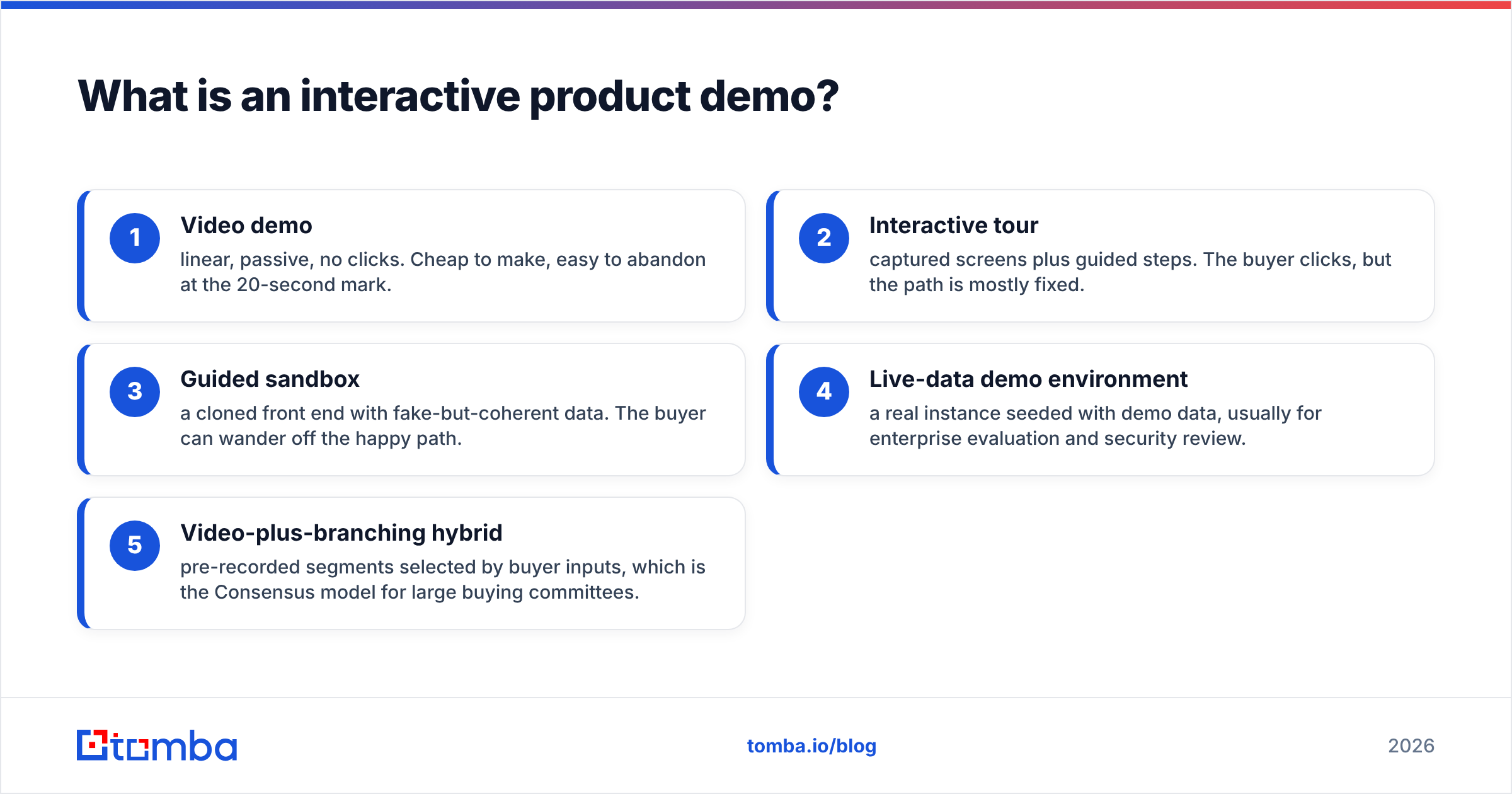
- Video demo — linear, passive, no clicks. Cheap to make, easy to abandon at the 20-second mark.
- Interactive tour — captured screens plus guided steps. The buyer clicks, but the path is mostly fixed.
- Guided sandbox — a cloned front end with fake-but-coherent data. The buyer can wander off the happy path.
- Live-data demo environment — a real instance seeded with demo data, usually for enterprise evaluation and security review.
- Video-plus-branching hybrid — pre-recorded segments selected by buyer inputs, which is the Consensus model for large buying committees.
Most of what people mean by "interactive product demos" is #2 and #3.
Why did interactive demos become standard?#
Because buyers stopped wanting the gatekeeper call. Gartner's B2B buying research has shown for years that buyers spend only a small fraction of their evaluation time with any single supplier's sales team — most of the process happens independently, in tabs you never see.
Four forces pushed this from experiment to default:
- Buying committees grew. A single champion now has to resell your product internally to five to ten people. A live call with one person does not travel. A shareable link does.
- PLG normalized self-serve. Once buyers got used to trying software before talking to anyone, "book a demo" started reading as friction, not as service.
- Sales headcount got expensive. A demo that qualifies buyers before an AE joins is cheaper than an AE running twelve discovery calls to find two real deals.
- Capture tooling got good. Five years ago, building a clickable demo meant an engineer and two weeks. Now a PMM can ship one in an afternoon.
What are the main types of interactive demos, and when should you use each?#
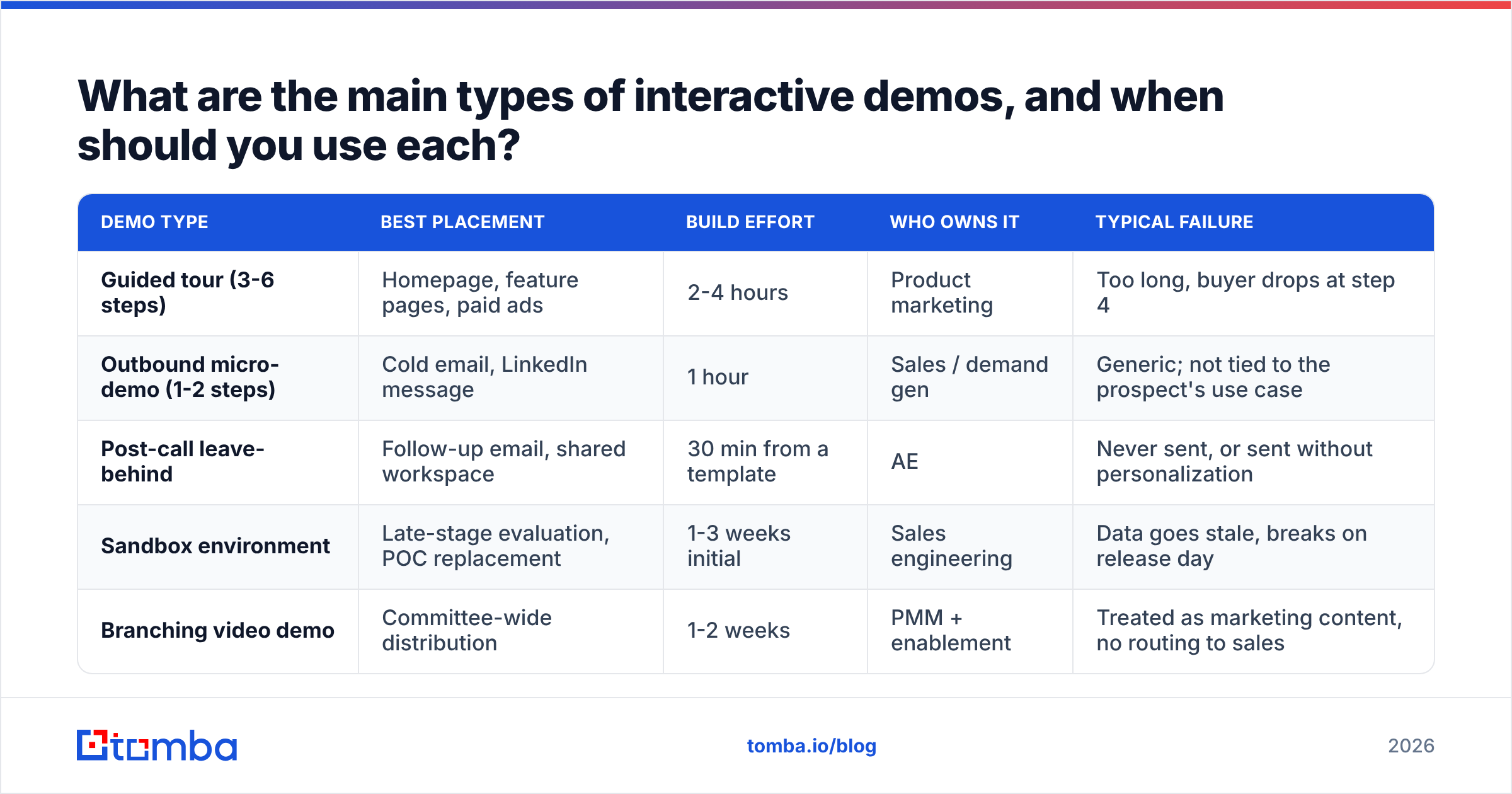
| Demo type | Best placement | Build effort | Who owns it | Typical failure |
|---|---|---|---|---|
| Guided tour (3-6 steps) | Homepage, feature pages, paid ads | 2-4 hours | Product marketing | Too long, buyer drops at step 4 |
| Outbound micro-demo (1-2 steps) | Cold email, LinkedIn message | 1 hour | Sales / demand gen | Generic; not tied to the prospect's use case |
| Post-call leave-behind | Follow-up email, shared workspace | 30 min from a template | AE | Never sent, or sent without personalization |
| Sandbox environment | Late-stage evaluation, POC replacement | 1-3 weeks initial | Sales engineering | Data goes stale, breaks on release day |
| Branching video demo | Committee-wide distribution | 1-2 weeks | PMM + enablement | Treated as marketing content, no routing to sales |
The rule of thumb: the earlier in the funnel, the shorter the demo. A homepage tour that runs eleven steps has a completion rate somewhere near zero. A late-stage sandbox that only allows three clicks insults a technical evaluator. Match depth to intent.
Which interactive demo platform should you pick?#
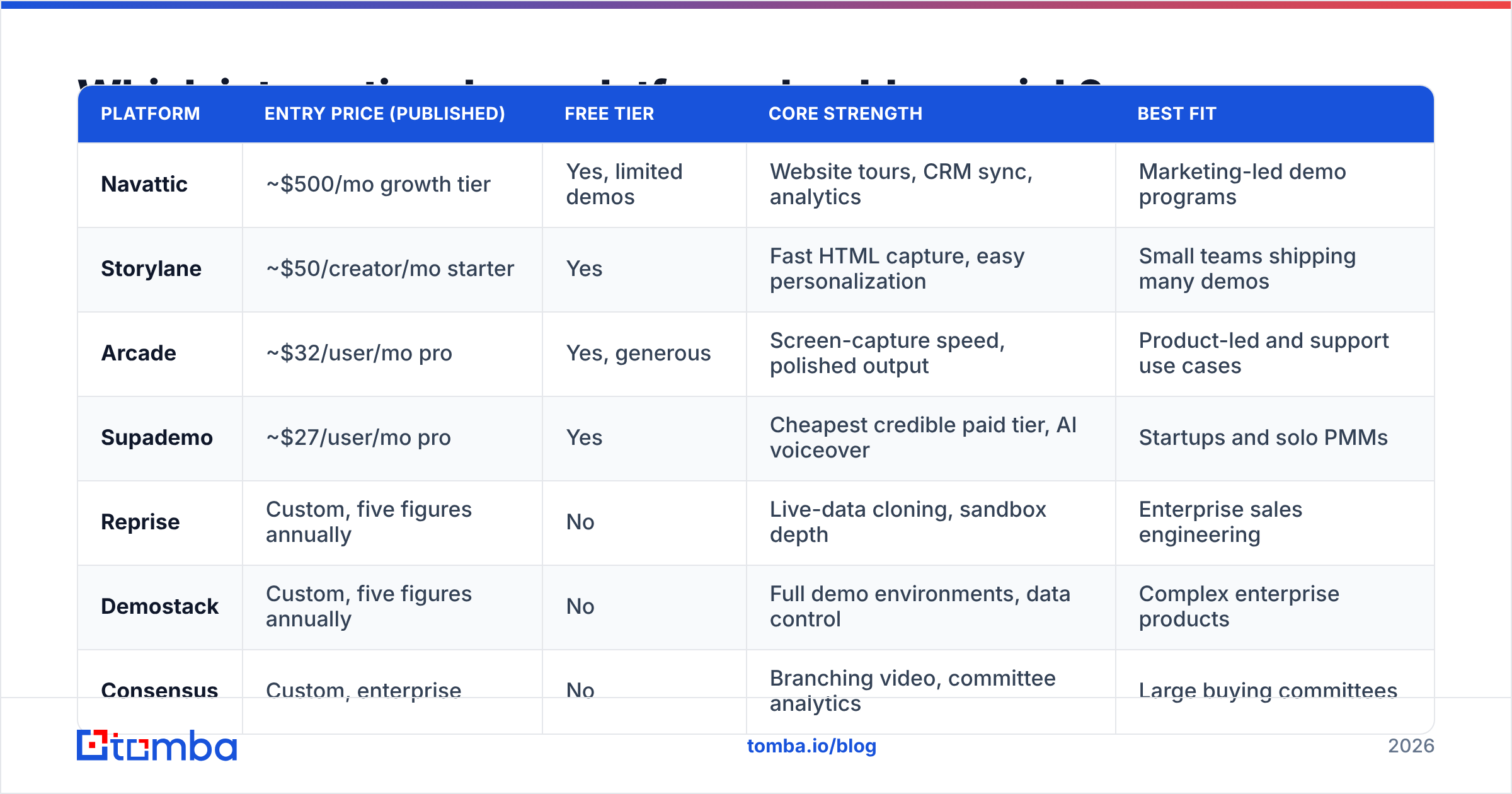
Pricing in this category moves constantly and most vendors gate higher tiers behind a call. Treat the table below as a shape-of-market guide and confirm current numbers on each vendor's own pricing page before you budget.
| Platform | Entry price (published) | Free tier | Core strength | Best fit |
|---|---|---|---|---|
| Navattic | ~$500/mo growth tier | Yes, limited demos | Website tours, CRM sync, analytics | Marketing-led demo programs |
| Storylane | ~$50/creator/mo starter | Yes | Fast HTML capture, easy personalization | Small teams shipping many demos |
| Arcade | ~$32/user/mo pro | Yes, generous | Screen-capture speed, polished output | Product-led and support use cases |
| Supademo | ~$27/user/mo pro | Yes | Cheapest credible paid tier, AI voiceover | Startups and solo PMMs |
| Reprise | Custom, five figures annually | No | Live-data cloning, sandbox depth | Enterprise sales engineering |
| Demostack | Custom, five figures annually | No | Full demo environments, data control | Complex enterprise products |
| Consensus | Custom, enterprise | No | Branching video, committee analytics | Large buying committees |
| Walnut | Custom, mid-to-high | Trial only | Sales-team personalization at scale | Enterprise AE-led motions |
Cross-check with buyer reviews on G2's demo automation category before you shortlist. The gap between demo-day impressions and month-three maintenance pain is where most of the real signal lives, and review text surfaces it faster than vendor decks do.
Two practical selection notes. First, capture method decides your maintenance cost. Screenshot-based tools break visibly when your UI ships a redesign; DOM-capture tools survive small changes but choke on heavy canvas or WebGL interfaces. Second, check CRM write-back on the plan you can actually afford. Several vendors put HubSpot and Salesforce sync one tier above where a startup lands, which means your demo analytics live in a dashboard nobody opens.
What does an interactive demo really cost?#
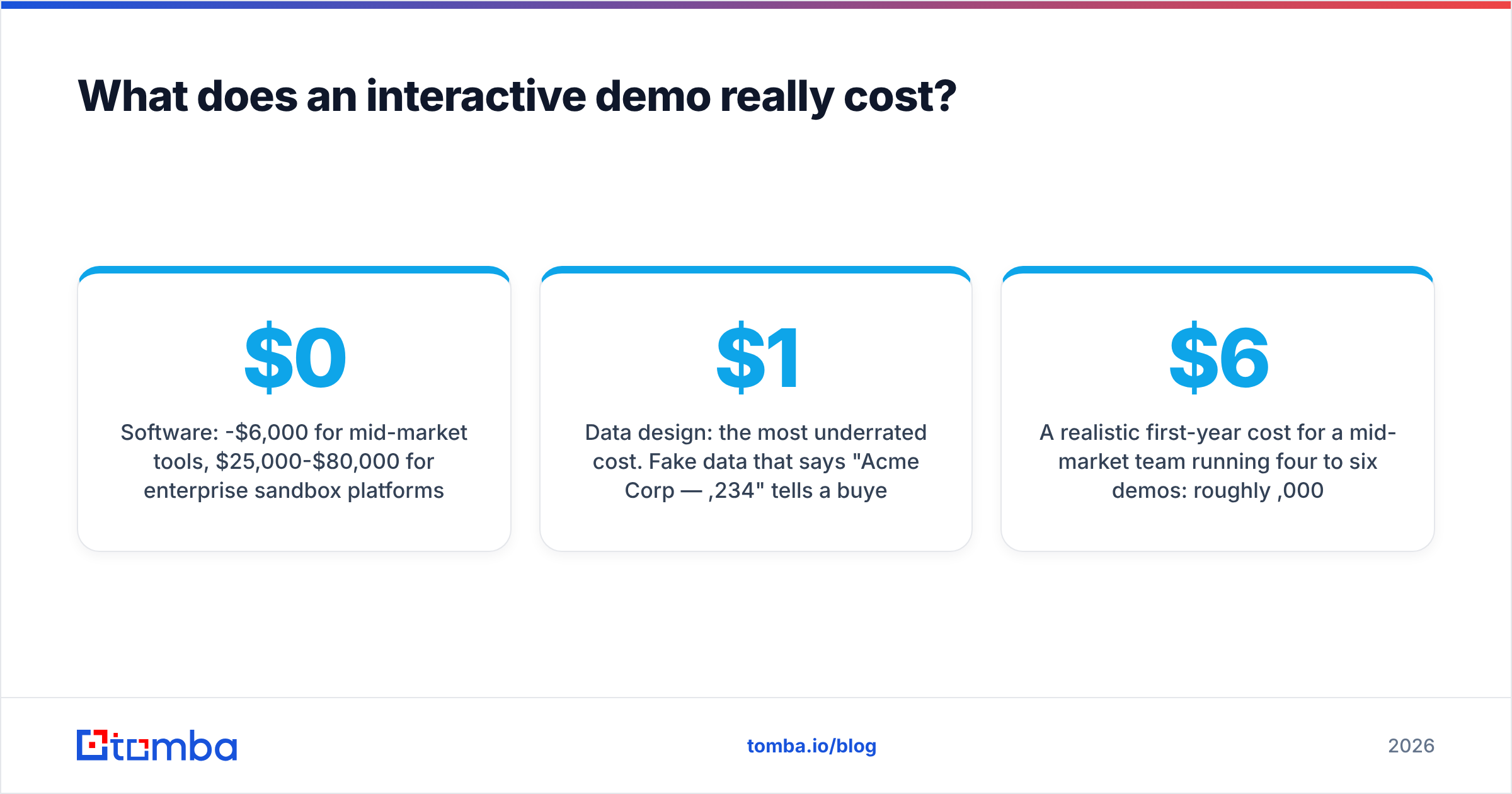
The license is the small number. Budget the whole line:
- Software: $0-$6,000/year for mid-market tools, $25,000-$80,000/year for enterprise sandbox platforms.
- Initial build: 10-30 hours for your first serious demo, including scripting, data seeding, and internal review. That is real PMM time.
- Data design: the most underrated cost. Fake data that says "Acme Corp — $1,234" tells a buyer nothing. Coherent demo data that models a plausible customer takes a day to design and pays back forever.
- Maintenance: 2-6 hours per month per demo if your product ships weekly. Multiply that by the number of demos you publish. Ten demos with no owner become ten pieces of visible, embarrassing rot.
- Enablement: an hour of training plus a template library, or your AEs will keep sending the generic company tour.
A realistic first-year cost for a mid-market team running four to six demos: roughly $6,000 in software plus 120-180 hours of internal time. That should clear the bar easily if the program influences even a handful of deals — but only if you measure it.
Do interactive product demos actually move pipeline?#
Sometimes. They reliably move three things:
- Demo-to-opportunity rate. When a buyer has already clicked through the core workflow, the first call skips the tour and starts at "here is my situation."
- Speed through the committee. A link forwards. A calendar invite for six people does not.
- Disqualification speed. People who bounce at step two were never buying. Finding that out in 40 seconds instead of 40 minutes is the quiet, underrated ROI.
What they do not fix: a weak ICP, a vague value proposition, or a distribution problem. If nobody sees your demo, the demo is not the variable.
Instrument it properly. Track, at minimum: completion rate by step (where do people quit?), demos-per-opportunity, time from first demo view to booked meeting, and forward rate. Then compare a cohort of deals that touched a demo against a matched cohort that did not. Do not compare against your all-time average — self-selection will flatter the demo every time.
How do you ship your first interactive demo in a week?#
- Pick one job to be done. Not "our product," not "everything." Pick the single workflow that makes a prospect say "oh, that's the part I hate doing manually."
- Write the script before you capture. Six steps maximum, one sentence of tooltip copy per step, and a clear end state that shows the outcome — not the settings page.
- Seed believable data. Use real-sounding company names, sensible numbers, dates in the current quarter. Buyers notice lorem ipsum instantly and stop trusting everything after it.
- Capture and trim. Remove every loading state, every modal that does not advance the story, and every step that exists only because the UI requires it.
- Add one branch, not five. Let the buyer choose a persona or use case at the start. That single fork lifts relevance more than four extra linear steps.
- Wire the ending to an action. Book a meeting, start a trial, or request pricing. A demo that ends on a "Thanks for watching" screen has thrown away its best moment.
Then publish it in three places at once: your highest-traffic feature page, your AE follow-up template, and your outbound sequence. Same asset, three distribution channels, three different measurable outcomes.
How do interactive demos fit into outbound?#
This is where most demo programs stall. The asset is good, the traffic is not.
A demo link in a cold email does three useful things: it replaces the ask ("hop on a 30-minute call") with an offer ("here are 60 seconds of the thing"), it gives you a click signal stronger than an open, and it survives forwarding inside the account. But every one of those depends on the email landing in a real inbox.
That is a data problem, not a demo problem. Before you attach a demo link to a sequence:
- Build the list from the accounts that look like your best closed-won deals, not from whoever a scraper surfaced. Firmographic and technographic data enrichment on your existing customer base tells you what "looks like" actually means.
- Find the right individual contacts with an email finder rather than guessing at patterns — a demo sent to info@ is a demo nobody watches.
- Run the list through an email verifier before send. Bounces do not just waste a demo view; they damage the sending domain that carries every future demo link.
- Segment by persona so the demo variant matches the recipient. An ops manager and a VP of finance should not land on the same first screen.
Then judge the sequence on response rate and meetings booked, not on demo plays. Plays are a vanity number when the list quality is unknown.
Where do interactive demos fail?#
Four patterns, all avoidable:
They get too long. Enthusiasm about the product turns a six-step tour into a fourteen-step tour. Completion falls off a cliff after roughly step seven in most programs. Cut ruthlessly.
Nobody owns maintenance. A demo built for a launch quietly diverges from the shipping product. Three months later a prospect sees a screen that no longer exists, and now your credibility is the thing being demoed. Assign an owner and a quarterly review date on day one.
They replace discovery instead of accelerating it. A demo cannot ask about budget, timeline, or the internal politics blocking the deal. Teams that treat the demo as the whole qualification step end up with a pipeline full of curious tourists.
They are measured as content. If your demo analytics live only in the marketing dashboard, sales never acts on the signal. Push demo events into the CRM and route high-engagement views to a rep the same day.
Are interactive product demos worth it in 2026?#
Yes, for most B2B software companies — with one condition. If your product's value is visible on screen, an interactive demo is one of the highest-leverage assets you can build, because it compresses the explaining phase of every deal and travels through a buying committee without you. If your value is invisible (deep infrastructure, services, heavily custom implementations), a demo will not carry the story and a sandbox or a technical workshop serves you better.
Start cheap. Ship one demo on a free or entry tier, distribute it three ways, and measure demo-to-opportunity for a quarter. If the number moves, upgrade to a tier with CRM sync and personalization. If it does not move, the problem is upstream — your targeting, your positioning, or your list — and no platform upgrade will fix it.
Which brings it back to distribution. The best demo in your category is worth nothing to a prospect who never receives it. If you are attaching demo links to outbound, start by making sure the contact data underneath is real: use Tomba's Email Finder to get verified, deliverable addresses for the exact people in your target accounts, with a free tier of 25 searches a month to test the list quality before you commit. Paid plans start at $49/month, and you can see the full breakdown on the Tomba pricing page. Build the demo once, then send it to inboxes that actually exist.
Related guides#
// get started
Find, verify and enrich your first contacts today
Start on the free plan with 25 searches a month, then scale when your team is ready.
Free plan · No credit card required · GDPR & CCPA
// about the author