Internal Sales Process: How to Build One That Reps Follow
Most internal sales processes die in a Google Doc nobody opens. Here's how to design stages, exit criteria, and data rules your reps actually use — with a framework you can ship in a week.
TL;DR
- An internal sales process is the documented, repeatable sequence your team runs from lead creation to closed-won — not a pipeline picture in your CRM.
- Stages fail when they describe what the rep did ("Contacted") instead of what the buyer did ("Confirmed budget owner and timeline"). Buyer-verified exit criteria are the single highest-leverage fix.
- Bad contact data corrupts every downstream metric. If 30% of your prospecting emails bounce, your "connect rate" is measuring your data vendor, not your reps.
- Four artifacts make a process real: a stage definition table, exit criteria, required fields per stage, and a handoff checklist. Everything else is decoration.
- Budget 6-10 weeks from first draft to adoption. Processes that launch in a single all-hands meeting get abandoned by week three.
What is an internal sales process, exactly?#
An internal sales process is the documented, enforceable sequence of stages, actions, and decision gates your sales team follows to move a lead from first touch to signed contract — plus the data rules and handoff points that keep it honest.
Think of it like a commercial kitchen. Anyone can cook a good meal once. A kitchen that serves 300 covers a night without variance needs stations, ticket rails, and a rule for exactly when a plate is allowed to leave the pass. Your sales process is the ticket rail. Reps are the line cooks. The exit criteria are the expo who refuses to let an undercooked deal go out.
Most teams confuse three things that are not the same:
- A sales methodology — MEDDIC, Challenger, SPIN. This is how you sell, a philosophy of questions and qualification.
- A sales pipeline — the visual stages in your CRM. This is where a deal sits.
- An internal sales process — the operating manual that says what must be true to enter each stage, who owns the deal, what data must exist, and what happens when it stalls.
You can have a methodology and a pipeline and still have no process. That's the default state of most teams under 50 reps, and it's why forecast accuracy collapses the moment your best rep goes on holiday.
Why do most internal sales processes get ignored?#
Because they were written to make a VP feel organized, not to make a rep's Tuesday easier.
Here's the pattern. Someone builds a 14-page process doc. It goes into Notion. It gets presented once. Reps skim it, keep doing what they were doing, and the doc becomes archaeology. Six months later a new VP arrives and writes a new 14-page doc.
The concrete failure modes, in the order they show up:
- Rep-activity stages. Stages named "Contacted," "Following Up," and "Nurturing" describe rep effort, not buyer progress. A deal can sit in "Following Up" for nine months and nobody is technically wrong.
- No exit criteria. If moving a deal from Stage 2 to Stage 3 requires nothing but a dropdown click, your pipeline is fiction and so is your forecast.
- Too many required fields. Ask for 22 fields at Discovery and reps will type "n/a" 22 times. Data hygiene rules must be short enough to be obeyed.
- Silent handoffs. SDR to AE, AE to CS, AE to solutions engineer. Every undefined handoff is a place where context evaporates and the buyer has to repeat themselves.
- Garbage inputs. This is the one nobody puts in the doc. If your prospecting data is 60% accurate, your top-of-funnel metrics measure your data source, not your process. Fixing the process without fixing the data is like tuning an engine while pouring sand in the tank.
Gartner's research on B2B buying consistently shows buyers spend only about 17% of their purchase journey with sales reps across all vendors under consideration (gartner.com). Your process has to earn its influence inside a very thin slice of the buyer's attention. A process that generates internal admin instead of buyer clarity is spending that slice on yourself.
What are the core stages of a working internal sales process?#
Six stages is the sweet spot for most B2B teams. Fewer than five and you lose forecast granularity; more than seven and reps stop distinguishing between them.
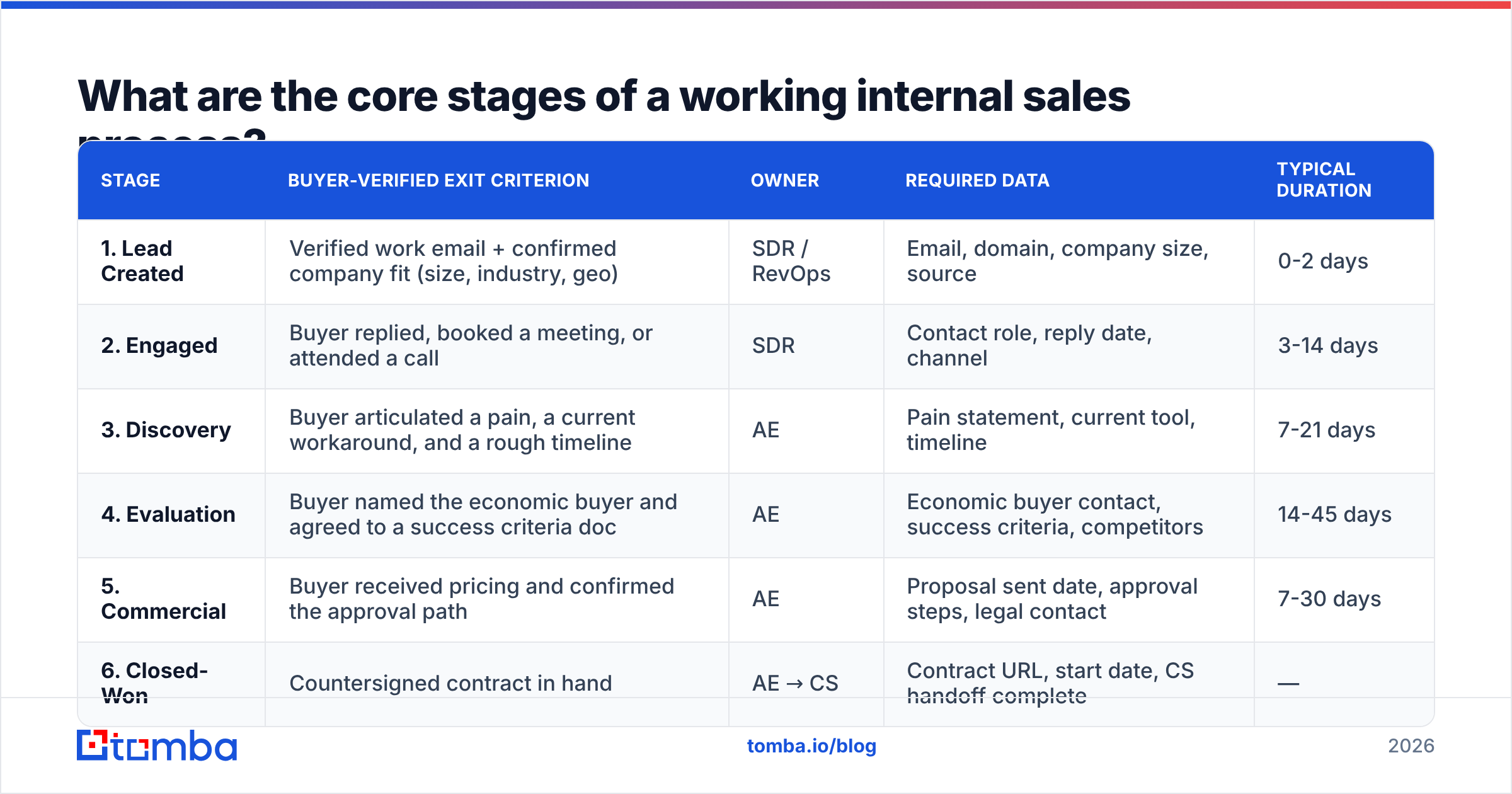
The critical design rule: every stage exit criterion must be something the buyer did or said, verifiable by someone who wasn't on the call.
| Stage | Buyer-verified exit criterion | Owner | Required data | Typical duration |
|---|---|---|---|---|
| 1. Lead Created | Verified work email + confirmed company fit (size, industry, geo) | SDR / RevOps | Email, domain, company size, source | 0-2 days |
| 2. Engaged | Buyer replied, booked a meeting, or attended a call | SDR | Contact role, reply date, channel | 3-14 days |
| 3. Discovery | Buyer articulated a pain, a current workaround, and a rough timeline | AE | Pain statement, current tool, timeline | 7-21 days |
| 4. Evaluation | Buyer named the economic buyer and agreed to a success criteria doc | AE | Economic buyer contact, success criteria, competitors | 14-45 days |
| 5. Commercial | Buyer received pricing and confirmed the approval path | AE | Proposal sent date, approval steps, legal contact | 7-30 days |
| 6. Closed-Won | Countersigned contract in hand | AE → CS | Contract URL, start date, CS handoff complete | — |
Notice what's absent: no "Qualified" stage. "Qualified" is a judgment, not an event. Replace every judgment stage with an observable buyer behavior and your pipeline reviews shrink from 90 minutes of debate to 20 minutes of fact-checking.
The four artifacts that make it real#
A process exists only if these four documents exist and are linked from inside your CRM:
- Stage definition table — the table above, one row per stage, visible without leaving the deal record.
- Exit criteria checklist — a per-stage checklist the AE ticks. Three items maximum per stage. If you can't get it to three, the stage is doing too much.
- Required-fields map — which CRM fields become mandatory at which stage. Front-load contact data; back-load commercial data.
- Handoff checklist — SDR→AE and AE→CS. What must be written down, what must be said live, and the SLA for the receiving side to act.
Add a fifth if you have more than 15 reps: a stall rule. Any deal exceeding 1.5× the median stage duration gets auto-flagged for a decision — advance, downgrade, or close-lost. Ambiguity is the most expensive thing in a pipeline because it consumes rep hours and inflates the forecast simultaneously.
How does contact data quality break the whole process?#
Every stage downstream of Lead Created inherits the accuracy of the data that entered at Lead Created. This is the least discussed failure point in sales process design and usually the largest.
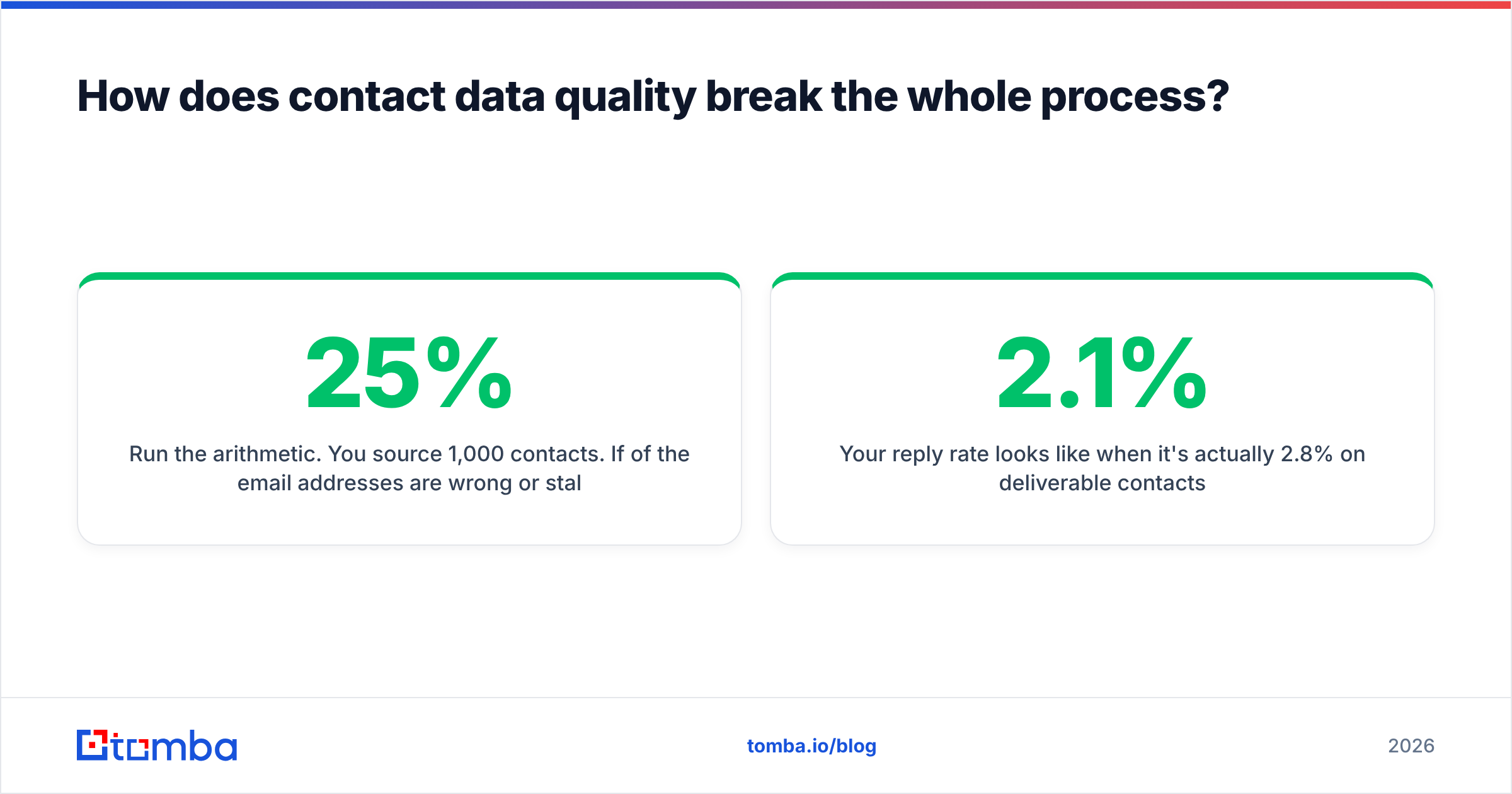
Run the arithmetic. You source 1,000 contacts. If 25% of the email addresses are wrong or stale:
- 250 sends bounce or land nowhere.
- Your bounce rate crosses the threshold where mailbox providers start throttling you, so a portion of the good 750 also underperforms.
- Your reply rate looks like 2.1% when it's actually 2.8% on deliverable contacts.
- Your SDR-to-meeting conversion metric — the number you use to decide headcount — is wrong by a third.
- Nobody knows this, so the next quarter's fix is "more activity," which makes the sender reputation problem worse.
Data rules belong in the process doc as hard gates, not aspirations:
- Gate 1: verification before send. No contact enters an outbound sequence without passing an email verifier. Treat unverified addresses the way a warehouse treats unlabeled inventory — it doesn't ship.
- Gate 2: pattern-first sourcing. For target accounts, resolve the company's email pattern once with domain search, then apply it across the account team rather than guessing per contact.
- Gate 3: catch-all handling. Catch-all domains accept everything and confirm nothing. Route them to a separate, slower cadence rather than dumping them in the main sequence. A dedicated catch-all verifier tells you which side of that line you're on.
- Gate 4: quarterly decay sweep. B2B contact data decays because people change jobs. Re-verify anything older than 90 days before it re-enters a sequence.
- Gate 5: enrichment at stage 3, not stage 1. Don't burn enrichment credits on cold leads. Run contact enrichment when a deal reaches Discovery and the account has earned the investment.
The framing that gets budget approved: data quality is not a tooling line item, it's the denominator under every conversion rate you report to the board.
How do you compare process maturity levels?#
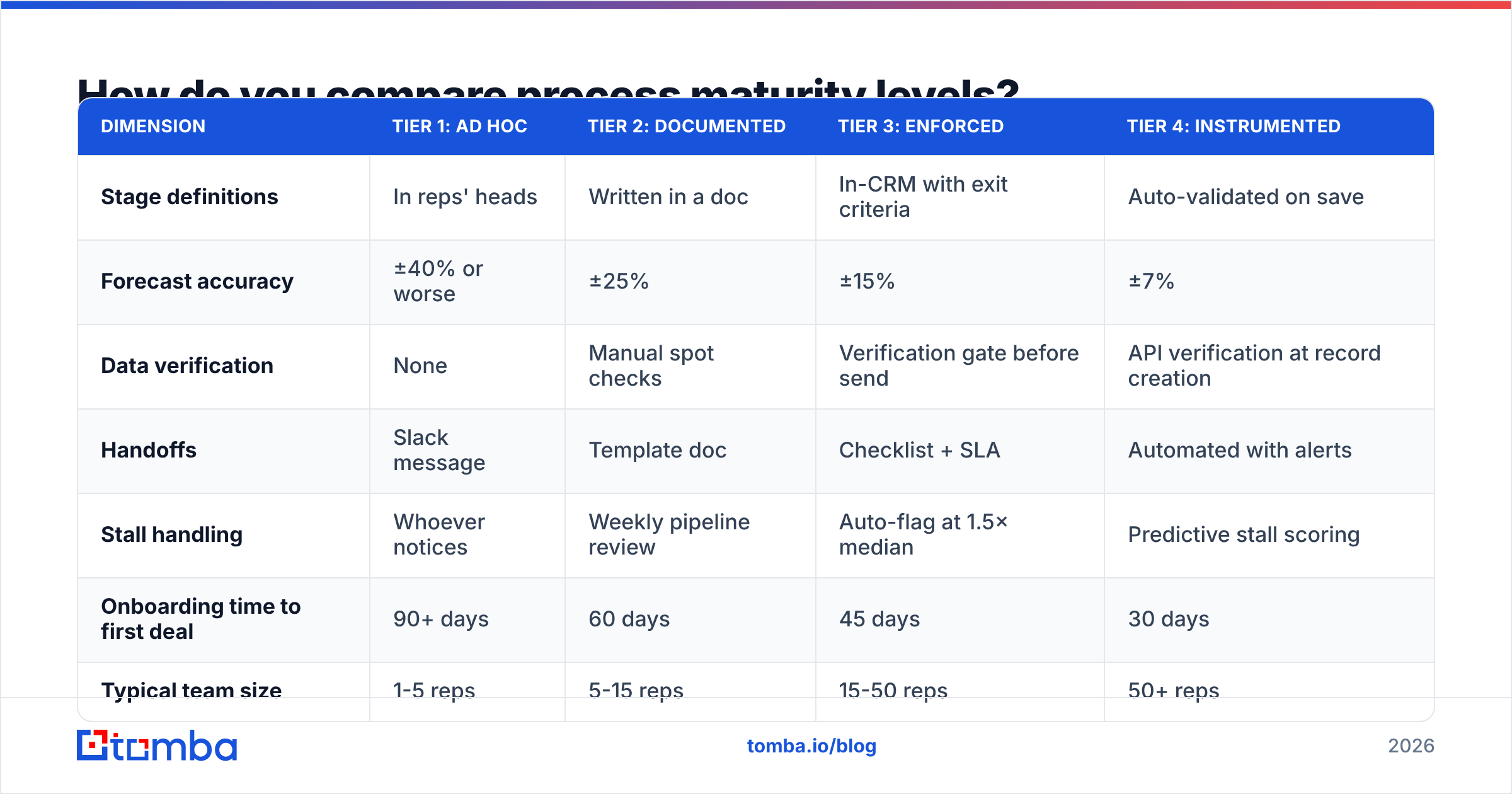
Teams generally sit in one of four maturity tiers. Find yours honestly before you decide what to build — jumping from Tier 1 to Tier 4 in one quarter is how processes get abandoned.
| Dimension | Tier 1: Ad hoc | Tier 2: Documented | Tier 3: Enforced | Tier 4: Instrumented |
|---|---|---|---|---|
| Stage definitions | In reps' heads | Written in a doc | In-CRM with exit criteria | Auto-validated on save |
| Forecast accuracy | ±40% or worse | ±25% | ±15% | ±7% |
| Data verification | None | Manual spot checks | Verification gate before send | API verification at record creation |
| Handoffs | Slack message | Template doc | Checklist + SLA | Automated with alerts |
| Stall handling | Whoever notices | Weekly pipeline review | Auto-flag at 1.5× median | Predictive stall scoring |
| Onboarding time to first deal | 90+ days | 60 days | 45 days | 30 days |
| Typical team size | 1-5 reps | 5-15 reps | 15-50 reps | 50+ reps |
Move one tier at a time. The jump from Tier 2 to Tier 3 — from "written down" to "enforced in the system" — produces the biggest single improvement in forecast accuracy, and it's mostly configuration work rather than culture work.
How do you actually roll it out without reps revolting?#
Six to ten weeks, in this order. The sequence matters more than the speed.
Week 1-2: Mine the actual process. Interview your top three reps and your bottom three. Pull the last 30 closed-won and 30 closed-lost deals and map what genuinely happened. You are documenting reality first, not prescribing an ideal. The gap between what your top rep does and what your doc says is the actual content of your training program.
Week 3: Draft stages and exit criteria with two reps in the room. Not for buy-in theater — for accuracy. Reps will immediately tell you which exit criteria are unobservable. Cut every criterion that can't be verified by a third party reading the deal record.
Week 4: Configure the CRM. Required fields, validation rules, stage-gating. If your CRM can't block a stage advance without the required fields, use a workflow rule that pings the manager. HubSpot's sales pipeline documentation and Salesforce's opportunity stage guidance both cover the mechanics for the two most common setups. Wire in your data gates here too — most teams connect verification through an email finder API or a HubSpot integration so records get checked at creation rather than at send time.
Week 5: Pilot with one pod. One team, four weeks, real deals. Track two things: how often reps skip a gate, and which field they complain about most. Both are design feedback, not compliance problems.
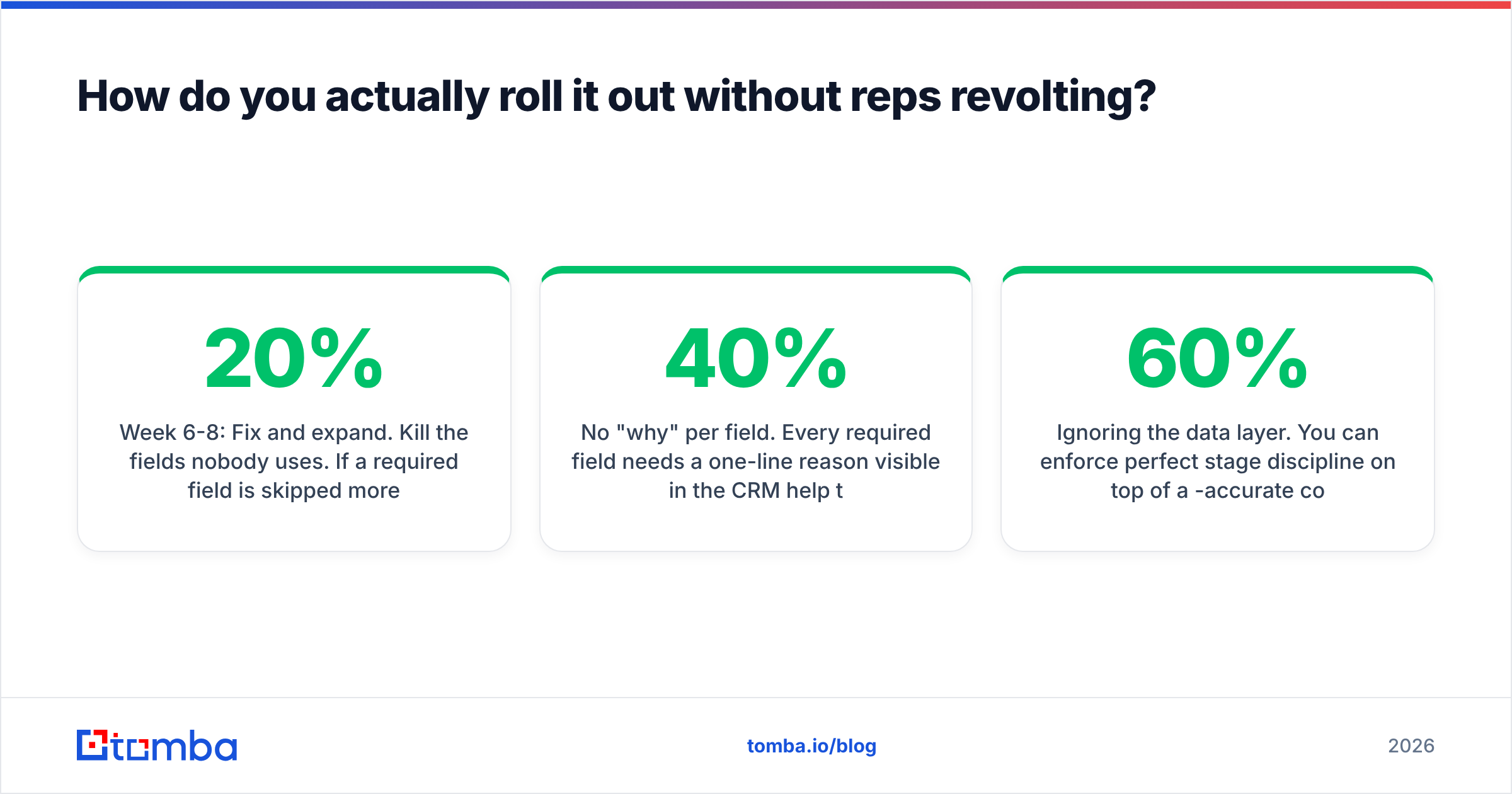
Week 6-8: Fix and expand. Kill the fields nobody uses. If a required field is skipped more than 20% of the time, it's either badly defined or genuinely useless. Then roll to the full team.
Week 9-10: Instrument. Now — and only now — build the dashboards. Stage conversion rates, median stage duration, stall counts, verification pass rates. Reviewing metrics from a process nobody follows yet just produces confident wrong decisions.
The rollout mistakes that kill adoption#
- Launching in a single meeting. Process adoption is a behavior change, and behavior change needs weekly reinforcement in deal reviews for at least a month.
- Managers exempting themselves. The moment a manager advances a deal without exit criteria to make the board number look better, the process is dead and everyone knows it.
- No "why" per field. Every required field needs a one-line reason visible in the CRM help text. "Economic buyer contact — deals without this close 40% slower" beats a blank mandatory field every time.
- Ignoring the data layer. You can enforce perfect stage discipline on top of a 60%-accurate contact list and still miss your number. Fix both, or you've just built a very rigorous way to track failure.
What should you measure once the process is live?#
Six numbers, reviewed monthly. Resist adding a seventh.
- Stage-to-stage conversion rate — where deals actually die. Your worst stage is your roadmap.
- Median stage duration — feeds the stall rule and the forecast.
- Exit criteria compliance rate — the percentage of stage advances with a complete checklist. Below 80% means the process is aspirational.
- Data verification pass rate — what share of sourced contacts survive verification. Trending down means your source is decaying.
- Handoff SLA adherence — how fast the receiving side acts. Slow handoffs are the quietest deal-killer in B2B.
- Win rate by lead source — closes the loop between your process and your demand gen spend.
Note that #4 sits alongside the deal metrics rather than in a separate ops report. That placement is deliberate. When verification pass rate appears next to conversion rate on the same dashboard, the correlation becomes visible to everyone and the "we need better data" argument stops needing to be made.
Build the process on data you can trust#
A documented internal sales process gives you stages, gates, and honest forecasts. It can't manufacture accurate contact data — and every conversion rate you measure sits on top of whatever entered at Lead Created.
Start there. The Tomba Email Finder resolves verified work emails by name and domain, so contacts enter your pipeline already checked instead of being discovered as bounces three weeks later. The free tier covers 25 searches a month for testing the gate on a sample list; paid plans start at $49/month on Starter and $99/month on Growth, with API access for teams that want verification wired into record creation rather than run as a manual step. See Tomba pricing for the full breakdown, or compare against your current source with G2's category listings before you commit.
Document the stages. Enforce the gates. Verify the inputs. In that order.
Related guides#
// get started
Find, verify and enrich your first contacts today
Start on the free plan with 25 searches a month, then scale when your team is ready.
Free plan · No credit card required · GDPR & CCPA
// about the author