Interseller vs Wiza (2026): Which Sourcing Tool Wins?
Interseller sells sequencing inside a recruiting workflow. Wiza sells LinkedIn list exports with verified emails. They solve different halves of the same problem, and picking wrong costs you a year of contract.
TL;DR
- Interseller is a sequencer with a contact finder bolted on. It was built for recruiters, acquired by Greenhouse, and its value lives in the ATS-connected workflow, not in raw data volume.
- Wiza is a LinkedIn list exporter with a verifier bolted on. You run a Sales Navigator search, export it, and get a CSV with emails and phone numbers attached.
- They barely compete on features. They compete on budget. If you only have money for one contact-data line item, this comparison matters.
- Neither is a good fit if you need programmatic lookups. Both are seat-priced UI products; API-first work gets expensive fast.
- Our pick depends on your motion: recruiters living in an ATS should look at Interseller, list-builders working off Sales Navigator should look at Wiza, and anyone enriching records inside their own system should look at a credit-based email finder instead.
What are Interseller and Wiza, exactly?#
Interseller started life in 2016 as a recruiting outreach tool: find a candidate, get their personal email, drop them into an automated email sequence, and sync the whole thing back into your ATS. Greenhouse acquired it in 2021, and the product has since been pulled deeper into that ecosystem. The sourcing and sequencing engine still exists as Interseller, but you should treat it as a recruiting-first platform with a data layer, not a data vendor.
Wiza came at the same problem from the opposite direction. It is, at its core, a LinkedIn scraper with a verification pass on top. You point it at a Sales Navigator search, a Recruiter Lite search, or a list of profile URLs, and Wiza returns a spreadsheet with work emails, personal emails, and mobile numbers where it can find them. There is a Chrome extension for one-off lookups and an export flow for bulk.
So the honest framing is this: Interseller sells a workflow. Wiza sells a list. Everything below follows from that difference.

How do Interseller and Wiza compare head-to-head?#
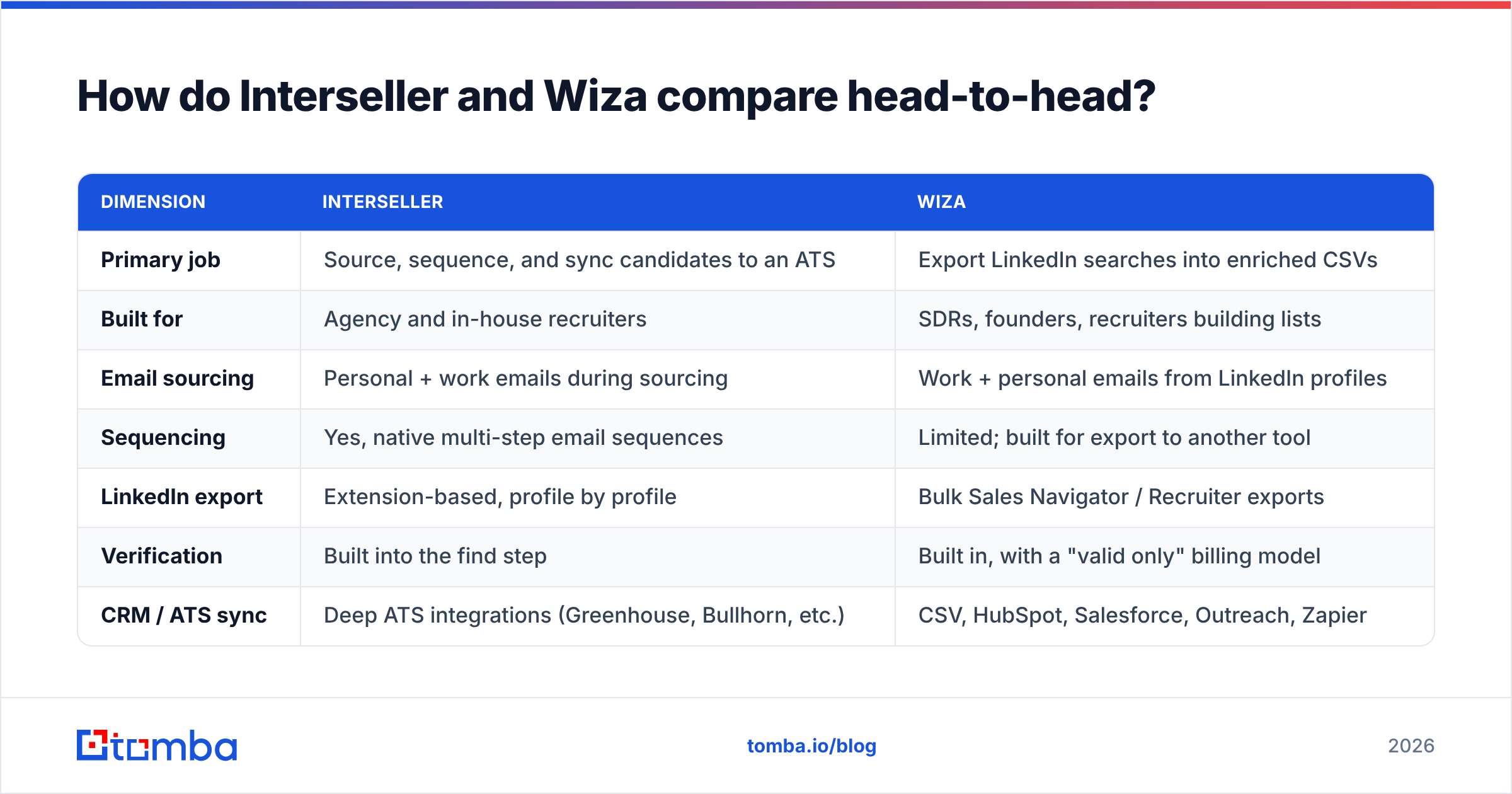
Here is the practical comparison, stripped of marketing language.
| Dimension | Interseller | Wiza |
|---|---|---|
| Primary job | Source, sequence, and sync candidates to an ATS | Export LinkedIn searches into enriched CSVs |
| Built for | Agency and in-house recruiters | SDRs, founders, recruiters building lists |
| Email sourcing | Personal + work emails during sourcing | Work + personal emails from LinkedIn profiles |
| Sequencing | Yes, native multi-step email sequences | Limited; built for export to another tool |
| LinkedIn export | Extension-based, profile by profile | Bulk Sales Navigator / Recruiter exports |
| Verification | Built into the find step | Built in, with a "valid only" billing model |
| CRM / ATS sync | Deep ATS integrations (Greenhouse, Bullhorn, etc.) | CSV, HubSpot, Salesforce, Outreach, Zapier |
| API access | Not a core selling point | Available, but list-export oriented |
| Pricing shape | Per seat, annual-leaning, quote-based at scale | Self-serve tiers plus credits |
| Best-case user | Recruiter who wants one tool for the whole cycle | Operator who wants a clean list, fast |
Two things jump out. First, only one of these tools actually sends email at scale. If you buy Wiza expecting a sequencer, you will end up paying for Instantly, Smartlead, or Lemlist on top of it. Second, only one of these tools is genuinely good at bulk. If you buy Interseller expecting to pull 5,000 contacts out of a Sales Navigator search in an afternoon, you will be disappointed by the pace.
Which one finds more valid emails?#
Neither vendor publishes an independently audited accuracy number, and you should be suspicious of anyone who quotes one without a methodology. What you can compare is the shape of their guarantees.
Wiza bills on valid results. If it returns a risky or invalid address, that generally does not consume a credit. That is a meaningful structural promise: it aligns the vendor's revenue with your bounce rate. The trade-off is coverage. On a hard list (small companies, non-US domains, privacy-heavy industries) Wiza will simply return fewer rows rather than return guesses.
Interseller does not sell you credits in the same way, so the incentive is softer. Its strength is personal email discovery for candidates, which is a different problem than work-email discovery for buyers. Recruiters consistently report better reach rates on personal addresses through Interseller than through generic B2B databases, because that is what the index was built around.

The number that actually predicts your bounce rate is not the vendor's headline accuracy claim. It is what happens on the domains you care about. Run the same 100 target contacts through both tools, then push every result through an independent email verifier before you send. If a tool returns 80 addresses and 12 of them fail an independent SMTP check, its real hit rate is 68 percent, not 80.
Three things drive most of the variance:
- Catch-all domains. Any provider can "verify" a catch-all as deliverable because the server accepts everything. Only a tool with dedicated catch-all verification logic can tell you whether the mailbox behind it is real.
- Role accounts. info@, sales@, and careers@ inflate coverage stats and destroy reply rates. Check whether the tool counts them as hits.
- Data recency. A contact who changed jobs eight months ago is still a "valid" email at an address that now bounces or, worse, reaches someone who reports you.
What does each one actually cost?#
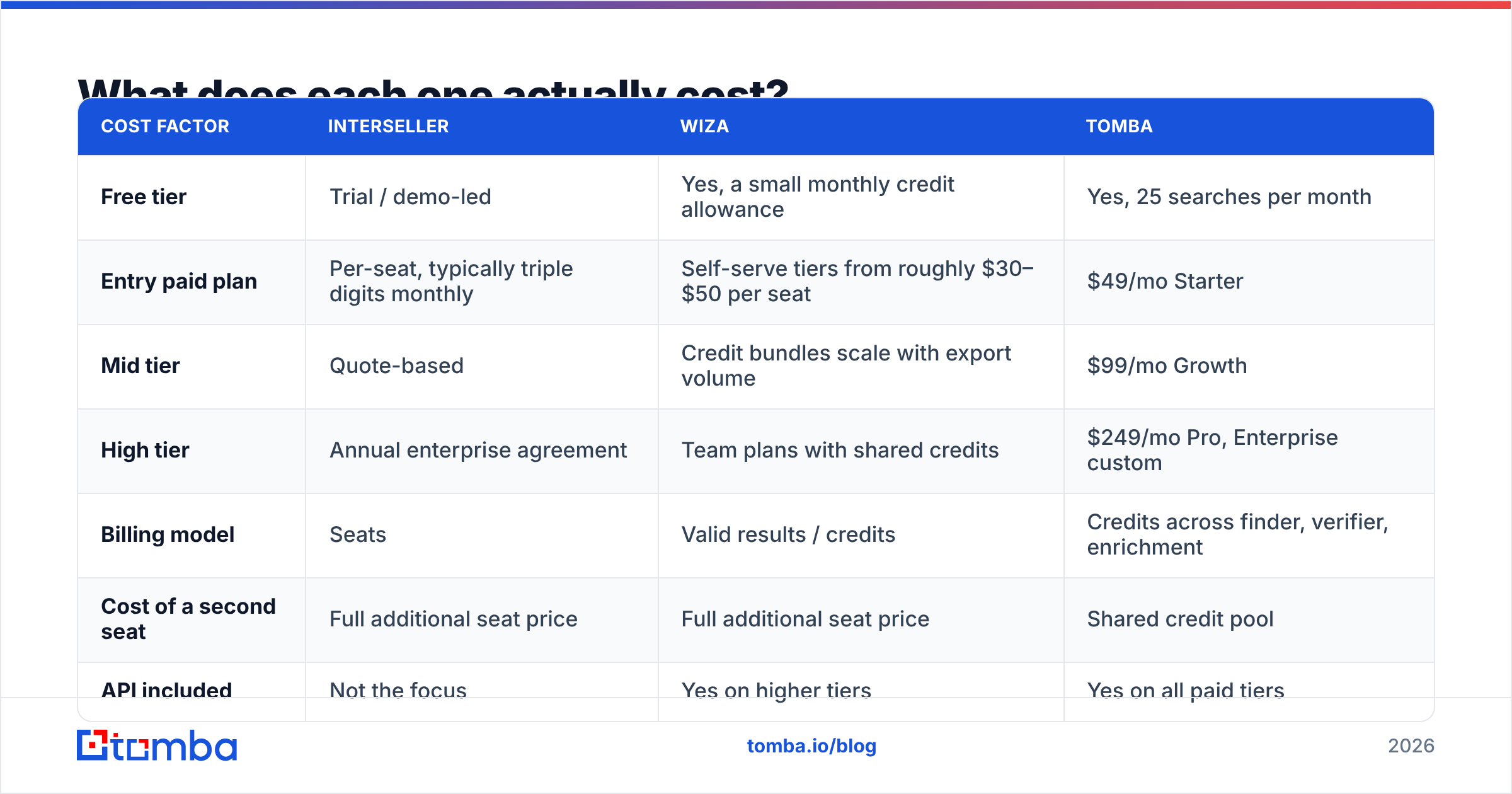
Pricing on both tools moves, and Interseller's has moved a lot since the Greenhouse acquisition. Treat the table below as the pricing shape rather than a quote, and confirm current numbers on each vendor's own page before you sign anything.
| Cost factor | Interseller | Wiza | Tomba |
|---|---|---|---|
| Free tier | Trial / demo-led | Yes, a small monthly credit allowance | Yes, 25 searches per month |
| Entry paid plan | Per-seat, typically triple digits monthly | Self-serve tiers from roughly $30–$50 per seat | $49/mo Starter |
| Mid tier | Quote-based | Credit bundles scale with export volume | $99/mo Growth |
| High tier | Annual enterprise agreement | Team plans with shared credits | $249/mo Pro, Enterprise custom |
| Billing model | Seats | Valid results / credits | Credits across finder, verifier, enrichment |
| Cost of a second seat | Full additional seat price | Full additional seat price | Shared credit pool |
| API included | Not the focus | Yes on higher tiers | Yes on all paid tiers |
The seat model is where budgets break. A five-person recruiting desk on a per-seat sourcing platform can clear $1,000 a month before anyone sends a single sequence. A five-person team on a credit pool pays once for the data and shares it. That is the entire argument for credit-based pricing, and it is why Tomba pricing starts at $49/mo for the Starter plan rather than per user.

Who should pick Interseller?#
Pick Interseller if three things are true at once:
- You are recruiting, not selling. The sequencing templates, the candidate stages, and the ATS write-back all assume a hiring funnel. Using it for B2B sales prospecting means fighting the product.
- Your ATS is already Greenhouse or Bullhorn. The integration depth is the moat. If your records live somewhere else, you lose most of what you are paying for.
- You want one bill, not four. Interseller replaces a finder, a sequencer, and a sync layer. That consolidation is worth real money even if each individual component is beatable.
Pass on it if you need high-volume list building, if you work in multiple ATSs, or if your team is small enough that per-seat pricing dwarfs your actual data usage.
Who should pick Wiza?#
Pick Wiza if:
- Sales Navigator is your primary sourcing surface. Wiza's export flow is genuinely fast and the "pay for valid only" model keeps waste low.
- You already own a sending tool. Wiza's job ends at the CSV. If you have Instantly, Smartlead, or Outreach, that is a clean handoff.
- You want spreadsheet output, not a system of record. Wiza is happiest producing files. If that suits your workflow, great. If you were hoping for a database, it will feel thin.
Pass on it if LinkedIn is not where your ICP lives, if you need contacts for companies with a weak LinkedIn footprint, or if your compliance team has opinions about scraping-adjacent data collection. On the last point, read the G2 reviews for both tools and pay attention to the negative ones; that is where the workflow friction shows up.

When is neither Interseller nor Wiza the right answer?#
There is a third scenario that this comparison usually ignores, and it is common: you do not need a new interface, you need contact data inside a system you already run.
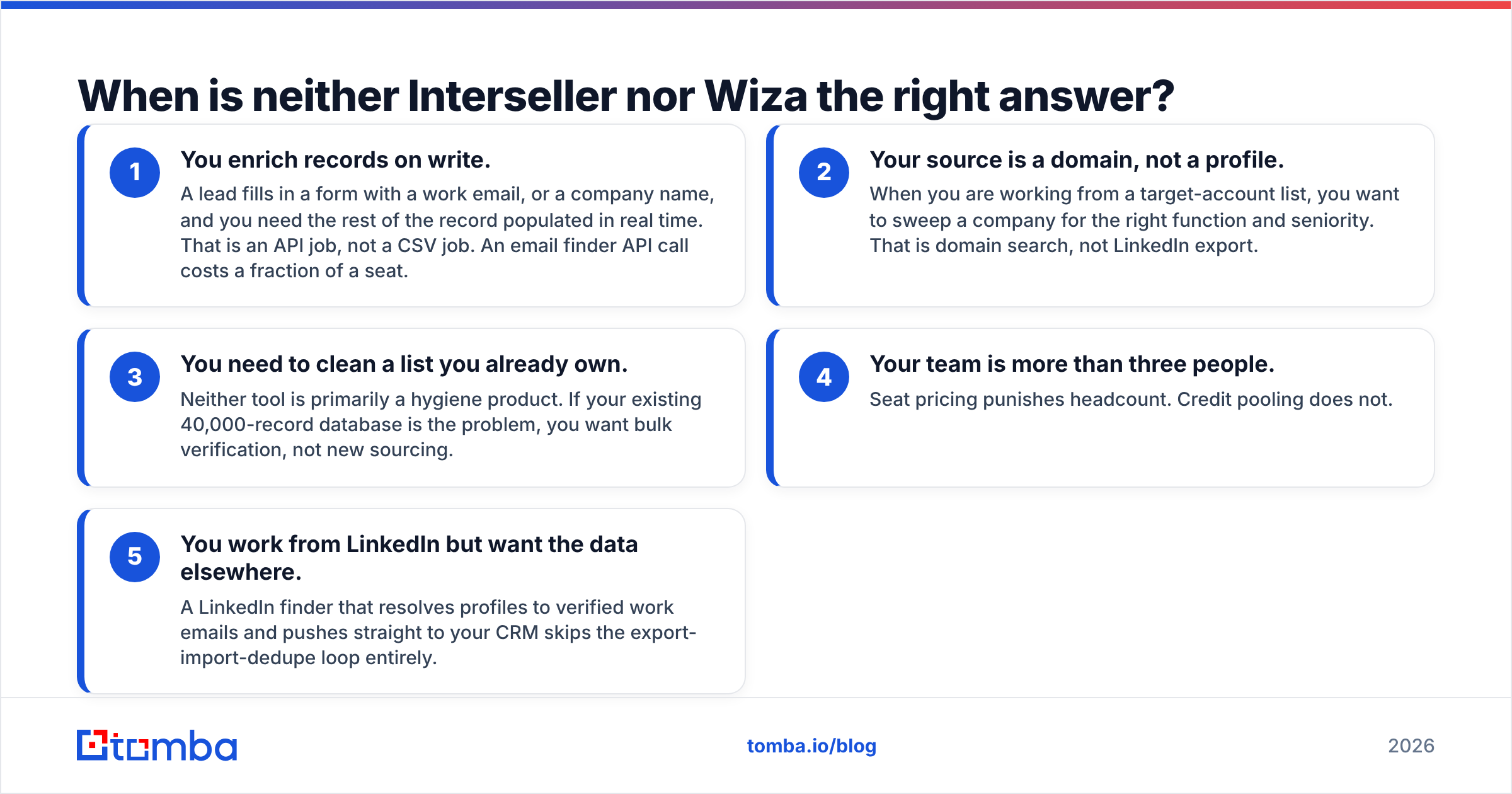
If any of these describe you, both tools are the wrong shape:
- You enrich records on write. A lead fills in a form with a work email, or a company name, and you need the rest of the record populated in real time. That is an API job, not a CSV job. An email finder API call costs a fraction of a seat.
- Your source is a domain, not a profile. When you are working from a target-account list, you want to sweep a company for the right function and seniority. That is domain search, not LinkedIn export.
- You need to clean a list you already own. Neither tool is primarily a hygiene product. If your existing 40,000-record database is the problem, you want bulk verification, not new sourcing.
- Your team is more than three people. Seat pricing punishes headcount. Credit pooling does not.
- You work from LinkedIn but want the data elsewhere. A LinkedIn finder that resolves profiles to verified work emails and pushes straight to your CRM skips the export-import-dedupe loop entirely.
The honest position: Interseller and Wiza are both good at one narrow thing, and both are expensive when you use them for anything outside that lane. The most common mistake we see is a team buying the recruiting platform for a sales motion, or buying the list exporter and then discovering that half their ICP has no usable LinkedIn presence.
How do you test all three without wasting a month?#
Run a controlled bake-off. It takes an afternoon.
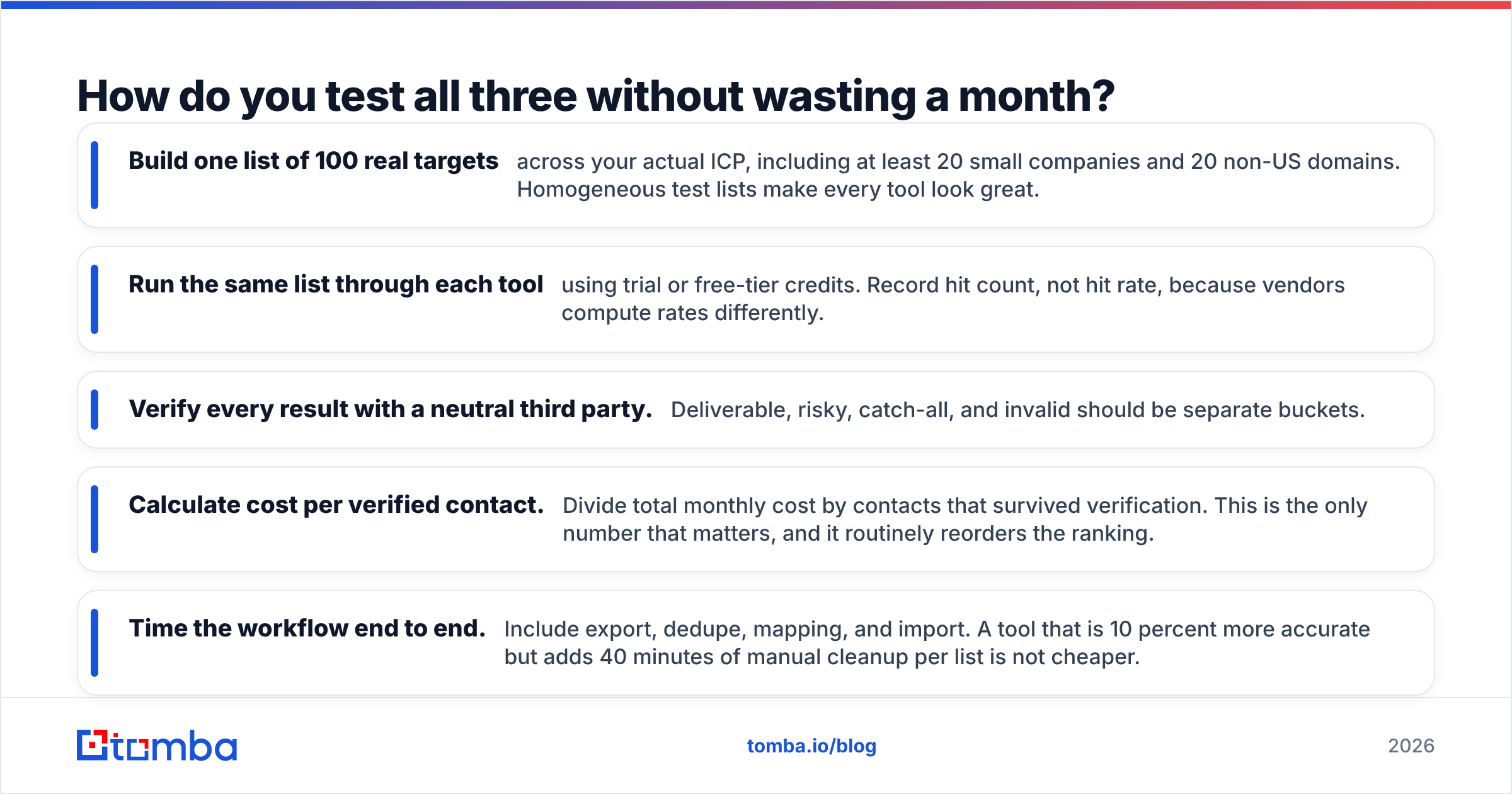
- Build one list of 100 real targets across your actual ICP, including at least 20 small companies and 20 non-US domains. Homogeneous test lists make every tool look great.
- Run the same list through each tool using trial or free-tier credits. Record hit count, not hit rate, because vendors compute rates differently.
- Verify every result with a neutral third party. Deliverable, risky, catch-all, and invalid should be separate buckets.
- Calculate cost per verified contact. Divide total monthly cost by contacts that survived verification. This is the only number that matters, and it routinely reorders the ranking.
- Time the workflow end to end. Include export, dedupe, mapping, and import. A tool that is 10 percent more accurate but adds 40 minutes of manual cleanup per list is not cheaper.
Most teams that run this test find their ranking has less to do with raw accuracy than with friction. The tool that drops verified contacts directly into the system where work already happens wins, even when it is not the accuracy leader on paper.
Final verdict: Interseller vs Wiza in 2026#
If you are a recruiter inside Greenhouse or Bullhorn, Interseller. The workflow consolidation justifies the seat cost, and personal-email discovery for candidates is a genuinely hard problem it handles well.
If you are building B2B lists off Sales Navigator and already own a sender, Wiza. Pay-for-valid billing is honest, exports are fast, and it does not pretend to be a platform.
If you are enriching records programmatically, working from domains rather than profiles, or splitting a data budget across a team, neither. You are paying for an interface you will not use.
That last case is where Tomba fits. Start with the free tier at 25 searches per month, run your own 100-contact bake-off, and check the cost per verified contact against whatever quote is sitting in your inbox. If the numbers work, the Tomba Email Finder gives you domain search, verification, catch-all checks, and API access on the same credit pool from $49/mo, with no per-seat tax when your team grows. Test it against both tools on your own list before you sign an annual contract with either.
Related guides#
// get started
Find, verify and enrich your first contacts today
Start on the free plan with 25 searches a month, then scale when your team is ready.
Free plan · No credit card required · GDPR & CCPA
// about the author