Introduction Email to New Client: Templates That Get Replies
Your first email to a new client sets the tone for the entire engagement. Here are the structures, templates, and send-timing rules that turn a formality into momentum.
TL;DR
- An introduction email to a new client has one job: make the next step obvious. Not to impress, not to recap the contract — to move the relationship forward.
- The highest-replying structure is four blocks: context line, who you are and why it matters to them, what happens next, one specific ask with a date.
- Send within 24 hours of the deal closing or the handoff. After 72 hours, your reply rate drops sharply because the buying energy has dissipated.
- Personalization that works is operational (their stack, their timeline, their named stakeholders), not flattery ("love what you're building").
- If you're introducing yourself to someone you've never emailed — a new stakeholder on the account, a replacement contact — verify the address first. Bounces on a first send damage both the relationship and your domain.
What Is an Introduction Email to a New Client?#
An introduction email to a new client is the first direct message you send after a business relationship is formally established — a signed contract, a closed deal, an account handoff from sales to delivery, or your assignment as the new point of contact on an existing account.
It is not a cold email. The prospect has already said yes to something. That changes everything about how you write it: you are not persuading, you are orienting. The client's internal question has shifted from "should we buy this?" to "what happens now, and is this going to be painful?"
Most people get this wrong in one of two directions. They either write a three-line note that says "Excited to work with you! Let me know if you need anything" — which pushes all the cognitive load onto the client — or they write a 600-word manifesto restating the proposal the client already read and signed.
Both fail for the same reason: neither one tells the client what to do in the next five minutes.
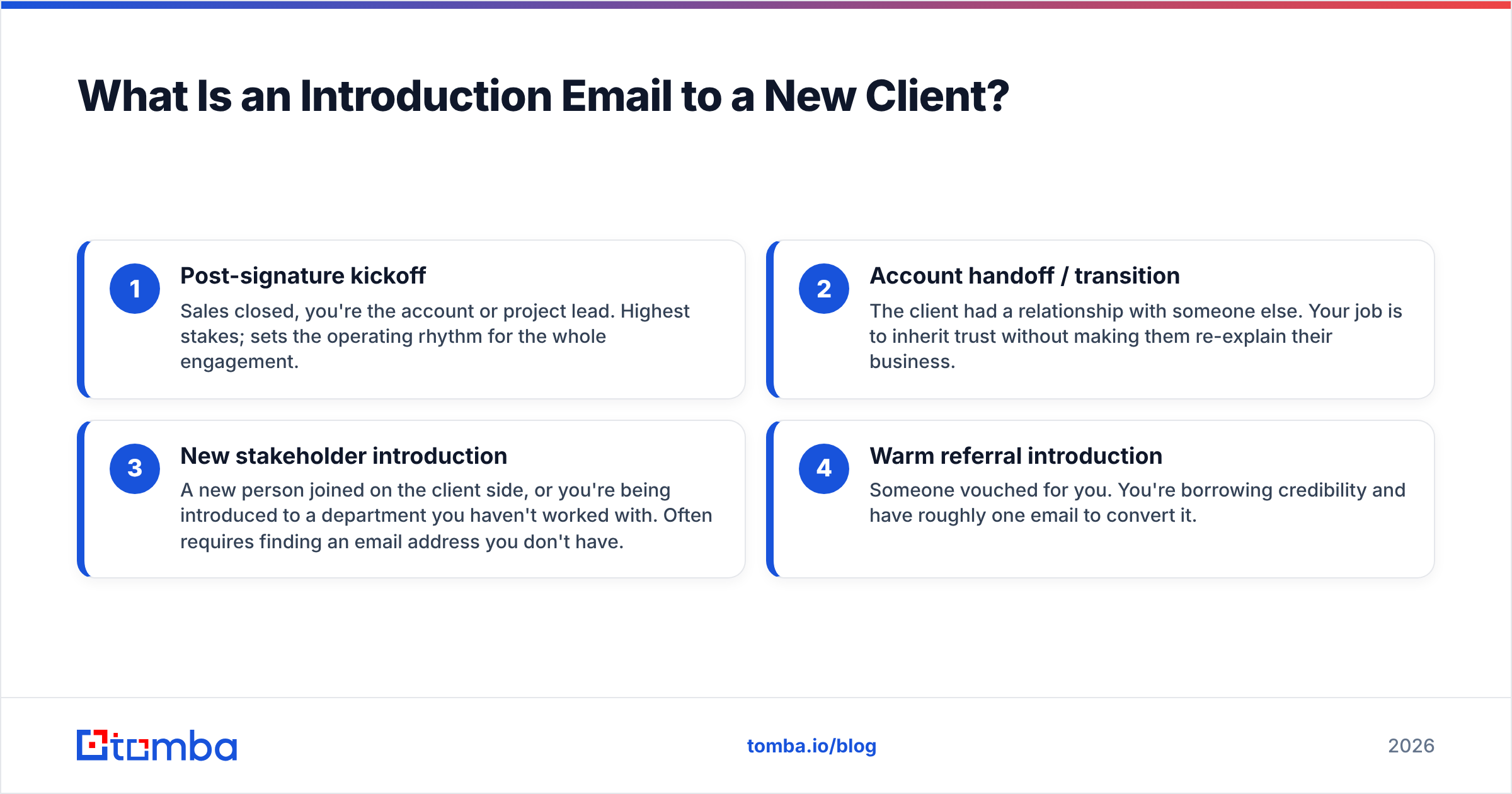
There are four distinct scenarios that all get called "introduction emails," and they need different treatments:
- Post-signature kickoff — Sales closed, you're the account or project lead. Highest stakes; sets the operating rhythm for the whole engagement.
- Account handoff / transition — The client had a relationship with someone else. Your job is to inherit trust without making them re-explain their business.
- New stakeholder introduction — A new person joined on the client side, or you're being introduced to a department you haven't worked with. Often requires finding an email address you don't have.
- Warm referral introduction — Someone vouched for you. You're borrowing credibility and have roughly one email to convert it.
The templates below are organized around these four. Skip to the one you need.
What Should an Introduction Email to a New Client Include?#
Five components. Drop any of them and reply rates fall measurably.
1. A subject line that names the relationship, not the emotion. "Excited to get started!" tells the recipient nothing and looks like marketing. "Kickoff for [Project] — next steps + a question" tells them there's an action inside. Subject lines that reference a specific project name or a specific date consistently outperform enthusiasm-based lines in B2B contexts.
2. A context anchor in the first sentence. Reference the thing that just happened: the signed SOW, the call with their VP, the referral from a mutual contact. This is not throat-clearing — it's proof you know which account you're writing to, which matters more than you'd think when a client is managing six vendors.
3. Your role, framed as a benefit. "I'm your account manager" is an org chart fact. "I'm the person who handles anything on your account — billing questions, scope changes, escalations — so you have one inbox instead of four" is a benefit. Same information, different value.
4. A concrete next step with a date attached. The single biggest predictor of whether an introduction email gets a reply is whether it contains a specific, scheduled, low-effort action. "Let me know when you're free" is high effort. "I've held Thursday 2pm and Friday 10am — which works?" is low effort.
5. One question, maximum. Every additional question you ask reduces the odds the client answers any of them. If you need five pieces of onboarding information, put them in an attached form or a shared doc and ask the one question that unblocks the next step.
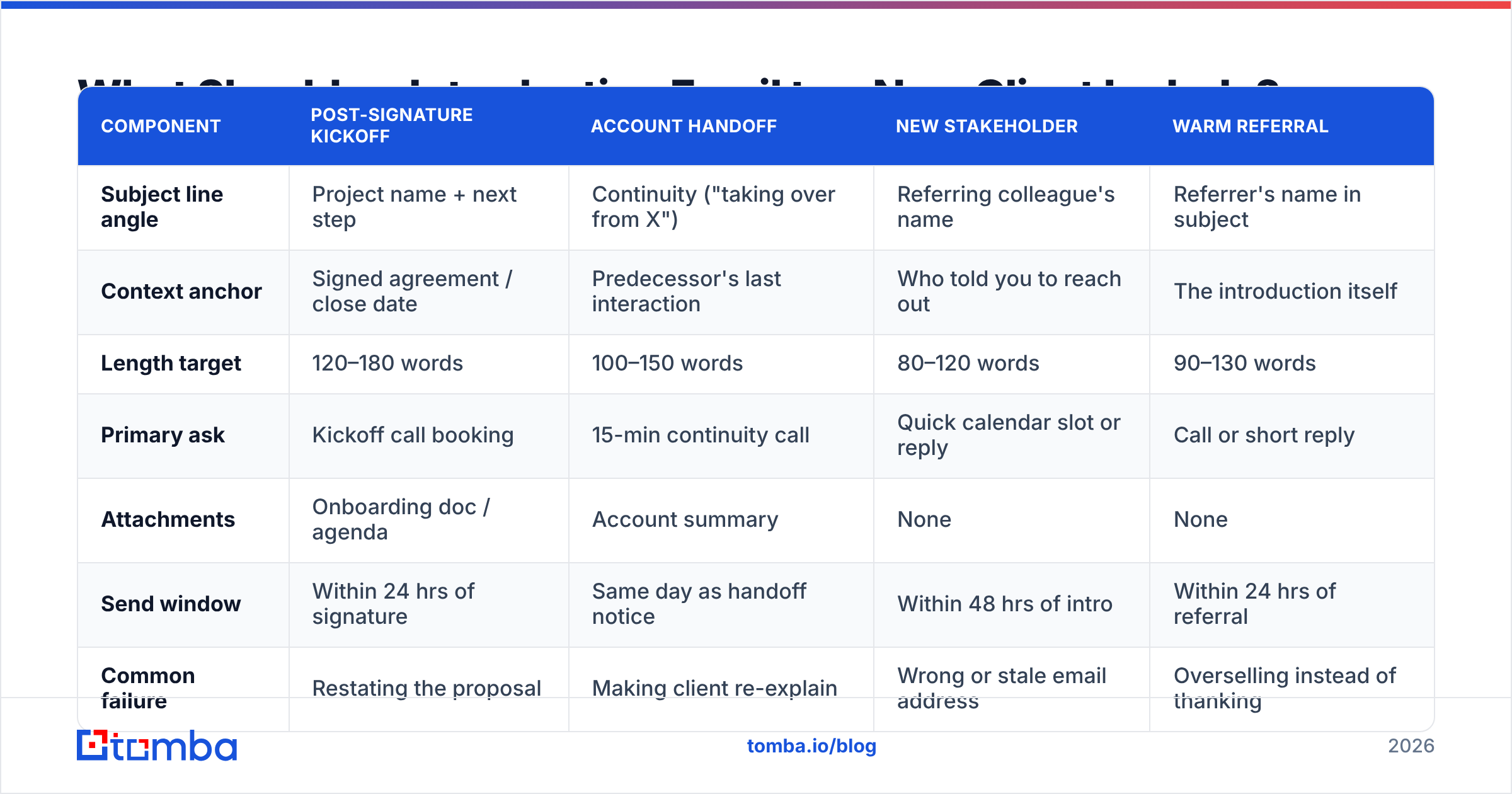
Here's how those components map across the four scenarios:
| Component | Post-Signature Kickoff | Account Handoff | New Stakeholder | Warm Referral |
|---|---|---|---|---|
| Subject line angle | Project name + next step | Continuity ("taking over from X") | Referring colleague's name | Referrer's name in subject |
| Context anchor | Signed agreement / close date | Predecessor's last interaction | Who told you to reach out | The introduction itself |
| Length target | 120–180 words | 100–150 words | 80–120 words | 90–130 words |
| Primary ask | Kickoff call booking | 15-min continuity call | Quick calendar slot or reply | Call or short reply |
| Attachments | Onboarding doc / agenda | Account summary | None | None |
| Send window | Within 24 hrs of signature | Same day as handoff notice | Within 48 hrs of intro | Within 24 hrs of referral |
| Common failure | Restating the proposal | Making client re-explain | Wrong or stale email address | Overselling instead of thanking |
How Do You Write the Post-Signature Kickoff Email?#
This is the most common scenario and the one where momentum is most fragile. The client just spent political capital internally to approve your contract. They want reassurance that the decision was correct.
Template — Post-Signature Kickoff
Subject: Acme × [Your Company] kickoff — agenda + two dates
Hi Dana,
The agreement came through this morning, so I'm officially on your account. I'm [Name], and I run delivery for everything you signed — implementation, the quarterly reviews, and anything that goes sideways in between. One inbox, not four.
I read through the notes from your calls with Marcus. The two things I've got flagged as priorities: getting the Salesforce sync live before your Q4 push, and making sure the three regional teams get trained separately rather than in one session.
Next step is a 30-minute kickoff so I can confirm I've got that right and walk you through the first two weeks. I've held Thursday 2pm ET and Friday 10am ET — reply with either and I'll send the invite.
Agenda attached so you can see there's no fluff in it.
— [Name]
Why this works: it proves internal knowledge transfer happened (the reference to Marcus's notes), it demonstrates comprehension of their actual priorities rather than generic "we're excited," and it closes with a binary choice instead of an open calendar request.
What to cut if you're tempted to add it: your company's founding story, a list of every feature they bought, the phrase "please don't hesitate to reach out."
How Do You Handle an Account Handoff Introduction?#
Handoffs are where accounts quietly churn. The client built a relationship with a specific person; that person is gone; the client now has to decide whether to re-invest. Your email either makes that easy or makes them start shopping.
The cardinal rule: never make the client re-explain their own business. If your email contains "I'd love to learn more about your goals," you have just told them the handoff was sloppy and they're starting from zero.
Template — Account Handoff
Subject: Taking over your account from Priya — nothing changes on your end
Hi Tom,
Priya moved to our enterprise team last week and handed me your account. I'm [Name].
I've gone through everything: the March scope expansion, the API rate-limit issue you hit in June and how we resolved it, and the fact that you need reporting exports in CSV rather than the default PDF because of your BI setup. You shouldn't have to repeat any of that.
Two things stay identical — your pricing and your delivery schedule. The only change is which name is on your emails.
Worth 15 minutes next week so you can tell me what Priya did well that I should keep doing? Tuesday or Wednesday afternoon, your pick.
— [Name]
The detail specificity here is the entire point. "The API rate-limit issue you hit in June" proves you read the account history. Vagueness proves you didn't.
How Do You Find the Right Email Address for a New Contact?#
You cannot send an introduction email to someone whose address you don't have, and guessing wrong is worse than not sending. A bounce on your first contact with a new stakeholder means the message is gone and your sending domain takes a small hit.
This comes up more than people expect. Your champion gets promoted and a new operations lead inherits the account. Procurement adds a contact you've never met. The client's IT director needs to be looped in for a security review and nobody gave you their address.
Three approaches, in order of reliability:
- Ask your existing contact. Free, accurate, and takes one Slack message. Always try this first. The failure mode is speed — you may wait two days for an answer you needed today.
- Derive it from the company's email pattern. Most companies use a consistent format. If you know two addresses at the domain, you can usually infer the third. A company email pattern check confirms the format before you guess.
- Use a lookup tool and verify. A domain search returns known addresses at a company, and an email verifier confirms the mailbox actually accepts mail before you send. This is the approach that scales when you're introducing yourself across a multi-stakeholder account.
Whichever route you take, verify before sending. Verification is a sub-second check that prevents a bounce, and bounce rate feeds directly into sender reputation — which affects whether your next email lands in the inbox at all.
When Should You Send an Introduction Email to a New Client?#
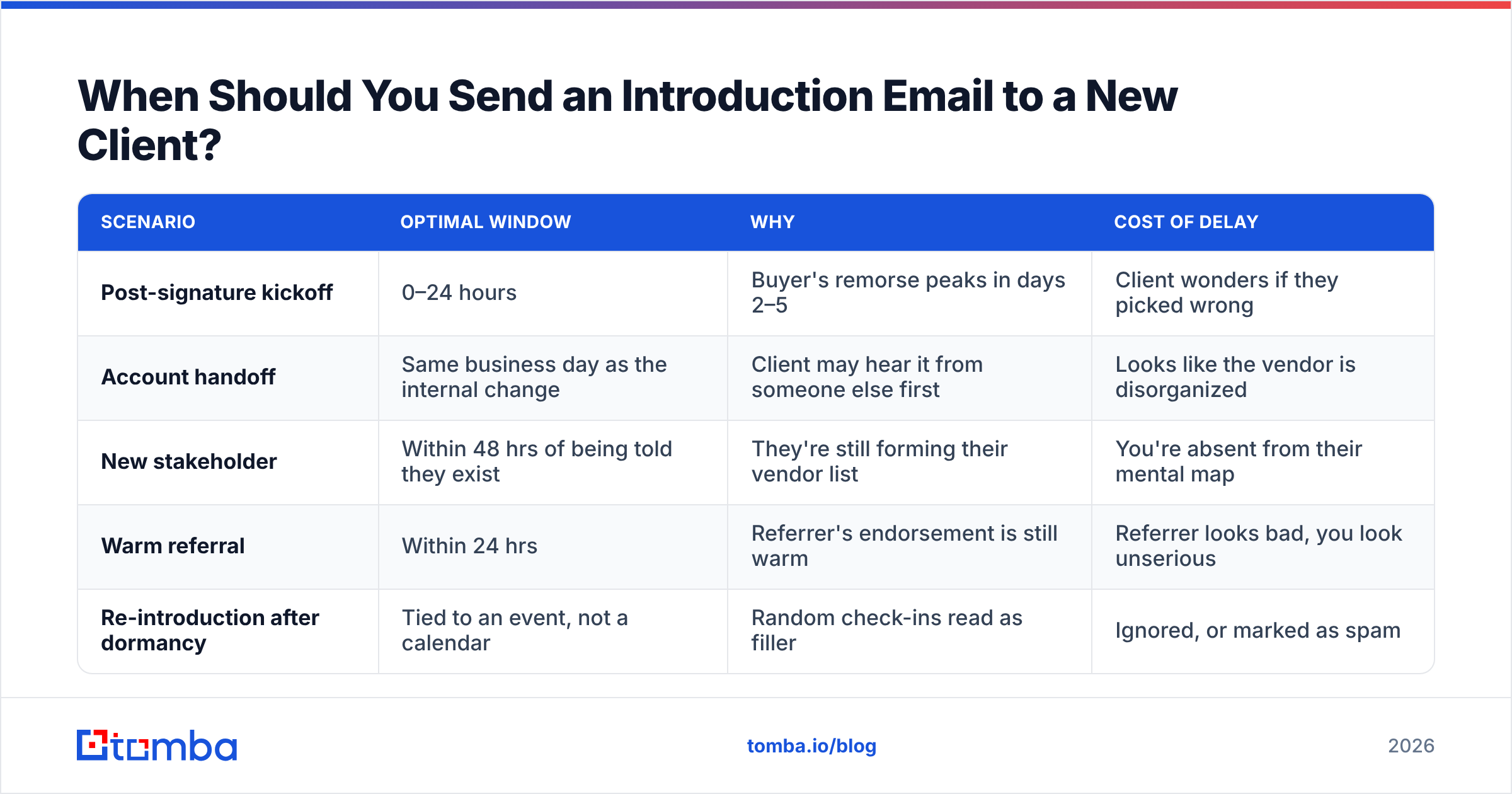
Timing is not a minor optimization here. It's a signal about how you operate.
| Scenario | Optimal window | Why | Cost of delay |
|---|---|---|---|
| Post-signature kickoff | 0–24 hours | Buyer's remorse peaks in days 2–5 | Client wonders if they picked wrong |
| Account handoff | Same business day as the internal change | Client may hear it from someone else first | Looks like the vendor is disorganized |
| New stakeholder | Within 48 hrs of being told they exist | They're still forming their vendor list | You're absent from their mental map |
| Warm referral | Within 24 hrs | Referrer's endorsement is still warm | Referrer looks bad, you look unserious |
| Re-introduction after dormancy | Tied to an event, not a calendar | Random check-ins read as filler | Ignored, or marked as spam |
Day of week: Tuesday through Thursday, 8–10am in the recipient's timezone, is the standard B2B recommendation and it holds up for introductions. Monday mornings compete with weekend backlog; Friday afternoons get read and forgotten.
One follow-up, not four. An introduction email is not a cold sequence. If you get no reply after five business days, send exactly one nudge that adds something — the agenda, a relevant case example, a scheduling link — and then pick up the phone. Hammering a new client with automated follow-ups is the fastest way to establish that you're annoying before you've delivered anything.
What Are the Most Common Introduction Email Mistakes?#
Restating the contract. They signed it. They know what they bought. Summarizing the proposal back to them signals you have nothing to add.
Leading with your company. "Founded in 2014, [Company] is a leading provider of..." Nobody has ever replied to this sentence. Lead with them, or with what happens next.
The open-ended ask. "Let me know if you have any questions" transfers work to the client. They don't have questions yet — they have a vague sense of obligation they'll resolve by archiving your email.
Too many CCs. Adding your entire delivery team to the first email makes the client feel outnumbered and makes it unclear who they should actually reply to. Introduce people gradually.
Attachments before trust. A 4MB PDF on first contact triggers spam filters and irritates recipients. Link instead, or keep the attachment under 1MB and mention it explicitly in the body.
Unverified sends. Covered above, but worth repeating: an introduction email that bounces is a lost relationship plus a reputational cost. Tools that combine finding and verification — Tomba, Hunter, and BookYourData all operate in this space with different emphases — make this a non-issue. BookYourData leans toward pre-built, pay-as-you-go B2B lists; Tomba leans toward on-demand lookup and verification against a live index. Pick based on whether your problem is volume or precision.
Writing for yourself instead of the reader. Read your draft and count the sentences that start with "I" or "We." If it's more than a third, rewrite.
How Do Introduction Emails Compare to Cold Emails?#
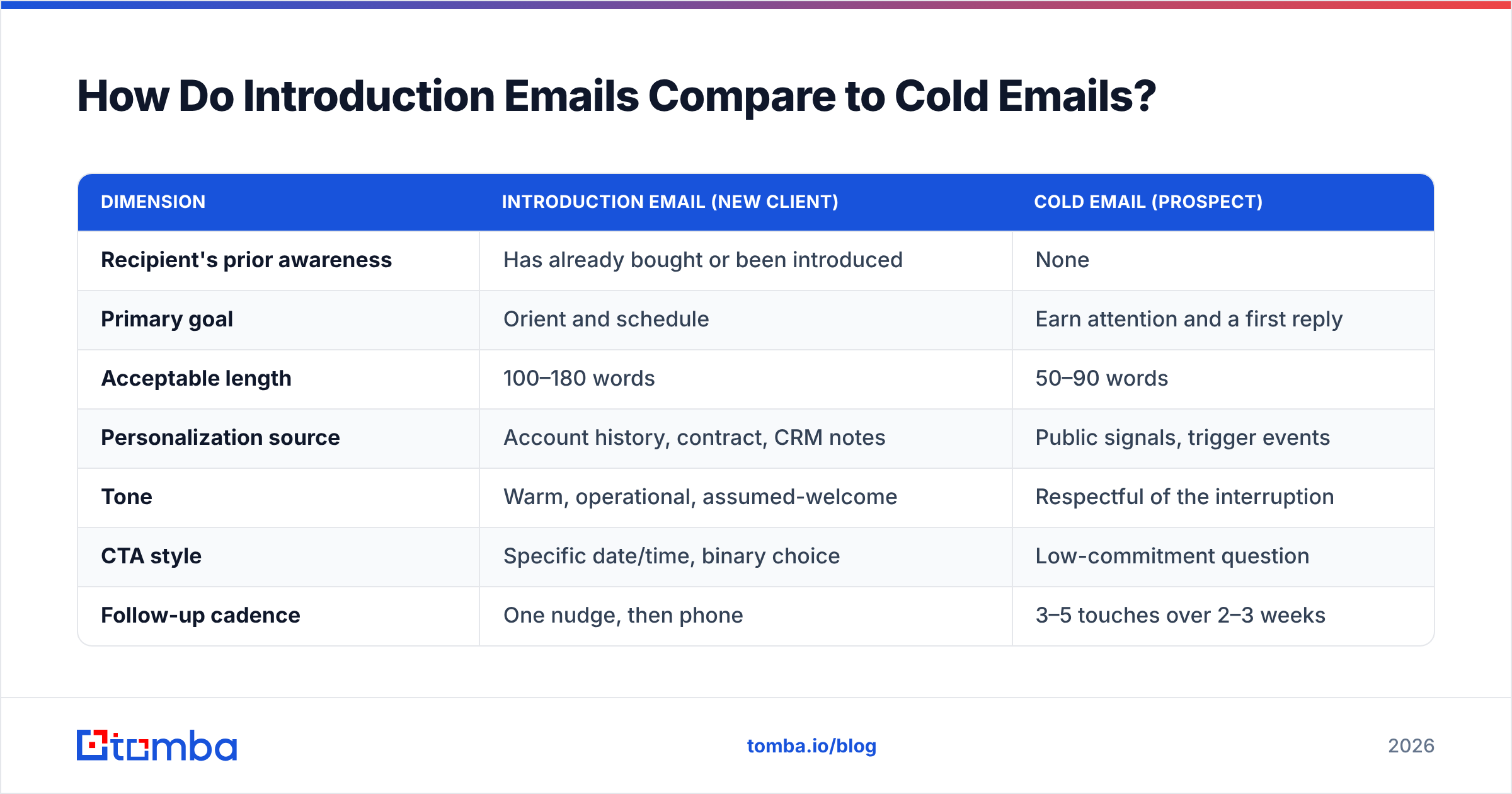
They are different instruments and confusing them is the root cause of most bad introduction emails.
| Dimension | Introduction email (new client) | Cold email (prospect) |
|---|---|---|
| Recipient's prior awareness | Has already bought or been introduced | None |
| Primary goal | Orient and schedule | Earn attention and a first reply |
| Acceptable length | 100–180 words | 50–90 words |
| Personalization source | Account history, contract, CRM notes | Public signals, trigger events |
| Tone | Warm, operational, assumed-welcome | Respectful of the interruption |
| CTA style | Specific date/time, binary choice | Low-commitment question |
| Follow-up cadence | One nudge, then phone | 3–5 touches over 2–3 weeks |
| Typical reply rate | 40–70% | 3–10% |
| Deliverability risk | Low (expected sender) | High (cold domain, cold list) |
The practical implication: you can be longer, warmer, and more direct in an introduction email than you can in a cold email. The permission is already granted. What you cannot do is be vague — because unlike a prospect, a new client has a real internal cost attached to your ambiguity. They have to report to someone about how onboarding is going.
If you want to pressure-test a draft, a subject line tester will catch the obvious spam triggers and length problems before you send. For tone calibration on longer first emails, both HubSpot's sales email research and G2's buyer-behavior reports publish reasonable baselines on B2B email length and response patterns.
What Does a Good Follow-Up to an Introduction Email Look Like?#
Short, additive, and dated.
Subject: Re: Acme × [Your Company] kickoff — agenda + two dates
Hi Dana — following up on the kickoff times. If Thursday and Friday don't work, here's my calendar: [link].
One thing I forgot to mention: the Salesforce sync usually takes 3–5 business days on our side, so if Q4 is the deadline we should start that piece regardless of when we do the kickoff call. Say the word and I'll kick it off Monday.
— [Name]
Notice the follow-up carries new information (the sync timeline) and offers a decision that can be made without a meeting. That's the pattern: every follow-up should either reduce the client's effort or give them something they didn't have.
If five business days pass with no response to either email, call. A new client who doesn't reply to two emails isn't ignoring you — they're usually buried, and a two-minute phone call resolves what a third email won't. If you don't have a direct line, a phone finder can surface it from the contact details you already have.
Which Template Should You Use?#
Match the template to the relationship state, not to your preference:
- Signed contract, you're the delivery lead → Post-signature kickoff. Lead with priorities you already know, close with two dates.
- Inheriting someone else's account → Handoff template. Prove you read the history; promise continuity explicitly.
- New person on an existing account → Short introduction, name the mutual contact, single low-effort ask. Verify the address first.
- Referred in by a mutual contact → Thank the referrer in the first line, keep it under 130 words, ask for a call, don't pitch.
- Reviving a dormant account → Don't call it an introduction. Tie it to an event — a product change, a renewal date, a relevant result at a similar company.
The mechanics are learnable. The part that actually separates a good introduction email from a forgettable one is whether the sender did five minutes of homework before writing. Knowing that the client's regional teams need separate training sessions is worth more than any subject-line formula.
Get the Address Right Before You Write the Email#
The best-written introduction email in the world fails if it lands in a dead mailbox. When you're reaching a new stakeholder, a replacement contact, or a department you've never worked with, start by confirming the address exists.
Tomba Email Finder locates professional email addresses by name and company domain and verifies them before you send, so your first impression actually arrives. The free tier covers 25 searches a month — enough to handle new-stakeholder lookups on a normal account load — and paid Tomba plans start at $49/mo when you need bulk lookups across a full book of business.
Write the email that earns a reply. Then make sure it gets delivered.
Related guides#
// get started
Find, verify and enrich your first contacts today
Start on the free plan with 25 searches a month, then scale when your team is ready.
Free plan · No credit card required · GDPR & CCPA
// about the author