Introductory Mail for New Product: Templates That Convert
Most product launch emails read like a press release and get deleted in four seconds. Here is the structure, the templates, and the sending checklist that actually earn replies in 2026.
TL;DR
- An introductory mail for new product is not a press release. It is a one-ask email that trades your reader's 20 seconds for one concrete outcome they care about.
- The structure that works in 2026: relevance line → problem in their words → what the product does in one sentence → one proof point → one low-friction ask.
- Segment before you write. The same launch needs three different versions: existing customers, warm leads, and cold prospects. Sending one version to all three is why launch emails flop.
- Deliverability kills more launches than copy does. A 12% bounce rate on launch day can tank your domain reputation for weeks.
- Benchmarks worth aiming for on a cold launch announcement: 45-60% open, 4-8% reply, under 2% bounce. Warm lists should beat all three by a wide margin.
What is an introductory mail for new product?#
An introductory mail for new product is the first email a person receives telling them something new exists and why they should care. That is the whole job. It is not the place to explain your architecture, your funding round, or your founder's origin story.
Think of it like introducing two people at a party. You do not recite one person's full résumé. You say, "Sarah, this is Marcus — he rebuilt the onboarding flow at a company your size and cut churn by a third." One sentence, one hook, then you step back and let them talk.
Most launch emails fail the party test. They read as announcements written for the internal team that built the thing. The buyer's question is never "what did you build?" It is "what changes for me on Monday if I say yes?"
There are three distinct jobs hiding under one label, and conflating them is the single most common mistake:
- Launch announcement — goes to people who already know you. Existing customers, trial users, newsletter subscribers. The relationship exists; you are updating it.
- Cold product introduction — goes to people who have never heard of you. You are buying attention with relevance, not with news. "We launched X" means nothing to a stranger.
- Expansion email — goes to an existing account to introduce a product they do not yet use. Highest conversion rate of the three, and the one most teams forget to send.
Write the same copy for all three and two of them will underperform badly.
What should an introductory email include?#
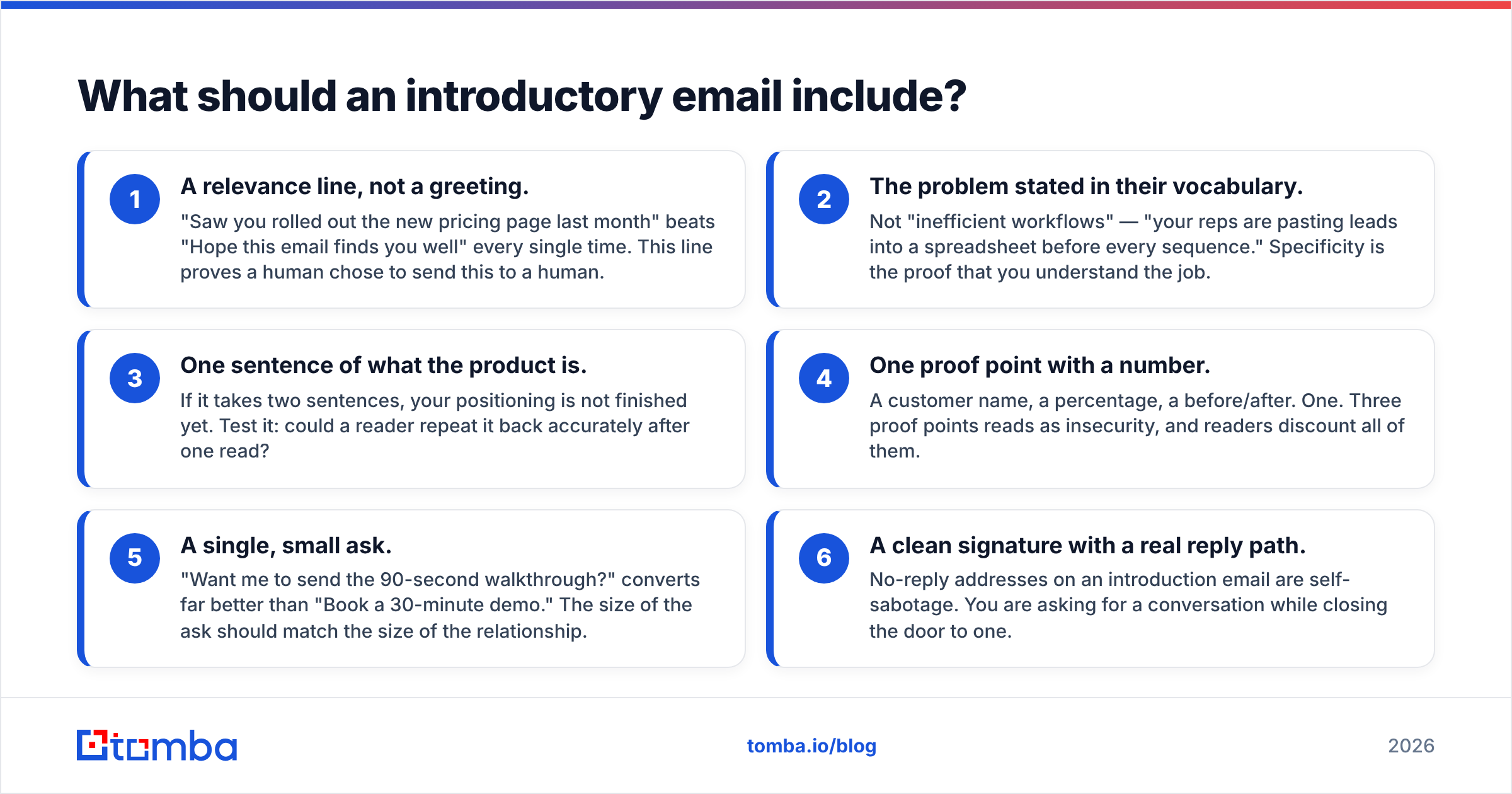
Six components, in this order. Cut any one and reply rate drops measurably.
- A relevance line, not a greeting. "Saw you rolled out the new pricing page last month" beats "Hope this email finds you well" every single time. This line proves a human chose to send this to a human.
- The problem stated in their vocabulary. Not "inefficient workflows" — "your reps are pasting leads into a spreadsheet before every sequence." Specificity is the proof that you understand the job.
- One sentence of what the product is. If it takes two sentences, your positioning is not finished yet. Test it: could a reader repeat it back accurately after one read?
- One proof point with a number. A customer name, a percentage, a before/after. One. Three proof points reads as insecurity, and readers discount all of them.
- A single, small ask. "Want me to send the 90-second walkthrough?" converts far better than "Book a 30-minute demo." The size of the ask should match the size of the relationship.
- A clean signature with a real reply path. No-reply addresses on an introduction email are self-sabotage. You are asking for a conversation while closing the door to one.

Notice what is not on the list: a feature grid, a logo wall, a pricing table, and a paragraph about your mission. Those belong on the landing page you are linking to. The email's only job is to earn the click or the reply.
Which introductory email template should you use?#
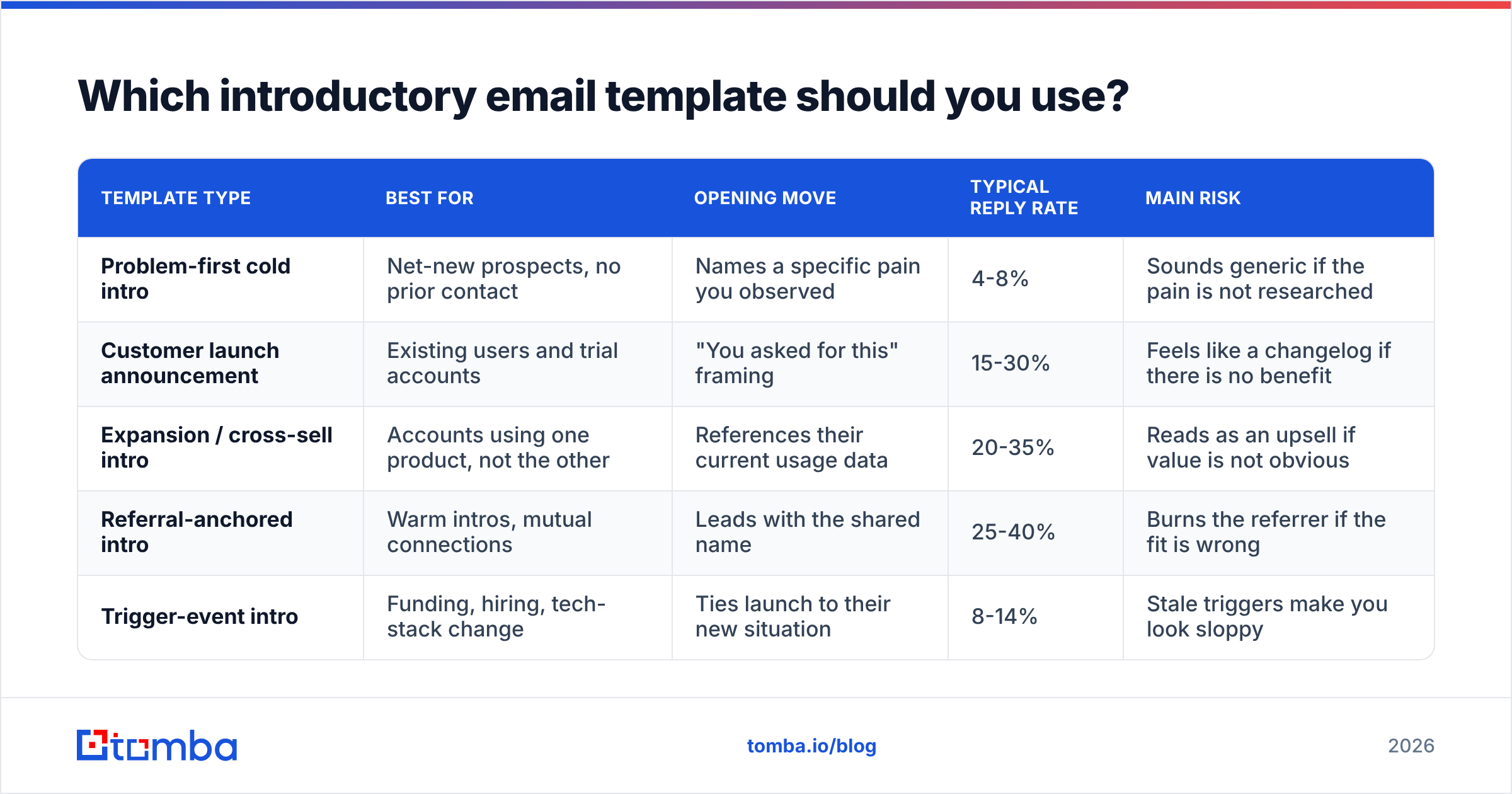
Pick the template by audience temperature and the size of the ask you can credibly make. Here is how the four workhorse formats compare.
| Template type | Best for | Opening move | Typical reply rate | Main risk |
|---|---|---|---|---|
| Problem-first cold intro | Net-new prospects, no prior contact | Names a specific pain you observed | 4-8% | Sounds generic if the pain is not researched |
| Customer launch announcement | Existing users and trial accounts | "You asked for this" framing | 15-30% | Feels like a changelog if there is no benefit |
| Expansion / cross-sell intro | Accounts using one product, not the other | References their current usage data | 20-35% | Reads as an upsell if value is not obvious |
| Referral-anchored intro | Warm intros, mutual connections | Leads with the shared name | 25-40% | Burns the referrer if the fit is wrong |
| Trigger-event intro | Funding, hiring, tech-stack change | Ties launch to their new situation | 8-14% | Stale triggers make you look sloppy |
The pattern is obvious once you see it laid out: reply rate tracks the strength of the existing connection far more than it tracks copy quality. Which means the highest-leverage work on a launch is usually segmentation and list quality, not word choice. Good copy on a bad list loses to average copy on a good list.
Template 1: cold problem-first introduction#
Subject: the spreadsheet step before your sequences
Hi {{FirstName}},
Noticed {{Company}} is hiring two more SDRs this quarter — congrats.
Most teams at that stage hit the same bottleneck: reps spend the first hour of every day pasting contacts between LinkedIn, a CRM, and a sequencing tool. It is not a tooling problem, it is a handoff problem.
We just launched {{Product}}, which collapses that handoff into one step — lead in, verified contact out, straight into your sequencer.
{{Customer}} cut that hour to about six minutes in their first month.
Want the 90-second walkthrough? I will send the link, no call needed.
— {{YourName}}
Why it works: the ask costs the reader nothing, and the proof point is specific enough to be checkable.
Template 2: existing-customer launch announcement#
Subject: the bulk export you asked for is live
Hi {{FirstName}},
You flagged this in March: exporting more than 500 rows meant three separate jobs.
As of today it is one job, up to 50,000 rows, and it runs in the background so you are not stuck watching a progress bar.
It is already on your plan — nothing to upgrade, nothing to install. Here is the 40-second demo.
If it does not behave the way you expected, reply and I will look at your account directly.
— {{YourName}}
Why it works: it closes a loop the customer opened. The strongest launch email is almost always a receipt for a request they made.
Template 3: expansion introduction#
Subject: you are verifying 8k emails a month manually
Hi {{FirstName}},
Your team ran about 8,000 lookups last month, then verified them somewhere else before sending.
That second step is now built in. Same dashboard, same credits, one fewer tool in the chain.
Worth 10 minutes to see whether it replaces your current verifier? If not, no harm — you keep what you have.
— {{YourName}}
Why it works: it uses data the reader knows is true, then offers a graceful exit. Giving people an easy "no" reliably increases the number of "yes" replies.
How do you avoid the spam folder on launch day?#
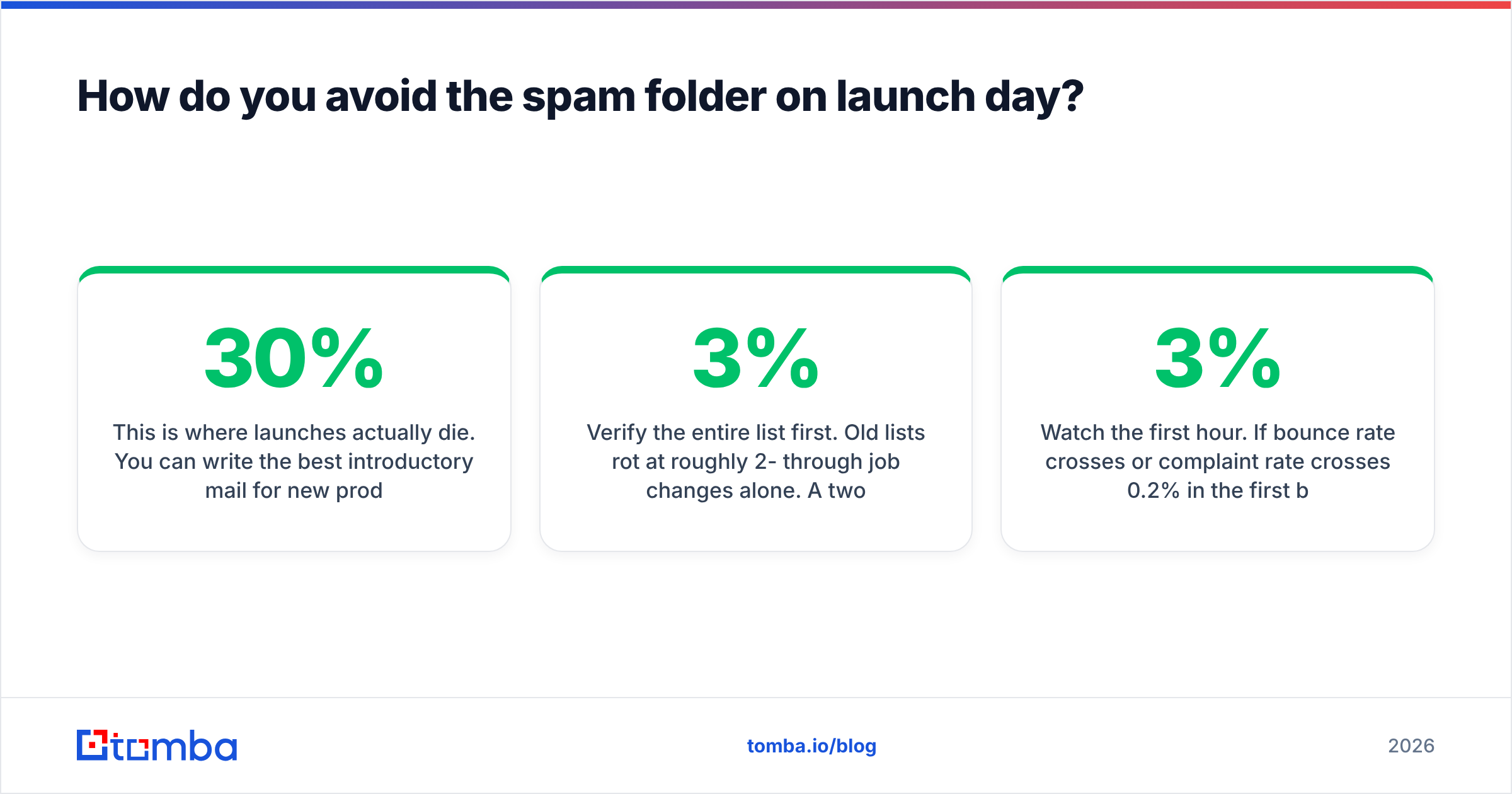
This is where launches actually die. You can write the best introductory mail for new product in your category and still have 30% of it never reach an inbox.
Launch sends are unusually risky because they break your normal pattern. You typically send 200 emails a day, and suddenly you send 5,000 to addresses you have not touched in eighteen months. Mailbox providers read that as exactly what it looks like: a list blast.
Work through this before you schedule anything:
- Verify the entire list first. Old lists rot at roughly 2-3% per month through job changes alone. A two-year-old list can be 25-40% dead. Run it through an email verifier and remove hard bounces before send, not after.
- Handle catch-all domains separately. They will not return a clean verdict from standard SMTP checks. Segment them into their own batch with a catch-all verifier rather than letting them inflate your unknown-risk bucket.
- Check authentication. SPF, DKIM, and DMARC must all pass. Google and Yahoo both enforce authentication requirements for bulk senders — Google's own sender guidelines are the authoritative reference, and they are stricter than most teams assume.
- Ramp the volume. Split a 5,000-contact launch across four days in increasing batches. Day one at 500, day four at 2,000. Sudden volume spikes are a stronger spam signal than most copy choices.
- Watch the first hour. If bounce rate crosses 3% or complaint rate crosses 0.2% in the first batch, stop the send. Fix the list, then resume. A paused launch recovers; a burned domain takes months.
- Keep launch sends off your primary domain if the list is cold. Use a separate sending domain so a bad outcome does not damage the address your whole company replies from.
One more: strip the tracking-pixel-plus-three-links-plus-image-header pattern from cold introductions. A plain-text-looking email with one link performs better and passes filters more reliably. Save the designed template for customers who already expect your branding.
What subject lines work for a product launch email?#
Subject lines for introductions follow a different rule than newsletters. You are not competing for attention with entertainment — you are competing with 60 other work emails, most of which the reader must open.
What works consistently:
- Specific and lowercase. "the bulk export you asked for" outperforms "Introducing Bulk Export 2.0."
- Under 45 characters. Roughly 60% of B2B email is now opened on mobile, where longer subjects truncate mid-thought.
- No "Introducing," no "Announcing," no version numbers. These signal broadcast, and broadcast signals delete.
- Question format for cold, statement format for warm. Questions invite a reply; statements deliver news to someone who already cares.
Run your candidates through a subject line tester before you commit, and always A/B two versions on the first batch. The difference between your best and worst subject line is routinely 20 percentage points of open rate — larger than almost any body-copy change you will make.
How do you measure whether the introduction worked?#
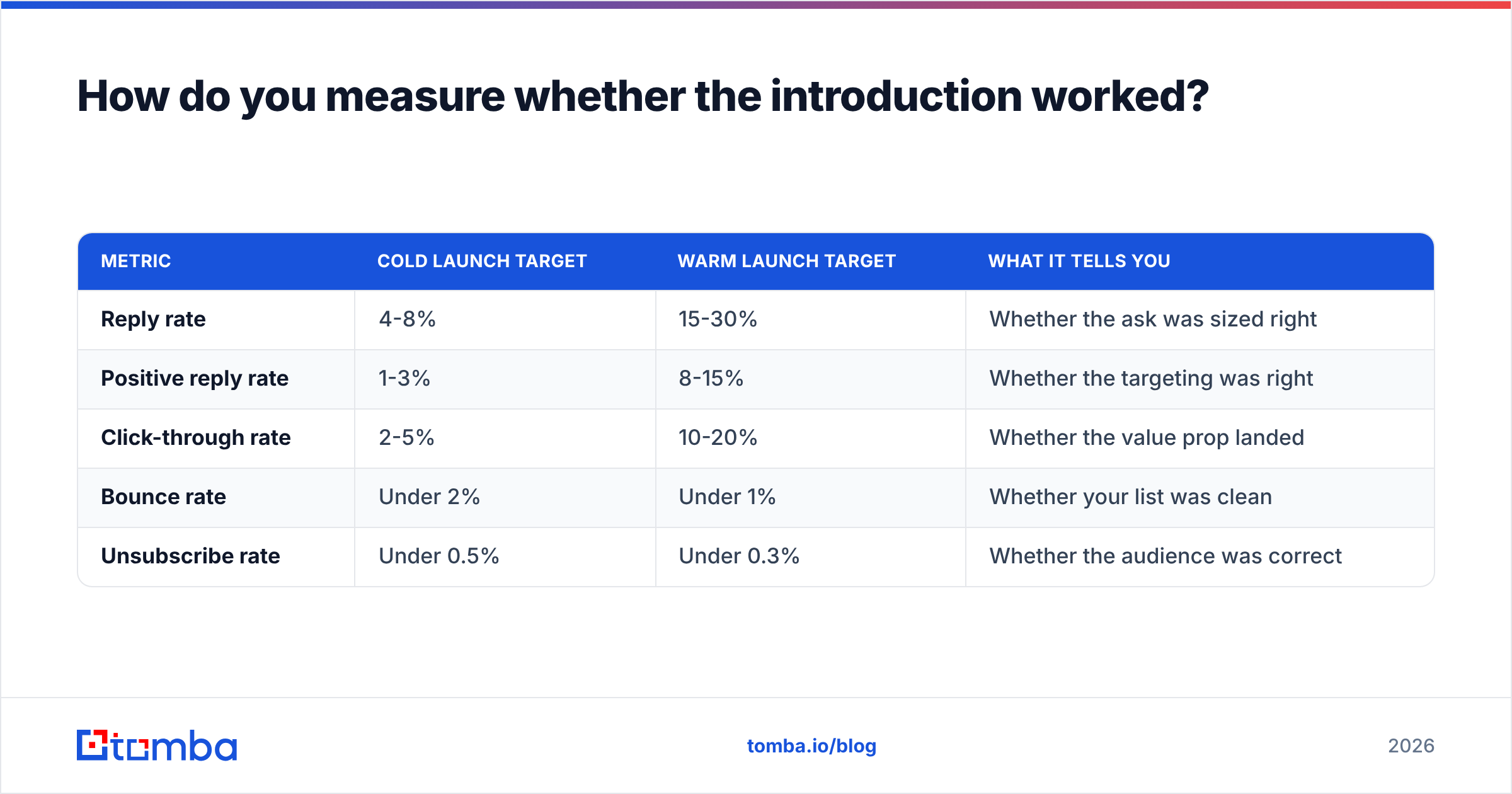
Open rate is the least useful number on the list, and Apple Mail Privacy Protection has made it unreliable since 2021. Track these instead, in order of importance:
| Metric | Cold launch target | Warm launch target | What it tells you |
|---|---|---|---|
| Reply rate | 4-8% | 15-30% | Whether the ask was sized right |
| Positive reply rate | 1-3% | 8-15% | Whether the targeting was right |
| Click-through rate | 2-5% | 10-20% | Whether the value prop landed |
| Bounce rate | Under 2% | Under 1% | Whether your list was clean |
| Unsubscribe rate | Under 0.5% | Under 0.3% | Whether the audience was correct |
The diagnostic pairing that matters most: high clicks with low replies means your product is interesting but your ask is too big. Low clicks with decent replies means your copy is working but your link is not compelling. High unsubscribes with high opens means your subject line wrote a check your body could not cash.
Industry review sites like G2 and analyst coverage from firms such as Gartner are useful for sanity-checking what "good" looks like in your specific category — B2B SaaS benchmarks differ substantially from agency or e-commerce norms.
What are the most common mistakes?#
- Writing for the team that built it. Internal excitement does not transfer. Every feature sentence should be followed by "which means you can…"
- Sending to an unsegmented list. One email to customers, prospects, and churned users at once will insult at least one of those groups.
- Asking for a demo in email one. For a cold introduction, the ask should cost under 30 seconds to accept.
- Skipping verification to hit a launch date. A date you hit with a 15% bounce rate costs more than a date you miss by two days.
- No follow-up planned. Roughly half of all replies to introduction sequences arrive after the first message. One follow-up four days later, referencing nothing but the original, recovers a meaningful share of non-responders.
- Launching without a place to send people. If the link goes to a homepage instead of a page about the specific thing you just introduced, you lose most of the intent you created.
If you need a starting point for the copy itself, the cold email templates library covers the structural variants above, and a domain search will tell you who at a target account actually owns the problem you are solving before you write a word.
Where should you start?#
Start with the list, not the copy. A launch email sent to 400 verified, correctly segmented contacts will beat the same email sent to 4,000 stale ones on every metric that matters — replies, pipeline, and the health of your sending domain six weeks later.
Build that list with the Tomba Email Finder: find the right people by domain, name, or company, verify before you send, and export straight into your sequencer. The free tier gives you 25 searches a month to test the workflow, and paid plans start at $49/mo — see Tomba pricing for the full breakdown. Get the list right, and the introduction has a chance to do its job.
Related guides#
// get started
Find, verify and enrich your first contacts today
Start on the free plan with 25 searches a month, then scale when your team is ready.
Free plan · No credit card required · GDPR & CCPA
// about the author