iOS 15 Email Tracking in 2026: What Still Works and What Doesn't
Apple's Mail Privacy Protection didn't just dent open rates — it made them unreadable for a third of most B2B lists. Here's what iOS 15 email tracking actually broke, and the metrics that still tell you the truth in 2026.
TL;DR
- Apple Mail Privacy Protection (MPP), shipped with iOS 15 in 2021, pre-fetches tracking pixels through a proxy. Every MPP-protected message registers as "opened" whether the human read it or not.
- On a typical B2B list, 35-55% of recipients now sit behind MPP or a similar image proxy. Your open rate is a blend of real humans and machines, and you can't separate them after the fact.
- Open-rate-based automation — re-send to non-openers, lead scoring on opens, "warm" segments — is the part that actually hurts. It quietly wastes sends and poisons scoring models.
- Replies, clicks (with caveats), meeting bookings, and reply sentiment are the metrics that survived. Deliverability monitoring replaces opens as your inbox-placement proxy.
- The fix is upstream: cleaner data, fewer sends, tighter targeting. A list where 97% of addresses resolve to real humans needs far less measurement theatre than one where 20% bounce.
What is iOS 15 email tracking and what exactly broke?#
Open tracking was always a trick. Your ESP embeds a 1x1 transparent image — a web beacon — with a unique URL per recipient. When the mail client loads that image, the server logs a request and calls it an "open." No image load, no open.
Apple broke the trick in September 2021 with Mail Privacy Protection, part of the iOS 15 / macOS Monterey privacy push described on Apple's privacy page. When a user enables MPP in Apple Mail, the device fetches all remote content in the message through Apple's proxy servers, in the background, shortly after delivery — regardless of whether the user opens anything.
Three things break at once:
- The open itself becomes fictional. The pixel fires on delivery, not on read. You record an open for someone who never touched the message.
- The timestamp becomes useless. "Opened at 9:14 AM Tuesday" is when Apple's proxy ran, not when your prospect was at their desk. Send-time optimization built on open timestamps is optimizing noise.
- Location and device data become wrong. MPP masks the IP address with one from Apple's proxy pool, usually in the same broad region. Geo-segmentation and device-type reporting degrade into guesswork.
Note what did not break: link clicks still require a human action. Replies still require a human. Bounces, complaints, and unsubscribes are still real signals.
How does Mail Privacy Protection actually work under the hood?#
The mechanics matter because they determine which workarounds are real and which are wishful thinking.
MPP runs as a background content-fetch on-device or via Apple's proxy network. The sequence looks like this:
- Message lands in the recipient's Apple Mail account (iCloud, Gmail, Outlook — MPP is client-side, not domain-side).
- Apple's proxy pre-fetches every remote asset in the HTML: images, tracking pixels, background images, remote CSS.
- Your ESP logs a hit from an Apple-owned IP range with a generic user agent.
- Content is cached locally so that when the human does open the message, no second request goes out.
- You see one open, ever — usually within minutes of delivery, from a location that may be hundreds of miles from the recipient.
That fifth point kills a common workaround. Some teams tried to filter out "the first open, if it arrives within 60 seconds of send." It helps a little, but because the content is cached, a genuine later open produces no additional pixel request. You lose the real signal while filtering the fake one.
The other dead end is "use a non-image tracking method." There isn't one that works in mainstream mail clients. CSS-based tracking, font-loading tricks, and video-poster hacks all rely on the same remote-content fetch that MPP proxies. Anything that loads from your server gets pre-fetched.

How much of your list is actually affected?#
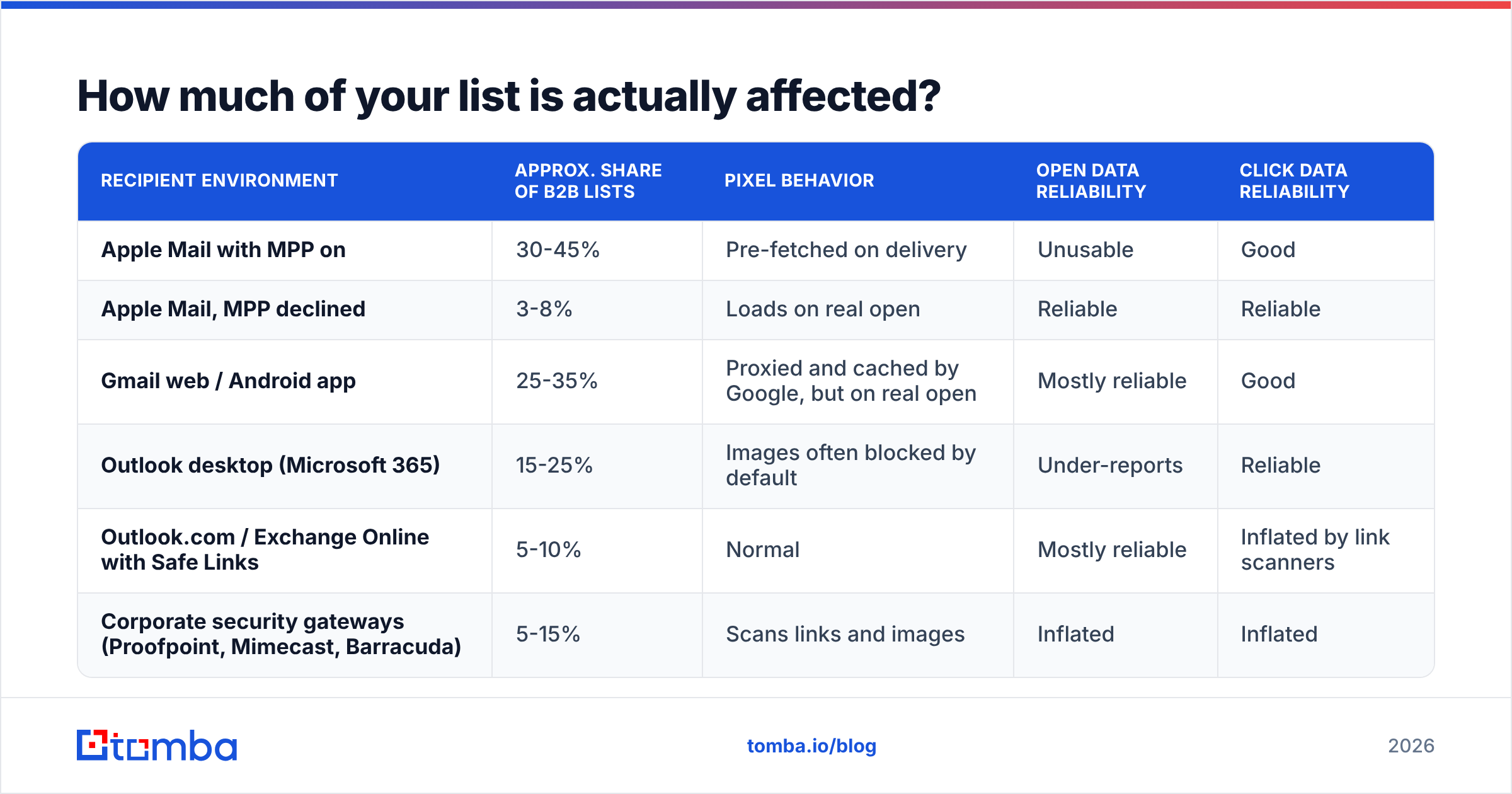
Adoption varies wildly by audience, which is why generic industry averages mislead. Here's the practical breakdown of how different mail environments handle your tracking pixel in 2026:
| Recipient environment | Approx. share of B2B lists | Pixel behavior | Open data reliability | Click data reliability |
|---|---|---|---|---|
| Apple Mail with MPP on | 30-45% | Pre-fetched on delivery | Unusable | Good |
| Apple Mail, MPP declined | 3-8% | Loads on real open | Reliable | Reliable |
| Gmail web / Android app | 25-35% | Proxied and cached by Google, but on real open | Mostly reliable | Good |
| Outlook desktop (Microsoft 365) | 15-25% | Images often blocked by default | Under-reports | Reliable |
| Outlook.com / Exchange Online with Safe Links | 5-10% | Normal | Mostly reliable | Inflated by link scanners |
| Corporate security gateways (Proofpoint, Mimecast, Barracuda) | 5-15% | Scans links and images | Inflated | Inflated |
Two lines in that table deserve attention beyond MPP.
Outlook has the opposite problem. Desktop Outlook frequently blocks remote images until the user clicks "download pictures." Those recipients read your message and never register an open. So your open rate is simultaneously inflated by Apple and deflated by Microsoft, in proportions you cannot measure.
Security gateways inflate clicks. Link-scanning appliances visit every URL in an inbound message to check for malware. That produces phantom clicks, often on every link in the email within the same second, from a data-center IP. If you're going to lean on clicks, you need to filter these — most serious sending platforms now do, by looking for multiple link hits in a sub-second window and known scanner ranges.
Are open rates completely useless now?#
No — they're useless as an absolute number and marginally useful as a relative one, under strict conditions.
Where open rate still has residual value:
- A/B tests within the same audience and time window. If variant A and variant B both go to random halves of the same list, MPP contamination is roughly equal on both sides. A large, consistent gap in opens can still indicate a subject-line difference. Small gaps are noise.
- Trend breaks. If your open rate has hovered at 62% for six months and drops to 31% overnight, something real happened — usually a deliverability event, not a copy problem. Opens are a smoke alarm, not a thermometer.
- Non-MPP segments. If your platform identifies Apple proxy hits (most do now), you can compute an open rate on the remaining recipients only. It's a smaller sample with its own bias — Outlook-heavy, so it under-reports — but it moves for real reasons.
Where open rate is actively harmful:
- Re-sending to "non-openers." Every MPP recipient is a false opener, so they're excluded from the follow-up they should have received. Meanwhile Outlook readers who genuinely read your email get re-sent the same message. You have inverted the logic.
- Lead scoring. Adding 5 points for an open means adding points for owning an iPhone. Scoring models trained on post-2021 open data have learned a device preference, not buying intent. If you run lead scoring built on opens, audit it.
- "Engaged" list hygiene. Sunsetting "unengaged" contacts based on opens now keeps the Apple users and cuts the Outlook users. That's the reverse of what you want.
What metrics should replace open rate in 2026?#
Here's the replacement stack, ranked by signal quality:
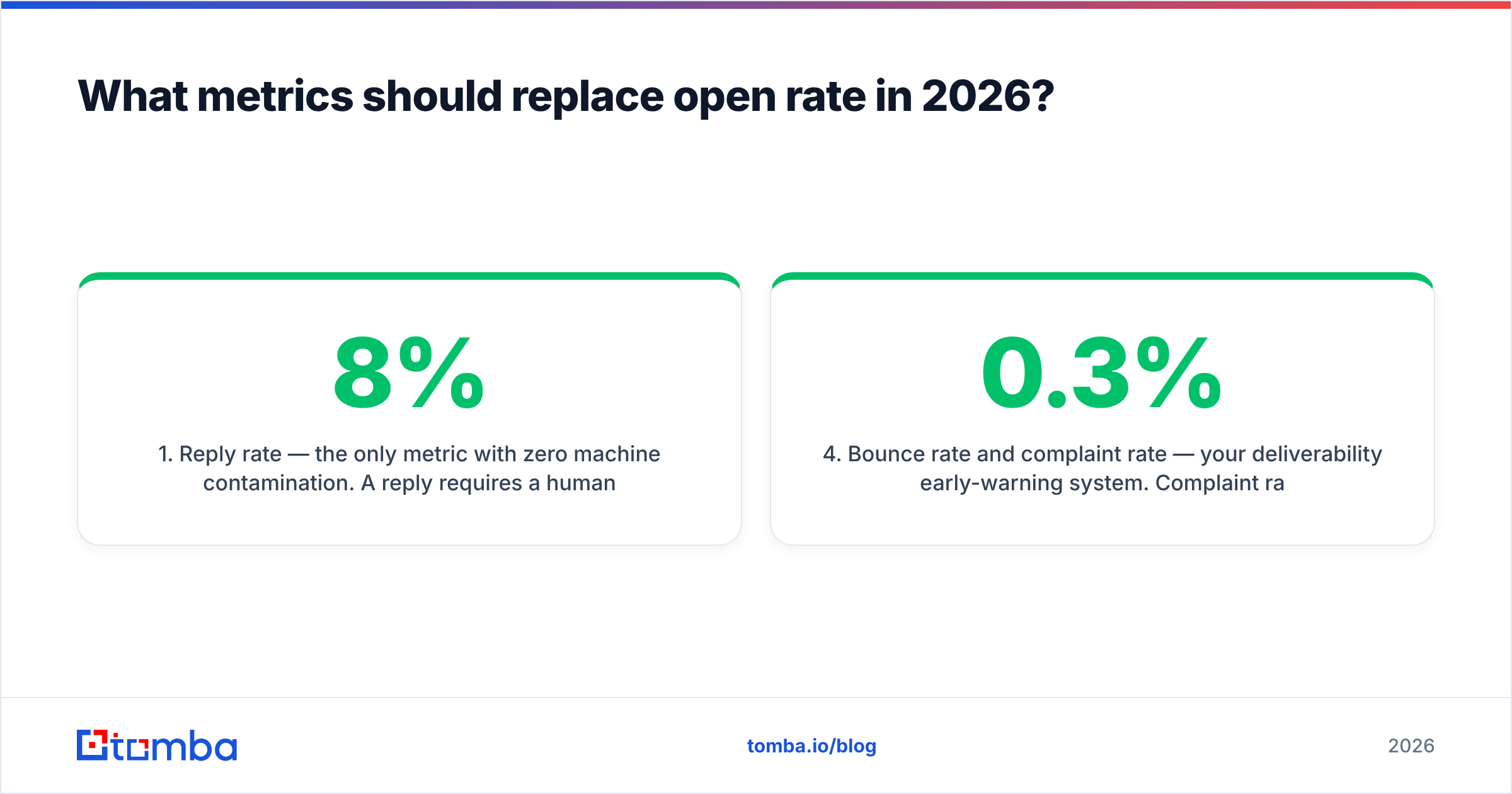
- Reply rate — the only metric with zero machine contamination. A reply requires a human composing text. For cold outbound, positive reply rate (replies that aren't "unsubscribe" or "wrong person") is the single number worth optimizing. Benchmark: 3-8% on a well-targeted B2B sequence, 1-3% on a broad one.
- Filtered click rate — clicks minus scanner traffic. Require a click that arrives more than a few seconds after delivery, from a residential or mobile IP, on only one link. Most platforms do this filtering natively now; verify yours does before you build reporting on it.
- Meeting/demo bookings per 1,000 sends — the metric your CFO already cares about. Slower to accumulate but immune to every tracking change Apple or Google will ship next.
- Bounce rate and complaint rate — your deliverability early-warning system. Complaint rate above 0.3% at Gmail is a red line under the 2024 bulk-sender rules; above 0.1% you should already be nervous.
- Website visits from sent domains — match anonymous traffic against the accounts you emailed. A website visitor reveal layer turns "did they engage?" into "did the account show up on the pricing page three days after the send?"
- Unsubscribe rate — an unsubscribe is a human action and a genuine relevance signal. A rising unsub rate with flat replies means your targeting is drifting, not your copy.

How do the old and new reporting models compare?#
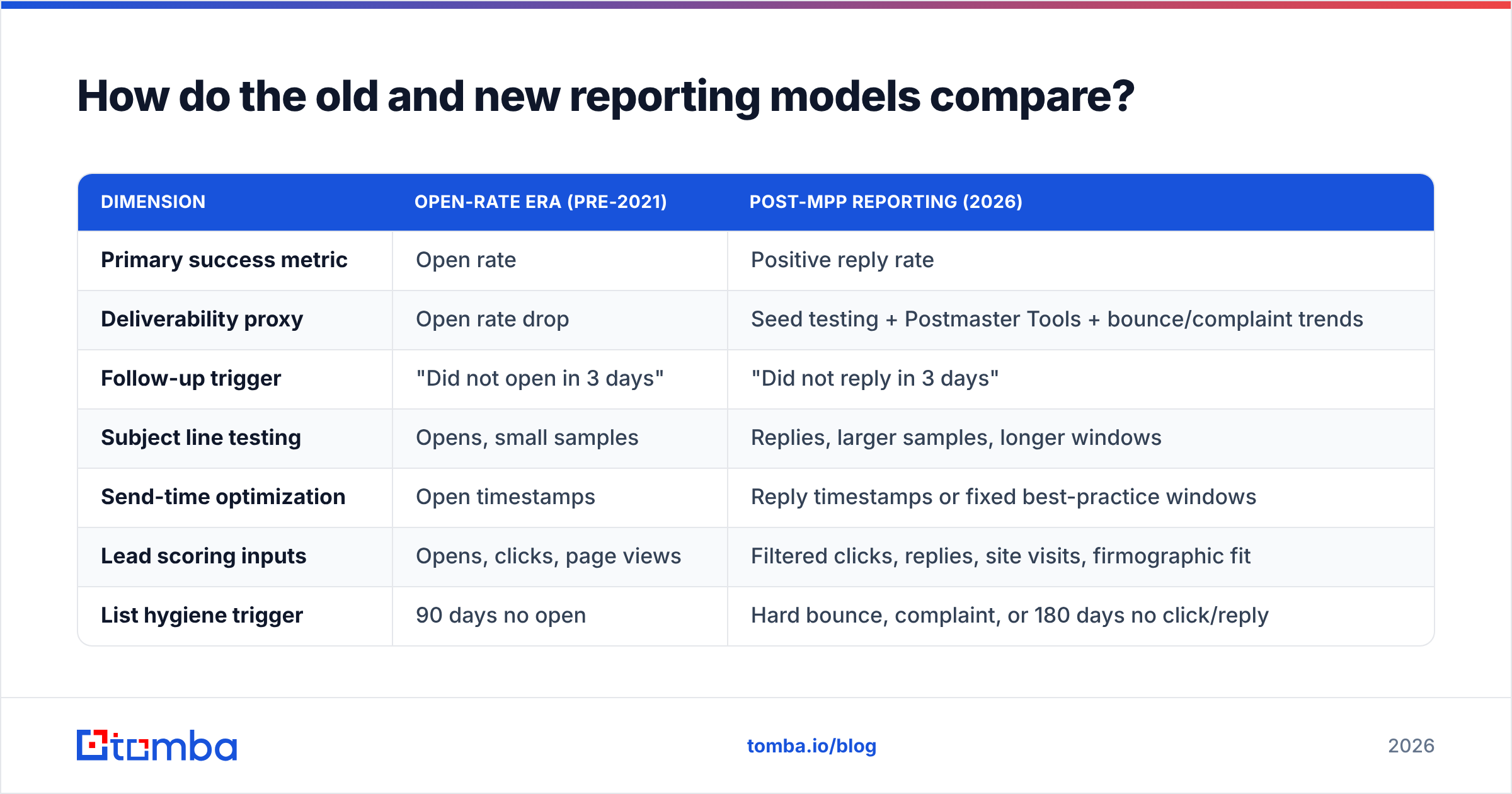
| Dimension | Open-rate era (pre-2021) | Post-MPP reporting (2026) |
|---|---|---|
| Primary success metric | Open rate | Positive reply rate |
| Deliverability proxy | Open rate drop | Seed testing + Postmaster Tools + bounce/complaint trends |
| Follow-up trigger | "Did not open in 3 days" | "Did not reply in 3 days" |
| Subject line testing | Opens, small samples | Replies, larger samples, longer windows |
| Send-time optimization | Open timestamps | Reply timestamps or fixed best-practice windows |
| Lead scoring inputs | Opens, clicks, page views | Filtered clicks, replies, site visits, firmographic fit |
| List hygiene trigger | 90 days no open | Hard bounce, complaint, or 180 days no click/reply |
| Reporting cadence | Per-send | Per-cohort, weekly rollups |
The structural change in that table is the shift from per-send to per-cohort reporting. Replies are rarer than opens, so a single send of 400 emails produces 12-30 replies — too few to A/B test against. You need to batch: run a variant for two weeks across several thousand sends, then compare. Teams that keep making per-send decisions on reply data are just adding a new kind of noise.
Does Mail Privacy Protection affect deliverability itself?#
Indirectly, and mostly for the better.
MPP does not change how mailbox providers filter. It doesn't touch SPF, DKIM, DMARC, or your domain reputation. What it changes is your behavior — and bad behavior is what damages reputation.
The dangerous pattern is this: open rates inflate, teams conclude their messaging is working, they scale volume, and the underlying reply rate stays flat or falls. Six weeks later, complaint rates rise and inbox placement collapses. The inflated open rate hid the problem for a month and a half.
Two defenses:
- Monitor placement directly. Google Postmaster Tools and Microsoft SNDS give you spam-rate and reputation data straight from the source. Seed-list testing with a service like Litmus shows you folder placement across clients. Neither depends on a pixel.
- Fix the inputs. Most deliverability damage starts with bad addresses. Hard bounces and spam traps come from unverified data, not from bad copy. Running a list through an email verifier before a send removes the single biggest reputation risk, and a catch-all verifier handles the domains that accept everything and bounce later.
If you want a refresher on the mechanics, the email deliverability primer covers authentication, reputation, and the feedback loops that matter.
How do you rebuild your reporting in practice?#
A workable migration, in order:
Step 1 — Audit every automation that reads an open. Search your sequencer, CRM workflows, and lead-scoring rules for open conditions. Most teams find between four and fifteen. List them before changing anything.
Step 2 — Rewrite non-opener branches as non-replier branches. This is usually a one-line change per sequence and it immediately stops the inverted-logic problem. Expect your follow-up volume to go up, because far fewer people reply than "open."
Step 3 — Remove opens from scoring entirely. Not down-weight — remove. A metric that's 40% machine noise doesn't get better with a smaller coefficient. Replace the points with firmographic fit and filtered clicks.
Step 4 — Set up placement monitoring. Postmaster Tools for Gmail, SNDS for Microsoft, plus a seed list. Do this before you need it; the data is only useful with history behind it.
Step 5 — Tighten the list instead of widening the funnel. This is the part teams skip. When you can't measure opens, volume-based outbound loses its feedback loop. Sending 5,000 mediocre emails to see what sticks stops working when "what stuck" is unmeasurable. Smaller, better-targeted lists with verified contacts produce reply data fast enough to actually learn from.
Step 6 — Report on cohorts, weekly. Group by ICP segment and campaign, not by individual send. Report replies, filtered clicks, bookings, and complaint rate. Show open rate as a greyed-out diagnostic line if your executives insist — but label it "unreliable since iOS 15."
What does this mean for how you build lists?#
The measurement change pushes the work upstream. When open rates were trustworthy, you could send wide and let the data sort it out. Now the sorting has to happen before you press send.
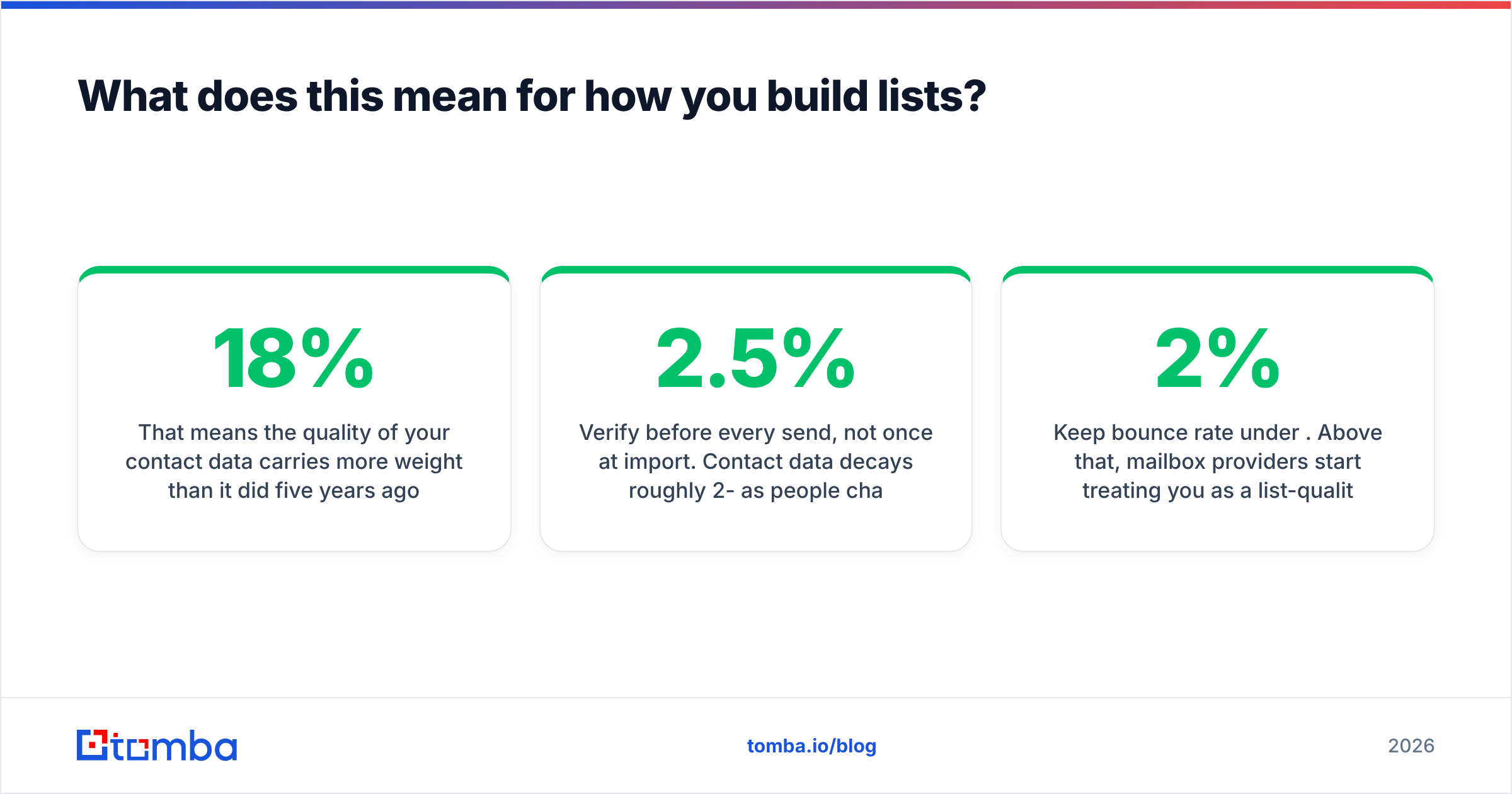
That means the quality of your contact data carries more weight than it did five years ago. A list where every address has been validated and every contact matches your ICP produces a reply rate you can actually read after a few hundred sends. A scraped list with 18% invalid addresses produces bounces, complaints, and a reply rate buried in noise — and you no longer have a fake open rate to comfort yourself with.
Practical implications:
- Verify before every send, not once at import. Contact data decays roughly 2-2.5% per month as people change jobs.
- Prefer pattern-confirmed addresses over guessed permutations. A domain search that returns the company's confirmed email pattern plus known contacts beats a permutator guessing six variants and burning your reputation on five of them.
- Enrich for fit, not just for contactability. Headcount, tech stack, and funding stage let you segment cohorts small enough to compare reply rates meaningfully.
- Keep bounce rate under 2%. Above that, mailbox providers start treating you as a list-quality risk, and no amount of copy tuning recovers it.
Where should you start?#
Start by deleting one thing: the "re-send to non-openers" step in your highest-volume sequence. It's the single automation doing the most damage on a post-MPP list, and removing it takes two minutes.
Then work on the input side. If your reply rate is the metric you're now judged on, the fastest lever isn't a better subject line — it's emailing the right person at a verified address. The Tomba Email Finder finds professional addresses by domain, name, or company and confirms deliverability before the send, so your reply data reflects your messaging rather than your bounce rate. The free tier gives you 25 searches a month to test the workflow; paid plans start at $49/mo on Starter, with Growth at $99/mo for teams running real outbound volume. Full details are on the Tomba pricing page.
Apple took away a metric that was never measuring what you thought it measured. The teams that adapted fastest are the ones now reporting on replies and bookings — and finding those numbers harder to fake, harder to inflate, and far more useful in a forecast.
Related guides#
// get started
Find, verify and enrich your first contacts today
Start on the free plan with 25 searches a month, then scale when your team is ready.
Free plan · No credit card required · GDPR & CCPA
// about the author