Istari.ai vs Skrapp (2026): Which B2B Data Tool Wins?
Istari.ai mines company websites for market intelligence. Skrapp finds work emails from LinkedIn. They are not the same product — here is how to pick, and what each one leaves you missing.
Most people who search "Istari.ai vs Skrapp" assume the two tools compete. They mostly don't. One reads company websites to tell you which firms matter. The other reads LinkedIn to tell you who to email. Pick the wrong one and you get a clean market map with nobody to email. Or 5,000 verified emails and no idea which 200 are worth sending.
TL;DR — what's the short answer?#
Here is the Istari.ai vs Skrapp answer in five lines.
- Istari.ai reads company websites. It scans firm sites at scale and turns the text into data: industry, tech in use, how big the web presence is. You get it by API or data feed.
- Skrapp finds work emails. It is a LinkedIn-first Chrome add-on with domain search and a bulk finder. It turns a list of people into a list of emails.
- They sit at different steps of one funnel. Istari.ai answers "which accounts?" Skrapp answers "which mailbox?"
- Buy the one that fits your gap. No target list? Buy company data. A list but no emails? Buy an email finder.
- Neither is a full stack. You still need checks for catch-all domains, plus enrichment and an API that holds up at volume. That is where a tool like Tomba Email Finder tends to land.
What is Istari.ai, exactly?#
Istari.ai is a company data platform built on web mining. It does not resell a static database. It crawls company websites, reads the text, and turns it into clean fields: industry, tech signals, what the firm does, and how strong its web presence looks.
The output reads more like a research file than a contact list. Teams use it to:
- Size a market — count how many firms in a region really do X, based on their own sites.
- Target by tech — find who mentions, ships, or hires around a given tool.
- Run policy or economics research — the firm grew out of academic web mining work, and it shows.
- Feed a scoring model — pipe the fields into lead scoring, not into a mail merge.
Check the official site for current coverage and delivery formats. There is no public price list. That tells you how they sell: this is a data contract, not a $49 card swipe.
One more thing. Istari.ai will not hand you firstname.lastname@company.com. People-level records are not its core product.
What is Skrapp, exactly?#
Skrapp is a plain B2B email finder. The heart of it is the browser add-on. Open a LinkedIn profile or a Sales Navigator search, click the add-on, and it returns likely work emails with a confidence score. Around that sit the usual parts: domain search, single and bulk finder, a verifier, list tools, and an API.
It fits the flow most sales reps already run:
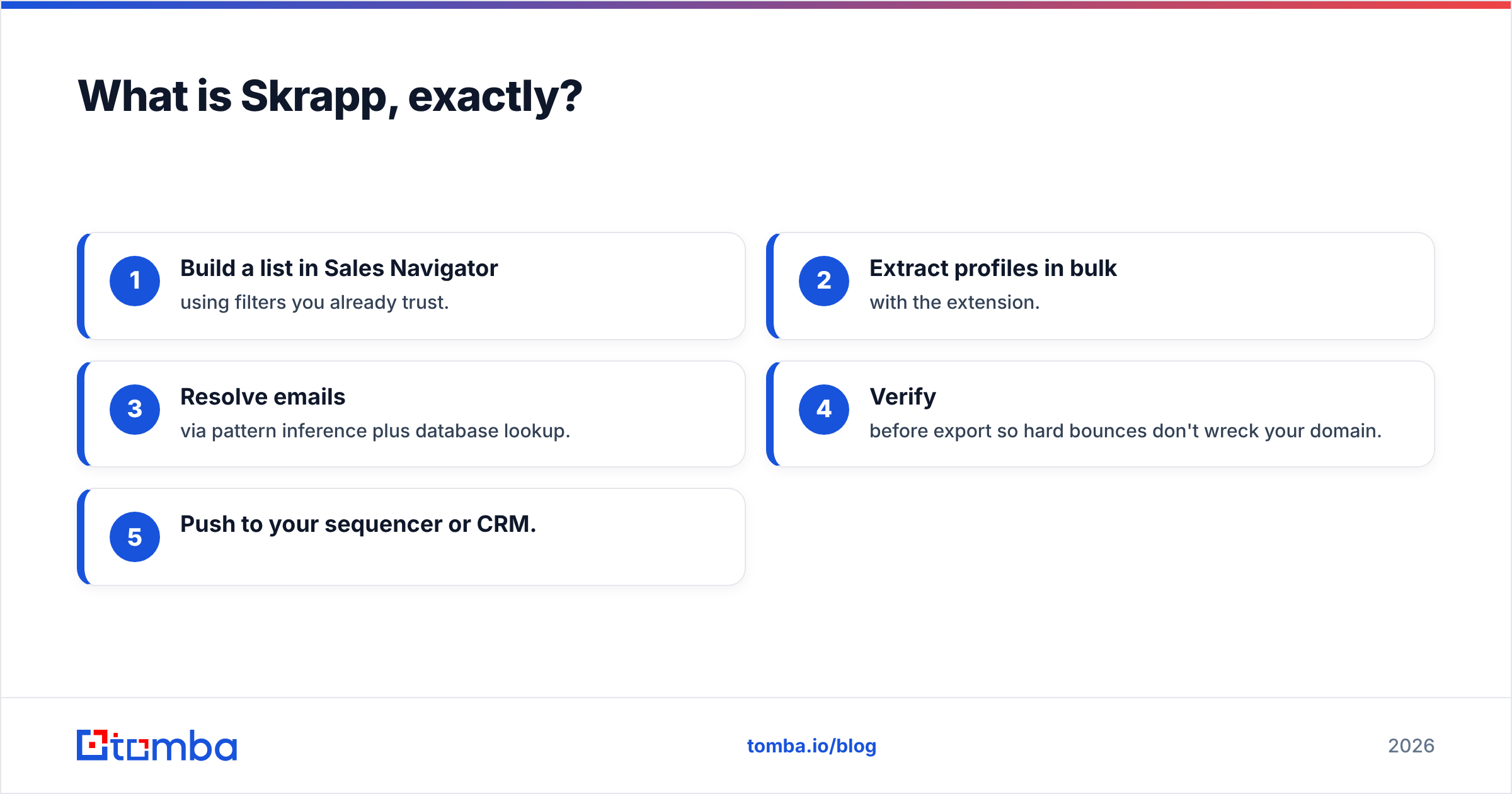
- Build a list in Sales Navigator with filters you already trust.
- Pull profiles in bulk with the add-on.
- Get emails from name patterns plus a database lookup.
- Check them before export, so bounces don't hurt your domain.
- Push to your sequencer or CRM.
It is narrow on purpose, and that is the selling point. You are not buying a data warehouse. You are buying the step between "I found this person on LinkedIn" and "I can email this person."

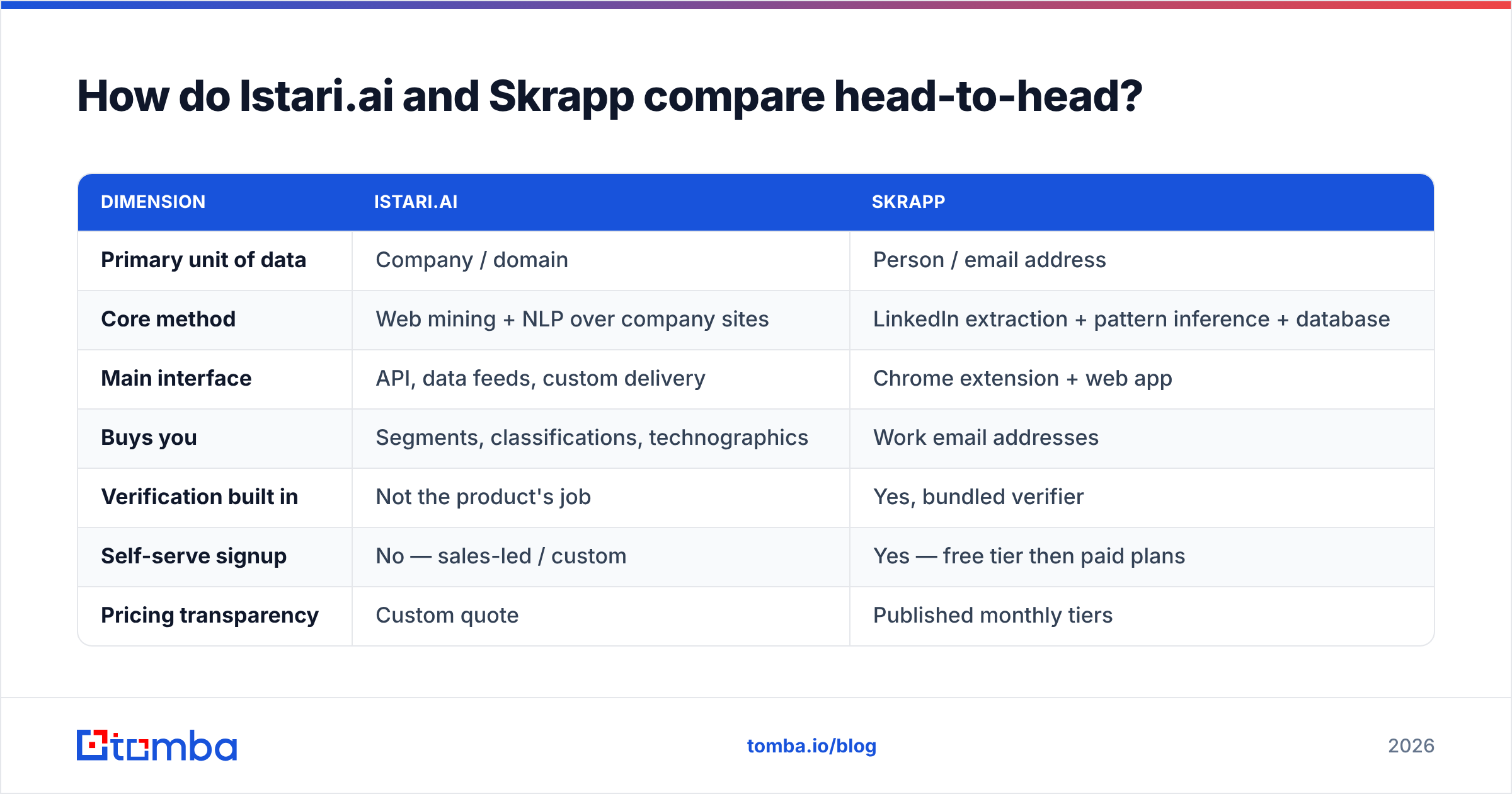
Istari.ai vs Skrapp: how do they compare head-to-head?#
| Dimension | Istari.ai | Skrapp |
|---|---|---|
| Primary unit of data | Company / domain | Person / email address |
| Core method | Web mining + NLP over company sites | LinkedIn extraction + pattern inference + database |
| Main interface | API, data feeds, custom delivery | Chrome extension + web app |
| Buys you | Segments, classifications, technographics | Work email addresses |
| Verification built in | Not the product's job | Yes, bundled verifier |
| Self-serve signup | No — sales-led / custom | Yes — free tier then paid plans |
| Pricing transparency | Custom quote | Published monthly tiers |
| Typical buyer | RevOps, market research, data teams | SDRs, founders, agencies, recruiters |
| Typical failure mode | Great list, no contacts | Great contacts, no targeting logic |
Read the last two rows together and you get the real story. The two tools fail in mirror ways. That is why teams that scale end up running one of each.
Istari.ai vs Skrapp: which one is more accurate?#
"Accuracy" means two different things here. Mixing them up is how people buy the wrong tool.
For Istari.ai, accuracy is about labels. Did the model see that this firm sells sensors, not consulting? You judge that against a hand-checked sample. It gets worse on firms with thin, old, or non-English sites. A one-page brochure site gives a web miner almost nothing to read.
For Skrapp, accuracy is about delivery. Does the email it gave you accept mail? You judge that by bounce rate. It gets worse on catch-all domains, on big firms with odd naming rules, and on people who just changed jobs. Buyer reviews on G2 land on the same pattern for every guess-based finder: strong on mid-market domains with clean MX records, weaker on large catch-all estates.
That second gap costs real money. A catch-all domain accepts every address at the SMTP layer. So a lazy checker marks the guess "valid," and you learn the truth when the bounce lands three days later. If you send at volume, use a real catch-all verifier instead of a green check that means "we could not tell."
What do Istari.ai and Skrapp cost in 2026?#
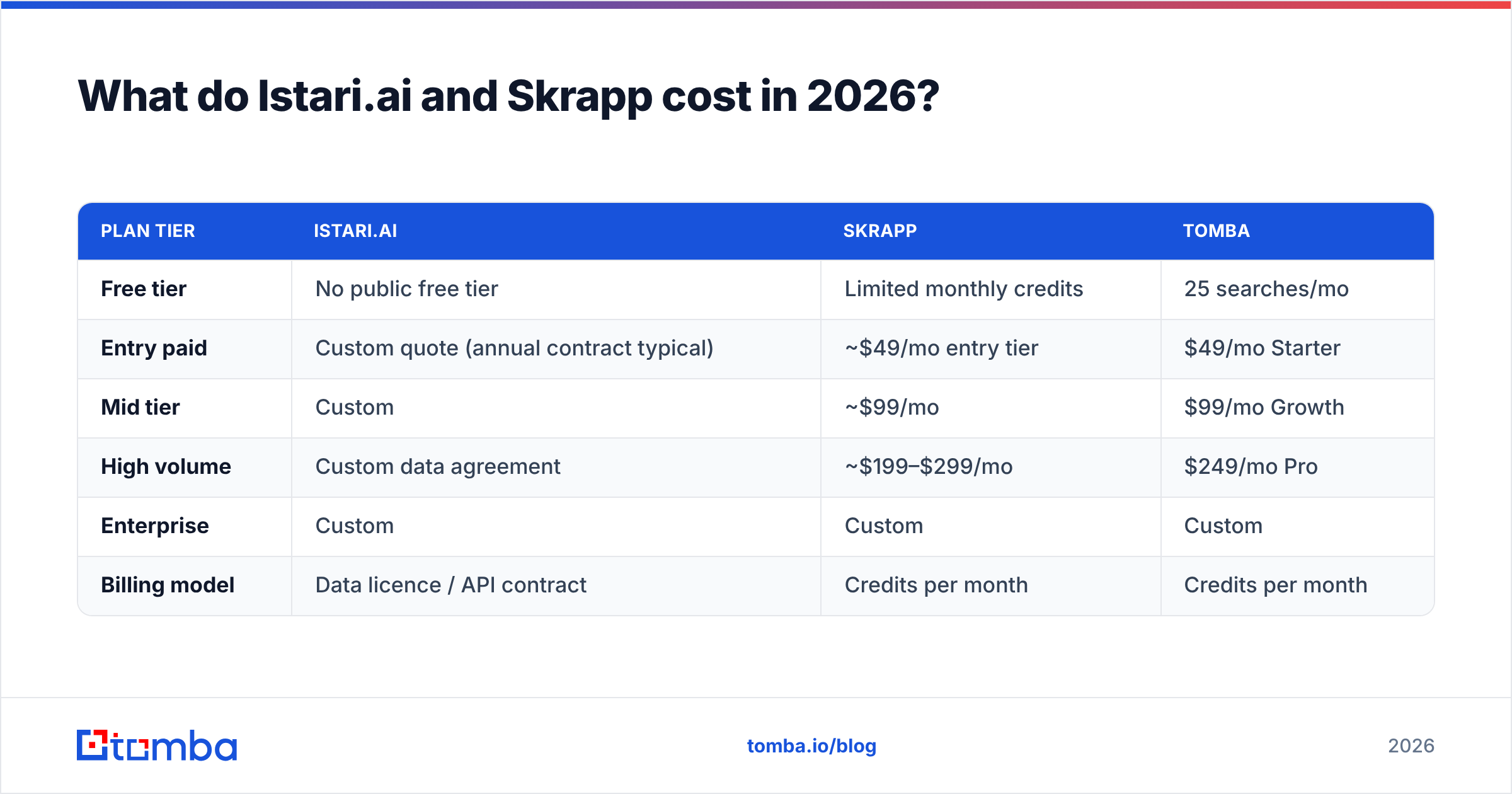
Prices move. Treat the shape as the signal, and check each vendor's page before you buy.
| Plan tier | Istari.ai | Skrapp | Tomba |
|---|---|---|---|
| Free tier | No public free tier | Limited monthly credits | 25 searches/mo |
| Entry paid | Custom quote (annual contract typical) | ~$49/mo entry tier | $49/mo Starter |
| Mid tier | Custom | ~$99/mo | $99/mo Growth |
| High volume | Custom data agreement | ~$199–$299/mo | $249/mo Pro |
| Enterprise | Custom | Custom | Custom |
| Billing model | Data licence / API contract | Credits per month | Credits per month |
The shape matters more than the dollar figures. Istari.ai is a purchase: scoping calls, a contract, a talk about delivery format. Skrapp and Tomba's plans are a credit card and a browser add-on. If you need an answer this quarter, and your budget is a line item rather than a project, the self-serve column is your only real option.
Which should you pick for your use case?#
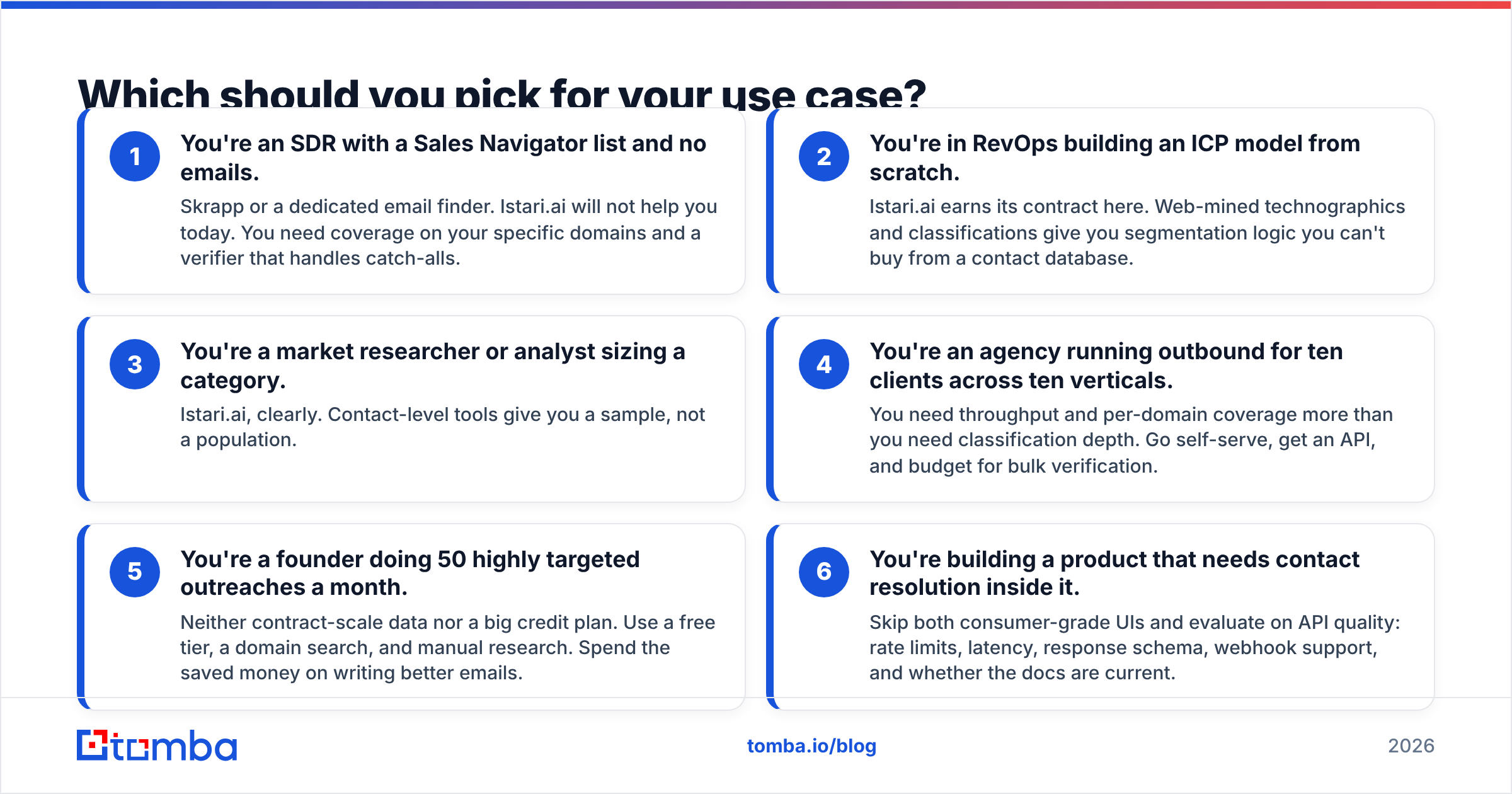
- You're a sales rep with a list and no emails. Pick Skrapp or another email finder. Istari.ai will not help you today. You need coverage on your domains and a checker that handles catch-alls.
- You're in RevOps building an ICP model. Istari.ai earns its contract here. Web-mined tech and industry labels give you targeting logic no contact database sells.
- You're sizing a market. Istari.ai, clearly. Contact tools give you a sample, not the whole set.
- You're an agency running outbound for ten clients. You need speed and domain coverage more than deep labels. Go self-serve, get an API, and budget for bulk checks.
- You're a founder sending 50 targeted emails a month. You need neither a data contract nor a big credit plan. Use a free tier, a domain search, and some manual work. Spend the rest on better writing.
- You're building contact lookup into a product. Skip both UIs. Judge them on the API: rate limits, speed, response shape, webhooks, and whether the docs are current.
Where does a dedicated email finder fit in this stack?#
Here is the awkward middle. Istari.ai tells you Company A matters. Skrapp turns a LinkedIn profile into an email. Neither is built for the most common case. You have a domain and a role, but no profile link. Call it the "I need the Head of Procurement at these 400 plants" problem.
That gap is what pure email tools are for. The test changes too:
- Coverage per domain, not per profile. Can it return every mailbox it can find at a domain, with sources and a score?
- Depth of checking. SMTP check, MX check, role-address flags, throwaway-address flags, and an honest catch-all label.
- Bulk speed. Can you push 50,000 rows through without the queue dying at row 12,000?
- Native links. HubSpot, Salesforce, Sheets, and Zapier, so the data lands where your team works.
- A grown-up API. Versioned endpoints, clear rate limits, SDKs, and a CLI for the engineer who would rather script it.
Tomba sits in this lane. The email finder works from a domain plus a name, or from the domain alone. The email verifier runs SMTP checks and flags catch-alls out loud.
All of it is exposed through an API you can build on, rather than a UI you have to scrape. The free tier is 25 searches a month, Starter is $49, and Growth is $99. That is the same self-serve shape as Skrapp, with more of the checking stack built in.
What are the honest downsides of each?#
Istari.ai's downsides: There is no self-serve path, so the buying cycle is slow. Web-mined data is only as good as the sites it reads. Thin sites, other languages, and stale pages all drag the output down. You also still need a contact layer, so it rarely stands alone.
Skrapp's downsides: It leans hard on LinkedIn, so your work inherits LinkedIn's limits and account risk. Coverage on smaller or non-Western domains is patchy, as it is for every guess-based tool. Credit plans also punish misses. A failed lookup can still burn credits, so read the credit rules before you pick a tier.
The shared downside: No tool tells you if the person wants to hear from you. Good data is needed, but it is not enough. If your response rate is 0.4%, a new email finder is almost never the fix.
Istari.ai vs Skrapp: what's the verdict?#
They are not swaps for each other. So "which wins" depends on the job.
Pick Istari.ai if your gap is targeting. You have budget, a data team, time, and a real need for web-mined company labels that off-the-shelf data does not give you.
Pick Skrapp if your gap is reaching people, your work lives in LinkedIn, and you want results this afternoon.
Pick a finder-plus-verifier platform if your gap is reaching people and you work from domains rather than profiles. Same if you need bulk speed, or you are building lookup into software. That is the most common case in B2B, and the Istari.ai vs Skrapp pair only half covers it.
Start with the free tier. Run 25 of your hardest domains through the email finder. Compare the bounce rate with your current tool. Coverage and delivery on your list is the only test that counts. Everyone else's averages are marketing.
Related guides#
// get started
Find, verify and enrich your first contacts today
Start on the free plan with 25 searches a month, then scale when your team is ready.
Free plan · No credit card required · GDPR & CCPA
// about the author