Jet Leads Pro vs Lead Kahuna: Which Lead Tool Wins in 2026?
Jet Leads Pro and Lead Kahuna both promise cheap B2B leads from a desktop app. We compare data accuracy, pricing, verification and scale — plus the option both leave on the table.
TL;DR
- Lead Kahuna is the more established of the two: a desktop lead-scraping and outreach tool aimed at agencies, SEO link builders and local-business prospectors. It bundles scraping, contact extraction and basic sending in one license.
- Jet Leads Pro is positioned in the same bracket — a lower-cost, often lifetime-deal lead scraper — but publishes far less public documentation, has a thinner review footprint, and should be verified directly with the vendor before you buy.
- Both tools win on one-time cost and lose on data freshness, verification depth, and team workflow. Neither is built to be the system of record for a scaling outbound team.
- If your bottleneck is "I need 200 local business emails this weekend for cheap", a desktop scraper is defensible. If it's "my bounce rate is 9% and my domain is burning", the fix is a verified data source with an API, not a faster scraper.
- Skip to the comparison table for the head-to-head, and the pricing section for the costs neither vendor puts on the sales page.
What are Jet Leads Pro and Lead Kahuna?#
Both belong to a specific and shrinking software category: desktop lead-scraping suites. You buy a license, install a Windows application, point it at a source (Google Maps, search results, a list of domains, LinkedIn-adjacent pages), and it harvests business names, websites, phone numbers and email addresses into a CSV.
Lead Kahuna has been around the longest and is the better-known of the pair. Its core pitch, per its official site, is scraping business and contact data at scale, then following up — it historically leaned hard into SEO outreach and link-building use cases, where you need the webmaster or editor behind a domain, not a job-title-filtered list. The tool combines a scraper, a contact finder that crawls sites for exposed addresses, and a mail-merge sender.
Jet Leads Pro markets itself into the same job — bulk local-business and domain lead extraction at a one-time price — and typically appears through lifetime-deal channels rather than a standard SaaS funnel. Here is the honest caveat, and it matters for a buying decision: public, verifiable documentation for Jet Leads Pro is thin. There is no substantial third-party review corpus on G2's lead intelligence category or comparable directories, no public API reference, and no published uptime or data-refresh commitments. That is not proof the tool is bad. It is proof you are buying with less information than you would get from a mainstream vendor, so treat every figure on the sales page as unverified until you've run a trial against your own target list.
That asymmetry — established-but-dated versus cheap-but-opaque — is the real Jet Leads Pro vs Lead Kahuna decision.

How do Jet Leads Pro and Lead Kahuna compare side by side?#
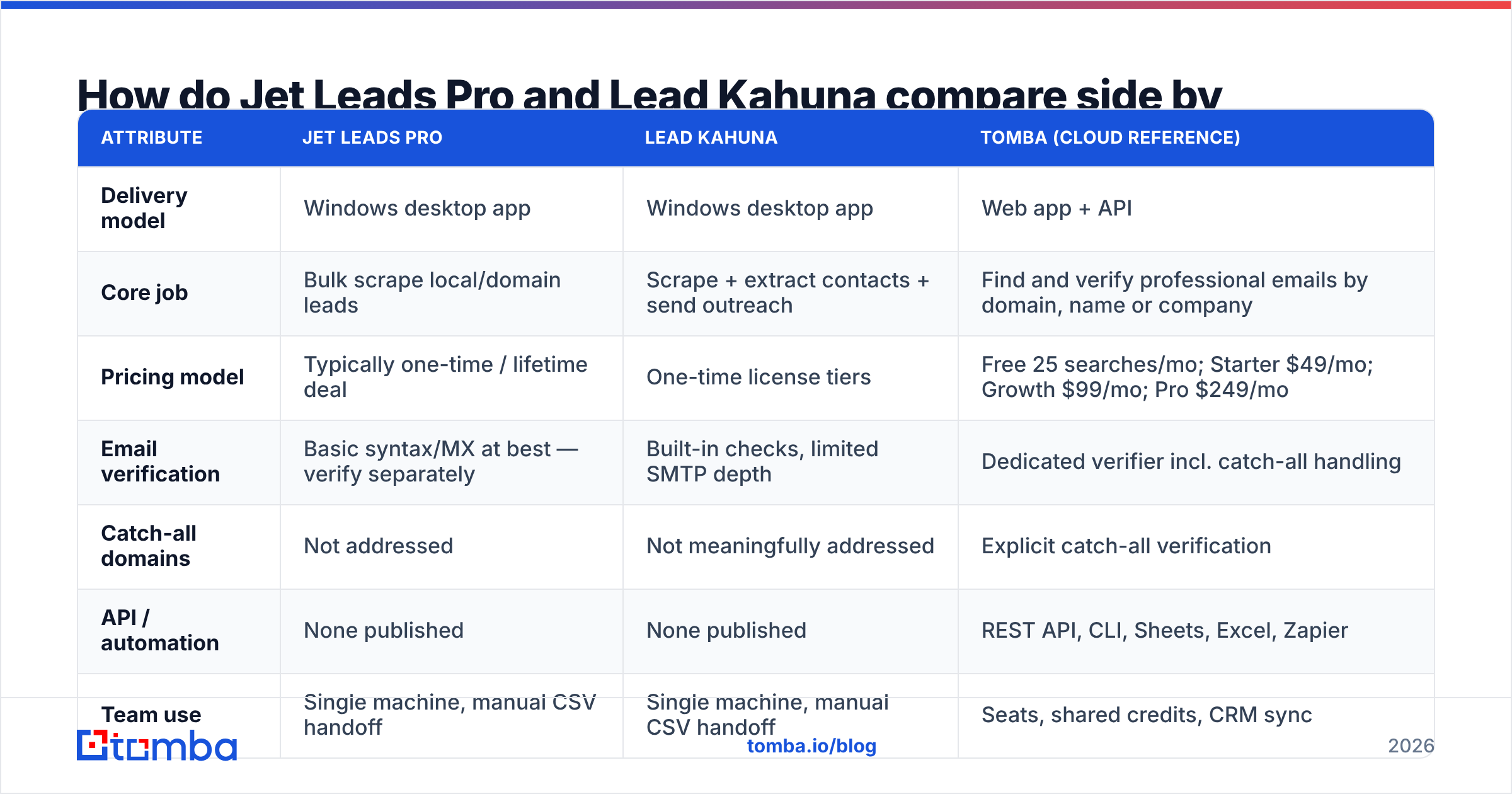
Here is the head-to-head, with a cloud API option included as a reference point because most buyers evaluating these two are really choosing between "cheap one-time scraper" and "metered verified data."
| Attribute | Jet Leads Pro | Lead Kahuna | Tomba (cloud reference) |
|---|---|---|---|
| Delivery model | Windows desktop app | Windows desktop app | Web app + API |
| Core job | Bulk scrape local/domain leads | Scrape + extract contacts + send outreach | Find and verify professional emails by domain, name or company |
| Pricing model | Typically one-time / lifetime deal | One-time license tiers | Free 25 searches/mo; Starter $49/mo; Growth $99/mo; Pro $249/mo |
| Email verification | Basic syntax/MX at best — verify separately | Built-in checks, limited SMTP depth | Dedicated verifier incl. catch-all handling |
| Catch-all domains | Not addressed | Not meaningfully addressed | Explicit catch-all verification |
| API / automation | None published | None published | REST API, CLI, Sheets, Excel, Zapier |
| Team use | Single machine, manual CSV handoff | Single machine, manual CSV handoff | Seats, shared credits, CRM sync |
| Data freshness | As fresh as your last scrape | As fresh as your last scrape | Continuously refreshed index |
| Best for | Solo operator, low budget, local lists | Agencies doing SEO/link outreach | Teams running repeatable outbound |

The pattern is consistent across every row: the desktop tools optimise for acquisition cost, the cloud tools optimise for cost per usable contact. Those are different metrics, and most teams pick the wrong one because the first is visible on a checkout page and the second only shows up in your bounce report six weeks later.
Which one actually finds more valid emails?#
Neither tool publishes an independently audited accuracy figure, so treat any "98% accurate" claim on either sales page as marketing until you test it. What you can reason about is method, because method sets the ceiling.
Desktop scrapers find emails one of three ways:
- Site crawling. Visit the domain, crawl
/contact,/about,/team, and regex out anything matching an address pattern. This is genuinely effective for local businesses and small agencies, which publishinfo@addresses openly. It is close to useless for finding a named decision-maker at a 500-person company. - Pattern guessing. Take
Jane Doe+acme.com, generatejane@,jdoe@,jane.doe@, and keep whatever survives a basic check. Without deep SMTP validation this produces a list that looks full and bounces hard. - Public directory scraping. Pull from Maps listings, directories and search results. Fine for firmographics, weak for role-level contacts.
The ceiling on all three is the same: you only get what is publicly exposed at the moment you scrape, with no cross-source corroboration. A cloud email finder reaches a different ceiling because it corroborates a candidate address against multiple independent sightings and a verification layer before returning a confidence score.

Verification is where the gap becomes expensive rather than academic. A real check opens an SMTP conversation with the receiving server and reads the response — and then has to correctly handle the domains that accept everything and bounce later. That is the catch-all problem, and it is not solved by regex. If you run scraped lists at volume, pairing them with a proper email verifier and a catch-all verifier is not optional; it's the difference between a 2% bounce rate and a suspended sending domain.
Practical read: Lead Kahuna's crawl-based extraction is respectable for its niche — webmaster and small-business contacts that are genuinely published on the page. Jet Leads Pro appears to work the same way at a lower price point. Neither replaces verification, and both should be treated as sourcing tools, not data quality tools.
What does each one really cost?#
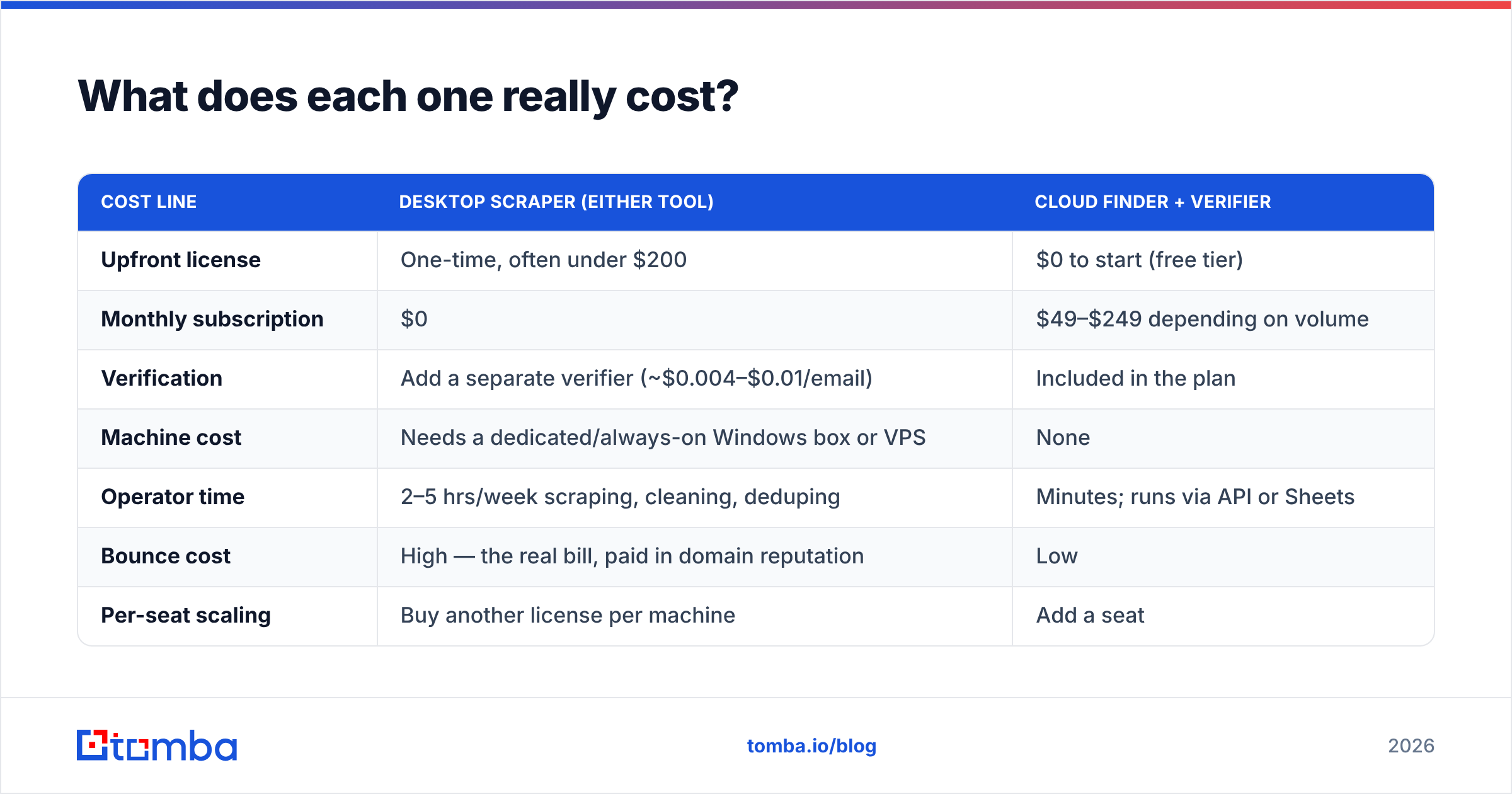
The sticker price is the least interesting number here.
| Cost line | Desktop scraper (either tool) | Cloud finder + verifier |
|---|---|---|
| Upfront license | One-time, often under $200 | $0 to start (free tier) |
| Monthly subscription | $0 | $49–$249 depending on volume |
| Verification | Add a separate verifier (~$0.004–$0.01/email) | Included in the plan |
| Machine cost | Needs a dedicated/always-on Windows box or VPS | None |
| Operator time | 2–5 hrs/week scraping, cleaning, deduping | Minutes; runs via API or Sheets |
| Bounce cost | High — the real bill, paid in domain reputation | Low |
| Per-seat scaling | Buy another license per machine | Add a seat |
Run the arithmetic honestly. A $150 lifetime license that consumes four hours of an SDR's week is costing you roughly $800/month in loaded labour before a single reply. That's Pro-plan money. The lifetime deal is only a bargain if the operator's time is genuinely free — which is true for a solo founder doing 50 leads a month, and false for a three-person sales team.
Compare that against published Tomba pricing, where the free tier (25 searches/month) is enough to benchmark both scrapers against a known-good source before you spend anything.
Where the hidden costs actually hide:
- Proxy and captcha fees. Aggressive scraping from one IP gets blocked. Sustained use means residential proxies, which are a recurring cost neither tool includes.
- Platform breakage. Scrapers depend on page structures that change. When a source redesigns, you wait for a patch. A one-time license comes with no SLA on that wait.
- Compliance exposure. Scraping and emailing EU or UK contacts pulls you into GDPR and PECR territory. A vendor with a documented data-sourcing policy and suppression handling is materially easier to defend than a CSV of unknown provenance.
- List hygiene debt. Unverified lists degrade every downstream metric: open rate, reply rate, inbox placement. You pay that back with interest.

Who should choose Lead Kahuna?#
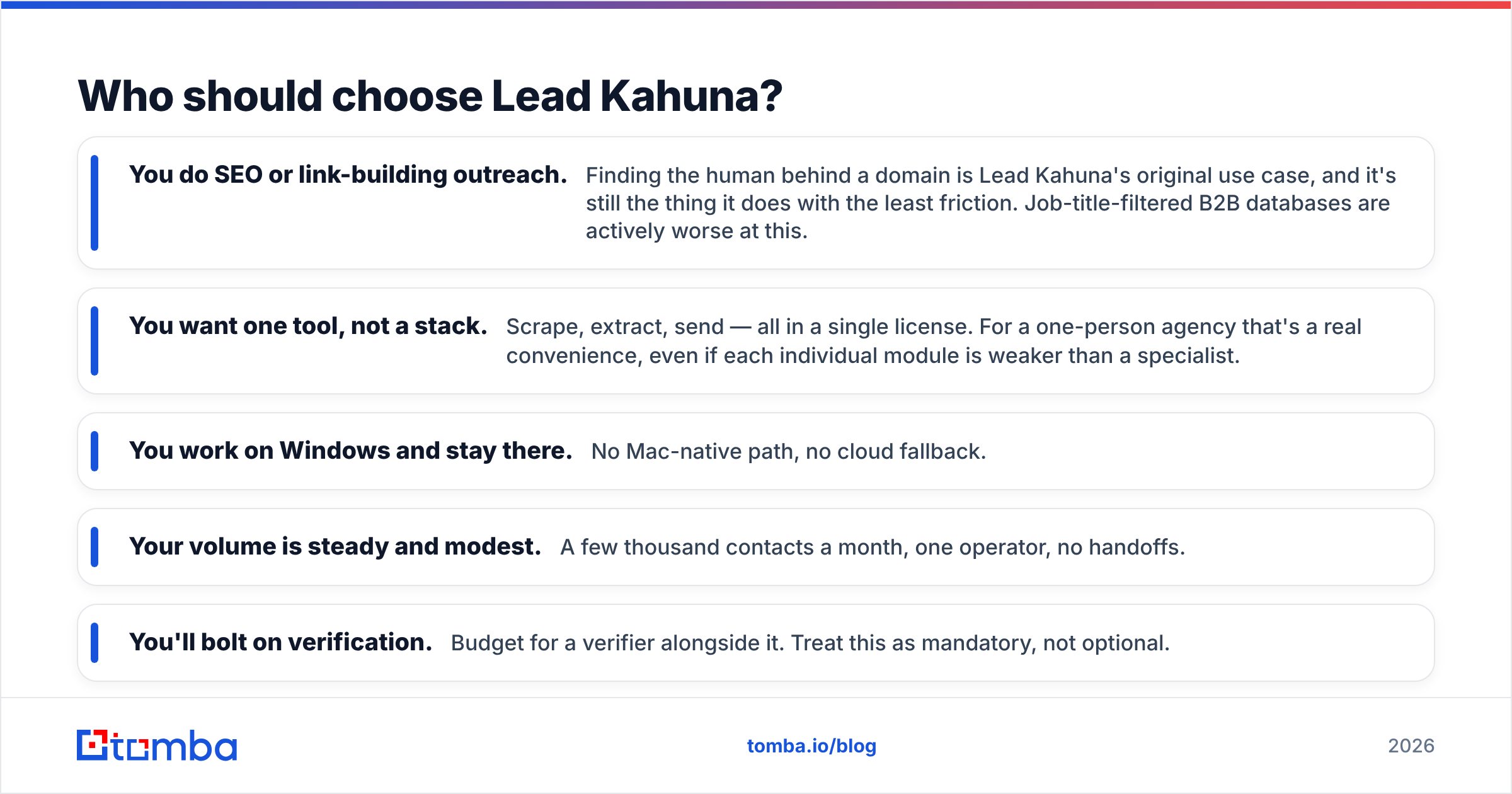
Pick Lead Kahuna if most of these are true:
- You do SEO or link-building outreach. Finding the human behind a domain is Lead Kahuna's original use case, and it's still the thing it does with the least friction. Job-title-filtered B2B databases are actively worse at this.
- You want one tool, not a stack. Scrape, extract, send — all in a single license. For a one-person agency that's a real convenience, even if each individual module is weaker than a specialist.
- You work on Windows and stay there. No Mac-native path, no cloud fallback.
- Your volume is steady and modest. A few thousand contacts a month, one operator, no handoffs.
- You'll bolt on verification. Budget for a verifier alongside it. Treat this as mandatory, not optional.
Check its current review footprint on Capterra before committing — desktop tools in this category churn, and last year's reviews may describe a version that no longer ships.
Who should choose Jet Leads Pro?#
Pick Jet Leads Pro only if:
- Price is the binding constraint. You have effectively no budget and need volume over precision.
- Your targets are local businesses. Restaurants, contractors, clinics, dentists — segments that publish a contact address on their homepage and can be reached at
info@. - You can trial before paying. Insist on a demo or refund window. With limited third-party documentation available, your own test against 50 known domains is the only accuracy data you can trust.
- The list is disposable. One campaign, one region, no requirement to keep the data current.
If you're buying it because it appeared in a lifetime-deal roundup, run this sanity check first: take 25 companies you already know the right contact for, run them through the tool, and score the hit rate. Twenty-five is enough to separate "usable" from "regex with a UI," and it costs you nothing but an hour.
Where do both tools fall short?#
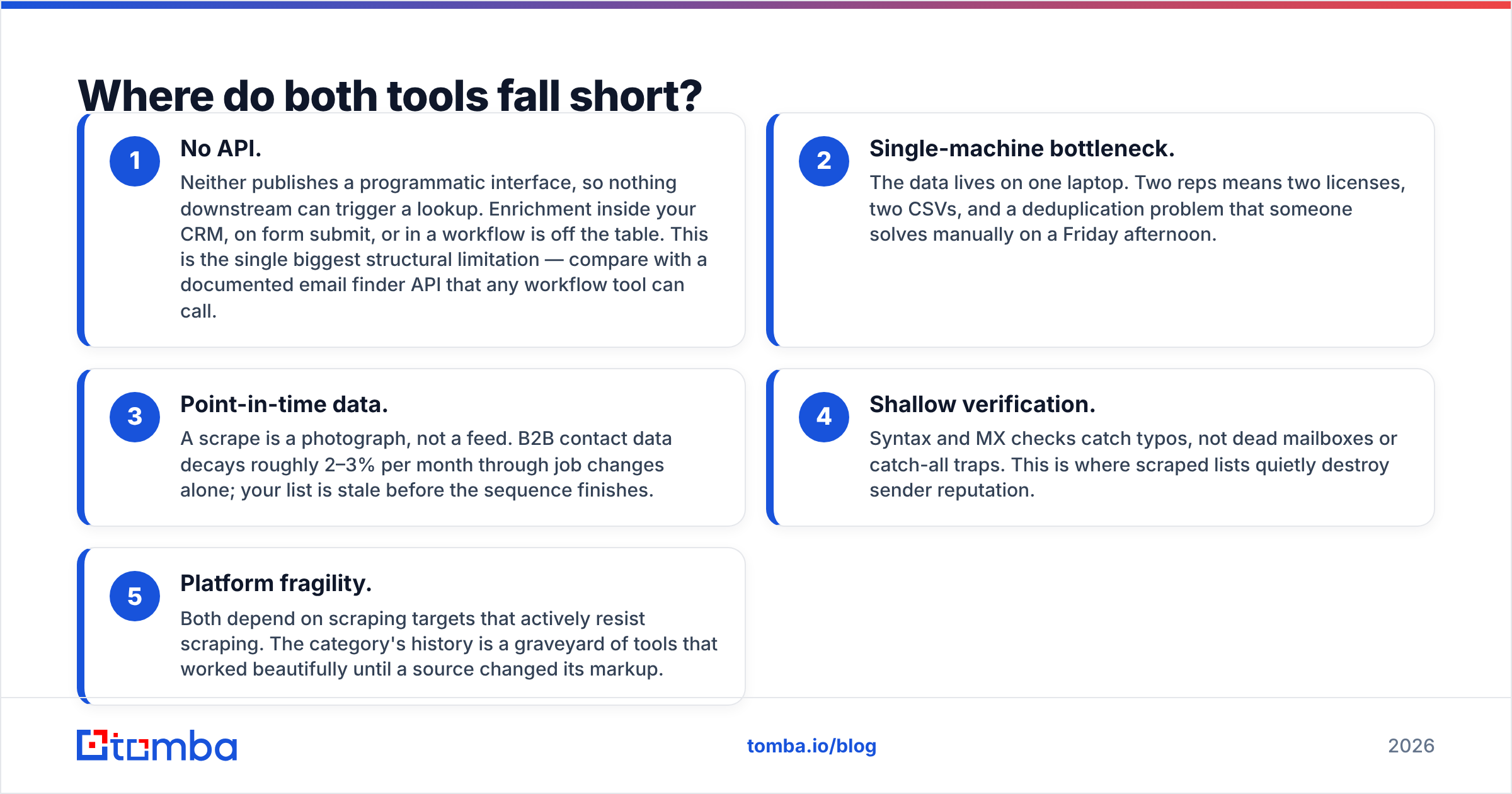
- No API. Neither publishes a programmatic interface, so nothing downstream can trigger a lookup. Enrichment inside your CRM, on form submit, or in a workflow is off the table. This is the single biggest structural limitation — compare with a documented email finder API that any workflow tool can call.
- Single-machine bottleneck. The data lives on one laptop. Two reps means two licenses, two CSVs, and a deduplication problem that someone solves manually on a Friday afternoon.
- Point-in-time data. A scrape is a photograph, not a feed. B2B contact data decays roughly 2–3% per month through job changes alone; your list is stale before the sequence finishes.
- Shallow verification. Syntax and MX checks catch typos, not dead mailboxes or catch-all traps. This is where scraped lists quietly destroy sender reputation.
- Platform fragility. Both depend on scraping targets that actively resist scraping. The category's history is a graveyard of tools that worked beautifully until a source changed its markup.
What's the smarter 2026 setup?#
Use the right tool for the right half of the job. Nothing stops you running a desktop scraper for discovery — build the universe of target domains cheaply — and then routing that domain list through a cloud finder and verifier for the contact layer. Domains are easy to scrape and rarely change. People move constantly.
A workable hybrid:
- Scrape or buy the domain list (cheap, low-risk, whatever tool you like).
- Run domain search to pull role-level contacts and confirm each company's email pattern.
- Verify everything, with explicit catch-all handling, before it touches your sequencer.
- Push only verified contacts into the CRM, with a refresh cadence of 60–90 days.
That split gets you the desktop tools' cost profile on the cheap part of the pipeline and real data quality on the part that determines whether your campaign lands. It also scales past one person, which neither Jet Leads Pro nor Lead Kahuna does without buying more licenses.
The verdict#
For SEO and agency outreach on a one-time budget, Lead Kahuna is the safer of the two — longer track record, clearer documentation, a use case it genuinely fits. Jet Leads Pro is the cheaper gamble, and until it publishes more verifiable detail, that's exactly how you should size the bet: trial it, test it against known-good data, and don't build a revenue process on it.
For either one, the honest conclusion is the same: they're sourcing tools with a verification gap, and the verification gap is what costs you money.
Ready to fix the data-quality half of the equation? The Tomba Email Finder finds professional addresses by domain, name or company and returns a confidence score with every result — no Windows box, no proxies, no stale CSV. Start on the free tier with 25 searches a month, benchmark it against whatever scraper you're running today, and move up to Starter at $49/mo only when the hit rate proves itself.
Related guides#
// get started
Find, verify and enrich your first contacts today
Start on the free plan with 25 searches a month, then scale when your team is ready.
Free plan · No credit card required · GDPR & CCPA
// about the author