Jet Leads Pro vs Leadsrush: Which Lead Tool Wins in 2026?
Two low-profile lead tools, one budget. We break down data sourcing, verification depth, export limits and real cost per usable contact — plus when neither is the right call.
TL;DR
- Jet Leads Pro and Leadsrush both sell the same promise — cheap B2B contact lists, fast — but they solve different halves of the problem: discovery volume versus contact quality.
- Neither publishes the kind of independent accuracy benchmark that established email-finding vendors do, so treat any advertised "98% accurate" claim as a marketing number until you test it on your own domains.
- Price per credit is the wrong metric. Price per deliverable, verified contact is the only one that survives contact with a bounce report.
- If your workflow is "scrape a list, blast it," either tool will get you there. If your workflow is "enrich a named account list and protect a sending domain," you want a verification-first platform instead.
- Run the same 50-contact test list through both, plus a control tool, before you commit to an annual plan. The whole test costs less than one month of the wrong subscription.
What are Jet Leads Pro and Leadsrush?#
Both products sit in the crowded low-to-mid tier of the B2B lead data market — the segment below Apollo, ZoomInfo and Cognism, where the pitch is "same data, a fraction of the price." That segment is real and it produces genuinely useful tools. It also produces a lot of thin wrappers around the same handful of underlying datasets.
Here is the honest framing, because it matters more than any feature list: Jet Leads Pro and Leadsrush are both small vendors with limited independent review coverage. Neither has the volume of verified G2 reviews that would let you triangulate claims the way you can with a Clearbit or a Hunter. That is not automatically disqualifying — plenty of excellent tools start small — but it shifts the burden of proof onto your own testing rather than onto a review site.
What each is generally positioned as:
- Jet Leads Pro markets itself around speed and volume — pull a large list quickly, filter by firmographics, export. The emphasis is discovery: find companies and contacts you did not previously have.
- Leadsrush leans toward extraction and list building from sources you point it at — think capturing contacts tied to a defined universe (a directory, a set of company domains, a search result set) rather than browsing a general database.
- Both sell credit-based packages rather than true seat-based SaaS pricing, which means your effective cost swings wildly with your hit rate.
- Neither is primarily a deliverability tool. Verification, where it exists, tends to be a syntax-and-MX pass rather than full SMTP-level validation with catch-all handling.
That last point is the one that quietly decides whether either tool is worth the money.
Wait — that image should read as a plain embed:

How do Jet Leads Pro and Leadsrush compare head-to-head?#
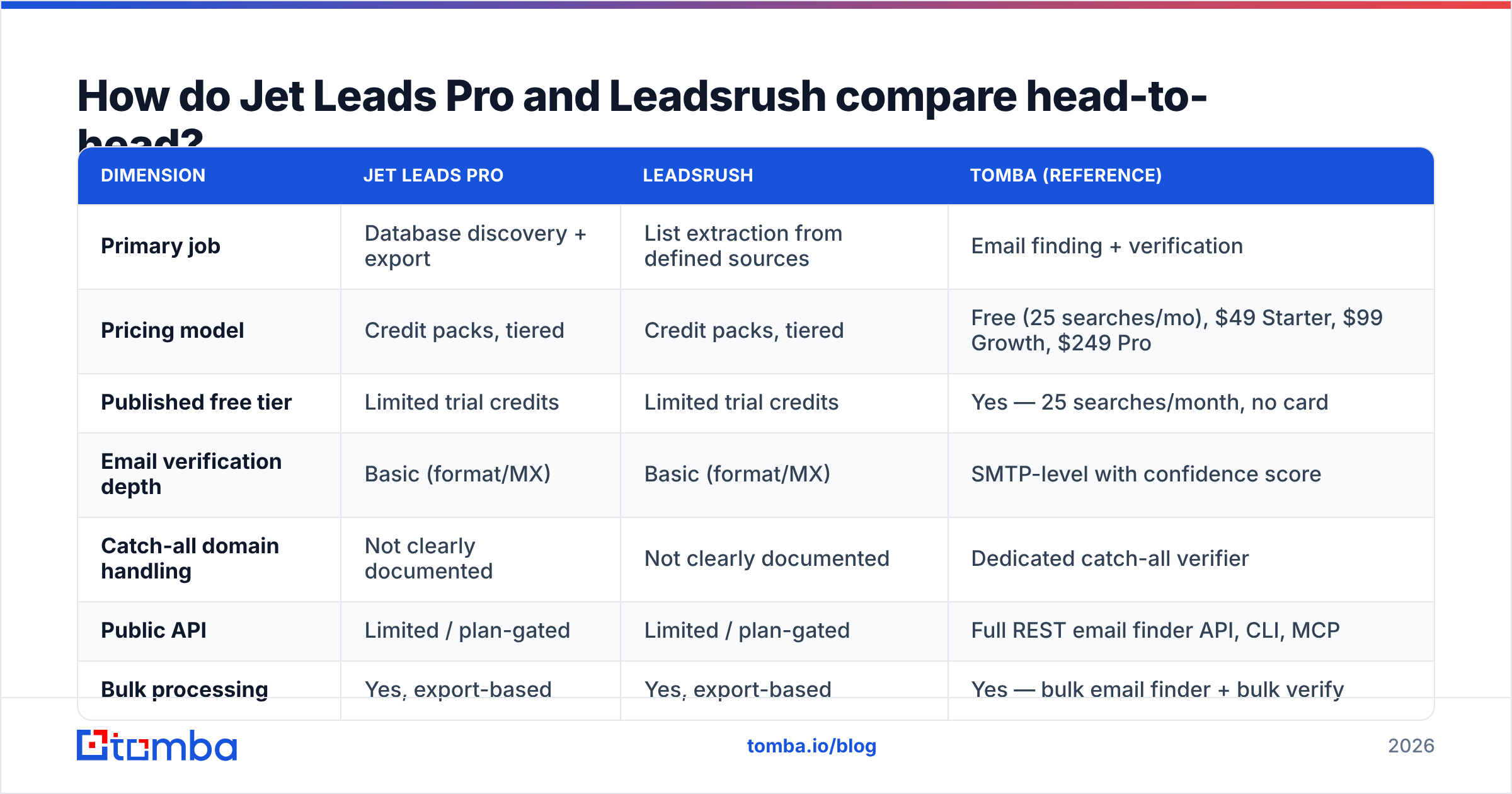
The table below compares the two on the dimensions that actually change outcomes, with a verification-first platform (Tomba) as a control column so you have a known reference point rather than two unknowns compared only to each other.
| Dimension | Jet Leads Pro | Leadsrush | Tomba (reference) |
|---|---|---|---|
| Primary job | Database discovery + export | List extraction from defined sources | Email finding + verification |
| Pricing model | Credit packs, tiered | Credit packs, tiered | Free (25 searches/mo), $49 Starter, $99 Growth, $249 Pro |
| Published free tier | Limited trial credits | Limited trial credits | Yes — 25 searches/month, no card |
| Email verification depth | Basic (format/MX) | Basic (format/MX) | SMTP-level with confidence score |
| Catch-all domain handling | Not clearly documented | Not clearly documented | Dedicated catch-all verifier |
| Public API | Limited / plan-gated | Limited / plan-gated | Full REST email finder API, CLI, MCP |
| Bulk processing | Yes, export-based | Yes, export-based | Yes — bulk email finder + bulk verify |
| Native CRM sync | Minimal, mostly CSV | Minimal, mostly CSV | HubSpot, Salesforce, Pipedrive, Zapier, Sheets |
| Independent review volume | Low | Low | Moderate, verifiable on G2 |
| Best for | Fast top-of-funnel volume | Targeted list capture | Accuracy-sensitive outbound |
Two things stand out. First, the two products are more similar to each other than either is to a verification-led platform — they compete on list size and price, not on deliverability. Second, the CSV-centric workflow in both means your RevOps burden (dedupe, normalise, re-verify, import) is real and recurring. Budget time for it.
You can sanity-check the review-volume point yourself on G2's lead intelligence category or Capterra's lead generation software directory — both list dozens of comparable vendors with review counts visible, which is the fastest way to see where a given tool sits on the maturity curve.
Which one has better data accuracy?#
Neither vendor publishes a methodology you can audit, so the honest answer is: test it, don't trust it.
Here is why the distinction matters so much in this price band. A tool that returns 1,000 contacts at 70% deliverability and a tool that returns 600 contacts at 95% deliverability produce 700 and 570 usable contacts respectively — nearly a tie. But the first tool also produced 300 bounces, and 300 bounces on a young sending domain is how you end up in the spam folder for the next quarter. The cost of the bad contacts is not zero; it is negative.

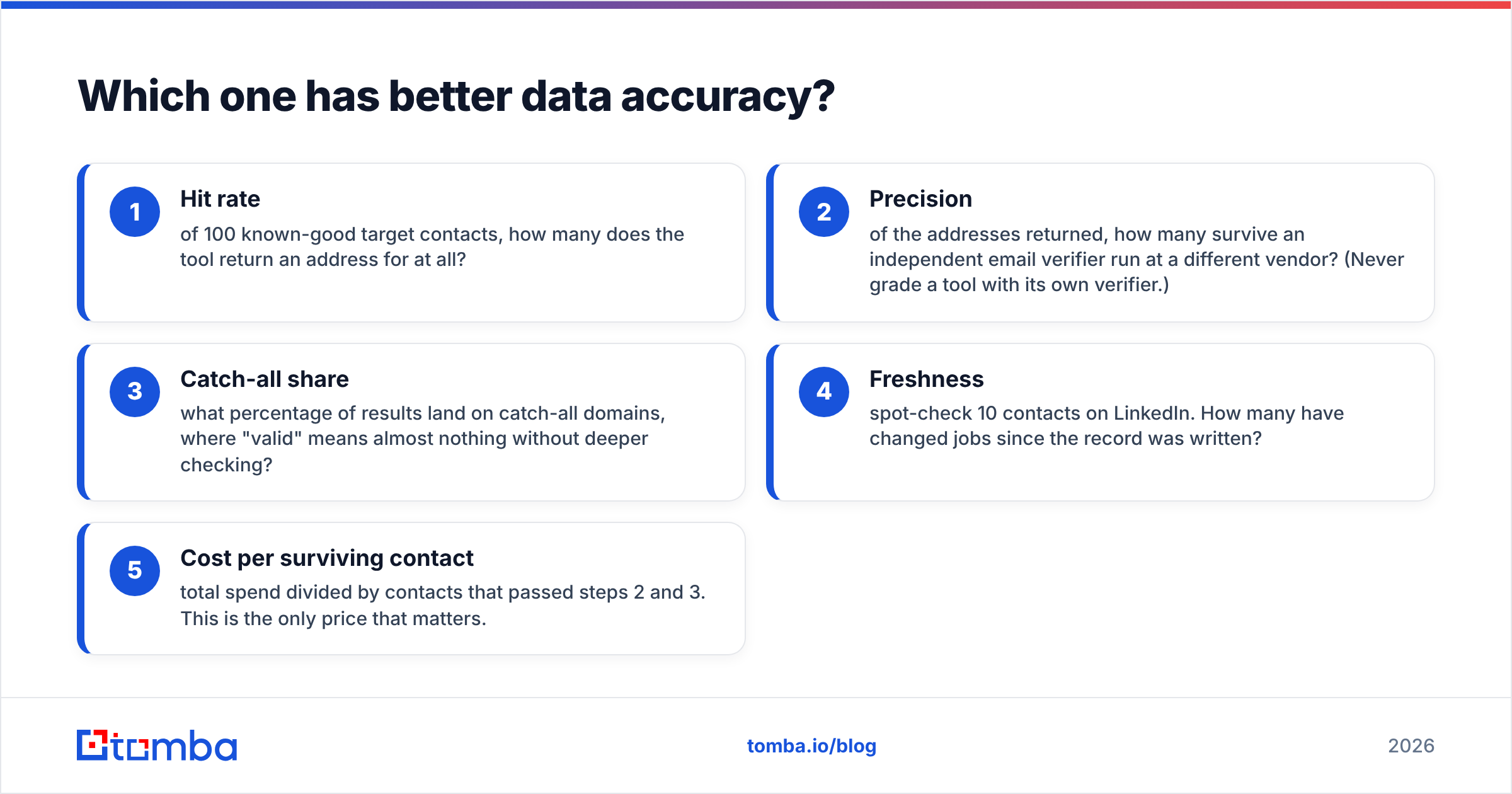
When you run your own test, measure these five numbers and nothing else:
- Hit rate — of 100 known-good target contacts, how many does the tool return an address for at all?
- Precision — of the addresses returned, how many survive an independent email verifier run at a different vendor? (Never grade a tool with its own verifier.)
- Catch-all share — what percentage of results land on catch-all domains, where "valid" means almost nothing without deeper checking?
- Freshness — spot-check 10 contacts on LinkedIn. How many have changed jobs since the record was written?
- Cost per surviving contact — total spend divided by contacts that passed steps 2 and 3. This is the only price that matters.
Most teams that run this exercise discover their real cost per usable contact is two to four times the advertised cost per credit. That gap is where the actual buying decision lives, and it is why a "cheaper" tool routinely loses.
One practical note on catch-all domains: they are extremely common in mid-market B2B, and a tool that reports them as simply "valid" is not lying so much as declining to answer the question. If a meaningful share of your ICP sits on catch-all infrastructure, treat catch-all handling as a hard requirement rather than a nice-to-have, and use a dedicated catch-all finder as part of the pipeline.
What do they actually cost?#
Both vendors run credit-pack pricing, and both — like most tools in this tier — reserve their most attractive per-credit rates for annual commitments. That is a reasonable business model, but it inverts the risk: you pay up front for volume before you know the hit rate.
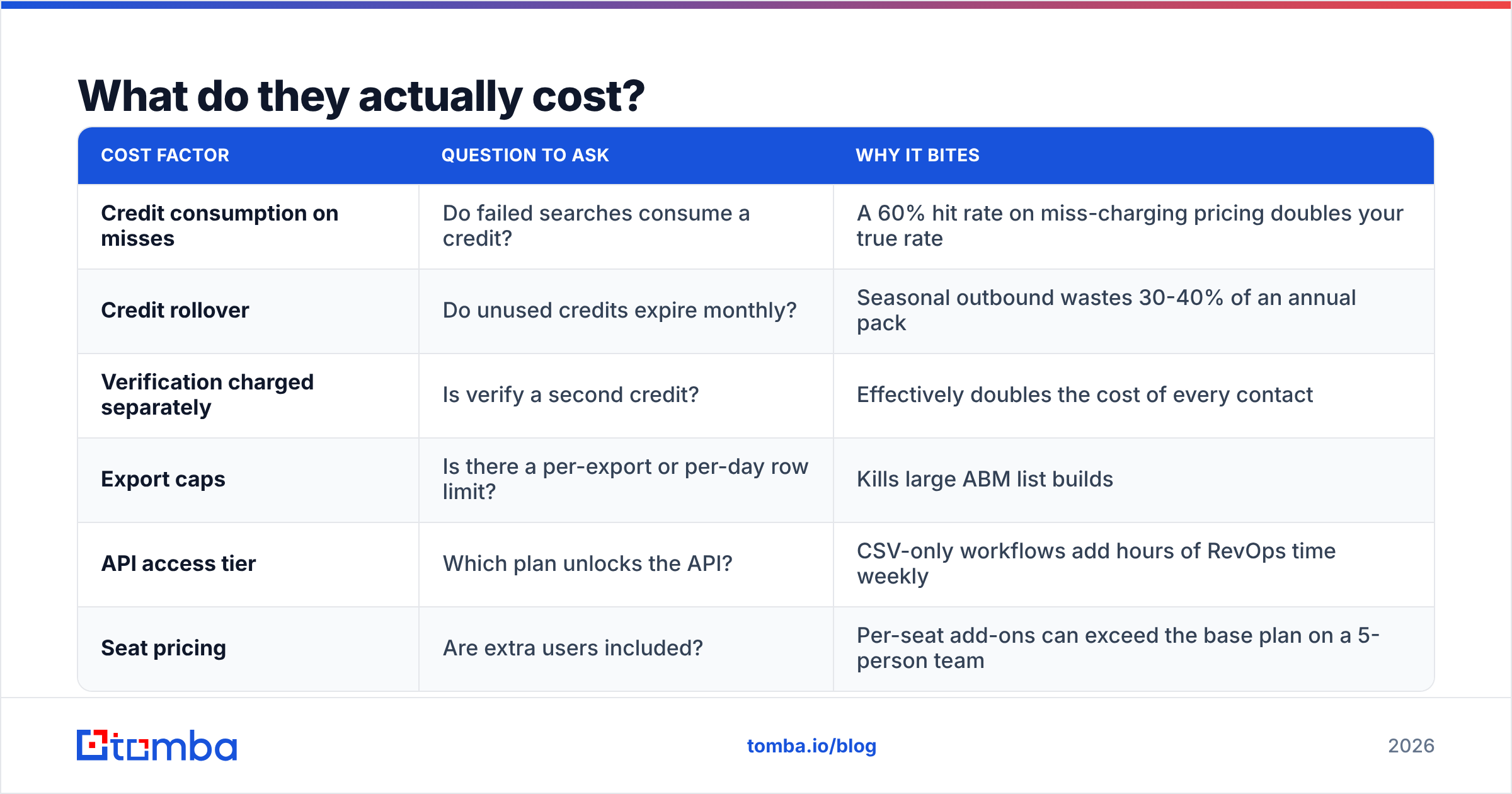
Some cost mechanics to check before you sign anything:
| Cost factor | Question to ask | Why it bites |
|---|---|---|
| Credit consumption on misses | Do failed searches consume a credit? | A 60% hit rate on miss-charging pricing doubles your true rate |
| Credit rollover | Do unused credits expire monthly? | Seasonal outbound wastes 30-40% of an annual pack |
| Verification charged separately | Is verify a second credit? | Effectively doubles the cost of every contact |
| Export caps | Is there a per-export or per-day row limit? | Kills large ABM list builds |
| API access tier | Which plan unlocks the API? | CSV-only workflows add hours of RevOps time weekly |
| Seat pricing | Are extra users included? | Per-seat add-ons can exceed the base plan on a 5-person team |
For a public reference point on how transparent pricing can look in this category, Tomba's pricing publishes every tier openly: a free plan with 25 searches per month, Starter at $49/mo, Growth at $99/mo, Pro at $249/mo, and custom Enterprise. Whatever you end up buying, that level of disclosure — full tiers, on the public site, without a demo gate — is a fair minimum standard to hold a vendor to.

Who should pick Jet Leads Pro?#
Jet Leads Pro makes sense when volume at the top of the funnel is the constraint and your downstream process already handles quality.
Choose it if:
- You are running broad, horizontal outbound where the ICP is loosely defined and you need raw coverage more than precision.
- You already own a separate verification layer and a warmed sending infrastructure, so bad records get filtered before they ever hit a mailbox.
- Your team is comfortable living in CSV and has someone who owns list hygiene.
- You are testing a new market and need cheap breadth before committing to better data.
Skip it if your domain is new, your sending volume is low, or your ICP is narrow enough that a 300-contact precise list beats a 3,000-contact rough one. In narrow-ICP motions, extra volume is not upside — it is noise that dilutes personalisation and burns reputation.
Who should pick Leadsrush?#
Leadsrush is the better fit when you already know where your prospects are and you need to extract them cleanly.
Choose it if:
- Your prospecting starts from a defined universe — a conference attendee list, an industry directory, a set of target company domains — rather than from open-ended database browsing.
- You want tighter control over which records enter your CRM, and you would rather return 400 relevant contacts than 4,000 loosely matched ones.
- Your motion is account-based, where the account list is fixed and the job is finding the right people inside it.
- You value a simpler interface over a sprawling filter panel you will never fully use.
Skip it if you need net-new account discovery. Extraction tools are excellent at deepening a list you have and poor at creating one you do not.
Are there better alternatives to both?#
Often, yes — and the reason is structural rather than a knock on either vendor.
Tools in this band compete on list size because list size is easy to advertise. Verification depth is harder to advertise and harder to fake, which is why verification-first platforms tend to price differently and perform differently on the only metric that matters downstream: replies per thousand sends.
A few directions worth evaluating alongside them:
- Verification-led email finders. Platforms built around finding and verifying email addresses — with SMTP-level checks, confidence scoring, catch-all handling and a real API — produce smaller lists with dramatically better deliverability. Tomba sits here, with domain search, data enrichment and bulk processing on the same credit pool.
- Curated database vendors. BookYourData takes a different and well-regarded approach — pay-as-you-go access to a human-checked B2B database with a bounce guarantee — which suits teams that want a finished list rather than a tool to build one. It is a genuinely strong option if you would rather buy data than operate a pipeline.
- All-in-one sales platforms. Apollo, Lusha and similar bundle data with sequencing. You pay more and the data is rarely best-in-class, but consolidation has real value for small teams. If you are weighing that path, HubSpot's sales prospecting guidance is a solid neutral primer on where tooling fits in the overall motion.

The practical answer for most teams is a two-tool stack, not a one-tool bet: a discovery source for breadth, and a verification layer that every record must pass before it reaches your sequencer. That stack costs slightly more on paper and considerably less in bounced sends, burned domains and wasted SDR hours.
How do you test either tool before committing?#
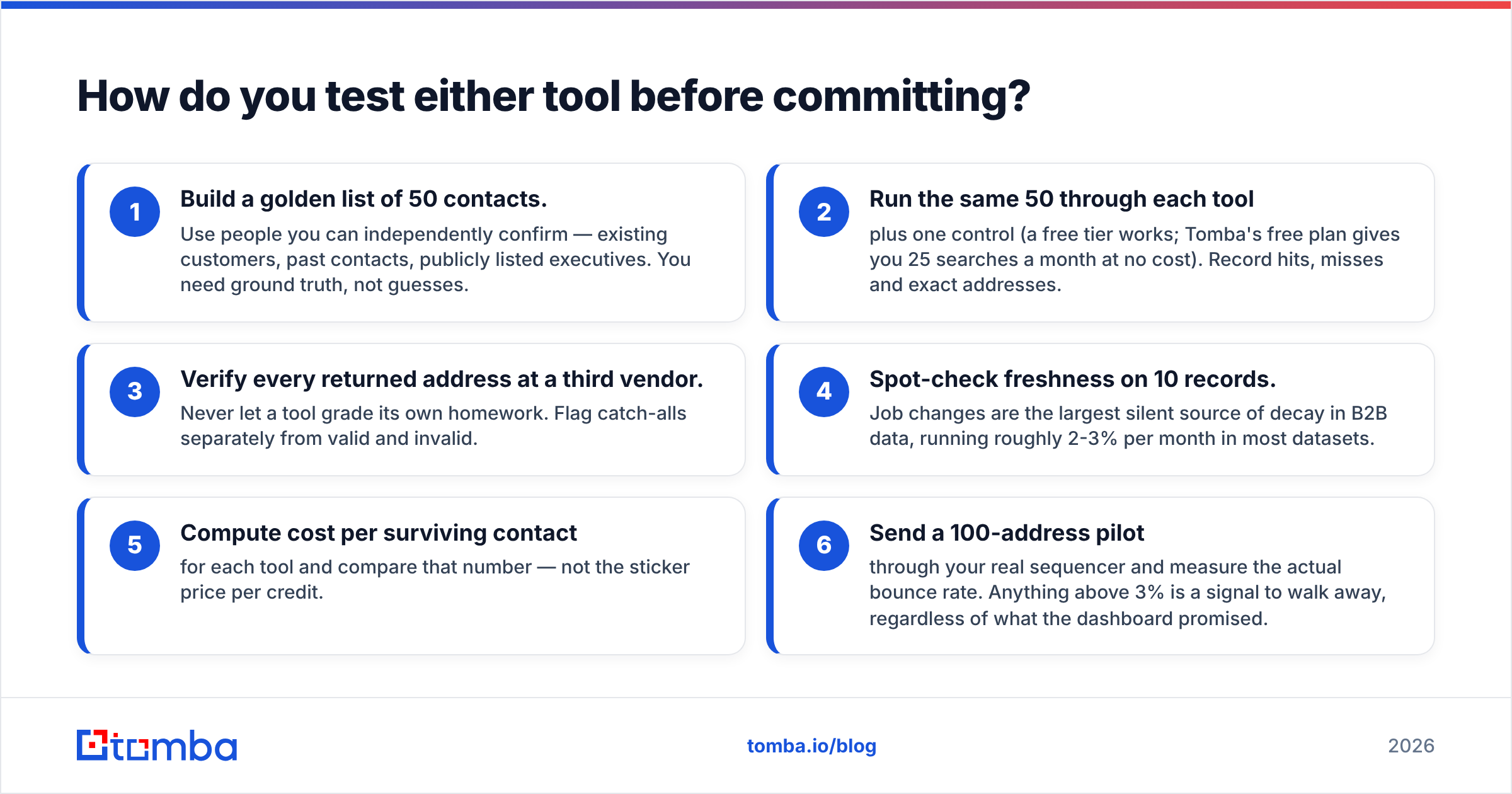
Run this in an afternoon. It is the single highest-ROI hour in the evaluation.
- Build a golden list of 50 contacts. Use people you can independently confirm — existing customers, past contacts, publicly listed executives. You need ground truth, not guesses.
- Run the same 50 through each tool plus one control (a free tier works; Tomba's free plan gives you 25 searches a month at no cost). Record hits, misses and exact addresses.
- Verify every returned address at a third vendor. Never let a tool grade its own homework. Flag catch-alls separately from valid and invalid.
- Spot-check freshness on 10 records. Job changes are the largest silent source of decay in B2B data, running roughly 2-3% per month in most datasets.
- Compute cost per surviving contact for each tool and compare that number — not the sticker price per credit.
- Send a 100-address pilot through your real sequencer and measure the actual bounce rate. Anything above 3% is a signal to walk away, regardless of what the dashboard promised.
Document the results in a shared sheet. When the annual renewal conversation comes around, that sheet is worth more than any vendor case study.
What is the final verdict on Jet Leads Pro vs Leadsrush?#
Leadsrush for precision, Jet Leads Pro for breadth — but neither should be your only layer.
If you are running targeted account-based outbound with a defined universe, Leadsrush's extraction-centric model fits the shape of the work better and wastes fewer credits on records you will never contact. If you are in market-discovery mode and need raw coverage cheaply, Jet Leads Pro's volume orientation is the more sensible buy.
What neither resolves is verification. Both leave you responsible for the step that determines whether your campaign lands in an inbox or a spam folder, and both are priced as though that step is free. It is not — it is the most expensive part of the pipeline when you skip it.
The strongest configuration in this price range is a discovery tool you like plus a verification-first email platform that every record passes through. Keep the list source you prefer, and stop letting unverified addresses reach your sending domain.
Ready to fix the accuracy half of the problem? Start with the Tomba Email Finder — find professional email addresses by domain, name or company, with SMTP-level verification, catch-all detection and confidence scoring built into the same credit pool. The free plan includes 25 searches a month with no card required, which is enough to run the 50-contact benchmark above and see exactly how your current list source holds up. If it wins, keep it. If it does not, you will have the data to say so.
Related guides#
// get started
Find, verify and enrich your first contacts today
Start on the free plan with 25 searches a month, then scale when your team is ready.
Free plan · No credit card required · GDPR & CCPA
// about the author