Jet Leads Pro vs Lusha 2026: Pricing, Accuracy, Verdict
Jet Leads Pro sells cheap volume. Lusha sells trusted, compliant contact data inside your CRM. Here is how the two actually compare on credits, accuracy, seat fees and export rights — plus when neither is the right buy.
TL;DR
- Lusha is the safer enterprise buy: mature CRM integrations, a well-documented compliance posture, and a browser extension most SDR teams already know. You pay for that with per-seat pricing and credit caps that get expensive fast.
- Jet Leads Pro competes on price and raw volume. It is a smaller, less-documented vendor, so treat its published accuracy claims as marketing until you run your own test.
- The deciding factor is almost never features. It is cost per usable contact — verified, exportable, and allowed in your CRM.
- Per-seat pricing punishes teams that want data in automations rather than in a browser tab. Credit-based APIs like Tomba at $49/mo don't.
- Run the same 100-contact sample through both before you sign anything. The section below gives you the exact protocol.
What are Jet Leads Pro and Lusha?#
Lusha is a B2B contact-data platform founded in 2016 and used mainly through a Chrome extension that surfaces emails and direct dials while you browse LinkedIn, company sites, or your CRM. It sells on three things: coverage of direct phone numbers, native sync into Salesforce and HubSpot, and a public compliance story — Lusha was one of the first contact-data vendors to publicly pursue ISO 27701 privacy certification. You can read their own positioning at lusha.com.
Jet Leads Pro sits in the value tier of the same market: a lead database plus finder/verifier workflow aimed at agencies, solo founders, and outbound teams who care more about volume per dollar than about brand recognition. It is a materially smaller operation than Lusha, with a thinner public paper trail — fewer third-party reviews, less published documentation, and no widely cited independent audit of its database.
That asymmetry matters more than any feature checkbox. With Lusha you are buying a known quantity at a premium. With Jet Leads Pro you are buying an unknown quantity at a discount, and the discount is only real if the data holds up.

How do Jet Leads Pro and Lusha compare on pricing?#
Pricing is where these two diverge hardest, and not just on the sticker number. Lusha charges per seat plus credits. Jet Leads Pro, like most value-tier vendors, charges mostly per credit. If you have six reps who each need occasional lookups, the seat model triples your bill before you've enriched a single record.
Verify current numbers on each vendor's own pricing page before you budget — value-tier pricing in this category changes often, and Lusha reprices its tiers regularly.
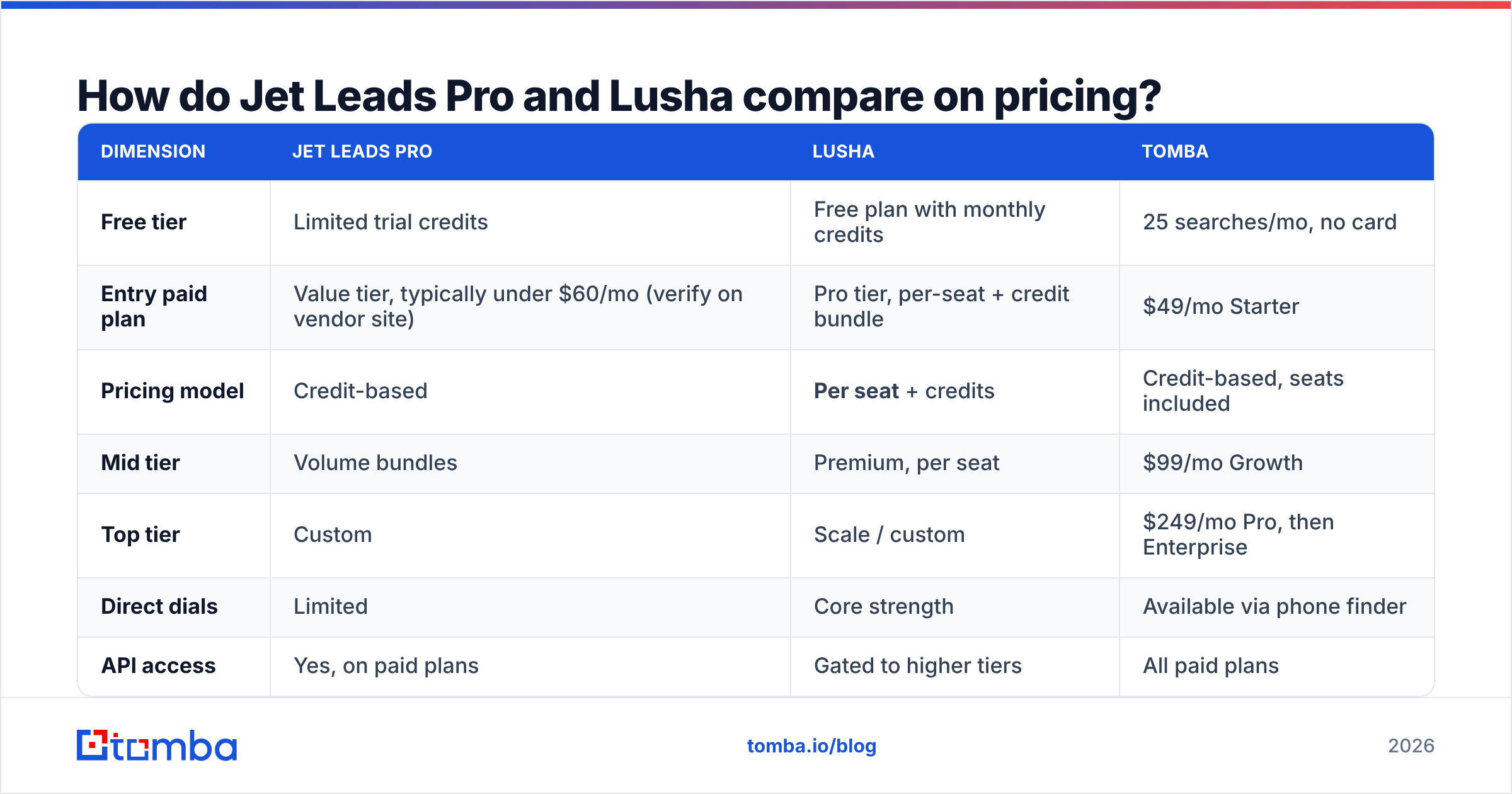
| Dimension | Jet Leads Pro | Lusha | Tomba |
|---|---|---|---|
| Free tier | Limited trial credits | Free plan with monthly credits | 25 searches/mo, no card |
| Entry paid plan | Value tier, typically under $60/mo (verify on vendor site) | Pro tier, per-seat + credit bundle | $49/mo Starter |
| Pricing model | Credit-based | Per seat + credits | Credit-based, seats included |
| Mid tier | Volume bundles | Premium, per seat | $99/mo Growth |
| Top tier | Custom | Scale / custom | $249/mo Pro, then Enterprise |
| Direct dials | Limited | Core strength | Available via phone finder |
| API access | Yes, on paid plans | Gated to higher tiers | All paid plans |
| Credit rollover | Varies by plan | Generally no | Plan-dependent |
| Export rights | Standard CSV | Restricted on lower tiers | Full CSV + API |
Two line items in that table decide most deals.
Seats. Lusha's per-seat model is fine for a five-rep team where everyone genuinely prospects in-browser every day. It is terrible for a RevOps setup where one person enriches a list of 5,000 accounts once a quarter and pipes it into the CRM. For that job you want credits and an API key, not licences.
Export rights. Check the contract language, not the pricing page. Some contact vendors restrict bulk export or downstream use on entry plans, which quietly invalidates the workflow you actually bought the tool for.
Which tool has more accurate data?#
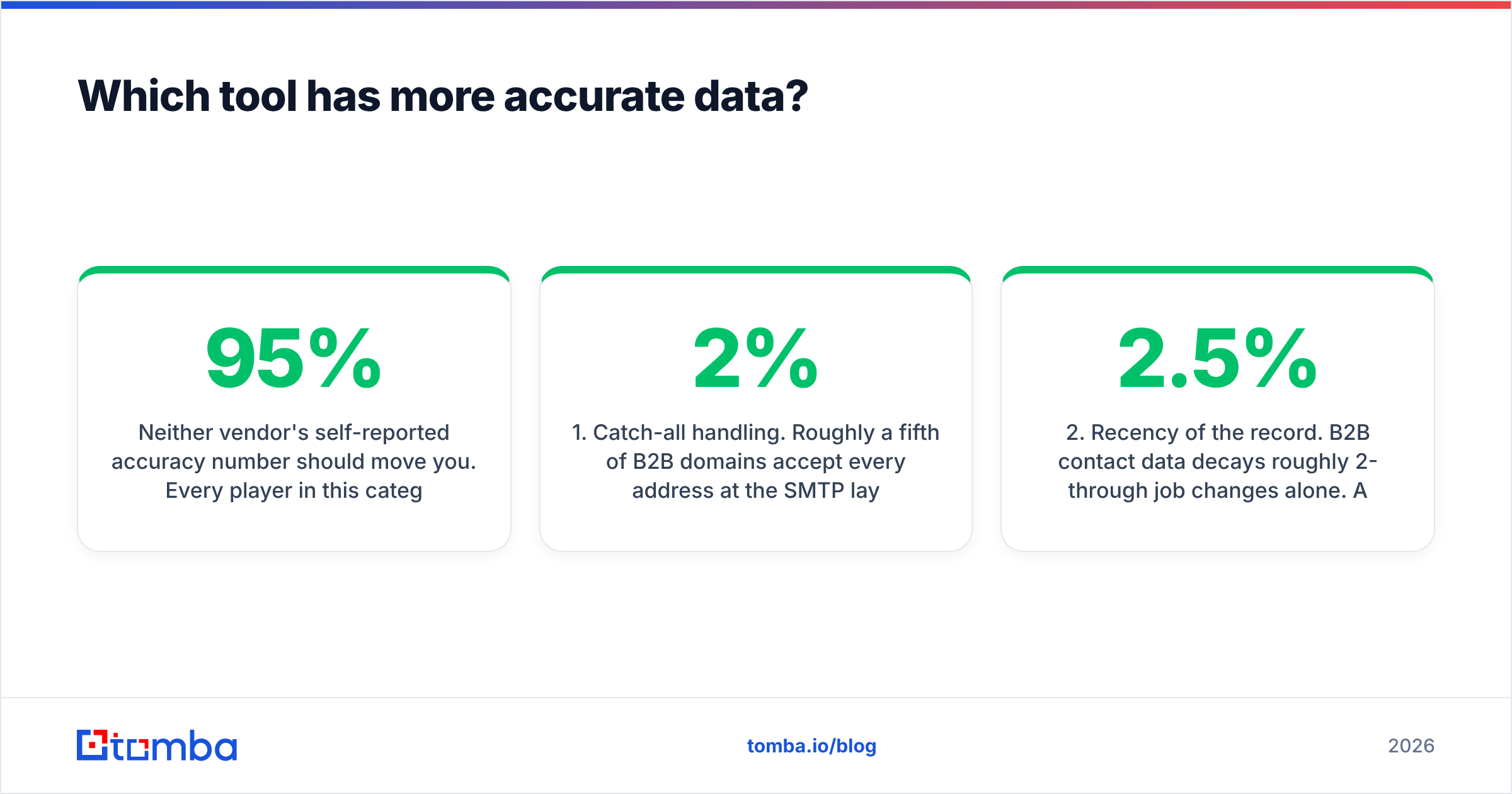
Neither vendor's self-reported accuracy number should move you. Every player in this category claims 95%+ and defines "accurate" differently — some count a syntactically valid address, some count an SMTP-acceptable mailbox, some count anything that didn't hard-bounce in a sample they chose themselves.

What actually separates providers in practice:
- Catch-all handling. Roughly a fifth of B2B domains accept every address at the SMTP layer, so a naive verifier marks garbage as valid. Ask each vendor how they classify catch-alls. If the answer is "we mark them valid," your bounce rate is going to be ugly. A dedicated catch-all verifier is the difference between a 2% and a 9% bounce rate on enterprise domains.
- Recency of the record. B2B contact data decays roughly 2-2.5% per month through job changes alone. A database that was excellent 18 months ago is mediocre today. Ask when the record was last re-verified, not when it was first collected.
- Coverage skew. Lusha is strongest on US and Western European tech and mid-market. Value-tier providers often pad totals with SMB records and non-decision-maker roles. A "150M contacts" claim means nothing if only 4,000 of them match your ICP.
- Direct dials vs switchboards. This is Lusha's genuine moat. Value vendors frequently return the company's main line labelled as a direct dial. Spot-check 20 numbers by hand before you believe any phone coverage claim.
- Verification at the point of export. Some tools verify on ingest and never again. You want verification at the moment you pull the record — that is what an email verifier step in your pipeline is for.
The honest conclusion: on direct dials and on enterprise coverage, Lusha usually wins. On cost per verified email, a focused finder-plus-verifier stack usually wins. Jet Leads Pro's position depends entirely on whether its database matches your specific ICP — which you can only learn by testing.
What does the head-to-head feature comparison look like?#

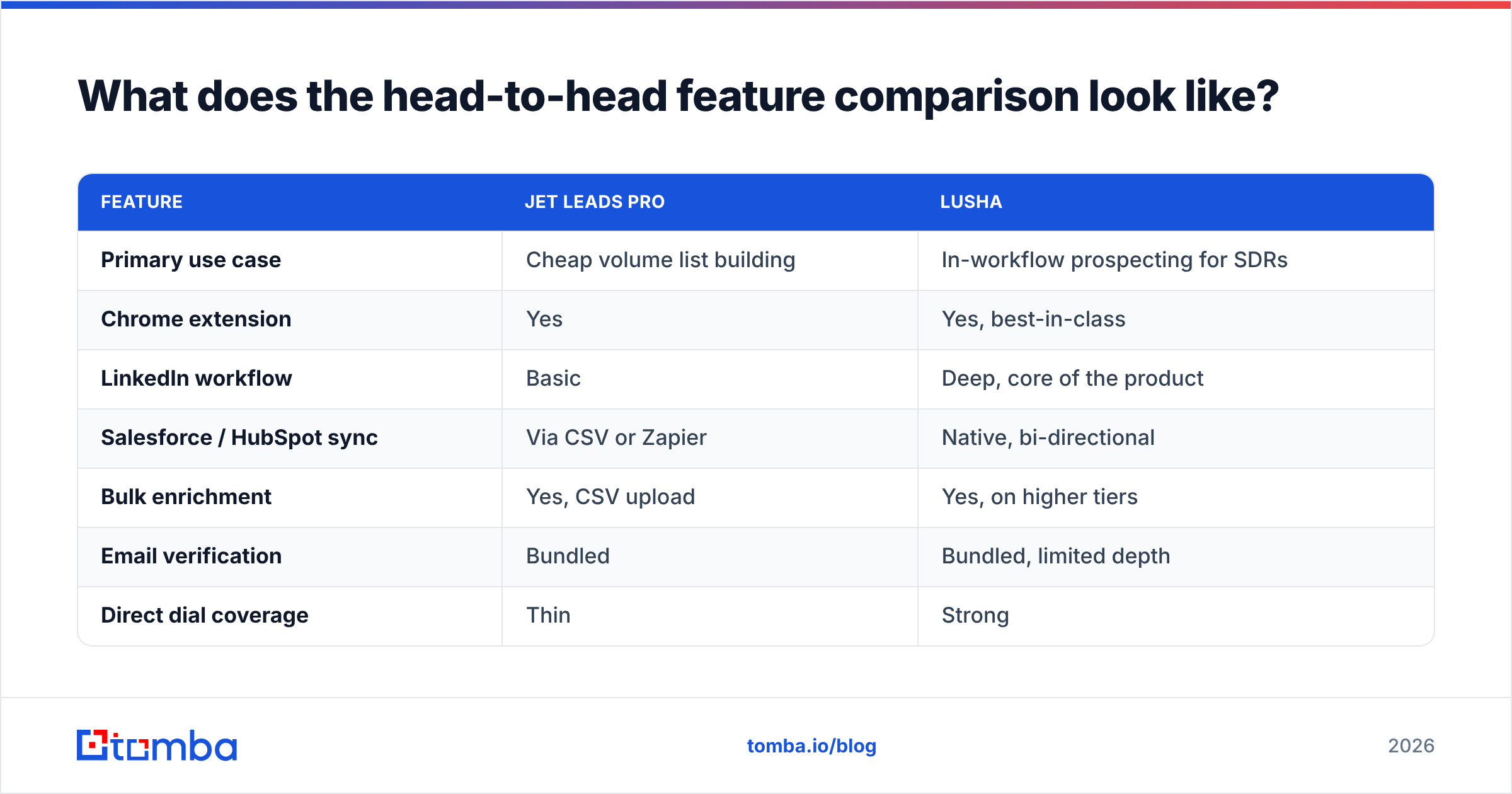
| Feature | Jet Leads Pro | Lusha |
|---|---|---|
| Primary use case | Cheap volume list building | In-workflow prospecting for SDRs |
| Chrome extension | Yes | Yes, best-in-class |
| LinkedIn workflow | Basic | Deep, core of the product |
| Salesforce / HubSpot sync | Via CSV or Zapier | Native, bi-directional |
| Bulk enrichment | Yes, CSV upload | Yes, on higher tiers |
| Email verification | Bundled | Bundled, limited depth |
| Direct dial coverage | Thin | Strong |
| Intent / buying signals | No | Available on upper tiers |
| Compliance documentation | Sparse | Published, ISO 27701 |
| Support responsiveness | Email, variable | Tiered, faster on paid plans |
| Best for | Agencies, solo founders | Funded SDR teams with CRM budget |
The pattern is consistent: Lusha is the workflow product, Jet Leads Pro is the volume product. If your reps live inside LinkedIn and your CRM hygiene is a board-level concern, Lusha earns its premium. If you're assembling lists for cold-email sequences and every dollar of CAC counts, the premium is dead weight.
Worth noting for buyers who mainly need a bulk list rather than a live enrichment tool: BookYourData is a credible pay-as-you-go option in that lane, with no subscription commitment — a genuinely different purchase shape from both tools here.
What's the compliance risk with each?#
If you sell into the EU or UK, this section outranks pricing.
Both vendors operate on the legitimate-interest basis under GDPR, which is standard for B2B contact data but not a free pass. Your obligations — notice at first contact, honouring erasure requests, keeping a record of your processing basis — travel with the data regardless of who sold it to you.
Lusha publishes its data-subject request process and its certifications. That makes procurement and legal review straightforward, and it is a large part of why enterprise buyers pay the premium. With smaller vendors like Jet Leads Pro, ask three questions in writing before signing:
- What is your lawful basis for processing, per jurisdiction?
- How do I get a contact deleted from your database, and how fast?
- Do you carry any third-party security certification (SOC 2, ISO 27001/27701)?
If those answers arrive slowly or vaguely, price that risk in. A cheap list that triggers a regulator complaint is not cheap.

How should you test both before buying?#
Do not evaluate on the demo. Evaluate on your own ICP, with a protocol you can repeat.
- Build a 100-row control set. Real target accounts, real job titles, mixed geography, mixed company size. Include at least 20 rows where you already know the correct email — those are your scoring key.
- Run the identical file through both tools. Same columns, same order, no manual cleanup in between. Record match rate (how many rows returned anything) separately from accuracy (how many returned the right thing).
- Verify the output with a neutral third tool. Never grade a vendor with its own verifier. Push both result sets through an independent free email checker and compare valid/risky/invalid splits.
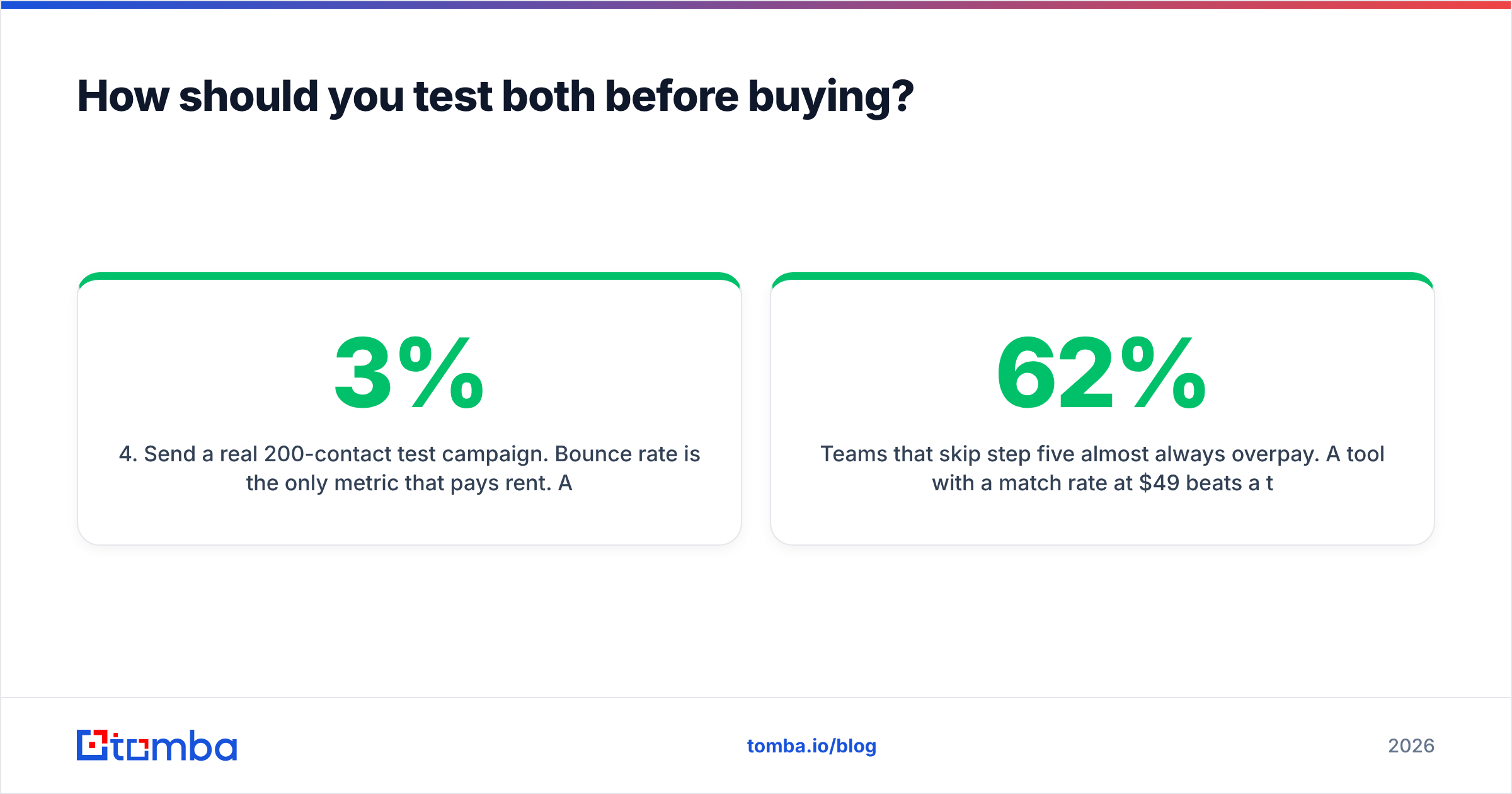
- Send a real 200-contact test campaign. Bounce rate is the only metric that pays rent. Anything over 3% means the list is costing you sender reputation, which compounds across every future send.
- Compute cost per usable contact. Total monthly spend — including seats — divided by contacts that were matched, verified, and didn't bounce. This number frequently reorders the ranking you had after step one.
- Check the export terms. Before the trial ends, confirm in writing that you can export, retain, and use the records after you cancel.
Teams that skip step five almost always overpay. A tool with a 62% match rate at $49 beats a tool with a 71% match rate at $199 per seat, every single time, and no feature grid will tell you that.
Where does each tool actually fall short?#
Lusha's weak points. Per-seat pricing scales badly for small teams and for automation-first workflows. Credits expire. API access sits behind higher tiers, which is frustrating when the API is the only thing you wanted. Coverage outside North America and Western Europe thins noticeably, and several G2 reviewers flag credit consumption on failed or partial lookups as a recurring annoyance.
Jet Leads Pro's weak points. Limited independent validation. Thinner CRM integrations, so you end up living in CSVs. Direct-dial coverage that doesn't hold up against Lusha's. And the structural risk that comes with any smaller vendor: less certainty that the product, the pricing, or the company itself looks the same in 24 months.
What both miss. Neither is built primarily as an API-first data layer. If your actual requirement is "enrich every inbound signup in under 300ms" or "find every email on this domain and push it to Postgres," you want a domain search endpoint and a documented API, not a Chrome extension with a data feature bolted on.
So which one should you pick?#
Pick Lusha if you have funded SDRs working LinkedIn daily, you need direct dials, your CRM is the system of record, and your procurement team requires published certifications. The seat cost buys you real workflow value and real compliance cover.
Pick Jet Leads Pro if you're an agency or lean team building cold-email lists, you've tested its coverage against your ICP and it held, and you can live in CSV workflows. Validate before you commit — the savings are real only if the accuracy is.
Pick neither if what you actually need is a credit-based, API-first email layer that doesn't tax you per user. That's the third option most buyers don't consider until they've already overpaid for a year.
That's where Tomba's Email Finder fits. Find emails by domain, name, or company; verify them in the same flow, including catch-all domains; and run it from the API, a Chrome extension, Google Sheets, or bulk CSV — with seats included rather than metered. Tomba pricing starts free at 25 searches a month, runs $49/mo at Starter and $99/mo at Growth, and the bulk email finder handles the list-building jobs that would burn a month of Lusha credits in an afternoon. Run your 100-row control set through it alongside both tools above and let the cost-per-usable-contact number decide.
Related guides#
// get started
Find, verify and enrich your first contacts today
Start on the free plan with 25 searches a month, then scale when your team is ready.
Free plan · No credit card required · GDPR & CCPA
// about the author