Jet Leads Pro vs Manyreach: Which B2B Outreach Tool Wins?
Jet Leads Pro and Manyreach get compared constantly, but they solve different halves of outbound. Here is where each one actually wins, what they cost, and the piece both leave you to solve yourself.
TL;DR
- Jet Leads Pro and Manyreach are not really competitors. One is oriented around sourcing lead lists, the other around sending cold email at volume with a pay-per-send pricing model.
- If your bottleneck is "I have nobody to email," a list/data tool matters more. If your bottleneck is "I have 40,000 contacts and no way to send to them without torching a domain," a sending platform matters more.
- Manyreach's unlimited-seats, unlimited-inbox, pay-for-what-you-send model is genuinely unusual in a market full of per-seat SaaS. That is its strongest argument.
- Neither tool removes the need for independent email verification. Bundled data is bundled data — it ages, and bounce rates are what get your domain flagged.
- The stack most teams actually land on: a verified data source, a sending platform, and a CRM. Buying one and hoping it covers all three is the most common and most expensive mistake.
What are Jet Leads Pro and Manyreach, actually?#
Start by refusing the framing. "Jet Leads Pro vs Manyreach" is a query people type because both names show up in the same cold-outbound conversations, not because the two products do the same job.
Manyreach is a cold email sending platform. Its pitch is infrastructure economics: connect as many sending mailboxes as you want, add as many teammates as you want, and pay based on emails sent rather than per seat per month. For agencies running campaigns for a dozen clients, or for a lean team that wants five people inside the tool without paying five times, that pricing shape is the whole reason it gets shortlisted. You can read their own positioning on the Manyreach site — it is refreshingly blunt about being a sending engine rather than an everything-suite.
Jet Leads Pro sits on the other side of the workflow. It is marketed to people who need lead lists — contacts, company records, exportable rows you can push into a sequencer. Products in this bracket vary enormously in how they source data, how often they refresh it, and whether "verified" means anything more than a regex check. Verify the current feature set and pricing directly before you commit, because tools in this category change plans frequently.
So the honest version of the comparison is: a list problem versus a sending problem. Most teams have both. Deciding which one hurts more this quarter is the real decision.

How do the two tools compare side by side?#
Here is the shape of the difference. Treat pricing as directional — both vendors adjust plans, and you should confirm on their pages before you buy.
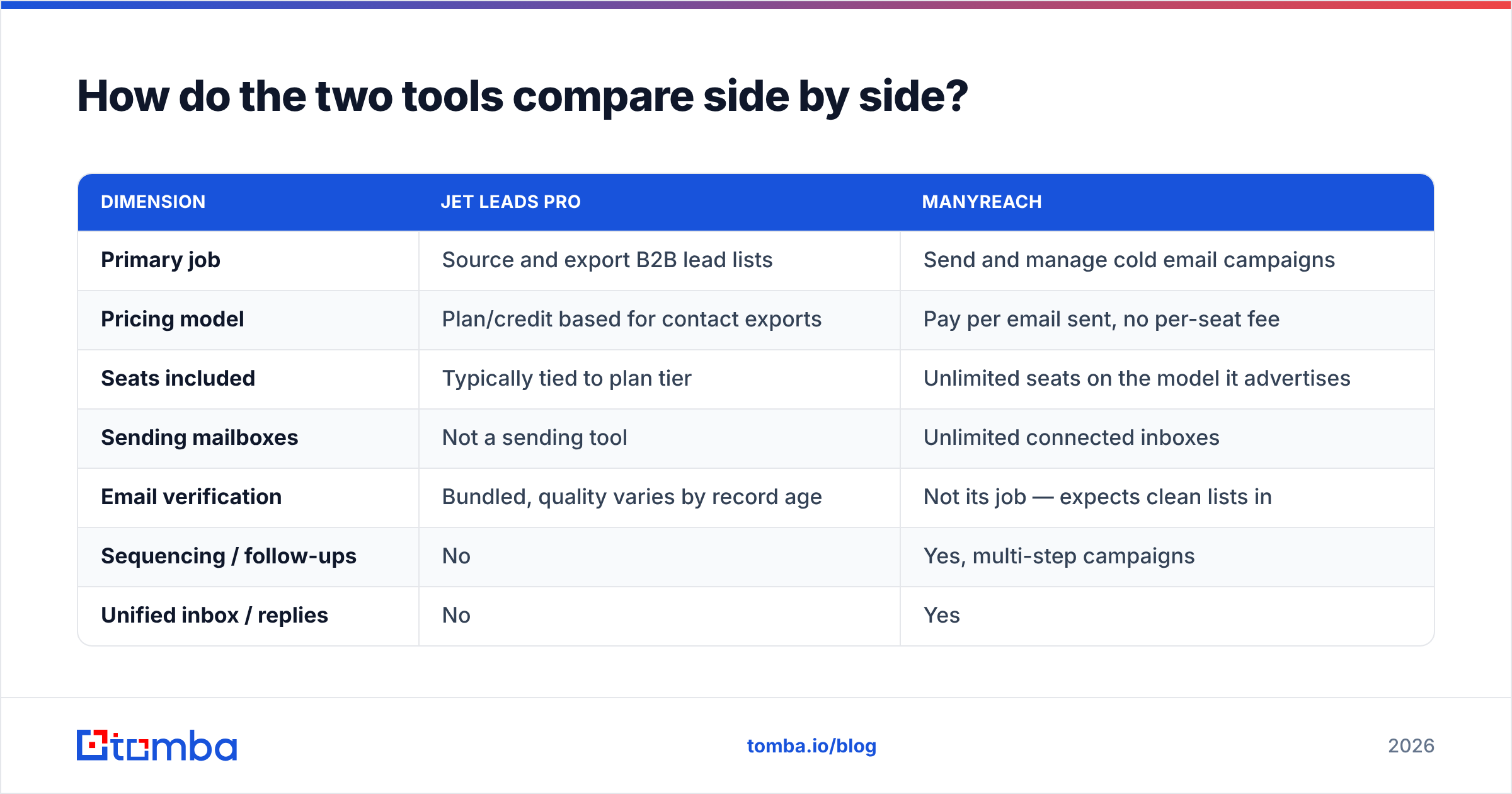
| Dimension | Jet Leads Pro | Manyreach |
|---|---|---|
| Primary job | Source and export B2B lead lists | Send and manage cold email campaigns |
| Pricing model | Plan/credit based for contact exports | Pay per email sent, no per-seat fee |
| Seats included | Typically tied to plan tier | Unlimited seats on the model it advertises |
| Sending mailboxes | Not a sending tool | Unlimited connected inboxes |
| Email verification | Bundled, quality varies by record age | Not its job — expects clean lists in |
| Sequencing / follow-ups | No | Yes, multi-step campaigns |
| Unified inbox / replies | No | Yes |
| Best for | Filling an empty list | Scaling volume across clients or domains |
| Weak spot | Data freshness and bounce risk | Nothing upstream — you must bring contacts |
Read that table twice and the conclusion writes itself: they slot together far more naturally than they compete. The teams asking "which one?" are usually really asking "which one do I buy first with the budget I have?"
Which problem should you solve first?#
Pick based on which of these five statements is most true for you right now.
- "My reps are manually hunting for contacts in LinkedIn." Your bottleneck is data acquisition. A list tool — or better, a targeted email finder you can point at specific companies — pays for itself in reclaimed hours before it pays for itself in pipeline.
- "We have lists but our bounce rate is above 5%." Your bottleneck is data quality, not data volume. Buying more rows makes it worse. Run what you have through an email verifier before you spend another dollar on acquisition.
- "We can't send enough without burning domains." Your bottleneck is infrastructure. This is the Manyreach case: multiple inboxes, rotation, sane volume per mailbox.
- "Our per-seat SaaS bill is absurd for the volume we actually send." Also the Manyreach case. Pay-per-send pricing punishes high-volume spray and rewards small, targeted campaigns — which happens to be the better strategy anyway.
- "We're an agency running campaigns for multiple clients." You need both, plus clean separation between client workspaces. Budget accordingly; this is the most expensive profile of the five.
Most teams misdiagnose themselves as #1 when they are actually #2. Volume feels like the fix because it is the easiest thing to buy.
Which one wins on data accuracy?#
Neither, because accuracy is not really a product feature — it is a pipeline property, and it decays.
A B2B contact record starts degrading the moment it is written. Industry churn estimates put professional email decay somewhere around 20–30% per year, and in fast-moving segments like tech sales it runs higher. That means a database refreshed 14 months ago is not "slightly stale." It is a list where roughly one in four rows will hard-bounce.
What matters in practice:
- When was the record last validated, not last scraped? Those are different dates and vendors love to conflate them.
- How does the tool treat catch-all domains? Plenty of providers mark every address at a catch-all domain as "valid" because the server accepts everything. That inflates the accuracy stat and destroys your sender reputation. A real catch-all verifier treats these as a separate risk class instead of quietly passing them.
- Is verification real-time or cached? A cached "valid" from six months ago is a guess wearing a badge.
- Does the vendor publish where its data comes from? Transparency about data sources is a reasonable proxy for whether anyone is maintaining the pipeline.
The practical rule: whatever list tool you use, re-verify immediately before send. Not at import. Not weekly. Before send. That single habit does more for deliverability than any sending-platform feature you can toggle.
Which one wins on deliverability?#
Manyreach — but with an asterisk the size of the tool itself.
A sending platform controls the mechanics: how many emails leave each mailbox per day, how they are spaced, whether replies route to a unified inbox, whether a sequence stops when someone responds. Those mechanics matter. What a sending platform cannot control is the quality of the addresses you feed it.
Mailbox providers made this explicit. Google's bulk sender requirements formalized a spam-complaint threshold and authentication requirements that used to be informal best practice — the current rules are laid out in Google's sender guidelines. Microsoft followed with its own tightening. The short version: bounces and complaints are now scored, and no sending tool can absorb the damage on your behalf.
So the deliverability stack looks like this, in order of impact:
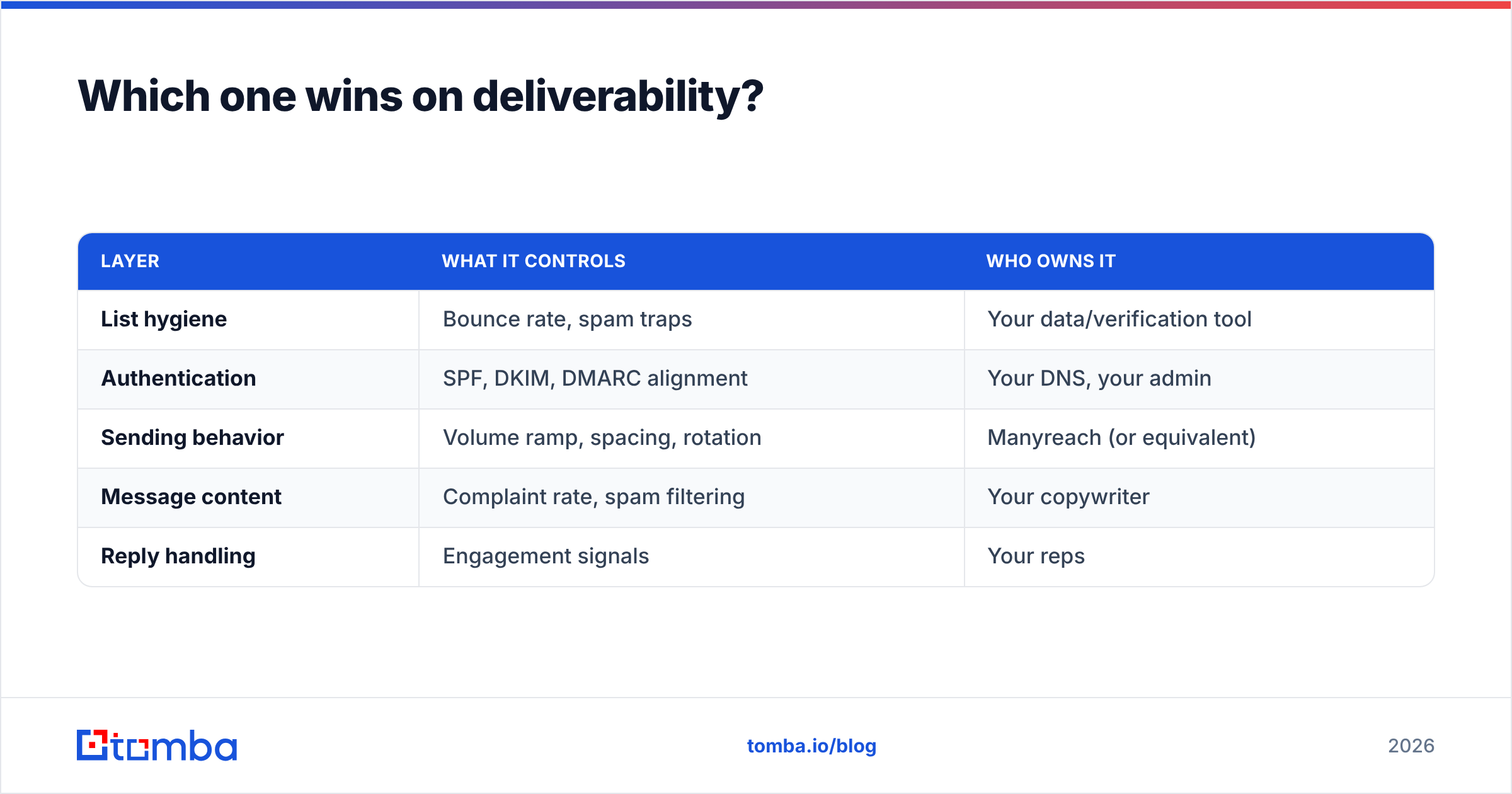
| Layer | What it controls | Who owns it |
|---|---|---|
| List hygiene | Bounce rate, spam traps | Your data/verification tool |
| Authentication | SPF, DKIM, DMARC alignment | Your DNS, your admin |
| Sending behavior | Volume ramp, spacing, rotation | Manyreach (or equivalent) |
| Message content | Complaint rate, spam filtering | Your copywriter |
| Reply handling | Engagement signals | Your reps |
Notice that the sending platform owns exactly one row. It is an important row. It is not the row that usually breaks. If you want the longer version of how these interact, the email deliverability primer covers the mechanics without the vendor spin.

What does each one actually cost you?#
Sticker price is the least interesting number. Cost per usable contact is the one that decides whether outbound is profitable.
Work the math with a 5,000-record list:
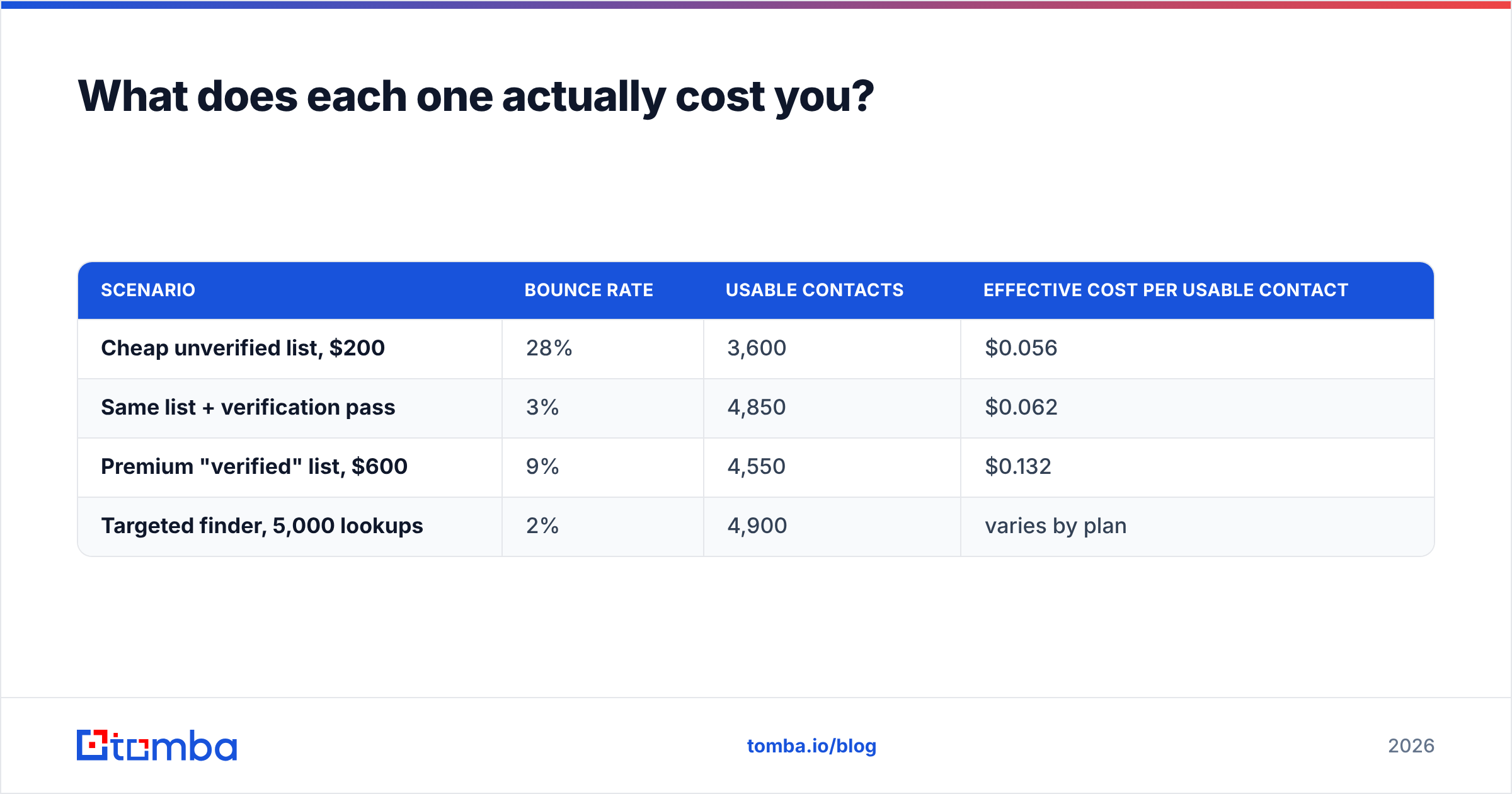
| Scenario | Bounce rate | Usable contacts | Effective cost per usable contact |
|---|---|---|---|
| Cheap unverified list, $200 | 28% | 3,600 | $0.056 |
| Same list + verification pass | 3% | 4,850 | $0.062 |
| Premium "verified" list, $600 | 9% | 4,550 | $0.132 |
| Targeted finder, 5,000 lookups | 2% | 4,900 | varies by plan |
The verification pass raises cost per contact by half a cent and removes roughly 1,250 bounces. Those 1,250 bounces are what move you from a healthy sender score to a throttled one — which then depresses inbox placement for the 3,600 addresses that were valid. The cheap list is not cheap. It is a tax on every campaign that follows it.
On the sending side, pay-per-email pricing changes the incentive structure in a way worth naming. Per-seat SaaS rewards you for sending more (marginal send is free). Pay-per-send rewards you for sending better, because every email has a price. Teams that switch to that model often discover their 2,000-contact blast was subsidizing laziness. That is a feature.
For reference on the data side, Tomba pricing runs a free tier at 25 searches per month, Starter at $49/mo, Growth at $99/mo, and Pro at $249/mo, with Enterprise custom. Bulk work runs through the bulk email finder rather than per-record lookups.
What about the alternatives people shortlist alongside these two?#
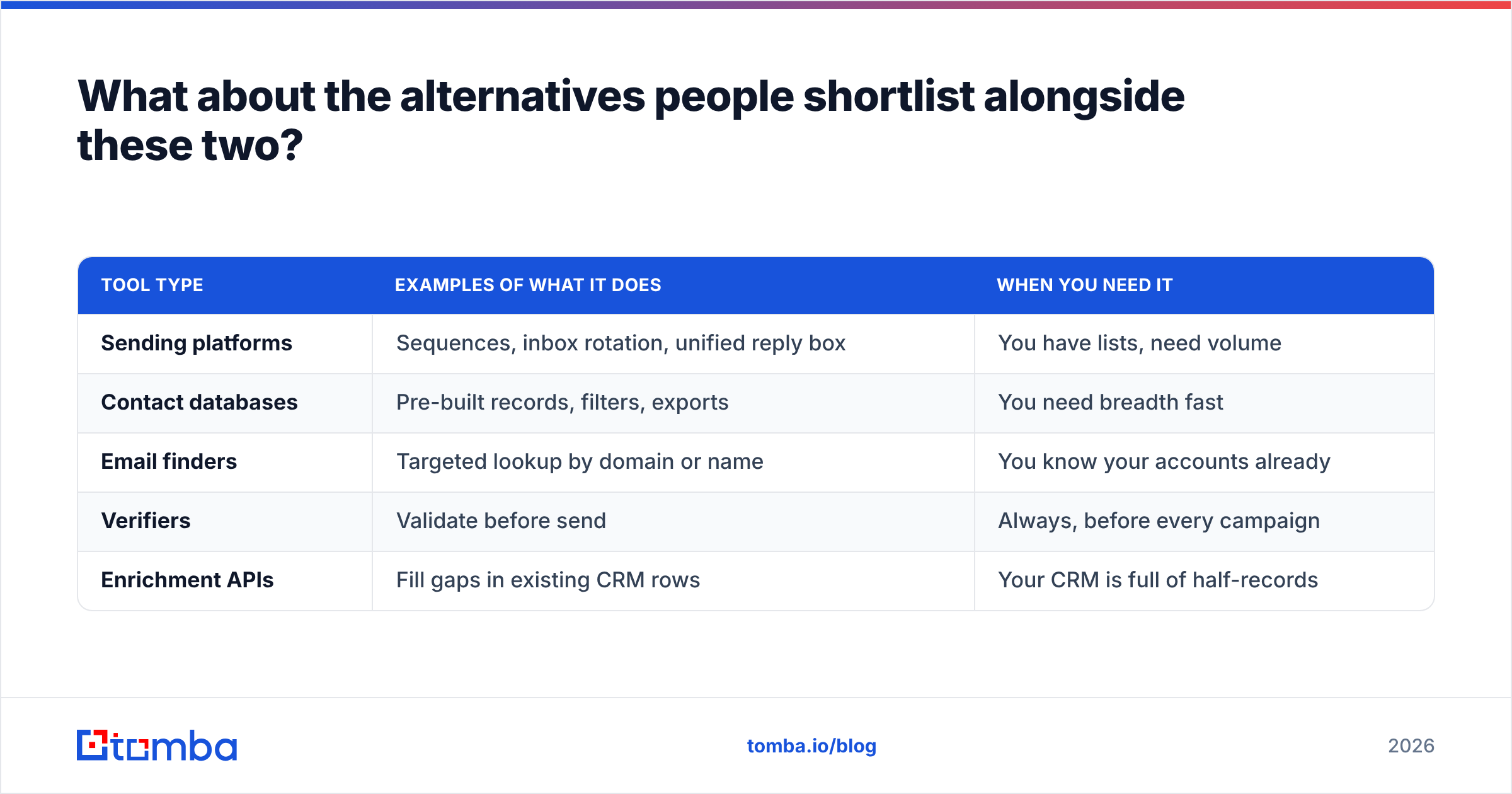
The category is crowded and the boundaries are blurry. A quick map of who plays where:
| Tool type | Examples of what it does | When you need it |
|---|---|---|
| Sending platforms | Sequences, inbox rotation, unified reply box | You have lists, need volume |
| Contact databases | Pre-built records, filters, exports | You need breadth fast |
| Email finders | Targeted lookup by domain or name | You know your accounts already |
| Verifiers | Validate before send | Always, before every campaign |
| Enrichment APIs | Fill gaps in existing CRM rows | Your CRM is full of half-records |
Two decision rules that hold up across every vendor in that table:
If you know your target accounts, do not buy a database. Account-based teams with a defined ICP get better results from domain search — point it at the 400 companies you actually want, pull the relevant roles, skip the 200,000 records you will never contact. Databases are for breadth. Finders are for precision. Paying database prices for precision work is the most common overspend in this category.
If you cannot name your data source, assume it is stale. Check independent reviews on G2 before trusting any vendor's own accuracy claim, and weight recent reviews heavily — data quality in this space changes fast, both directions.
Which should you actually buy?#
Short answers, by profile:
- Solo founder, first 500 outbound emails. Neither, yet. Use a free tier to find 200 genuinely relevant contacts, verify them, and send from one warmed mailbox. Buying infrastructure before you have product-market fit on the message is spending money to scale a message that does not work.
- Small sales team, per-seat pain. Manyreach for sending. Pair it with a dedicated finder and verifier rather than whatever list tool is cheapest that week.
- Agency, multiple clients. Manyreach's unlimited-seat, unlimited-inbox model fits the shape of agency work better than almost anything else on the market. Handle data separately per client — different ICPs need different sourcing.
- Data-starved team with an existing sequencer. A list tool like Jet Leads Pro can fill the gap, but budget for a verification pass on every export. Treat the vendor's "verified" label as a starting point, not a guarantee.
- Enterprise with a CRM full of decaying records. Neither. You need data enrichment against what you already own before you buy a single new contact.
The uncomfortable truth in every one of those profiles: the data layer is where the money leaks, and it is the layer people shop for last. Sending platforms are fun to evaluate — dashboards, sequences, reply views. Verification is boring. Verification is also the difference between a domain that lands in inboxes in month six and one that does not.
Where does Tomba fit in this stack?#
Tomba is deliberately not a sending platform. It sits upstream of Manyreach, not against it: find the address, confirm it is real, hand a clean list to whatever sends your mail.
If your bounce rate is the thing keeping you up, start with the Tomba Email Finder. Search by domain, by name, or by company, get verification status on every result, and export something your sending tool will not choke on. The free tier gives you 25 searches a month to test the accuracy against a list you already know the answers to — which is the only benchmark that matters. Run that test before you scale spend on either tool in this comparison.
Related guides#
// get started
Find, verify and enrich your first contacts today
Start on the free plan with 25 searches a month, then scale when your team is ready.
Free plan · No credit card required · GDPR & CCPA
// about the author