Jet Leads Pro vs Ninjapear (2026): Which Lead Tool Wins?
A neutral head-to-head on Jet Leads Pro vs Ninjapear: how each sources contact data, what the credit math really costs you, and which one survives a bounce-rate test.
TL;DR
- Jet Leads Pro and Ninjapear solve the same job — turn a name or a domain into a reachable B2B contact — but they sell it differently: one leans list-building volume, the other leans single-lookup convenience.
- Neither vendor publishes an independently audited accuracy number, so the only comparison that matters is the one you run yourself on 200 of your own target accounts.
- Credit math, not sticker price, decides your real cost. A "cheap" plan that charges credits for failed lookups and unverified catch-alls is more expensive than a higher-priced plan that doesn't.
- If you need an API, a verifier, and a catch-all check in one billing relationship, both tools force you into a second vendor. That's where a consolidated platform like Tomba (free tier, then $49/mo) changes the math.
- Pick Jet Leads Pro if you build large static lists. Pick Ninjapear if reps look up contacts one at a time in-browser. Pick neither if your bounce rate is the metric your boss watches.
What are Jet Leads Pro and Ninjapear?#
Both products sit in the same category: B2B contact data and email finding. You give them an identifier — a full name plus a company domain, a LinkedIn profile URL, or just a company website — and they return a work email address, sometimes a direct dial, sometimes a job title and headcount band alongside it.
The category is well defined. Lead generation tooling has consolidated around three technical approaches, and every vendor in this space is some blend of them:
- Pattern inference. The tool learns that a company uses
first.last@domain.com, then generates the candidate address for your target and tests it. Cheap, fast, and only as good as the pattern sample. - Crawled and contributed sources. Public web pages, press releases, GitHub commits, conference listings, and — for some vendors — contributed contacts from browser extensions installed by their own users.
- Licensed third-party databases. Bulk data bought from aggregators. Broad coverage, notoriously stale in the 12–36 month range.
Jet Leads Pro positions itself toward the list-building end: bulk jobs, CSV in and CSV out, filtering by firmographics. Ninjapear positions itself toward the in-workflow end: browser extension, one contact at a time, fast reveal while a rep is already looking at a prospect.
That difference in posture matters more than any feature-checkbox comparison, because it predicts where each one gets expensive.

How do Jet Leads Pro and Ninjapear compare at a glance?#
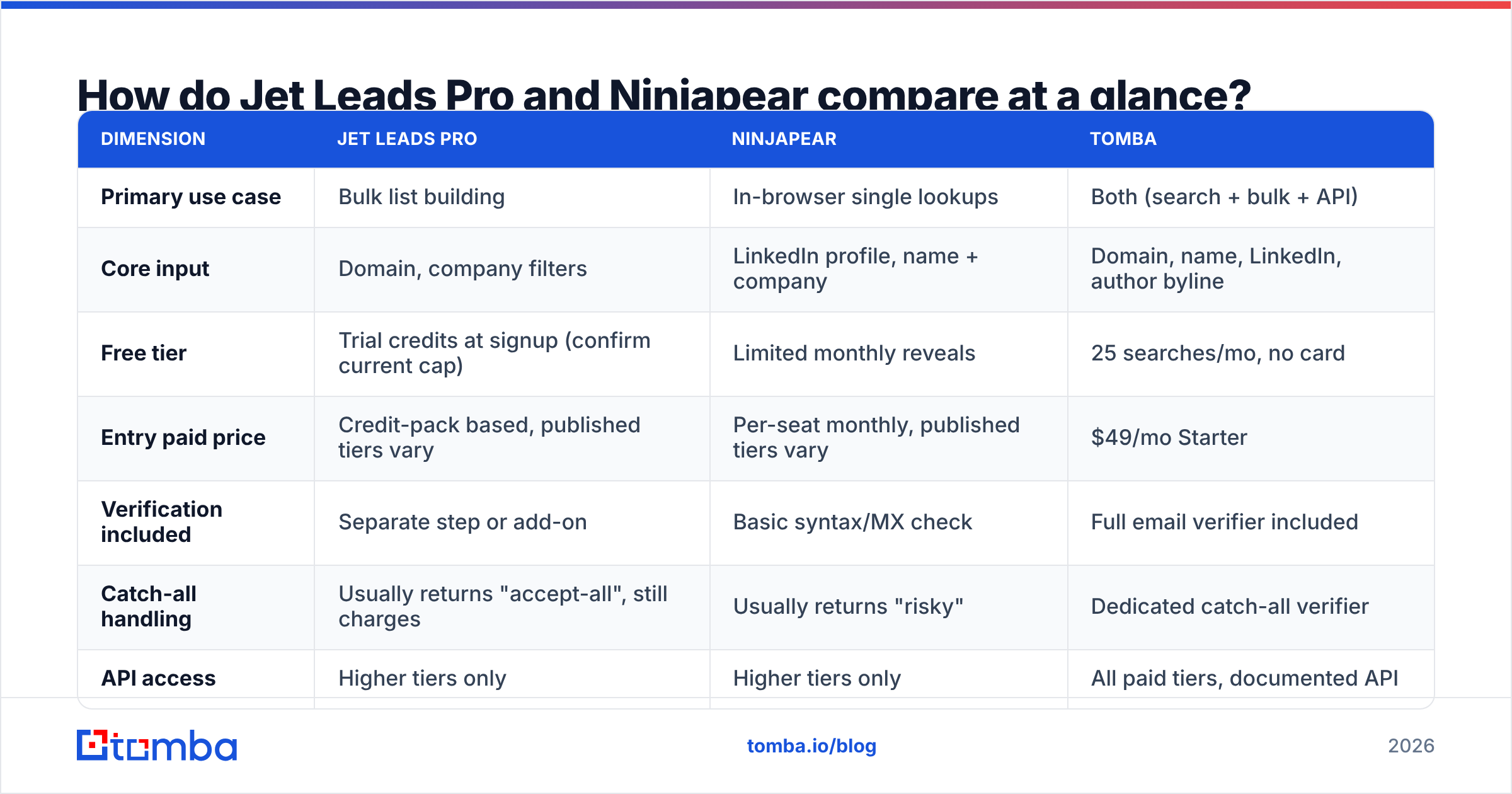
Here is the honest version of the comparison table. Where a vendor does not publish a number, this table says so rather than inventing one — and you should treat "not published" as a data point in itself, because sales-gated pricing in this category almost always means annual contracts and seat minimums.
| Dimension | Jet Leads Pro | Ninjapear | Tomba |
|---|---|---|---|
| Primary use case | Bulk list building | In-browser single lookups | Both (search + bulk + API) |
| Core input | Domain, company filters | LinkedIn profile, name + company | Domain, name, LinkedIn, author byline |
| Free tier | Trial credits at signup (confirm current cap) | Limited monthly reveals | 25 searches/mo, no card |
| Entry paid price | Credit-pack based, published tiers vary | Per-seat monthly, published tiers vary | $49/mo Starter |
| Verification included | Separate step or add-on | Basic syntax/MX check | Full email verifier included |
| Catch-all handling | Usually returns "accept-all", still charges | Usually returns "risky" | Dedicated catch-all verifier |
| API access | Higher tiers only | Higher tiers only | All paid tiers, documented API |
| Bulk CSV | Yes, core feature | Limited or add-on | Yes, native bulk |
| Best for | Agencies building static lists | SDRs working account-by-account | Teams that need one vendor for find + verify |
Two rows in that table do most of the work: verification included and catch-all handling. Everything else is convenience.
Which one actually returns accurate emails?#
Short answer: you cannot know from marketing pages, and you should not try.
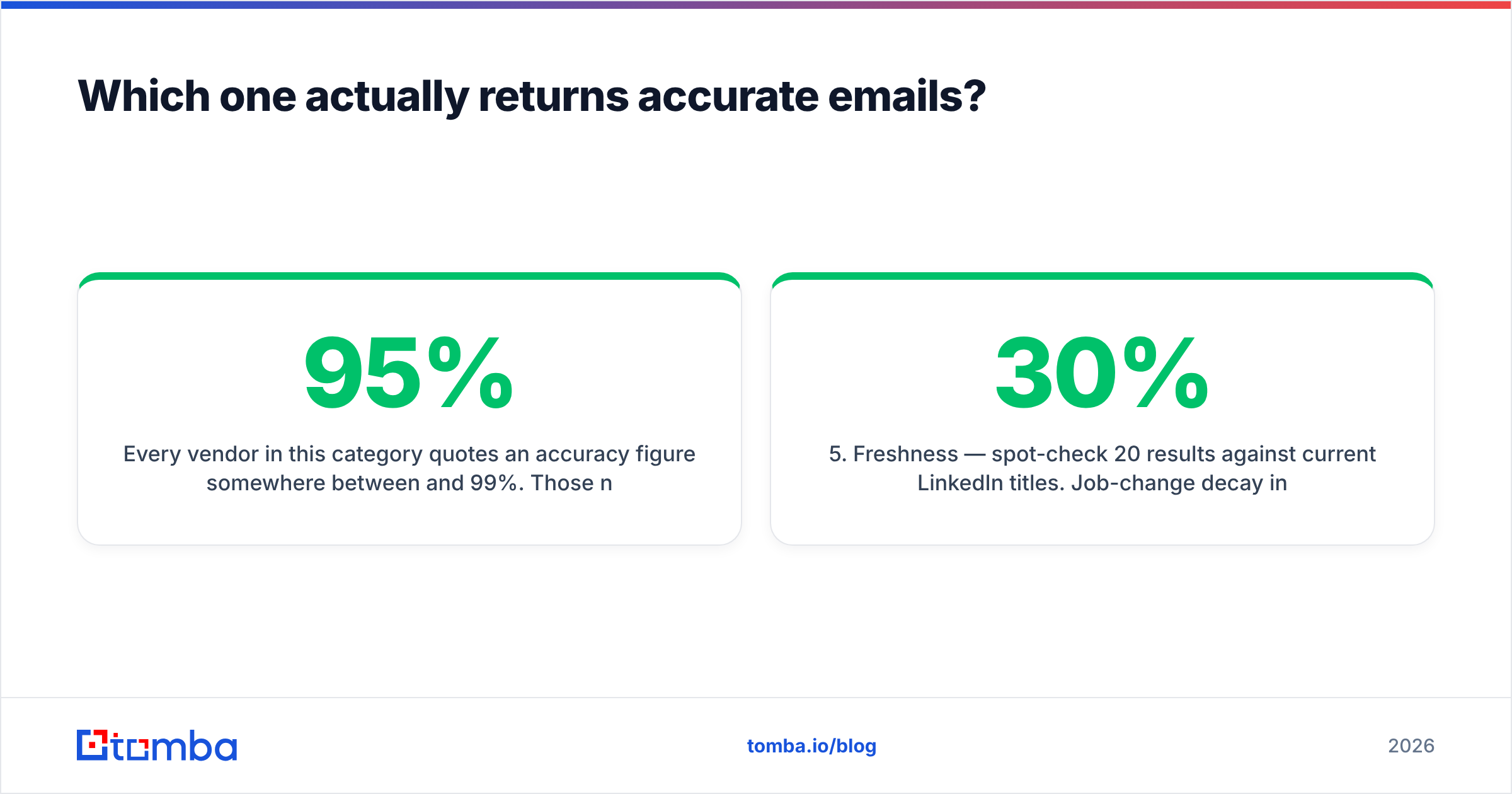
Every vendor in this category quotes an accuracy figure somewhere between 95% and 99%. Those numbers are not lies, exactly — they are measured on the subset of lookups the tool chose to return a result for. A tool that finds an address for 40% of your list and is 98% accurate on those is worse for your pipeline than a tool that finds 70% and is 93% accurate, but the first one has the better marketing number.
The metrics that decide this are:
- Hit rate — of 200 target contacts, how many produced any address at all?
- Verified rate — of those hits, how many came back as deliverable rather than "accept-all" or "unknown"?
- True bounce rate — send to a sample and count hard bounces. This is the only number your ESP cares about.
- Credit efficiency — how many credits did you burn to get one usable, verified address? Divide plan cost by that figure for your real cost per contact.
- Freshness — spot-check 20 results against current LinkedIn titles. Job-change decay in B2B data runs roughly 25–30% per year, and stale records are the silent killer of reply rates.

Run that five-metric test on the same 200 rows through both tools. It takes an afternoon and it will tell you more than every review site combined. Crowd-sourced ratings on G2's lead intelligence category and Capterra's lead generation listings are useful for spotting support and billing complaints — reviewers are reliable about being angry — but they are close to useless for accuracy, because almost no reviewer measures it.
How does the pricing really compare?#
Sticker price is the wrong unit. Cost per verified, deliverable contact is the right one.
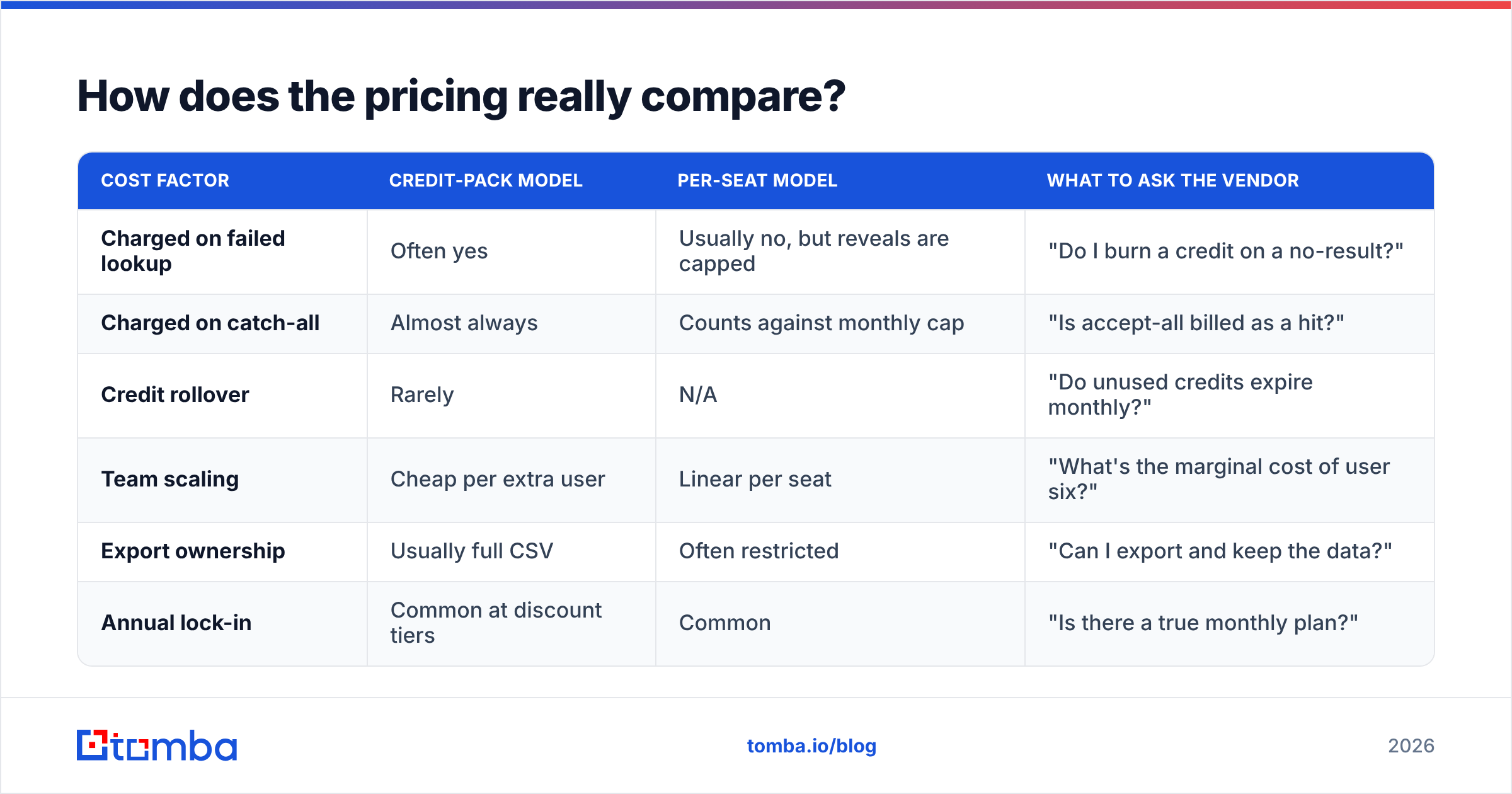
Here is why the two models diverge. Credit-pack pricing (Jet Leads Pro's shape) rewards you for volume but usually charges on attempt, not on success — including for catch-all domains where nobody can confirm deliverability. Per-seat pricing (Ninjapear's shape) is predictable but scales with headcount, so a five-rep team pays five times for a dataset that doesn't get five times bigger.
| Cost factor | Credit-pack model | Per-seat model | What to ask the vendor |
|---|---|---|---|
| Charged on failed lookup | Often yes | Usually no, but reveals are capped | "Do I burn a credit on a no-result?" |
| Charged on catch-all | Almost always | Counts against monthly cap | "Is accept-all billed as a hit?" |
| Credit rollover | Rarely | N/A | "Do unused credits expire monthly?" |
| Team scaling | Cheap per extra user | Linear per seat | "What's the marginal cost of user six?" |
| Export ownership | Usually full CSV | Often restricted | "Can I export and keep the data?" |
| Annual lock-in | Common at discount tiers | Common | "Is there a true monthly plan?" |
That last row catches more buyers than any other. Read the refund terms before the demo, not after.
For reference on the consolidated side: Tomba pricing runs a free tier at 25 searches per month, Starter at $49/mo, Growth at $99/mo, Pro at $249/mo, and custom Enterprise — with verification and catch-all checks inside the same plan rather than as a second invoice from a second vendor.


Which one fits your workflow better?#
Workflow fit is where these two genuinely separate, and it maps cleanly to how your team is organized.
Choose the Jet Leads Pro shape if:
- You or an agency builds lists in batches — 2,000 rows at a time, handed off to a sequencer.
- Firmographic filtering matters more than per-contact depth.
- You have a separate verification vendor already in the stack and you're fine paying two bills.
- Your reps never touch the data tool directly; ops owns it.
Choose the Ninjapear shape if:
- Reps prospect account-by-account inside LinkedIn or a CRM tab.
- Volume is modest — a few hundred lookups a month per rep.
- Speed-of-reveal during live research beats batch throughput.
- You want zero ops overhead and can live with per-seat cost growth.
Choose neither if:
- You need programmatic access on a budget tier. Both gate the API behind upper plans, which is the single most common upgrade trap in this category.
- Your primary metric is deliverability rather than list size. Neither tool's bundled verification is a substitute for a real SMTP-level check.
- You're consolidating vendors this quarter. Two tools that each do 60% of the job cost more than one that does 90%.
What about data sourcing and compliance?#
Ask both vendors the same three questions in writing, and keep the answers.
Where does the data come from? If the answer includes "contributed by our extension users," understand that you may be buying contacts scraped from someone else's inbox. That is legal in some jurisdictions and a GDPR problem in others. Vendors that publish their data sources openly are easier to defend in a procurement review.
What is the suppression and deletion process? Under GDPR and CCPA you need a working path to delete a record on request, and you need the vendor to honor it too. Get the SLA.
Is there a documented DPA? No DPA, no deal, if you sell into the EU. This is not negotiable and it is surprisingly often missing at the small-vendor end of this market.
Which should you choose — the verdict?#
If you must pick one of the two: Jet Leads Pro for ops-owned batch list building, Ninjapear for rep-owned live prospecting. That's the whole verdict, and it has nothing to do with which one has the prettier dashboard.
But the framing of "Jet Leads Pro vs Ninjapear" hides the more useful question, which is whether a point tool is the right purchase at all. Most teams that run this comparison end up buying one of them plus a verifier plus, six months later, an enrichment vendor — three invoices, three credit systems, three support queues, and data that doesn't reconcile between them.
The consolidation case is simple arithmetic. If find, verify, catch-all check, and enrichment live behind one API key, you stop paying the integration tax and your cost-per-verified-contact becomes a number you can actually calculate.
Run the 200-row test. Include a third option in it. Let the bounce rate pick the winner.
Ready to run your own test?#
Take the same 200 target contacts you'd use to evaluate Jet Leads Pro or Ninjapear and run them through the Tomba Email Finder — 25 searches free, no card, with verification and catch-all detection included rather than billed separately. Compare hit rate, verified rate, and true bounce rate side by side. If a point tool wins on your data, buy the point tool. If one platform covers find, verify, and enrich at $49/mo, you just removed two vendors from next year's renewal cycle.
Related guides#
// get started
Find, verify and enrich your first contacts today
Start on the free plan with 25 searches a month, then scale when your team is ready.
Free plan · No credit card required · GDPR & CCPA
// about the author