Jet Leads Pro vs Noparam: Which Lead Tool Wins in 2026?
Jet Leads Pro and Noparam both promise verified B2B contacts, but they solve different problems. Here is an honest breakdown of coverage, accuracy, exports, API access, and the real cost per usable email.
TL;DR
- Jet Leads Pro and Noparam are not the same product category. One sells list-building volume, the other sells per-contact lookup quality. Comparing them on price alone will mislead you.
- Neither tool's headline "95% accuracy" claim survives contact with a catch-all domain. Accuracy numbers are only meaningful when you know what the vendor counted as a "valid" result.
- Cost per usable email is the only metric that matters. A $0.02 credit that bounces costs more than a $0.08 credit that lands, once you price in domain reputation damage.
- Run a 200-contact bake-off before you commit to an annual plan. Same list, same day, three tools, one independent verifier. It takes an afternoon and saves four figures.
- If you need an API, a verifier, and catch-all handling in one place, a consolidated platform like Tomba (free tier at 25 searches/mo, Starter $49/mo) usually beats stitching two point tools together.
What are Jet Leads Pro and Noparam?#
Short version: Jet Leads Pro positions itself as a list-building and lead-sourcing suite — you filter a database by industry, headcount, geography, and title, then export a batch. Noparam positions itself closer to a lookup and enrichment layer — you give it a person or a domain and it returns a contact, often by querying multiple upstream sources and returning the best hit.
That distinction drives everything else. A database product optimises for breadth: how many rows can you pull for a filter set. A lookup product optimises for hit rate on a specific target: when you already know who you want, does it find them.
Most buyers get this wrong. They compare a database export price against a per-lookup price, conclude the database is ten times cheaper, and then discover that half the exported rows were never going to be relevant. The right question is not "which is cheaper per credit" but "which one matches the shape of my prospecting motion."
One more honesty note before we go further: both vendors change plans, credit definitions, and feature packaging frequently, and neither publishes an audited accuracy methodology. Where this post gives concrete figures, they are for Tomba (which we can verify) or they are framed as what you should confirm on the vendor's own plan page before you buy. Treat any comparison table on the internet — including this one — as a checklist, not a receipt.
How do these tools actually find an email address?#
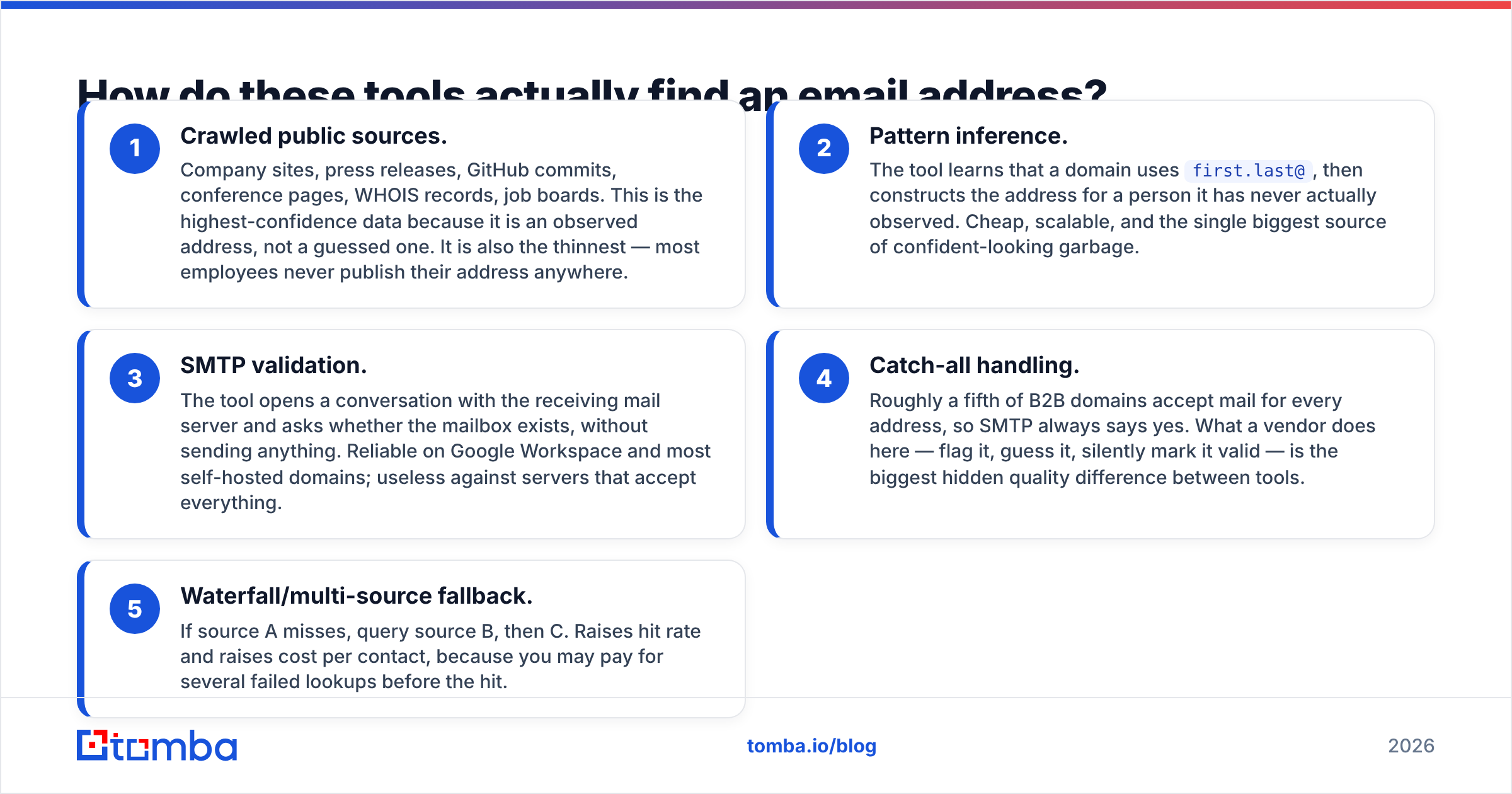
Both products, and every competitor in this space, run some combination of the same five techniques. Knowing which ones a vendor leans on tells you more than any marketing page.
- Crawled public sources. Company sites, press releases, GitHub commits, conference pages, WHOIS records, job boards. This is the highest-confidence data because it is an observed address, not a guessed one. It is also the thinnest — most employees never publish their address anywhere.
- Pattern inference. The tool learns that a domain uses
first.last@, then constructs the address for a person it has never actually observed. Cheap, scalable, and the single biggest source of confident-looking garbage. - SMTP validation. The tool opens a conversation with the receiving mail server and asks whether the mailbox exists, without sending anything. Reliable on Google Workspace and most self-hosted domains; useless against servers that accept everything.
- Catch-all handling. Roughly a fifth of B2B domains accept mail for every address, so SMTP always says yes. What a vendor does here — flag it, guess it, silently mark it valid — is the biggest hidden quality difference between tools.
- Waterfall/multi-source fallback. If source A misses, query source B, then C. Raises hit rate and raises cost per contact, because you may pay for several failed lookups before the hit.
A vendor that is heavy on (1) and (3) will show you a lower hit rate and a lower bounce rate. A vendor heavy on (2) will show you a gorgeous hit rate and hand you a bounce problem three weeks later. Neither is lying, exactly — they are counting different things.
This is also why "does it have an API" is not a nice-to-have checkbox. If your enrichment only exists as a manual CSV export, every refresh is a human task, and B2B contact data decays at roughly 2-3% per month as people change jobs. A programmatic path — a proper email finder API, a Sheets add-on, a CRM connector — is what keeps the data alive after the first import.
Jet Leads Pro vs Noparam: how do they compare head-to-head?#
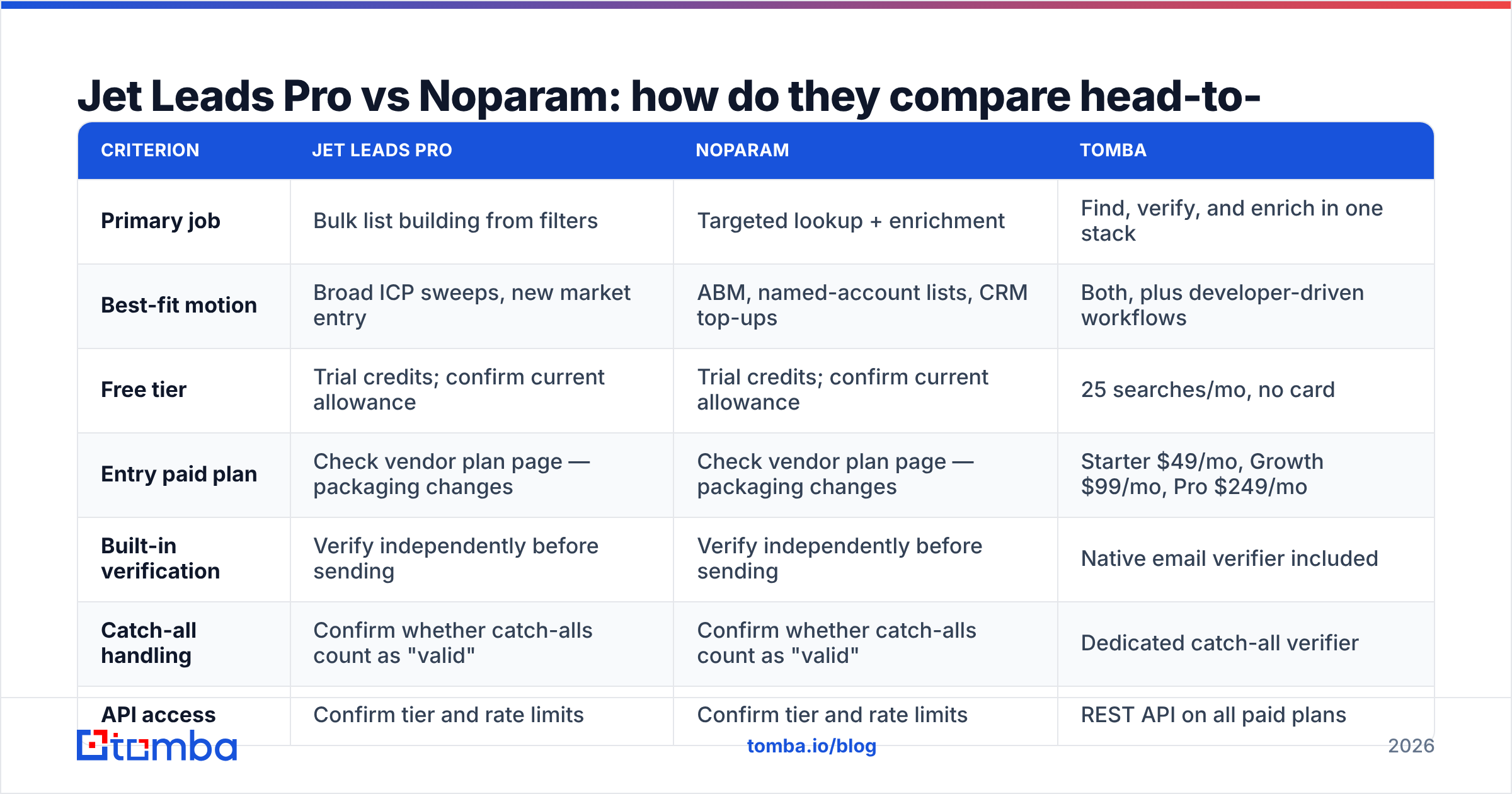
Here is the criteria grid. Use it as a buying checklist — fill in the vendor columns from their live plan pages on the day you evaluate, because both move.
| Criterion | Jet Leads Pro | Noparam | Tomba |
|---|---|---|---|
| Primary job | Bulk list building from filters | Targeted lookup + enrichment | Find, verify, and enrich in one stack |
| Best-fit motion | Broad ICP sweeps, new market entry | ABM, named-account lists, CRM top-ups | Both, plus developer-driven workflows |
| Free tier | Trial credits; confirm current allowance | Trial credits; confirm current allowance | 25 searches/mo, no card |
| Entry paid plan | Check vendor plan page — packaging changes | Check vendor plan page — packaging changes | Starter $49/mo, Growth $99/mo, Pro $249/mo |
| Built-in verification | Verify independently before sending | Verify independently before sending | Native email verifier included |
| Catch-all handling | Confirm whether catch-alls count as "valid" | Confirm whether catch-alls count as "valid" | Dedicated catch-all verifier |
| API access | Confirm tier and rate limits | Confirm tier and rate limits | REST API on all paid plans |
| Credit refund on miss | Ask in writing before signing | Ask in writing before signing | Failed searches don't consume credits |
| Data provenance | Ask for source disclosure | Ask for source disclosure | Published data sources |

Three rows in that table deserve more weight than the rest: catch-all handling, credit refund policy, and provenance. Those are the ones vendors never put on the pricing page, and they are the ones that determine whether your invoice matches your results. Ask all three over email so you have the answer in writing.
Which one is more accurate — and how would you know?#
You would know by testing, and only by testing. Every vendor's published accuracy number is computed on a sample they chose, using a definition of "valid" they chose.
Here is a bake-off protocol you can run in an afternoon:
- Build a 200-row ground-truth list. Real people at real companies, spread across domain types: 60 Google Workspace, 60 Microsoft 365, 40 known catch-all domains, 40 small self-hosted domains. Skew it toward the industries you actually sell to, not toward tech companies where every tool performs well.
- Run the same list through both tools on the same day. Data freshness varies week to week; a test run three weeks apart is not a test.
- Verify every returned address with a third, independent verifier. Never grade a tool with its own verifier. That is the vendor marking its own homework.
- Score four buckets, not one: found-and-valid, found-and-invalid, correctly-flagged-as-risky, and no-result. A tool that returns nothing is far less expensive than a tool that returns a wrong address confidently.
- Compute cost per found-and-valid contact. Credits spent divided by bucket one. This single number usually reorders the leaderboard.

The bucket that surprises people is number three. A tool that says "this domain is catch-all, I can't confirm this mailbox" is doing you a favour. It lets you route that contact to LinkedIn, a phone call, or a low-volume warm sequence instead of a cold blast. A tool that silently promotes catch-all guesses into your "verified" column is quietly borrowing against your sender reputation.
That reputation cost is not abstract. Google's bulk sender requirements put a hard spam-complaint ceiling on senders, and a bounce-heavy list is the fastest route to tripping filters at Google and Microsoft simultaneously. Once a sending domain is throttled, no amount of better copy fixes it — you are rebuilding on a fresh domain for six to eight weeks.

What does each one actually cost per usable email?#
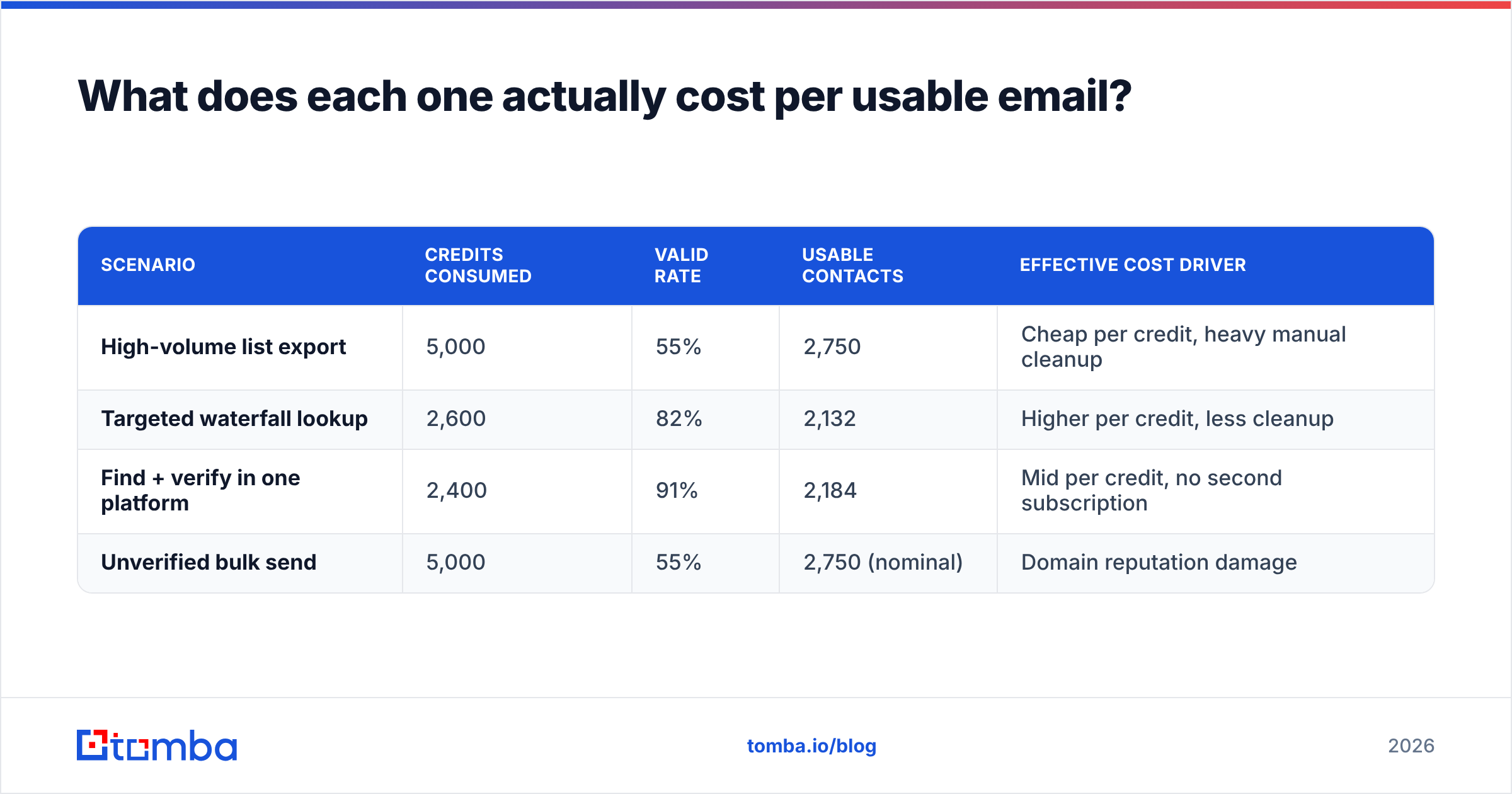
Run the arithmetic rather than reading the pricing page. Assume you need 2,000 usable contacts a month.
| Scenario | Credits consumed | Valid rate | Usable contacts | Effective cost driver |
|---|---|---|---|---|
| High-volume list export | 5,000 | 55% | 2,750 | Cheap per credit, heavy manual cleanup |
| Targeted waterfall lookup | 2,600 | 82% | 2,132 | Higher per credit, less cleanup |
| Find + verify in one platform | 2,400 | 91% | 2,184 | Mid per credit, no second subscription |
| Unverified bulk send | 5,000 | 55% | 2,750 (nominal) | Domain reputation damage |
Row four is the trap. On paper it is the cheapest option in the table. In practice, sending to a 45%-invalid list once is enough to push a young domain into the spam folder for months, at which point your cost per usable email is the cost of an entire rebuilt outbound program.
Two practical consequences. First, budget for verification as a line item, not an afterthought — either inside your finder or as a separate verifier. Second, compare fully-loaded stacks, not individual tools. A $49/mo platform with verification bundled beats a $29/mo finder plus a $39/mo verifier, and it beats it again on engineering time because it is one API key instead of two.
If you want a concrete anchor for that math, Tomba pricing runs a free tier at 25 searches/mo, Starter at $49/mo, Growth at $99/mo, and Pro at $249/mo, with the verifier, domain search, and catch-all checks included rather than sold separately. Whatever you choose, build the same bundled comparison for your shortlist.
Which should you pick for your use case?#
- You are entering a new vertical and need 10,000 rows to find the shape of the market. Lean toward the database/list-building side of the comparison — Jet Leads Pro's model fits this. Then verify the export before it touches a sequencer.
- You run named-account ABM with 50-300 target companies. Lean toward the lookup/enrichment side — Noparam's model fits this. Hit rate on specific people matters far more than breadth.
- You need both, and you have engineers. Consolidate. Two subscriptions, two credit systems, and two data schemas is a reconciliation tax you pay every month forever.
- You are a solo founder testing an offer. Start on a free tier, run 25-50 lookups, and validate that the ICP replies at all before you buy anything. Most tools in this category are bought six months too early.
- You already have a CRM full of stale contacts. Your problem is not sourcing, it is refresh. Prioritise API and CRM-integration quality over database size; a tool you can schedule beats a tool you have to babysit.
For a broader view of the category before you shortlist, the sales intelligence category on G2 is a reasonable neutral starting point, and HubSpot's prospecting guide is still the clearest explanation of how list quality feeds pipeline math.
What questions should you ask both vendors before buying?#
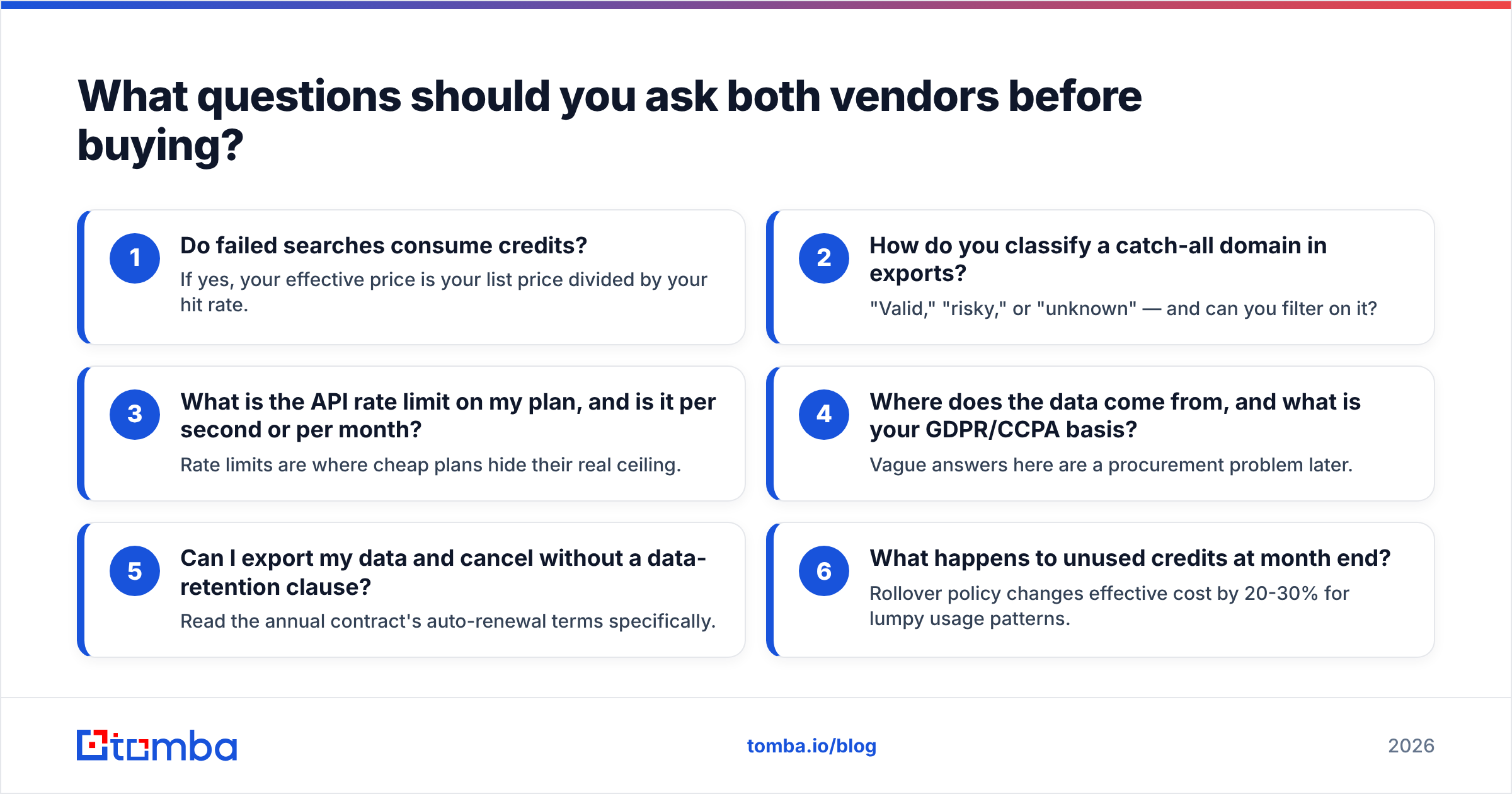
Send this as one email. The response time and the willingness to answer in writing tell you as much as the answers.
- Do failed searches consume credits? If yes, your effective price is your list price divided by your hit rate.
- How do you classify a catch-all domain in exports? "Valid," "risky," or "unknown" — and can you filter on it?
- What is the API rate limit on my plan, and is it per second or per month? Rate limits are where cheap plans hide their real ceiling.
- Where does the data come from, and what is your GDPR/CCPA basis? Vague answers here are a procurement problem later.
- Can I export my data and cancel without a data-retention clause? Read the annual contract's auto-renewal terms specifically.
- What happens to unused credits at month end? Rollover policy changes effective cost by 20-30% for lumpy usage patterns.
The bottom line#
Jet Leads Pro and Noparam are both credible tools solving adjacent problems — breadth versus precision. Pick based on your prospecting motion, not on their pricing pages, and grade both with an independent verifier before you commit to twelve months of anything.
If your real requirement is "find the address, confirm it is real, and do it programmatically without a second subscription," start with the Tomba Email Finder. The free tier gives you 25 searches a month with no card, which is more than enough to run the 200-row bake-off described above and see how it scores against whatever else is on your shortlist. Bring your own list, verify the results independently, and let the numbers decide.
Related guides#
// get started
Find, verify and enrich your first contacts today
Start on the free plan with 25 searches a month, then scale when your team is ready.
Free plan · No credit card required · GDPR & CCPA
// about the author