Kaspr vs Mailshunt 2026: Phone Data vs Email Outreach
Kaspr sells LinkedIn phone numbers. Mailshunt sells email discovery plus sending. They overlap less than the category pages suggest — here is where each one actually earns its seat.
TL;DR
- Kaspr is a phone-number tool first. Its real differentiator is mobile numbers pulled while you browse LinkedIn. Email is a secondary output, and coverage outside Europe thins out fast.
- Mailshunt is an email-and-send tool. Finding addresses is step one; the platform's reason to exist is pushing sequences out the door afterward.
- They are not really substitutes. Choosing between them is mostly choosing between a calling motion and an emailing motion, not between two versions of the same product.
- Both charge on credits, and both get expensive per usable contact once you subtract catch-alls, bounces, and dead mobiles.
- If what you need is accurate B2B email at API scale, a dedicated finder-plus-verifier stack usually beats either one on cost per verified record.
What are Kaspr and Mailshunt, exactly?#
Kaspr is a contact-data extension built around LinkedIn. You open a profile, click the sidebar, and it returns mobile numbers, direct dials, and email addresses for that person. It was acquired by Cognism in 2022 and now sits as the self-serve, SMB-priced layer under Cognism's enterprise data business. Its center of gravity is European mobile data — that is where the database is deepest and where the GDPR compliance story is strongest.
Mailshunt comes at outbound from the opposite end. It bundles email finding, verification, and a cold-email sending engine into one subscription. The pitch is consolidation: find the address, clean the list, warm the inbox, run the sequence, all without stitching three vendors together.
So the honest framing of Kaspr vs Mailshunt is not "which tool has better data." It is:
- What channel are you actually running? Kaspr feeds dialers and LinkedIn sequences. Mailshunt feeds inboxes.
- Where are your prospects? Kaspr's mobile coverage is materially better in Western Europe than in APAC or LATAM. Email-only tools are less geographically lopsided.
- Do you want bundling or best-of-breed? All-in-one platforms trade peak quality in each module for one bill and one login.
- How do you consume data — by hand or by API? Extension-first tools reward manual researchers. API-first tools reward RevOps teams enriching in bulk.
- What is your tolerance for credit math? Both meter usage, and both charge you for lookups that return nothing usable.

How do Kaspr and Mailshunt compare feature by feature?#
Here is the side-by-side, with a dedicated email-finder stack as a reference column so you can see what each platform gives up.
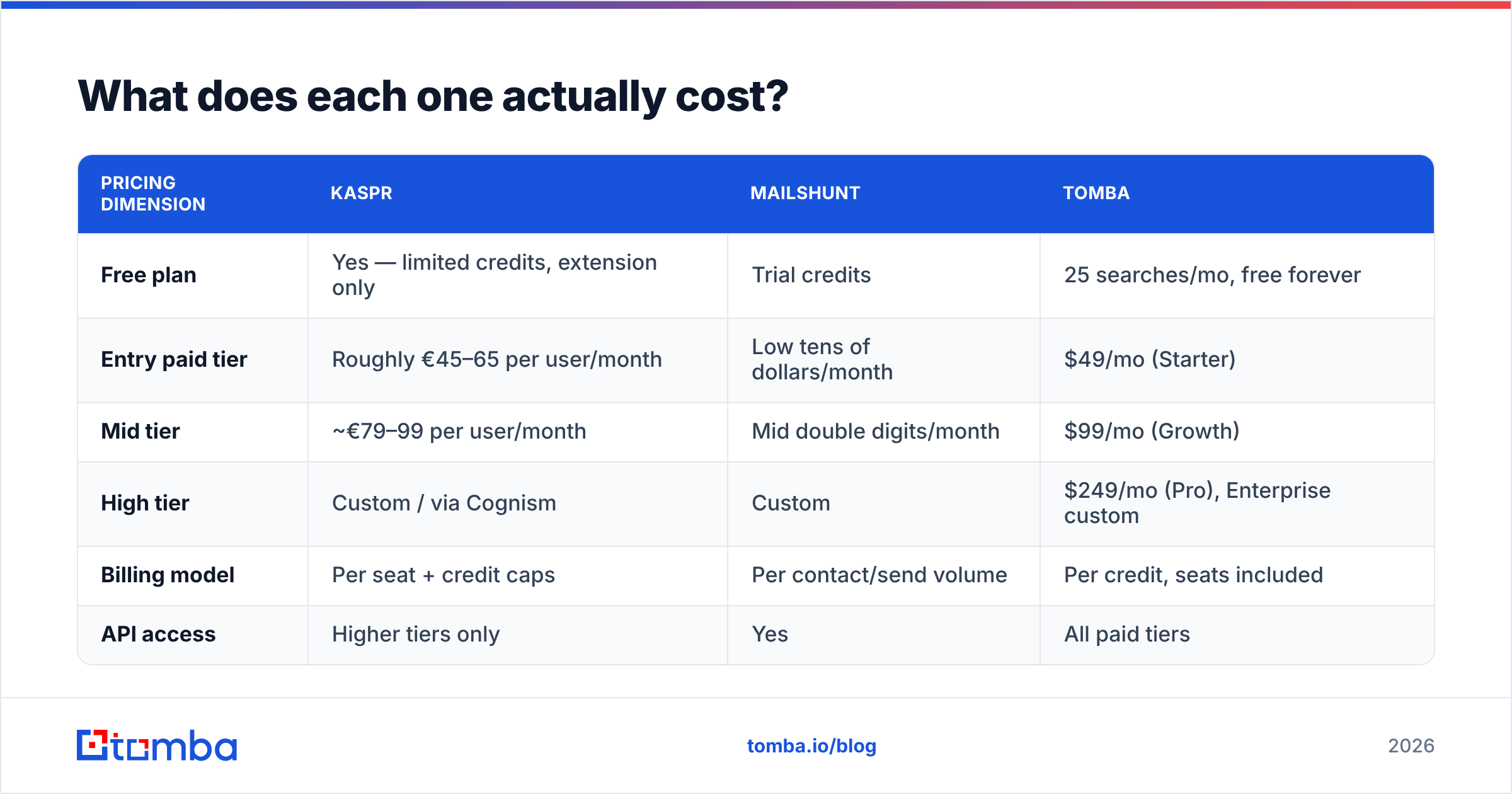
| Capability | Kaspr | Mailshunt | Tomba |
|---|---|---|---|
| Primary strength | Mobile + direct-dial numbers | Email finding + sending in one tool | Email discovery + verification accuracy |
| LinkedIn extension | Yes — core workflow | Limited | Yes (LinkedIn finder) |
| Bulk domain search | Basic | Yes | Yes, full domain search |
| Email verification | Included, basic | Included | Dedicated email verifier + catch-all handling |
| Phone numbers | Strongest in category for EU | Not a focus | Yes, via phone finder |
| Cold email sending | No | Yes — built in | No (integrates instead) |
| Public API | Limited on lower tiers | Available | Full REST API on all paid plans |
| Free tier | Yes, small credit grant | Trial credits | 25 searches/mo, no card |
| Best fit | SDRs cold calling EU accounts | Solo founders running email-only outbound | RevOps and devs enriching at scale |
Two things jump out. First, the overlap between Kaspr and Mailshunt is narrower than the "sales intelligence" bucket on G2 implies — one is a dialer feeder, the other is a sender. Second, neither is trying to be the most accurate pure email source; that is a different product category with different engineering priorities.
Which one has better data accuracy?#
Different question for each, because they are optimizing different fields.
Kaspr's accuracy story is about phones. A mobile number is either connected to the right human or it is not, and reps find out in ten seconds. In practice, users report solid hit rates on European mobiles and noticeably weaker results on US direct dials and on anything outside the US/EU corridor. The emails Kaspr returns are fine but rarely best-in-class — they are a bundled convenience, not the flagship.
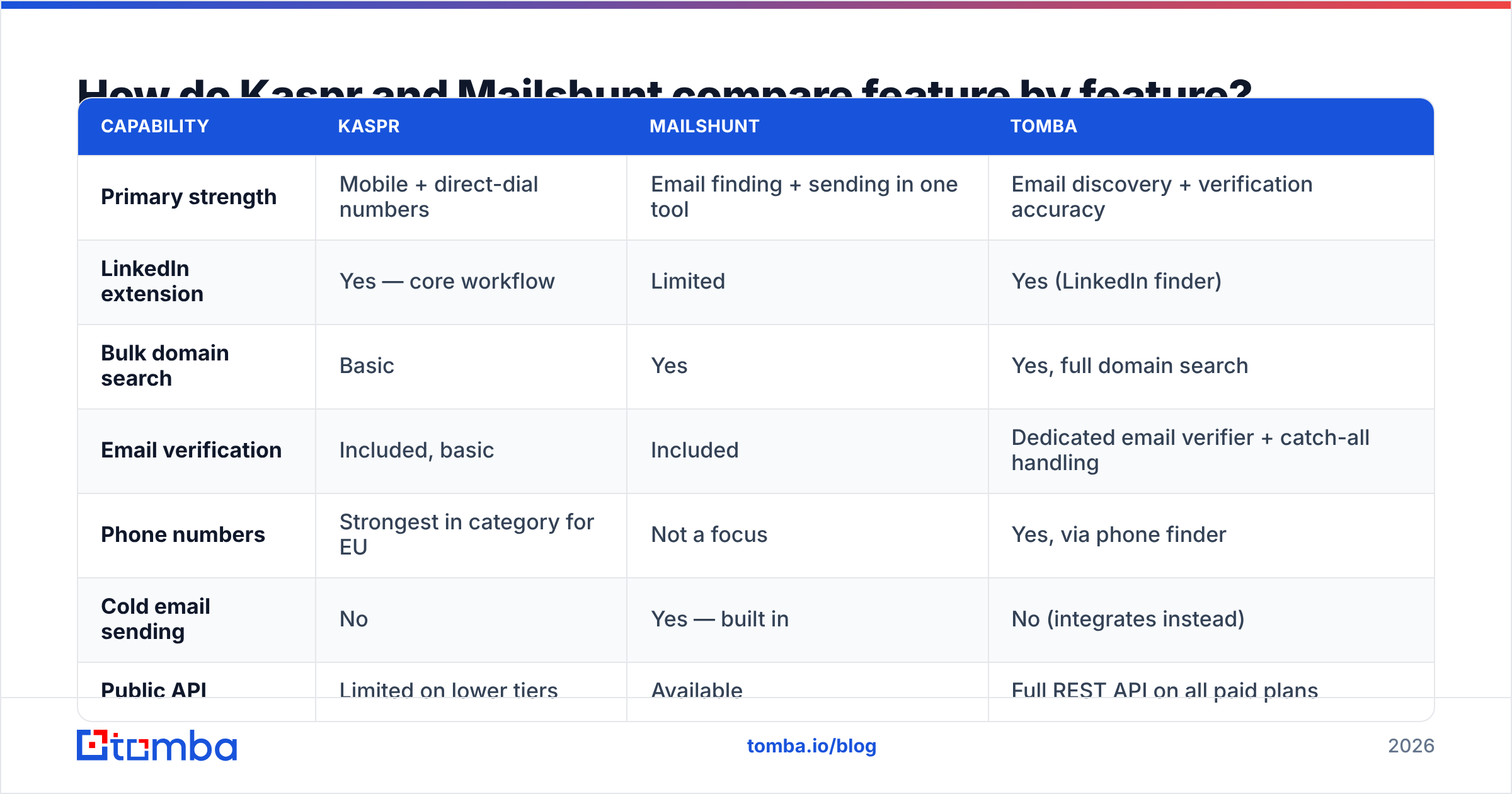
Mailshunt's accuracy story is about bounce rate. Because it also sends, its incentive is to not blow up your domain. That is a genuinely good alignment. The practical question is how it handles catch-all domains, which is where most email tools quietly fail. A catch-all server accepts every address at SMTP time, so a naive verifier marks garbage as "valid." If your list is 30% catch-all — normal for mid-market B2B — a tool that guesses on those records will hand you a bounce problem it cannot see.

The practical test, regardless of vendor: take 100 known-good contacts from your CRM, strip the emails, and run them through each tool. Measure three numbers — found rate, accuracy on found records, and how many "risky/unknown" verdicts you get back. A tool that returns 90% found but 20% unknown is worse than one that returns 70% found with 3% unknown, because unknowns are unusable and you paid for them either way.
That is also the case for keeping verification separate from discovery. If the same vendor both finds and grades the address, it has an incentive to grade generously. Running a second, independent email verification pass before a send is cheap insurance.
What does each one actually cost?#
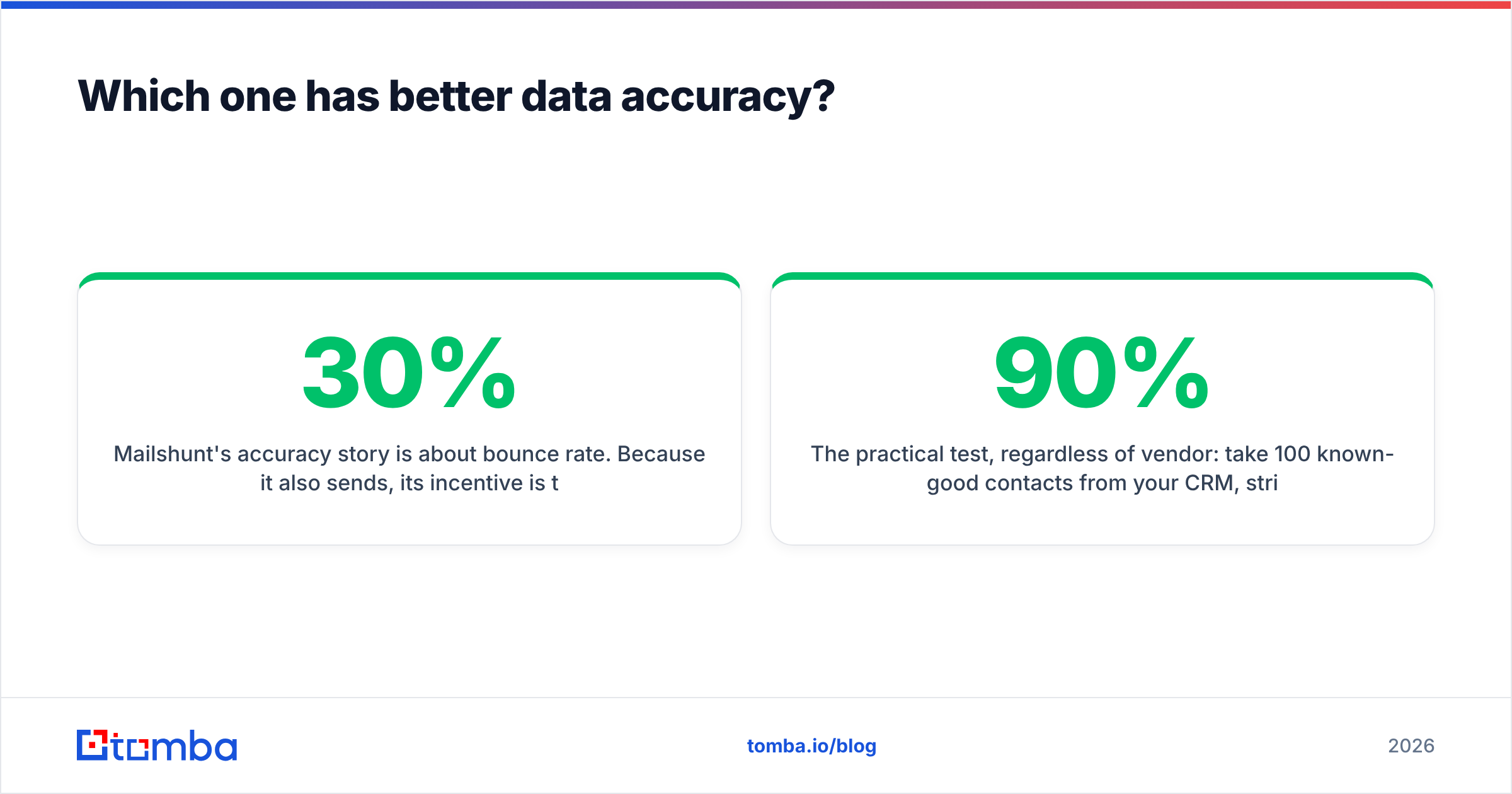
Both vendors change pricing regularly, so treat the numbers below as shape rather than gospel and confirm on their own pages before you buy.
| Pricing dimension | Kaspr | Mailshunt | Tomba |
|---|---|---|---|
| Free plan | Yes — limited credits, extension only | Trial credits | 25 searches/mo, free forever |
| Entry paid tier | Roughly €45–65 per user/month | Low tens of dollars/month | $49/mo (Starter) |
| Mid tier | ~€79–99 per user/month | Mid double digits/month | $99/mo (Growth) |
| High tier | Custom / via Cognism | Custom | $249/mo (Pro), Enterprise custom |
| Billing model | Per seat + credit caps | Per contact/send volume | Per credit, seats included |
| API access | Higher tiers only | Yes | All paid tiers |
The seat-based model matters more than the headline number. Kaspr charges per user, so a five-rep team multiplies the sticker price by five before anyone has pulled a single record. Mailshunt and credit-based finders let one RevOps seat enrich for the whole team, which is dramatically cheaper if your reps consume data through the CRM rather than through a browser sidebar.
Run the math on cost per usable contact, not cost per credit. Take the monthly fee, divide by credits, then divide again by your measured accuracy rate. A $0.02 credit at 65% usable accuracy costs $0.031 per real contact. A $0.03 credit at 95% costs $0.032 — effectively identical, with far less list hygiene work and far less domain risk. Check the full Tomba pricing tiers if you want a fixed reference point for that calculation.
Who should pick Kaspr?#
Kaspr earns its price in a specific setup:
- You run a calling-led motion. If dials are your primary channel and email is follow-up, phone coverage is the whole ballgame and Kaspr is genuinely strong there.
- Your ICP sits in Western Europe. France, UK, Benelux, DACH — this is where the database is deepest and where GDPR-compliant sourcing is a purchasing requirement, not a nice-to-have.
- Your reps prospect manually in LinkedIn Sales Navigator. The extension workflow is fast and the credit-per-profile model matches how they work.
- You are small enough that per-seat pricing does not compound. Two to five reps, fine. Twenty reps, look hard at the total.
Where it disappoints: US mobile coverage, bulk enrichment jobs, and any workflow that needs an API on an entry-level plan. If you are trying to enrich 40,000 CRM rows overnight, an extension-first tool is the wrong shape entirely.

Who should pick Mailshunt?#
Mailshunt makes sense when consolidation is worth more to you than peak quality in any single module:
- You are a solo founder or a two-person team. One subscription that finds, verifies, and sends beats three tools and three invoices when nobody has time to integrate anything.
- Email is your only channel. No dialing, no LinkedIn automation — just sequences.
- Volumes are modest. All-in-one platforms tend to price well at the bottom and poorly at the top, where dedicated vendors win on unit economics.
- You do not have an existing sending stack. If you already run Instantly, Smartlead, or Lemlist, you are paying twice for the sending half.
Where it disappoints: teams that already own a sequencer, teams that need phone data, and teams whose deliverability standards demand an independent verification layer. Bundled verifiers are convenient; they are rarely the most conservative graders on the market, and conservative is exactly what you want before a 5,000-contact send.

Is there a third option that beats both?#
For a lot of teams, yes — and it is a boring one: decouple the layers.
The modern outbound stack has three jobs, and they do not need to live in the same product.
- Discovery — turn a name and domain into a candidate address. This is a data-coverage problem.
- Verification — grade that address honestly, including catch-all domains where SMTP tells you nothing useful. This is a signal-quality problem.
- Delivery — warm, throttle, personalize, and send. This is an infrastructure problem.
Bundles compromise on at least one of the three, almost always verification, because it is the layer buyers evaluate last and notice only when the bounce report lands.
A dedicated email finder plugged into whatever sequencer you already trust gives you better unit economics and lets you swap any layer without migrating the other two. Tomba sits in that first-and-second layer: domain search, pattern detection, catch-all verification, phone lookup, and enrichment, all exposed through a single API so RevOps can enrich in bulk instead of asking reps to click a sidebar 300 times a week.
And unlike per-seat tools, credit-based pricing means a team of two and a team of twenty pay for the same thing: records, not logins.
How should you actually run the evaluation?#
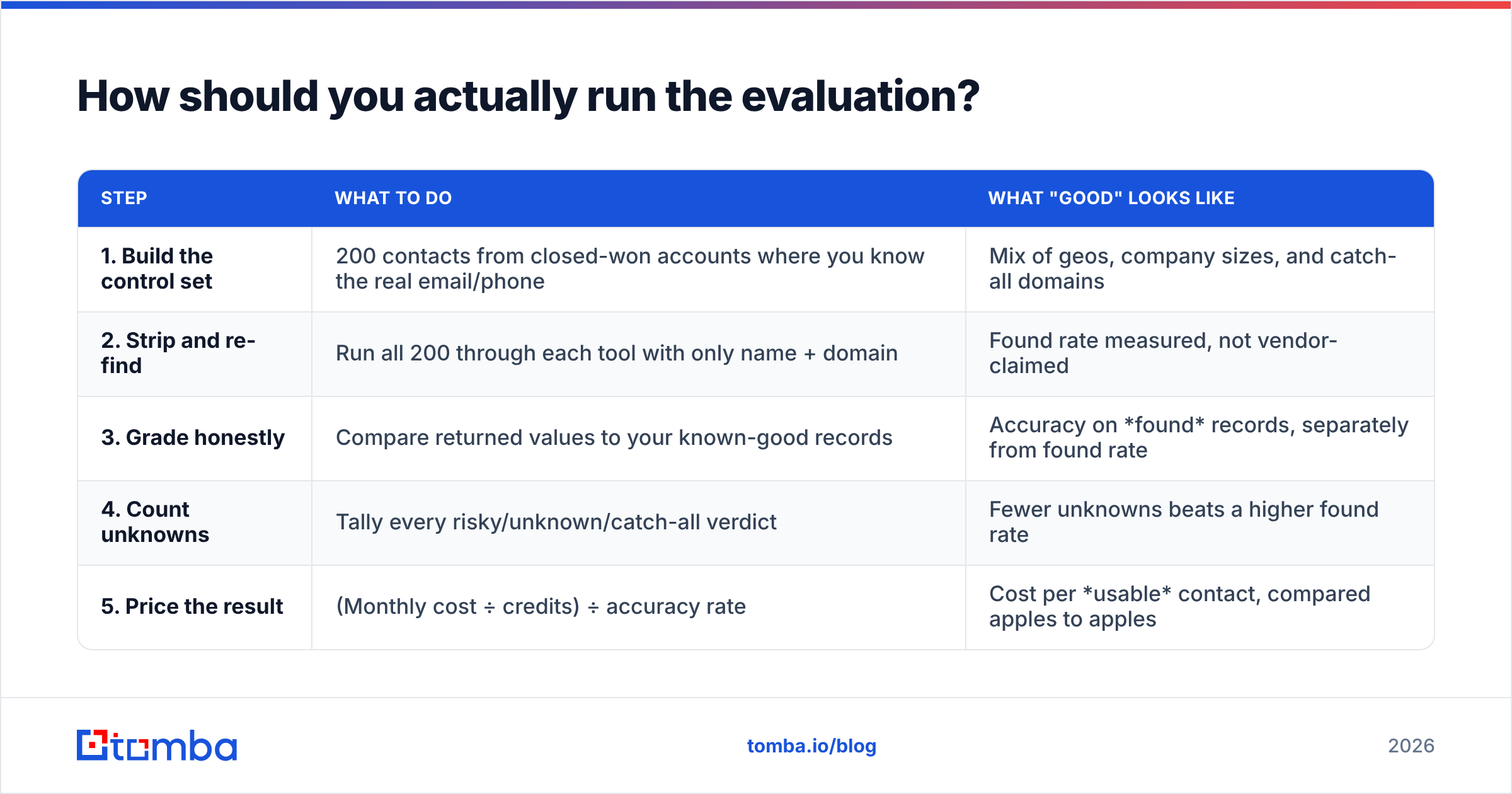
Do not read feature tables — including this one — as a decision. Run a 200-contact bake-off.
| Step | What to do | What "good" looks like |
|---|---|---|
| 1. Build the control set | 200 contacts from closed-won accounts where you know the real email/phone | Mix of geos, company sizes, and catch-all domains |
| 2. Strip and re-find | Run all 200 through each tool with only name + domain | Found rate measured, not vendor-claimed |
| 3. Grade honestly | Compare returned values to your known-good records | Accuracy on found records, separately from found rate |
| 4. Count unknowns | Tally every risky/unknown/catch-all verdict | Fewer unknowns beats a higher found rate |
| 5. Price the result | (Monthly cost ÷ credits) ÷ accuracy rate | Cost per usable contact, compared apples to apples |
That exercise takes an afternoon and routinely overturns the conclusion people reach from pricing pages. It also surfaces geographic blind spots that no vendor advertises.
Which one wins for 2026?#
- Cold calling European accounts with a small team? Kaspr. Nothing in this comparison beats it on EU mobile coverage, and the LinkedIn workflow is genuinely fast.
- Solo operator running email-only outbound on a budget? Mailshunt. One bill, one login, and enough of each function to get sequences live this week.
- Scaling outbound, enriching a CRM, or building data into a product? Neither. Take a dedicated finder plus an independent verifier, and keep sending in whatever tool your team already knows.
The trap in every Kaspr vs Mailshunt evaluation is treating them as interchangeable line items on the same spreadsheet. They are not. Pick the channel first, then the tool — and keep the verification layer independent regardless of which way you go.
Ready to test the data layer on your own list? Start with Tomba Email Finder — 25 free searches a month, no credit card, full API access on every paid plan from $49/mo. Run your 200-contact control set through it alongside whichever platform you are evaluating, and let the accuracy numbers make the call instead of the pricing page.
Related guides#
// get started
Find, verify and enrich your first contacts today
Start on the free plan with 25 searches a month, then scale when your team is ready.
Free plan · No credit card required · GDPR & CCPA
// about the author