Kaspr vs Tami AI: Which B2B Contact Data Tool Wins in 2026?
Kaspr sells LinkedIn-sourced phone numbers per seat. Tami AI sells an autonomous prospecting agent. They solve different problems — and the wrong pick costs you a quarter. Here's the honest breakdown.
TL;DR
- Kaspr and Tami AI are not really competitors. Kaspr is a LinkedIn-first contact-data extension (phone numbers being its headline asset). Tami AI is an AI-agent layer that tries to run research and outreach for you. Buying one expecting the other is the most common mistake here.
- Kaspr wins on phone numbers and speed-of-use. If your SDRs live inside LinkedIn Sales Navigator and dial for a living, Kaspr's in-browser reveal is hard to beat.
- Tami AI wins on leverage per rep. If you have two people doing the work of six and need research, list-building and drafting compressed into one flow, agentic tooling pays off faster than another data seat.
- Both charge in credits, and credit math is where budgets break. Per-seat pricing plus per-reveal credits means your real cost per usable contact is usually 2–4x the sticker number once bounces and blanks are removed.
- Neither is a great verification layer. Whatever you pick, run the exported emails through a dedicated verifier before they touch a sending domain.
What are Kaspr and Tami AI?#
Kaspr is a contact-data tool built around a Chrome extension. You open a LinkedIn profile or a Sales Navigator list, click the widget, and it returns the person's business email and — the part people actually buy it for — direct and mobile phone numbers. It was acquired by Cognism in 2022 and now sits as the self-serve, SMB-facing side of that portfolio. The product's own positioning leans hard on LinkedIn workflows, one-click enrichment, and lightweight sequencing (tasks, reminders, simple email steps) rather than full sales engagement.
Tami AI belongs to a much newer category: agentic prospecting. Instead of "here is a database, go query it," the pitch is "describe your ideal customer and the agent does the research, assembles the list, enriches it, and drafts the outreach." The category as a whole — Tami, Clay-style orchestration, AI SDR products — is moving fast, and published feature sets change month to month. Treat every spec you read (including mine) as a snapshot, and verify on the vendor's live pricing page before you sign.
The practical difference in one line: Kaspr gives your rep a better phone number. Tami AI tries to give you a rep.
How do Kaspr and Tami AI compare head-to-head?#
Here is the honest structural comparison. Where a value depends on a plan that vendors reshuffle quarterly, I've said so rather than inventing a number.
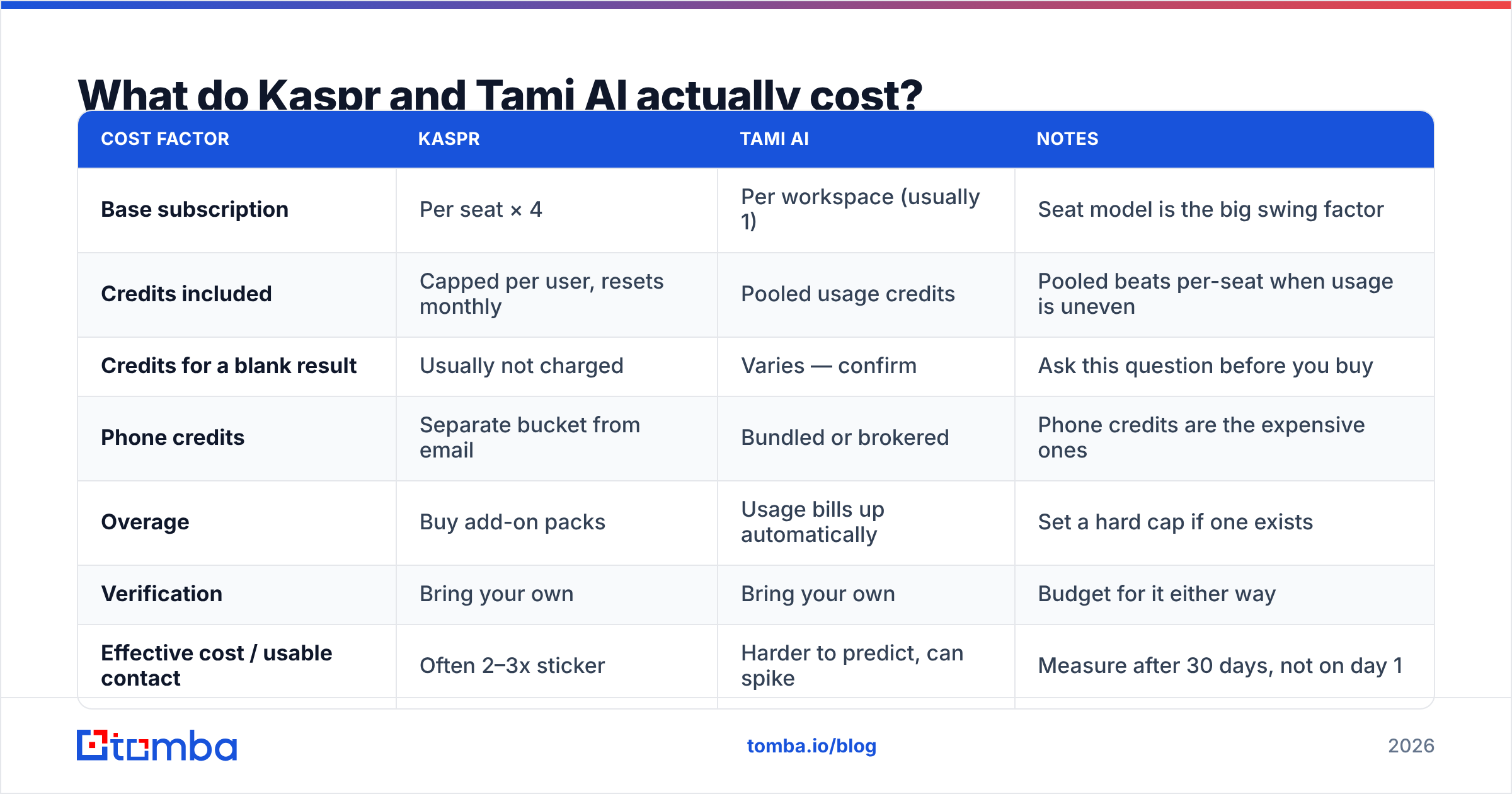
| Dimension | Kaspr | Tami AI | Tomba |
|---|---|---|---|
| Core job | Reveal email + phone from LinkedIn | Agentic research, list-building and outreach drafting | Find and verify business emails at scale |
| Primary interface | Chrome extension + web dashboard | Web app / agent console | Web app, API, CLI, Sheets, Excel |
| Phone numbers | Yes — headline feature, mobile + direct | Varies by enrichment partner | Yes, via phone finder |
| Bulk / list workflows | Yes, from Sales Navigator lists | Yes, agent-generated lists | Yes, bulk finder + bulk verify |
| Email verification | Basic validity signal | Depends on enrichment vendor underneath | Dedicated verifier + catch-all handling |
| API access | Available on higher tiers | Available; agent-oriented | Full REST API on all paid tiers |
| Pricing model | Per user/seat + monthly credits | Per workspace/agent + usage credits | Flat plan credits, seats not metered the same way |
| Entry paid price | ~$49–65 per user/mo (check current page) | Usage-based; confirm on vendor site | $49/mo Starter |
| Free tier | Yes, limited credits | Trial/limited tier — verify | 25 searches/mo |
| Best fit | Dialer-first SDR teams on LinkedIn | Small teams wanting research + drafting automated | Data-layer for anyone building lists or pipelines |
Two things stand out from that grid.
First, Kaspr's cost scales with headcount, Tami AI's scales with volume. A five-person SDR team on Kaspr pays five times. A five-person team on a usage-priced agent platform pays once, plus whatever the agents consume. If your team is growing, that difference compounds faster than the feature gap.
Second, neither tool is designed to be your source of truth for email validity. Kaspr surfaces contact data from a contributive network and third-party sources; Tami AI, like most agent platforms, brokers enrichment from underlying providers. Both hand you a string that looks like an email. Whether it accepts mail on a Tuesday is a separate question.

Which one has better data accuracy?#
Kaspr is the more predictable of the two on phones; email accuracy is a coin-flip you should be measuring yourself.
Kaspr's data model is contributive — users share their own address books in exchange for credits — layered with licensed and public sources. That model is excellent for mobile numbers in Western Europe, where Kaspr has its strongest coverage, and noticeably thinner in APAC and LATAM. It also means freshness varies by how recently someone in the network touched that contact. Reviews on G2's lead intelligence category consistently praise Kaspr's phone hit rate and are much more mixed on email quality — which matches what most teams report when they actually measure bounce rate rather than trusting a green checkmark.
Tami AI's accuracy is harder to pin down because it's a composite. An agent that queries several enrichment sources and returns the first hit will beat any single vendor on coverage and will inherit every one of their errors. If you can't see which source produced a given record, you can't diagnose why your bounce rate jumped in week three.

The uncomfortable truth about this whole category: vendor-published accuracy percentages are marketing artifacts. They're measured on the vendor's own sample, usually against large well-indexed companies, and they rarely separate "syntactically plausible" from "actually deliverable." Run your own test. It takes an afternoon:
- Build one control list of 200 contacts you can independently confirm — existing customers, closed-lost accounts, people whose email you already have in your CRM.
- Run that same list through both tools without telling either which answers you already know.
- Score three numbers separately: hit rate (did it return anything), match rate (is it the right person), and deliverability (does it survive an email verifier).
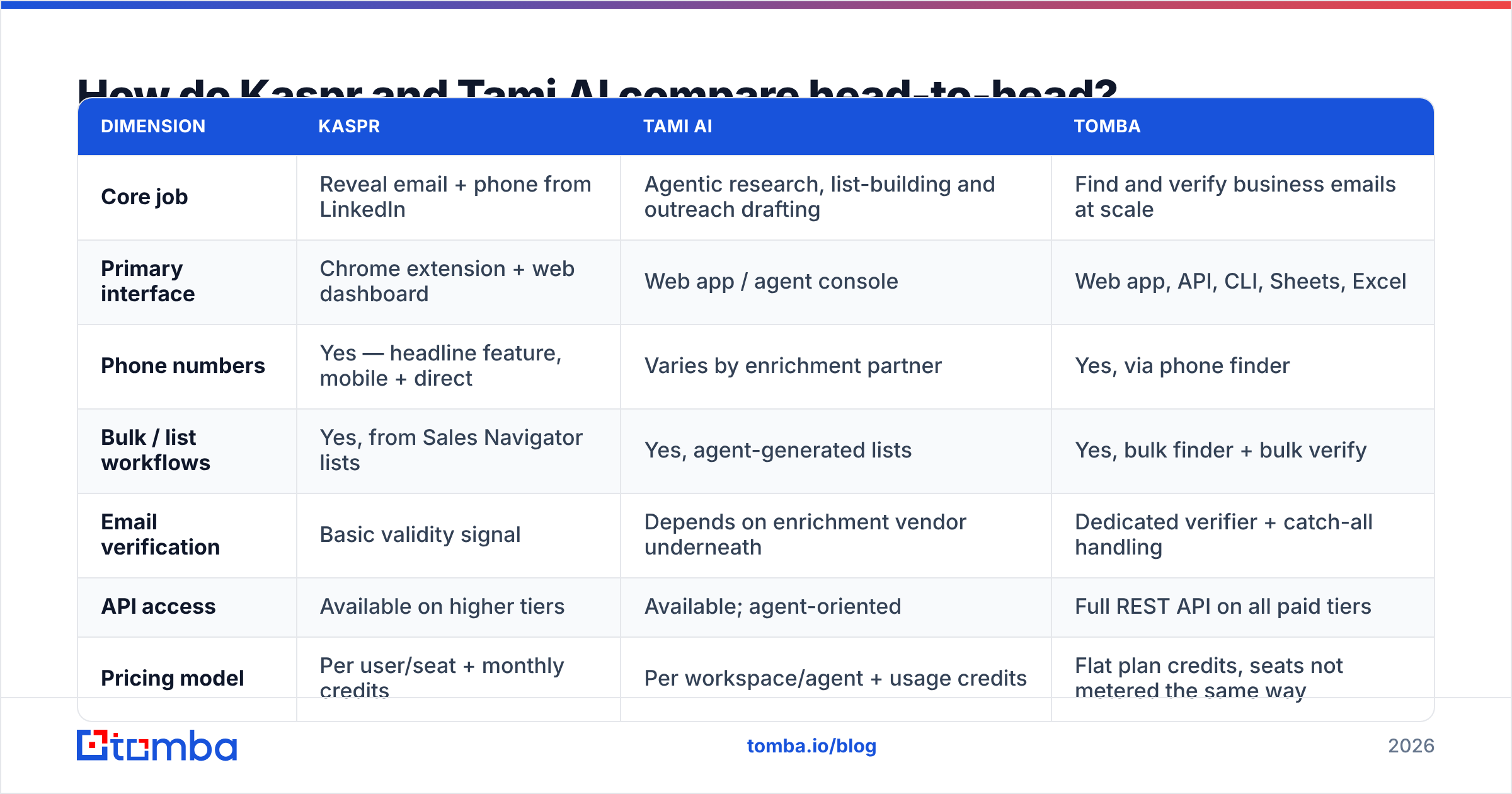
- Weight by segment. A tool that's 90% accurate on 5,000-employee US companies and 40% accurate on 50-person European SaaS is worthless if the second group is your ICP.
- Repeat in 60 days. Data decays roughly 2–3% per month in B2B. A tool that wins the pilot can lose the renewal.
That last point is why most teams end up running a verification pass regardless of which finder they buy. If you're testing in bulk, a bulk verify run against both exports will tell you more in twenty minutes than any comparison article — including this one.
What do Kaspr and Tami AI actually cost?#
Sticker price is the least useful number in this comparison. What matters is cost per usable contact: the ones that are the right person, at the right company, with an address that accepts mail.
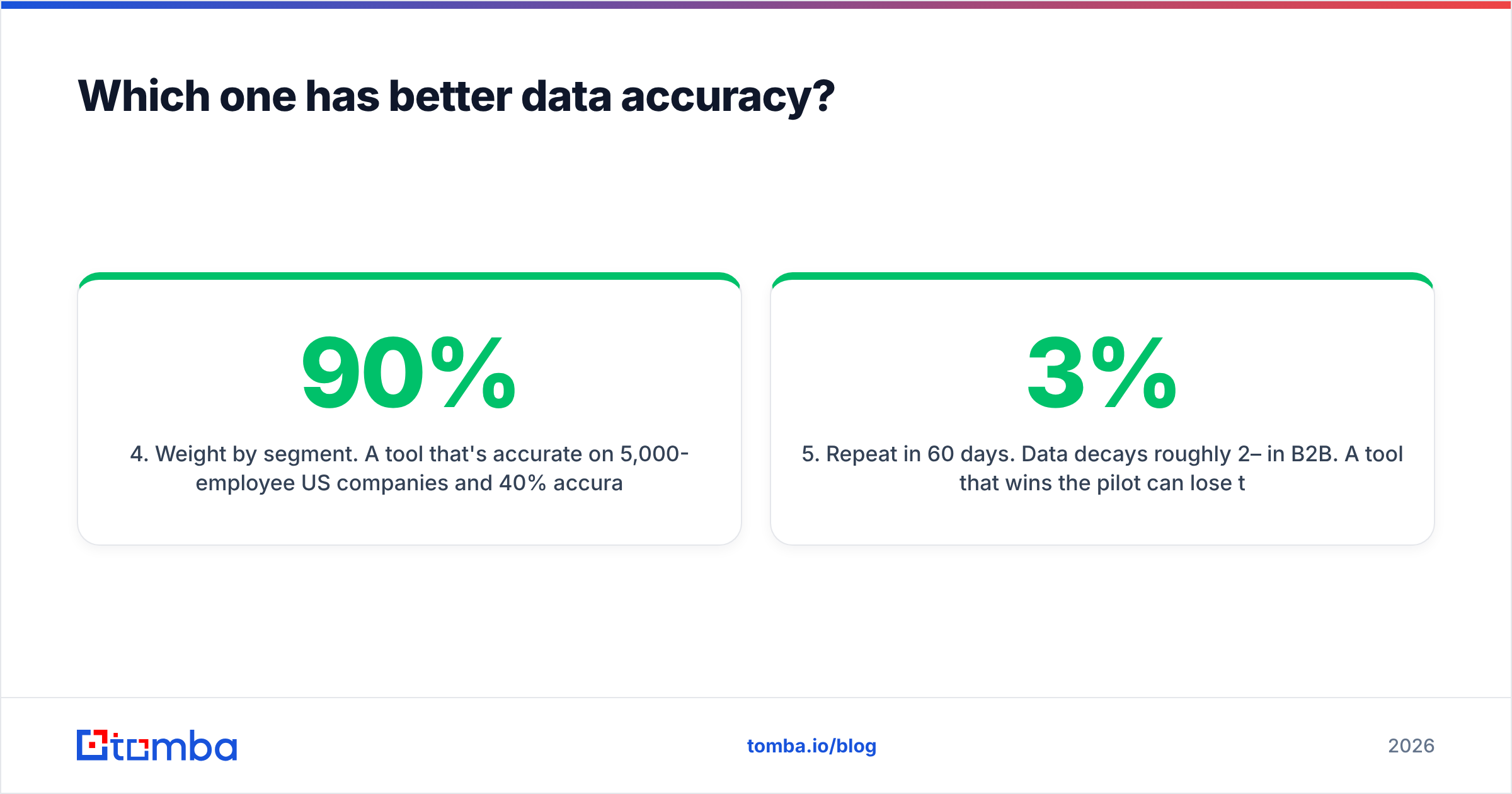
Here's how the math typically breaks down for a team of four SDRs building 500 net-new contacts a month:
| Cost factor | Kaspr | Tami AI | Notes |
|---|---|---|---|
| Base subscription | Per seat × 4 | Per workspace (usually 1) | Seat model is the big swing factor |
| Credits included | Capped per user, resets monthly | Pooled usage credits | Pooled beats per-seat when usage is uneven |
| Credits for a blank result | Usually not charged | Varies — confirm | Ask this question before you buy |
| Phone credits | Separate bucket from email | Bundled or brokered | Phone credits are the expensive ones |
| Overage | Buy add-on packs | Usage bills up automatically | Set a hard cap if one exists |
| Verification | Bring your own | Bring your own | Budget for it either way |
| Effective cost / usable contact | Often 2–3x sticker | Harder to predict, can spike | Measure after 30 days, not on day 1 |

Three budget traps worth naming:
- Per-seat credit caps create hoarding. When each rep gets their own capped bucket, your best prospector runs dry on the 18th while a quota-missing rep sits on unused credits. Pooled credits solve this; per-seat models rarely do.
- Usage-based agent pricing has no natural ceiling. An agent that decides to enrich 4,000 records because the ICP prompt was vague will do exactly that. Ask for a spend cap in writing.
- Annual discounts are quoted against the wrong baseline. "40% off annual" on a tool you'll churn in five months is a 100% loss. Pilot monthly.
For reference on what a flat, non-seat-metered model looks like, Tomba pricing runs Free (25 searches/mo), Starter at $49/mo, Growth at $99/mo, and Pro at $249/mo, with the API included from the first paid tier rather than gated to enterprise. That's not a claim that it does everything Kaspr's extension does — it's a different shape of product — but it is the cheapest way to answer "does this vendor's data actually cover my ICP" before you commit to seats.
Who should choose Kaspr?#
Pick Kaspr if most of these describe you:
- Phone is your primary channel. If your team's number one activity metric is dials or connects, Kaspr's mobile coverage is the single strongest reason to buy it.
- Your reps prospect inside LinkedIn, manually. The extension workflow is genuinely fast. Profile open → click → contact in CRM. No CSV round-trip.
- Your ICP is European. Coverage skews strongly toward Western Europe and the UK. If that's your market, the hit rate difference is material.
- You have a small, stable headcount. Per-seat pricing is fine at four reps. It gets painful at fifteen.
- You want light sequencing bundled in. Kaspr's built-in tasks and simple email steps are enough for a team that doesn't need a dedicated engagement platform.
Skip Kaspr if you're building lists programmatically, if your ICP is outside its coverage core, or if you need email verification you can actually trust without a second tool.
Who should choose Tami AI?#
Pick Tami AI if:
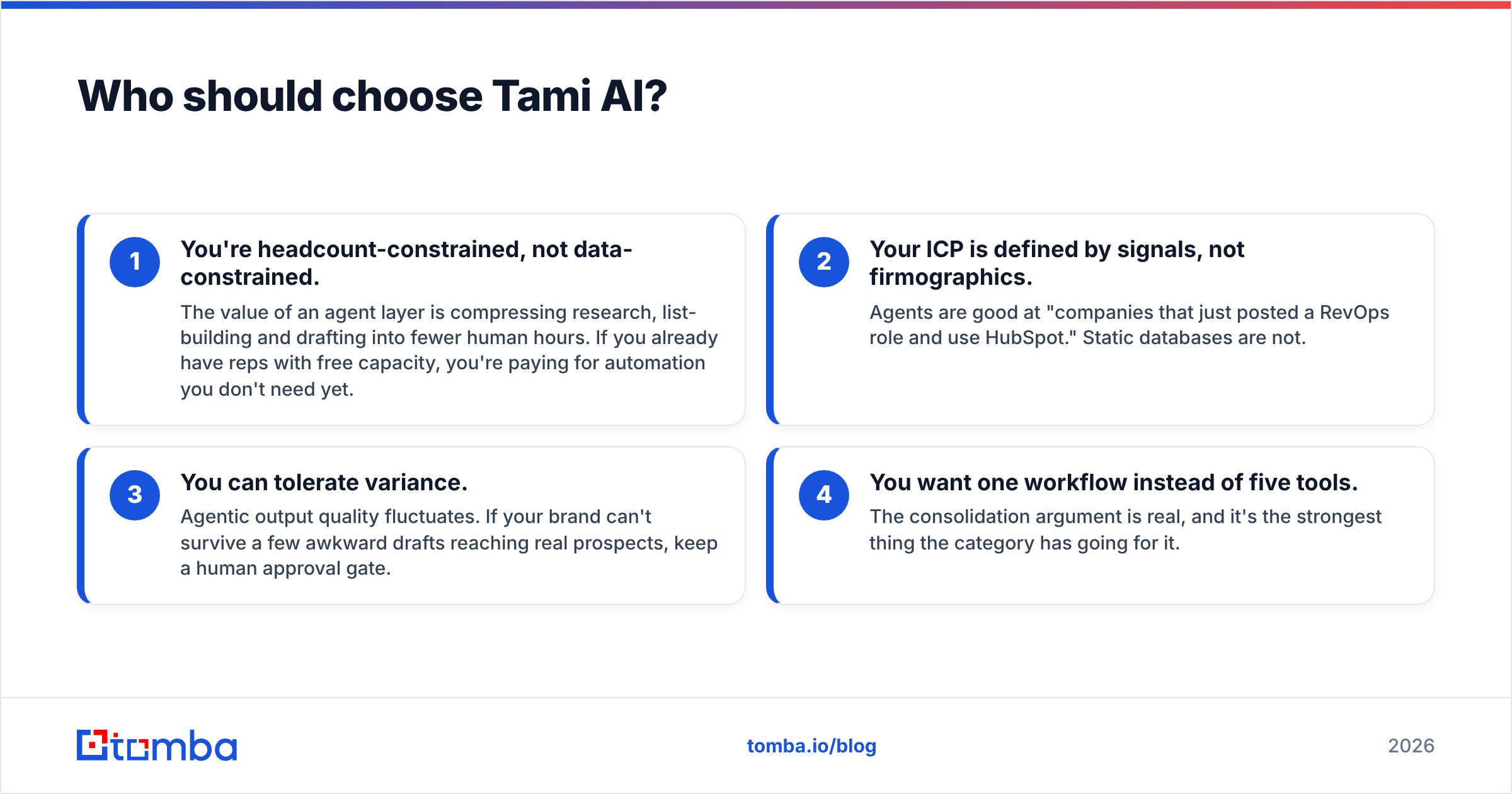
- You're headcount-constrained, not data-constrained. The value of an agent layer is compressing research, list-building and drafting into fewer human hours. If you already have reps with free capacity, you're paying for automation you don't need yet.
- Your ICP is defined by signals, not firmographics. Agents are good at "companies that just posted a RevOps role and use HubSpot." Static databases are not.
- You can tolerate variance. Agentic output quality fluctuates. If your brand can't survive a few awkward drafts reaching real prospects, keep a human approval gate.
- You want one workflow instead of five tools. The consolidation argument is real, and it's the strongest thing the category has going for it.
Skip Tami AI if you need auditable data lineage, if your compliance team requires knowing the source of every record, or if your outbound motion is high-volume dialing rather than research-heavy targeting.

Do you actually have to choose between them?#
No — and most mature teams don't. The pattern that works is layering, not replacing:
- Discovery layer — where you decide who to contact. Sales Navigator, intent signals, or an agent like Tami AI generating the target set.
- Data layer — where you turn a name and company into a reachable contact. This is where a dedicated email finder or domain search does the work, and where an API matters more than a pretty UI.
- Verification layer — non-negotiable. Catch-all domains, role accounts and stale records are what torch a sending domain, and neither Kaspr nor an agent platform is built to be your last line of defense here.
- Execution layer — sequencing, dialing, CRM sync.
The failure mode I see most often is a team buying a tool at layer one and expecting it to cover layers two and three. Then bounce rate creeps past 4%, the sending domain gets throttled, and everyone blames the copy. It wasn't the copy.
If you want the layered version without a six-tool stack, the practical build is: use your existing LinkedIn or signal workflow for targeting, pull contacts through an API-first data layer, and gate everything on verification before it reaches your sequencer. That's three integrations, not ten, and every step is measurable.
How should you run the bake-off?#
Two weeks, four steps, no commitment:
- Week 1, days 1–2: Build the 200-contact control list described earlier. Same list for every tool.
- Days 3–5: Run all candidates. Record hit rate, match rate, and verified-deliverable rate separately. Do not let the vendor run the test for you.
- Week 2: Send a real 300-contact campaign from each source to a warmed domain. Track bounce rate and reply rate by data source, not in aggregate.
- Decision: Compute cost per replied contact. Not per credit, not per record. That number ends most arguments.
Where does Tomba fit?#
If your bottleneck is finding and verifying business email addresses — not dialing, not agent orchestration — start with the Tomba Email Finder. It handles domain search, single and bulk lookups, catch-all handling, and verification in one place, with the Tomba API available from the $49/mo Starter plan rather than locked behind an enterprise call. The free tier gives you 25 searches a month, which is enough to run the control-list test above against your own ICP before you spend anything.
Run that test against Kaspr, against Tami AI, and against Tomba on the same 200 names. Whichever wins on cost per replied contact is the right answer for your market — and it may not be the one with the best marketing page.
Related guides#
// get started
Find, verify and enrich your first contacts today
Start on the free plan with 25 searches a month, then scale when your team is ready.
Free plan · No credit card required · GDPR & CCPA
// about the author