Keap vs Ontraport: Full 2026 Comparison for B2B Teams
Keap and Ontraport both bundle CRM, email automation and payments into one platform — but they price, scale and automate very differently. Here is the honest breakdown, plus who each one actually fits.
TL;DR
- Keap is the simpler of the two: CRM, email, pipeline and invoicing bundled for small service businesses that want automation without hiring an ops person.
- Ontraport is the deeper one: better campaign logic, custom objects, built-in membership sites and pages, and a pricing model that scales on contacts rather than seats.
- Pricing rarely matches the sticker. Keap historically charges a mandatory onboarding fee and bundles users in small counts; Ontraport tiers on contact volume, so a large but cold list costs you real money.
- Neither is a data source. Both assume you already have contacts. Bad emails silently wreck both platforms' automation logic and your sender reputation.
- Pick Keap if you sell services locally and want it working this month. Pick Ontraport if your funnel has conditional logic, courses, or custom data models Keap can't express.
What are Keap and Ontraport, exactly?#
Both are "all-in-one" platforms, which is a category that has quietly split in two.
Think of it like buying a kitchen. Keap sells you a fitted, pre-installed kitchen — everything is where it should be, you cook dinner tonight, and you accept the layout. Ontraport sells you a modular system with more connectors, more settings, and a weekend of assembly before dinner happens.
Keap (formerly Infusionsoft) targets small service businesses — agencies, consultants, home services, coaches. Its center of gravity is the contact record plus a visual automation builder, wrapped around invoicing and appointments. The 2019 rebrand from Infusionsoft was explicitly a simplification move, and the product has kept drifting toward "easy" ever since.
Ontraport never made that pivot. It stayed aimed at marketers who want the machine to do complicated things: multi-branch campaign maps, custom objects, native landing pages, membership and course delivery, partner/affiliate tracking. It reads less like a small-business CRM and more like a marketing operating system with a CRM attached.
That difference explains almost every other difference in this comparison.
How do Keap and Ontraport compare feature by feature?#
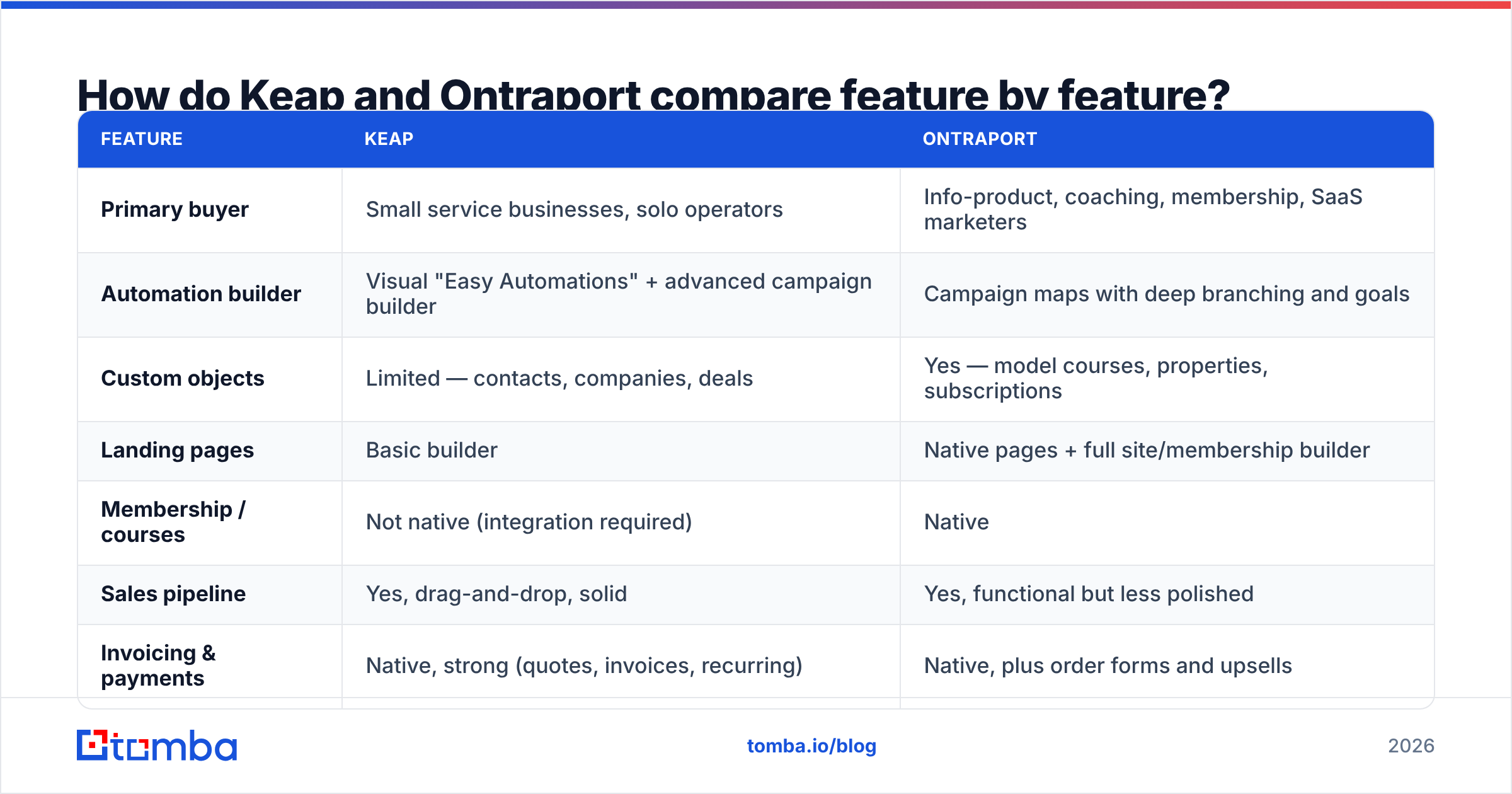
| Feature | Keap | Ontraport |
|---|---|---|
| Primary buyer | Small service businesses, solo operators | Info-product, coaching, membership, SaaS marketers |
| Automation builder | Visual "Easy Automations" + advanced campaign builder | Campaign maps with deep branching and goals |
| Custom objects | Limited — contacts, companies, deals | Yes — model courses, properties, subscriptions |
| Landing pages | Basic builder | Native pages + full site/membership builder |
| Membership / courses | Not native (integration required) | Native |
| Sales pipeline | Yes, drag-and-drop, solid | Yes, functional but less polished |
| Invoicing & payments | Native, strong (quotes, invoices, recurring) | Native, plus order forms and upsells |
| Affiliate / partner program | Add-on / higher tiers | Native partner tracking |
| Pricing model | Per plan, bundled users, contact tiers | Contact-volume tiers, more generous on users |
| Onboarding fee | Historically mandatory | Not standard |
| Learning curve | Moderate | Steep |
| Best-known weakness | Ceiling on complex logic | Dated UI in places, heavier setup |
Verify current specifics on each vendor's own site before you buy — both have shuffled plan names and limits more than once, and both restructured pricing within the last few years.
The short read: Keap wins on time-to-value, Ontraport wins on ceiling. If your automation fits on a whiteboard in five minutes, Keap does it faster. If your whiteboard needs three colors of marker and a legend, Ontraport is the one that won't fight you at month four.
Which one is actually cheaper?#
Neither list price tells you what you'll pay, because they meter different things.
Keap bundles a small number of users into the base plan and charges per additional seat, with contact limits stacked on top. Historically it has also required a paid onboarding/coaching package on new accounts — a real line item that surprises buyers who budgeted from the pricing page. Entry pricing sits in the mid-hundreds per month range once you're past a couple of users and a few thousand contacts.
Ontraport prices primarily on contact count. Its entry tier is dramatically cheaper than Keap's on paper, and its upper tiers are generous with users. That is excellent if you run a lean team with a qualified list, and punishing if you've hoovered up 80,000 unengaged contacts you never email.
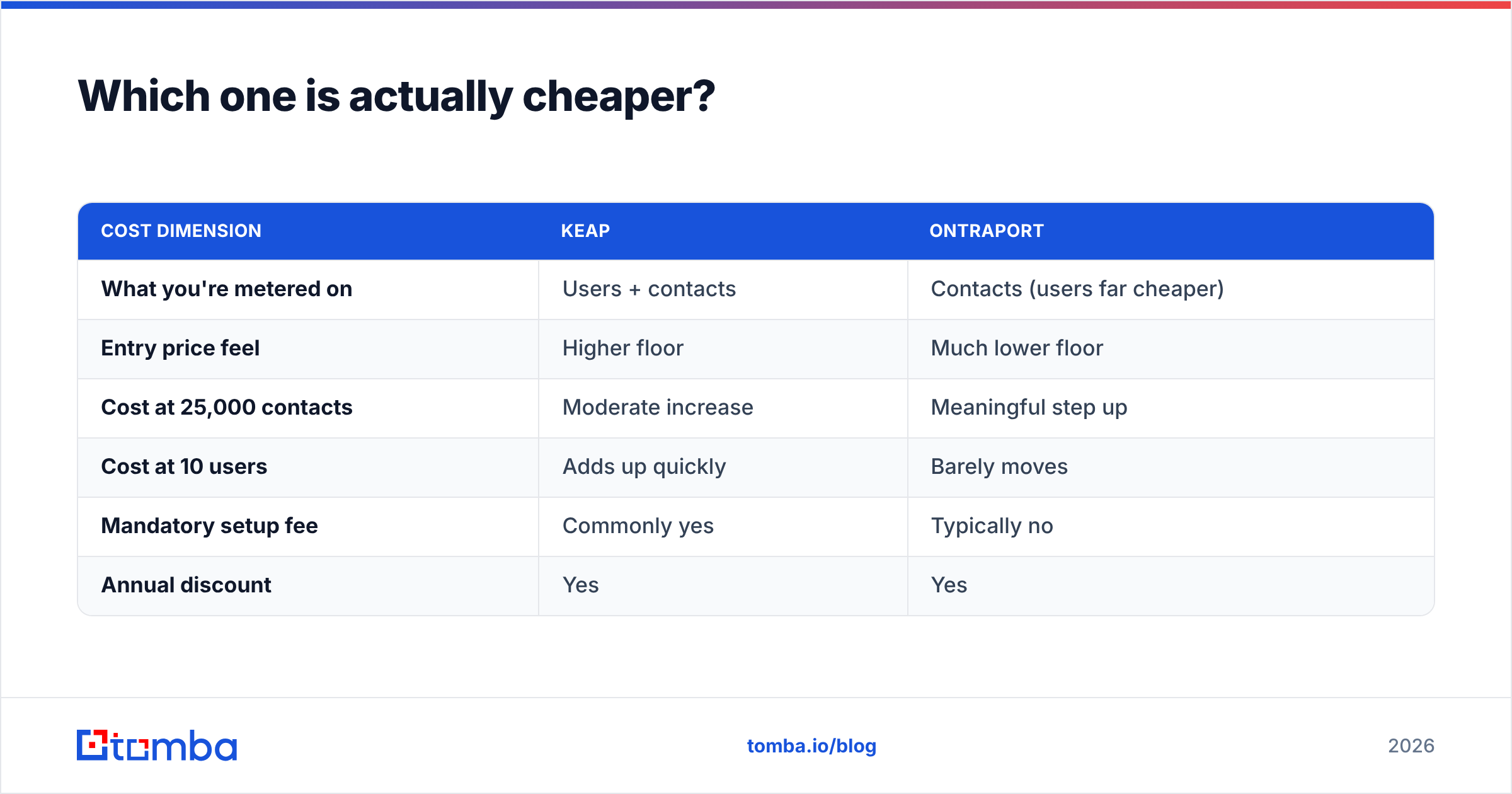
| Cost dimension | Keap | Ontraport |
|---|---|---|
| What you're metered on | Users + contacts | Contacts (users far cheaper) |
| Entry price feel | Higher floor | Much lower floor |
| Cost at 25,000 contacts | Moderate increase | Meaningful step up |
| Cost at 10 users | Adds up quickly | Barely moves |
| Mandatory setup fee | Commonly yes | Typically no |
| Annual discount | Yes | Yes |
So the real question isn't "which is cheaper," it's "is my cost driver people or contacts?" A five-person sales team with a 3,000-contact list will usually land cheaper on Ontraport. A one-person consultancy with a 40,000-name list may find the opposite.
There's a third cost nobody puts on a pricing page: the contacts you pay to store that were never valid in the first place. If 18% of your list bounces, you're paying Ontraport's contact tier — and Keap's — to warehouse dead records that also drag your deliverability down. Running an email verifier across the list before import is the cheapest optimization in this entire comparison.

Which platform has deeper automation?#
Ontraport, clearly — but "deeper" cuts both ways. Here's where the gap actually shows up:
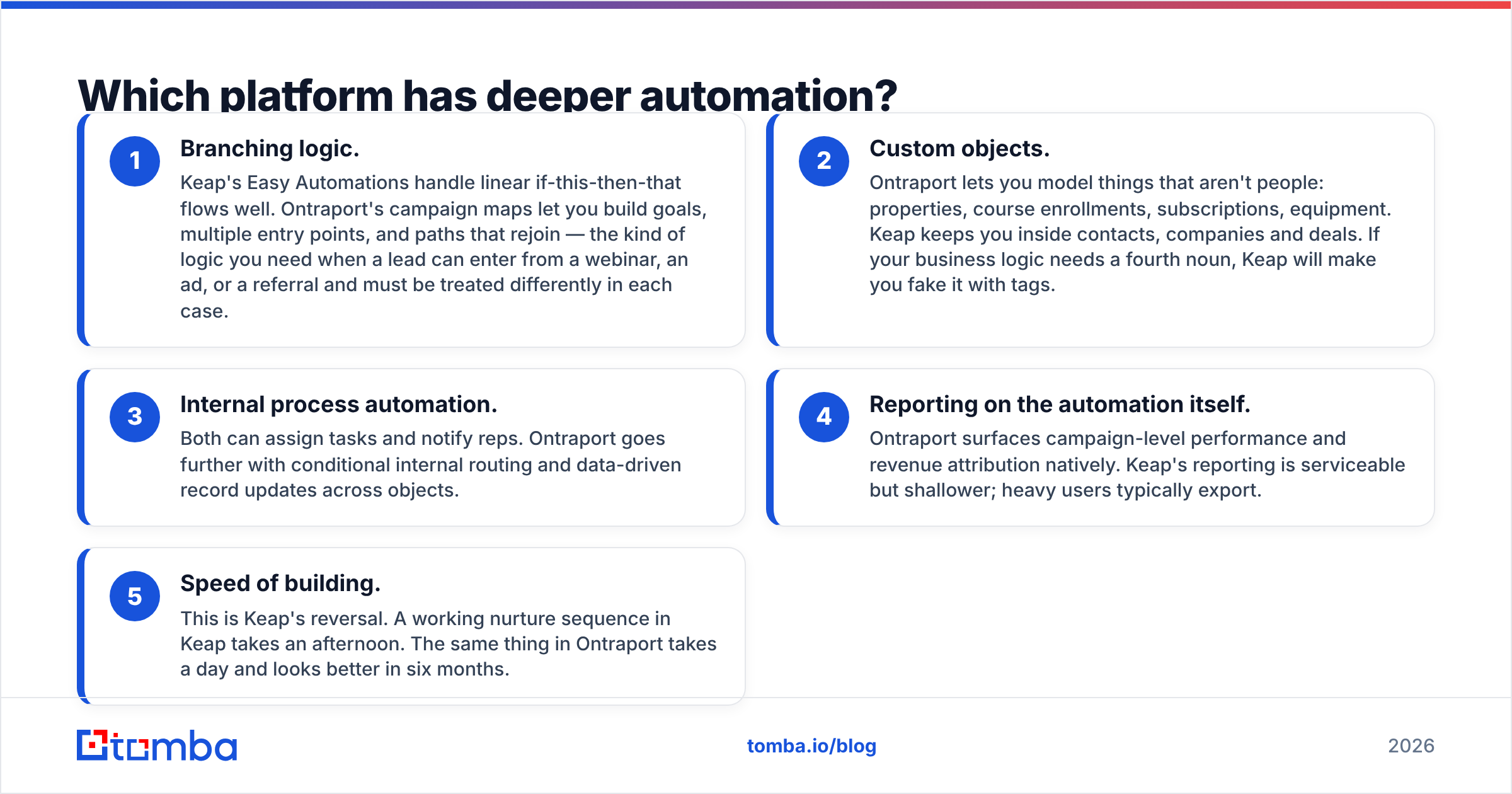
- Branching logic. Keap's Easy Automations handle linear if-this-then-that flows well. Ontraport's campaign maps let you build goals, multiple entry points, and paths that rejoin — the kind of logic you need when a lead can enter from a webinar, an ad, or a referral and must be treated differently in each case.
- Custom objects. Ontraport lets you model things that aren't people: properties, course enrollments, subscriptions, equipment. Keap keeps you inside contacts, companies and deals. If your business logic needs a fourth noun, Keap will make you fake it with tags.
- Internal process automation. Both can assign tasks and notify reps. Ontraport goes further with conditional internal routing and data-driven record updates across objects.
- Reporting on the automation itself. Ontraport surfaces campaign-level performance and revenue attribution natively. Keap's reporting is serviceable but shallower; heavy users typically export.
- Speed of building. This is Keap's reversal. A working nurture sequence in Keap takes an afternoon. The same thing in Ontraport takes a day and looks better in six months.
One honest caveat: depth you don't use is just complexity you pay for. Plenty of teams buy Ontraport for the campaign maps and ship three linear sequences. Read your own last twelve months of actual campaigns before you buy for the ones you imagine building.
Is Keap better than Ontraport for small sales teams?#
For a team of two to five reps selling services, usually yes — with one condition.
Keap's pipeline, quoting and invoicing chain is genuinely good. A rep can move a deal, send a quote, collect payment and trigger a follow-up sequence without leaving the tool or wiring a Zap. For a home-services company or a boutique agency, that closed loop is worth more than Ontraport's branching logic will ever be.
The condition: Keap's per-seat economics get uncomfortable as the team grows. Around the seven-to-ten rep mark, teams often start comparing against dedicated sales CRMs rather than Ontraport — because at that size you're usually buying pipeline management, not marketing automation, and the CRM market has cheaper specialists.
Ontraport's sales side is capable but less loved. Reps describe the interface as functional rather than pleasant, and pipeline work feels secondary to campaign work. If your revenue comes from reps working deals, that matters daily. If your revenue comes from a funnel that reps only touch at the end, it doesn't.
Check recent reviews on G2 for both — the pattern in user feedback is remarkably stable: Keap gets praised for usability and dinged for limits and support costs; Ontraport gets praised for power and dinged for the learning curve.
What do both platforms assume you already have?#
Contacts. Good ones. And neither tool gives them to you.
This is the blind spot in every all-in-one comparison. You can pick the right platform, build immaculate automation, and still get nothing — because the pipeline you're automating starts with a list that's 20% wrong.
Three failure modes show up constantly:
- Bounces poison the automation. A hard bounce doesn't just fail to deliver; in both platforms it starts corrupting your engagement-based branching. Contacts sit in "sent, no open" branches forever because the message never arrived.
- Sender reputation decays quietly. Mailbox providers punish repeated bounces. By the time you notice open rates sliding, you've trained filters against your domain. Protect it early — email deliverability damage takes far longer to repair than to cause.
- Contact tiers inflate. On Ontraport especially, junk records are a direct line item.
The fix is upstream, not inside the CRM. Source contacts by company domain and role rather than buying lists, verify before import, and enrich so your segmentation has something to segment on. A domain search against target accounts plus verification gives you a list your automation can actually reason about.

How should you decide between Keap and Ontraport?#
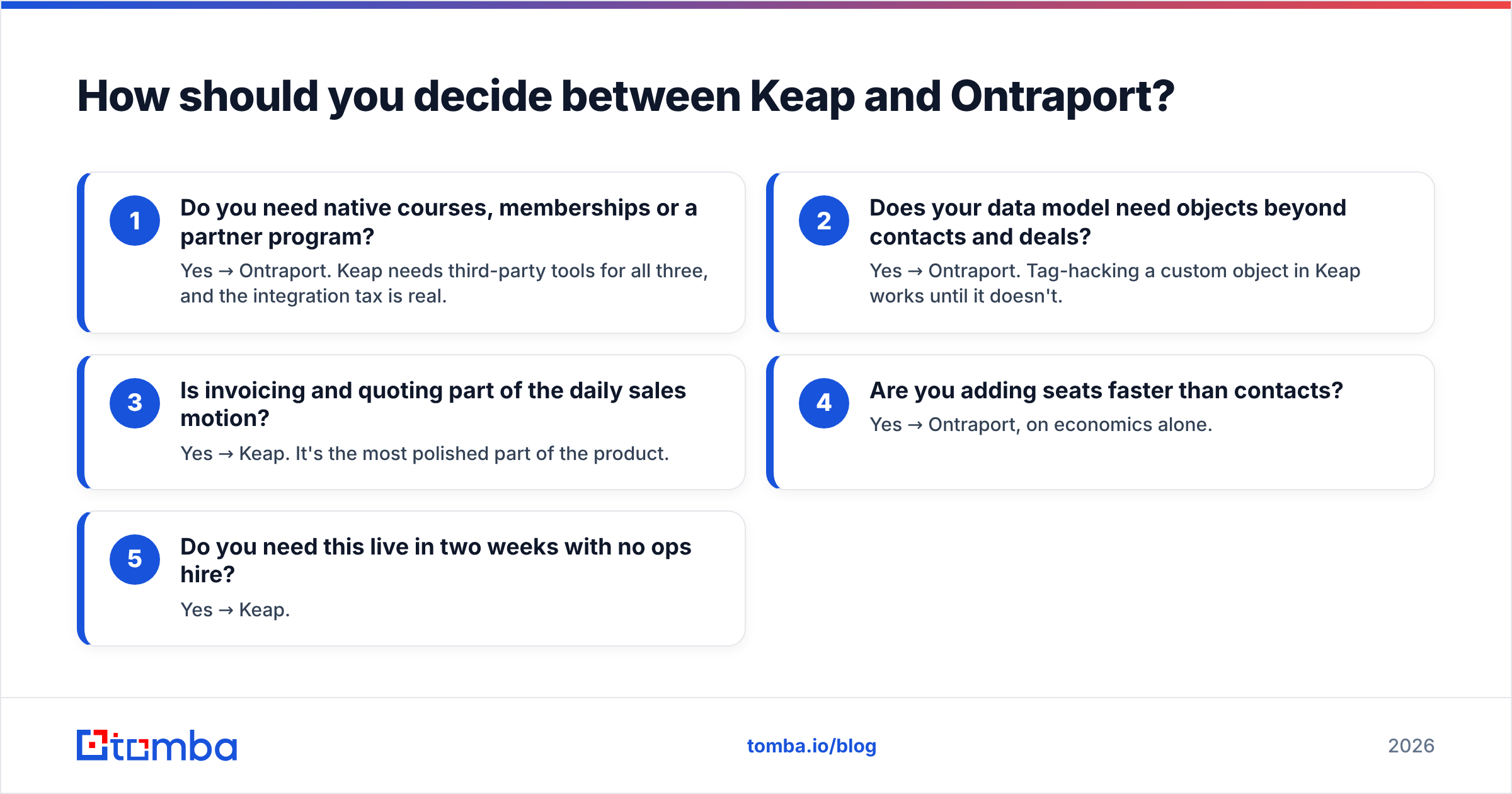
Run these five questions in order. The first "yes" usually decides it.
- Do you need native courses, memberships or a partner program? Yes → Ontraport. Keap needs third-party tools for all three, and the integration tax is real.
- Does your data model need objects beyond contacts and deals? Yes → Ontraport. Tag-hacking a custom object in Keap works until it doesn't.
- Is invoicing and quoting part of the daily sales motion? Yes → Keap. It's the most polished part of the product.
- Are you adding seats faster than contacts? Yes → Ontraport, on economics alone.
- Do you need this live in two weeks with no ops hire? Yes → Keap.
If you answered no to all five, you probably don't need either. A lightweight CRM plus a dedicated sending tool will cost less and annoy you less — and you can connect the pieces through a Zapier integration or direct API without buying a suite.
What are the most common regrets with each?#
Keap regrets cluster around ceilings and cost: hitting the limits of the automation builder eighteen months in, discovering the onboarding fee at signup, and per-seat pricing that outpaced headcount growth. Migration out is non-trivial because the invoicing and automation are entangled.
Ontraport regrets cluster around adoption: buying power the team never used, a UI that reps quietly avoid, and a build phase that stretched from three weeks to three months. Teams that succeed with Ontraport almost always have one person who owns it.
Neither regret list contains "the emails didn't send." Both platforms are technically solid senders. What breaks is the input — which is why list hygiene belongs in your evaluation, not after it.
FAQ#
Is Ontraport a Keap alternative? Yes, and it's the most direct one. Same all-in-one category, same buyer overlap, different bet on complexity. Buyers comparing these two are usually also looking at HubSpot and ActiveCampaign.
Can you migrate from Keap to Ontraport? Yes. Contacts, tags and basic sequences transfer with effort. Invoicing history, complex campaign logic and integrations do not transfer cleanly — budget for a rebuild, not a move.
Which has better support? Keap has more structured onboarding (which you pay for). Ontraport has a reputation for responsive support relative to its size. Neither is a differentiator strong enough to decide on.
Do either include a contact database? No. Both are activation platforms, not data providers. You bring the contacts.
Start with data your automation can trust#
Whichever platform wins your evaluation, it inherits whatever list you feed it. Build that list properly: find verified business emails by company domain, name or role, check them before they ever hit your CRM, and skip the bought-list roulette entirely.
Tomba Email Finder does exactly that — domain search, name lookup, bulk processing and verification in one place, with a free tier at 25 searches a month and paid plans from $49/mo. See full Tomba pricing if you're sizing a larger list, or wire it straight into Keap or Ontraport through the API so every new contact lands verified.
Pick the platform that fits your complexity. Just don't let it automate bad data faster.
Related guides#
// get started
Find, verify and enrich your first contacts today
Start on the free plan with 25 searches a month, then scale when your team is ready.
Free plan · No credit card required · GDPR & CCPA
// about the author