KeepSync Pricing, Reviews, Pros and Cons: 2026 Breakdown
KeepSync tracks job changes inside HubSpot and prices per contact monitored. Here's what each tier really covers, where the cost curve bites, and when a data-first stack beats it.
TL;DR
- KeepSync is a narrow, well-executed tool: it watches the contacts already in your HubSpot CRM and tells you when they change jobs, then re-enriches the new email, phone, and company.
- Public pricing lands around $79/mo for roughly 1,000 tracked contacts, ~$149/mo for ~5,000, and ~$399/mo for ~20,000. Third-party listings disagree on the exact ladder, so treat any number you read (including these) as a starting point and confirm on keepsync.io.
- The pricing unit is contacts monitored per month, not contacts found. You pay for surveillance of a list, whether or not anyone moves.
- Biggest pro: it is dramatically cheaper than enterprise job-change platforms and installs in minutes. Biggest con: it is HubSpot-shaped, and it does nothing for net-new prospecting.
- If your real problem is "our contact data is stale and incomplete" rather than "our champions keep moving," a data enrichment and email-finding stack starting at $49/mo covers more ground for less.
What is KeepSync and what problem does it solve?#
KeepSync is a job-change tracking tool built as a native HubSpot integration. You point it at a list of contacts you already own, it monitors those people, and when one of them shows up at a new company it re-enriches the record and pushes the signal into your CRM.
The analogy: your CRM is an address book you wrote in 2023. Every year, roughly a fifth of the people in it move house without telling you. KeepSync is the postal service's forwarding scheme — it does not find you new friends, it just stops the letters to your existing ones from bouncing.
That distinction matters more than any price comparison. Job-change tracking is a retention and re-engagement play, not a prospecting play. The pitch is that a champion who bought your product at Company A is the warmest lead you will ever get when they land at Company B — they already know the product, they already trust you, and they now have a fresh budget cycle. Vendors in this space routinely claim these re-engagement plays convert several times better than cold outbound, and directionally that is believable for the simple reason that the relationship already exists.
KeepSync's specific angle, per its own site, is 94% accuracy on detected changes, weekly refresh cycles, five-minute setup with no technical resources, and pricing well below the incumbents. It sits in the same sales intelligence neighborhood as UserGems and Champify, but deliberately undercuts them.
What does KeepSync actually do at each tier?#
Here is the functional stack, roughly in the order it fires when someone moves:
- Contact monitoring. You sync a HubSpot list. KeepSync watches those records on a weekly cadence rather than a real-time one. Weekly is fine for this use case — job changes are not a same-day signal.
- Change detection. When a contact's employer changes, KeepSync flags it. The accuracy claim (94%) is the vendor's own; no independent audit exists that I can find, so treat it as a marketing figure, not a benchmark.
- Re-enrichment. The detected contact gets a refreshed business email, phone number, and company record. This is the part that determines whether the signal is actually usable — a job-change alert without a working email is trivia.
- CRM write-back. A new contact or deal is created in HubSpot, mapped to the new company.
- Routing and alerting. Configurable workflows assign the record to the right rep, and a Slack alert fires so someone actually acts on it within the window where the move is still fresh.
- Reporting. Basic volume and pipeline attribution so you can tell your CRO whether the line item earned its keep.
The tiers differ almost entirely on volume, with API access and some workflow depth gated to the middle plan and above. That is a clean, honest pricing model — but it also means the cheapest plan is not a stripped-down product, it is the same product pointed at a shorter list.
How much does KeepSync cost in 2026?#
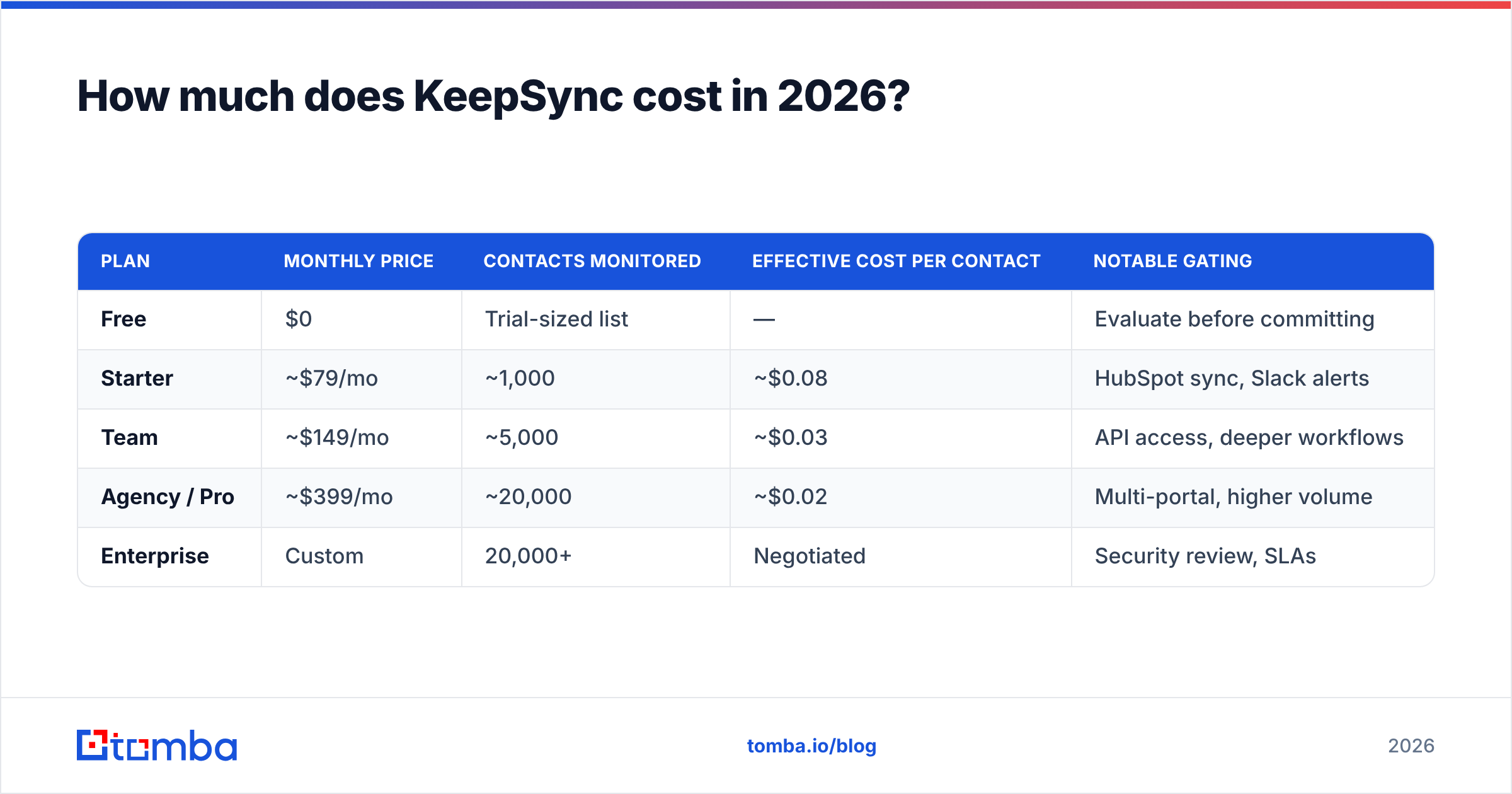
Published figures vary by source, which is a normal sign of a fast-moving startup that has repriced at least once. The most commonly cited ladder in 2026 looks like this:
| Plan | Monthly price | Contacts monitored | Effective cost per contact | Notable gating |
|---|---|---|---|---|
| Free | $0 | Trial-sized list | — | Evaluate before committing |
| Starter | ~$79/mo | ~1,000 | ~$0.08 | HubSpot sync, Slack alerts |
| Team | ~$149/mo | ~5,000 | ~$0.03 | API access, deeper workflows |
| Agency / Pro | ~$399/mo | ~20,000 | ~$0.02 | Multi-portal, higher volume |
| Enterprise | Custom | 20,000+ | Negotiated | Security review, SLAs |
Two things stand out.
First, the unit economics improve steeply with volume. Moving from Starter to Team quadruples your cost but quintuples your monitored contacts. If you are anywhere near the top of a tier, the next plan up is almost always better value per record — which is exactly how the pricing is designed to feel.
Second, you pay for monitoring, not for outcomes. If 1,000 monitored contacts produce 40 job changes in a year, you paid roughly $24 per detected move. If they produce 120, you paid $8. Your realized price depends entirely on how churny your contact base is — which is why the tool pays off much better on a list of SaaS operators than on a list of tenured manufacturing buyers.
Some third-party listings report a $49 entry point and a $349 Scale plan instead. Both ladders circulate. Confirm the live numbers before you build a business case on them.
What do reviews say are KeepSync's biggest pros?#
It is priced like a tool, not like a platform. The incumbents in job-change tracking have historically sold on annual contracts in the five-figure range. KeepSync's monthly, no-annual-commitment structure means a mid-market team can run a real 60-day test for a few hundred dollars instead of a procurement cycle.
Setup genuinely is fast. Because it is a native HubSpot app rather than a general-purpose data platform, there is no field mapping project, no reverse-ETL configuration, and no RevOps ticket queue. You authorize, pick a list, set a workflow, done.
The write-back is the product. Plenty of tools will tell you someone changed jobs. Fewer will create the new contact, attach it to the new company, route it, and ping the owner. That last mile is where most job-change programs quietly die, and KeepSync automates it.
Re-enrichment is included, not upsold. A change signal that also carries a verified new email is worth several times a bare notification. Bundling it into the base price is the right call and materially improves the effective value per tier.
It stays in its lane. There is something to be said for a tool that does one job, prices it clearly, and does not try to become your entire GTM stack.
What are KeepSync's cons and hidden costs?#
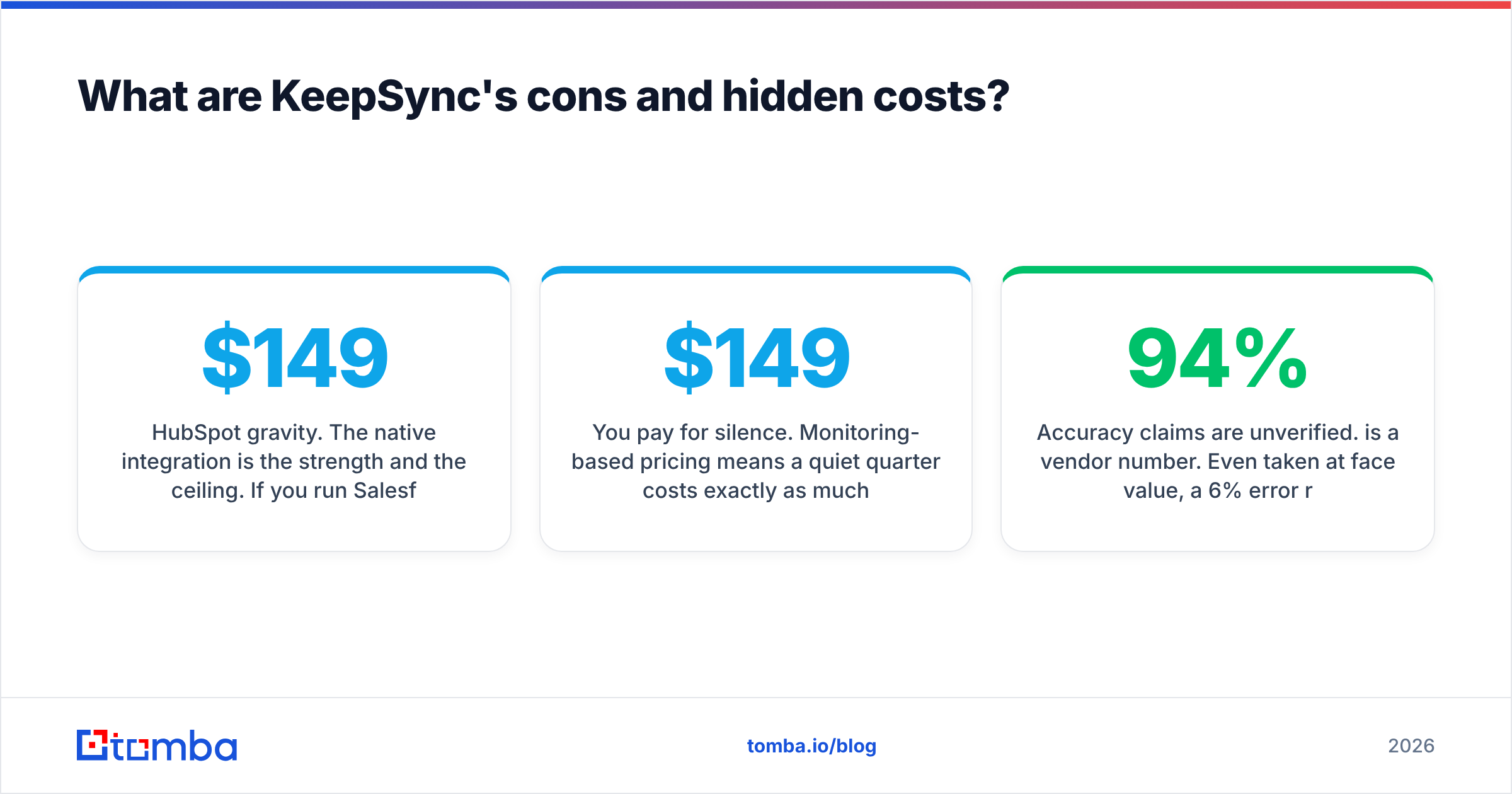
HubSpot gravity. The native integration is the strength and the ceiling. If you run Salesforce, Pipedrive, or a homegrown CRM, you are either out of luck or pushed toward the API tier at ~$149/mo, which changes the entry price of the whole evaluation. Check your CRM first — it decides whether this is a $79 decision or a $149 one.
You pay for silence. Monitoring-based pricing means a quiet quarter costs exactly as much as a busy one. On a 5,000-contact list at $149/mo, a stretch where nobody moves still bills $447 per quarter.
Accuracy claims are unverified. 94% is a vendor number. Even taken at face value, a 6% error rate on 20,000 monitored contacts is a lot of noise for a rep to wade through, and false positives are expensive in a workflow that auto-creates deals.
Weekly refresh has a floor. For job-change tracking, weekly is defensible. But if a competitor reaches your former champion in week one of their new role and you arrive in week three, the "warm relationship" advantage is already half spent.
It is not a prospecting tool, and that is easy to forget. You cannot ask KeepSync to find the 300 heads of RevOps at Series B fintechs. It only knows about people you already know. Teams that buy it expecting pipeline generation are buying the wrong category — which is the single most common complaint pattern in this corner of the market.

How does KeepSync compare to the alternatives?#
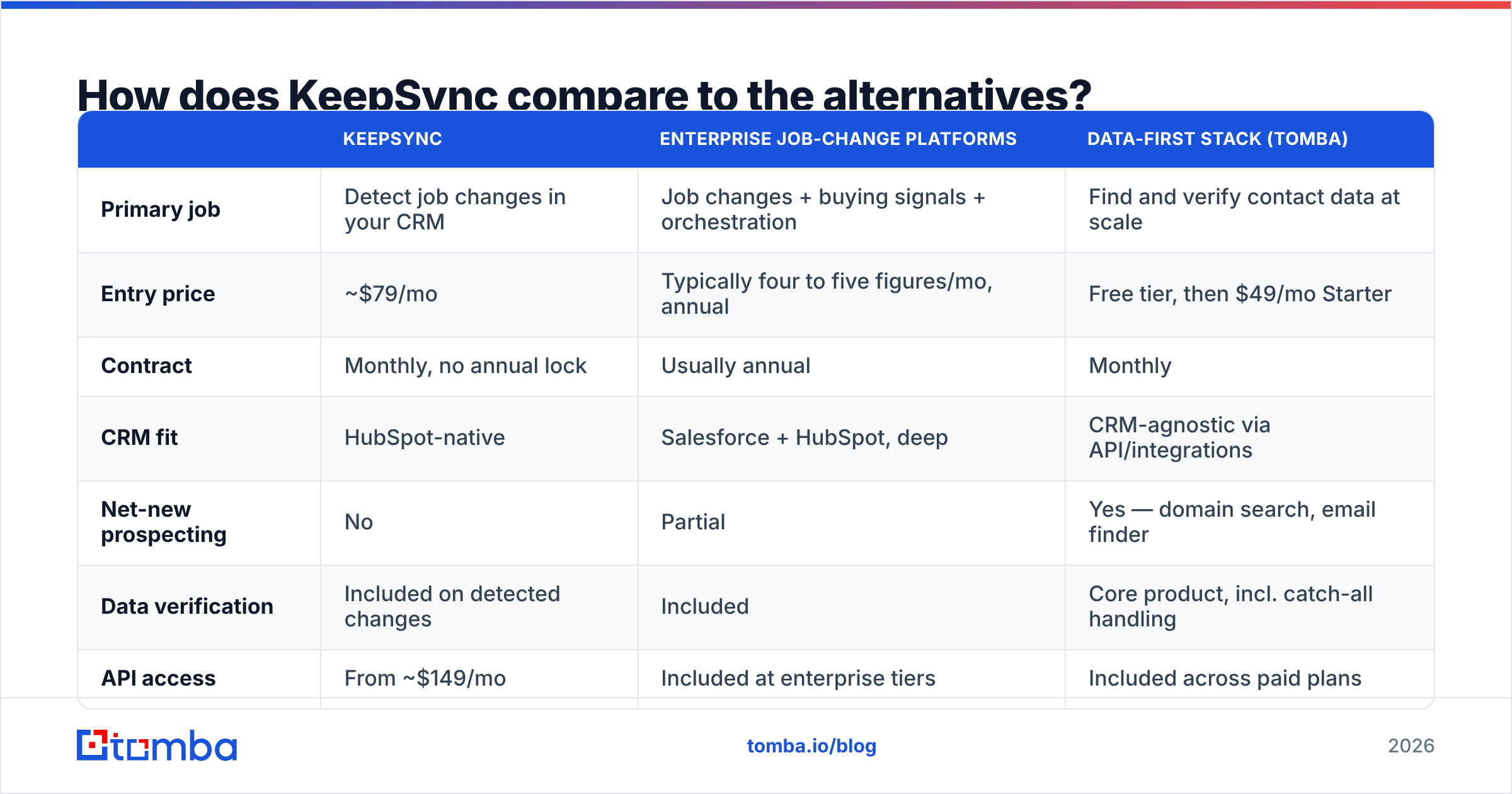
The honest comparison is not KeepSync versus one competitor — it is KeepSync versus three different shapes of solution.
| KeepSync | Enterprise job-change platforms | Data-first stack (Tomba) | |
|---|---|---|---|
| Primary job | Detect job changes in your CRM | Job changes + buying signals + orchestration | Find and verify contact data at scale |
| Entry price | ~$79/mo | Typically four to five figures/mo, annual | Free tier, then $49/mo Starter |
| Contract | Monthly, no annual lock | Usually annual | Monthly |
| CRM fit | HubSpot-native | Salesforce + HubSpot, deep | CRM-agnostic via API/integrations |
| Net-new prospecting | No | Partial | Yes — domain search, email finder |
| Data verification | Included on detected changes | Included | Core product, incl. catch-all handling |
| API access | From ~$149/mo | Included at enterprise tiers | Included across paid plans |
| Setup effort | Minutes | Weeks, with RevOps involvement | Minutes to hours |
| Best for | HubSpot teams with a warm base | Large enterprise GTM orgs | Teams that need volume + accuracy |
A few reads on that grid:
If you are a HubSpot-native company with 2,000+ past buyers and champions, KeepSync is the obvious first purchase. Nothing else in the category gets you running this cheaply.
If you are an enterprise with a mature signal strategy, KeepSync will feel thin. You will want the platforms that fuse job changes with intent, account movement, and sequence orchestration — and you will pay for it.
If your actual bottleneck is "we don't have enough good contacts in the first place," job-change tracking is solving a problem you do not have yet. A stack built around an email finder, bulk verification, and enrichment will move your numbers faster and cost less. You can layer job-change tracking on later, once you have a base worth monitoring.
Is KeepSync worth it for your team?#
Run this three-question filter before you buy.
How churny is your contact base? Pull your CRM contacts and check how many have a title or company field older than 18 months. If it is under 15% of the list, your job-change volume is probably too low to justify a monitoring subscription. If it is 25%+ — common in SaaS, agencies, and tech services — the math starts working quickly.
Do you have a re-engagement motion at all? Job-change alerts are worthless without someone who acts on them within a week, with a message that references the prior relationship. If your reps are already at capacity on net-new, the alerts will sit in Slack and rot.
Is your CRM HubSpot? If yes, KeepSync is cheap and frictionless. If no, price the API tier and compare it honestly against building the same signal with an enrichment API on a scheduled job — which, for a team with any engineering capacity, is a real option.
The break-even is simple. At ~$79/mo, you need roughly one re-engaged deal per year at any meaningful ACV to justify it. That is a low bar for most B2B teams. At ~$399/mo on 20,000 contacts, you are committing about $4,800 a year, and you should expect a documented pipeline number, not vibes.
What should you do if you need data, not just alerts?#
Most teams asking about KeepSync pricing are really asking a broader question: how do we stop working from stale contact data? Job-change tracking is one answer, but it only covers people already in your database.
The wider fix is a data layer that keeps every record current and fills the gaps: verified business emails, working phone numbers, firmographics, and the ability to pull net-new contacts at a named account on demand. That is a different budget line, and usually a cheaper one — Tomba pricing starts with a free tier at 25 searches/month, then $49/mo Starter, $99/mo Growth, and $249/mo Pro, with an email finder API available across paid plans for teams that want to automate refresh cycles themselves.
In practice, plenty of teams run both: an enrichment and finding layer for coverage, plus a lightweight job-change tool for the warm-relationship signal. They are complements, not substitutes. The mistake is buying the alert layer first and discovering your underlying data was never good enough to monitor.
Start with the data. If you want to see what a clean contact base looks like before you spend anything on monitoring it, run your target accounts through the Tomba Email Finder — find verified professional emails by name, domain, or company, check the accuracy on 25 free searches, and decide from there whether a job-change subscription is the next thing your pipeline needs.
Related guides#
// get started
Find, verify and enrich your first contacts today
Start on the free plan with 25 searches a month, then scale when your team is ready.
Free plan · No credit card required · GDPR & CCPA
// about the author