9 Best Kickbox Alternatives in 2026 for Email Verification
Kickbox is a dependable verifier, but it is not the cheapest, the fastest, or the most complete. Here are nine Kickbox alternatives compared on accuracy, catch-all handling, bulk pricing, and what happens when you also need to find the addresses first.

TL;DR
- Kickbox is a genuinely good verifier with a clean API and a useful Sendex quality score, but its pay-as-you-go pricing gets expensive fast and it stops at verification — it will never tell you an address you do not already have.
- The cheapest credible swaps on price alone are MillionVerifier and DeBounce; the closest feature-for-feature swaps are Bouncer, Emailable, and ZeroBounce.
- If half your problem is finding the addresses, a combined finder + verifier like Tomba removes a whole tool and a whole data handoff from your stack.
- Catch-all (accept-all) domains are where verifiers actually differ. Everything else is close to parity. Test your own list before you commit.
- Run the same 500-address sample through three candidates before buying credits. Vendor-published accuracy numbers are marketing, not evidence.
What does Kickbox actually do — and where does it fall short?#
Kickbox is a dedicated email verification service. You upload a list or hit the API, and it returns a deliverable / undeliverable / risky / unknown verdict per address, plus a "Sendex" score that estimates the quality of the inbox behind the address. It has been around long enough to be boring in the good way: stable uptime, honest documentation, real support humans.
So why are you reading a list of alternatives? In practice, three reasons come up over and over.
Price at volume. Kickbox is priced per verification with volume discounts. At small volumes you are paying roughly a cent per address. That is fine for a 2,000-row list. It stops being fine when you are cleaning 200,000 records quarterly, or re-verifying a CRM on a rolling schedule. Several competitors are less than half the price at the same tier.
Catch-all ambiguity. Like every verifier, Kickbox cannot definitively confirm an address on an accept-all domain via SMTP alone, so those come back as "risky" or "unknown." If your ICP skews enterprise — where accept-all configurations are common — a meaningful slice of your list lands in a bucket you have to make a judgment call on. How a vendor handles that bucket is the single biggest practical difference between verifiers.
It only verifies. Kickbox validates addresses you already have. It does not source them. If your workflow is "scrape a list → verify it → import it," you are paying for and maintaining two vendors, two credit pools, and one lossy CSV handoff between them.

What should you compare before switching verifiers?#
Most comparison posts list feature checkboxes that every vendor ticks. Ignore those. These six things are what actually change your outcome:
- Real bounce rate on your list, not the vendor's claimed accuracy. Every vendor claims 98–99%. That number is measured on their sample, not yours. The only figure that matters is the bounce rate your ESP reports after you send.
- Catch-all policy. Does the tool flag accept-all domains as "unknown" and hand the risk back to you, or does it apply additional signals (pattern matching, historical send data, provider-specific probes) to resolve them? A catch-all verifier that resolves even 40% of that bucket changes your usable list size more than a 1% accuracy difference ever will.
- Pricing model — credits vs. subscription. Pay-as-you-go credits never expire but cost more per unit. Monthly subscriptions cost less per unit but you forfeit unused volume. Match the model to whether your cleaning is bursty or continuous.
- Throughput and API ergonomics. A 100,000-row list that takes 14 hours to process is a different product from one that takes 40 minutes. Check async job endpoints, webhook callbacks, and rate limits — not just whether an API exists.
- Whether it also finds addresses. If you are buying a verifier to clean lists you built by hand, a combined platform collapses two line items into one.
- Data handling and compliance. GDPR posture, data retention windows, whether uploaded lists are used to enrich the vendor's own database. Ask directly; the answers vary more than you would expect.
How do the top Kickbox alternatives compare?#
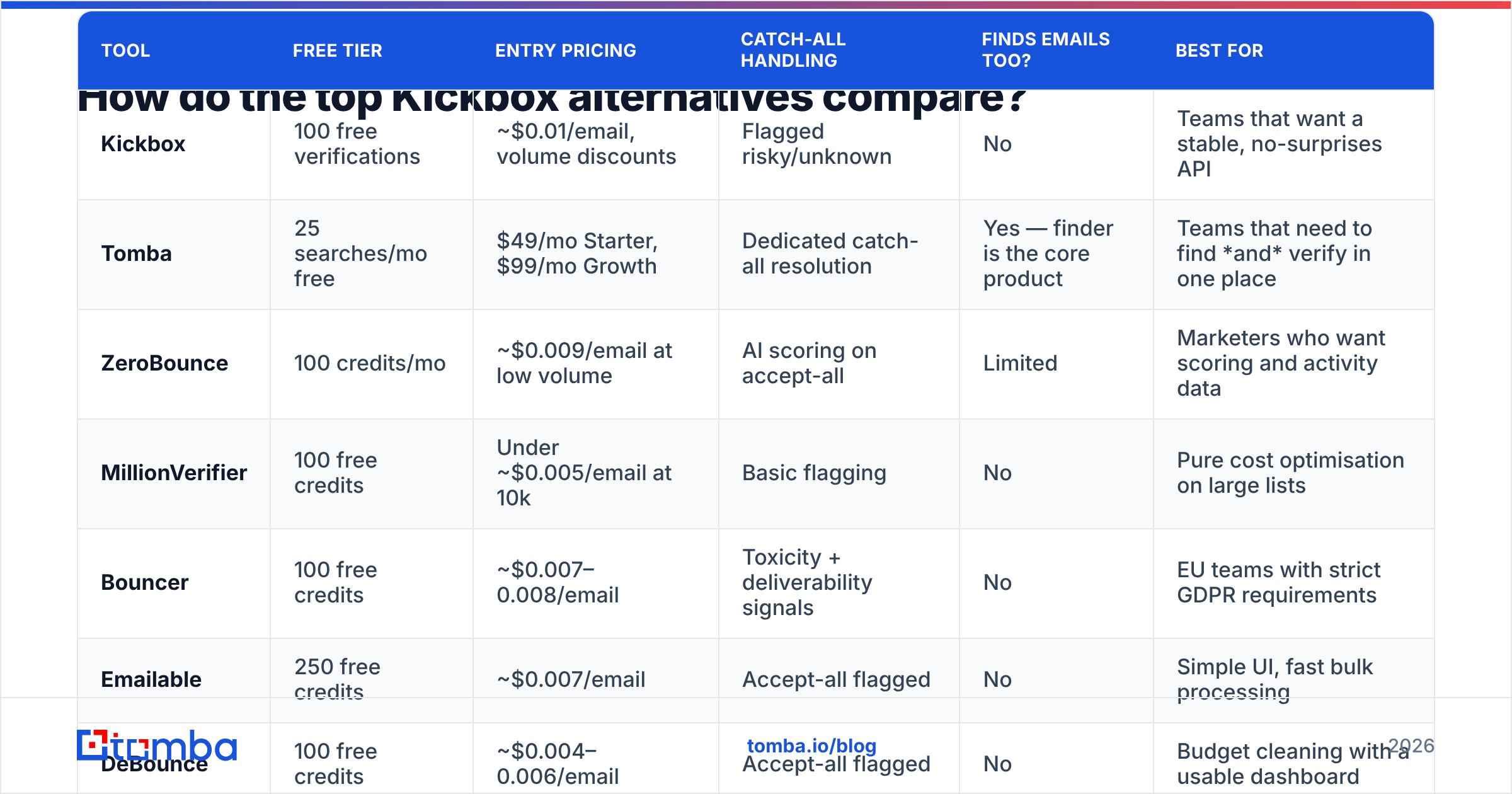
Here is the practical comparison. Prices are indicative entry-level figures observed in September 2026 and move frequently — confirm on each vendor's own pricing page before you buy.

| Tool | Free tier | Entry pricing | Catch-all handling | Finds emails too? | Best for |
|---|---|---|---|---|---|
| Kickbox | 100 free verifications | ~$0.01/email, volume discounts | Flagged risky/unknown | No | Teams that want a stable, no-surprises API |
| Tomba | 25 searches/mo free | $49/mo Starter, $99/mo Growth | Dedicated catch-all resolution | Yes — finder is the core product | Teams that need to find and verify in one place |
| ZeroBounce | 100 credits/mo | ~$0.009/email at low volume | AI scoring on accept-all | Limited | Marketers who want scoring and activity data |
| MillionVerifier | 100 free credits | Under ~$0.005/email at 10k | Basic flagging | No | Pure cost optimisation on large lists |
| Bouncer | 100 free credits | ~$0.007–0.008/email | Toxicity + deliverability signals | No | EU teams with strict GDPR requirements |
| Emailable | 250 free credits | ~$0.007/email | Accept-all flagged | No | Simple UI, fast bulk processing |
| DeBounce | 100 free credits | ~$0.004–0.006/email | Accept-all flagged | No | Budget cleaning with a usable dashboard |
| Clearout | 100 free credits | ~$0.007/email | Confidence scoring on accept-all | Partial (finder add-on) | Mixed find + verify at modest volume |
| BookYourData | Free sample records | Per-record, pay-as-you-go | Verified at point of purchase | Yes — sells verified contact records | Buying a pre-verified list rather than cleaning one |
A note on that last row, because it is a genuinely different shape of solution: BookYourData is not a verifier you point at an existing list. It sells contact records that are verified at the moment of purchase, with a bounce guarantee attached. If your underlying problem is "my list is bad because my source was bad," buying pre-verified records solves it upstream instead of downstream. Worth evaluating alongside the verifiers rather than against them.
How accurate are these verifiers in practice?#
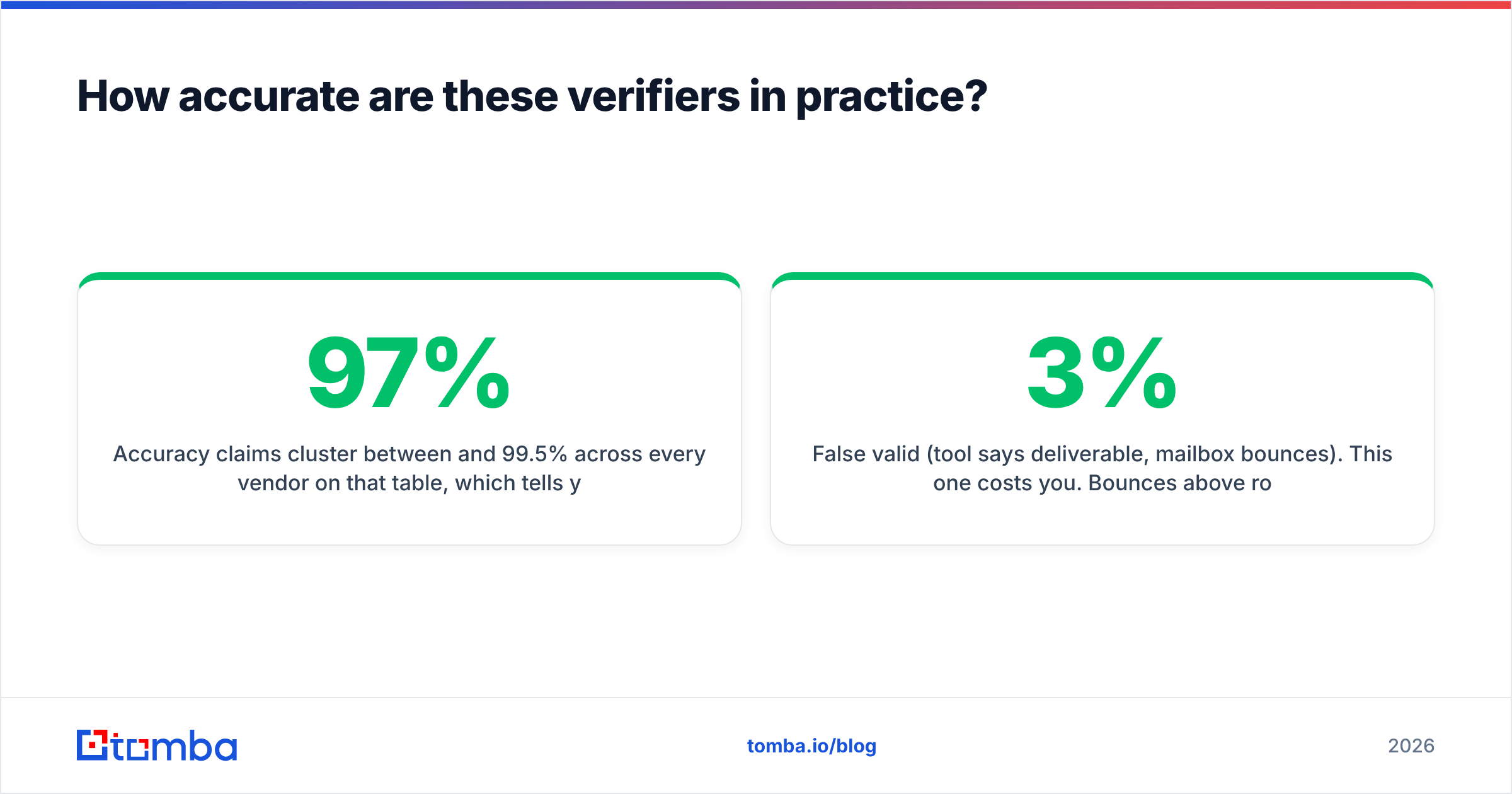
Accuracy claims cluster between 97% and 99.5% across every vendor on that table, which tells you the claims are not a useful decision input. What separates them in real testing is the size of the "unknown" bucket and whether the tool is confidently wrong.

Two failure modes matter, and they are not symmetrical:
- False valid (tool says deliverable, mailbox bounces). This one costs you. Bounces above roughly 2–3% start dragging on sender reputation, and at Gmail and Microsoft scale that damage compounds across every campaign from that domain.
- False invalid (tool says undeliverable, mailbox is fine). This one costs you silently. You delete reachable prospects and never find out. Aggressive verifiers that keep their bounce rate low by over-rejecting look great on the accuracy dashboard and quietly shrink your TAM.
The honest test is cheap to run. Take 500 addresses you already have send history for — you know which ones bounced and which ones replied. Run that exact file through three candidate tools on their free tiers. Compare each tool's verdict against ground truth. Total cost: an hour and zero dollars. It will tell you more than every comparison table on the internet, this one included.
For a sanity check on how buyers rate these tools at scale, the G2 email verification category is a reasonable second opinion — just weight recent reviews heavily, because these products change quarterly.
Is a verifier alone enough, or do you need a finder too?#
This is the question that decides whether you should be shopping for a Kickbox replacement at all.
If your lists arrive already populated — imported from a CRM, handed over by marketing, exported from an event registration — a pure verifier is the right tool and you should pick on price and catch-all handling.
But most outbound teams are not in that situation. They have a company list and a set of target job titles, and the addresses do not exist yet. In that workflow, a standalone verifier is the second half of a two-vendor process:
- Find candidate addresses (finder tool, or guessing patterns, or a scraper)
- Export to CSV
- Upload to verifier
- Download results
- Re-import to sequencer
Steps 2 through 4 are pure overhead, and they are where data goes stale and columns get mangled. Consolidating them is why platforms that do both exist. Tomba's email finder runs verification as part of the find operation rather than as a separate paid step, so an address comes back with a confidence verdict already attached. The same applies to bulk email finder jobs — upload a company list, get back verified contacts, no intermediate file.

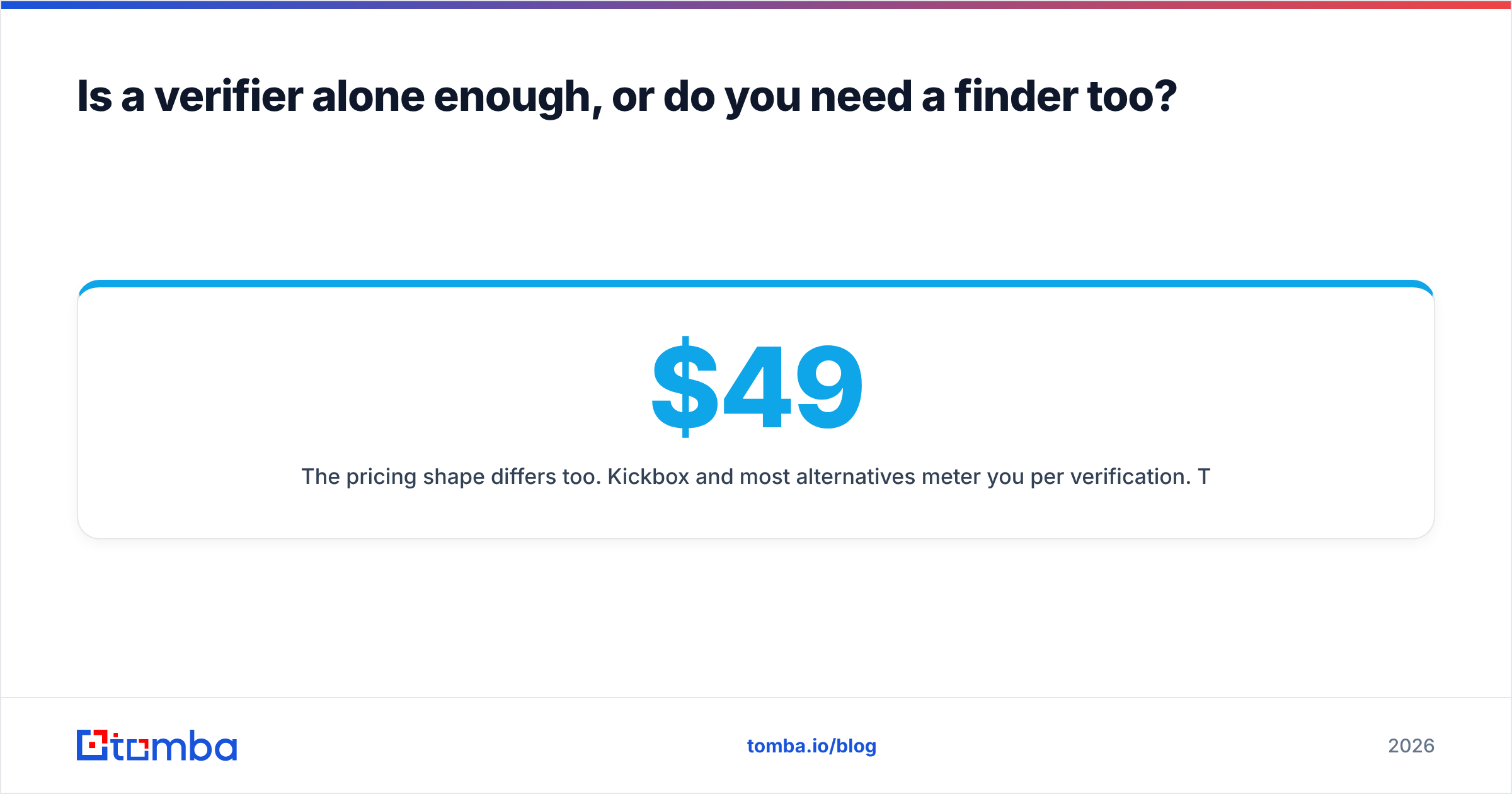
The pricing shape differs too. Kickbox and most alternatives meter you per verification. Tomba is subscription-based — free tier at 25 searches per month, Starter at $49/mo, Growth at $99/mo, Pro at $249/mo, Enterprise custom — with finding and verification both covered. See current Tomba pricing for the per-plan breakdown. Whether that is cheaper depends entirely on your mix: if you verify 500,000 addresses a year and find zero, per-credit vendors win. If you find 3,000 contacts a month and verify the same 3,000, a bundled subscription wins by a wide margin.
Which Kickbox alternative fits your situation?#
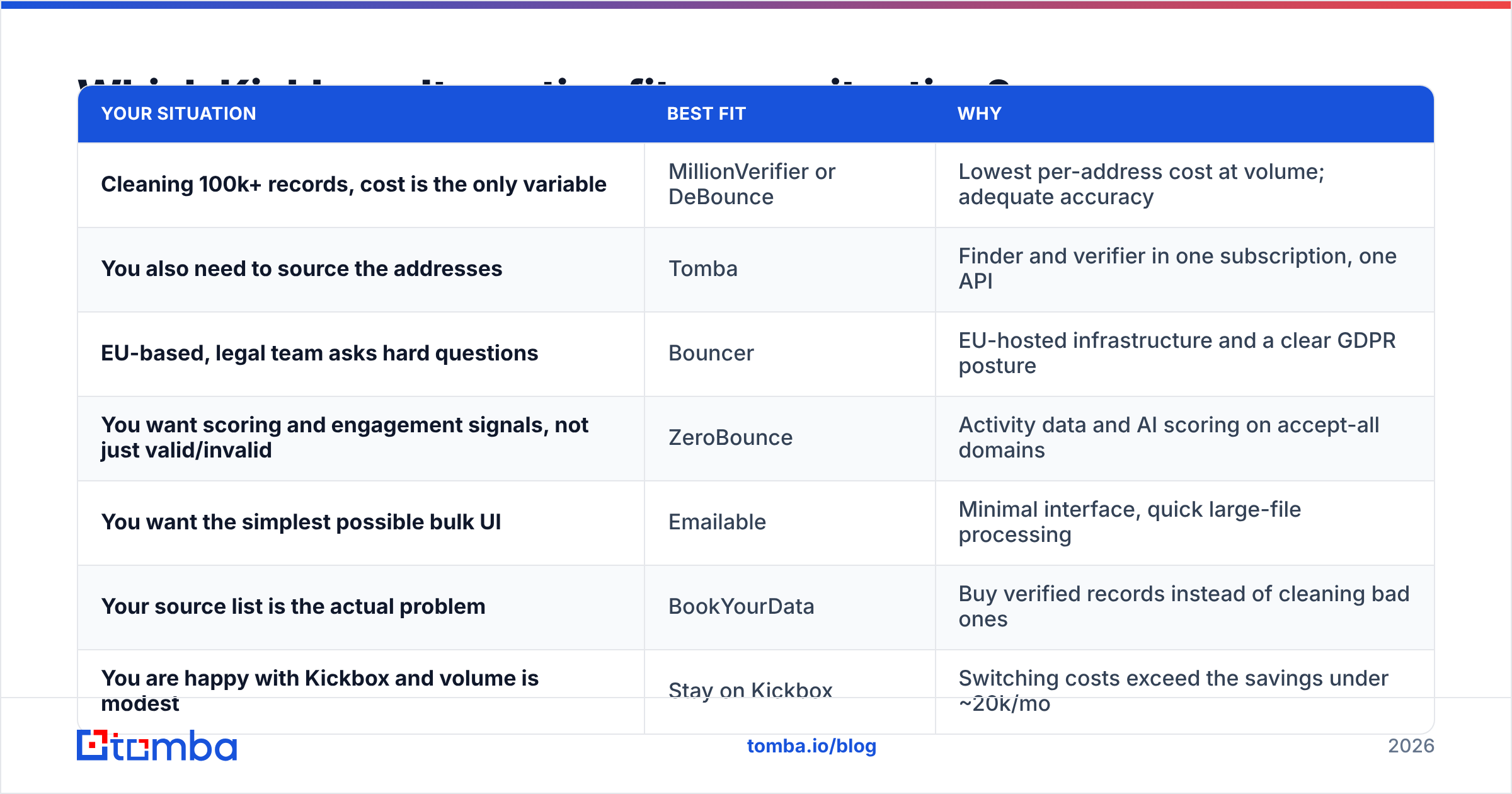
Matching by use case rather than by feature list:
| Your situation | Best fit | Why |
|---|---|---|
| Cleaning 100k+ records, cost is the only variable | MillionVerifier or DeBounce | Lowest per-address cost at volume; adequate accuracy |
| You also need to source the addresses | Tomba | Finder and verifier in one subscription, one API |
| EU-based, legal team asks hard questions | Bouncer | EU-hosted infrastructure and a clear GDPR posture |
| You want scoring and engagement signals, not just valid/invalid | ZeroBounce | Activity data and AI scoring on accept-all domains |
| You want the simplest possible bulk UI | Emailable | Minimal interface, quick large-file processing |
| Your source list is the actual problem | BookYourData | Buy verified records instead of cleaning bad ones |
| You are happy with Kickbox and volume is modest | Stay on Kickbox | Switching costs exceed the savings under ~20k/mo |
That last row is not filler. If you are verifying 10,000 addresses a month, the difference between Kickbox and the cheapest alternative is somewhere around $40–60 a month. That is not worth an engineering ticket, a new vendor review, and a fresh API integration. Switch when the arithmetic is obvious, not when a blog post tells you to.
What about the free and semi-free options?#
There is a tier below all of this: single-address checkers and syntax validators. They are legitimately useful for spot-checking one address before you send a high-stakes email, and useless for list hygiene at any scale.
If that is all you need right now, a free email checker will confirm syntax, MX records, and mailbox existence for one address at a time without a signup. What it will not do is process a 40,000-row file, resolve catch-alls, or give you an auditable record of what was checked when. Do not build a sending program on top of a one-at-a-time tool.
Also worth knowing: a "valid" verdict never guarantees inbox placement. Verification confirms the mailbox accepts mail. Whether your message reaches the inbox or the spam folder is governed by email deliverability factors — authentication, sending history, content, engagement — that no verifier controls. Clean lists are necessary and not sufficient. A bounce is only the most visible failure mode.
Is Kickbox still worth paying for in 2026?#
Yes, for a specific buyer: a team that verifies moderate volume, values a stable and well-documented API over the last 30% of cost savings, and already has its address sourcing solved somewhere else. Kickbox has not gotten worse. The market around it has gotten cheaper and more consolidated.
You should move if any of these are true:
- You verify more than ~50,000 addresses a month and have not priced the alternatives in the last year.
- More than 15% of your list comes back risky or unknown and you have no process for that bucket.
- You are paying for a finder and a verifier separately and passing CSVs between them.
- You need phone numbers, LinkedIn profiles, or firmographic fields alongside the email — that is an enrichment problem a verifier will never solve.
Ready to stop running two tools?#
If the real bottleneck is that you are paying to verify addresses you first had to find somewhere else, consolidate the workflow. The Tomba Email Finder returns addresses with verification already applied — search by domain, by name, or by company, in the app, through the API, or in bulk from a CSV. Start on the free tier with 25 searches a month, run your own 500-address ground-truth test against whatever you use today, and switch only if the numbers say so. That is the same advice we would give about any tool on this list, including ours.
Related guides#
// get started
Find, verify and enrich your first contacts today
Start on the free plan with 25 searches a month, then scale when your team is ready.
Free plan · No credit card required · GDPR & CCPA
// about the author