Kickbox vs Wiza (2026): Email Verifier vs LinkedIn Finder
Kickbox verifies emails you already have. Wiza finds new ones on LinkedIn. Here is the honest breakdown of pricing, accuracy, and which tool your outbound stack actually needs in 2026.
TL;DR
- Kickbox and Wiza are not competitors. Kickbox is an email verification engine; Wiza is a LinkedIn-based email and phone finder. Comparing them head-to-head only makes sense if you are trying to decide which problem to solve first.
- Pick Kickbox if you already own a list (CRM exports, form signups, an old database) and your bounce rate is hurting your sender reputation.
- Pick Wiza if your prospecting starts inside LinkedIn Sales Navigator and you need contact data for people you have never emailed.
- Running both means two subscriptions, two credit systems, and a manual handoff between them. At small-to-mid volume that usually costs more than one platform that finds and verifies in the same workflow.
- If you want one bill instead of two, a combined finder-plus-verifier (Tomba, Findymail, Prospeo, Apollo) is typically the cheaper path under ~50k contacts a year.
What is Kickbox and what does it actually do?#
Kickbox is an email verification service. You give it an address — one at a time through the API, or a CSV with a million rows — and it tells you whether mail sent to that address will land, bounce, or land you in trouble.
Its output is more opinionated than most verifiers. Alongside the standard deliverable / undeliverable / risky / unknown verdict, Kickbox returns a Sendex score, a 0-1 quality rating that factors in whether the address looks like a real human, whether it's a role account (info@, sales@), whether it's a disposable domain, and whether the mailbox looks abandoned. That extra signal is the reason a lot of ESPs and transactional-email teams standardise on it.
What Kickbox does not do is find anything. It has no database of people, no company search, no LinkedIn connection. It is a quality gate you put in front of a list you already have. If your list is empty, Kickbox has nothing to work on.
Typical Kickbox jobs:
- Cleaning a legacy CRM before migrating to a new ESP, so you don't import 40% dead addresses and torch the new sending domain.
- Real-time signup validation — an API call on the registration form that blocks typos and disposable addresses before they enter the database.
- Pre-send hygiene on a large newsletter list that hasn't been mailed in six months.
- Compliance-ish list scoring where you need a defensible audit trail of why an address was mailed or suppressed.
What is Wiza and how is it different?#
Wiza sits at the opposite end of the pipeline. It's a prospecting tool built around LinkedIn: you run a search in LinkedIn or Sales Navigator, hand Wiza the search URL (or use its Chrome extension), and it returns a CSV of those people with work emails, personal emails, and — on higher tiers — mobile numbers.
Wiza's pitch is that it only charges you for contacts it can actually resolve, and that the emails it returns are already validated before they hit your export. So there's verification inside Wiza, but it's a step in a pipeline you don't control rather than a standalone product you can point at your own list.
The dependency matters: Wiza's value is proportional to how good you are at LinkedIn filtering. If your ICP is well-defined in Sales Navigator terms — headcount, title, geography, technologies — Wiza turns that into a contact list fast. If your ICP lives somewhere else (a directory, a conference attendee list, a list of domains from your analytics), Wiza is the wrong shape of tool.
How do Kickbox and Wiza compare side by side?#
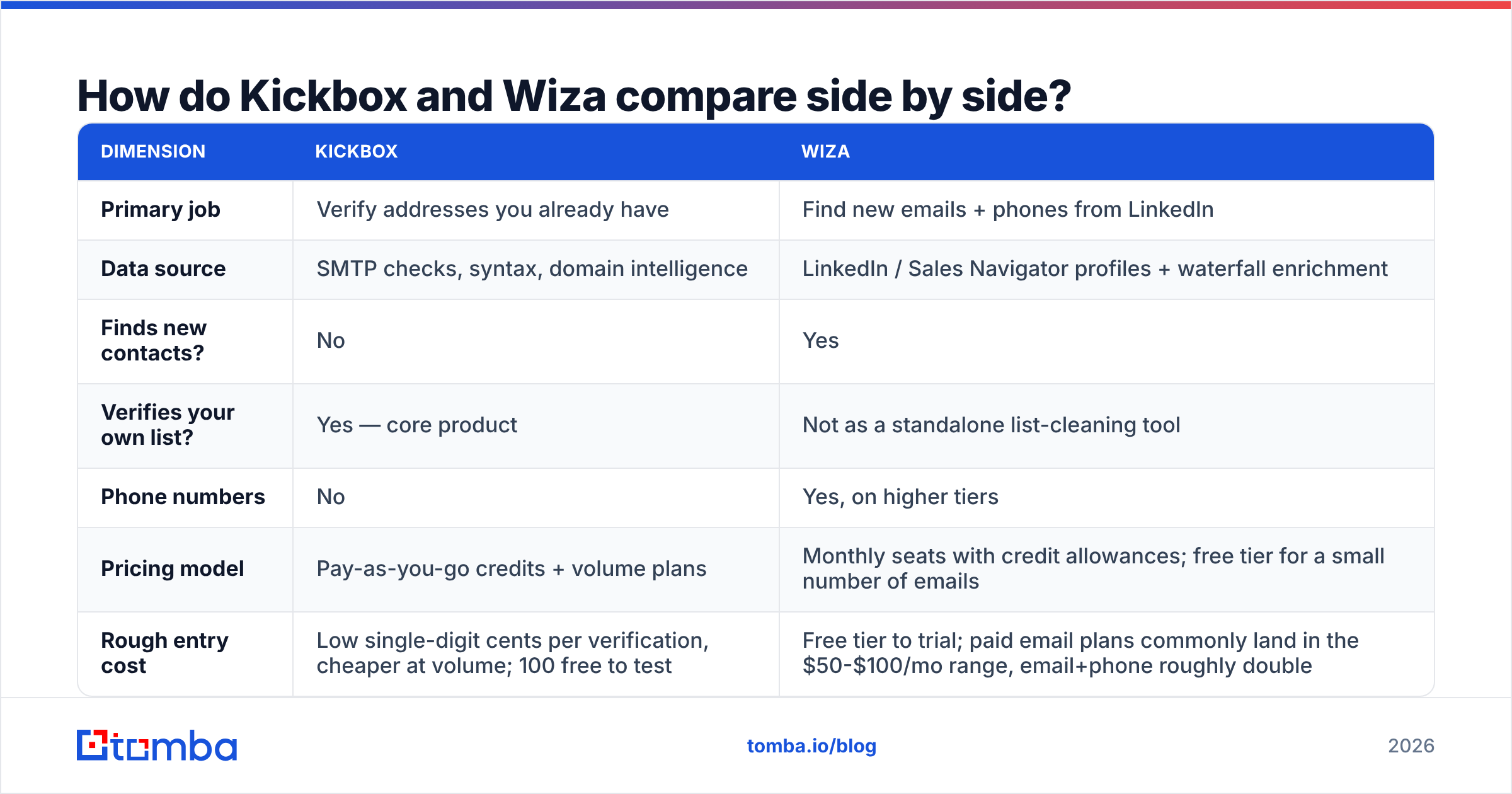
Here is the practical breakdown. Prices move — always confirm on the vendor's own page before you buy.
| Dimension | Kickbox | Wiza |
|---|---|---|
| Primary job | Verify addresses you already have | Find new emails + phones from LinkedIn |
| Data source | SMTP checks, syntax, domain intelligence | LinkedIn / Sales Navigator profiles + waterfall enrichment |
| Finds new contacts? | No | Yes |
| Verifies your own list? | Yes — core product | Not as a standalone list-cleaning tool |
| Phone numbers | No | Yes, on higher tiers |
| Pricing model | Pay-as-you-go credits + volume plans | Monthly seats with credit allowances; free tier for a small number of emails |
| Rough entry cost | Low single-digit cents per verification, cheaper at volume; 100 free to test | Free tier to trial; paid email plans commonly land in the $50-$100/mo range, email+phone roughly double |
| API | Mature, well documented, real-time | Available, more export-oriented |
| Best fit | ESPs, growth teams with big owned lists, signup forms | SDRs and founders prospecting out of Sales Navigator |
| Worst fit | Anyone who needs new contacts | Anyone cleaning a 200k-row legacy database |

The row that decides most evaluations is the third one. Teams searching "kickbox vs wiza" are usually in one of two states: they have a dirty list and no new leads, or they have no list at all. Those are different purchases.
Which one is more accurate?#
Accuracy means two different things here, and conflating them is how people end up disappointed.
Kickbox's accuracy is verification accuracy: of the addresses it marked deliverable, what percentage actually delivered? Good verifiers sit in the high 90s on that metric for standard mailboxes. Kickbox is consistently in that band and its reviews on G2 reflect it. The caveat everyone hits is catch-all domains — servers configured to accept mail for any address at the domain. No verifier can SMTP-probe its way to certainty there; they can only infer. Kickbox flags these as risky/unknown rather than guessing, which is honest but leaves you with a pile of undecided rows. If a big share of your ICP sits on catch-all infrastructure, you'll want a dedicated catch-all verifier layered on top, whichever primary verifier you use.
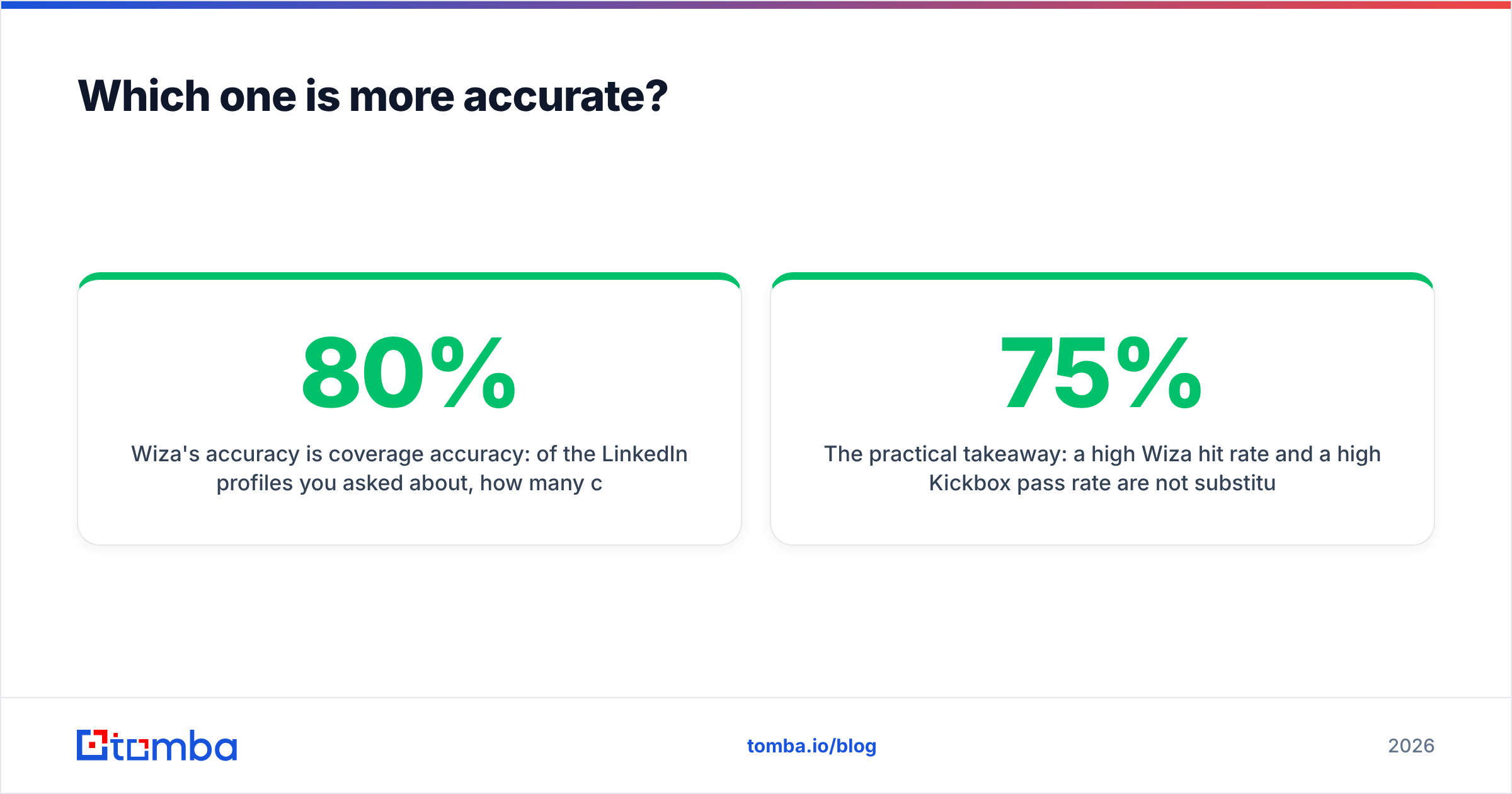
Wiza's accuracy is coverage accuracy: of the LinkedIn profiles you asked about, how many came back with a usable work email, and how many of those were correct? Real-world hit rates for LinkedIn-sourced work emails across the category land roughly in the 60-80% range depending on seniority, company size, and region. Enterprise and US contacts resolve well; small European companies, non-English domains, and very junior titles resolve worse. Wiza's credit model softens this — you're broadly not paying for misses — but it doesn't change the underlying ceiling.

The practical takeaway: a high Wiza hit rate and a high Kickbox pass rate are not substitutes. You can have a 75%-coverage list where every returned address verifies clean, and you can have a 100%-coverage list where a third of it bounces. Measure both, separately.
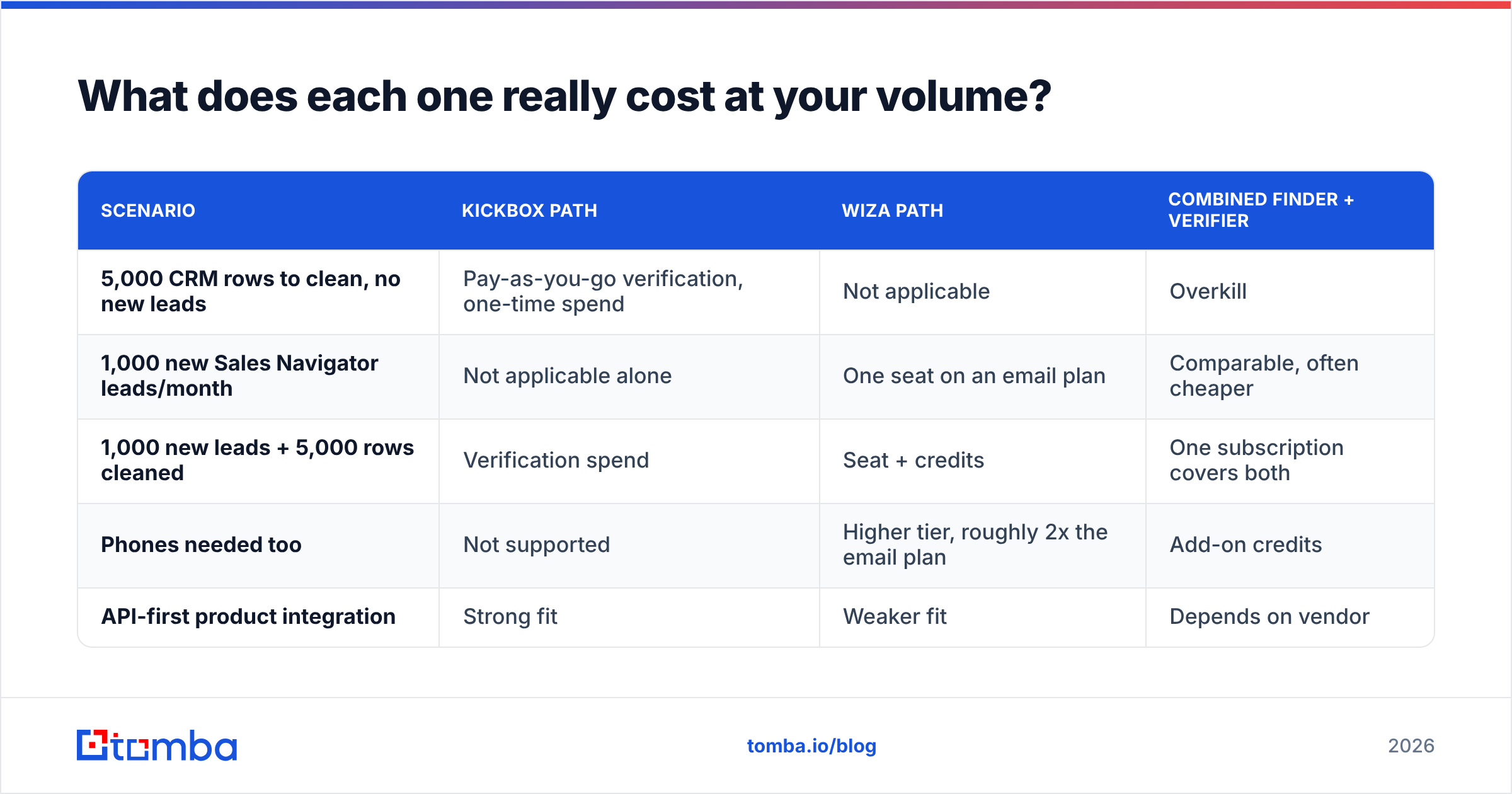
What does each one really cost at your volume?#
Model the cost per usable contact, not the sticker price.
| Scenario | Kickbox path | Wiza path | Combined finder + verifier |
|---|---|---|---|
| 5,000 CRM rows to clean, no new leads | Pay-as-you-go verification, one-time spend | Not applicable | Overkill |
| 1,000 new Sales Navigator leads/month | Not applicable alone | One seat on an email plan | Comparable, often cheaper |
| 1,000 new leads + 5,000 rows cleaned | Verification spend | Seat + credits | One subscription covers both |
| Phones needed too | Not supported | Higher tier, roughly 2x the email plan | Add-on credits |
| API-first product integration | Strong fit | Weaker fit | Depends on vendor |
Two costs never show up on the pricing page:
- The handoff tax. Export from Wiza, import to Kickbox, re-export, import to your sequencer. That's 15-20 minutes per batch plus the risk of a stale CSV going out. Weekly, that's a working day a quarter.
- Credit fragmentation. Two credit pools that expire on two schedules, and you always run out of the wrong one mid-campaign.
If either of those bothers you, the honest answer is that you're comparing the wrong two products. The real comparison is two specialists vs one generalist.
Who should choose Kickbox?#
Choose Kickbox when verification is the actual bottleneck:
- You run an ESP, a SaaS with signup forms, or a transactional sender. Real-time API validation at the point of capture is Kickbox's home turf, and the Sendex score gives you a threshold to tune against.
- You inherited a large, old list. Anything unmailed for 6+ months needs a hygiene pass before it touches a sending domain. Bounce rate above ~2-3% is where mailbox providers start throttling you.
- You need documentation. Kickbox's per-address reason codes are easy to defend in a compliance or deliverability review.
- Your lead source is already solved. If inbound, partnerships, or a data vendor fills your pipeline, you don't need a finder — you need a filter.
Note that Kickbox is a category with real competition: ZeroBounce, NeverBounce, Bouncer and Tomba's own email verifier all play here, and pricing between them varies more than quality does. Run the same 1,000-row sample through two or three before committing to annual volume.
Who should choose Wiza?#
Choose Wiza when the bottleneck is contacts, not cleanliness:
- Your ICP is expressible in Sales Navigator filters. This is the single biggest predictor of whether Wiza works for you.
- You're an SDR or founder doing 200-1,000 net-new contacts a month. Small enough that a seat-based tool is cheap, big enough that manual lookup is painful.
- You need mobile numbers alongside emails. Wiza's email+phone tier is a genuine convenience if your motion is call-plus-email — though compare against a dedicated phone finder before paying the premium.
- You want list-building and validation in one export. Wiza's built-in validation removes a step, even if it's less configurable than a standalone verifier.
Where Wiza gets awkward: domain-first prospecting. If your input is a list of 500 company websites rather than LinkedIn profiles, you want domain search — feed a domain, get the people and the company's email pattern back — not a LinkedIn scraper.
Do you actually need both — or one tool that does both?#
Most teams asking about Kickbox vs Wiza are really asking: can one platform cover this?
Usually, yes. The finder-plus-verifier category exists precisely because the handoff between the two was annoying enough to productise. Tomba, Findymail, Prospeo, and Apollo all bundle discovery and verification; BookYourData takes a different but legitimate route — a pre-built, pay-as-you-go B2B database with verification baked in, which suits teams that want a list today rather than a workflow.
Where Tomba lands in this specific comparison:
- Covers Wiza's job via the LinkedIn finder for profile-based lookups, plus domain search and bulk email finder for list-based work — so you aren't locked into LinkedIn as the only entry point.
- Covers Kickbox's job with a verifier and catch-all handling on the same credits, plus an email verification API if you need it on a signup form.
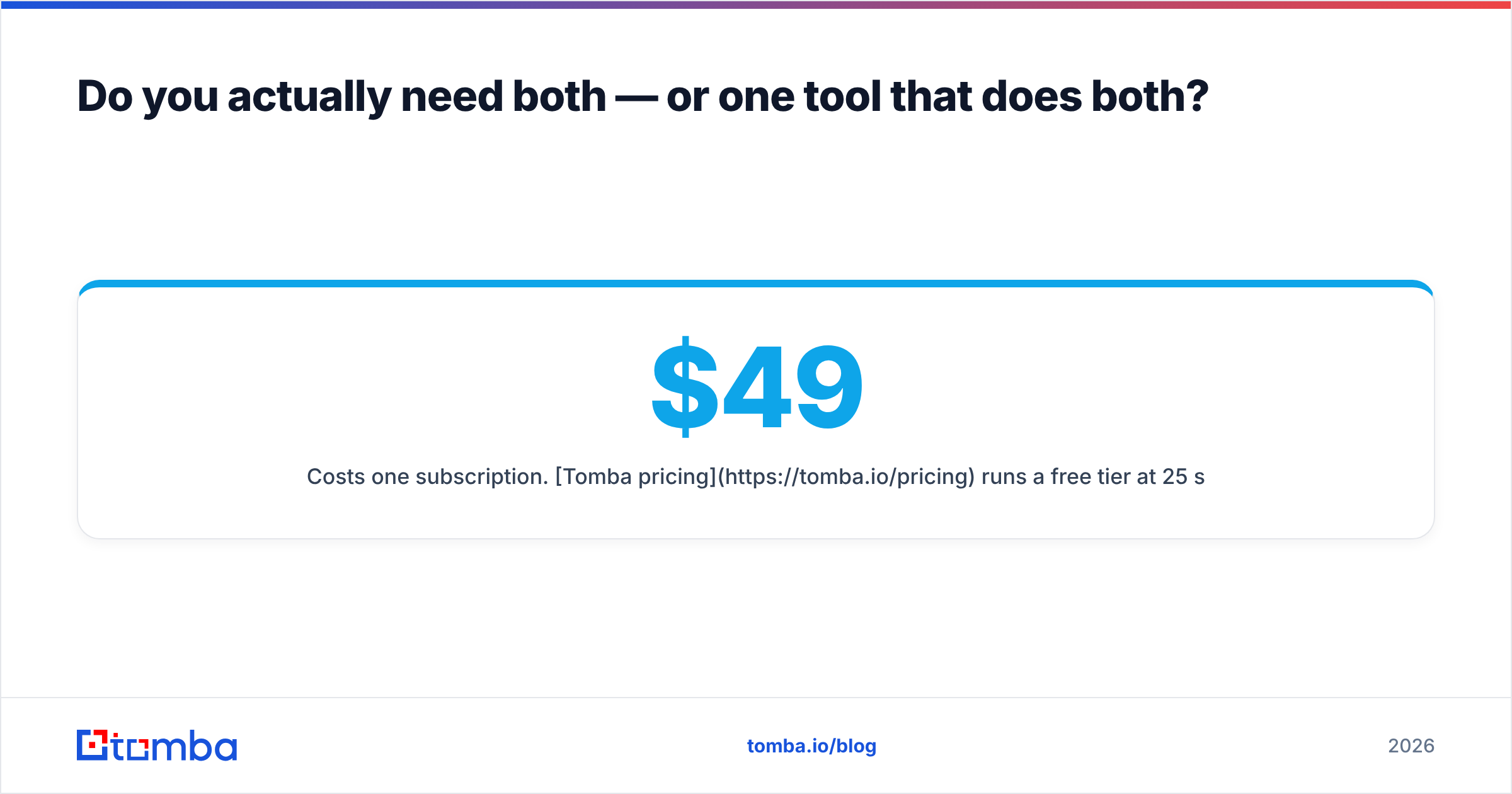
- Costs one subscription. Tomba pricing runs a free tier at 25 searches/month, Starter at $49/mo, Growth at $99/mo, Pro at $249/mo, and custom enterprise — which, at the volumes most SDR teams work at, sits below a Wiza seat plus a separate verification budget.
That's not an argument that Kickbox is a weak verifier or that Wiza is a weak finder. Both are good at their one thing, and at high volume a specialist verifier with a tuned API beats a bundled one. It's an argument about stack count: below roughly 50,000 contacts a year, two tools rarely earn their second bill.

What's the verdict on Kickbox vs Wiza?#
- Dirty list, no lead problem → Kickbox. It's a mature, honest verifier with the best risk scoring in its tier.
- No list, LinkedIn-native ICP → Wiza. Fast, credit-fair, and it removes the validation step for you.
- Both problems at once, mid volume → one combined platform. The handoff tax and split credits will cost you more than the feature differences save.
- Both problems at once, high volume or API-critical → keep the specialists. At scale, Kickbox's API and Wiza's LinkedIn depth are worth managing separately.
Before you commit, run the same 100 contacts through both free tiers: Kickbox's 100 free verifications against a list you already know the answer for, and Wiza's free credits against a Sales Navigator search of your real ICP. Ten minutes of testing beats a month of reading comparison posts — including this one.
Building the list and keeping it clean? Start with the Tomba Email Finder — find work emails by domain, name, or LinkedIn profile, with verification and catch-all checks running on the same credit pool. The free tier gives you 25 searches a month to test against your own ICP, and Starter is $49/mo when you're ready to scale. One tool, one bill, no CSV handoff.
Related guides#
// get started
Find, verify and enrich your first contacts today
Start on the free plan with 25 searches a month, then scale when your team is ready.
Free plan · No credit card required · GDPR & CCPA
// about the author