Kickbox vs ZoomInfo (2026): Which One Do You Actually Need?
Kickbox verifies emails you already have. ZoomInfo sells you contacts you don't. Here's an honest 2026 breakdown of cost, accuracy, and which one your pipeline actually needs — plus a cheaper way to cover both jobs.
TL;DR
- Kickbox vs ZoomInfo is not a fair fight. The two tools do different jobs. Kickbox checks emails you already own. ZoomInfo sells you contacts you do not have.
- Kickbox is cheap, clear, and pay-as-you-go. It is very good at one task: telling you if an address will bounce. It will never hand you a new lead.
- ZoomInfo is a full sales data platform. You get intent signals, org charts, and phone numbers. Deals are annual and often land in the five figures.
- Need verified work emails for a target list? Neither tool is the quick answer. A find-and-verify tool like Tomba covers both steps from $49/mo.
- Best mix for most small teams in 2026: a finder with built-in checks. Add a dedicated verifier only if you mail lists you bought or inherited.
Why is the Kickbox vs ZoomInfo comparison so confusing?#
Because the two products sit at opposite ends of the same pipeline. Vendor marketing then blurs the line.
Think of a kitchen. ZoomInfo is the grocery supplier. It shows up with crates of food you did not have. Kickbox is the safety inspector. It tells you which items in your fridge have gone bad. Asking which one is better is like asking for a supplier or an inspector. You need both jobs done. You rarely need both vendors at full price.
The mix-up makes sense. Both tools touch email data. Both promise accuracy. Both show up in the same G2 search. But what you get back is very different.
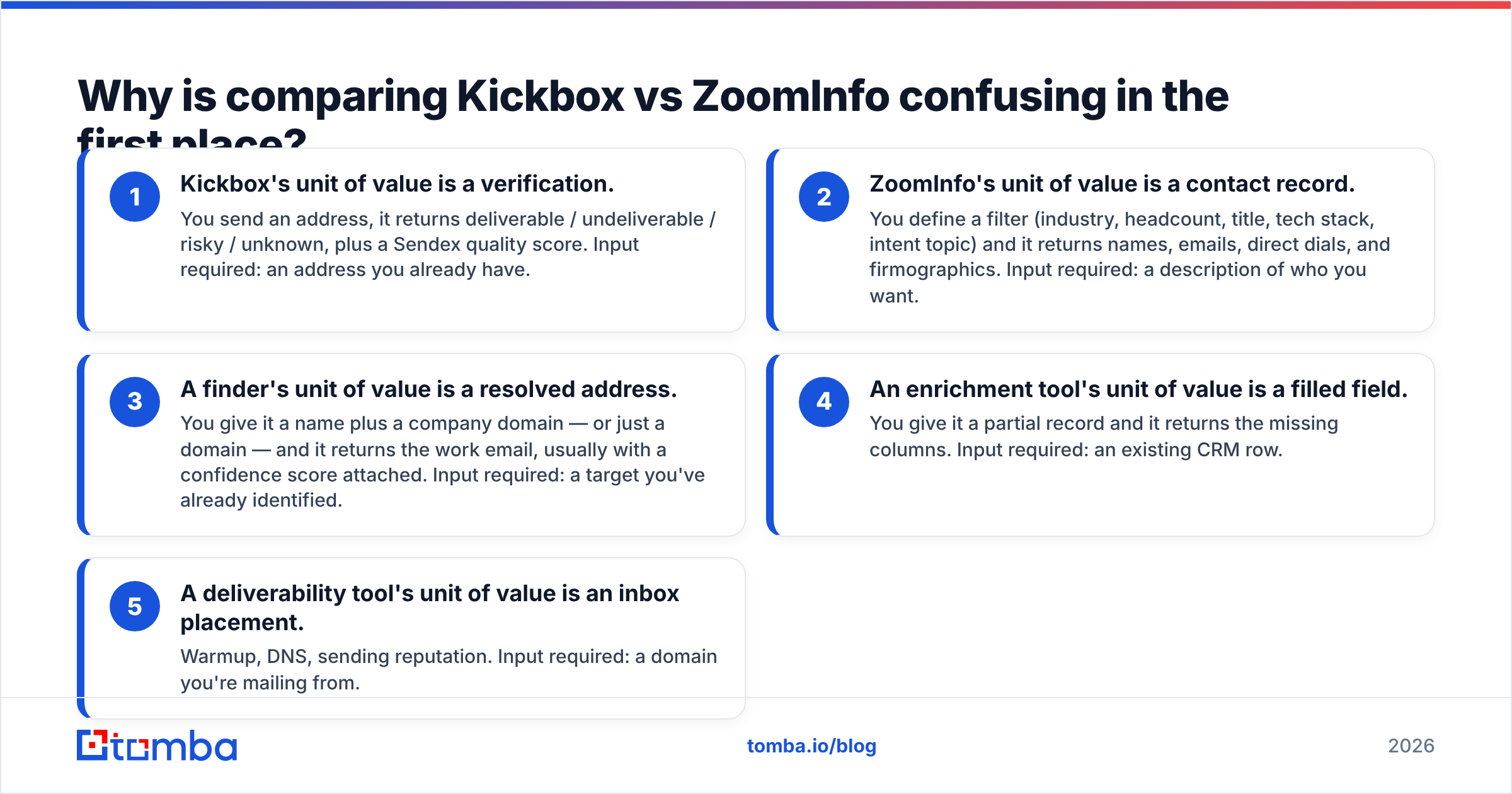
- Kickbox gives you a verdict. You send an address. It returns deliverable, undeliverable, risky, or unknown, plus a Sendex quality score. You must already have the address.
- ZoomInfo gives you a contact record. You set a filter: industry, headcount, job title, tech stack, intent topic. It returns names, emails, direct dials, and company details. You only need a description of your buyer.
- A finder gives you a resolved address. You hand it a name and a company domain, or just the domain. It returns the work email with a confidence score.
Two more tool types sit close by, and people often mistake them for the first three.
- An enrichment tool fills blank fields. You give it a partial record. It returns the missing columns. You need an existing CRM row.
- A deliverability tool protects inbox placement. Think warmup, DNS, and sender reputation. You need a domain you send from.
Most people searching Kickbox vs ZoomInfo are really in group 3 or 4. They just have not spotted it yet. That is the costliest mistake in this whole comparison. ZoomInfo contracts run a full year. Kickbox credits never expire, but they never build pipeline either.
What does Kickbox actually do well?#
Kickbox cleans lists, and it is unusually honest about the limits.
The product is an email verification API with a bulk uploader. You feed it addresses. It runs syntax checks, domain checks, and MX record checks. It spots disposable addresses and role accounts like info@ and sales@. It also probes the mailbox over SMTP where the receiving server allows it.
You get a result plus a Sendex score from 0 to 1. That score blends deliverability and quality. An address at a free consumer domain scores lower than an old corporate mailbox, even when both accept mail.
Where Kickbox earns its name:
- Clear pricing, no contract. Pay as you go by volume. At scale you pay a fraction of a cent per check. There are no seats and no annual lock-in. A free batch lets you test first.
- Honest "unknown" results. Many verifiers quietly mark catch-all domains as valid. That inflates their pass rate. Kickbox is careful about what it cannot confirm. That is the behaviour you want when your sender reputation is on the line.
- Real deliverability know-how. Kickbox has long worked on sending and inbox placement. The team thinks in bounce economics, not just string parsing.
- A simple API. One endpoint, a predictable response. It drops straight into a signup form for live checks.
Where it stops: Kickbox never tells you who to email. There is no database, no search, no company data, no intent signals, no phone numbers. If your list is empty, Kickbox does nothing for you.
What does ZoomInfo actually do well?#
ZoomInfo sells coverage and context. It does not sell clean addresses.
ZoomInfo is a go-to-market platform. At its core sits a contact and company database. On top sit intent signals, org charts, tech stack data, scoops, call recording, and workflow tools. Large revenue teams use it to feed Salesforce and the sequencer.
Its real strengths:
- Direct dials. Phone coverage is the standout, above all mobile numbers for North American mid-market and enterprise contacts. If cold calling drives your pipeline, that is hard to match cheaply.
- Deep filters. You can slice by headcount growth, funding stage, installed tech, and intent topic in one query. No email finder does that.
- One workflow surface. CRM sync, list building, enrichment schedules, and routing rules sit in a single contract.
- Org charts. Handy in enterprise deals where you have to map a buying group.
Where it stops: price and commitment. ZoomInfo does not publish rates. Buyer reviews on G2 point to annual deals that start in the low five figures. The price then climbs fast with seats, credits, and add-on modules.
Credits burn on export, and overages get billed. The contract runs a year, so a three-month test is off the menu. Email accuracy also varies outside its strongest segments. Many teams still run ZoomInfo exports through a verifier before they send. That tells you something.
Kickbox vs ZoomInfo: how do they compare side by side?#
Here is the honest Kickbox vs ZoomInfo matrix. I added a find-and-verify tool as a third column, because that is the option most searchers actually want.

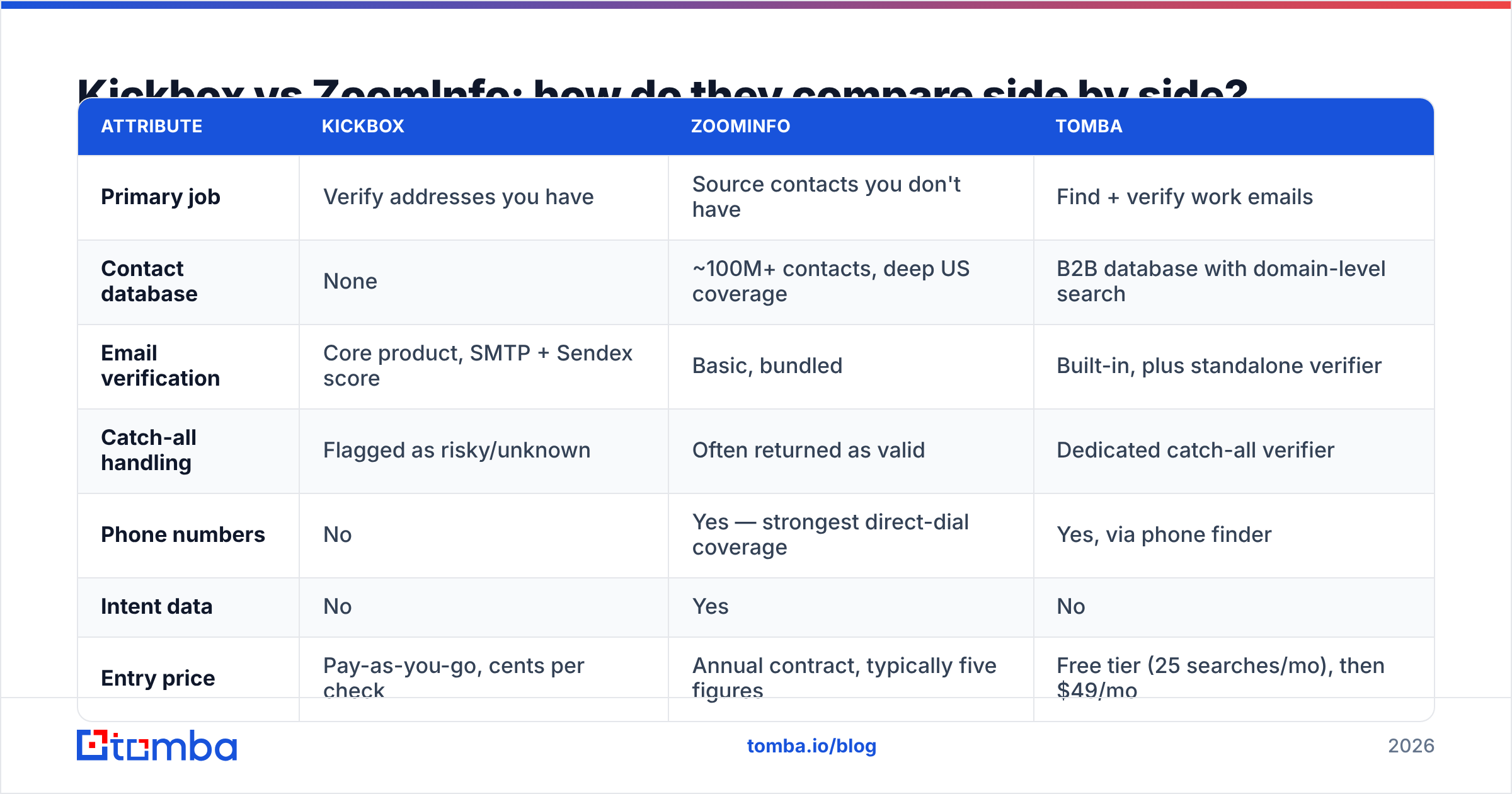
| Attribute | Kickbox | ZoomInfo | Tomba |
|---|---|---|---|
| Primary job | Verify addresses you have | Source contacts you don't have | Find + verify work emails |
| Contact database | None | ~100M+ contacts, deep US coverage | B2B database with domain-level search |
| Email verification | Core product, SMTP + Sendex score | Basic, bundled | Built-in, plus standalone verifier |
| Catch-all handling | Flagged as risky/unknown | Often returned as valid | Dedicated catch-all verifier |
| Phone numbers | No | Yes — strongest direct-dial coverage | Yes, via phone finder |
| Intent data | No | Yes | No |
| Entry price | Pay-as-you-go, cents per check | Annual contract, typically five figures | Free tier (25 searches/mo), then $49/mo |
| Contract | None | Annual, seat minimums | Monthly, cancel anytime |
| Free trial | Free verification batch | Demo + limited trial | Free tier, no card |
| API | Yes, single endpoint | Yes, enterprise tier | Yes, full REST API |
| Best for | List hygiene, signup forms | Enterprise ABM + cold calling | SMB/mid-market outbound and enrichment |
The pattern is clear. Kickbox and ZoomInfo share no core feature at all. They only share the word "data" in their pitch.
Which one is more accurate?#
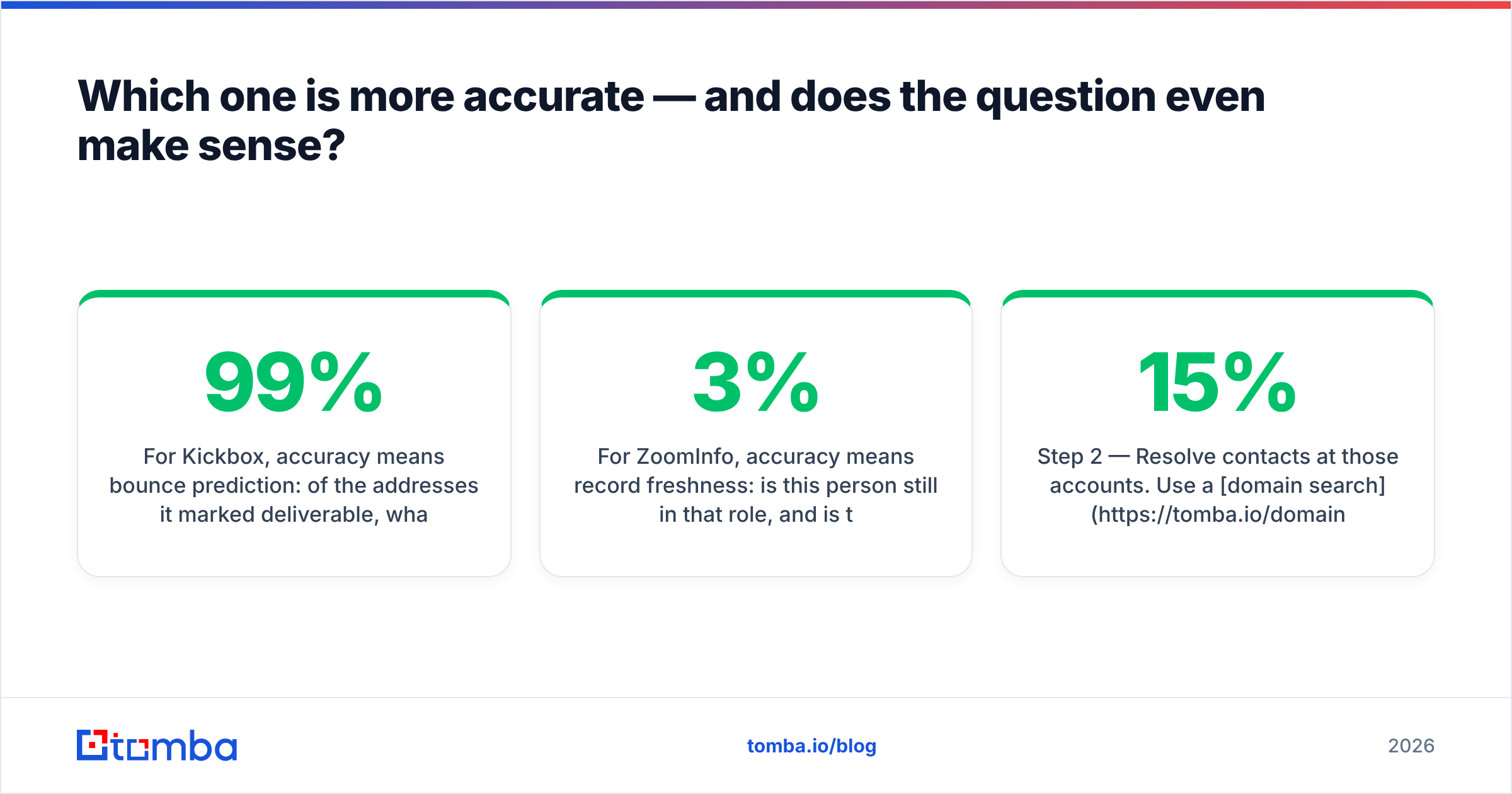
They measure different things. So accuracy means two different numbers here.
For Kickbox, accuracy means bounce prediction. Of the addresses it called deliverable, how many accepted mail? Good verifiers hit 97–99% on clean corporate domains. The honest ones admit that catch-all domains stay unknown until you send. Kickbox plays it safe, and that is a feature. An honest "unknown" beats a false "valid" that burns your sender reputation.
For ZoomInfo, accuracy means record freshness. Is this person still in the role? Is the email still their mailbox? Databases decay by roughly 2–3% per month as people switch jobs. Over a year, a quarter of any static list goes stale. Big databases are not safe from this. Scale makes re-checking by hand impossible.

So the one-vendor dream falls apart. A ZoomInfo export is a snapshot of a moving target. A Kickbox check is a point-in-time test. Neither one alone gives you a contact that is both current and deliverable at the moment you hit send.
Here is the workflow that does solve it:
- Step 1 — Build the account list. Use job boards, funding news, tech-stack filters, event lists, or your own site visitors. People skip this step, then blame the data vendor.
- Step 2 — Find contacts at those accounts. Run a domain search to pull the people and email patterns at each company. That beats paying per record for a list you use 15% of.
- Step 3 — Verify at send time, not at buy time. Run an email verifier right before launch. A check from 60 days ago is decoration.
- Step 4 — Decide on catch-alls yourself. Choose whether you mail them, and from which domain. Do not let a vendor decide quietly for you.
- Step 5 — Suppress and recycle. Push hard bounces into your suppression list. Re-check those contacts next quarter.

What does each option really cost in 2026?#
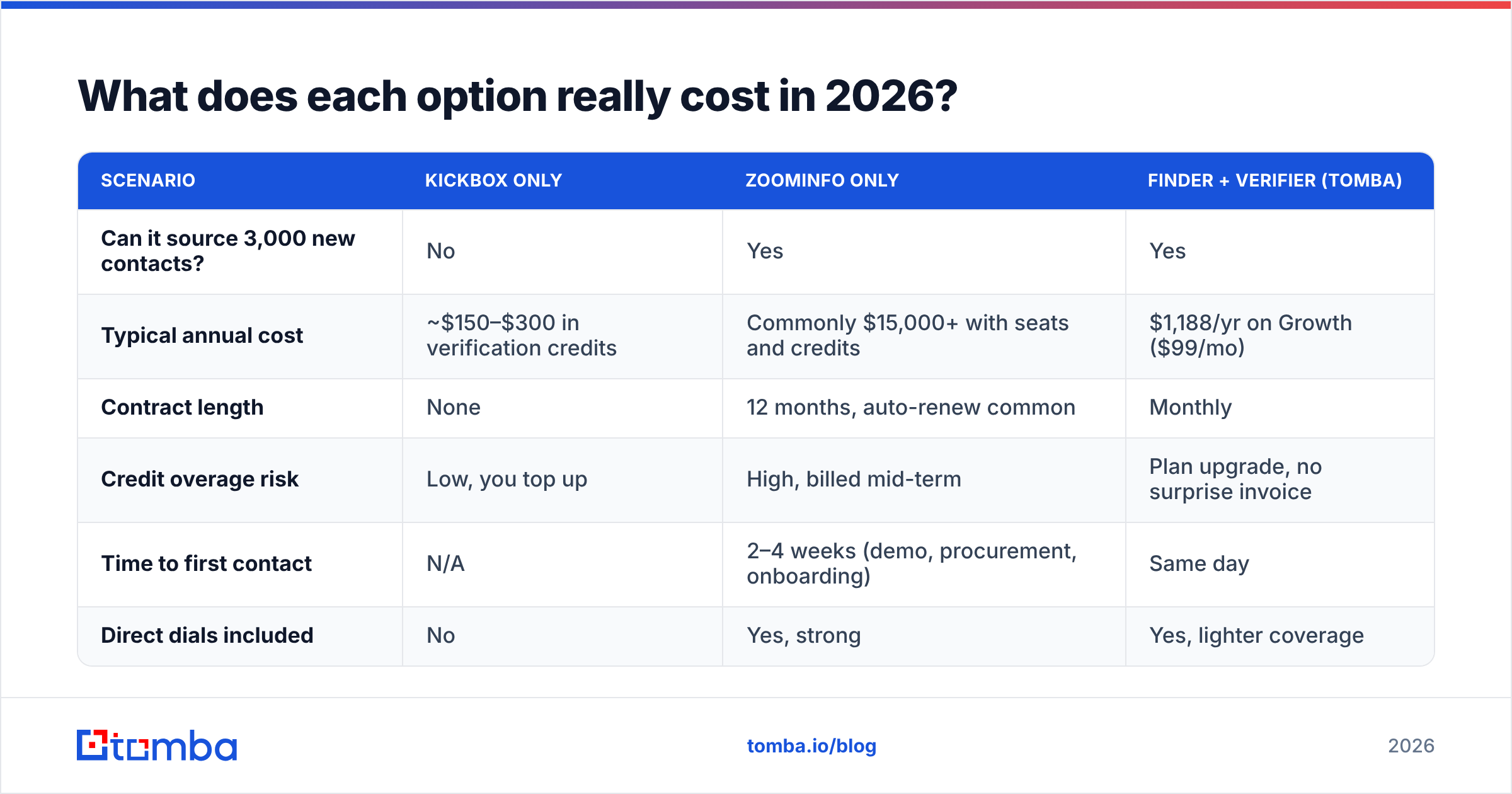
Put real numbers on it. Say a 4-person sales team needs 3,000 fresh, verified contacts per month.
| Scenario | Kickbox only | ZoomInfo only | Finder + verifier (Tomba) |
|---|---|---|---|
| Can it source 3,000 new contacts? | No | Yes | Yes |
| Typical annual cost | ~$150–$300 in verification credits | Commonly $15,000+ with seats and credits | $1,188/yr on Growth ($99/mo) |
| Contract length | None | 12 months, auto-renew common | Monthly |
| Credit overage risk | Low, you top up | High, billed mid-term | Plan upgrade, no surprise invoice |
| Time to first contact | N/A | 2–4 weeks (demo, procurement, onboarding) | Same day |
| Direct dials included | No | Yes, strong | Yes, lighter coverage |
Two honest caveats before you read that as a slam dunk.
First, cold calling may carry more than half your pipeline. If you also sell to North American enterprise, ZoomInfo phone data can pay for itself. Nobody else has the same mobile-number depth. One closed deal can cover the year.
Second, you may run an ESP, a marketplace, or a product with open signups. Then Kickbox at the form level is superb value. Catching a typo before it enters your database costs a fraction of a cent. It also saves you a permanent bounce record.
Who should choose what?#
- Choose Kickbox if you already have lists and your problem is bounce rate, not lead volume. Think old CRM data, newsletter signups, or a list marketing handed you. Add live checks to your signup form and stop the problem at the source.
- Choose ZoomInfo if you are a funded mid-market or enterprise team running ABM. You need intent signals and org charts, cold calling is central, and you have both the budget and a RevOps owner to run the platform. Unused ZoomInfo seats are the most common wasted line item in B2B software.
- Choose a find-and-verify tool if you run lean outbound and already know your target accounts. You need verified work emails without a procurement cycle. That is most people reading this.
- Choose a combination if you mail high volume into mixed-quality data. Source with a finder. Clean with a dedicated verifier. Keep a catch-all verifier on hand for the domains nobody else resolves.
One more note for anyone leaving ZoomInfo. Do not just cancel. Export everything your contract allows first. Then run the file through a bulk verify pass. A stale export is a liability. A verified one is an asset you keep after the contract ends. Also check Tomba pricing against your real per-contact cost. Most teams find their cost per usable contact is 5–10x what they assumed.
Is there a middle path in the Kickbox vs ZoomInfo debate?#
Yes. That is why this comparison usually ends with a third choice.
The gap between the two is the everyday job. "I have 200 target companies and 40 named prospects. Get me their verified work emails today, with no sales call." Kickbox cannot source them. ZoomInfo can, but at a price built for teams ten times your size.
Middle-path tools bundle four steps into one pass: domain discovery, name-plus-domain lookup, pattern detection, and verification. The address you export has already been checked. You give up intent data and deep mobile coverage. You gain speed, clear pricing, and a same-day start. For a team sending a few thousand targeted emails a month, that trade is usually right.
Ready to test the middle path? Start with the Tomba Email Finder — 25 free searches a month, no card, no demo call. Drop in a company domain and pull the verified work emails. Compare the hit rate against what your current vendor charges per record. If it does not beat your ZoomInfo cost per usable contact, you have lost ten minutes.
Related guides#
// get started
Find, verify and enrich your first contacts today
Start on the free plan with 25 searches a month, then scale when your team is ready.
Free plan · No credit card required · GDPR & CCPA
// about the author