Kickscale Pricing, Reviews, Pros and Cons: Honest 2026 Take
Kickscale sells AI meeting intelligence per seat — but the real cost shows up in seat math, recording limits, and what it deliberately does not do. Here's the honest breakdown before you sign.
TL;DR
- Kickscale is an AI meeting-intelligence and sales-enablement platform: it records, transcribes, and analyzes sales calls, then scores them against your playbook. Pricing is per seat, per month, with a free trial and annual discounts.
- The sticker price is not the real price. Seat math is what bites — you pay for every rep whose calls get recorded, and most teams underestimate that number by 30-50%.
- Reviewers consistently praise the multilingual transcription (strong German and European-language coverage) and the playbook scoring. The most common complaints are seat cost at scale, limited native CRM depth versus Gong or Clari, and a smaller integration library.
- Kickscale is not a prospecting tool. It analyzes conversations you already booked. You still need a separate source of verified contact data to fill the calendar.
- Best fit: European mid-market sales teams of 5-40 reps who want coaching and call analysis without Gong-tier contracts. Poor fit: solo founders, teams under 5 reps, or anyone expecting lead sourcing built in.
What is Kickscale and who actually uses it?#
Kickscale is a European AI sales-enablement platform built around meeting recording. A bot joins your Zoom, Teams, or Google Meet call, records it, transcribes it, and produces a structured output: summary, action items, objections raised, talk-time ratio, and a score against whatever sales methodology you configured (MEDDIC, SPIN, BANT, or a custom playbook).
Think of it as a dashcam for sales conversations. You are not buying a recorder — you are buying the review footage and the coaching that comes from watching it. The recording itself is commodity. The analysis layer is the product.
The company is headquartered in Austria, which matters more than it sounds. Two practical consequences:
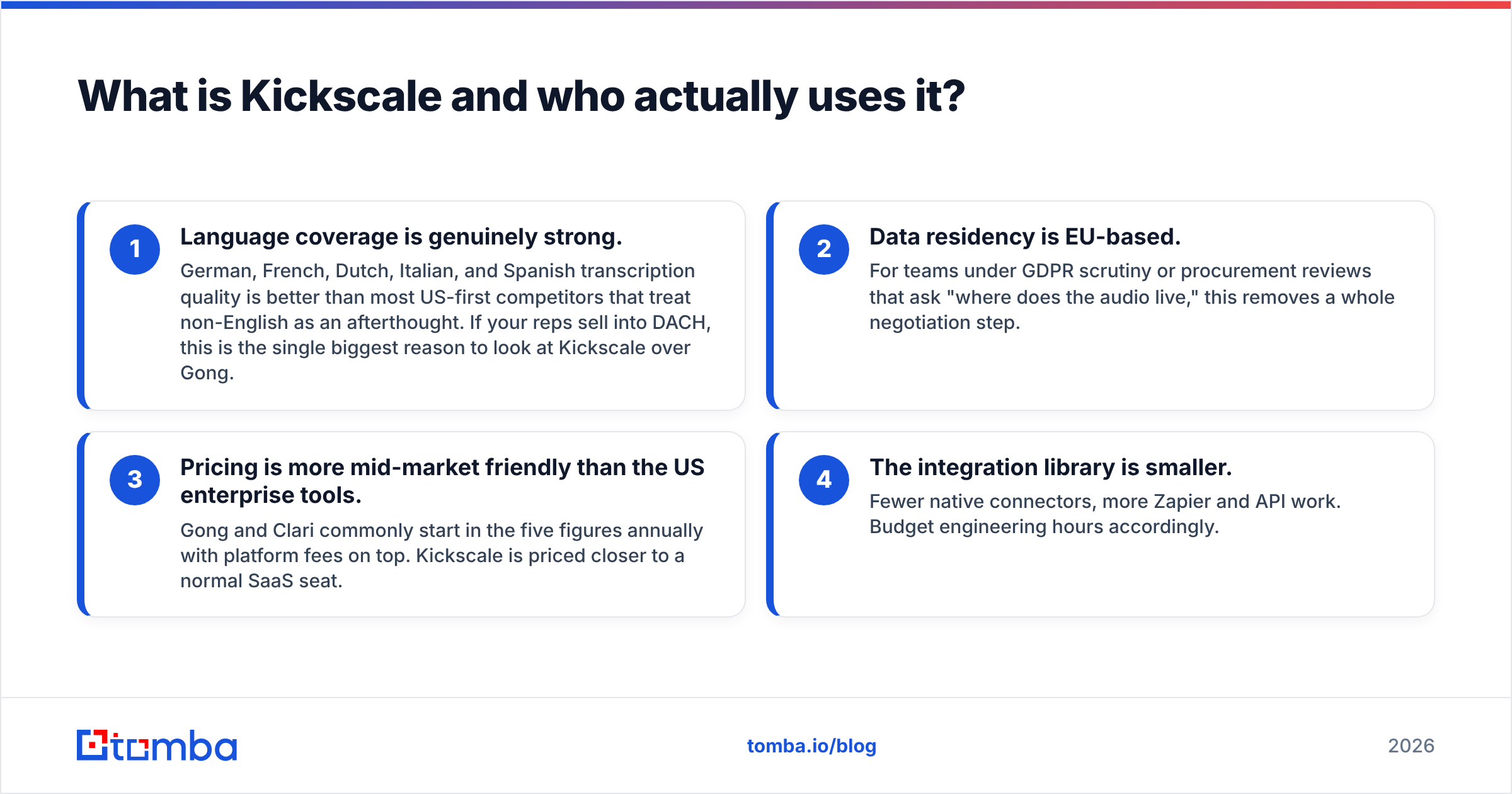
- Language coverage is genuinely strong. German, French, Dutch, Italian, and Spanish transcription quality is better than most US-first competitors that treat non-English as an afterthought. If your reps sell into DACH, this is the single biggest reason to look at Kickscale over Gong.
- Data residency is EU-based. For teams under GDPR scrutiny or procurement reviews that ask "where does the audio live," this removes a whole negotiation step.
- Pricing is more mid-market friendly than the US enterprise tools. Gong and Clari commonly start in the five figures annually with platform fees on top. Kickscale is priced closer to a normal SaaS seat.
- The integration library is smaller. Fewer native connectors, more Zapier and API work. Budget engineering hours accordingly.
Typical buyer: a VP Sales or founder-led sales team with 5-40 reps, running discovery and demo calls in more than one language, who wants consistent coaching without hiring a full-time enablement person.
How does Kickscale pricing actually work in 2026?#
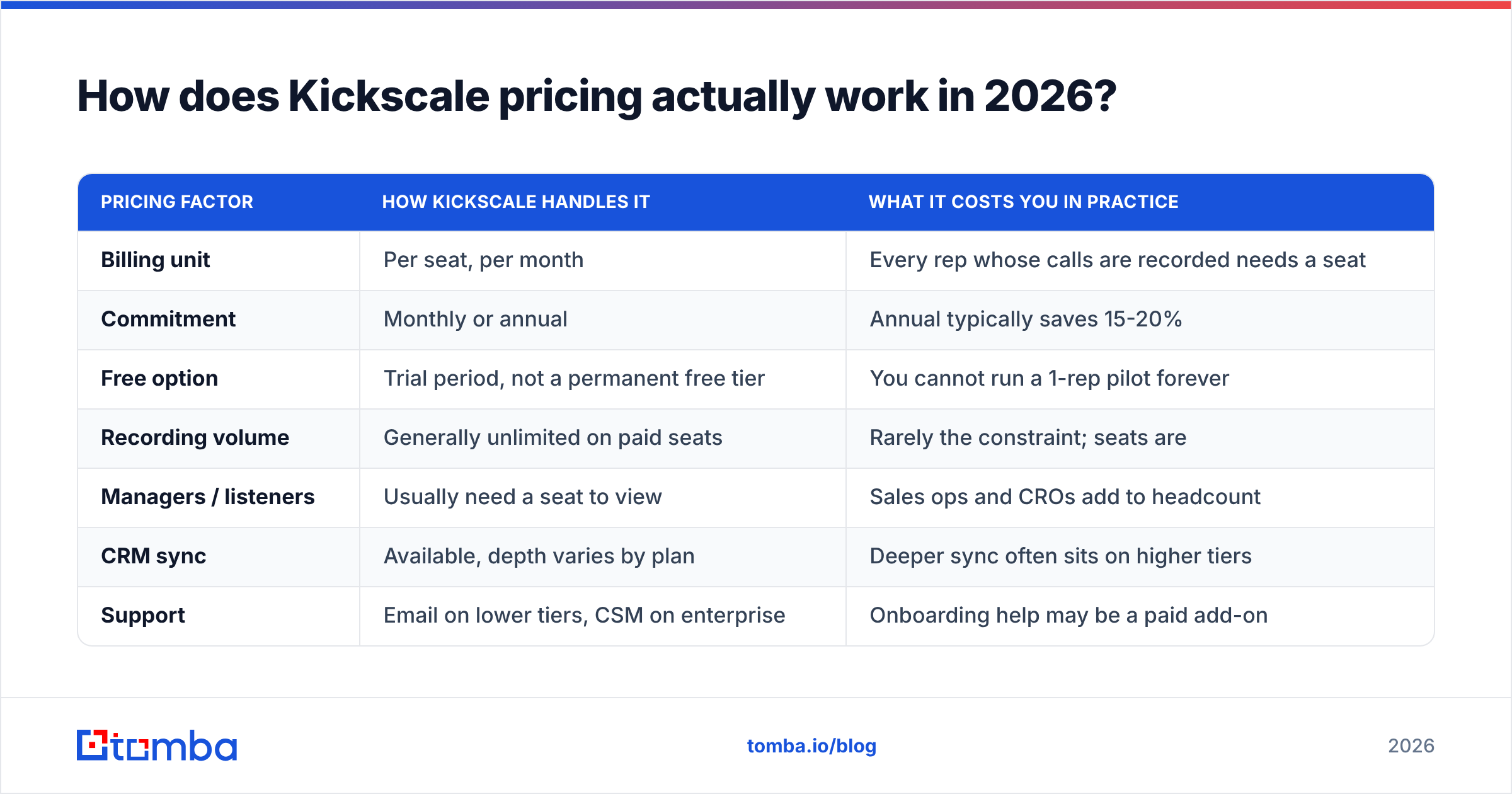
Kickscale prices per user, per month, with tiered plans and a meaningful annual discount. Public pricing has historically sat in the roughly €50-€100 per seat per month range depending on tier and commitment, with enterprise quotes handled through sales. Check kickscale.com directly before you budget — meeting-AI pricing moves fast and vendors reprice quarterly.
The mechanics that matter more than the number:
| Pricing factor | How Kickscale handles it | What it costs you in practice |
|---|---|---|
| Billing unit | Per seat, per month | Every rep whose calls are recorded needs a seat |
| Commitment | Monthly or annual | Annual typically saves 15-20% |
| Free option | Trial period, not a permanent free tier | You cannot run a 1-rep pilot forever |
| Recording volume | Generally unlimited on paid seats | Rarely the constraint; seats are |
| Managers / listeners | Usually need a seat to view | Sales ops and CROs add to headcount |
| CRM sync | Available, depth varies by plan | Deeper sync often sits on higher tiers |
| Support | Email on lower tiers, CSM on enterprise | Onboarding help may be a paid add-on |
The trap is the "manager seat" question. Teams price out 10 reps, sign, then discover the VP, the sales ops analyst, and two team leads also want dashboard access. That is 14 seats, not 10 — a 40% budget overrun in week three. Ask the seat-definition question in writing before you sign: does a person who only views recordings and dashboards, and never has a call recorded, require a paid seat?
The second trap is the pilot-to-rollout cliff. Meeting AI demos beautifully with three enthusiastic reps. The cost curve only gets real at full team rollout, and by then you have already built process around it.
Is Kickscale worth it compared to Gong, Avoma, and Fathom?#
It depends entirely on team size and what you are optimizing for. Here is the honest layout:
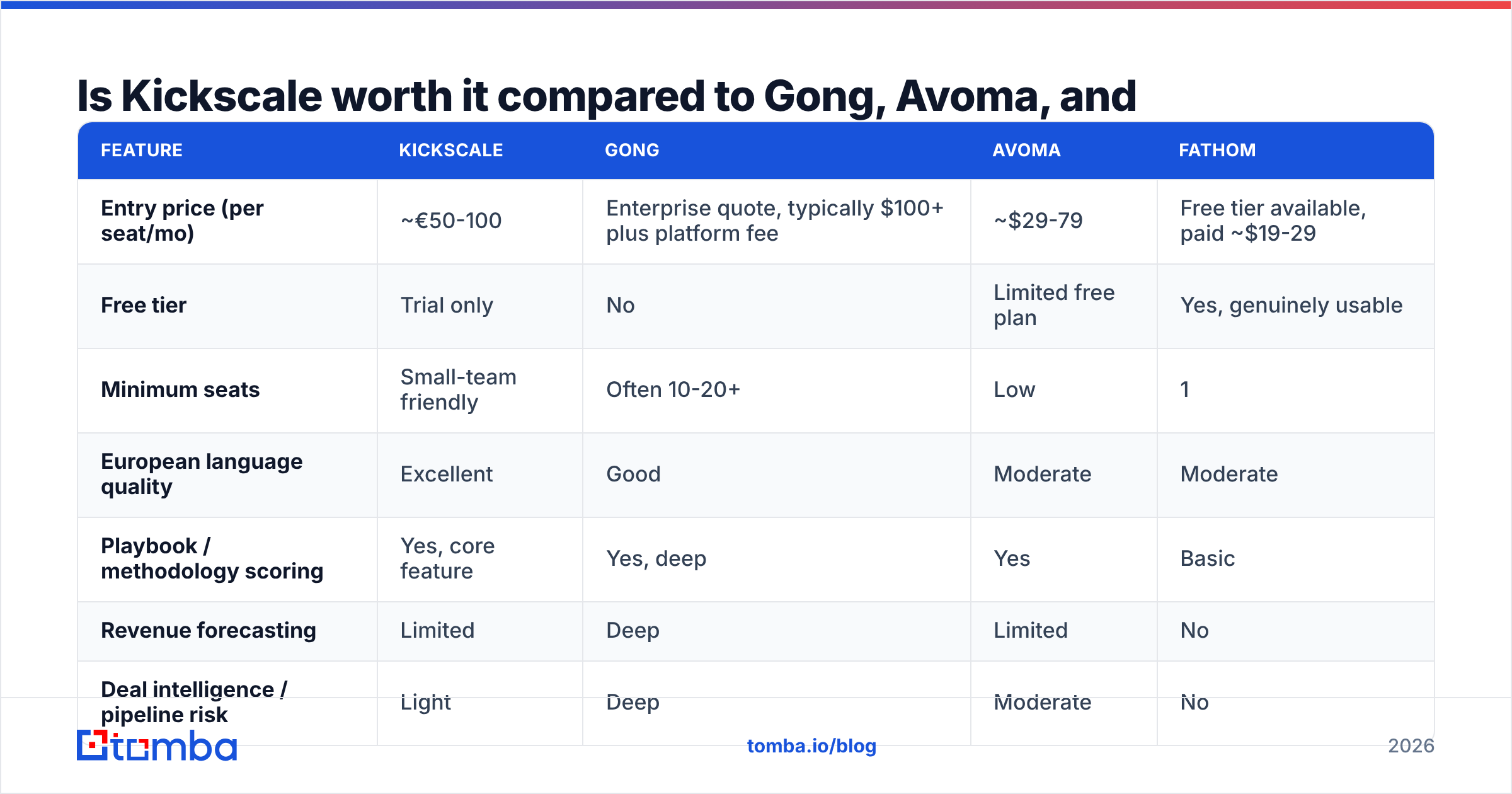
| Feature | Kickscale | Gong | Avoma | Fathom |
|---|---|---|---|---|
| Entry price (per seat/mo) | ~€50-100 | Enterprise quote, typically $100+ plus platform fee | ~$29-79 | Free tier available, paid ~$19-29 |
| Free tier | Trial only | No | Limited free plan | Yes, genuinely usable |
| Minimum seats | Small-team friendly | Often 10-20+ | Low | 1 |
| European language quality | Excellent | Good | Moderate | Moderate |
| Playbook / methodology scoring | Yes, core feature | Yes, deep | Yes | Basic |
| Revenue forecasting | Limited | Deep | Limited | No |
| Deal intelligence / pipeline risk | Light | Deep | Moderate | No |
| Native CRM integrations | Fewer | Extensive | Good | Basic |
| Data residency | EU | US/EU options | US | US |
| Best for | EU mid-market, 5-40 reps | Enterprise revenue teams | Mid-market meeting ops | Solo and small teams |
Read that table as three distinct buying decisions, not one.
If you are a solo founder or a 2-3 person team, Fathom's free tier does 80% of what you need and Kickscale's per-seat model is hard to justify. If you are a 250-rep enterprise with a forecasting problem, Gong's deal intelligence and pipeline analytics are in a different category and the price reflects it — Kickscale will feel thin. If you are a 12-rep team selling in German and English who wants every discovery call scored against MEDDIC, Kickscale is well-positioned and materially cheaper than the enterprise tier. That middle band is where it wins.
Independent reviews on G2 and Capterra are worth reading in raw form rather than in aggregate score — filter to reviews from companies your size, since a 5-rep team and a 200-rep team describe the same product completely differently.
What do reviewers consistently praise?#
Across public review sites and practitioner discussion, the repeatable positives cluster tightly:
- Transcription accuracy in non-English languages. This is the most-cited strength. Teams that tried US-first tools and got mangled German transcripts describe Kickscale as the fix.
- Playbook scoring that is actually configurable. You define what a good call looks like, and calls get scored against it. Reviewers report this as more useful than generic "sentiment" scoring, because it maps to something a manager can coach on Monday.
- Fast onboarding. Days, not a quarter-long implementation. Compared to enterprise revenue-intelligence rollouts, this is a real differentiator.
- Responsive support. Small-vendor advantage. Reviewers report reaching actual humans quickly, which large incumbents cannot match at mid-market price points.
- Meeting prep briefs. Pre-call summaries that pull prior context save reps real time when they run eight calls a day.
What are the real cons and hidden costs?#
Nothing here is disqualifying, but all of it should be priced in before you sign.
1. Seat cost compounds faster than you model. Per-seat pricing means growth is a tax. A team that goes from 10 to 25 reps in a year sees this line item multiply. Model the 18-month cost, not the month-one cost.
2. It analyzes demand, it does not create it. Kickscale improves the calls you already have. It does nothing to fill the calendar. This is the most common mismatch in expectations — buyers hoping for a revenue lift discover that call quality only compounds if call volume exists. That volume comes from prospecting, which means a separate email finder and a clean outbound motion.
3. Integration depth is narrower than incumbents. Fewer native connectors means more Zapier middleware or API work. If your stack is unusual, scope the integration work honestly — an engineer-week is a real cost that never appears on the pricing page.
4. Recording consent is your legal problem, not theirs. Two-party consent jurisdictions, works-council requirements in Germany and Austria, and internal policy all land on you. Some teams get through procurement in a week; others spend two months with legal. Start that conversation before you buy, not after.
5. Forecasting and deal intelligence are light. If your actual pain is "I cannot trust my pipeline number," this is not the tool. That is Gong's and Clari's territory and you will feel the gap.
6. Adoption is the silent killer. Meeting AI has a well-documented shelf-life problem: enthusiastic first month, then managers stop reviewing the scored calls and the tool becomes an expensive transcription service. The cost of a tool nobody opens is 100% of the invoice.
How should you calculate your real Kickscale cost?#
Work through these five numbers before you talk to sales.
- True seat count. Reps with recorded calls, plus managers who need dashboards, plus sales ops, plus anyone in enablement. Multiply by 1.3 for twelve-month growth.
- Annual vs monthly delta. Annual saves real money but removes your exit. If you are unsure about fit, pay the monthly premium for one quarter and treat it as insurance.
- Integration labor. Hours of engineering or ops time to wire it into your CRM and get the fields you actually need. Price at a loaded internal rate.
- Onboarding and enablement time. Reps in training are reps not selling. Two hours per rep is a conservative estimate.
- The opportunity cost line. What else could this budget buy? If your close rate is fine but your pipeline is empty, spending on call analysis is optimizing the wrong half of the funnel.
That last point deserves a blunt statement: if your reps are running fewer than ten meaningful sales conversations a week, a meeting-intelligence tool is premature. There is not enough signal to coach on and not enough volume to justify per-seat spend. Fix top-of-funnel first, then buy the coaching layer.
What should you use alongside Kickscale?#
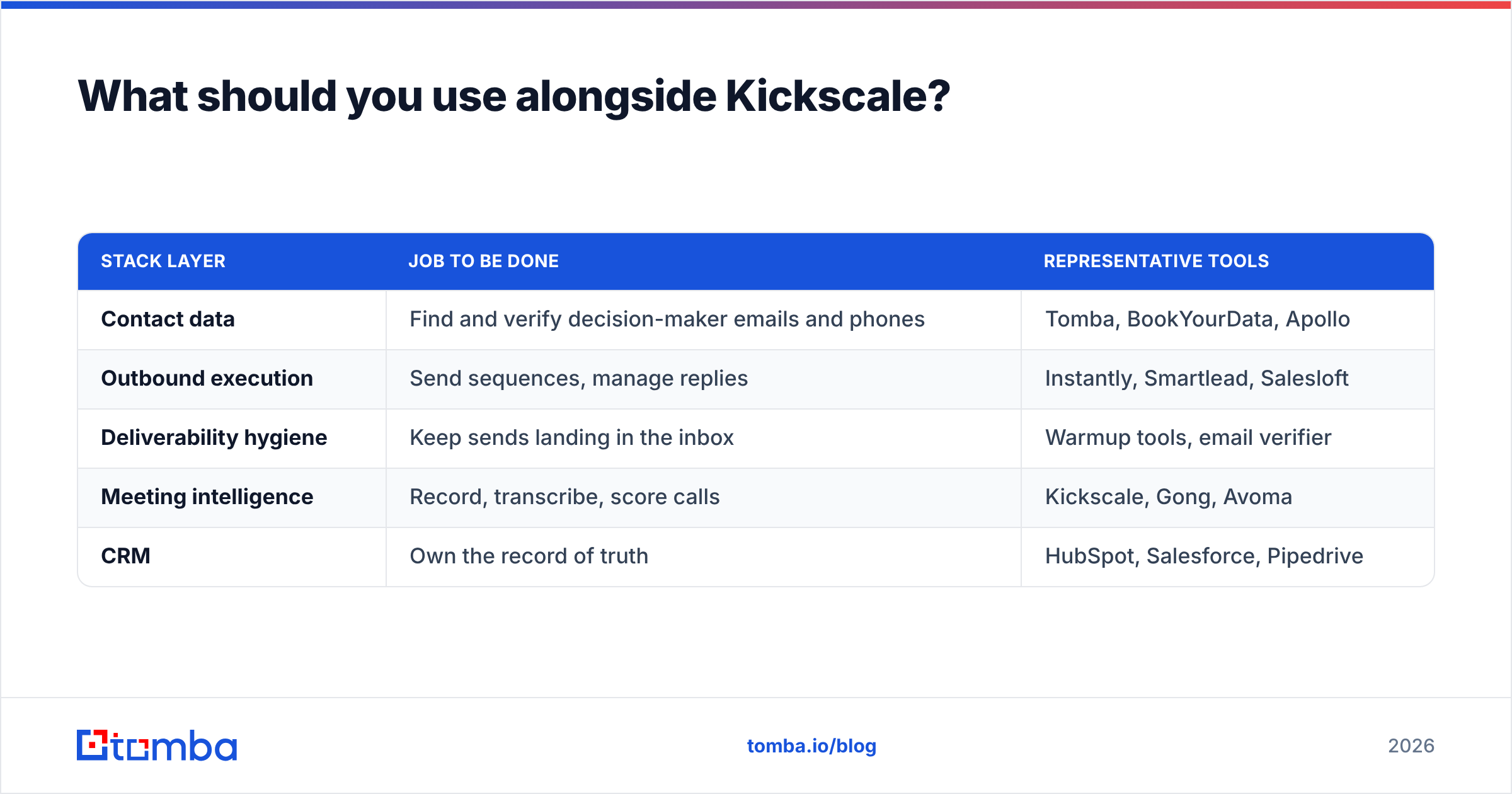
Meeting intelligence sits at the bottom of a stack that has to be fed from the top. A functional 2026 mid-market setup looks like this:
| Stack layer | Job to be done | Representative tools |
|---|---|---|
| Contact data | Find and verify decision-maker emails and phones | Tomba, BookYourData, Apollo |
| Outbound execution | Send sequences, manage replies | Instantly, Smartlead, Salesloft |
| Deliverability hygiene | Keep sends landing in the inbox | Warmup tools, email verifier |
| Meeting intelligence | Record, transcribe, score calls | Kickscale, Gong, Avoma |
| CRM | Own the record of truth | HubSpot, Salesforce, Pipedrive |
The layers are not interchangeable. Buying Kickscale to fix a data problem is like buying a better oven because your grocery delivery never arrives. BookYourData is a solid option if you want pre-built lists with verification baked in; Tomba's domain search and bulk email finder work better when you have a defined target account list and want to build contacts company by company rather than buying in bulk.
For teams doing the math on total stack cost, note the asymmetry: contact data typically costs a fraction of meeting intelligence per seat. Tomba pricing starts free at 25 searches a month, with Starter at $49/mo and Growth at $99/mo — roughly one Kickscale seat funds an entire team's prospecting data. Whether that ratio is right for you depends on which half of the funnel is actually broken.
If you want more detail on how vendors source and maintain contact records, HubSpot's sales enablement resources are a reasonable neutral primer on where these tools fit in a broader revenue process.
Who should buy Kickscale — and who should skip it?#
Buy it if:
- You have 5-40 reps running regular discovery and demo calls.
- You sell in German, Dutch, French, or another European language and transcription quality has burned you before.
- You want methodology-based coaching without an enterprise contract.
- EU data residency is a procurement requirement.
- Your pipeline is healthy and your problem is conversion, not volume.
Skip it if:
- You are under 5 reps — Fathom's free tier or Avoma's entry plan covers you cheaper.
- Your core problem is forecast accuracy — look at Gong or Clari instead.
- Your calendar is empty — fix prospecting first; call analysis of four calls a month teaches you nothing.
- You need deep native integrations with a long tail of niche tools.
- Nobody on the team owns coaching. Without an owner, the scored calls go unreviewed and you are paying for transcripts.
The honest summary: Kickscale is a well-built tool priced sensibly for the segment it targets, with a genuine European-language moat and real limits on the enterprise end. The risk is not that the product disappoints — it is that you buy it to solve a problem it was never built to solve.
Fill the calendar before you optimize the calls#
Kickscale makes good conversations better. It cannot manufacture conversations that never got booked. If your reps have open calendar slots, the bottleneck is upstream — you need verified decision-maker contacts, not another analysis layer.
Start with Tomba Email Finder. Find verified professional email addresses by name, company, or domain, with a free tier that gives you 25 searches a month to test accuracy on your own target accounts before spending anything. Build the pipeline first. Then buy the tool that makes each call count.
Related guides#
// get started
Find, verify and enrich your first contacts today
Start on the free plan with 25 searches a month, then scale when your team is ready.
Free plan · No credit card required · GDPR & CCPA
// about the author