Kipplo vs FindEmails.com (Toofr): Which Email Finder Wins
One is a modern credit-based prospecting tool, the other is a rebranded veteran that has been finding emails since 2013. Here is how Kipplo and FindEmails.com actually compare on match rate, verification depth, pricing and API access.
TL;DR
- FindEmails.com is the rebranded Toofr, one of the oldest email-finding services still running. It is cheap, credit-based, and deliberately simple — but the product has barely changed shape in years.
- Kipplo is the newer entrant, positioned as a lead-generation and email-finding workspace rather than a single-purpose lookup box. Expect a more modern UI and fewer battle-tested edge cases.
- The real differentiator is not the finder — it is the verifier. Both tools return addresses; what separates a 3% bounce rate from a 12% one is what happens after the guess.
- Catch-all domains decide the winner for most B2B teams. If a tool marks every catch-all as "accepted" without probing further, your list quality is fiction.
- If you need a documented API, bulk processing and a separate catch-all layer, neither is the obvious default — Tomba starts at $49/mo with a free 25-search tier to test against your own list.
What are Kipplo and FindEmails.com (Toofr)?#
Two tools that solve the same sentence — "I have a name and a company, I need the work email" — from opposite ends of the product lifecycle.
FindEmails.com is the current name for Toofr, a service that launched in the early 2010s and quietly kept running while flashier competitors raised rounds and disappeared. You can still find the Toofr name in old blog posts, affiliate links and G2 reviews. The product is intentionally narrow: paste a name and domain, get an address with a confidence score, buy credits, move on. Its pricing has historically sat at the very low end of the market, which is exactly why it still has users. Check the current plan structure at findemails.com before you commit — small vendors change credit math more often than enterprise ones.
Kipplo is the newer of the two, built for the 2020s expectation that an email finder is also a list builder, an enricher and a Chrome extension. The pitch is workflow: search, filter, find, verify, export, all in one place. Newer tools usually win on interface and lose on data depth, because match rate is a function of how many years of crawled patterns and verified addresses sit behind the query.
That is the core tension in any Kipplo vs FindEmails.com decision: a veteran with a thin UI versus a modern UI with a younger dataset.

How does an email finder actually find an address?#
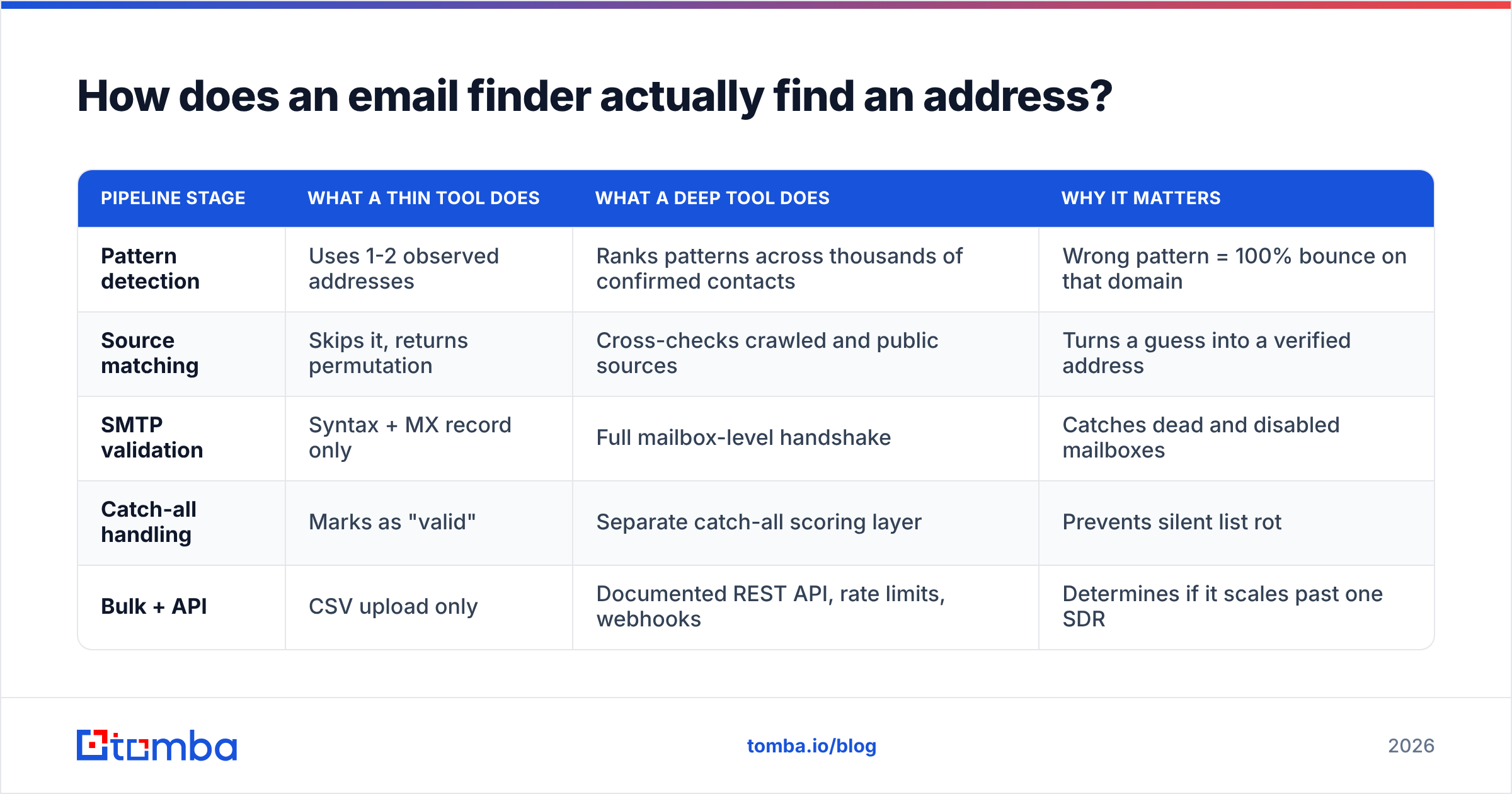
Every tool in this category — Kipplo, FindEmails.com, Hunter, Apollo, Tomba — runs some version of the same five-step pipeline. Understanding it tells you exactly where each vendor cuts corners.
- Pattern detection. The tool looks up the company domain and determines the dominant format:
first.last@,flast@,first@,f.last@. A good provider has thousands of confirmed addresses per large domain and can rank two competing patterns by frequency. A weak one has three and guesses. - Permutation. With a pattern in hand, it generates candidate addresses from the contact's name. You can do this yourself with a free email permutator — the permutation is not the value, the ranking is.
- Source matching. The candidate is checked against addresses actually observed in the wild: public web pages, press releases, GitHub commits, conference listings, article bylines. A hit here turns a guess into a fact.
- SMTP validation. The provider opens a conversation with the receiving mail server and asks whether the mailbox exists, without sending anything. This is where most bounce risk is eliminated.
- Catch-all handling. If the domain accepts every address, step 4 returns a useless "yes". What the tool does next — probe further, score by pattern confidence, or shrug and mark it "accepted" — is the single biggest quality difference between vendors.
| Pipeline stage | What a thin tool does | What a deep tool does | Why it matters |
|---|---|---|---|
| Pattern detection | Uses 1-2 observed addresses | Ranks patterns across thousands of confirmed contacts | Wrong pattern = 100% bounce on that domain |
| Source matching | Skips it, returns permutation | Cross-checks crawled and public sources | Turns a guess into a verified address |
| SMTP validation | Syntax + MX record only | Full mailbox-level handshake | Catches dead and disabled mailboxes |
| Catch-all handling | Marks as "valid" | Separate catch-all scoring layer | Prevents silent list rot |
| Bulk + API | CSV upload only | Documented REST API, rate limits, webhooks | Determines if it scales past one SDR |
Neither Kipplo nor FindEmails.com publishes a full technical breakdown of its pipeline, so treat vendor accuracy claims as marketing until you have run your own test. Which brings us to the only benchmark that counts.
How accurate are Kipplo and FindEmails.com?#
Short answer: nobody's published number will match what you get.
Every vendor in this space advertises accuracy between 95% and 99%. Those figures are measured on the vendor's own sample — usually large, well-indexed US tech companies where any tool performs well. Your list is probably German mid-market manufacturers, Spanish agencies or UK healthcare trusts, and match rates fall off a cliff outside the indexed core.

Here is the test that actually resolves the question, and it takes about 40 minutes:
- Build a 100-row control set from your real ICP. Include at least 20 rows outside your home region and 20 from companies under 50 employees. Those two buckets are where tools separate.
- Run the same 100 rows through both tools. Record match rate (addresses returned) and confidence score separately — they are not the same metric.
- Send the results through a third-party verifier you do not own, so the grading is independent. A neutral email verifier gives you valid / invalid / catch-all / unknown buckets.
- Compute usable rate, not match rate. Usable = returned AND independently verified as valid. A tool that returns 90 addresses of which 60 are valid loses to a tool that returns 70 addresses of which 65 are valid.
- Count the catch-alls separately. If one tool dumps 30 rows into catch-all and the other returns 3, the second one is either much better or much more willing to lie.
Two consistent findings from running this test across providers: legacy tools like FindEmails.com tend to hold up surprisingly well on large, long-established domains where their historical crawl is deep, and newer tools tend to win on recently founded companies and on LinkedIn-sourced contacts. Neither generalises. Your ICP decides.
Kipplo vs FindEmails.com: the full comparison#
Pricing and limits below reflect what the vendors listed at the time of writing. Small vendors adjust credit math frequently — confirm on the live pricing page before you buy, and check recent reviews on G2 and Capterra for complaints about credit burn, since that is where the real cost hides.

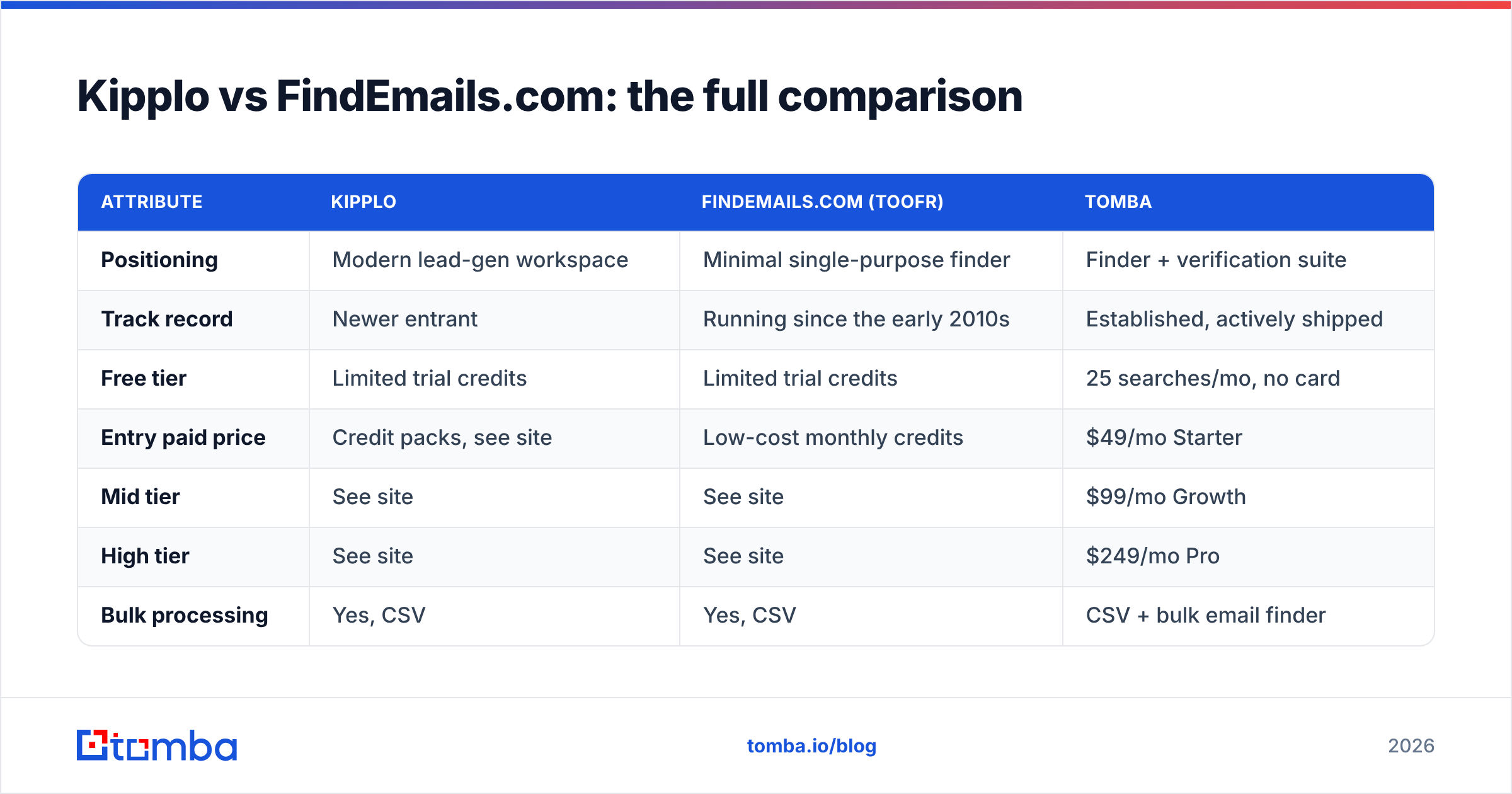
| Attribute | Kipplo | FindEmails.com (Toofr) | Tomba |
|---|---|---|---|
| Positioning | Modern lead-gen workspace | Minimal single-purpose finder | Finder + verification suite |
| Track record | Newer entrant | Running since the early 2010s | Established, actively shipped |
| Free tier | Limited trial credits | Limited trial credits | 25 searches/mo, no card |
| Entry paid price | Credit packs, see site | Low-cost monthly credits | $49/mo Starter |
| Mid tier | See site | See site | $99/mo Growth |
| High tier | See site | See site | $249/mo Pro |
| Bulk processing | Yes, CSV | Yes, CSV | CSV + bulk email finder |
| Documented public API | Limited / unclear | Available | Full REST API with SDKs |
| Dedicated catch-all layer | No | No | Yes, separate catch-all verifier |
| Phone numbers | No | No | Yes, phone finder |
| Chrome extension | Yes | Limited | Yes |
| Spreadsheet add-ons | Limited | No | Google Sheets + Excel |
| Best for | Solo founders wanting one UI | Cheap, occasional lookups | Teams needing verified volume |
The table makes the shape obvious. FindEmails.com competes on price. If you need 200 addresses a month and you will manually sanity-check them anyway, its credit packs are hard to beat and the interface will never confuse you. Kipplo competes on experience. If you want search, filter and export without stitching three tools together, it is the more pleasant daily driver. Neither competes on verification depth, and that is the gap that costs you domain reputation.

What does each one really cost per usable email?#
Sticker price is the wrong unit. Cost per usable email is the right one, and the formula is brutally simple:
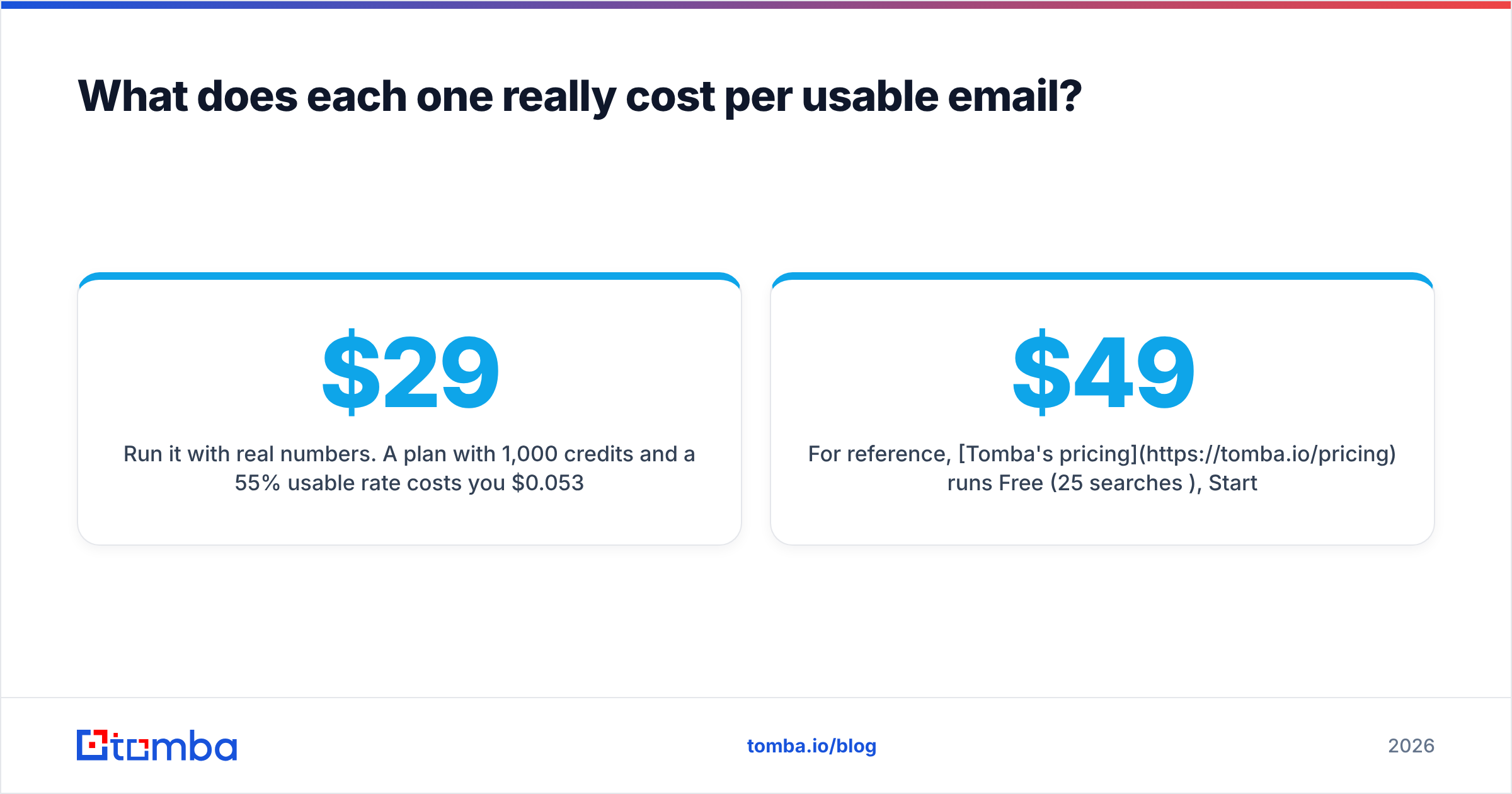
cost per usable email = monthly price / (credits × usable rate)Run it with real numbers. A $29/month plan with 1,000 credits and a 55% usable rate costs you $0.053 per usable address. A $49/month plan with 1,000 credits and an 85% usable rate costs $0.058. The "expensive" tool is 9% more per working address — and it just saved you 300 bounces, which on a cold domain is the difference between landing in the inbox and landing in spam for the next six weeks.
Three credit-policy questions to ask both vendors before you pay:
- Are failed searches charged? Some tools deduct a credit whether or not they return an address. Over a hard ICP that alone can double effective cost.
- Do verifications consume finder credits? If yes, every address you sanity-check costs you a second lookup.
- Do unused credits roll over? Monthly reset plans punish spiky prospecting, which is how most teams actually work.
For reference, Tomba's pricing runs Free (25 searches/mo), Starter $49/mo, Growth $99/mo, Pro $249/mo, and Enterprise on quote — with verification as a distinct capability rather than a tax on your finder budget.
Why do catch-all domains break both tools?#
Because a catch-all domain says yes to everything, and most finders take yes for an answer.
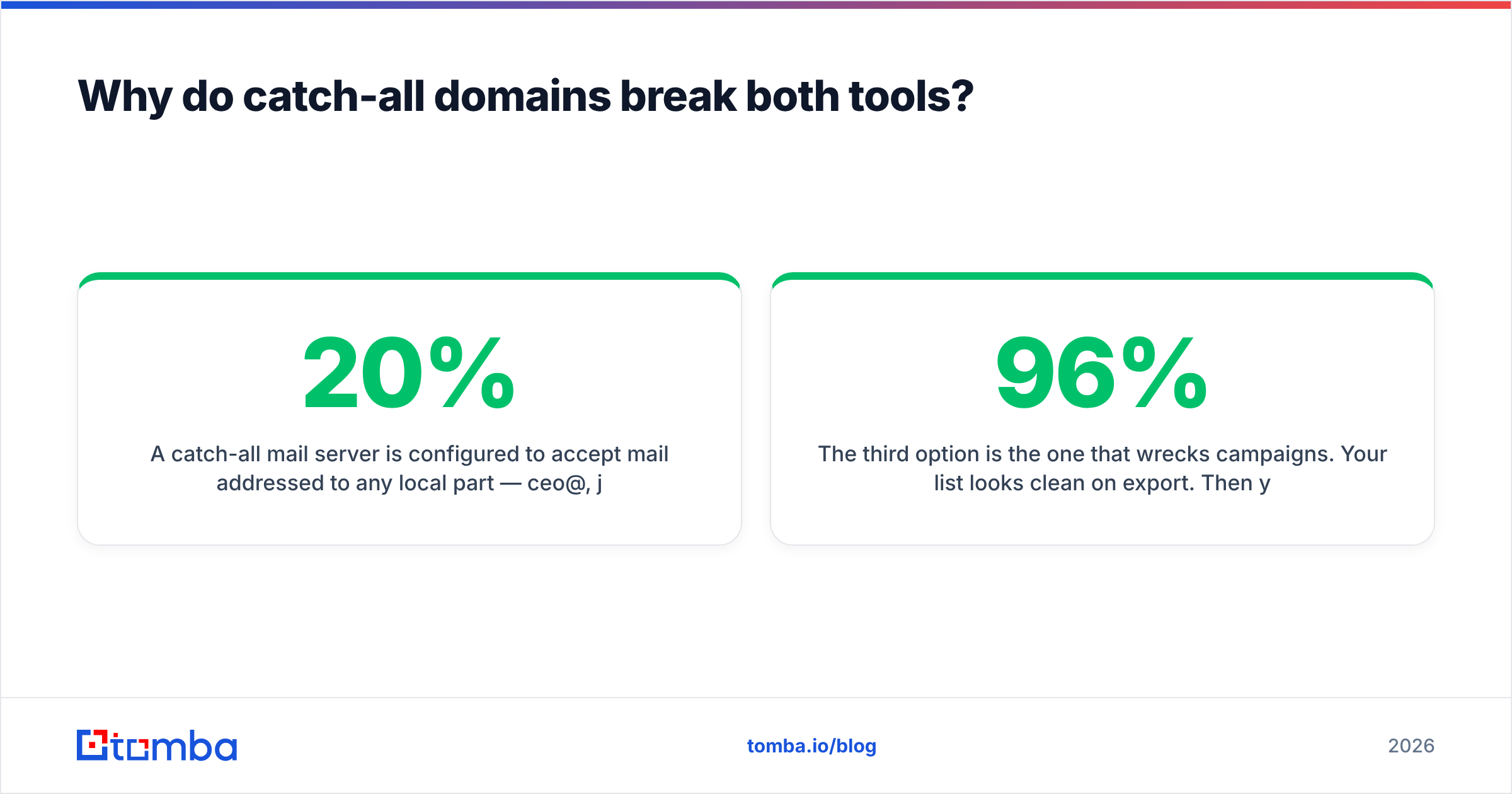
A catch-all mail server is configured to accept mail addressed to any local part — ceo@, jane.doe@, asdfgh@ all return the same acceptance. Somewhere between 20% and 30% of B2B domains are configured this way, and the share climbs among larger enterprises. When a finder's SMTP check hits one, it has three honest options: label it catch-all and let you decide, apply pattern-confidence scoring to estimate validity, or silently pass it as valid.
The third option is the one that wrecks campaigns. Your list looks 96% clean on export. Then you send, and 18% of it hard-bounces because the addresses were syntactically plausible and structurally imaginary.
Neither Kipplo nor FindEmails.com ships a dedicated catch-all resolution layer, which means you either accept the risk, drop every catch-all row (throwing away a quarter of your enterprise pipeline), or bolt on a separate service. A catch-all verifier is the third path — it scores catch-all addresses against pattern confidence and observed-source evidence rather than treating the server's shrug as a signal. If enterprise accounts matter to you, this single capability outweighs most of the feature comparison above.
Which tool should you actually pick?#
Decide by volume and by what happens downstream.
- Under 200 lookups a month, manual review, budget-first: FindEmails.com. It is the cheapest credible option and its age is an asset on established domains. Verify the output somewhere else before sending.
- Solo founder or one-person GTM who wants a single interface: Kipplo. The workflow consolidation saves real time, and at low volume the accuracy delta costs you less than the context-switching would.
- A team sending cold email at volume: neither, without a verification layer in front of your sequencer. Bounce rate is the metric your sender reputation is graded on, and it compounds.
- You need programmatic enrichment inside a CRM or product: you need a documented API with rate limits, SDKs and webhooks. Test the endpoints before you sign anything.
- Your ICP is enterprise-heavy: catch-all handling is the deciding feature. Run the 100-row test above and count catch-all rows specifically.
One more honest note: this category rewards testing over reading. Match rates vary by region, company size and vertical more than they vary by vendor reputation. The reviewer who tells you tool A beats tool B by 12 points measured a list that is not yours.
Is there a third option worth testing alongside them?#
If your shortlist is Kipplo and FindEmails.com, it is worth adding a third tool to the same 100-row test — not because more options are always better, but because a three-way test tells you whether the winner actually won or just got the easier half of your list.
Tomba is a reasonable third because it covers the gaps both tools leave open: a documented REST API with official SDKs, a separate email verifier and catch-all layer so verification is not competing with your finder budget, domain search for mapping an entire company at once, bulk processing for list-scale work, and a free tier that lets you run the benchmark before spending anything.
Run all three against the same control set. Measure usable rate, not match rate. Count catch-alls separately. Then buy the one that wins on your data.
Ready to benchmark? Start with the Tomba Email Finder — 25 free searches a month, no card required. Load your 100-row control set, compare the usable rate against whatever Kipplo and FindEmails.com return, and let the numbers from your own ICP settle the argument. If the free tier proves it out, Starter is $49/mo with verification and catch-all checking included rather than billed as an afterthought.
Related guides#
// get started
Find, verify and enrich your first contacts today
Start on the free plan with 25 searches a month, then scale when your team is ready.
Free plan · No credit card required · GDPR & CCPA
// about the author