Kipplo vs Reachfast: Which Email Finder Wins in 2026?
Kipplo and Reachfast both promise verified B2B contacts, but they solve different problems. Here is how they compare on accuracy, credit math, API depth, and cost per usable contact — plus how to run a 100-lead test before you commit.
TL;DR
- Kipplo and Reachfast sit in the same category but optimise differently: Kipplo leans toward prospecting workflows and list building, Reachfast leans toward contact lookup and direct-dial style retrieval. Neither is a drop-in replacement for the other.
- Headline price is the wrong comparison. The number that matters is cost per usable contact — price divided by the leads that actually resolve, verify, and land in an inbox.
- Both vendors change plans, credit rollover rules, and coverage regularly. Treat every published figure (including anything in this post) as a starting point and confirm on the live pricing page before you pay.
- The only honest way to choose is a controlled 100-lead bake-off on your own ICP, scored on hit rate, bounce rate, and time-to-list.
- If you need a finder plus verification, catch-all handling, and an API in one bill, Tomba is worth adding as a third column in your test — the free tier gives you 25 searches to run the comparison without a credit card.
What are Kipplo and Reachfast?#
Both tools answer the same question a rep asks fifty times a day: what is this person's work email, and will it bounce?
Think of them as two different libraries. One is organised by shelf — you walk in with a company and walk out with everyone who works there. The other is organised by card catalogue — you walk in with a specific person's name and walk out with their details. Same building, different retrieval model.
Kipplo positions itself around prospecting throughput: you start from a company, a domain, or a filtered list, and the product's job is to hand you a working list quickly. That shape favours SDR teams building weekly lists and agencies producing lead files for clients.
Reachfast positions itself around lookup depth on a known individual: you already know who you want, and the product's job is to return the richest possible contact record for that person. That shape favours recruiters, founders doing precision outbound, and anyone whose target list is short but high-value.
The distinction matters more than any feature checklist, because it determines which one will feel "inaccurate" to you. A lookup-first tool tested on bulk list building will look sparse. A list-first tool tested on ten hard-to-find executives will look shallow. Most negative reviews of both products are really reviews of a mismatch.
How do Kipplo and Reachfast compare head-to-head?#
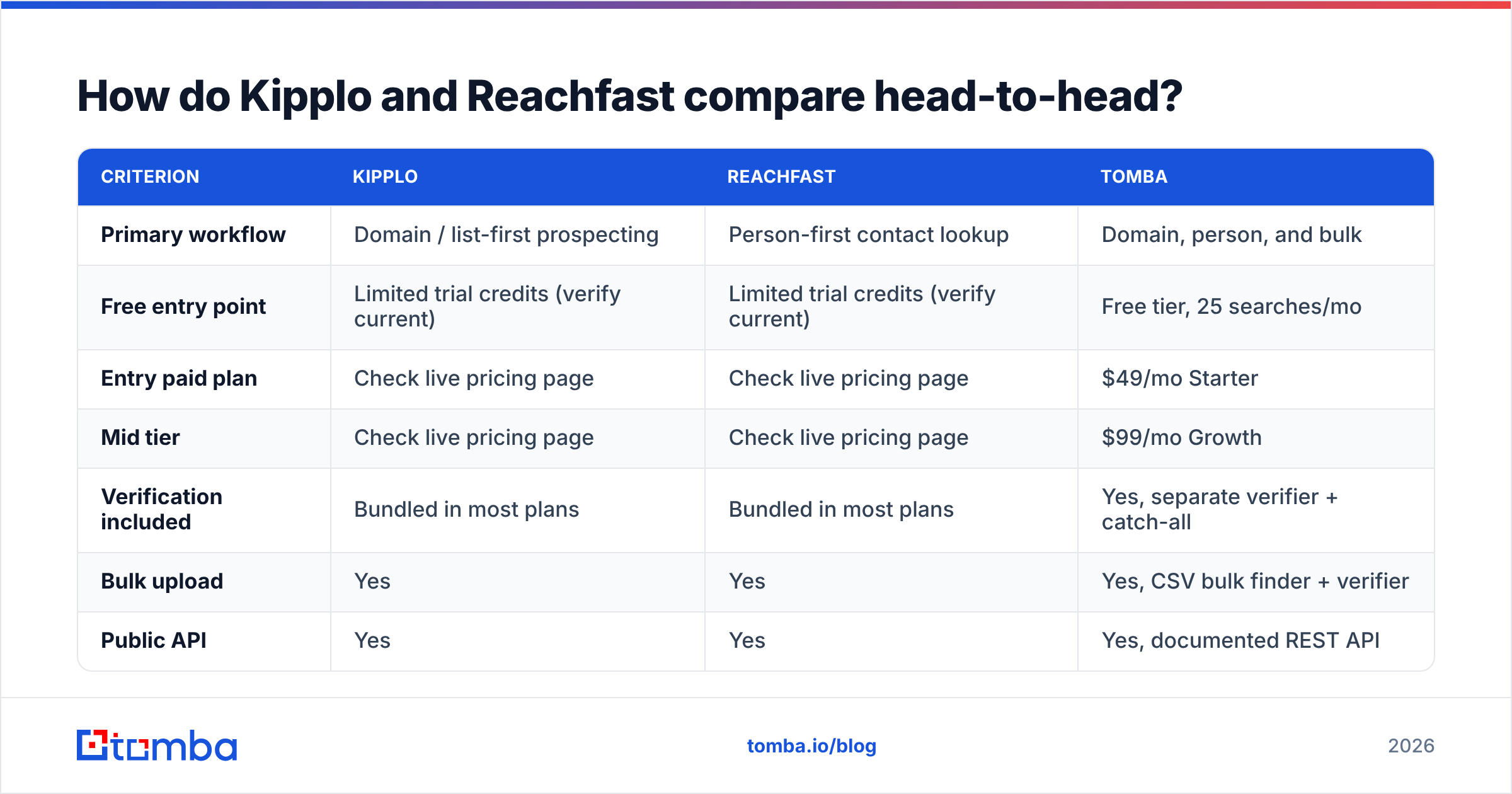
Here is the structured comparison. The Tomba column is included because it is the reference point this blog knows best, and because its numbers are fixed and public.
| Criterion | Kipplo | Reachfast | Tomba |
|---|---|---|---|
| Primary workflow | Domain / list-first prospecting | Person-first contact lookup | Domain, person, and bulk |
| Free entry point | Limited trial credits (verify current) | Limited trial credits (verify current) | Free tier, 25 searches/mo |
| Entry paid plan | Check live pricing page | Check live pricing page | $49/mo Starter |
| Mid tier | Check live pricing page | Check live pricing page | $99/mo Growth |
| Verification included | Bundled in most plans | Bundled in most plans | Yes, separate verifier + catch-all |
| Bulk upload | Yes | Yes | Yes, CSV bulk finder + verifier |
| Public API | Yes | Yes | Yes, documented REST API |
| Credit consumption on a miss | Varies by plan — confirm | Varies by plan — confirm | Not charged for unfound results |
| Best fit | Repeatable list building | Hard-to-find individuals | Teams that need both + API |
Two things about that table deserve emphasis.
First, the rows I left as "check live pricing page" are deliberate. Both vendors have revised their packaging more than once, and publishing a stale dollar figure would be worse than publishing none. Open both pricing pages side by side before you decide, and screenshot them — credit definitions change quietly.
Second, the credit consumption on a miss row is the sleeper. A tool that charges you for a "not found" result at 40% miss rate is effectively 1.67x its sticker price. Ask both vendors this question in writing before you sign anything annual.

Which one actually finds more valid emails?#
Neither one, universally. Accuracy is a function of your list, not the vendor's marketing page.
Every email finder assembles results from some blend of crawled public sources, contributed data, pattern inference, and SMTP-level checks. Coverage therefore concentrates where the underlying sources concentrate. In practice that means:
- US and Western European mid-market domains are well covered by nearly every vendor, including both of these. Expect high hit rates and small differences between tools.
- APAC, LATAM, and MENA domains show the widest spread between vendors. This is where a 20-point hit-rate gap can appear on the same 100 names.
- Sub-50-employee companies are harder for list-first tools and easier for lookup-first tools, because there is less structured firmographic data to key off.
- Catch-all domains are the great equaliser. Roughly a fifth of B2B domains accept everything at the SMTP layer, so no verifier can return a simple valid/invalid. How a tool labels these — "risky", "accept-all", or silently "valid" — changes your measured accuracy dramatically. A tool that calls every catch-all "valid" will look the most accurate and bounce the hardest.
- Role and generic addresses (info@, sales@, hello@) inflate hit rates without inflating replies. Exclude them before you score anything.
If you want to understand the mechanics underneath, the Simple Mail Transfer Protocol spec explains why a mail server can accept a recipient at handshake time and still discard the message later. That gap is the reason "verified" is a probability, not a guarantee, at every vendor in this category.
How should you test Kipplo vs Reachfast before you pay?#
Run the same 100 contacts through both. It takes about ninety minutes and it settles the argument permanently.
- Build the sample from closed-won accounts. Pull 100 contacts that resemble your best customers, not a random export. If a tool wins on your actual ICP, that is the only result that generalises.
- Split the sample deliberately. 50 easy (mid-market, US/EU, common titles), 50 hard (small companies, non-English domains, niche roles). Score the halves separately — the aggregate number hides everything interesting.
- Score three metrics, not one. Hit rate (addresses returned ÷ contacts submitted), validity rate (addresses that survive independent verification ÷ addresses returned), and usable rate (the product of the two). Usable rate is the only one that predicts pipeline.
- Verify with a third party. Never score a vendor's output with the same vendor's verifier. Run both result sets through a neutral email verifier so the grading is independent of the grader.
- Time the workflow. Log minutes from raw list to enriched CSV including manual cleanup. A tool that wins on hit rate by 5 points but costs an extra hour per list loses on any team where rep time is the scarce resource.
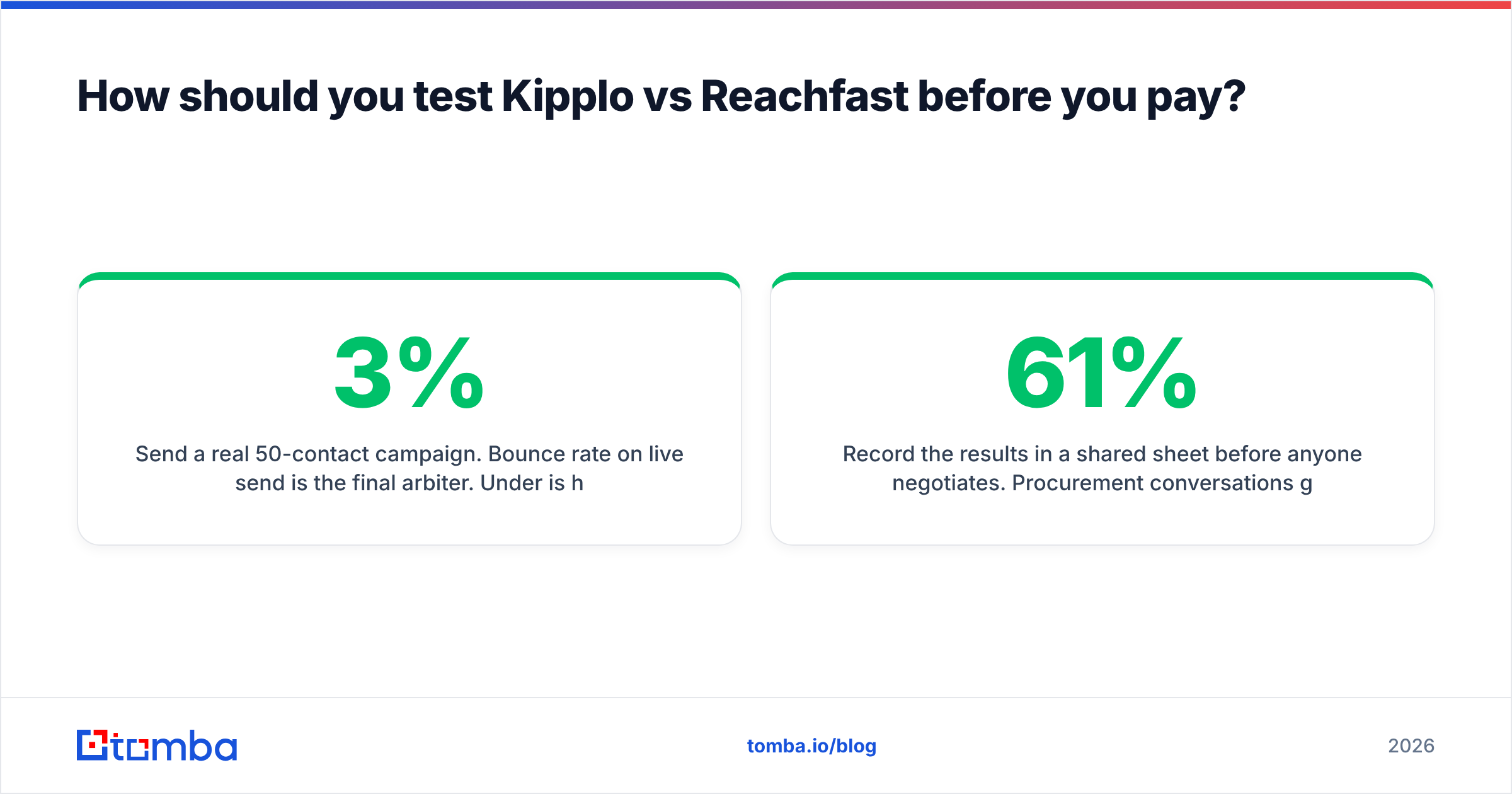
- Send a real 50-contact campaign. Bounce rate on live send is the final arbiter. Under 3% is healthy; above 5% means the verification layer is not doing its job regardless of what the dashboard said.
Record the results in a shared sheet before anyone negotiates. Procurement conversations go very differently when you can say "your usable rate on our ICP was 61%, theirs was 74%."
What does each one really cost per usable contact?#
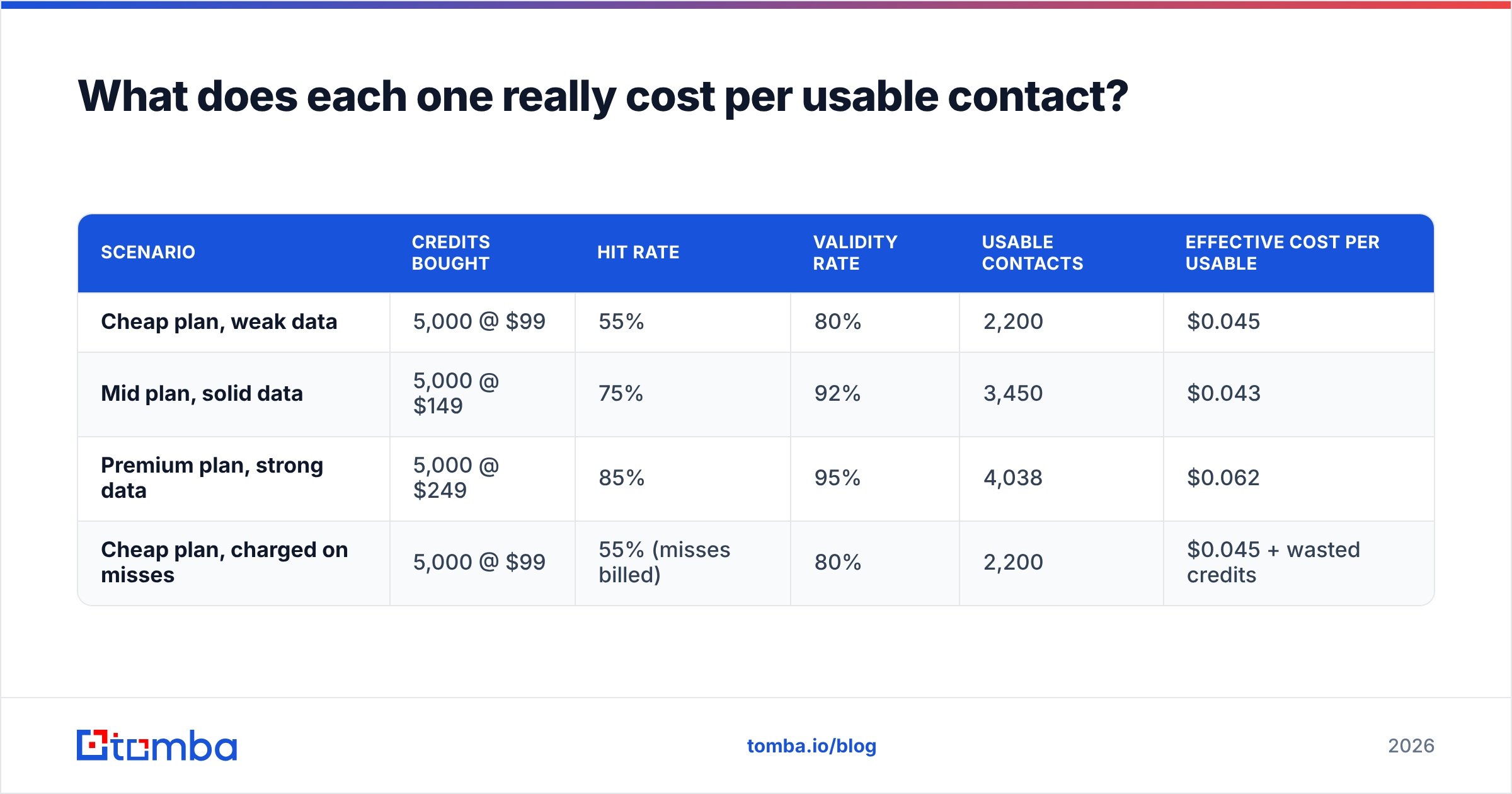
Here is the arithmetic that vendors never put on a pricing page.
| Scenario | Credits bought | Hit rate | Validity rate | Usable contacts | Effective cost per usable |
|---|---|---|---|---|---|
| Cheap plan, weak data | 5,000 @ $99 | 55% | 80% | 2,200 | $0.045 |
| Mid plan, solid data | 5,000 @ $149 | 75% | 92% | 3,450 | $0.043 |
| Premium plan, strong data | 5,000 @ $249 | 85% | 95% | 4,038 | $0.062 |
| Cheap plan, charged on misses | 5,000 @ $99 | 55% (misses billed) | 80% | 2,200 | $0.045 + wasted credits |
The illustrative point: the cheapest plan is almost never the cheapest outcome, and the most expensive plan is not automatically the worst value either. What kills budgets is the fourth row — paying for misses at a low hit rate, which quietly doubles your real unit cost while the invoice stays the same.
Plug your own measured hit and validity rates from the 100-lead test into that table. Whichever of Kipplo or Reachfast produces the lower cost-per-usable number on your ICP is your answer, and it may not be the one with the friendlier pricing page.

Which should you choose for your use case?#
- High-volume SDR team building weekly lists → favour the list-first model. You care about throughput, bulk email finder workflows, dedupe, and CRM push. Kipplo's shape fits this better out of the box.
- Recruiter or founder doing precision outbound → favour the lookup-first model. You care about depth on individuals and the ability to crack the 5% of contacts nobody else returns. Reachfast's shape fits this better.
- Agency running lists for multiple clients → whichever tool gives you non-expiring credits and seat-level separation. Ask about credit rollover explicitly; monthly expiry is brutal for lumpy agency workloads.
- Engineering-led GTM with an enrichment pipeline → API quality outranks UI quality. Check rate limits, webhook support, latency under batch load, and whether the sandbox returns realistic data. Skim independent review volume on G2's sales intelligence category and Capterra's lead generation listings for patterns in what breaks at scale.
- Budget under $100/month → you likely cannot afford a miss-billed plan at a mediocre hit rate. Prioritise tools that do not charge for unfound results.
Where does Tomba fit in the comparison?#
Honest framing: Tomba is not a better version of either tool. It is a different bundle.
Kipplo and Reachfast each specialise. Tomba's pitch is that finding, verifying, catch-all handling, and enrichment sit on one bill and one API key, which matters when your bottleneck is integration overhead rather than raw coverage. The email finder handles domain, name, and company lookups; the catch-all verifier addresses the accept-all problem that silently inflates bounce rates; and the Tomba API exposes all of it for pipeline work.
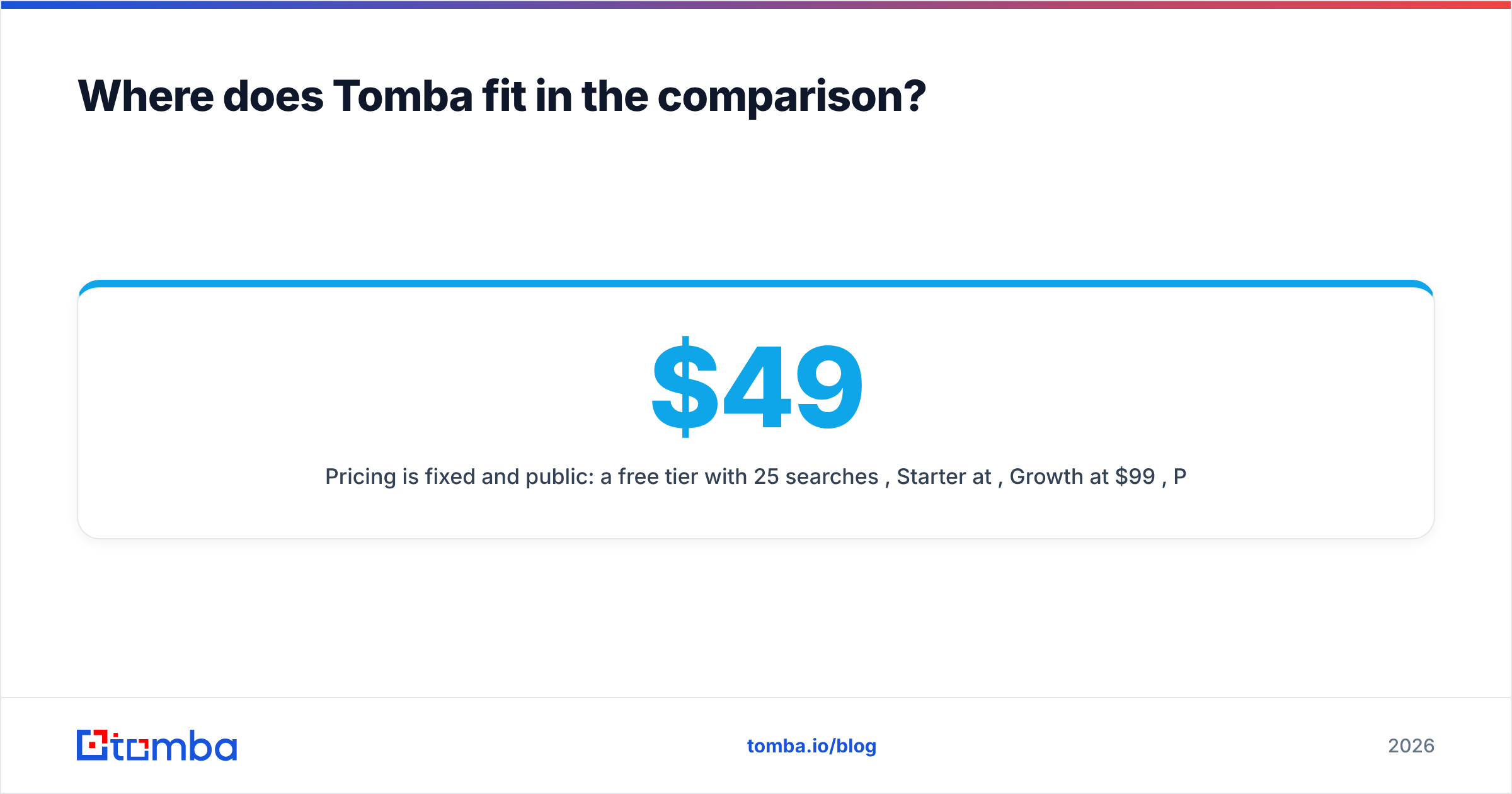
Pricing is fixed and public: a free tier with 25 searches per month, Starter at $49/mo, Growth at $99/mo, Pro at $249/mo, and custom Enterprise. Unfound results do not consume credits, which removes the miss-billing variable from the cost-per-usable math entirely.
Where Tomba will lose your test: if your target list is dominated by hard-to-find individuals at tiny companies in regions where a specialist has better contributed data, a specialist can and does win. Run the 100-lead test and let the numbers decide. Full details are on the Tomba pricing page.

Does the winner still matter if your deliverability is broken?#
Less than you think, and this is the part most comparison posts skip.
A 90% valid list sent from a domain with no SPF alignment, no warmup, and a 200-email daily blast will underperform a 70% valid list sent from a properly authenticated domain at 40 sends a day. The finder is upstream of the outcome, not the outcome itself.
Before you spend a month choosing between Kipplo and Reachfast, confirm the boring infrastructure: authentication records published and aligned, a warmed sending domain separate from your primary, list hygiene on every import, and suppression of anything flagged risky. Once that foundation is in place, the difference between two good finders is worth real money. Before it is in place, the difference is noise.
What is the verdict on Kipplo vs Reachfast?#
There is no universal winner, and any post that declares one is guessing on your behalf.
Choose Kipplo if your work is repeatable list building at volume and you want speed from domain to CSV. Choose Reachfast if your work is depth on a short list of specific people and you are willing to pay more per contact for the ones nobody else returns. Choose a bundled platform if your real cost is integration and vendor sprawl rather than coverage on the margin.
Then validate with the 100-lead test. Ninety minutes of measurement beats ninety days of buyer's remorse.
Ready to add a third column to your bake-off? Run the same 100 contacts through the Tomba Email Finder on the free tier — 25 searches, no credit card, no credits burned on results it cannot find. Score it on usable rate against Kipplo and Reachfast, and let your own ICP pick the winner.
Related guides#
// get started
Find, verify and enrich your first contacts today
Start on the free plan with 25 searches a month, then scale when your team is ready.
Free plan · No credit card required · GDPR & CCPA
// about the author