Kipplo vs Salesbot: Which AI Sales Tool Wins in 2026?
Kipplo and Salesbot both promise AI-driven outbound, but they solve different halves of the problem. Here is an honest breakdown of workflow fit, data quality, pricing transparency, and which one deserves your pilot budget.
TL;DR — Kipplo vs Salesbot at a glance
- They are not the same category of product. Kipplo sits closer to AI-assisted prospecting and outbound execution. Salesbot leans toward conversational automation — chat, qualification, and reply handling. Start by naming the problem you actually have.
- Neither is a data vendor. Both consume contact records. Neither is built to be the system of record for verified B2B emails. That gap is where most pilots quietly fail.
- Pricing transparency is the fastest tiebreaker. One vendor publishes per-seat or per-credit costs. The other gates everything behind a demo call. You already know which one respects a 30-day evaluation.
Two more rules before you shortlist either tool:
- Run the same 200-lead test on both. Same ICP, same sequence, same week. Reply rate and bounce rate settle the argument faster than any feature matrix.
- Budget for the data layer separately. A verified email source like Tomba Email Finder plugged into whichever tool you pick usually moves deliverability more than switching platforms.
Kipplo vs Salesbot: what are these two tools?#
Short version: both are AI sales tools competing for the same line item in your budget. They attack outbound from opposite ends.
Kipplo sits in the AI prospecting and outbound-execution space. That is the part of the funnel where you build a target list, personalize messaging at volume, and push sequences out the door. Tools in this lane usually bundle list building, AI copy generation, and multichannel sending.
Salesbot leans conversational. The name gives it away. Products in this category focus on automated qualification, chat-style engagement, and reply handling without a human touching every thread. Think of it as staffing the front desk rather than knocking on doors.
An analogy that holds up: Kipplo is the rep who dials and emails cold lists all day. Salesbot is the receptionist who greets everyone who walks in and routes them. Asking which one is better is like asking whether a rep beats a receptionist. It depends on where your leads come from.
Both are smaller, newer entrants than platforms like Outreach, Salesloft, or Apollo. Price that in. You get less third-party review volume on G2, thinner integration catalogs, faster feature velocity, and pricing pages that change often. Verify every number on the vendor's live pricing page before you sign. That advice applies to both.
Kipplo vs Salesbot: the head-to-head comparison#
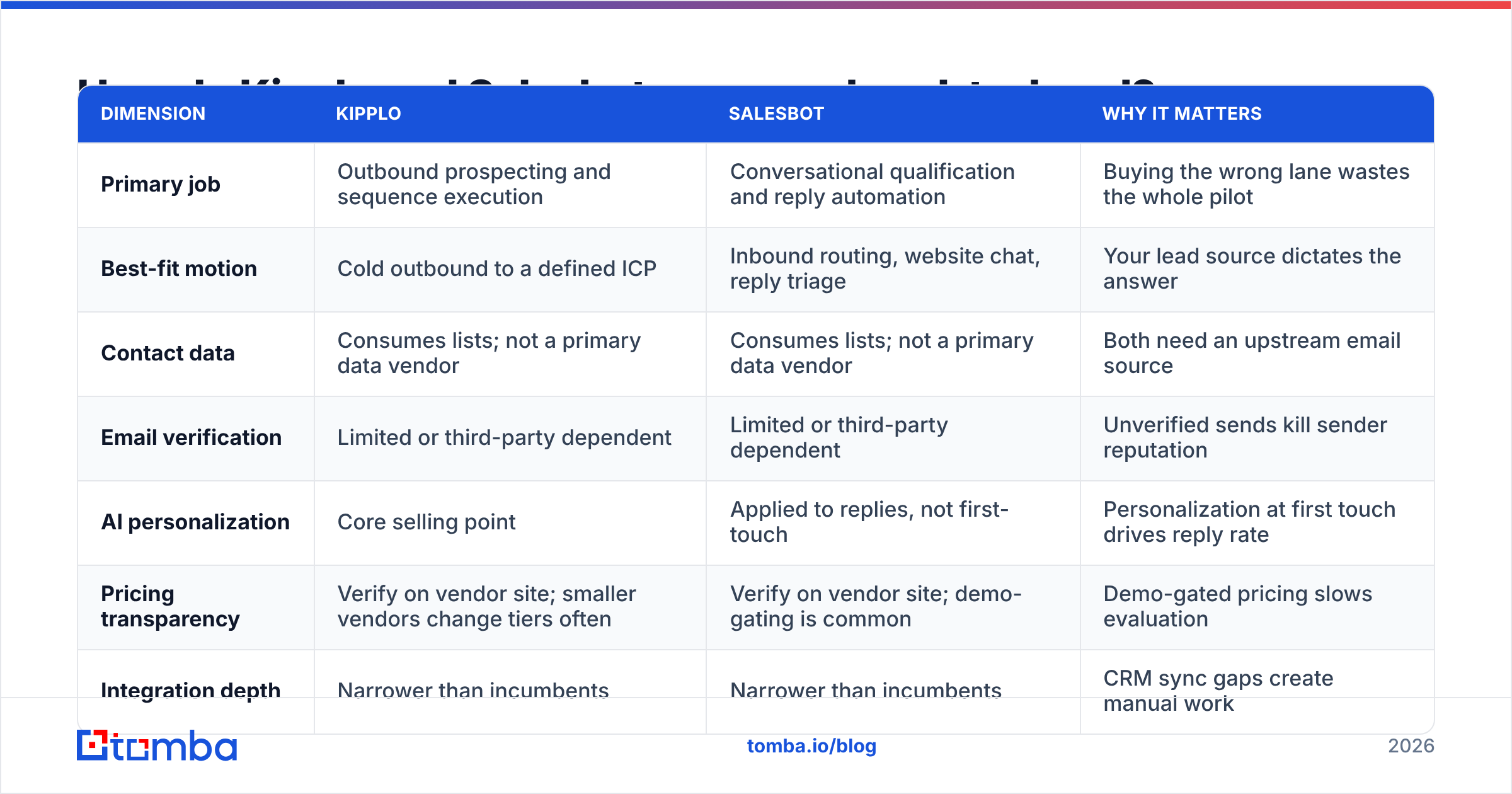
Here is the honest matrix. Where public documentation is thin, the row says so rather than inventing a number. Start with the rows that define the lane:
| Dimension | Kipplo | Salesbot | Why it matters |
|---|---|---|---|
| Primary job | Outbound prospecting and sequence execution | Conversational qualification and reply automation | Buying the wrong lane wastes the whole pilot |
| Best-fit motion | Cold outbound to a defined ICP | Inbound routing, website chat, reply triage | Your lead source dictates the answer |
| Contact data | Consumes lists; not a primary data vendor | Consumes lists; not a primary data vendor | Both need an upstream email source |
| Email verification | Limited or third-party dependent | Limited or third-party dependent | Unverified sends kill sender reputation |
| AI personalization | Core selling point | Applied to replies, not first-touch | First-touch personalization drives reply rate |
Then check the practical rows — the ones that decide how a pilot actually goes:
| Dimension | Kipplo | Salesbot | Why it matters |
|---|---|---|---|
| Pricing transparency | Verify on vendor site; smaller vendors change tiers often | Verify on vendor site; demo-gating is common | Demo-gated pricing slows evaluation |
| Integration depth | Narrower than incumbents | Narrower than incumbents | CRM sync gaps create manual work |
| Team size sweet spot | 2-15 rep outbound teams | Teams with meaningful inbound volume | Enterprise needs audit trails and SSO |
| Ramp time | Days to first sequence | Days to first bot flow | Long ramp eats your trial window |
| Biggest risk | Great copy sent to bad addresses | Bot handles conversations it should escalate | Both risks are fixable with process |
Read those tables twice and the real conclusion surfaces. The two tools barely overlap on the rows that matter. Say you have 4,000 monthly website visitors and no outbound motion. Kipplo is solving a problem you do not have. Flip it: a rep stares at an empty pipeline and no inbound traffic. Salesbot is staffing a lobby nobody walks into.
Which five questions actually decide this?#
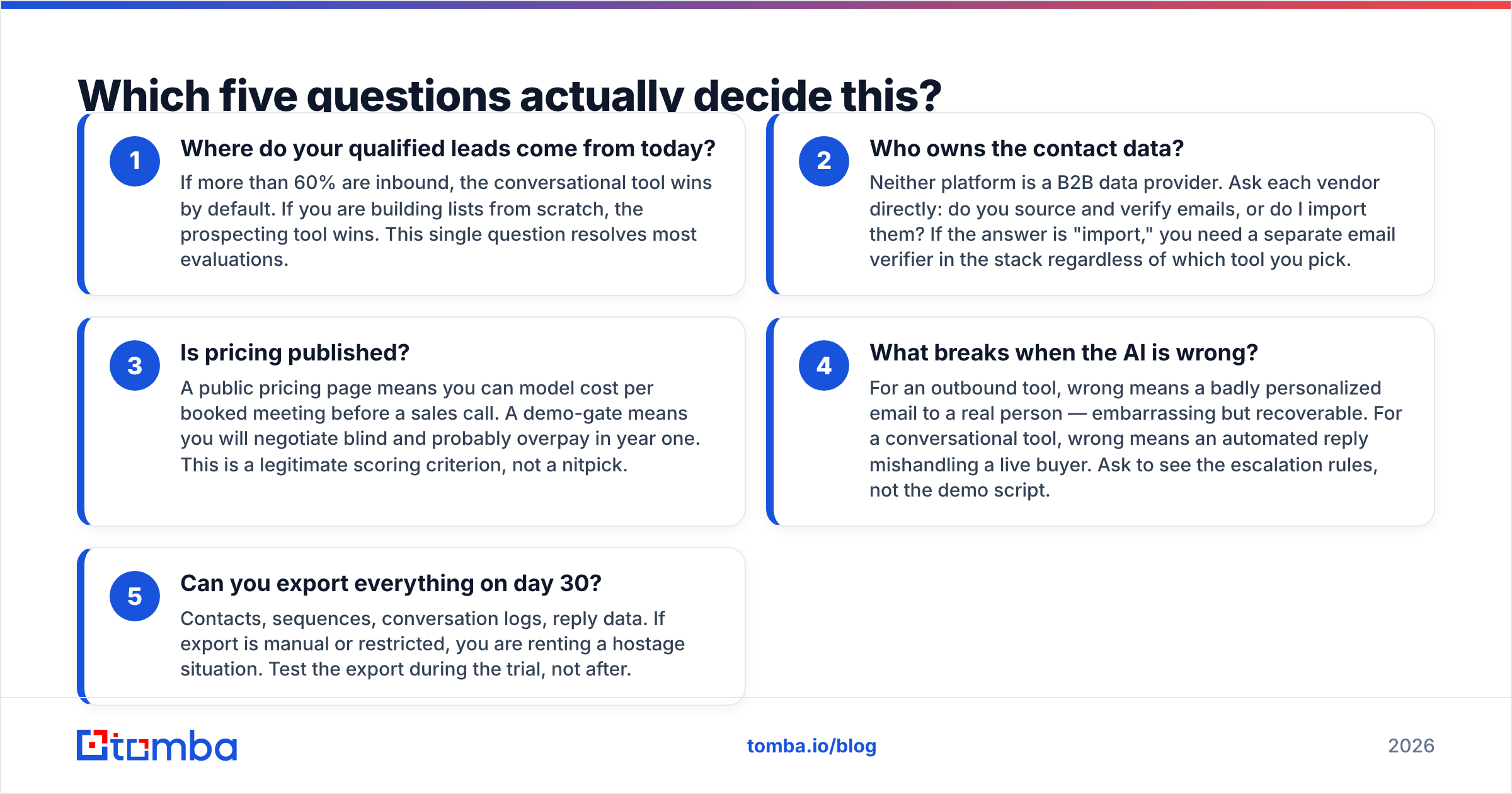
Skip the feature checklist. These five questions eliminate one of the two tools in about twenty minutes.
- Where do your qualified leads come from today? If more than 60% are inbound, the conversational tool wins by default. If you are building lists from scratch, the prospecting tool wins. This single question resolves most evaluations.
- Who owns the contact data? Neither platform is a B2B data provider. Ask each vendor directly: do you source and verify emails, or do I import them? If the answer is "import," you need a separate email verifier in the stack.
- Is pricing published? A public pricing page lets you model cost per booked meeting before a sales call. A demo-gate means you negotiate blind and probably overpay in year one.
The last two questions are the ones vendors dislike. Ask them anyway.
- What breaks when the AI is wrong? For an outbound tool, wrong means a clumsy email to a real person. Embarrassing, but recoverable. For a conversational tool, wrong means an automated reply mishandling a live buyer. Ask to see the escalation rules, not the demo script.
- Can you export everything on day 30? Contacts, sequences, conversation logs, reply data. If export is manual or restricted, you are renting a hostage situation. Test the export during the trial, not after.
Answer those honestly and you usually find you needed a third thing entirely: better source data.
Is one of them actually better than the other?#
No. Any post that declares a universal winner between two tools in different categories is selling something.
Here is what is fair to say. Kipplo is the safer pick if your problem is empty pipeline. Salesbot is the safer pick if your problem is unanswered conversations. Have both problems? Do not buy both at once. Fix pipeline first. A conversational layer on top of zero volume produces nothing to converse about.
There is a third scenario worth naming. Some teams discover mid-pilot that their bottleneck is neither sending nor replying. It is that 22% of their list bounces. No amount of AI copy fixes a bad address. In that case, buy a data source first and tooling second.
What do both tools get wrong about data?#
They assume you arrive with a clean list. Almost nobody does.
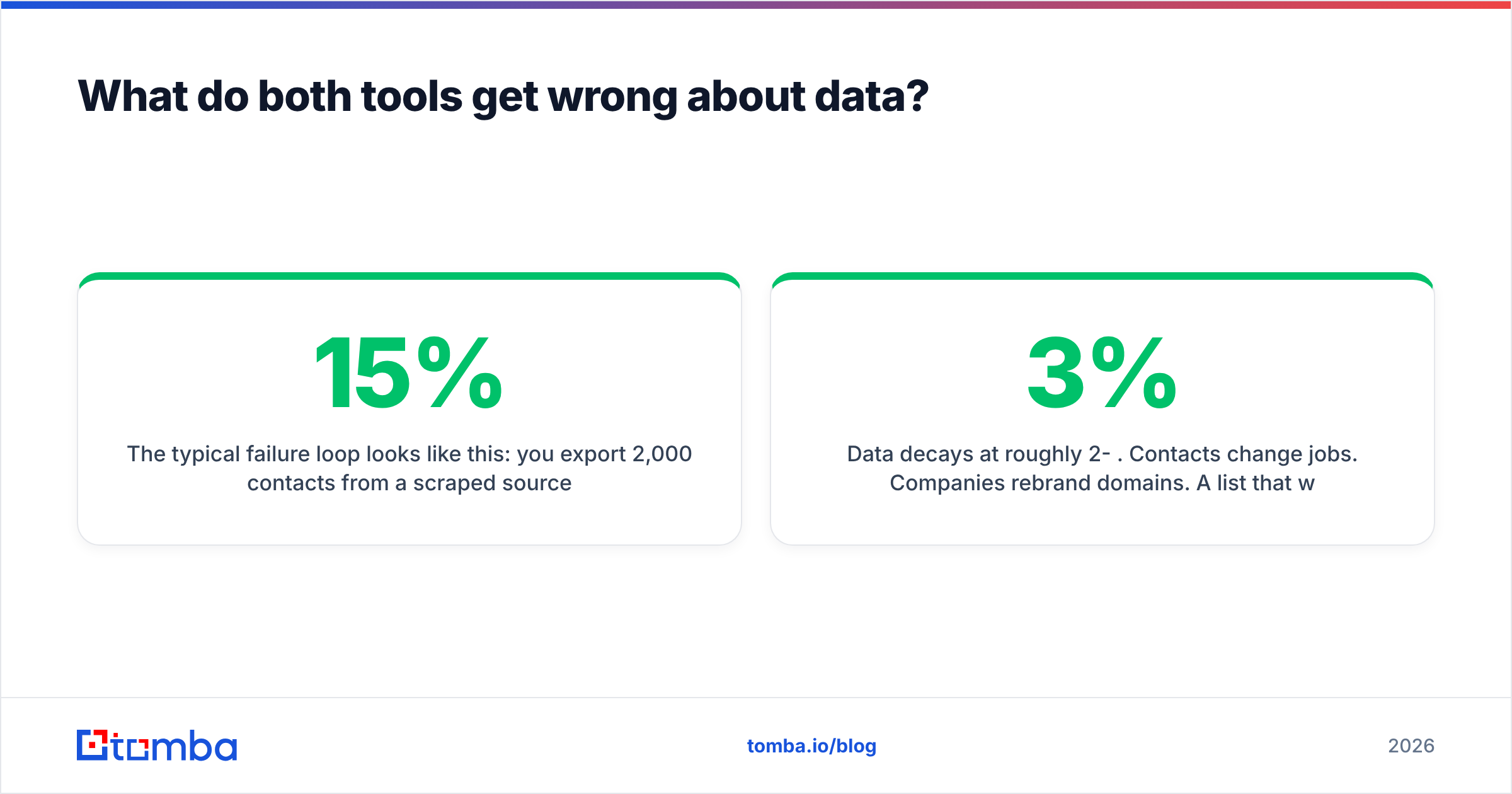
The typical failure loop looks like this. You export 2,000 contacts from a scraped source or an aging CRM. You drop them into whichever platform you picked and launch a sequence. Two weeks later, a bounce rate north of 15% has torched your domain reputation. The tool did exactly what you asked. The inputs were the problem.
Three specifics worth internalizing:
- Catch-all domains are not "valid." A catch-all server accepts everything and tells you nothing. Treating those results as deliverable is the most common way teams inflate list size and deflate email deliverability. A dedicated catch-all check separates real mailboxes from wishful thinking.
- Data decays at roughly 2-3% per month. Contacts change jobs. Companies rebrand domains. A list that was 95% accurate in January is much worse by June. Re-verifying before every campaign is not paranoia. It is arithmetic.
- Role accounts poison reply metrics. info@, sales@, and support@ addresses inflate your delivered count and never reply. Strip them before they distort your baseline.

This is where a purpose-built data layer earns its keep. Run your target domains through a domain search to pull real, pattern-confirmed addresses. Verify them before they enter Kipplo or Salesbot. That routinely cuts bounce rates from double digits to low single digits. The delta is worth more than any AI copy feature either vendor will demo for you.
How should you price the full stack?#
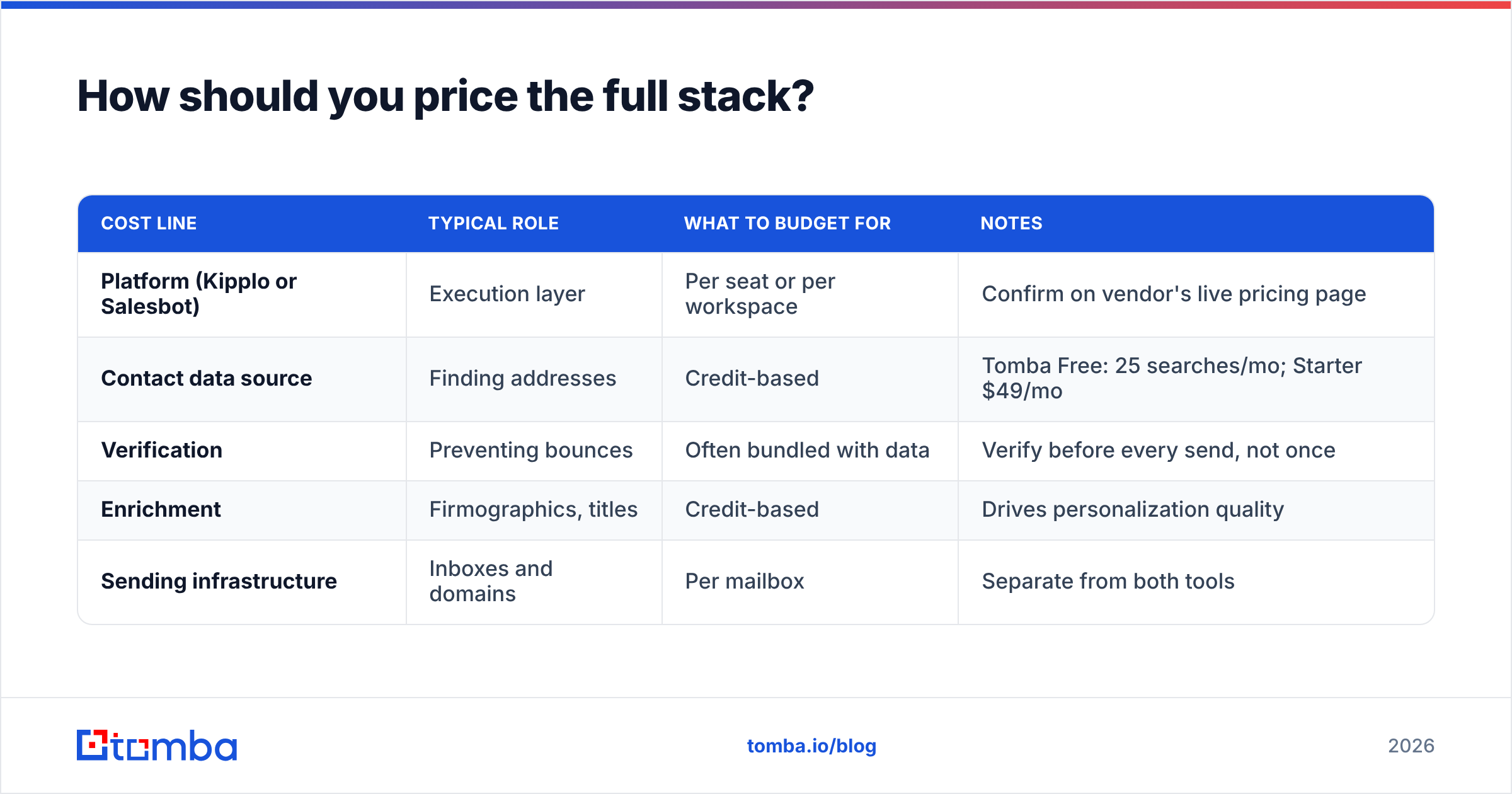
Here is the part most comparison posts skip. The platform fee is not the total cost. Model data, sending infrastructure, and verification together.
| Cost line | Typical role | What to budget for | Notes |
|---|---|---|---|
| Platform (Kipplo or Salesbot) | Execution layer | Per seat or per workspace | Confirm on vendor's live pricing page |
| Contact data source | Finding addresses | Credit-based | Tomba Free: 25 searches/mo; Starter $49/mo |
| Verification | Preventing bounces | Often bundled with data | Verify before every send, not once |
| Enrichment | Firmographics, titles | Credit-based | Drives personalization quality |
| Sending infrastructure | Inboxes and domains | Per mailbox | Separate from both tools |
For reference on the data line: Tomba pricing runs a free tier at 25 searches per month, Starter at $49/mo, Growth at $99/mo, Pro at $249/mo, and custom Enterprise. That gives you a concrete anchor when a vendor quotes a bundled number. You can decompose their price and see what the data portion really costs.
A practical rule: compare the bundle against the standalone cost of data plus verification plus sending. If the bundle costs more, it is only worth it when the workflow savings are real. Measure that during the trial.
How do you run a fair 30-day bake-off?#
Do not evaluate on demos. Run the test.
Week 1 — Build one list, not two. Pick a single ICP segment. Source 200 contacts the same way for both tools so the data variable is controlled. Verify every address first. Strip role accounts and unconfirmed catch-alls.
Week 2 — Mirror the campaign. Same subject lines, same sequence length, same send windows. Comparing a prospecting tool against a conversational tool? Adapt the test honestly. Measure Kipplo on meetings booked from cold outreach. Measure Salesbot on qualified conversations converted from existing traffic. Different denominators, same 30 days.
Week 3 — Instrument everything. Track bounce rate, open rate, reply rate, positive reply rate, and meetings booked. Only positive reply rate correlates with revenue. Track the others to diagnose, not to celebrate.
Week 4 — Test the exit. Export your data and time it. Note what does not come out cleanly. Then ask support a real technical question and see how long the answer takes. Trial-period support is the most optimistic version you will ever get.
Want the workflow to scale past manual exports? Wire the data step straight into the platform through the Tomba API so lists arrive pre-verified. Automating verification is what turns a good pilot into a repeatable process. HubSpot's sales blog has solid baseline benchmarks for outbound response rates if you need external numbers. Capterra is useful for scanning adjacent tools you may have missed.
Kipplo vs Salesbot: which should you choose?#
Choose the prospecting-oriented tool (Kipplo) if your pipeline problem is volume, your team does cold outbound, and your inbound traffic is negligible. You need lists, sequences, and personalization at scale.
Choose the conversational tool (Salesbot) if you already generate real inbound interest and reps lose deals to slow replies. You need qualification and routing, not more cold sends.
Choose neither yet if your current list bounces above 8%. Fix the data first. Both tools perform far better on clean inputs. You will also make a better platform decision once the data variable stops skewing your results.
Running a hybrid motion? Sequence the purchases. Outbound tooling first. A conversational layer second, once volume justifies automating replies.
Where does Tomba fit in either stack?#
Underneath both. Tomba is not a sequencer and not a chatbot. It is the data layer that either one depends on.
Run your target company domains through Tomba to find real addresses by name, company, or domain. Verify them before a single email leaves your sender. Enrich what you find with titles and firmographics so your personalization rests on facts, not AI guesswork. Then feed the clean output into whichever platform wins your bake-off.
Start with the Tomba Email Finder on the free tier.25 searches a month is enough to sanity-check your list quality before you commit budget to either platform. If your bounce rate turns out to be the real problem, you just saved yourself a twelve-month contract on a tool that was never going to fix it.
Related guides#
// get started
Find, verify and enrich your first contacts today
Start on the free plan with 25 searches a month, then scale when your team is ready.
Free plan · No credit card required · GDPR & CCPA
// about the author