Kitt AI vs UpLead: Which B2B Prospecting Tool Wins in 2026
One sells an AI agent that runs your prospecting. The other sells a verified contact database you drive yourself. Here is how Kitt AI and UpLead actually differ on data, pricing, and workflow fit — plus the cheaper third path most teams miss.
TL;DR
- Kitt AI and UpLead are not the same category. Kitt AI sells automation on top of prospecting (AI agents that research, draft, and sequence). UpLead sells the raw material: a verified B2B contact database you query yourself.
- UpLead's pitch is verification at export time. Its headline claim is a 95% data accuracy guarantee with real-time email verification before a credit is spent — the strongest single reason teams pick it.
- Kitt AI's pitch is time saved, not records delivered. If your bottleneck is "nobody writes the emails," an AI layer helps. If your bottleneck is "the emails bounce," it does not.
- Pricing is the real decision point. UpLead publishes per-seat monthly plans that start near $99/mo; Kitt AI-style agent tools are typically quote-based and scale by seat plus usage. Confirm both directly before you budget.
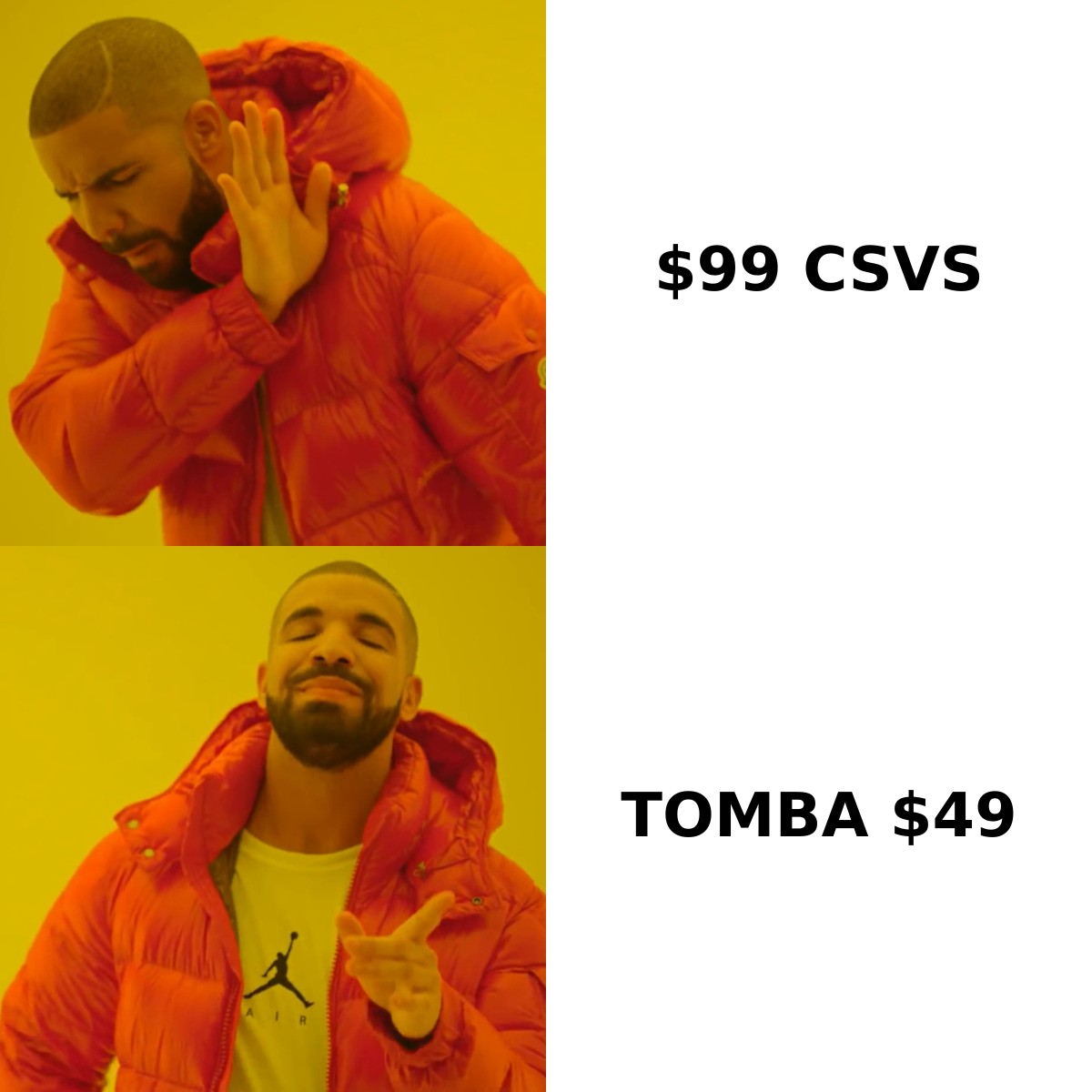
- A third path is usually cheaper: pair a dedicated email finder and verifier (Tomba starts at $49/mo, with a free tier) with whatever sequencer you already pay for. You stop renting a database and a writing assistant at the same time.
What are Kitt AI and UpLead, exactly?#
Start with the honest framing: you are comparing a workflow tool to a data source.
Think of it like cooking. UpLead is the grocery store — it sells you ingredients and guarantees they are fresh at checkout. Kitt AI is the sous-chef — it takes ingredients and turns them into plated dishes faster than you would alone. A sous-chef with rotten produce still serves a bad dinner. A great grocery store with nobody in the kitchen serves nothing at all.
UpLead is a B2B contact and company database with roughly 160M+ contacts, 50+ search filters (title, industry, headcount, technology used, intent), a Chrome extension, and CRM push to HubSpot, Salesforce, Pipedrive, and others. Its differentiator, stated plainly on uplead.com, is that it verifies each email in real time at the moment you export — so credits are not burned on dead records. It sits in the same G2 category as ZoomInfo, Apollo, Lusha, and Cognism (lead intelligence), and generally wins on data hygiene rather than raw volume.
Kitt AI belongs to the newer AI-SDR / agentic prospecting wave: tools that chain account research, persona matching, message drafting, and multichannel follow-up into one automated loop. The value proposition is headcount leverage — one rep running the pipeline of three. Be aware of two things before you evaluate it:
- Pricing is not publicly listed in the way UpLead's is. Agent-style tools in this category are typically sold by quote, priced per seat plus usage, and gated behind a demo. Get the number in writing before you compare.
- The underlying contact data is usually licensed or aggregated, not owned. Ask directly which provider sits underneath, how often it refreshes, and whether emails are SMTP-verified at export or only pattern-guessed. That single answer changes your bounce rate more than any AI feature.
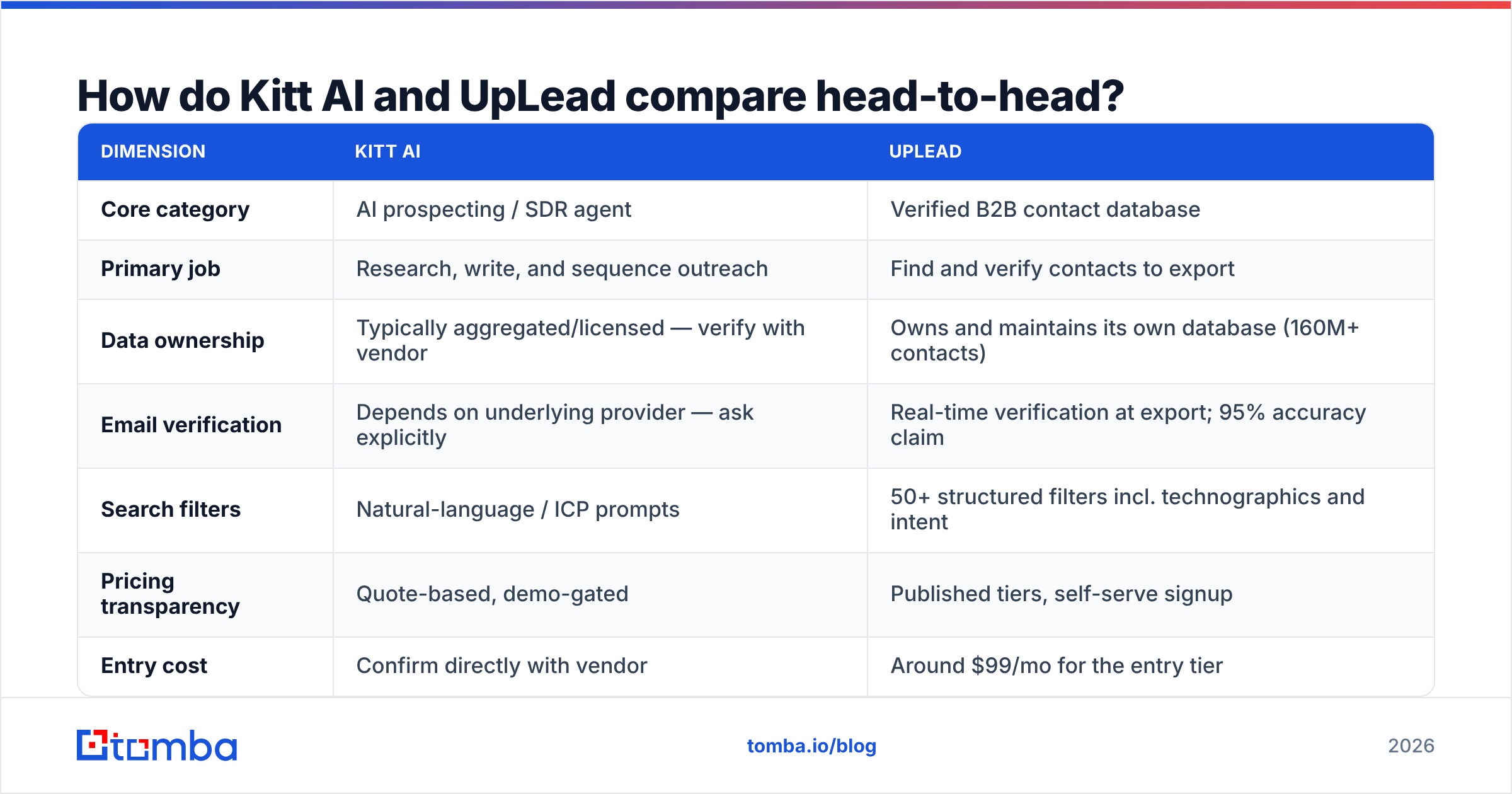
How do Kitt AI and UpLead compare head-to-head?#
| Dimension | Kitt AI | UpLead |
|---|---|---|
| Core category | AI prospecting / SDR agent | Verified B2B contact database |
| Primary job | Research, write, and sequence outreach | Find and verify contacts to export |
| Data ownership | Typically aggregated/licensed — verify with vendor | Owns and maintains its own database (160M+ contacts) |
| Email verification | Depends on underlying provider — ask explicitly | Real-time verification at export; 95% accuracy claim |
| Search filters | Natural-language / ICP prompts | 50+ structured filters incl. technographics and intent |
| Pricing transparency | Quote-based, demo-gated | Published tiers, self-serve signup |
| Entry cost | Confirm directly with vendor | Around $99/mo for the entry tier |
| Best for | Small teams with no copywriting bandwidth | Teams that already have a sequencer and want clean data |
| Weakest point | Opaque data provenance; output quality varies | No sending engine; credits expire monthly |
| Learning curve | Low — the agent does the work | Low-to-medium — you drive the filters |
The table makes the trap obvious. These tools do not overlap as much as the "vs" query suggests. Most teams searching Kitt AI vs UpLead are actually asking a different question: do I buy data and run outbound myself, or do I buy an automated layer and hope the data underneath is good?
Which one has better data accuracy?#
On published commitments, UpLead has the clearer story — and accuracy is where outbound quietly dies.
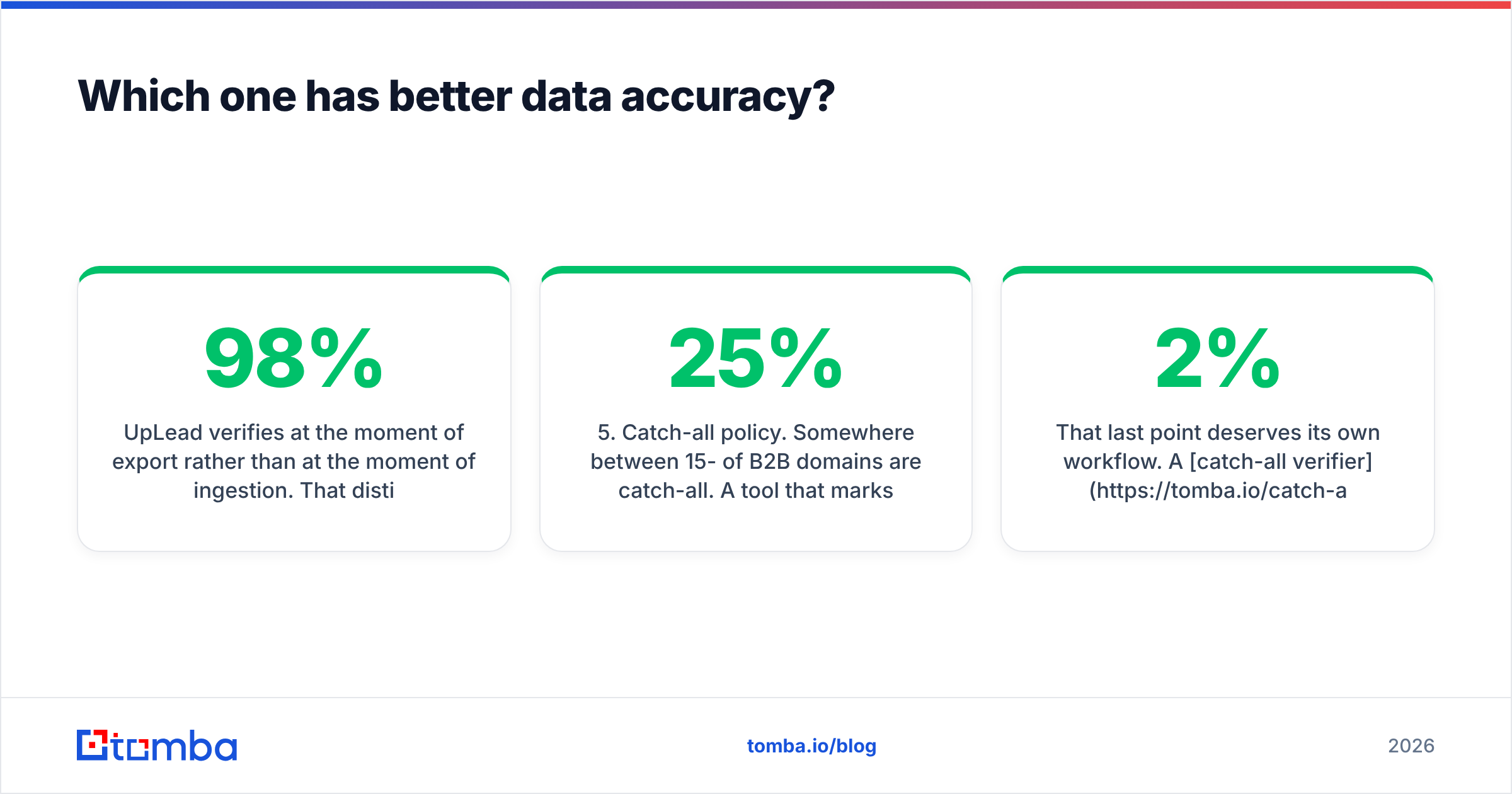
UpLead verifies at the moment of export rather than at the moment of ingestion. That distinction matters more than the headline percentage. A database that was 98% accurate when it was scraped in March is maybe 80% accurate by September, because roughly 25-30% of B2B contact data decays annually as people change jobs. Verification at export is the only timing that protects your sender reputation today.
AI-agent tools rarely make an equivalent commitment, because they are not the ones maintaining the records. When you evaluate Kitt AI, ask for:
- The data source name. "Proprietary AI enrichment" is not an answer. A named provider is.
- The verification method. SMTP handshake, catch-all handling, or pattern inference? Pattern inference alone produces guesses that look like emails.
- The measured bounce rate, not the accuracy claim. Ask for the 30-day average across their customer base.
- What happens on a bad record. Do you get the credit back, or did you just pay for a bounce?
- Catch-all policy. Somewhere between 15-25% of B2B domains are catch-all. A tool that marks them all "valid" is inflating its own accuracy number.
That last point deserves its own workflow. A catch-all verifier treats those domains as a separate bucket instead of silently passing or silently dropping them, which is the difference between a 2% bounce rate and a 12% one.
If your current provider gives you vague answers on all five questions, run a control test: pull 200 contacts from each source, push them through an independent email verifier, and compare the valid rate. It costs one afternoon and settles the argument permanently.
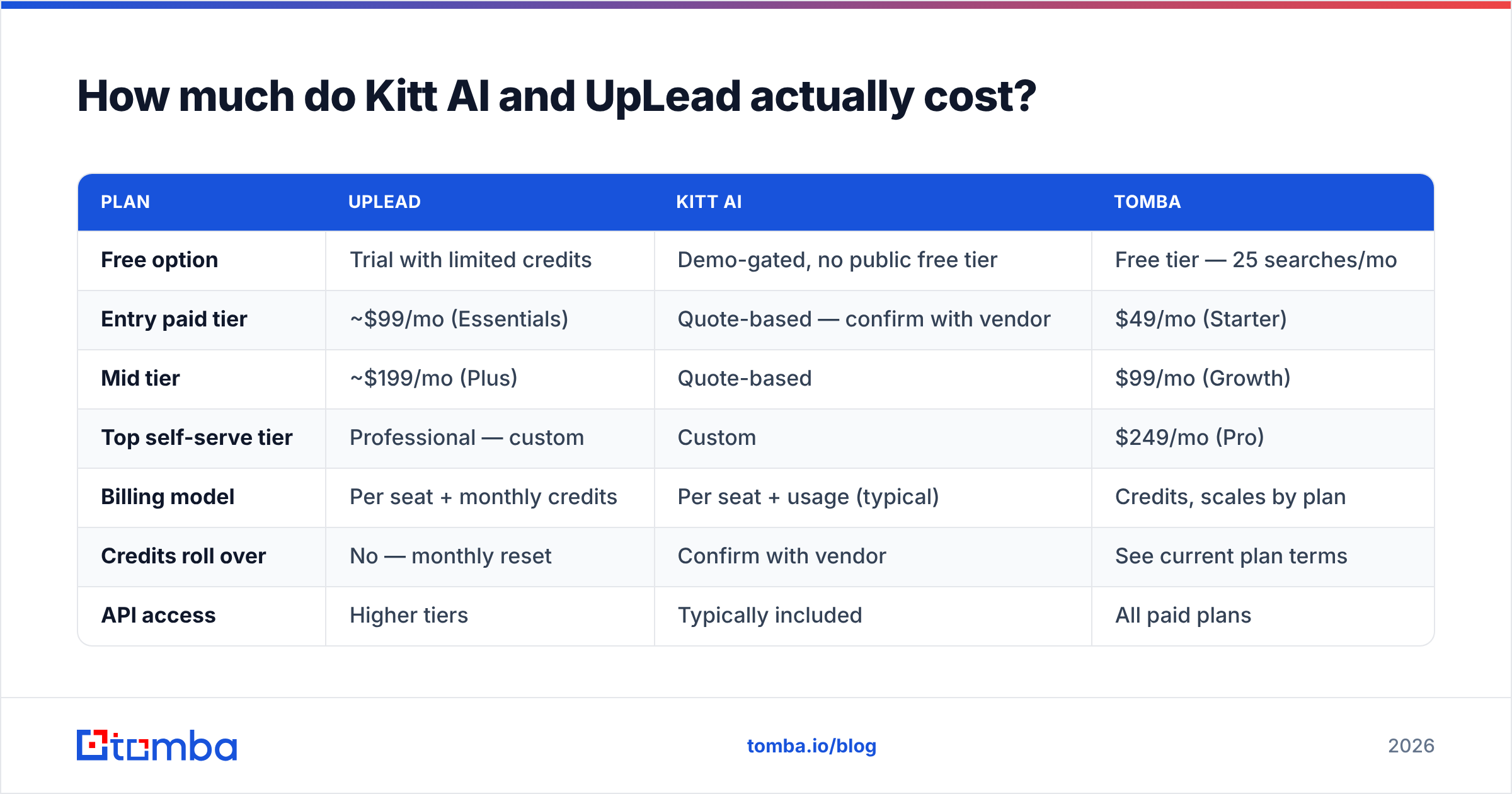
How much do Kitt AI and UpLead actually cost?#
| Plan | UpLead | Kitt AI | Tomba |
|---|---|---|---|
| Free option | Trial with limited credits | Demo-gated, no public free tier | Free tier — 25 searches/mo |
| Entry paid tier | ~$99/mo (Essentials) | Quote-based — confirm with vendor | $49/mo (Starter) |
| Mid tier | ~$199/mo (Plus) | Quote-based | $99/mo (Growth) |
| Top self-serve tier | Professional — custom | Custom | $249/mo (Pro) |
| Billing model | Per seat + monthly credits | Per seat + usage (typical) | Credits, scales by plan |
| Credits roll over | No — monthly reset | Confirm with vendor | See current plan terms |
| API access | Higher tiers | Typically included | All paid plans |
| Sending included | No | Yes | No — pairs with your sequencer |
Two cost mechanics catch teams off guard.
Credit expiry. Monthly credits that reset punish uneven prospecting. If your team builds lists in two-week sprints around campaigns, you pay every month for capacity you use twice a quarter.
Seat multiplication. Per-seat data tools get expensive the moment you add a second SDR. Three seats on a $199 tier is $597/mo before you have sent a single email — and you still need a sequencer, a warmup tool, and a CRM. Map the full stack cost, not the line item.

Who should choose Kitt AI?#
Pick the AI-agent route when your constraint is human hours, not data quality:
- You are a founder doing outbound solo. No SDR, no copywriter, and every hour spent writing sequences is an hour not spent selling. An agent that produces 40 decent emails beats 4 perfect ones you never send.
- Your ICP is broad and repeatable. Agent tools perform best when the message does not need deep vertical nuance. Highly technical or regulated buyers still need a human draft.
- You want one contract, not five. Consolidation has real value if you are a two-person GTM team without tooling patience.
- You can tolerate variable output. Budget review time. AI-drafted outreach that goes out unread by a human is how brands end up in spam folders and screenshot threads.
Be clear-eyed about the risk: if the agent is generating volume on top of unverified data, you are automating your way to a damaged sending domain. Speed multiplies whatever quality you feed it — in both directions.
Who should choose UpLead?#
Pick the database route when your constraint is list quality, not writing:
- You already own a sequencer. If Instantly, Smartlead, Outreach, or HubSpot Sequences is in place, you are buying data, not workflow — and you should pay data prices.
- Your filters need to be precise. Technographic and intent filters let you find "companies running Shopify Plus with 50-200 employees that added a RevOps hire," which no prompt reliably reproduces.
- Deliverability is already fragile. If you are rebuilding sender reputation, real-time verification at export is worth paying for outright.
- You need CRM hygiene. Enrichment back into Salesforce or HubSpot is a legitimate second use case that AI-SDR tools handle awkwardly.
For teams in this camp, the honest follow-up question is whether you need a full database subscription or just reliable lookup. If you already know the companies you want, a domain search that returns every public address at a target company plus its email pattern covers most of the job at a fraction of database pricing.
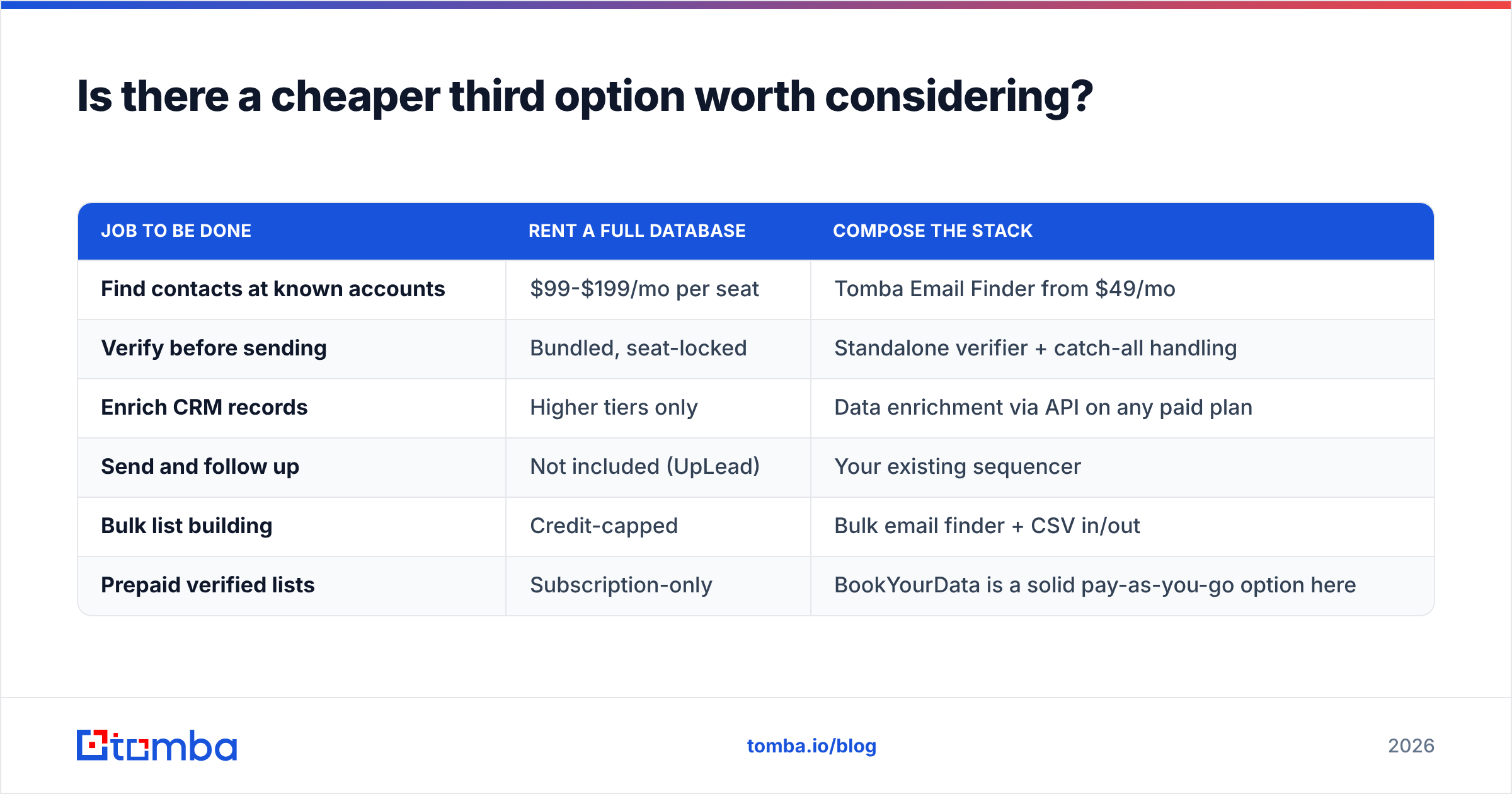
Is there a cheaper third option worth considering?#
Yes — and for most sub-20-person sales teams it is the better buy. Instead of renting a full database or an agent layer, compose the stack:
| Job to be done | Rent a full database | Compose the stack |
|---|---|---|
| Find contacts at known accounts | $99-$199/mo per seat | Tomba Email Finder from $49/mo |
| Verify before sending | Bundled, seat-locked | Standalone verifier + catch-all handling |
| Enrich CRM records | Higher tiers only | Data enrichment via API on any paid plan |
| Send and follow up | Not included (UpLead) | Your existing sequencer |
| Bulk list building | Credit-capped | Bulk email finder + CSV in/out |
| Prepaid verified lists | Subscription-only | BookYourData is a solid pay-as-you-go option here |
A note on that last row, because it is a real gap in both tools: if you need a one-time verified list for a single campaign and have no appetite for a monthly contract, a prepaid list provider like BookYourData is a genuinely sensible purchase. Subscriptions are the wrong shape for one-off campaigns.
The composed approach wins on three fronts:
- You pay for lookups, not seats. Adding a second rep does not double the bill.
- Data and sending stay decoupled. When your sequencer disappoints you, you swap it without losing your contact source.
- API-first workflows scale. A Tomba API call inside your enrichment pipeline costs less than a seat and runs without anyone logging in.
The tradeoff is real: you manage two or three vendors instead of one, and nobody writes your emails for you. If that tradeoff is unacceptable, buy the agent. If it is merely annoying, compose the stack and keep the difference.
What mistakes do teams make when comparing these tools?#
- Comparing the sticker price instead of the delivered cost. A $99 plan that yields 68% valid emails is more expensive per delivered message than a $49 plan at 95%. Do the arithmetic on cost-per-inbox-reached, not cost-per-credit.
- Trusting an accuracy number without a control test. Every vendor in this market cites a percentage. Pull 200 records, verify independently, compare. Twenty minutes of work, zero ambiguity.
- Automating before deliverability is fixed. If your SPF, DKIM, and DMARC are not clean and your domains are not warmed, an AI agent just helps you get blocked faster. Fix email deliverability first, then add volume.
- Ignoring credit expiry against your actual rhythm. Campaign-driven teams waste 40-60% of monthly credits. Pick a model that matches how you actually work.
- Skipping the trial with real ICP data. Test with your hardest accounts — the mid-market European manufacturers, not the US SaaS logos every vendor indexes well. Vendors look identical on easy accounts.
Both HubSpot's and most CRM vendors' own guidance on data quality management lands in the same place: the cheapest fix for pipeline problems is almost always cleaner input, not more automation.
So what is the verdict on Kitt AI vs UpLead?#
Buy UpLead if you already have a sending motion and need verified, precisely filtered contacts pushed into it. Its export-time verification and deep filters are the genuine differentiator, and the published pricing means no procurement theater.
Buy Kitt AI if your bottleneck is that outbound is not happening at all — no SDR, no copy, no sequence discipline. Just get the data provenance in writing first, and review what the agent sends before it sends it.
Buy neither if what you actually need is reliable email lookup and verification at a price that does not scale by headcount. That is the majority case, and it is the gap the composed stack fills.
Start there before you sit through two demos. Run your next target account through Tomba Email Finder — find the contacts by domain, name, or company, verify them before they touch your sequencer, and see what your real valid rate looks like. The free tier gives you 25 searches a month with no card, Starter is $49/mo, and full Tomba pricing is public, so you can compare the delivered cost against whatever quote lands in your inbox. Make the vendors compete against a number you measured yourself.
Related guides#
// get started
Find, verify and enrich your first contacts today
Start on the free plan with 25 searches a month, then scale when your team is ready.
Free plan · No credit card required · GDPR & CCPA
// about the author