Kixie Pricing Reviews Pros and Cons: A 2026 Buyer's Guide
Kixie sells speed: multi-line dialing, local presence, and CRM logging. But the per-seat list price is only part of the bill. Here is what Kixie actually costs, what reviewers praise and complain about, and when a leaner stack wins.
This guide covers Kixie pricing reviews pros and cons in one place. You get real per-seat costs for 2026, the praise from users, and the gripes.
TL;DR
- List pricing runs about $35/user/month (Integrated) up to $95/user/month (Outbound PowerDialer) on annual billing. Enterprise is a custom quote. The sticker price is not the bill.
- Reviewers praise two things: dial speed and clean logging into HubSpot, Salesforce, and Pipedrive. That is why teams buy it.
- The gripes are just as steady: cost per seat at scale, 10DLC and SMS setup, call quality on weak Wi-Fi, and slow support on low tiers.
- Kixie is worth it for 3+ reps who dial all day and keep a clean CRM. Below roughly 40 dials a day per rep, it is poor value.
- The biggest hidden cost is bad phone and email data. A $95 seat that calls wrong numbers is a pricey path to voicemail.
What is Kixie and who actually uses it?#
Kixie is a sales engagement platform built around the phone. Think of it as jumper cables between your CRM and the phone network. It sits on top of HubSpot, Salesforce, Pipedrive, Zoho, or your helpdesk, and turns every record into a one-click call that logs and records itself.
It is not a full sequencer like Outreach or Salesloft. It is not a contact database like Apollo or ZoomInfo. It is a dialer-first layer. That matters when you judge the price: you pay for call volume and CRM plumbing, not for leads.
The core pieces you are actually buying:
- PowerCall dialer — a Chrome extension plus web app. Click to call from any page, with recording and automatic CRM logging.
- Multi-line PowerDialer — dials several numbers at once per rep and connects the first human who answers. This one feature is what justifies the top tier.
- Local presence and number management — rotating local caller IDs, so your Chicago prospect sees a Chicago area code. Spam-label monitoring is included.
- Two-way SMS and templates — text from the same pane as the call. Texts can fire on call outcomes such as no answer or voicemail drop.
- Call coaching and analytics — listen, whisper, and barge live, plus leaderboards and connect-rate reports for managers.
Typical buyers are outbound teams of 5 to 50 reps: staffing, insurance, home services, SaaS SDR pods, and agencies that book appointments. If your team sells mostly by email and LinkedIn, most of this spend is wasted.

How much does Kixie cost in 2026?#
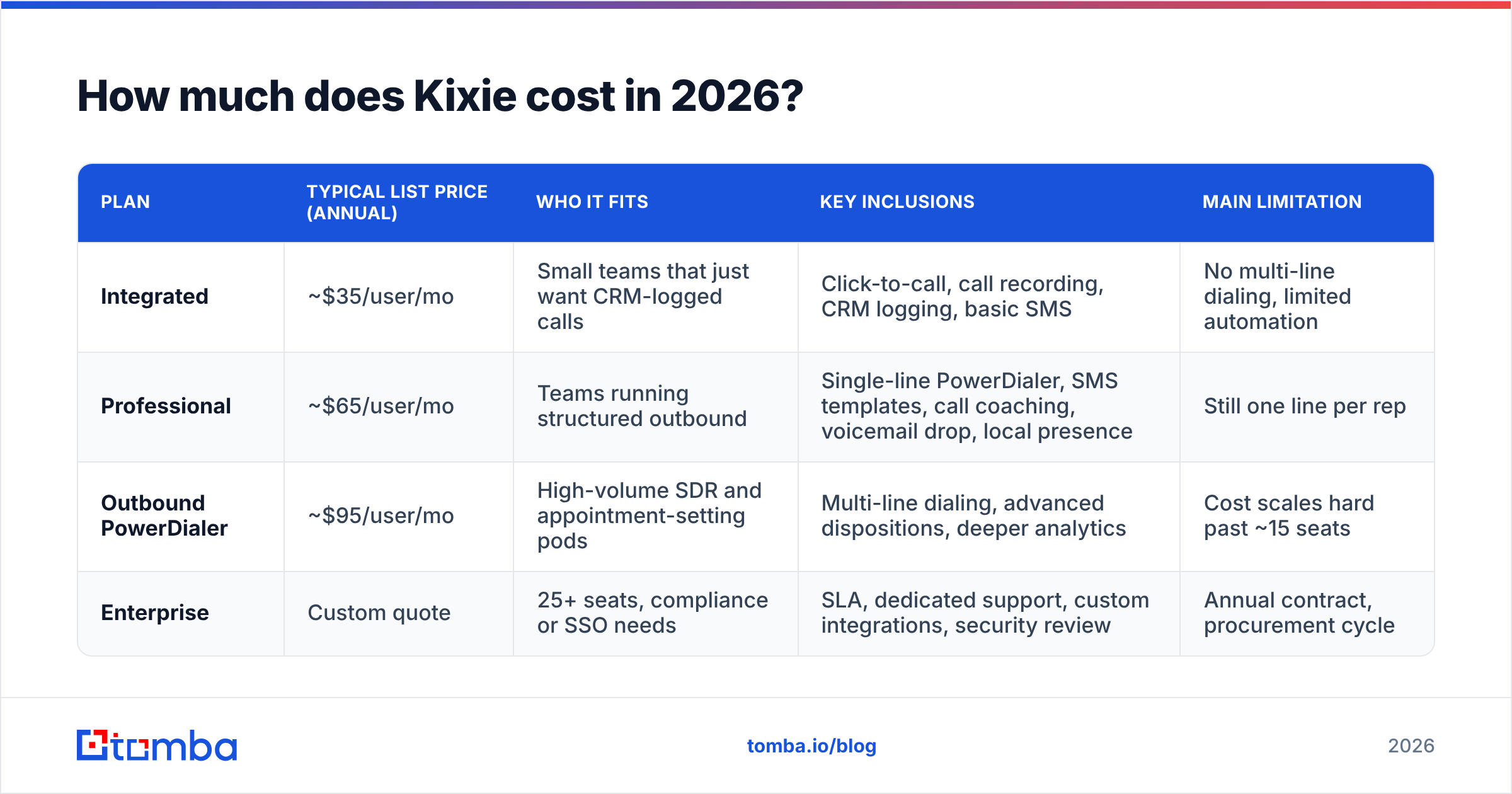
Kixie lists per-user, per-month pricing with a discount for an annual deal. The plan names have been stable for years. Still, check the official Kixie pricing page before you budget, because tiers and included minutes get adjusted.
| Plan | Typical list price (annual) | Who it fits | Key inclusions | Main limitation |
|---|---|---|---|---|
| Integrated | ~$35/user/mo | Small teams that just want CRM-logged calls | Click-to-call, call recording, CRM logging, basic SMS | No multi-line dialing, limited automation |
| Professional | ~$65/user/mo | Teams running structured outbound | Single-line PowerDialer, SMS templates, call coaching, voicemail drop, local presence | Still one line per rep |
| Outbound PowerDialer | ~$95/user/mo | High-volume SDR and appointment-setting pods | Multi-line dialing, advanced dispositions, deeper analytics | Cost scales hard past ~15 seats |
| Enterprise | Custom quote | 25+ seats, compliance or SSO needs | SLA, dedicated support, custom integrations, security review | Annual contract, procurement cycle |
What is not in the per-seat number?#
This is where most "Kixie is expensive" reviews start. The per-seat fee covers software. These items land on top:
- Phone numbers — a small monthly fee per number. Local presence plans that rotate dozens of numbers add up.
- Usage overage — each plan bundles minutes. Heavy dialers blow past them and pay per minute. Multi-line dialing burns minutes 3–4x faster, which shocks finance in month two.
- SMS and 10DLC — US A2P registration fees and per-message costs come from carriers, not from Kixie. They still hit your invoice.
- Seat minimums — some tiers require a minimum user count. A three-person team on Outbound PowerDialer pays a floor, not a head count.
- Annual lock-in — monthly billing costs a lot more. The advertised price assumes twelve months prepaid.
A 10-rep team on the top tier usually lands near $1,100–$1,400 a month. That is well above the $950 you get from seats times list price. Budget for the spread, not the marketing number.
What do Kixie reviews actually say?#
Ratings on G2 and Capterra sit between 4.5 and 4.7 across several hundred reviews. For a dialer, where 4.0 is normal, that is strong. Read fifty of them and the same themes repeat.
What reviewers praise, in order of frequency:
- Setup speed. Teams report going live in under a day, CRM link included. That is rare in phone software.
- Connect rates. Local presence and spam monitoring lift them. Some reviews claim double-digit gains, though none are audited.
- CRM logging. Calls, recordings, dispositions, and text threads land on the right record with no rep effort. For managers, this is the product.
- Onboarding. Reviewers often name the person who helped them launch.
What reviewers complain about, in order of frequency:
- Price per seat next to lighter dialers, above all for teams that never use multi-line.
- SMS delivery and 10DLC signup pain. Every US texting vendor has this problem, but buyers feel it as a Kixie problem.
- Call quality on weak or busy Wi-Fi. Kixie runs on WebRTC, so a poor network sounds choppy, and reps blame the tool.
- Support tiers. Faster replies come with higher plans, and lower-tier customers notice.
- Reporting depth. Fine for connect rates and leaderboards. Thin next to a real conversation-intelligence tool.
Treat reviews like restaurant ratings. The five-star ones tell you the food is good. The three-star ones tell you whether the kitchen is slow on a Friday. Read the three-star ones first.
What are the real pros and cons of Kixie?#
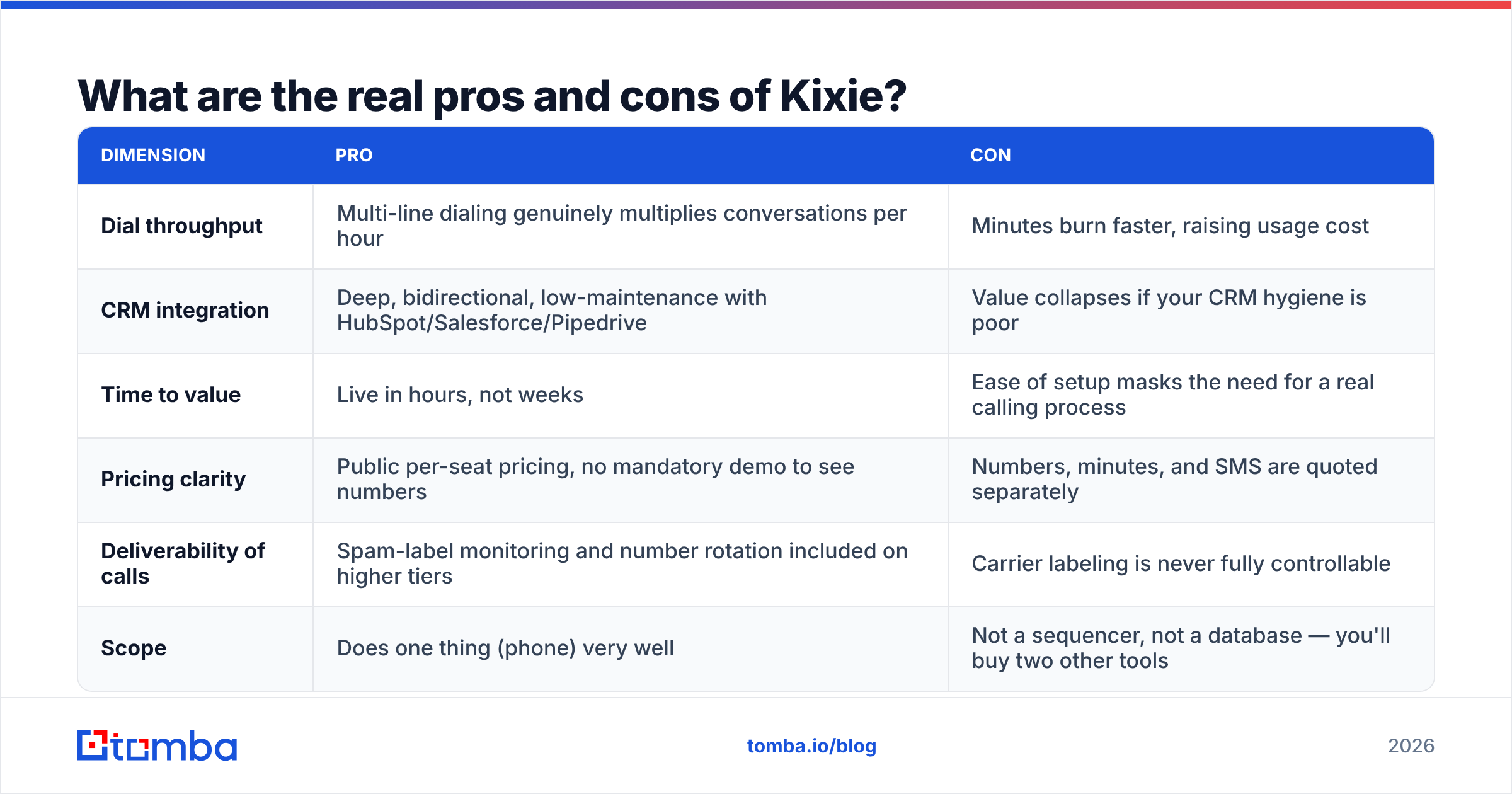
| Dimension | Pro | Con |
|---|---|---|
| Dial throughput | Multi-line dialing genuinely multiplies conversations per hour | Minutes burn faster, raising usage cost |
| CRM integration | Deep, bidirectional, low-maintenance with HubSpot/Salesforce/Pipedrive | Value collapses if your CRM hygiene is poor |
| Time to value | Live in hours, not weeks | Easy setup masks the need for a real calling process |
| Pricing clarity | Public per-seat pricing, no mandatory demo to see numbers | Numbers, minutes, and SMS are quoted separately |
| Deliverability of calls | Spam-label monitoring and number rotation on higher tiers | Carrier labeling is never fully in your control |
| Scope | Does one thing (phone) very well | Not a sequencer, not a database — you will buy two other tools |
The honest summary: Kixie is a specialist. Specialists are worth paying for when the specialty is your bottleneck. Is your bottleneck "we can't get enough conversations per hour"? Kixie solves that. Is it "we don't know who to call"? Then Kixie does nothing for you, and you spent $95 a seat to dial the wrong list faster.
How does Kixie compare to other dialers in 2026?#
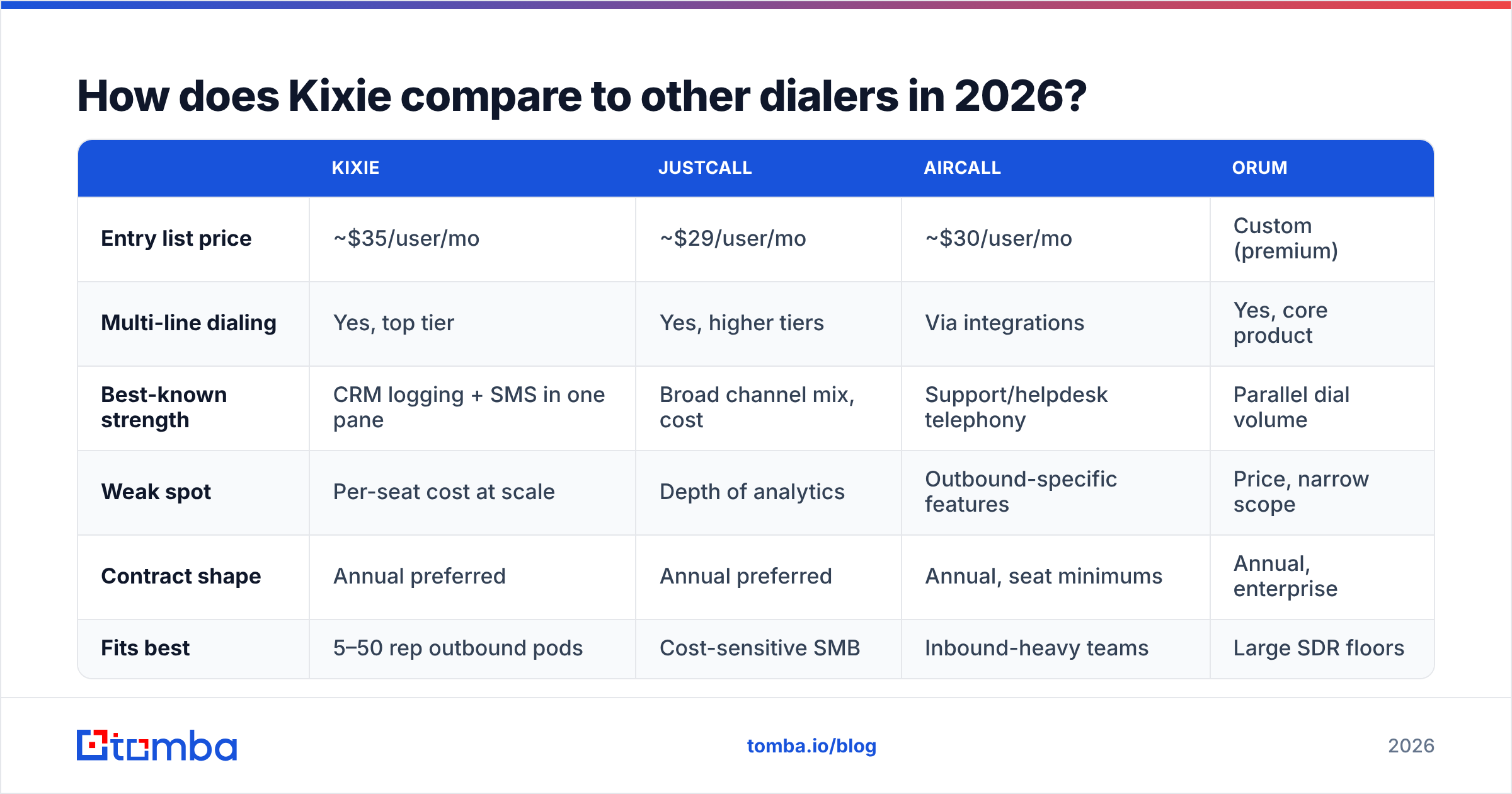
| Kixie | JustCall | Aircall | Orum | |
|---|---|---|---|---|
| Entry list price | ~$35/user/mo | ~$29/user/mo | ~$30/user/mo | Custom (premium) |
| Multi-line dialing | Yes, top tier | Yes, higher tiers | Via integrations | Yes, core product |
| Best-known strength | CRM logging + SMS in one pane | Broad channel mix, cost | Support/helpdesk telephony | Parallel dial volume |
| Weak spot | Per-seat cost at scale | Depth of analytics | Outbound-specific features | Price, narrow scope |
| Contract shape | Annual preferred | Annual preferred | Annual, seat minimums | Annual, enterprise |
| Fits best | 5–50 rep outbound pods | Cost-sensitive SMB | Inbound-heavy teams | Large SDR floors |
Those are list prices at the time of writing, and they move. Check each vendor's page. The shape still holds: Kixie sits mid-market, above cheap VoIP and below the parallel-dial specialists. It earns that spot with integration quality, not with price.

Is Kixie worth it for your team?#
Run these four checks before you sign. Fail two of them and the money is better spent elsewhere.
- Volume test. Do your reps place 60+ dials a day each? Below about 40, the multi-line premium never pays back. The Integrated tier, or a cheaper VoIP setup, covers you.
- CRM test. Is your CRM the real source of truth? Kixie's value is writing activity into it. If half your pipeline lives in spreadsheets, you are buying plumbing for a house with no water.
- Process test. Do you have a set cadence — call, text, call, email — with owners and SLAs? Dialers amplify process. They do not create it. HubSpot's sales cadence research is a fine place to start.
- Data test. How many of your phone numbers reach the right person? Nobody measures this before buying, and it decides your ROI.
That fourth test needs its own section. It is where most dialer spend quietly fails.
What should you fix before you buy any dialer?#
Fix the list. A dialer multiplies whatever you feed it, garbage included.
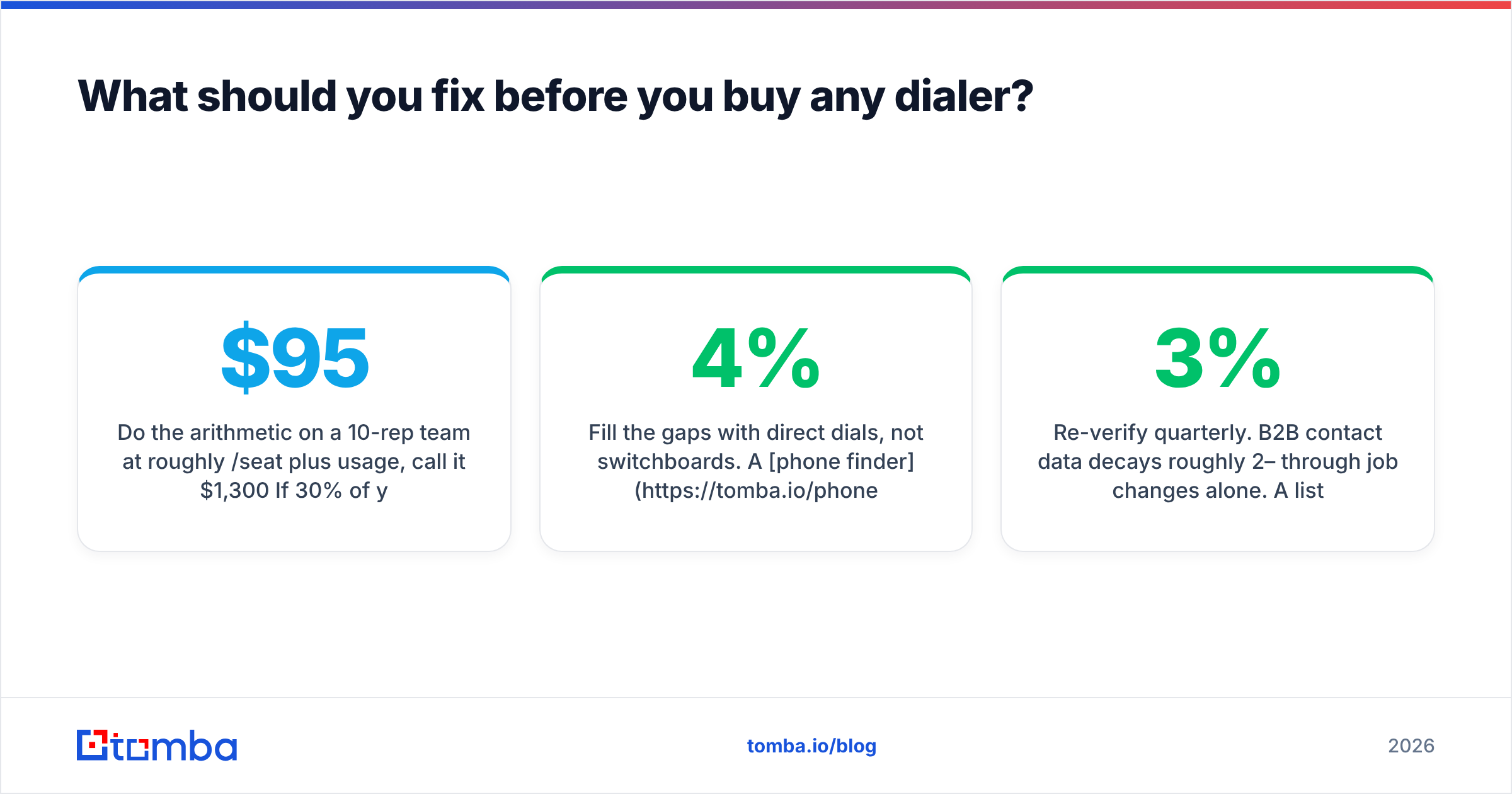
Do the math on a 10-rep team at about $95 a seat plus usage, so roughly $1,300 a month. Say 30% of your direct dials are dead lines, wrong people, or switchboards. That is about $390 a month of guaranteed dead air, plus the rep hours, plus the morale hit of a bad session. No feature on the pricing page fixes that.
The pre-purchase checklist that actually moves connect rate:
- Validate what you already have. Run your list through a phone validator to drop dead lines and flag line type before the first dial.
- Add direct dials, not switchboards. A phone finder returns mobile numbers tied to a named person. That is the gap between a 4% and a 12% connect rate.
- Pair phone with verified email. Phone-only outbound is a coin flip in 2026. Pull matching addresses with an email finder so the follow-up after a no-answer lands.
- Enrich before you import. Push title, company size, and location into the CRM with data enrichment so your routing rules have something to work with.
- Re-verify every quarter. B2B contact data decays 2–3% a month from job changes alone. A list that was clean in January is worse by April.
Teams that do this first get the lift they expected from the dialer. Teams that skip it blame the dialer.
Kixie pricing reviews pros and cons: the verdict#
Kixie is fairly priced for what it is. It is mispriced for what many buyers assume it is.
Run a real phone motion — 60+ dials per rep per day, a maintained CRM, a written cadence, five or more reps — and the $95 Outbound PowerDialer tier holds up. The extra throughput pays for it inside a quarter. Reviews back that up with rare consistency.
Are you three people hoping a dialer will create pipeline? You will pay seat minimums and a year of commitment for software your reps open twice a week. Start on Integrated, or start on a cheaper VoIP stack, and spend the difference on better lists.
Somewhere in the middle? Buy the tier that matches your current dial volume, not your ambition. You can upgrade next month. You cannot un-sign an annual contract.
Before you add another seat, fix the list it will dial. Tomba's Email Finder gives you verified professional emails to pair with every direct dial, so your call-then-text-then-email cadence reaches a human. Start free with 25 searches a month, or check Tomba pricing — Starter is $49/mo, Growth $99/mo, Pro $249/mo. That is less than one Kixie seat, and it improves every seat you already own.
Related guides#
// get started
Find, verify and enrich your first contacts today
Start on the free plan with 25 searches a month, then scale when your team is ready.
Free plan · No credit card required · GDPR & CCPA
// about the author