Koncert Pricing, Reviews, Pros and Cons: Full 2026 Breakdown
Koncert doesn't publish a price list. Here's what teams actually pay per seat, what reviewers praise and complain about, and the point where a parallel dialer stops paying for itself.
TL;DR
- Koncert is a multi-mode B2B sales dialer (parallel, flow, agent-assisted, click) that sells almost exclusively through demo-gated quotes. There is no public self-serve checkout.
- Publicly reported deals land roughly in the $40–$150 per user per month band depending on dialer mode, seat count, and contract length. Agent-assisted dialing is the expensive tier; click dialing is the cheap one.
- Reviewers consistently praise connect-rate lift and the local-presence caller ID tooling. The recurring complaints are onboarding friction, call-quality variance, and opaque pricing.
- A parallel dialer multiplies dial volume — it does not fix a bad list. If 30% of your phone numbers are wrong, Koncert just helps you reach voicemail faster.
- Budget the data layer separately. Verified contact data at $49–$99/mo is usually the cheaper half of the stack and the half that decides whether the dialer earns its seat cost.
What is Koncert and who actually uses it?#
Koncert is a sales engagement and dialing platform built for outbound teams that live on the phone. It was formerly known as ConnectLeader and rebranded to Koncert in 2021, so older reviews and comparison posts still carry the old name — worth knowing when you search for historical pricing data.
The product is not one dialer. It's four, sold as a suite, plus a cadence layer and a coaching layer. That matters for pricing because what you pay is driven almost entirely by which dialing mode you buy.
The typical buyer is an SDR team of 5 to 50 reps doing high-volume cold outbound into mid-market or enterprise accounts — the kind of motion where connect rates sit between 2% and 6% and the only way to hit meeting quota is raw dial volume. Koncert also gets bought by agencies and outsourced SDR shops, where the agent-assisted tier makes economic sense because human dialing agents can be amortized across clients.
If your team makes 20 thoughtful calls a day into a named-account list, you do not need this. If your team makes 200 dials a day, the math starts working.
How do Koncert's four dialer modes differ?#
The four modes sit on a spectrum from cheapest-and-slowest to most-expensive-and-fastest. Understanding where you sit on that spectrum is the whole pricing conversation.
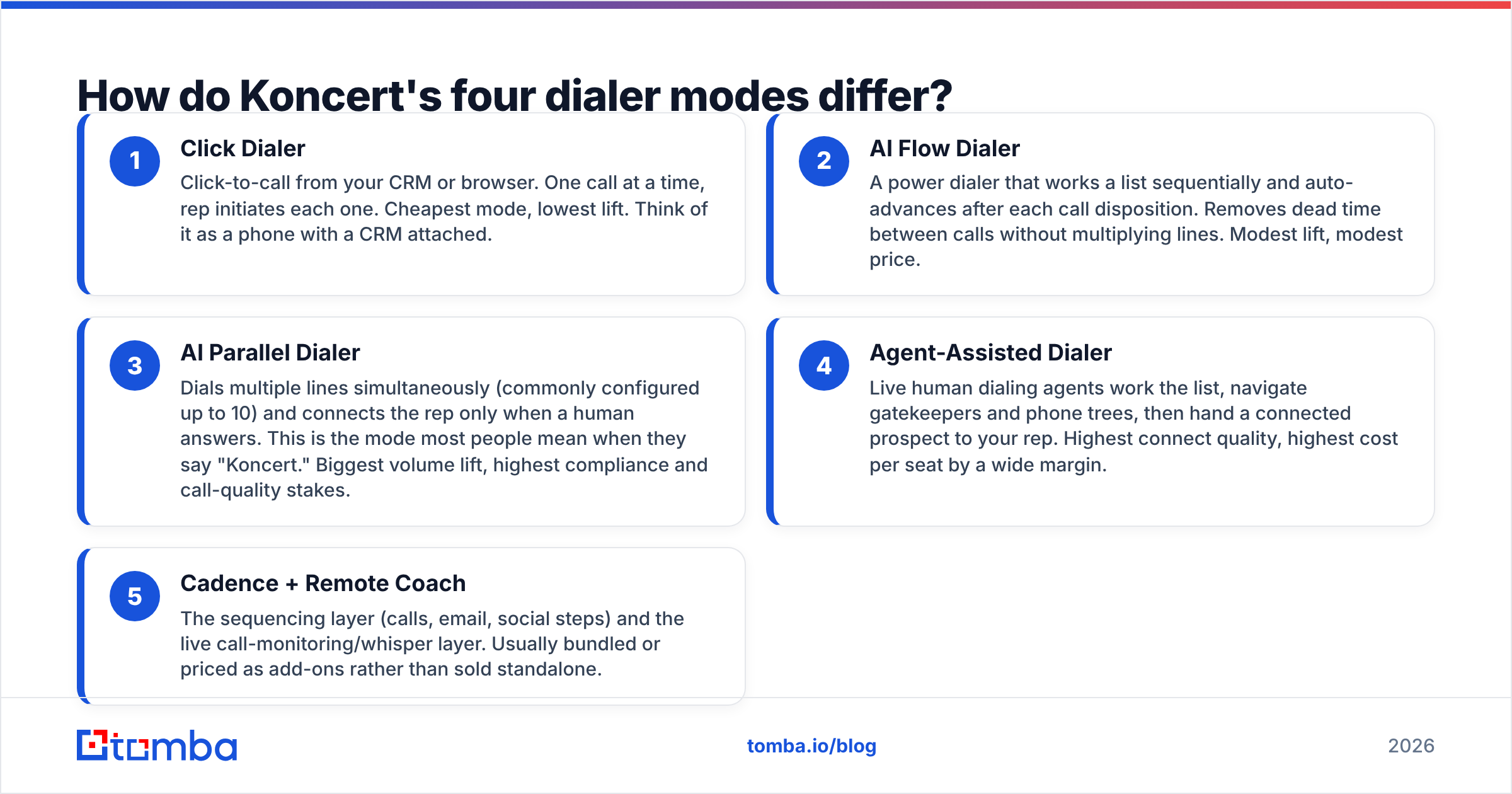
- Click Dialer — Click-to-call from your CRM or browser. One call at a time, rep initiates each one. Cheapest mode, lowest lift. Think of it as a phone with a CRM attached.
- AI Flow Dialer — A power dialer that works a list sequentially and auto-advances after each call disposition. Removes dead time between calls without multiplying lines. Modest lift, modest price.
- AI Parallel Dialer — Dials multiple lines simultaneously (commonly configured up to 10) and connects the rep only when a human answers. This is the mode most people mean when they say "Koncert." Biggest volume lift, highest compliance and call-quality stakes.
- Agent-Assisted Dialer — Live human dialing agents work the list, navigate gatekeepers and phone trees, then hand a connected prospect to your rep. Highest connect quality, highest cost per seat by a wide margin.
- Cadence + Remote Coach — The sequencing layer (calls, email, social steps) and the live call-monitoring/whisper layer. Usually bundled or priced as add-ons rather than sold standalone.
The practical rule: each step up the ladder buys you conversations per hour and costs you dollars per seat. Teams routinely over-buy here, paying parallel-dialer prices for a motion that a flow dialer would have served fine.
How does Koncert pricing work in 2026?#
Koncert does not publish a standard price list on its site. You book a demo, describe your seat count and dialing mode, and receive a quote. That is standard for this category — Koncert's own site routes pricing questions through sales rather than a checkout page — but it does make budgeting harder than it should be.
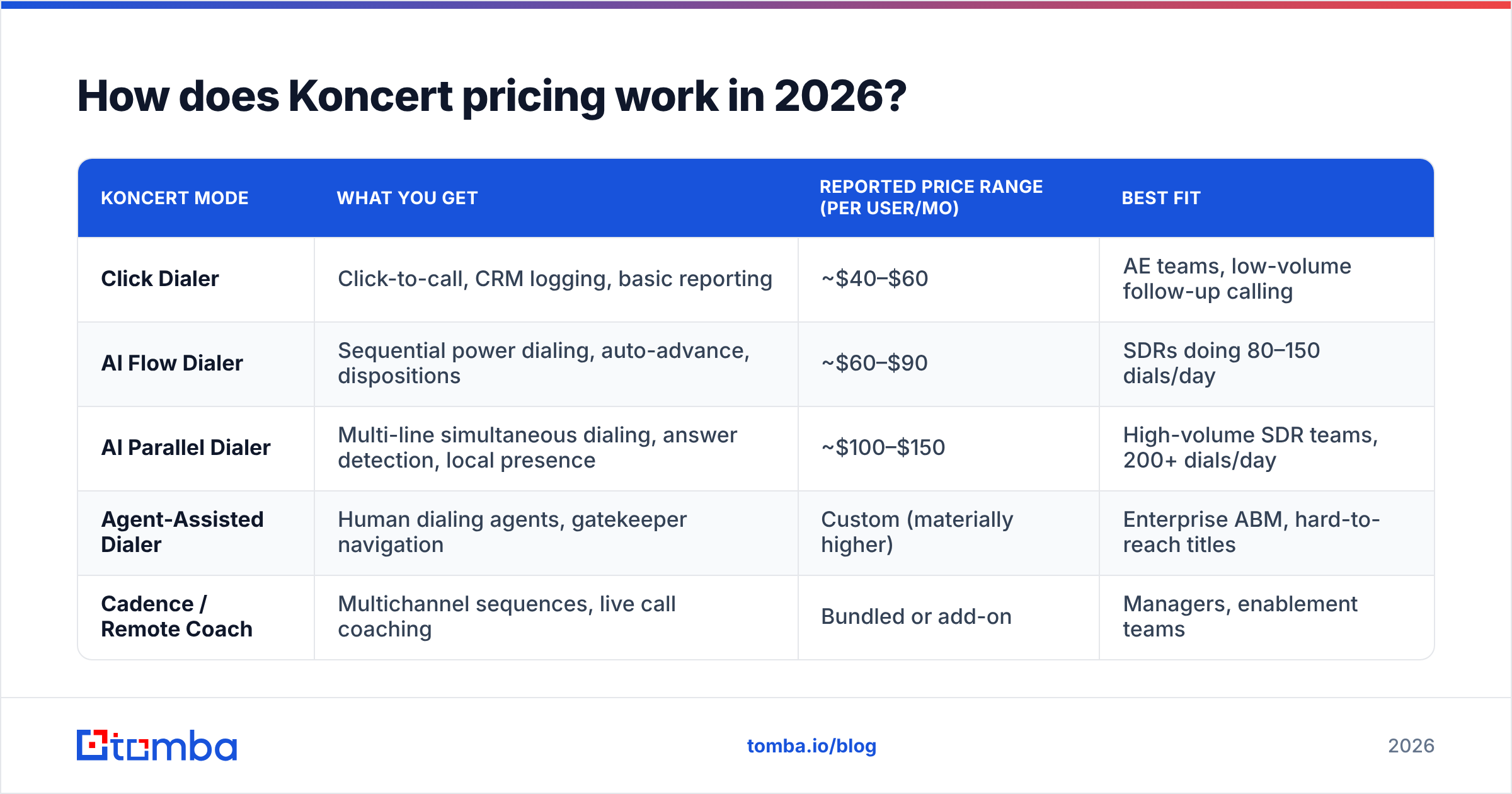
Here is what the publicly reported ranges look like, aggregated from vendor directories, buyer reports, and review-site pricing notes. Treat these as directional, not quoted. Your number will move with seat count, term length, and which modules you bundle.
| Koncert mode | What you get | Reported price range (per user/mo) | Best fit |
|---|---|---|---|
| Click Dialer | Click-to-call, CRM logging, basic reporting | ~$40–$60 | AE teams, low-volume follow-up calling |
| AI Flow Dialer | Sequential power dialing, auto-advance, dispositions | ~$60–$90 | SDRs doing 80–150 dials/day |
| AI Parallel Dialer | Multi-line simultaneous dialing, answer detection, local presence | ~$100–$150 | High-volume SDR teams, 200+ dials/day |
| Agent-Assisted Dialer | Human dialing agents, gatekeeper navigation | Custom (materially higher) | Enterprise ABM, hard-to-reach titles |
| Cadence / Remote Coach | Multichannel sequences, live call coaching | Bundled or add-on | Managers, enablement teams |
Three things commonly move the final number and rarely show up in the first quote:
- Annual commitment. Month-to-month pricing, where it's offered at all, carries a meaningful premium. Most published ranges assume an annual term.
- Seat minimums. Small teams frequently hit a floor — you may be quoted for more seats than you have reps.
- Telephony and number costs. Local presence caller ID, number pools, and per-minute charges can sit outside the seat price. Ask explicitly whether minutes are included or metered.

Ask for the full year-one total in writing: seats × months + onboarding + telephony + any implementation fee. The per-seat headline number is almost never the number on the invoice.
What do Koncert reviews actually say?#
Aggregate sentiment on Koncert is genuinely positive — it holds strong ratings on G2's Koncert reviews page and similar directories, and the praise is specific rather than generic. But the criticism clusters in predictable places, which is more useful to you than a star rating.
What reviewers consistently praise:
- Connect-rate lift is real. Reps report 3x to 5x more conversations per hour on the parallel dialer versus manual dialing. This is the single most repeated positive.
- Caller ID and local presence management. Koncert invests in number reputation and heat-map style number selection, which matters enormously now that carriers aggressively label suspected spam traffic.
- CRM sync quality. Salesforce and HubSpot logging is generally described as reliable — dispositions, call recordings, and activity land where they should.
- Support responsiveness. Named CSMs and hands-on implementation come up often in enterprise reviews.
What reviewers consistently complain about:
- Onboarding takes longer than expected. Multi-week implementations are common, especially with CRM field mapping and number provisioning. Budget ramp time, not just license cost.
- Call quality variance. Parallel dialing inherently introduces connect latency — that half-second pause when a prospect says "hello" and the system bridges the rep. Some prospects hang up on it. Reviewers report this ranges from unnoticeable to occasionally rough depending on network conditions.
- Pricing opacity. The most common non-product complaint. Buyers dislike not being able to self-qualify on budget before sitting through a demo.
- UI feels dated in places. Functional rather than beautiful. Not a dealbreaker, but it comes up.
- Learning curve for managers. Reporting is deep but not immediately intuitive.
Read reviews with the rebrand in mind — some older ConnectLeader-era feedback describes a product that has since changed materially.
What are the real pros and cons of Koncert?#
Stripped to the decision-relevant points:
Pros
- Four dialing modes under one contract means you can assign different tiers to different roles instead of buying one expensive license for everyone.
- Answer detection and number reputation management are mature — this is a vendor that has been doing telephony for a long time, not a sequencer that bolted on a dialer.
- Agent-assisted dialing is a genuinely differentiated offering. Very few competitors sell human dialing agents as a product tier.
- Compliance posture is taken seriously, which matters as call authentication rules continue to tighten in the US.
Cons
- No transparent pricing, no free tier, no self-serve trial. You cannot evaluate budget fit without a sales conversation.
- Seat minimums and annual terms make it a poor fit for a 2-person team testing whether outbound calling works at all.
- The parallel dialer's value is entirely dependent on phone number accuracy — which Koncert does not supply. You bring the data.
- Overlap with your existing sequencer. If you already run Outreach, Salesloft, or Instantly for email, you are now paying for two cadence engines.

How does Koncert compare to other parallel dialers?#
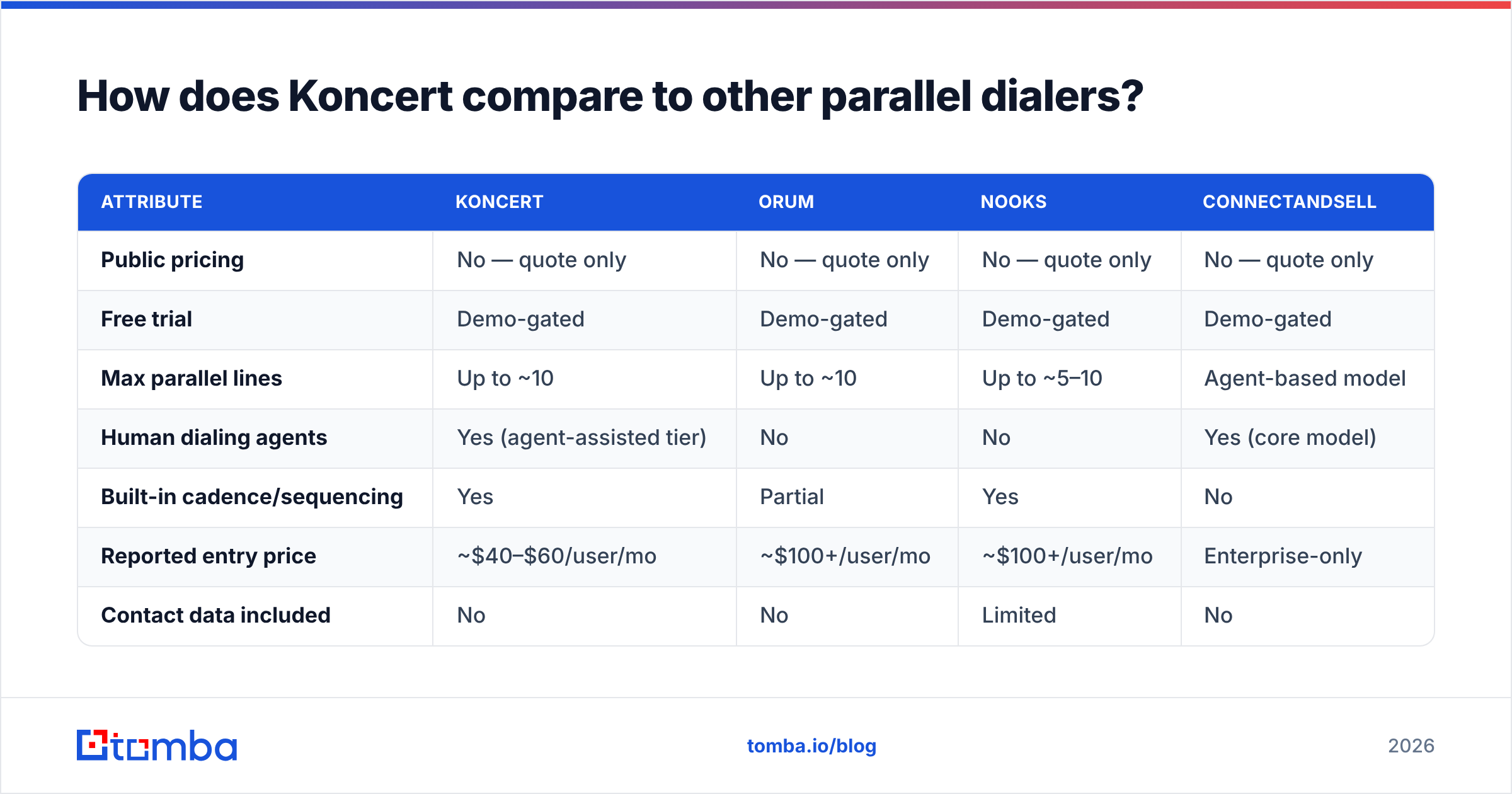
Parallel dialing got crowded fast. Here's how the category lines up on the attributes buyers actually weigh.
| Attribute | Koncert | Orum | Nooks | ConnectAndSell |
|---|---|---|---|---|
| Public pricing | No — quote only | No — quote only | No — quote only | No — quote only |
| Free trial | Demo-gated | Demo-gated | Demo-gated | Demo-gated |
| Max parallel lines | Up to ~10 | Up to ~10 | Up to ~5–10 | Agent-based model |
| Human dialing agents | Yes (agent-assisted tier) | No | No | Yes (core model) |
| Built-in cadence/sequencing | Yes | Partial | Yes | No |
| Reported entry price | ~$40–$60/user/mo | ~$100+/user/mo | ~$100+/user/mo | Enterprise-only |
| Contact data included | No | No | Limited | No |
| Best for | Mixed-mode teams | Pure speed-to-connect | Coaching-heavy SDR floors | Enterprise ABM calling |
The honest summary: Koncert's differentiator is breadth of dialing modes plus the agent-assisted option, and it tends to quote lower at the entry tier than the newer venture-backed dialers. The newer tools tend to win on interface polish and analytics.
Note the row that is identical across all four columns: none of them include contact data. Every one of these platforms assumes you arrive with a list of names and phone numbers that are actually correct.
What should you fix before you buy any dialer?#
Your list, not your dialer. This is the part buyers skip and then blame the vendor for.
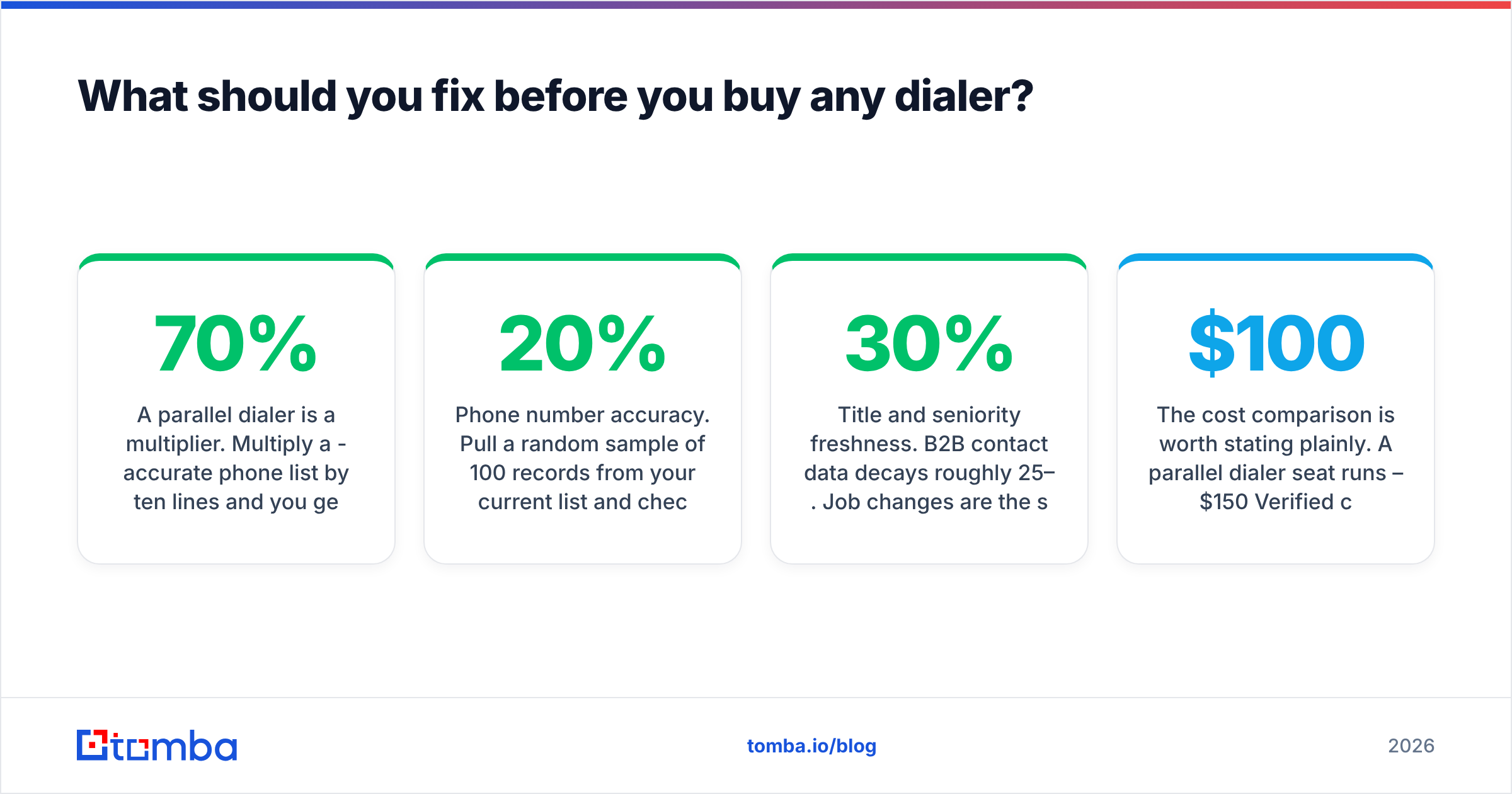
A parallel dialer is a multiplier. Multiply a 70%-accurate phone list by ten lines and you get ten times more wrong numbers, disconnected lines, and gatekeepers for people who left the company in 2024. The connect-rate lift you were sold assumes clean data underneath.
Run this audit before you sign:
- Phone number accuracy. Pull a random sample of 100 records from your current list and check them. If more than 20% are wrong or stale, fix data before adding dial capacity. A phone finder that sources direct dials, paired with a phone validator to strip disconnected and invalid lines, does more for connect rate than an extra parallel line.
- Title and seniority freshness. B2B contact data decays roughly 25–30% per year. Job changes are the single biggest source of wasted dials.
- Email coverage on the same records. Dialers convert best inside a multichannel cadence. If you only have a phone number, you have one shot. Contact enrichment that fills email alongside phone gives the cadence somewhere to go after a no-answer.
- Deduplication. Calling the same prospect twice from two reps is a fast way to burn a number's reputation and an account's goodwill.
The cost comparison is worth stating plainly. A parallel dialer seat runs $100–$150/mo. Verified contact data — the input that determines whether that seat produces conversations — typically costs a fraction of that. Tomba pricing starts with a free tier at 25 searches/mo, with Starter at $49/mo, Growth at $99/mo, and Pro at $249/mo. Compare that to what an under-fed dialer seat costs you in dead dials.
Is Koncert worth it for your team?#
Buy Koncert if: you run 5+ SDRs at 150+ dials per day, you already have a reliable source of direct-dial numbers, you want multiple dialing modes on one contract, and you can commit annually. The agent-assisted tier is worth a serious look if you sell to titles that never pick up their own phone.
Skip it if: you're a team of one to three, you're still testing whether cold calling works for your ICP, you need transparent pricing to get budget approved, or your phone data quality is unknown. Start with a click dialer or your CRM's native calling, prove the motion, then upgrade.
Negotiate hard on: annual term discounts, seat minimums, telephony minutes, and implementation fees. Ask for a pilot on a subset of seats. Ask what happens to your number reputation data if you churn.
And do the arithmetic before the demo, not after. If a $130/mo seat needs to produce one extra meeting per month to break even, and your list accuracy caps you at half the connects the vendor modeled, the seat does not pay for itself no matter how good the dialer is.
Get the contact data your dialer actually needs#
Whichever dialer you land on, the conversations come from the list — not the software. Before you add parallel lines, make sure every record you're feeding in has a verified work email and a current direct dial attached to a person who still holds the job.
Start with the Tomba Email Finder to build and verify the contact layer under your outbound motion. It's free to test at 25 searches per month, $49/mo at Starter, and it costs less than the dial capacity it makes worth paying for.
Related guides#
// get started
Find, verify and enrich your first contacts today
Start on the free plan with 25 searches a month, then scale when your team is ready.
Free plan · No credit card required · GDPR & CCPA
// about the author