Labnify Pricing, Reviews, Pros and Cons: A 2026 Breakdown
Labnify sells flat-rate email sending in a market that bills per email. Here is how that model actually prices out, what reviewers report, and where the savings quietly disappear.
TL;DR
- Labnify's pitch is structural, not cosmetic: it charges a flat monthly fee for email sending instead of metering you per thousand emails the way most ESPs and SMTP relays do.
- That model wins hard at high volume and loses at low volume. Under roughly 50,000 sends a month, most teams pay less on a metered plan or a free tier elsewhere.
- Reviews cluster around two themes: people like the cost predictability and the SMTP-relay simplicity; they complain about thinner analytics, a smaller integration catalog, and support depth compared with incumbents.
- The real budget line is rarely the sending tool. It is domains, inboxes, warmup, and list quality — and a bad list will burn any sender, flat-rate or not.
- Verify every number on labnify.com before you buy. Sending-infrastructure pricing changes faster than review sites update.
What is Labnify?#
Labnify is an email sending platform: an SMTP relay plus a sending/campaign layer, aimed at people who push high volumes of email and are tired of per-email metering. Think of it as the difference between a metered taxi and a monthly transit pass. The taxi is cheaper for one short ride. The pass is cheaper if you ride four times a day, and — the part people underrate — it removes the anxiety of watching the meter.
It sits in the same shelf as Mailgun, Amazon SES, SendGrid, Brevo, and the cold-email senders like Instantly or Smartlead, but it does not do all the same jobs. Labnify's center of gravity is throughput and cost control. If you want a mature deliverability consulting arm, a 40-app integration directory, and a decade of ESP tooling, that is not the trade this product is making.
Two things to be clear about before we discuss money:
- A sending tool is not a data tool. Labnify does not build your list. It moves the mail.
- A sending tool is not a deliverability guarantee. Flat-rate pricing makes it cheaper to send a million emails. It does nothing to make a million emails wanted.
How does Labnify pricing work in 2026?#
The mechanic to understand is that Labnify prices on the plan tier, not on the send count. Metered vendors do the opposite: the tier is a bucket, and you buy more buckets. The practical difference shows up in four places.
- Your marginal cost per email. On a metered relay, email number 500,001 costs the same as email number 1. On a flat plan, it costs effectively nothing — which is great for economics and dangerous for discipline.
- Your forecast accuracy. Flat plans give you one number for the CFO. Metered plans give you a range that moves with campaign calendar and list growth.
- Your floor price. Flat plans have a floor — you pay it in a slow month. SES, by contrast, can cost a few dollars for a quiet quarter.
- What is bundled vs. billed. Dedicated IPs, extra sending domains, contact storage, seats, and validation credits are the usual add-ons across every vendor in this category. Read the line items, not the headline.
- The upgrade trigger. On metered plans you upgrade when volume rises. On flat plans you upgrade when you need a capability — more domains, more users, higher throughput caps, priority support.
- Contract length. Annual prepay discounts are standard in this market and typically the single biggest lever on effective price.
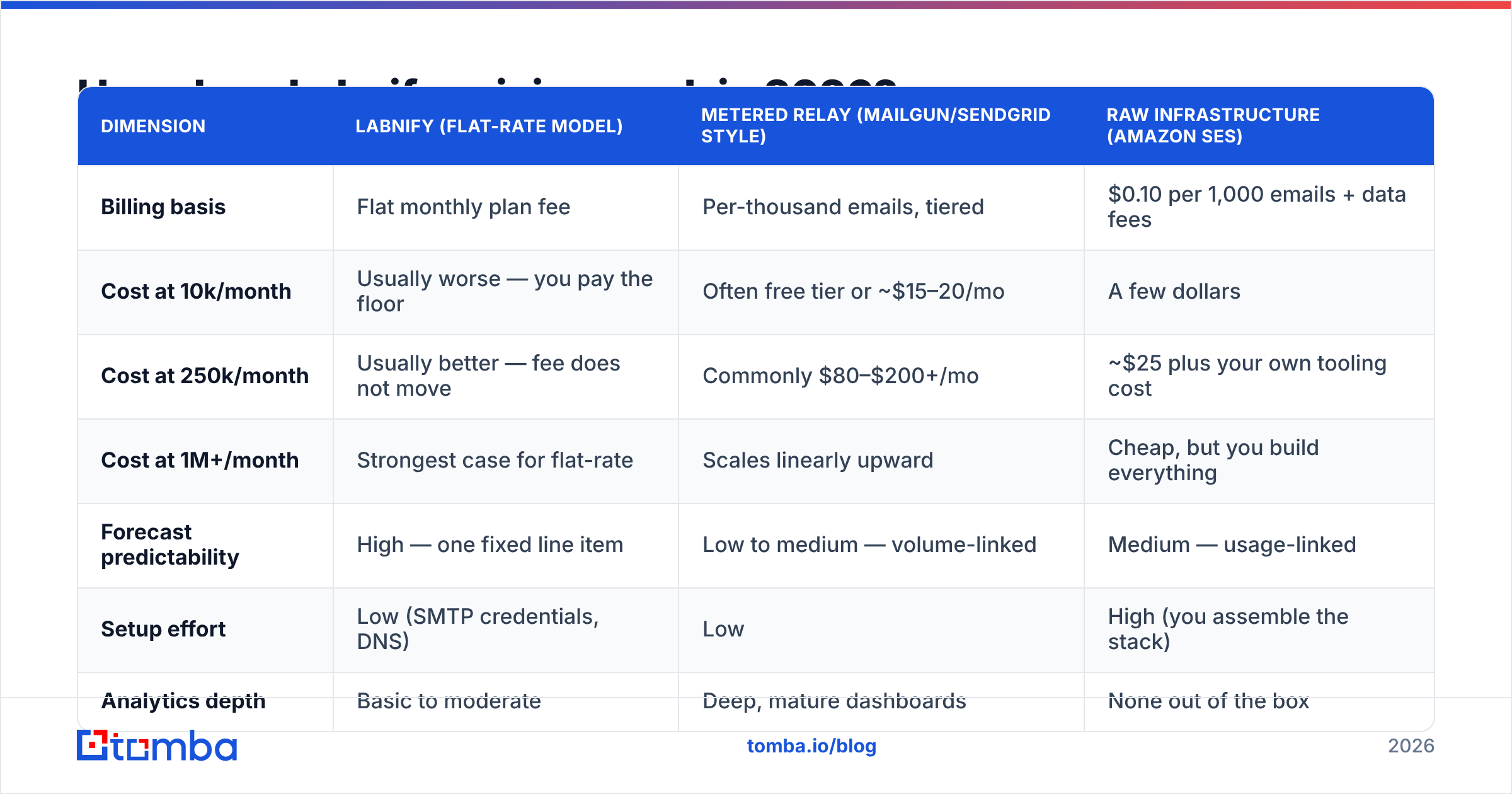
Here is how the models compare in shape. Treat every figure as an illustrative planning benchmark for a 250,000-email month, not a live quote — check each vendor's own pricing page before you commit.
| Dimension | Labnify (flat-rate model) | Metered relay (Mailgun/SendGrid style) | Raw infrastructure (Amazon SES) |
|---|---|---|---|
| Billing basis | Flat monthly plan fee | Per-thousand emails, tiered | $0.10 per 1,000 emails + data fees |
| Cost at 10k/month | Usually worse — you pay the floor | Often free tier or ~$15–20/mo | A few dollars |
| Cost at 250k/month | Usually better — fee does not move | Commonly $80–$200+/mo | ~$25 plus your own tooling cost |
| Cost at 1M+/month | Strongest case for flat-rate | Scales linearly upward | Cheap, but you build everything |
| Forecast predictability | High — one fixed line item | Low to medium — volume-linked | Medium — usage-linked |
| Setup effort | Low (SMTP credentials, DNS) | Low | High (you assemble the stack) |
| Analytics depth | Basic to moderate | Deep, mature dashboards | None out of the box |
| Best for | High-volume, cost-capped senders | Mixed transactional + marketing | Engineering teams who want control |
The honest reading: Labnify's pricing is a volume bet. If you are not actually sending the volume, you are subsidising a ceiling you never touch. If you are sending it, the flat fee is the cheapest sanity in the category.
What do Labnify reviews actually say?#
Review coverage for Labnify is thinner than for the incumbents, which itself is a data point — you will find far more verified Mailgun and SendGrid reviews on G2 and Capterra than you will for any newer sender. Weigh that when you read a small sample of five-star ratings. Small samples swing.
Across public reviews, forum threads, and vendor-comparison chatter, the recurring positives are:
- Predictable invoices. This is the single most-cited benefit, and it is the one the product is designed to deliver.
- Fast setup. SMTP relay configuration is a familiar, well-trodden path: credentials, SPF, DKIM, DMARC, send.
- Reasonable throughput for bulk campaigns without the tier-jump anxiety.
- Responsive early-stage support — common with smaller vendors, where you sometimes reach an actual engineer.
The recurring criticisms:
- Analytics and reporting depth trail the incumbents. If you live in cohort-level engagement reporting, you will feel the gap.
- Integration catalog is smaller. Expect to lean on SMTP, API, or an automation layer like Zapier or Make rather than a native connector for every CRM.
- Documentation and community are limited compared with a decade-old ESP. When you hit an edge case at 2am, Stack Overflow will not save you.
- Track record. Deliverability reputation is earned over years of IP and domain hygiene. Newer platforms have less of it, by definition.
- Migration friction. Moving templates, suppression lists, and webhooks off an incumbent is real work nobody budgets for.
None of that is disqualifying. It is the standard profile of a challenger product: better on the one axis it picked, thinner on the long tail.
What are the pros of Labnify?#
Cost ceiling. At scale, the flat fee is the pitch, and it delivers. A team sending 800,000 emails a month can genuinely cut spend versus per-thousand billing.
Budget defensibility. One fixed number is easier to approve, easier to forecast, and does not spike when marketing runs an extra campaign.
Simplicity of the send layer. SMTP relay plus an API is a boring, portable interface. Boring is a feature in infrastructure. If you ever leave, you change credentials — you are not unpicking a proprietary workflow engine.
Removes the volume-throttling instinct. Teams on metered plans quietly under-send to protect budget. That is a bad reason to shrink a campaign.
What are the cons of Labnify?#
Wrong shape for low volume. Under about 50,000 sends a month, the floor price is hard to justify when free and near-free tiers exist elsewhere.
Analytics gap. If your reporting needs go past opens, clicks, bounces, and unsubscribes, plan on exporting to your own warehouse or BI layer.
Fewer native integrations. Budget engineering time or an automation subscription.
Unlimited-ish sending invites bad behavior. When marginal cost approaches zero, volume becomes the lazy lever. Blast harder, hit more spam traps, torch your domain. Flat pricing does not care about your sender reputation — you have to.
Smaller vendor risk. Pricing model changes, feature roadmap, and long-term viability all carry more uncertainty than with an incumbent. Do not put a mission-critical transactional flow anywhere you have not stress-tested.
What hidden costs should you budget for?#
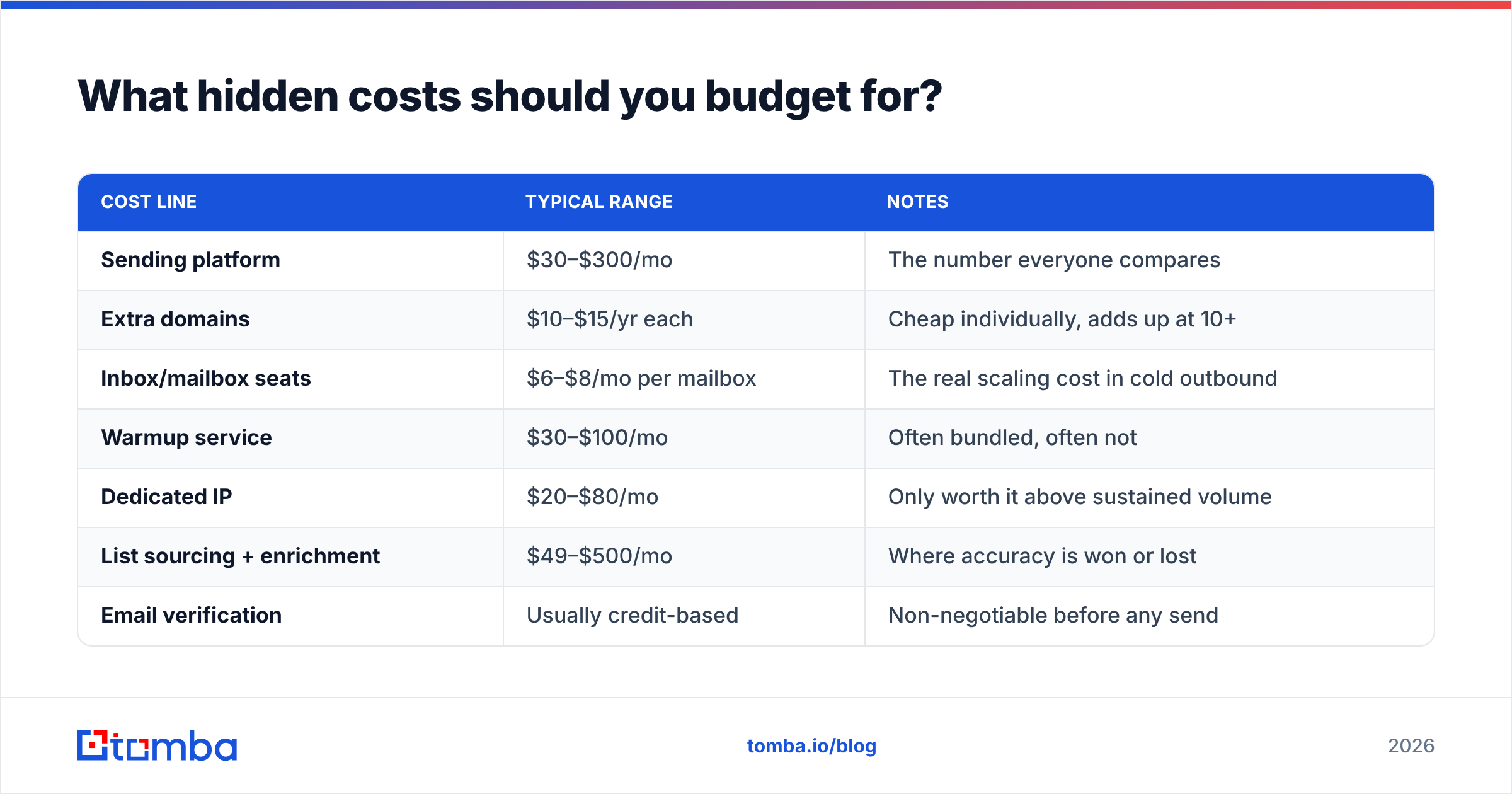
The sending platform is usually 20–40% of the real cost of an outbound program. The rest is the stack around it:
| Cost line | Typical range | Notes |
|---|---|---|
| Sending platform | $30–$300/mo | The number everyone compares |
| Extra domains | $10–$15/yr each | Cheap individually, adds up at 10+ |
| Inbox/mailbox seats | $6–$8/mo per mailbox | The real scaling cost in cold outbound |
| Warmup service | $30–$100/mo | Often bundled, often not |
| Dedicated IP | $20–$80/mo | Only worth it above sustained volume |
| List sourcing + enrichment | $49–$500/mo | Where accuracy is won or lost |
| Email verification | Usually credit-based | Non-negotiable before any send |
That second-to-last row is the one that decides whether the whole program works. You can run the cheapest sender on earth and still fail if 20% of your addresses do not exist.
Does cheap sending fix deliverability?#
No. Sending cost and inbox placement are almost unrelated variables, and conflating them is the most expensive mistake in outbound.
Mailbox providers judge you on engagement signals, authentication, complaint rate, and bounce rate. A flat-rate plan changes none of those. What it changes is the temptation to send more, which pushes bounce and complaint rates the wrong way if your list is not clean.
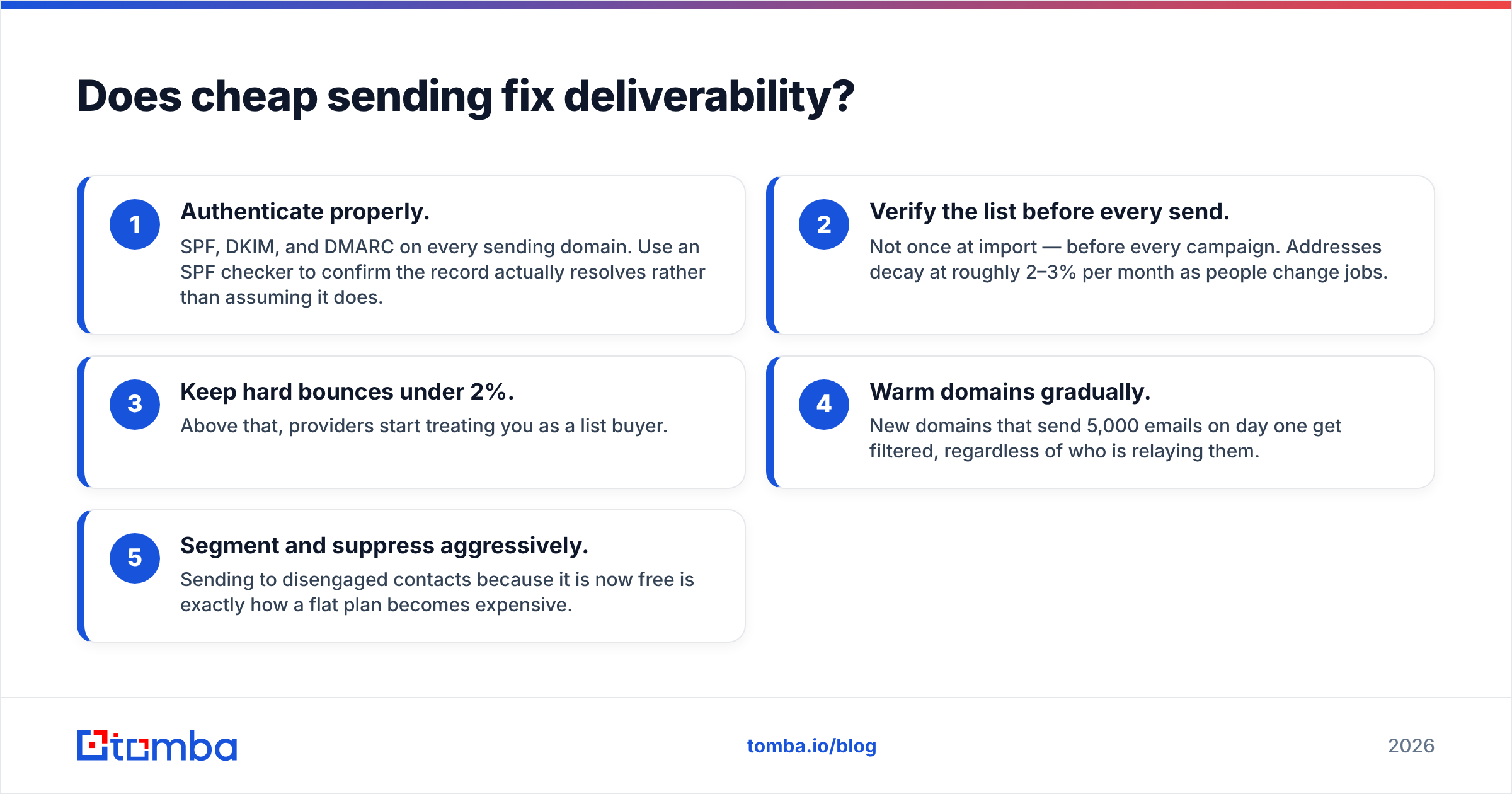
The practical hygiene checklist, in priority order:
- Authenticate properly. SPF, DKIM, and DMARC on every sending domain. Use an SPF checker to confirm the record actually resolves rather than assuming it does.
- Verify the list before every send. Not once at import — before every campaign. Addresses decay at roughly 2–3% per month as people change jobs.
- Keep hard bounces under 2%. Above that, providers start treating you as a list buyer.
- Warm domains gradually. New domains that send 5,000 emails on day one get filtered, regardless of who is relaying them.
- Segment and suppress aggressively. Sending to disengaged contacts because it is now free is exactly how a flat plan becomes expensive.

This is where the sending decision and the data decision separate. Labnify (or Mailgun, or SES) is your pipe. What flows through it comes from somewhere else — a purchased list, a scraped export, a B2B data provider like BookYourData, or a targeted email finder that resolves contacts one company at a time. The pipe does not audit the water.
Run every list through an email verifier before it touches your sender. Verification is cheap. A burned domain is not — rebuilding sender reputation takes weeks, and the campaigns you cannot run during those weeks are the actual cost.
Who should buy Labnify, and who should not?#
Good fit:
- You send 250,000+ emails a month and your metered bill has become a recurring argument with finance.
- You want a predictable, single-line-item cost you can defend in a budget review.
- Your reporting needs are satisfied by standard delivery metrics, or you already pipe events into your own analytics stack.
- You are comfortable with SMTP/API integration rather than needing a native connector for everything.
Poor fit:
- You send under 50,000 a month. Take the free tier or a metered plan and revisit at scale.
- Deep native CRM automation is core to your workflow.
- You run mission-critical transactional email (password resets, receipts) and need a long, public track record plus a hard SLA.
- You are hoping cheaper sending will fix a reply-rate problem. It will not. That is a targeting and data problem.
How should you evaluate it in a 14-day test?#
Do not migrate on a spreadsheet. Run a controlled test:
- Split a real campaign — same list, same copy, same schedule — across your current sender and Labnify. Only the pipe changes.
- Measure inbox placement, not delivery rate. "Delivered" includes spam folders. Use seed-list testing.
- Check bounce classification quality. Good senders distinguish hard, soft, and block bounces clearly. Vague bounce data costs you list hygiene later.
- Time the support response on a real question during the trial, not a sales question.
- Model 12 months at your projected volume, including domains, mailboxes, warmup, and verification — not just the plan fee.
- Test the exit. Can you export suppression lists and event logs? If not, the price is irrelevant.
If Labnify wins that test on your actual volume, the flat-rate model is doing its job. If your volume is modest, the test will show you what the review sites will not: you are paying for headroom you do not use.
Compare the total against what you would spend elsewhere — including on the data layer. It is worth putting Tomba pricing next to your sending spend, because most teams discover the split is backwards: they over-invest in the pipe and under-invest in the list. Free tier at 25 searches a month, Starter at $49/mo, Growth at $99/mo, Pro at $249/mo.
The verdict#
Labnify is a reasonable buy for high-volume senders who want cost predictability and can live with a leaner feature surface. It is a poor buy for low-volume teams, for deep-integration workflows, and for anyone expecting a pricing model to solve a deliverability problem. Confirm current plan details directly with the vendor — this category reprices often.
And fix the input before you optimise the output. If your bounce rate is above 3%, no sending platform on the market will save the campaign.
Start with the list, not the pipe. Use the Tomba Email Finder to build verified, role-targeted contact lists by domain, name, or company — then run them through verification before your first send. Clean data makes every sending platform look better, and it is the one variable that improves reply rates rather than just lowering invoices. Try it free with 25 searches a month.
Related guides#
// get started
Find, verify and enrich your first contacts today
Start on the free plan with 25 searches a month, then scale when your team is ready.
Free plan · No credit card required · GDPR & CCPA
// about the author