Labnify vs LeadRocks: Which B2B Sales Tool Wins in 2026?
Labnify sends email at volume. LeadRocks sells you contacts. Comparing them head-to-head only makes sense once you see which half of the outbound stack each one actually owns — and what you still have to buy separately.
TL;DR#
- They are not the same category. Labnify is sending infrastructure (SMTP relay, mail merge, unlimited-ish volume). LeadRocks is a B2B contact database (LinkedIn-sourced emails and phone numbers). Buying one does not remove the need for the other.
- If your lists are fine but your sending is fragile, Labnify is the relevant purchase. If your sending works but you have nobody to email, LeadRocks is.
- Neither one solves verification. Database exports decay, and a sender will happily blast a stale list straight into a spam folder. That's the gap that kills most campaigns.
- Lifetime-deal pricing distorts the comparison. Both tools have circulated on AppSumo-style deals, which makes "cost per lead" look artificially good until you hit credit limits or need fresh data.
- The honest 2026 stack is: a verified data layer (Tomba, or a database you trust), a sending layer (Labnify, Instantly, Smartlead), and a CRM. Trying to make one product do all three is where pipelines go to die.
What is Labnify?#
Labnify is an email sending and mail-merge platform. Its pitch is volume without per-email pricing: connect your own domains and mailboxes, or use its relay, and send campaigns at a scale that would get expensive fast on a traditional ESP. It's built for people who already have lists and want them out the door — sequences, personalisation variables, tracking, inbox rotation.
Think of it as the delivery van. It's very good at moving boxes. It has no opinion about whether the addresses on those boxes are real.
That distinction matters more than any feature bullet on Labnify's site. A sending tool's ceiling is set by the quality of what you feed it. Two teams on identical Labnify plans can see a 4% reply rate and a 0.2% reply rate, and the difference is almost never the software.
What Labnify handles well:
- High-volume campaigns — per-seat or flat pricing beats per-email billing once you're past a few thousand sends a month.
- Mailbox and domain rotation — spreads volume so no single sender burns out.
- Mail merge personalisation — standard variable substitution across CSV columns.
- Basic deliverability hygiene — SPF/DKIM guidance, throttling, warmup-adjacent features.
What it does not handle:
- Finding the contacts in the first place
- Deep verification of the addresses you upload
- Firmographic enrichment (headcount, tech stack, funding)
What is LeadRocks?#
LeadRocks is on the other side of the ledger: a B2B contact database. You search by job title, company, location, industry, or headcount and export contacts with work emails and — this is its main selling point — direct and mobile phone numbers. Much of its data is LinkedIn-derived, which is why the profile coverage feels current even when the contact details are not.
LeadRocks does have a small outreach layer bolted on, but nobody buys it for that. You buy it for the list. And a list is a snapshot, not a feed.
The uncomfortable arithmetic: B2B contact data decays at roughly 25–30% per year, and faster in tech where tenure is short. A database export that was 92% accurate on the day it was built is meaningfully worse six months later. That is not a LeadRocks-specific flaw — it's true of every static database, including the big enterprise ones.

Labnify vs LeadRocks: how do they actually compare?#
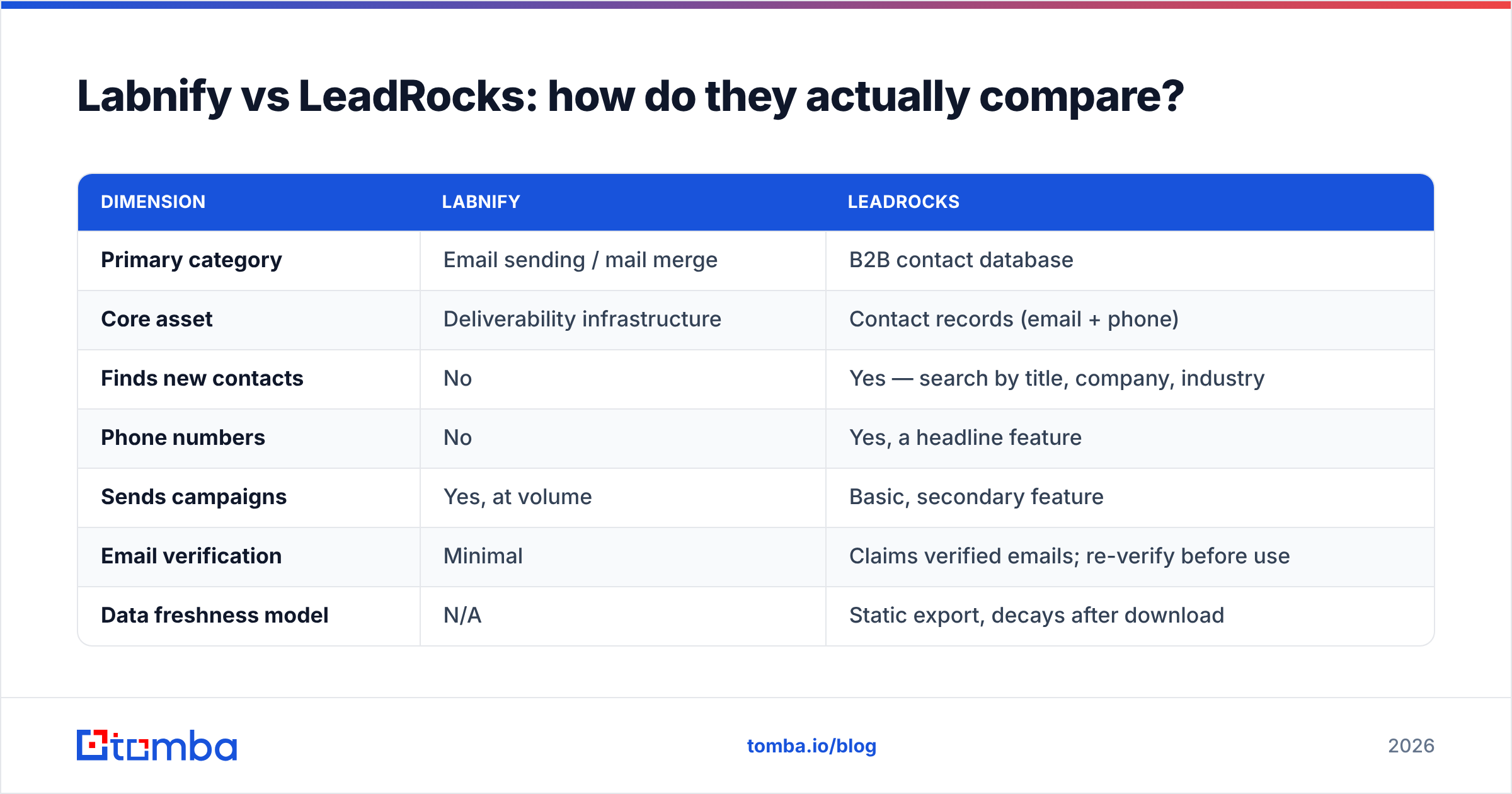
Here's the head-to-head, keeping in mind that half these rows are "not applicable" by design rather than by weakness.
| Dimension | Labnify | LeadRocks |
|---|---|---|
| Primary category | Email sending / mail merge | B2B contact database |
| Core asset | Deliverability infrastructure | Contact records (email + phone) |
| Finds new contacts | No | Yes — search by title, company, industry |
| Phone numbers | No | Yes, a headline feature |
| Sends campaigns | Yes, at volume | Basic, secondary feature |
| Email verification | Minimal | Claims verified emails; re-verify before use |
| Data freshness model | N/A | Static export, decays after download |
| Typical pricing shape | Flat/seat-based, volume-friendly | Credit packs + lifetime deals |
| Best for | Teams with lists, no sending stack | Teams with sending, no lists |
| Biggest gap | Garbage-in, garbage-out | No control over sending reputation |
If you only take one thing from that table: the "vs" framing is a trap. The real question is which half of your stack is currently broken.
Which one should you buy first?#
Conclusion first — diagnose the bottleneck, then buy.
Buy the sending layer (Labnify) if:
- You already have a list you trust, from your CRM, a partner, or an existing database subscription
- Your current ESP is charging per-email and the bill scales faster than your pipeline
- You're sending from a single mailbox and hitting throttles or spam placement
- You need mail merge across multiple domains without stitching scripts together
Buy the data layer (LeadRocks, or an email finder) if:
- Your reps are manually digging through LinkedIn for contact details
- You need phone numbers as well as emails for a multichannel motion
- Your total addressable list is smaller than your monthly sending capacity
- You're targeting well-defined titles at known companies
Buy neither yet if:
- Your bounce rate is above 5%. Fix data quality before you scale sends. More volume through a leaky funnel just burns domains faster.
Why does verification sit between them?#
Because this is the seam where most outbound stacks leak.
A contact database gives you a record that was accurate when it was scraped. A sending tool takes whatever you upload and dispatches it. Nothing in that chain checks whether sarah.chen@acme.com still routes to a human who works at Acme. Gmail and Microsoft both tightened bulk-sender requirements in 2024 and have kept tightening; a spam complaint rate above 0.3% now gets you throttled rather than politely warned. Bounces feed directly into sender reputation, and reputation is the asset that takes months to rebuild.
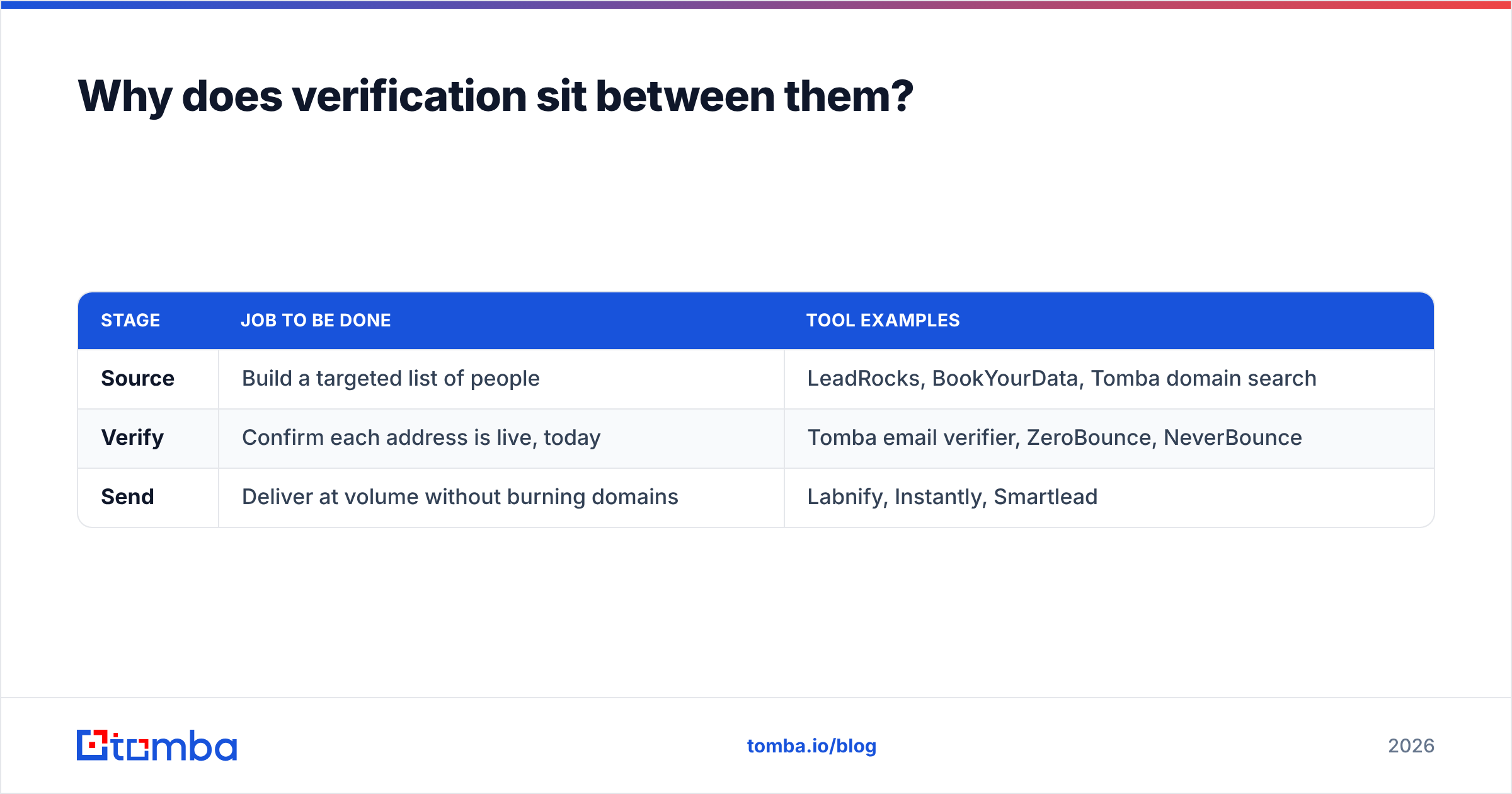
So the practical workflow is three steps, not two:
| Stage | Job to be done | Tool examples |
|---|---|---|
| Source | Build a targeted list of people | LeadRocks, BookYourData, Tomba domain search |
| Verify | Confirm each address is live, today | Tomba email verifier, ZeroBounce, NeverBounce |
| Send | Deliver at volume without burning domains | Labnify, Instantly, Smartlead |
Running an email verifier between your database export and your sending tool typically knocks bounce rates from the 8–15% range you see on aged exports down to low single digits. That one step does more for deliverability than any warmup schedule.
There's also the catch-all problem. A meaningful share of B2B domains accept everything at the SMTP layer, which means a standard verification check returns "unknown" rather than a verdict. Those addresses are neither safe nor useless — they need a catch-all verifier that uses pattern confidence and secondary signals rather than a single SMTP handshake. Dumping unknowns straight into Labnify is how people discover their catch-all rate the expensive way.
How does an email finder compare to buying a database?#
Different economics, different freshness model.
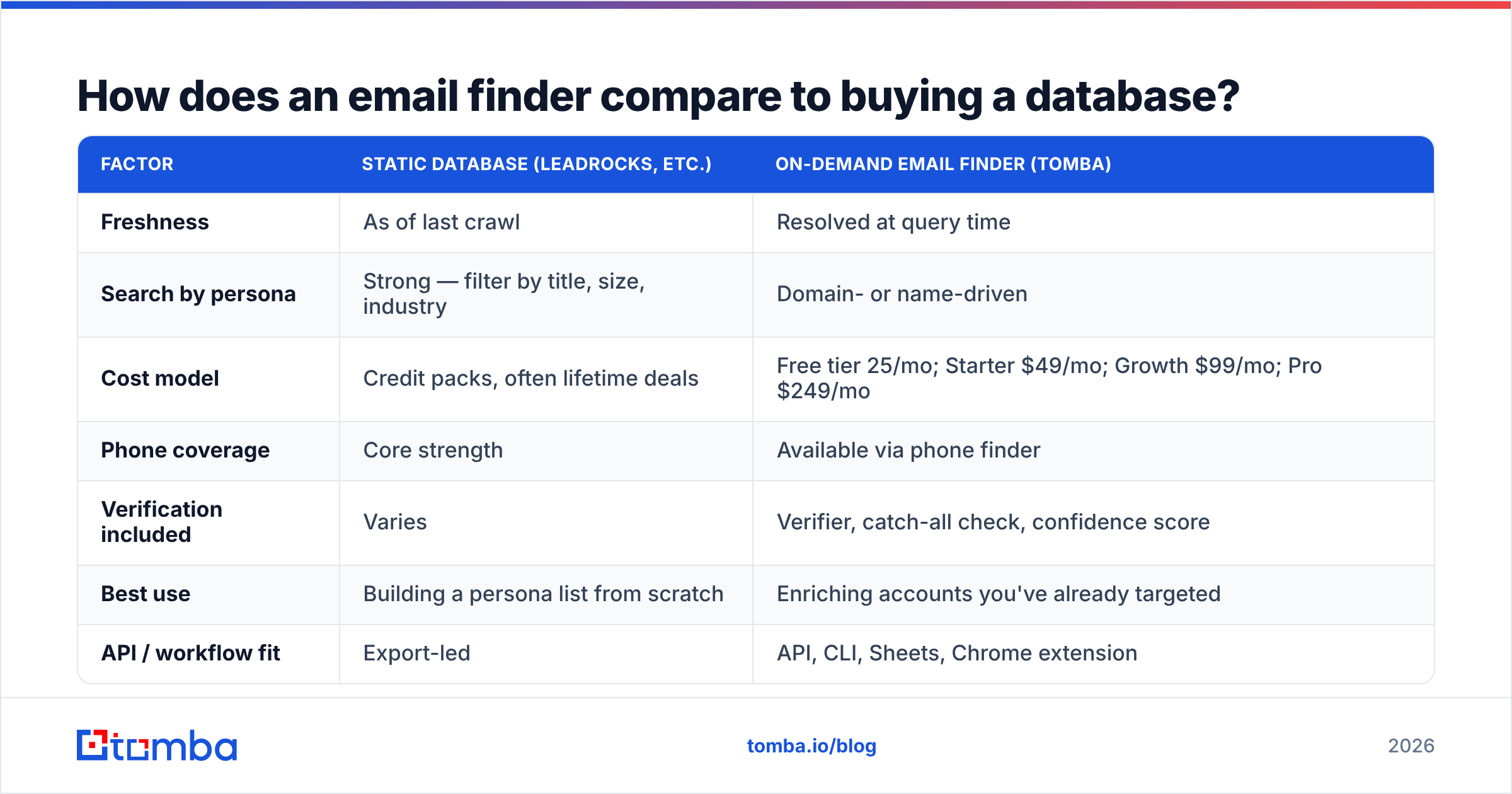
A database sells you a pre-built snapshot: you pay per credit, you export, the file ages on your hard drive. An email finder resolves an address at the moment you ask — given a name and a domain, or a company domain and a role — so what you get reflects current signals rather than a crawl from last quarter.
| Factor | Static database (LeadRocks, etc.) | On-demand email finder (Tomba) |
|---|---|---|
| Freshness | As of last crawl | Resolved at query time |
| Search by persona | Strong — filter by title, size, industry | Domain- or name-driven |
| Cost model | Credit packs, often lifetime deals | Free tier 25/mo; Starter $49/mo; Growth $99/mo; Pro $249/mo |
| Phone coverage | Core strength | Available via phone finder |
| Verification included | Varies | Verifier, catch-all check, confidence score |
| Best use | Building a persona list from scratch | Enriching accounts you've already targeted |
| API / workflow fit | Export-led | API, CLI, Sheets, Chrome extension |
Neither model is strictly better. If you need "all VPs of Engineering at 200–1000 person SaaS companies in Germany," a database search is faster. If you have a list of 4,000 target accounts from your ICP work and need the right contact at each, on-demand resolution wins on accuracy and cost. Most serious teams run both: a database for discovery, a finder plus verifier for accuracy at the point of send.

What do the pricing models really cost?#
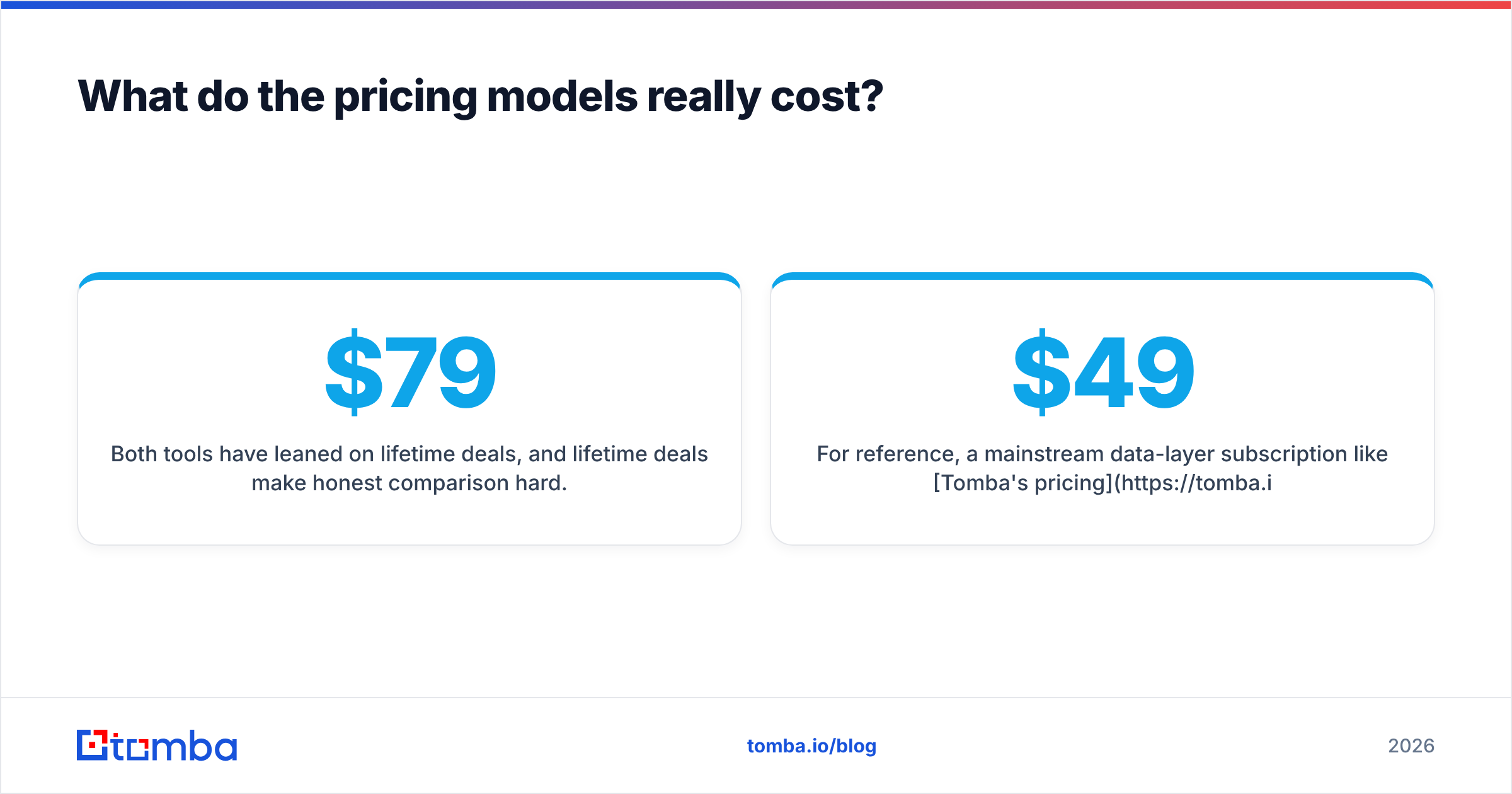
Both tools have leaned on lifetime deals, and lifetime deals make honest comparison hard. A $79 one-time payment for "unlimited" anything looks unbeatable until you read what's actually metered — credits, seats, exports, or monthly send caps — and until you need data that was refreshed after the deal closed.
Three questions to ask before either purchase:
- What resets, and when? Lifetime access to a platform is not lifetime access to credits. Check whether the credit pool refills monthly or is a one-time grant.
- What happens at scale? A plan that's generous at 2,000 sends/month may be punitive at 50,000. Price the volume you'll be at in six months, not today.
- What's the cost of a bad record? A bounced email costs more than its credit price — it costs a fraction of your domain reputation. Factor verification into the per-lead number.
For reference, a mainstream data-layer subscription like Tomba's pricing runs $49/mo at Starter and $99/mo at Growth, with a free tier of 25 searches a month for testing accuracy before you commit. Compare that against a credit pack's effective cost after you discard the records that fail verification — the gap usually narrows a lot.
Are there better alternatives to either?#
Depends which half you're replacing.
Instead of Labnify (sending): Instantly and Smartlead are the volume incumbents, with deeper warmup networks and unibox features. Both cost more. Labnify's argument is price-per-send, and it's a real argument if your volume is high and your data is clean.
Instead of LeadRocks (data): Apollo bundles data with sequencing at the cost of accuracy complaints on niche segments. BookYourData is a solid choice when you want targeted, pre-verified lists with clear coverage by region and role. Tomba sits differently — it resolves and verifies on demand through an email finder API, which suits engineering-led teams who want enrichment inside their own workflow rather than a CSV round trip.
For multichannel: if the phone numbers are the reason you're looking at LeadRocks, compare directly against a dedicated phone finder rather than assuming a bundled database wins on that axis. Mobile coverage varies enormously by geography, and every vendor's headline number is a global average that may not describe your territory.
What's the verdict on Labnify vs LeadRocks?#
Neither wins, because they're not playing the same game.
Labnify wins the sending comparison against other senders. LeadRocks wins some data comparisons — particularly on phone coverage at its price point — against other databases. Put them against each other and the only useful answer is: buy the one that fixes your current bottleneck, and budget for verification regardless of which you pick.
The failure mode to avoid is buying Labnify, pointing it at an unverified export, and concluding that cold email doesn't work. It works. It just doesn't work on a list where one in eight addresses no longer exists.
Run this order of operations instead:
- Define the ICP tightly enough that a list of 2,000 beats a list of 40,000
- Source contacts — database search, LinkedIn finder, or domain-level discovery
- Verify every address, including catch-alls, before it touches a sender
- Send in controlled volumes with domain rotation
- Re-verify quarterly, because your list is decaying while you read this
Start with the data layer#
If your bounce rate is the problem — and for most teams comparing these two tools, it is — fix the input before you upgrade the pipe. Tomba Email Finder resolves professional email addresses by name, domain, or company, returns a confidence score with every result, and includes verification so you're not shipping guesses into a sending tool. The free tier gives you 25 searches a month, which is enough to test accuracy against a sample of your existing list and see exactly how much of it is dead weight.
Run that test before your next campaign. Whatever you decide about Labnify and LeadRocks, you'll be making the decision with real numbers instead of a vendor's landing page.
Related guides#
// get started
Find, verify and enrich your first contacts today
Start on the free plan with 25 searches a month, then scale when your team is ready.
Free plan · No credit card required · GDPR & CCPA
// about the author