Labnify vs OneMoreLead: Cold Email Sender vs B2B Data List
Labnify sends cold email. OneMoreLead sells B2B contact lists. Comparing them only makes sense once you know which half of your outbound stack is actually broken — here is the honest breakdown.
TL;DR
- Labnify and OneMoreLead are not really competitors. Labnify is a cold email sending platform (mailbox connections, sequences, warmup, SMTP rotation). OneMoreLead is a B2B contact database you buy lists from.
- If your problem is "my emails aren't going out at scale," look at Labnify. If your problem is "I have nobody to email," look at OneMoreLead — or at a live email finder.
- Both are best known through lifetime-deal style pricing, which makes the sticker price attractive and the long-term data freshness the real risk.
- The failure mode nobody warns you about: a static purchased list decays roughly 2-2.5% per month. A sender with perfect deliverability still bounces on dead contacts.
- Most teams end up needing three things, not two: a source of contacts, a verification layer, and a sender. Pick the stack, not the tool.
Search "Labnify vs OneMoreLead" and you get a lot of pages that pretend these two products do the same job. They don't. One puts messages in inboxes; the other hands you a spreadsheet of people to message. Comparing them head-to-head is like comparing a delivery van to a warehouse — useful only once you admit you probably need both, and that you might be buying the wrong one first.
This is a neutral breakdown of what each tool is for, where each one gets thin, and what an honest 2026 outbound stack looks like around them.
What is Labnify, and what does it actually replace?#
Labnify positions itself as a cold email and email marketing sender: you connect sending mailboxes, load a list, build a sequence, and it handles rotation, throttling, warmup and reply detection. In practice it sits in the same category slot as Instantly, Smartlead, Saleshandy or Reply.io — the "sending layer" of outbound.
What you're buying when you buy a sender:
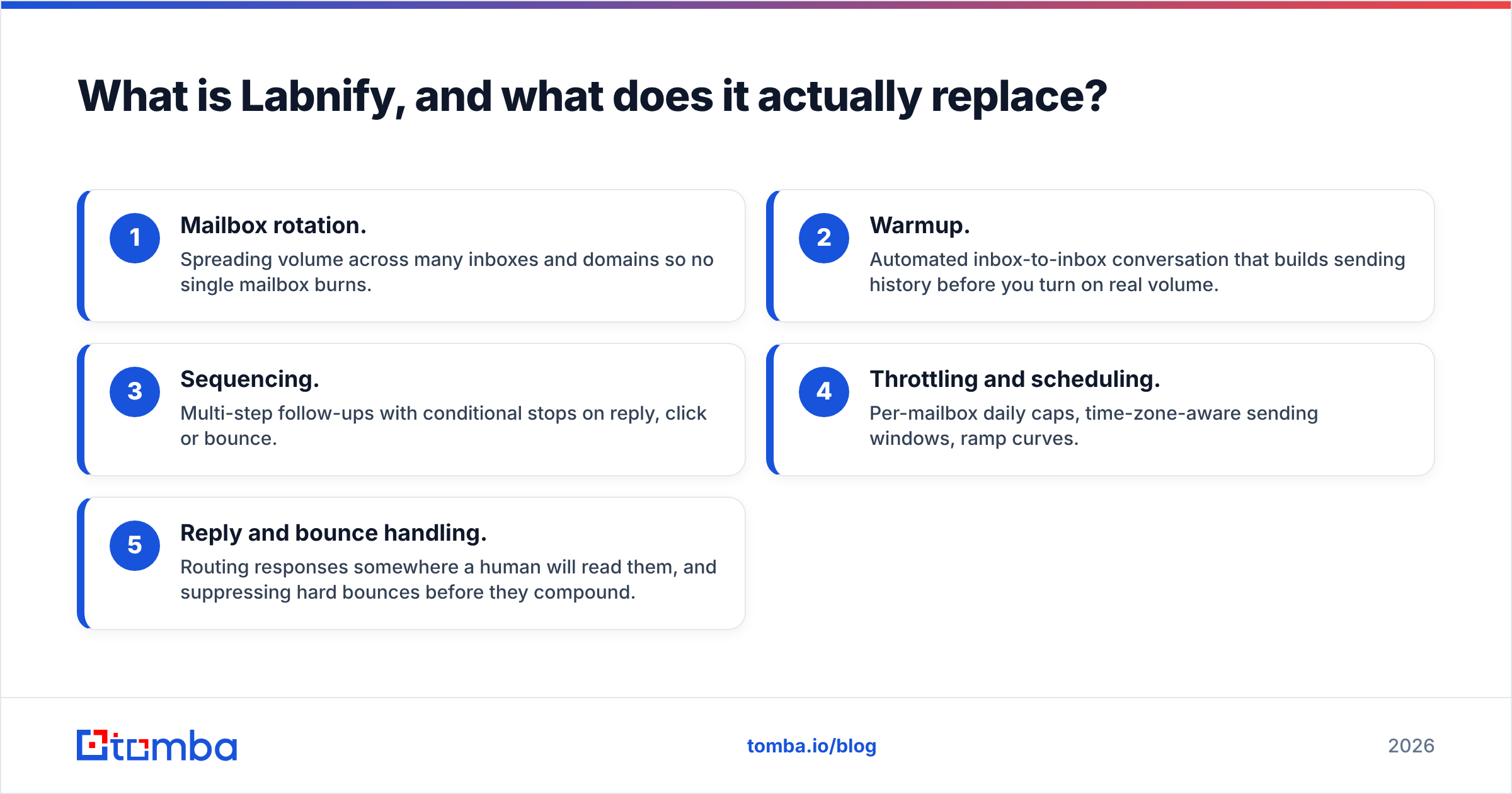
- Mailbox rotation. Spreading volume across many inboxes and domains so no single mailbox burns.
- Warmup. Automated inbox-to-inbox conversation that builds sending history before you turn on real volume.
- Sequencing. Multi-step follow-ups with conditional stops on reply, click or bounce.
- Throttling and scheduling. Per-mailbox daily caps, time-zone-aware sending windows, ramp curves.
- Reply and bounce handling. Routing responses somewhere a human will read them, and suppressing hard bounces before they compound.
Notice what is not on that list: contacts. A sender does not know who your prospects are. It takes a CSV or an API push and moves it. If the CSV is bad, the sender's job becomes impossible — no amount of warmup saves a campaign where 18% of addresses don't exist. That is the single most important thing to understand before you compare these two products. Check the current feature set and plan structure directly on labnify.com before you commit, because sender pricing models change often.

What is OneMoreLead, and where does its data come from?#
OneMoreLead is a B2B contact database. You filter by industry, company size, job title, location and similar firmographics, then export contacts — name, company, role, email, sometimes phone — as a list. Its marketing has historically leaned on a large US-weighted B2B profile count in the tens of millions, sold through generous one-time or lifetime-style packages rather than per-credit metering. You can confirm the current filter set and export limits on onemorelead.com.
Databases like this are built from some combination of public web crawling, business registries, partner data-sharing, contributed contact books, and purchased third-party files. That's normal for the category — it's roughly how every static B2B database works, from the cheapest AppSumo deal to the most expensive enterprise platform.
The important question is never "how many records?" It's when was this record last confirmed true?
How accurate is a static B2B list in 2026?#
Here is the uncomfortable arithmetic that applies to OneMoreLead, and to every static list vendor equally.
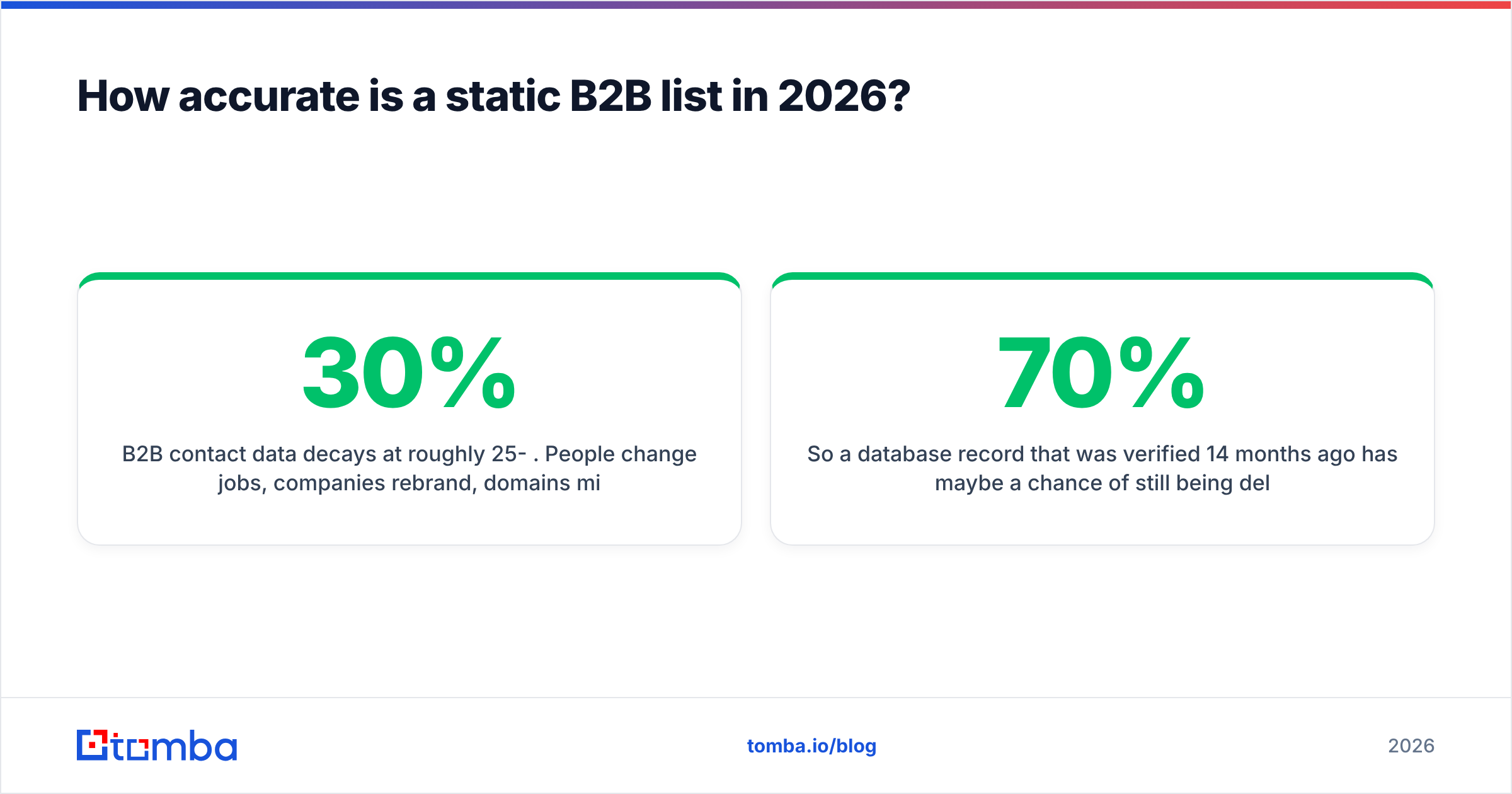
B2B contact data decays at roughly 25-30% per year. People change jobs, companies rebrand, domains migrate, mailbox naming conventions change after an acquisition. That's about 2-2.5% of your list dying every single month, quietly, whether you email it or not.
So a database record that was verified 14 months ago has maybe a 70% chance of still being deliverable. Export 5,000 contacts and you're statistically looking at 1,000-1,500 addresses that will bounce, soft-fail, or land in an abandoned mailbox that nobody reads. Send that through any sender — Labnify included — and you will torch the domain reputation you spent three weeks warming up.
This is why the honest answer to "is OneMoreLead's data good enough?" is: it depends entirely on when you verify it, not on who sold it to you. A list from an expensive enterprise vendor and a list from a lifetime-deal vendor both need a verification pass on the day you send. Treat every static export as unverified until proven otherwise. If you want the mechanics, our notes on data sources and how recency is established are a reasonable starting point.
The practical workflow that survives contact with reality:
- Export small, verify same-day. Pull 500-1,000 rows, not 50,000. Verify within 24 hours of sending.
- Run a real verification pass. An email verifier checks MX records, SMTP acceptance and known-trap patterns before a single message leaves your mailbox.
- Handle catch-all domains separately. Roughly a fifth of B2B domains accept everything at the server level. A catch-all verifier scores those instead of guessing.
- Re-find rather than re-send. When a contact bounces, the person usually still exists somewhere. Re-finding the current address beats retiring the lead.
Labnify vs OneMoreLead: how do they compare side by side?#
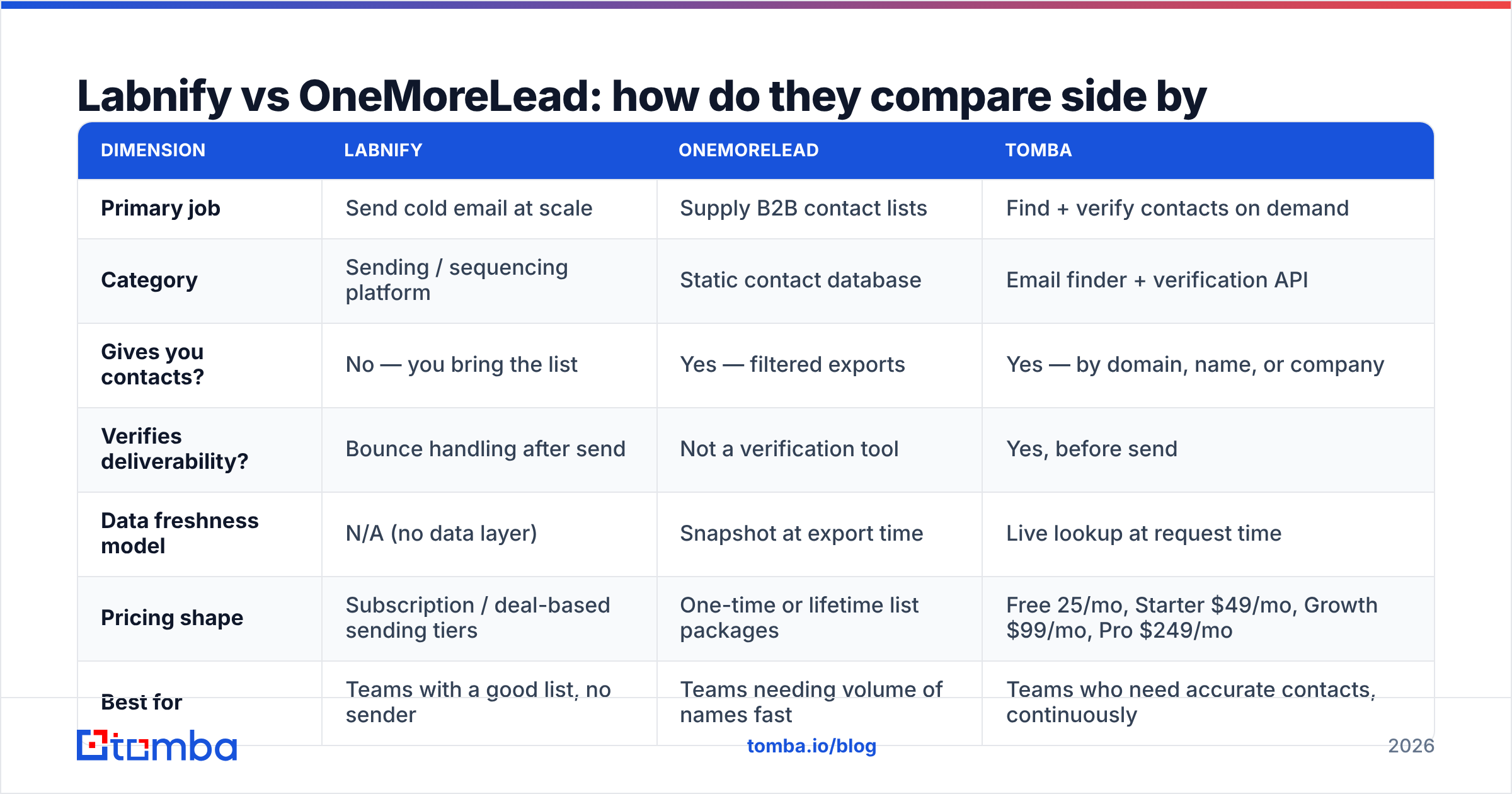
| Dimension | Labnify | OneMoreLead | Tomba |
|---|---|---|---|
| Primary job | Send cold email at scale | Supply B2B contact lists | Find + verify contacts on demand |
| Category | Sending / sequencing platform | Static contact database | Email finder + verification API |
| Gives you contacts? | No — you bring the list | Yes — filtered exports | Yes — by domain, name, or company |
| Verifies deliverability? | Bounce handling after send | Not a verification tool | Yes, before send |
| Data freshness model | N/A (no data layer) | Snapshot at export time | Live lookup at request time |
| Pricing shape | Subscription / deal-based sending tiers | One-time or lifetime list packages | Free 25/mo, Starter $49/mo, Growth $99/mo, Pro $249/mo |
| Best for | Teams with a good list, no sender | Teams needing volume of names fast | Teams who need accurate contacts, continuously |
| Biggest risk | Great deliverability on a dead list | Decay between export and send | Requires you to know your ICP domains |
| API access | Sending APIs | Limited / export-driven | Full email finder API |
Read that table row by row and the conclusion writes itself: the two products overlap in exactly zero rows. Which means "which is better" is the wrong question. The right question is which gap in your stack is currently costing you the most pipeline.
Which one should you actually buy first?#
Work through these in order. Stop at the first one that describes you.
- You have a clean, current list and can't send at volume. Buy the sender. Labnify (or any comparable sending platform) is the bottleneck-breaker here. Nothing else you buy will help until messages leave the building.
- You have deliverability under control but the pipeline is empty. You need contacts. A database export gets you volume fast; a finder gets you precision. Pick based on whether you know who you want or only what type of company you want.
- You know your target accounts by name. Skip the bulk database entirely. Run domain search across your account list and pull the roles you actually need. You'll get fewer contacts and dramatically better reply rates.
- Your bounce rate is above 5%. Buy neither yet. Fix verification first. A verification layer costs less than either product and it's the thing currently destroying your sender reputation.
- You're doing all three badly at once. Sequence it: contacts → verification → sender. In that order. Buying a sender first is the most common and most expensive mistake in outbound.

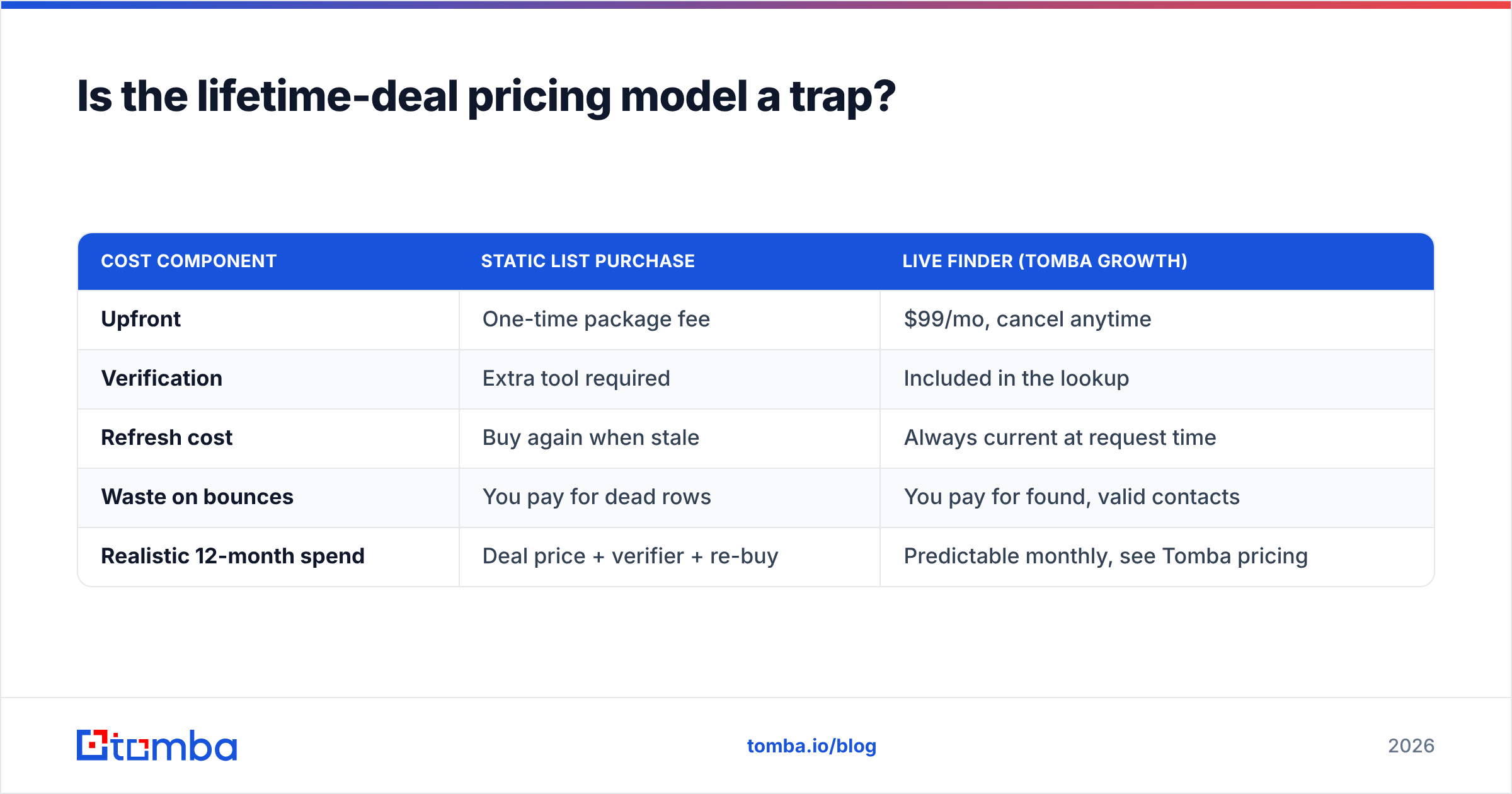
Is the lifetime-deal pricing model a trap?#
Not a trap — but it changes what you're optimizing for.
Lifetime and one-time deals are genuinely good value for tools where the product is software. A sender is software: the code keeps working, the mailbox rotation logic doesn't expire, and if the vendor keeps shipping you keep benefiting. Paying once for a sending platform can be a rational bet.
Lifetime deals on data are structurally different. You aren't buying software, you're buying a snapshot of a moving target. The value of that snapshot declines about 2% a month from the moment you download it. A "lifetime" database access that doesn't refresh aggressively is a lifetime of access to increasingly historical information.
The evaluation question to ask any list vendor, including OneMoreLead: what percentage of your database was re-verified in the last 90 days? If the answer is a record count instead of a recency percentage, you have your answer. G2's lead intelligence category reviews are useful here precisely because buyers complain about staleness in a way vendor pages never do.
Cost modelling that reflects reality:
| Cost component | Static list purchase | Live finder (Tomba Growth) |
|---|---|---|
| Upfront | One-time package fee | $99/mo, cancel anytime |
| Verification | Extra tool required | Included in the lookup |
| Refresh cost | Buy again when stale | Always current at request time |
| Waste on bounces | You pay for dead rows | You pay for found, valid contacts |
| Realistic 12-month spend | Deal price + verifier + re-buy | Predictable monthly, see Tomba pricing |
Can you use Labnify and OneMoreLead together?#
Yes, and that's the configuration that actually works — with one mandatory step in between.
The stack looks like this: OneMoreLead (or any source of contacts) → verification → Labnify (or any sender). Skip the middle step and you've built a machine that efficiently delivers mail to addresses that don't exist. Senders are unforgiving about this; mailbox providers score your domain on bounce rate, spam complaints and engagement, and a purchased list fails all three metrics at once if you send it raw.
A workable weekly rhythm:
- Monday: export or build a 500-1,500 contact segment for one ICP slice.
- Monday afternoon: run the full segment through verification. Drop hard fails, quarantine catch-alls, re-find where possible with a bulk email finder.
- Tuesday: load only the verified rows into the sender. Cap per-mailbox volume conservatively.
- Ongoing: suppress every bounce immediately and never re-import an unverified file.
If you're doing this at any real volume, wire it together rather than doing it by hand — integrations with your CRM or automation layer turn this from a Monday chore into a background process.
So which wins, Labnify or OneMoreLead?#
Neither, because they're answering different questions — but here's the decision in one line each.
Choose Labnify if your contacts are already good and you need a sending engine with warmup and rotation. It's a sender; judge it on deliverability features, mailbox limits, reply handling and support responsiveness, not on data.
Choose OneMoreLead if you need a large volume of B2B names quickly, you're targeting mainstream US B2B segments, and you're prepared to verify every export before it touches a mailbox. Judge it on filter granularity and refresh cadence, not on headline record count.
Choose neither as your data layer if your outbound depends on accuracy at the individual-contact level — named accounts, senior titles, tight ICPs. That's when a live lookup beats a snapshot, every time.
The pattern we see repeatedly: teams buy a sender because sending feels like the hard part, then discover that their 22% bounce rate was never a sending problem. The sender was fine. The list was from 2019.
Ready to fix the data half of the equation?#
If your bounce rate is the thing standing between you and a working outbound program, start there rather than with another sending tool. The Tomba Email Finder resolves current, verified business email addresses by domain, name or company — at the moment you ask, not whenever a database snapshot was last refreshed. The free tier gives you 25 searches a month to sanity-check your existing list against live data, and Starter is $49/mo when you're ready to run it at volume.
Test it against a sample of whatever list you're about to buy. If the two agree, buy with confidence. If they don't, you just saved your sending domain.
Related guides#
// get started
Find, verify and enrich your first contacts today
Start on the free plan with 25 searches a month, then scale when your team is ready.
Free plan · No credit card required · GDPR & CCPA
// about the author