Labnify vs SalesQL: Sending Power vs Contact Data in 2026
One tool sends the email. The other finds who to send it to. Here is how Labnify and SalesQL actually compare in 2026 - and the data-quality gap neither of them closes on its own.
TL;DR
- Labnify and SalesQL are not really competitors. Labnify is cold-email sending infrastructure; SalesQL is a LinkedIn contact extractor. Most teams that ask "Labnify vs SalesQL" actually need one of each.
- Pick SalesQL if your bottleneck is "I have a LinkedIn list and no email addresses."
- Pick Labnify if your bottleneck is "I have 4,000 contacts and my Gmail account keeps landing in spam."
- Neither tool solves data decay. A LinkedIn-sourced email that was valid in 2024 can bounce hard in 2026, and no sending platform will save you from that.
- The honest stack for most 2-15 person outbound teams: a dedicated finder + verifier for data, a sending platform for delivery, and a hard bounce rule under 2%.
What are Labnify and SalesQL, actually?#
The short answer: they sit at opposite ends of the outbound pipeline.
Labnify positions itself as a cold-email sending and mailing platform — the layer that takes a list you already have and gets it into inboxes. That means sending accounts, warmup, sequencing, throttling, inbox rotation, and reply handling. Its whole reason to exist is volume without burning domains.
SalesQL is the opposite end. It is a browser extension and enrichment tool built primarily around LinkedIn. You browse a profile, a Sales Navigator search, or a group, and SalesQL surfaces personal and work email addresses plus phone numbers, then lets you export to CSV or push to a CRM. It does not send anything.
So when people search "Labnify vs SalesQL," they are usually one of three people:
- The list-builder who has Sales Navigator access but no way to email anyone.
- The sender who has a list already and is getting crushed by spam filters.
- The budget owner who has been told to consolidate tools and is trying to figure out which one is redundant.
If you are person 3, the honest answer is: neither is redundant, but you may be paying for a third tool that is.

How do they compare feature by feature?#
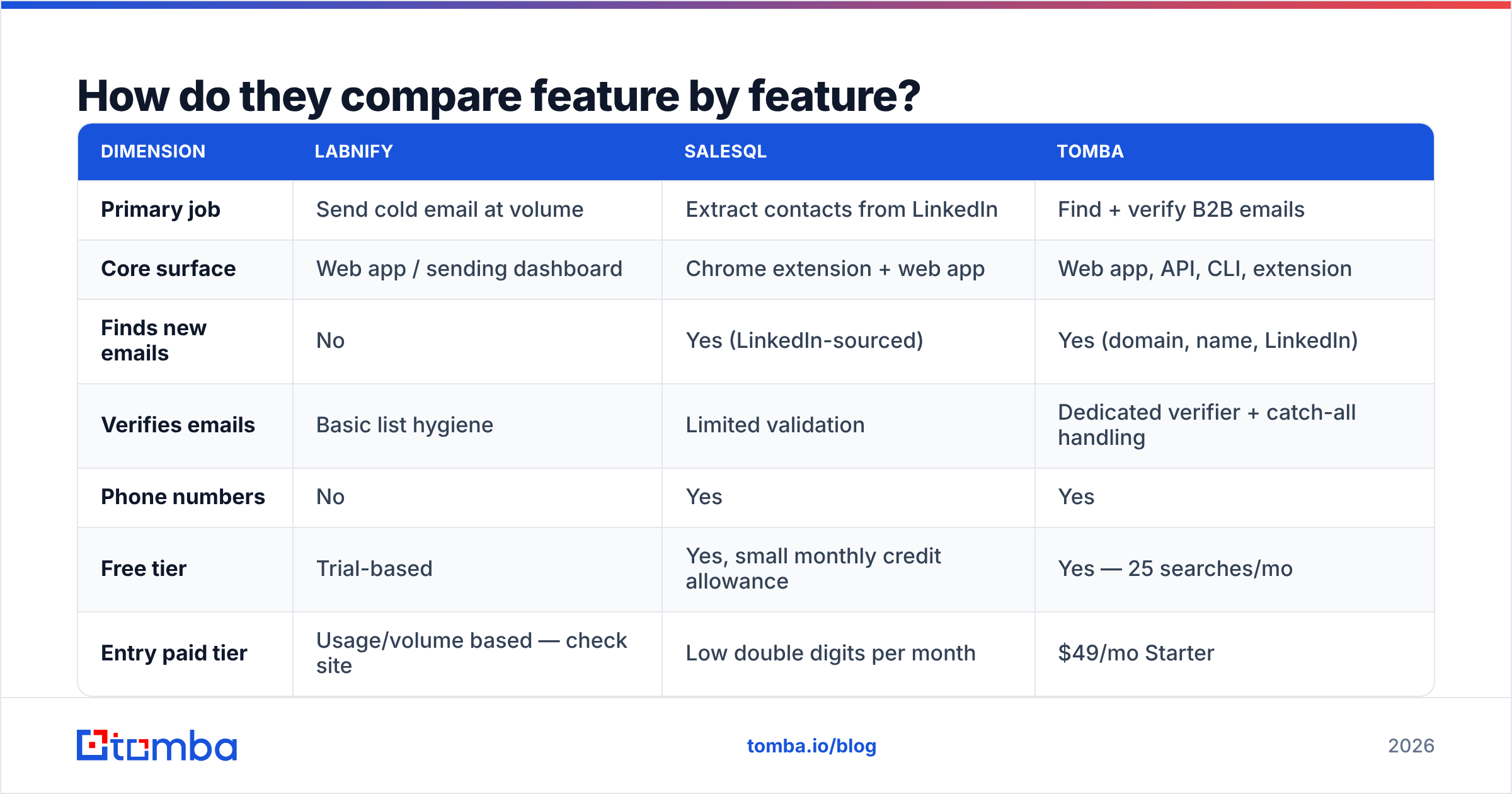
Here is the practical breakdown. Treat pricing as directional — both vendors adjust tiers, and you should confirm on their own pricing pages before you buy.
| Dimension | Labnify | SalesQL | Tomba |
|---|---|---|---|
| Primary job | Send cold email at volume | Extract contacts from LinkedIn | Find + verify B2B emails |
| Core surface | Web app / sending dashboard | Chrome extension + web app | Web app, API, CLI, extension |
| Finds new emails | No | Yes (LinkedIn-sourced) | Yes (domain, name, LinkedIn) |
| Verifies emails | Basic list hygiene | Limited validation | Dedicated verifier + catch-all handling |
| Phone numbers | No | Yes | Yes |
| Free tier | Trial-based | Yes, small monthly credit allowance | Yes — 25 searches/mo |
| Entry paid tier | Usage/volume based — check site | Low double digits per month | $49/mo Starter |
| Mid tier | Volume based | Mid double digits per month | $99/mo Growth |
| API access | Sending API | Yes, on higher tiers | Yes, on all paid tiers |
| Bulk processing | Sending queues | CSV export | Bulk finder + bulk verifier |
| Best for | Deliverability and volume | LinkedIn-first prospecting | Data accuracy at the top of funnel |
The table makes the overlap obvious: there is almost none. The only shared column where both do something is list hygiene, and neither does it as its primary job.
Which one fits which job?#
Think of outbound like running a restaurant. SalesQL is sourcing — going to the market and picking ingredients. Labnify is the delivery fleet — getting plates out the door without them arriving cold. You can have the best ingredients in the city and still lose customers to a broken delivery van, and the fastest fleet in the world cannot rescue spoiled produce.
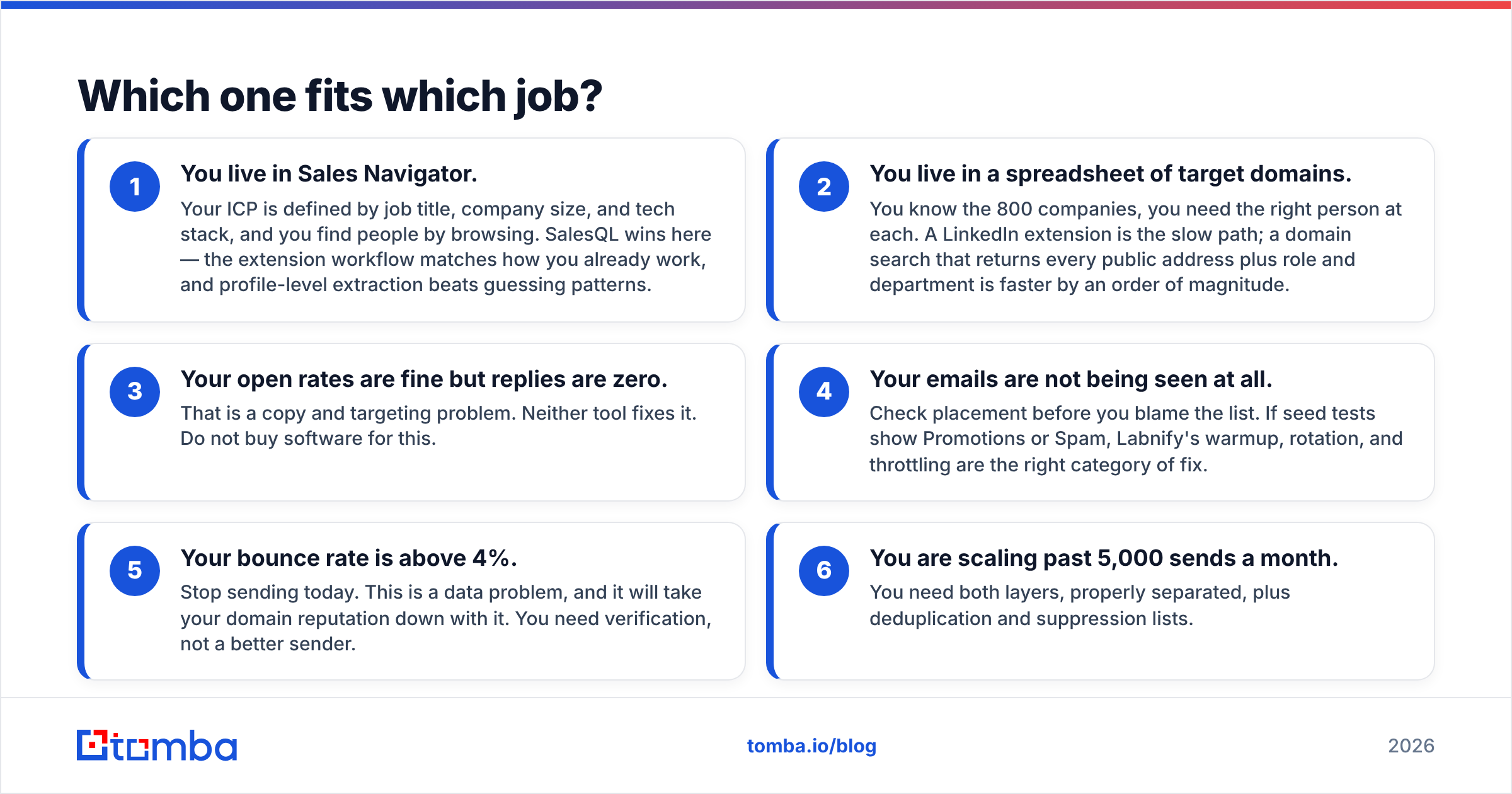
Here is how the decision usually breaks down:
- You live in Sales Navigator. Your ICP is defined by job title, company size, and tech stack, and you find people by browsing. SalesQL wins here — the extension workflow matches how you already work, and profile-level extraction beats guessing patterns.
- You live in a spreadsheet of target domains. You know the 800 companies, you need the right person at each. A LinkedIn extension is the slow path; a domain search that returns every public address plus role and department is faster by an order of magnitude.
- Your open rates are fine but replies are zero. That is a copy and targeting problem. Neither tool fixes it. Do not buy software for this.
- Your emails are not being seen at all. Check placement before you blame the list. If seed tests show Promotions or Spam, Labnify's warmup, rotation, and throttling are the right category of fix.
- Your bounce rate is above 4%. Stop sending today. This is a data problem, and it will take your domain reputation down with it. You need verification, not a better sender.
- You are scaling past 5,000 sends a month. You need both layers, properly separated, plus deduplication and suppression lists.
That last point matters more than the feature grid. Most teams break at the seam between the two tools, not inside either one.
Is LinkedIn-sourced data accurate enough to send to?#
This is where the honest comparison gets uncomfortable.
LinkedIn extraction tools like SalesQL are genuinely good at what they do: they map a human being to contact details. The problem is that LinkedIn is a profile database, not a contact database. The email attached to a profile may be a personal Gmail from a job the person left in 2021, a work address at a company they have since departed, or an address that still resolves but is now an unmonitored alias.
Gartner and other analysts have put B2B contact data decay somewhere in the 25-30% per year range for a reason: people change jobs, companies get acquired, and mail servers get reconfigured. That means roughly a quarter of any list you exported twelve months ago is already wrong.
Three practical consequences:
- Personal emails carry deliverability risk. A Gmail address for a VP of Engineering might be technically valid and still get you marked as spam, because nobody expects a vendor pitch at their personal inbox. Gmail's spam signals are user-driven, and complaints hurt.
- Catch-all domains lie to you. Many corporate domains accept every address at SMTP level. A basic validity check returns "valid" for
asdfgh@company.com. You need a catch-all verifier that uses pattern confidence and additional signals, not just an SMTP handshake. - "Verified" is not one thing. Syntax check, MX check, SMTP check, and role-account detection are four different tests. Tools that say "verified" without telling you which tests ran are giving you a feeling, not a number.
This is why so many teams end up with a third tool in the middle. You source with an extension, you verify with a dedicated email verifier, and only then do you hand a clean list to your sending platform. The verification step is what protects the expensive asset — your sending domain.

What does each tool cost in practice?#
Sticker price is rarely the real number. Both categories have a hidden cost multiplier.
For SalesQL-style extraction tools, the multiplier is credit burn on misses. If you spend a credit on a profile and get back nothing — or get back an unverified guess — you paid for a lookup that produced no usable contact. Ask any vendor what their policy is on failed lookups before you commit to an annual plan. Some refund, some do not.
For Labnify-style sending platforms, the multiplier is infrastructure. Volume sending needs multiple domains, multiple mailboxes per domain, warmup time measured in weeks, and DNS records configured correctly. Budget for domain registrations and the calendar time before those mailboxes are safe to use at volume. A sending platform is the software layer on top of that; it is not a substitute for it.
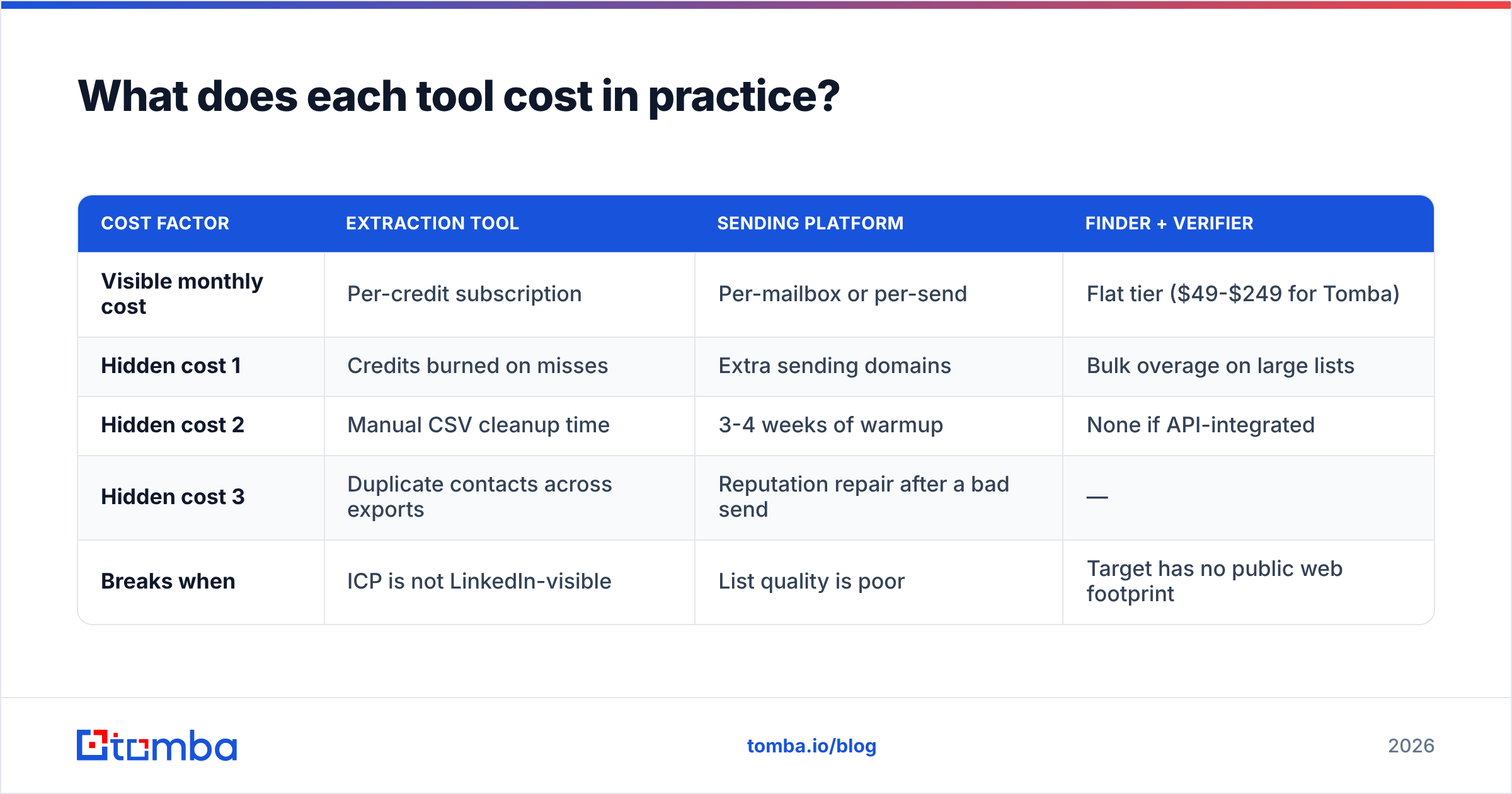
| Cost factor | Extraction tool | Sending platform | Finder + verifier |
|---|---|---|---|
| Visible monthly cost | Per-credit subscription | Per-mailbox or per-send | Flat tier ($49-$249 for Tomba) |
| Hidden cost 1 | Credits burned on misses | Extra sending domains | Bulk overage on large lists |
| Hidden cost 2 | Manual CSV cleanup time | 3-4 weeks of warmup | None if API-integrated |
| Hidden cost 3 | Duplicate contacts across exports | Reputation repair after a bad send | — |
| Breaks when | ICP is not LinkedIn-visible | List quality is poor | Target has no public web footprint |
Notice the third row. "Reputation repair after a bad send" is the single most expensive line item in outbound, and it is caused almost entirely by the data layer, not the sending layer. You can buy a better sender; you cannot buy back a burned domain.
Where does Tomba fit between the two?#
Tomba is not a sending platform, so it does not compete with Labnify at all. It does overlap with SalesQL on the finding side, with a different center of gravity.
SalesQL starts from a person on LinkedIn. Tomba starts from a company domain or a name-plus-domain pair, and works outward — though the LinkedIn finder covers the profile-first workflow too. In practice that means:
- Company-first prospecting is faster. Give it a domain, get back the addresses, patterns, departments, and seniority signals in one call.
- Verification is first-class, not a bolt-on. Every result carries a confidence score, and the verifier runs syntax, MX, SMTP, disposable, and role-account checks as distinct tests you can see.
- Bulk and API are on every paid tier. A bulk email finder run and the Tomba API mean you can wire enrichment directly into the step before your sending platform, instead of moving CSVs by hand.
- Pricing is flat and predictable. Free tier at 25 searches a month, Starter at $49/mo, Growth at $99/mo, Pro at $249/mo, Enterprise custom. Full Tomba pricing is public, so you can model cost per verified contact before you sign up.
The point is not that one tool replaces the others. It is that the middle of the pipeline — the part between "I found a name" and "I pressed send" — is where deals quietly die, and it is the part teams under-invest in most.
What stack should you actually run?#
For a team doing 3,000-10,000 sends a month, the configuration that holds up looks like this:
Source layer. Whatever matches how you prospect. If your ICP is LinkedIn-visible, an extension like SalesQL earns its seat. If you work from domain lists, ABM target accounts, or job boards, a domain-first finder is faster and cheaper per contact.
Verification layer. Non-negotiable, run on every list, every time, immediately before send — not at export time. Data decays between the two. Target under 2% bounce; if you are above 3%, pause the campaign.
Sending layer. Labnify or an equivalent, with warmed mailboxes, sensible daily caps per mailbox, SPF/DKIM/DMARC configured, and proper suppression lists. Check your SPF record before your first send, not after your first spam complaint.
Measurement layer. Track bounce rate, spam-complaint rate, and reply rate separately. Open rate is increasingly unreliable thanks to privacy proxies. Reply rate and response rate are the numbers that survive.
If you want peer signal on any of these vendors before you commit, G2 reviews filtered by company size are more useful than the overall star rating — a tool that works for a 200-person sales org often collapses for a three-person team, and vice versa.
The verdict#
Labnify vs SalesQL is the wrong framing. One is a delivery engine, the other is a sourcing tool, and picking between them is like choosing between an oven and a grocery store. If you are forced to buy only one, buy the one that fixes your current bottleneck: sourcing if you have no list, sending if your list is fine but your inbox placement is not.
What deserves more scrutiny than either is the layer between them. Unverified data is the reason most cold-email programs stall — it burns your sending reputation, it wastes the credits you spent finding the contact, and it makes every downstream metric unreadable.
Start by testing your data, not your sender. Run a sample of your current list through the Tomba Email Finder and the verifier on the free tier — 25 searches a month, no card — and see what percentage of your "good" contacts come back clean. If it is above 90%, your problem is copy or sending. If it is below 80%, you just found the leak, and no sending platform on the market was going to plug it for you.
Related guides#
// get started
Find, verify and enrich your first contacts today
Start on the free plan with 25 searches a month, then scale when your team is ready.
Free plan · No credit card required · GDPR & CCPA
// about the author