Labnify vs UpLead: Which One Actually Fixes Your Outbound?
Labnify sends email. UpLead sells contacts. Most teams comparing them are really comparing two halves of the same outbound stack - here's how pricing, data quality and deliverability actually stack up in 2026.
TL;DR
- Labnify and UpLead are not really competitors. Labnify is sending infrastructure (SMTP relay, inbox rotation, warmup, campaign delivery). UpLead is a B2B contact database you buy verified records from.
- If your problem is "my emails land in spam," Labnify is the relevant purchase. If your problem is "I don't know who to email," UpLead is.
- UpLead's entry plan is credit-metered and gets expensive per contact once you scale past a few hundred prospects a month. Labnify prices around send volume and seats, not per-record credits.
- Neither one removes the need to verify addresses at send time. Bought lists decay roughly 2-3% per month, and a stale record bounces the same way a guessed one does.
- The cheapest workable stack for most teams: your own targeted data (pulled fresh with an email finder and validated with an email verifier), plus a sending layer you control. Labnify covers the second half; UpLead only rents you the first.
What are Labnify and UpLead, exactly?#
Start here, because half the confusion in a "labnify vs uplead" search is a category error.
Labnify is a cold email sending platform. Its pitch is delivery volume: connect your domains, run inbox rotation across dozens or hundreds of mailboxes, warm them up, and push campaigns through an SMTP/API layer without babysitting Google Workspace limits. You bring the list. Labnify's job is getting that list's mail into an inbox rather than a spam folder.
UpLead is a B2B prospecting database. You filter a catalogue of company and contact records by industry, headcount, technology stack, title, and geography, then spend credits to unlock rows. Its differentiator is a real-time verification step at unlock time and a published accuracy claim in the mid-90s. You take those rows and send them somewhere else — UpLead is not a sending tool.
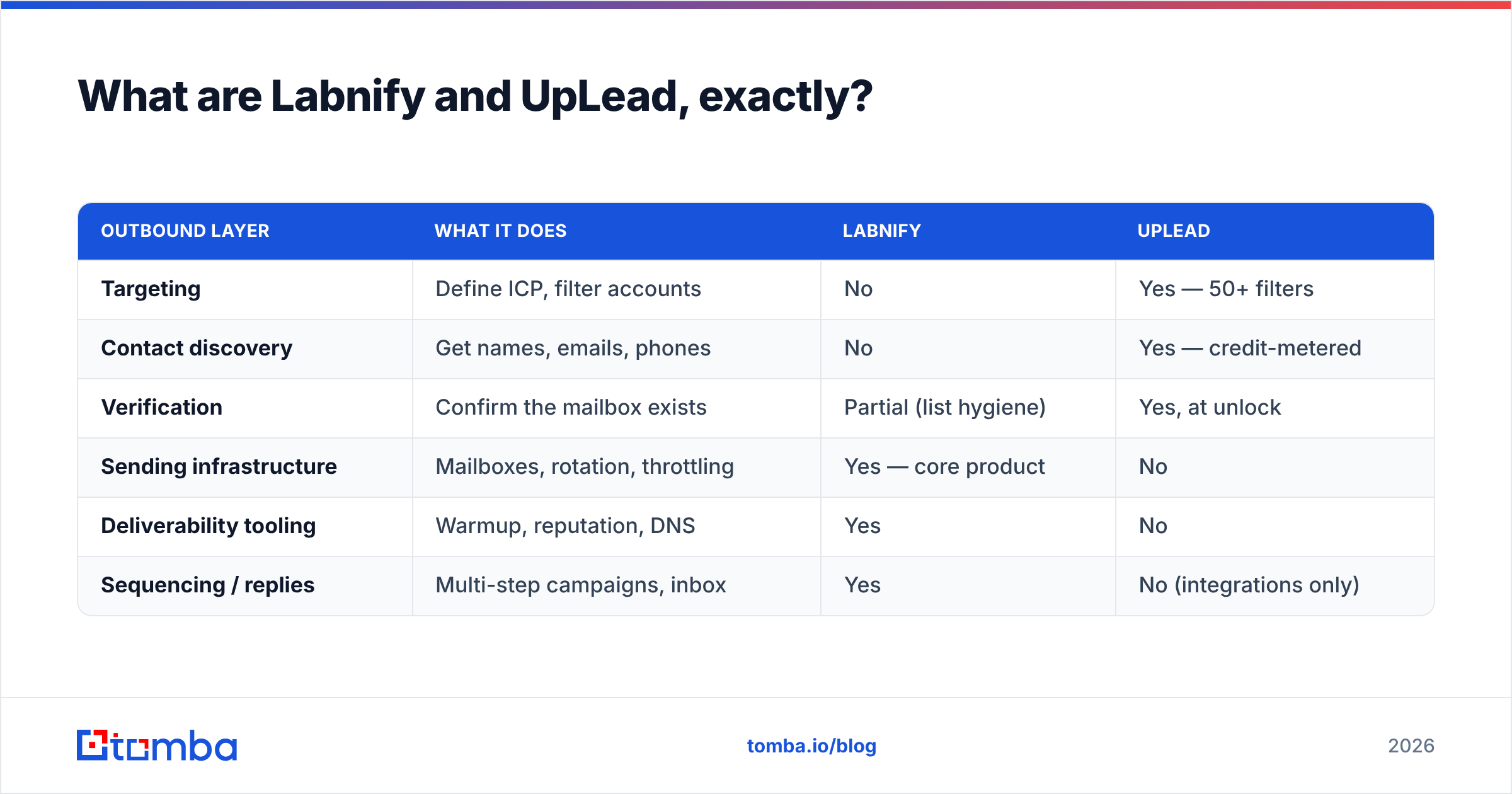
So the honest framing is a stack, not a duel:
| Outbound layer | What it does | Labnify | UpLead |
|---|---|---|---|
| Targeting | Define ICP, filter accounts | No | Yes — 50+ filters |
| Contact discovery | Get names, emails, phones | No | Yes — credit-metered |
| Verification | Confirm the mailbox exists | Partial (list hygiene) | Yes, at unlock |
| Sending infrastructure | Mailboxes, rotation, throttling | Yes — core product | No |
| Deliverability tooling | Warmup, reputation, DNS | Yes | No |
| Sequencing / replies | Multi-step campaigns, inbox | Yes | No (integrations only) |
Read that table twice before you buy either. Teams routinely subscribe to UpLead, blast the list through a default Gmail account, tank their domain, and conclude the data was bad. Other teams pay for sending infrastructure and feed it a scraped list that hasn't been touched since 2023.
How do Labnify and UpLead compare feature by feature?#
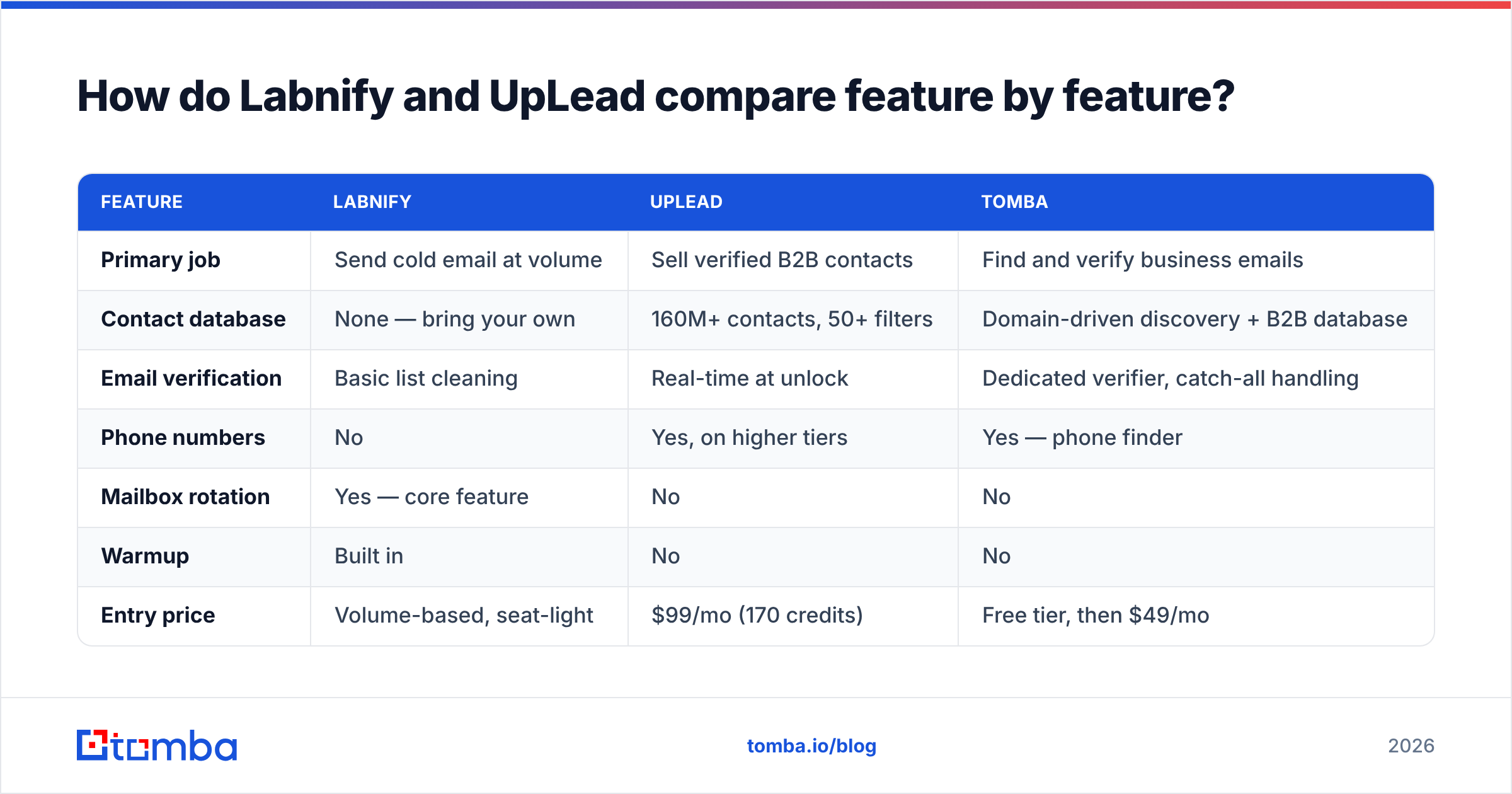
Here is the direct comparison, with a neutral third column so you can see what a data-plus-verification approach looks like against both.
| Feature | Labnify | UpLead | Tomba |
|---|---|---|---|
| Primary job | Send cold email at volume | Sell verified B2B contacts | Find and verify business emails |
| Contact database | None — bring your own | 160M+ contacts, 50+ filters | Domain-driven discovery + B2B database |
| Email verification | Basic list cleaning | Real-time at unlock | Dedicated verifier, catch-all handling |
| Phone numbers | No | Yes, on higher tiers | Yes — phone finder |
| Mailbox rotation | Yes — core feature | No | No |
| Warmup | Built in | No | No |
| Entry price | Volume-based, seat-light | $99/mo (170 credits) | Free tier, then $49/mo |
| Free tier | Trial-style | 5 test credits | 25 searches/mo |
| API | Yes (sending) | Yes (data) | Yes — email finder API |
| Best for | Agencies, high-volume senders | ICP-driven list buying | Precision sourcing + hygiene |
Pricing shown is the published rate at the time of writing; both vendors adjust tiers, so confirm on their own pages before you commit. UpLead's Essentials tier has historically sat at $99/mo for 170 credits, with Plus around $199/mo for 400 credits and an enterprise tier quoted on request. Labnify prices closer to a sending utility — throughput and connected mailboxes rather than per-record credits — which is why the two bills behave so differently as you scale.
Where the cost curves diverge#
- UpLead scales with people. Every contact you unlock burns a credit. 170 credits at $99 is roughly $0.58 per record, and that is before you discover a chunk of them are role accounts, job-changers, or catch-all domains you can't safely mail.
- Labnify scales with sends. A 1,000-contact list emailed four times is 4,000 sends. The list cost you nothing extra; the infrastructure did.
- Verification scales with risk. This is the line item teams forget. Whatever the source, addresses decay — people change jobs, companies consolidate domains, mailboxes get deactivated.
- Domain replacement scales with mistakes. If you burn three sending domains learning this, that's a real cost in dollars and in the two-week warmup you have to redo.

Is UpLead's data accurate enough to skip a verifier?#
Short answer: not quite, and that is not a knock on UpLead specifically.
UpLead's real-time verification is genuinely useful — it checks the address when you unlock it, which is better than databases that verified a record eighteen months ago and never looked again. Vendor-published accuracy in the 90-95% range is defensible for a static catalogue.
But three things happen after the unlock:
- Time passes. B2B contact data degrades at roughly 2-3% per month as people change roles. A list you pulled in March is materially worse by July.
- Catch-all domains pass verification without proving anything. A catch-all server accepts mail for every address at the domain, so an SMTP check returns "valid" whether or not the mailbox exists. You need a catch-all verifier to score those separately rather than treating them as confirmed.
- Verified ≠ mailable.
info@,sales@, and shared aliases verify perfectly and reply almost never, while dragging your engagement metrics down.
The practical rule: re-verify any list older than 30 days immediately before a send, regardless of who sold it to you. On a 5,000-record list, that's a few dollars of verification against a bounce rate that decides whether your domain survives the quarter. Mailbox providers now weigh complaint and bounce signals heavily, and email deliverability damage is far more expensive to repair than to prevent.

When should you choose Labnify over UpLead?#
Pick Labnify when the bottleneck is delivery, not discovery:
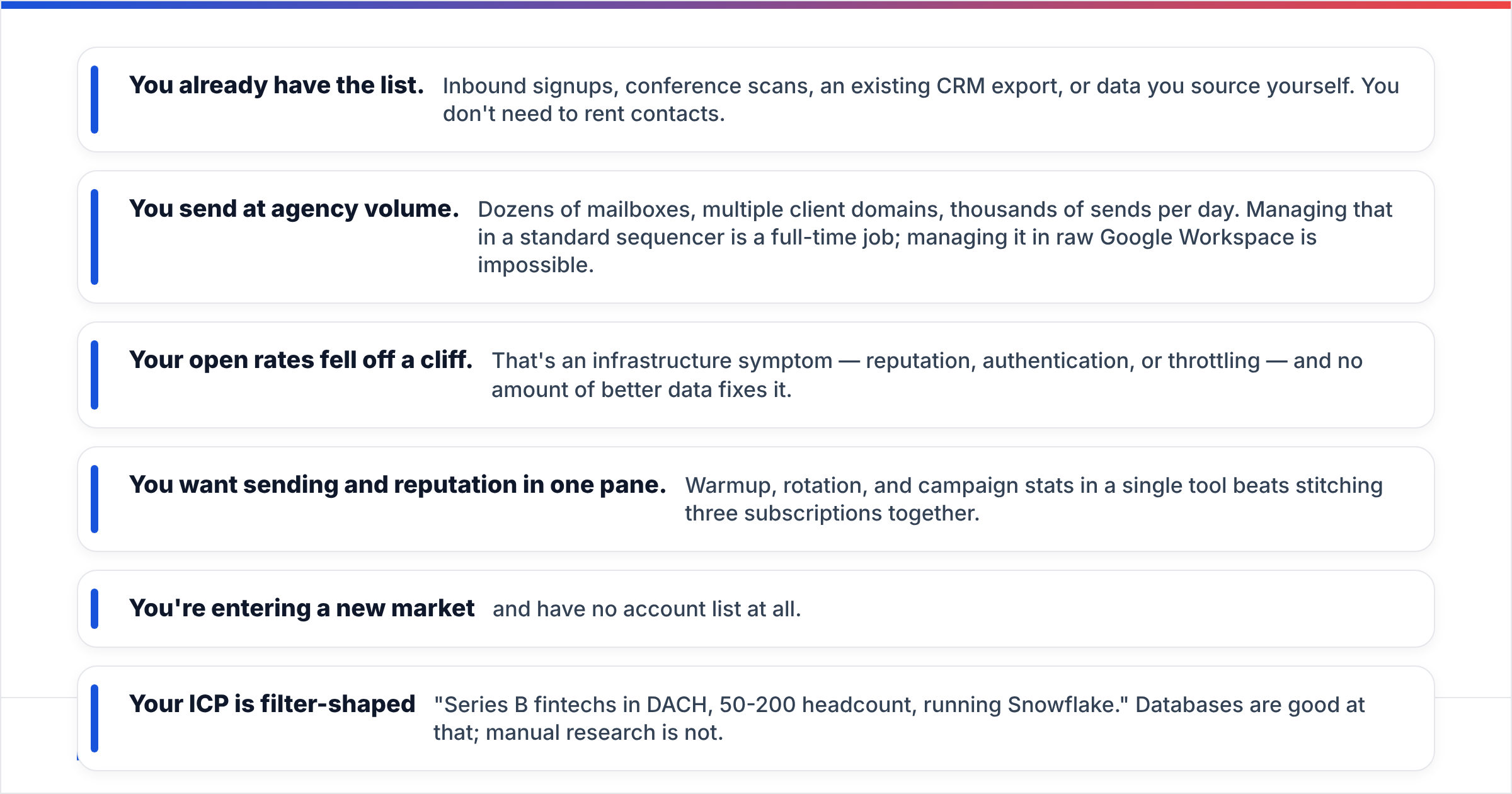
- You already have the list. Inbound signups, conference scans, an existing CRM export, or data you source yourself. You don't need to rent contacts.
- You send at agency volume. Dozens of mailboxes, multiple client domains, thousands of sends per day. Managing that in a standard sequencer is a full-time job; managing it in raw Google Workspace is impossible.
- Your open rates fell off a cliff. That's an infrastructure symptom — reputation, authentication, or throttling — and no amount of better data fixes it.
- You want sending and reputation in one pane. Warmup, rotation, and campaign stats in a single tool beats stitching three subscriptions together.
Pick UpLead when the bottleneck is knowing who exists:
- You're entering a new market and have no account list at all.
- Your ICP is filter-shaped — "Series B fintechs in DACH, 50-200 headcount, running Snowflake." Databases are good at that; manual research is not.
- You need intent or technographic filters that you can't reconstruct from a company website.
- Volume is modest. A few hundred well-chosen contacts a month fits the credit model without pain.
Note that neither choice is exclusive. A lot of teams run both, plus a sequencer, plus a verifier, and the combined bill is the thing worth scrutinizing.
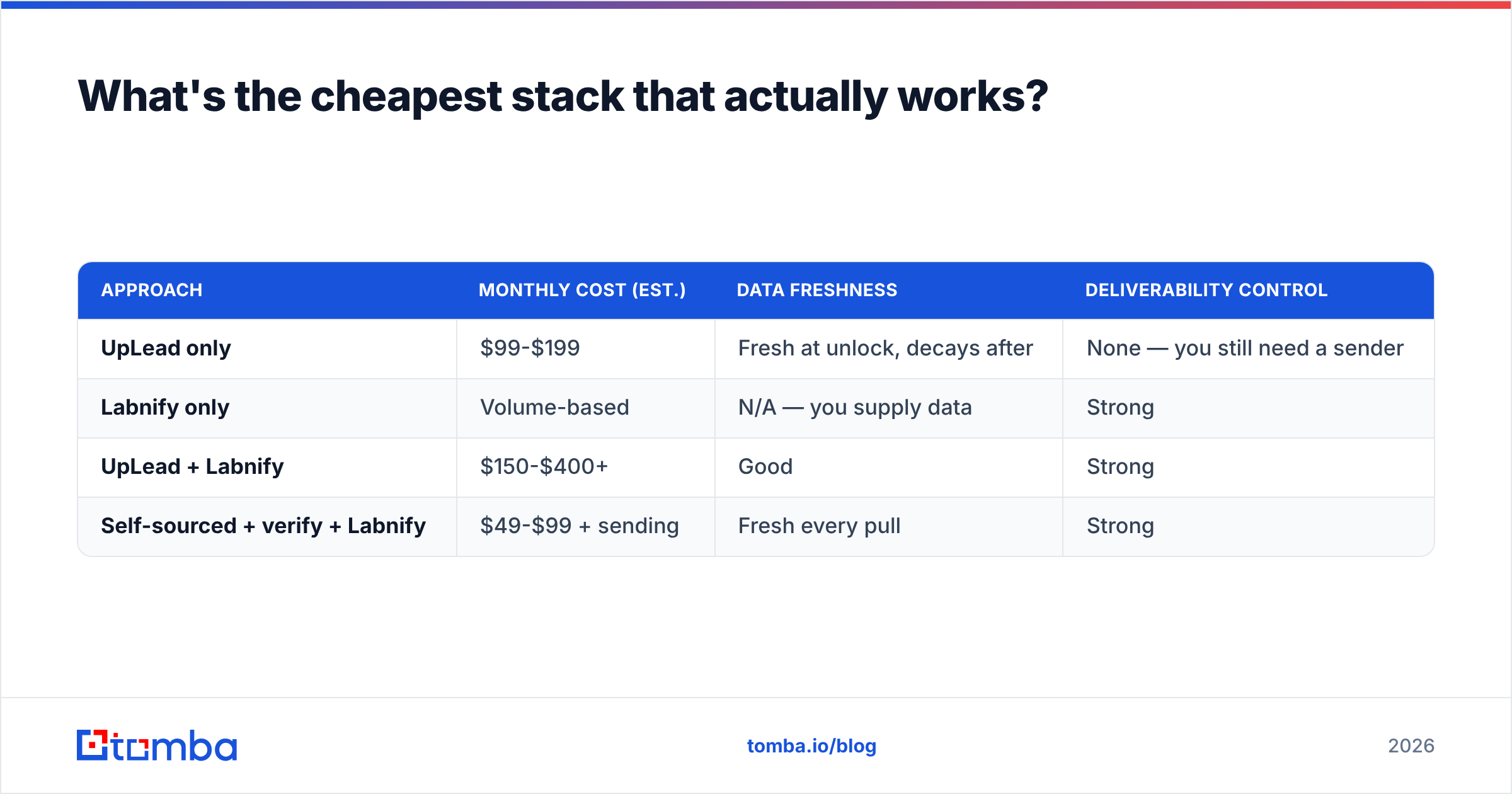
What's the cheapest stack that actually works?#
Here's where a third approach beats picking a side. Instead of renting a static catalogue and hoping the rows survive, source contacts on demand against the accounts you've already qualified.
| Approach | Monthly cost (est.) | Data freshness | Deliverability control |
|---|---|---|---|
| UpLead only | $99-$199 | Fresh at unlock, decays after | None — you still need a sender |
| Labnify only | Volume-based | N/A — you supply data | Strong |
| UpLead + Labnify | $150-$400+ | Good | Strong |
| Self-sourced + verify + Labnify | $49-$99 + sending | Fresh every pull | Strong |
The self-sourced route works like this. You build the account list yourself — from a conference exhibitor page, a funding database, a G2 category, your closed-lost pipeline — then run domain search to pull the people at each company, verify before export, and hand the clean file to your sending layer. Tomba's pricing starts free at 25 searches a month, then $49/mo Starter, $99/mo Growth, and $249/mo Pro, and searches aren't tied to a fixed catalogue — you look up whoever you actually want to reach.
That does mean more work on targeting. A database hands you a filtered list in 30 seconds; self-sourcing takes an afternoon. The trade is freshness and cost per usable contact. If your ICP is narrow and you know it well, self-sourcing usually wins. If you need breadth fast, a database earns its keep — and providers like UpLead or BookYourData, which sells verified records on a pay-as-you-go basis, are reasonable ways to get it.
Can you use Labnify and UpLead together?#
Yes, and for a certain profile it's the obvious setup: UpLead supplies the rows, a verifier scrubs them, Labnify sends them. The three pieces don't overlap, so you're not paying twice for the same capability.
Watch two things when you wire it up:
- Export hygiene. UpLead exports include role accounts and catch-all domains. Segment those out before they reach the sending layer — dumping a raw export into a high-volume sender is the single fastest way to lose a domain.
- Cadence vs credits. If your sequence is five touches, 400 credits buys 400 people and 2,000 sends. Budget the two lines separately; they do not scale together.
If you're evaluating alternatives to either, real user reviews on G2 are more useful than vendor comparison pages, including this one — filter to reviews from companies your size, not enterprise logos.
What's the verdict on Labnify vs UpLead?#
They solve different problems, so the real question is which problem you have.
- Emails aren't landing? Labnify. Buying more contacts will just give you more addresses to bounce.
- No one to email? UpLead, or self-sourced data if your ICP is specific enough to target by hand.
- Both? Then budget for both, and add verification as a non-negotiable third line item — it's the cheapest insurance in the stack.
What neither tool does well is the middle: finding the right person at a company you've already identified, and proving the address is live right before you press send. That's the gap where most outbound programs quietly leak money — paying for credits on contacts they'll never mail, or sending to addresses that stopped working two quarters ago.
If that's your gap, start with the Tomba Email Finder. Give it a domain and a name, or just a domain, and get the professional addresses behind it with a confidence score and the sources they came from — verified at lookup, not eighteen months ago. The free tier covers 25 searches a month, which is enough to test your actual ICP against real data before you commit a credit budget to anyone.
Related guides#
// get started
Find, verify and enrich your first contacts today
Start on the free plan with 25 searches a month, then scale when your team is ready.
Free plan · No credit card required · GDPR & CCPA
// about the author