LakeB2B vs ListKit: Which B2B Data Provider Wins in 2026?
One sells custom-built lists through a sales rep. The other sells self-serve credits to a prospecting database. Here's how LakeB2B and ListKit actually compare on price, accuracy, and bounce risk.
TL;DR
- LakeB2B is a list broker. You describe an audience, a rep scopes it, and you receive a custom-built file. Pricing is quote-based, minimum orders apply, and turnaround is measured in days.
- ListKit is a self-serve prospecting database. You filter, export, and push contacts into Smartlead or Instantly in minutes on a monthly credit plan.
- They solve different problems. LakeB2B wins on niche firmographics, healthcare/NPI-style segments, and append projects. ListKit wins on speed, cost predictability, and cold-email-ready records.
- Neither removes your verification burden. Any purchased file — brokered or self-serve — decays 2-3% per month. Re-verifying before send is the single highest-ROI step in this whole comparison.
- The cheapest path for most teams is hybrid: buy or build the account list once, then resolve and verify contacts on demand with an email finder API instead of paying per record for data you never touch.
What are LakeB2B and ListKit, really?#
They get lumped together as "B2B data vendors," but the business models are nearly opposites.
LakeB2B has been in the data business for roughly two decades. It operates like a traditional list broker with a modern coat of paint: you submit a request ("VPs of Nursing at US hospitals with 200+ beds"), a rep scopes the count, quotes you, and delivers a file. Alongside list rental and purchase, LakeB2B sells data appending, data cleansing, intent overlays, and managed campaign services. Healthcare and technology audiences are where it's historically strongest.
ListKit launched in 2023 out of the cold-email operator community and was built backwards from one job: fill a sequencer with contacts that don't bounce. You log in, apply filters (title, industry, headcount, tech, geography), preview records, spend credits, and export — or push straight into your sending tool. There is no rep, no scoping call, no minimum order.
That difference cascades into everything else: how you're priced, how fast you move, how much you can inspect before you pay, and who's accountable when the data is wrong.
How do their data models differ?#
The mechanics matter more than the marketing. Here's what actually changes between a brokered file and a self-serve export:
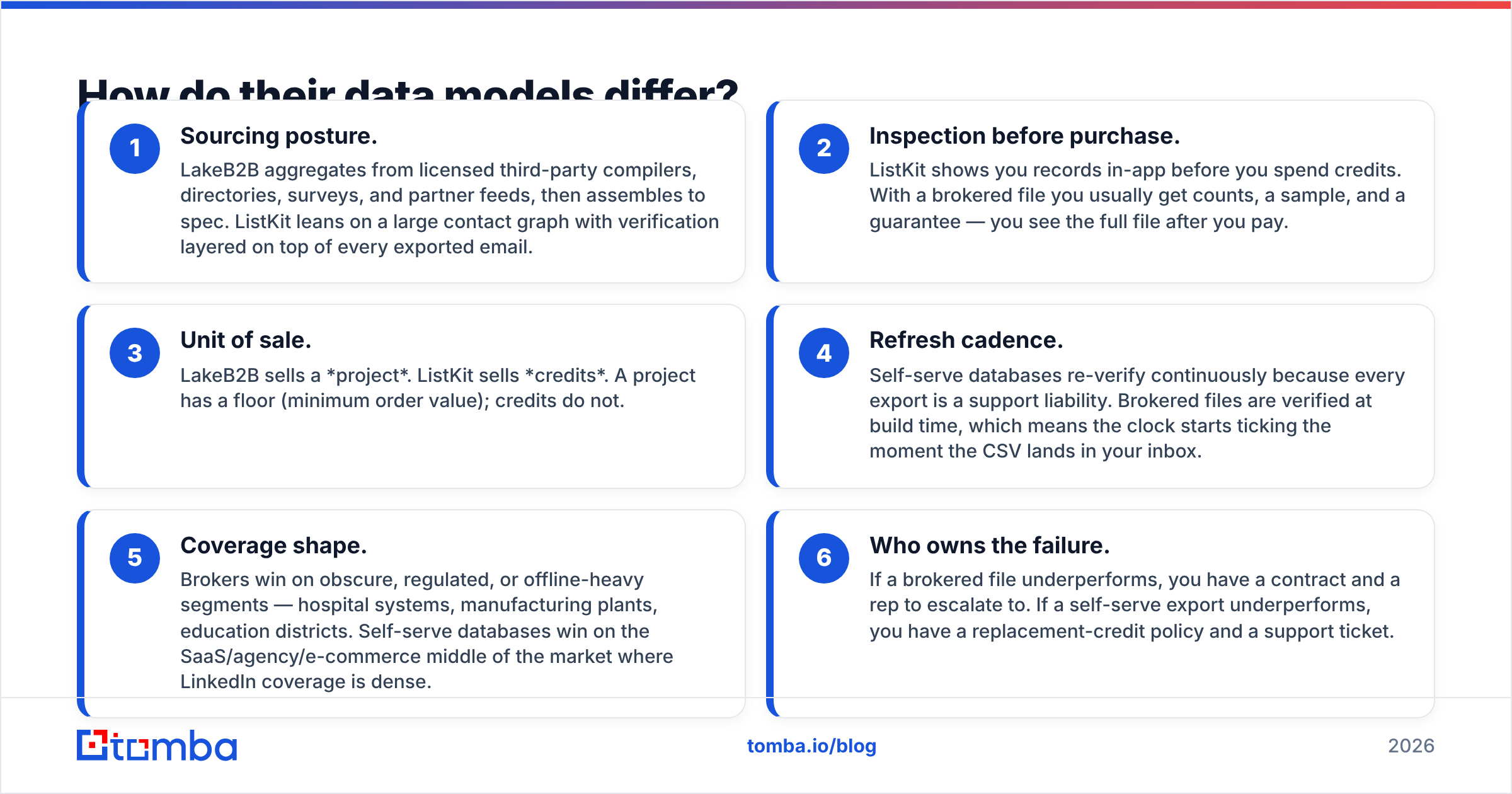
- Sourcing posture. LakeB2B aggregates from licensed third-party compilers, directories, surveys, and partner feeds, then assembles to spec. ListKit leans on a large contact graph with verification layered on top of every exported email.
- Inspection before purchase. ListKit shows you records in-app before you spend credits. With a brokered file you usually get counts, a sample, and a guarantee — you see the full file after you pay.
- Unit of sale. LakeB2B sells a project. ListKit sells credits. A project has a floor (minimum order value); credits do not.
- Refresh cadence. Self-serve databases re-verify continuously because every export is a support liability. Brokered files are verified at build time, which means the clock starts ticking the moment the CSV lands in your inbox.
- Coverage shape. Brokers win on obscure, regulated, or offline-heavy segments — hospital systems, manufacturing plants, education districts. Self-serve databases win on the SaaS/agency/e-commerce middle of the market where LinkedIn coverage is dense.
- Who owns the failure. If a brokered file underperforms, you have a contract and a rep to escalate to. If a self-serve export underperforms, you have a replacement-credit policy and a support ticket.
LakeB2B vs ListKit: how do they compare head to head?#
Figures below reflect publicly available information at the time of writing. Quote-based vendors change terms per deal, and self-serve plans get repackaged — confirm current numbers with each vendor before you commit.
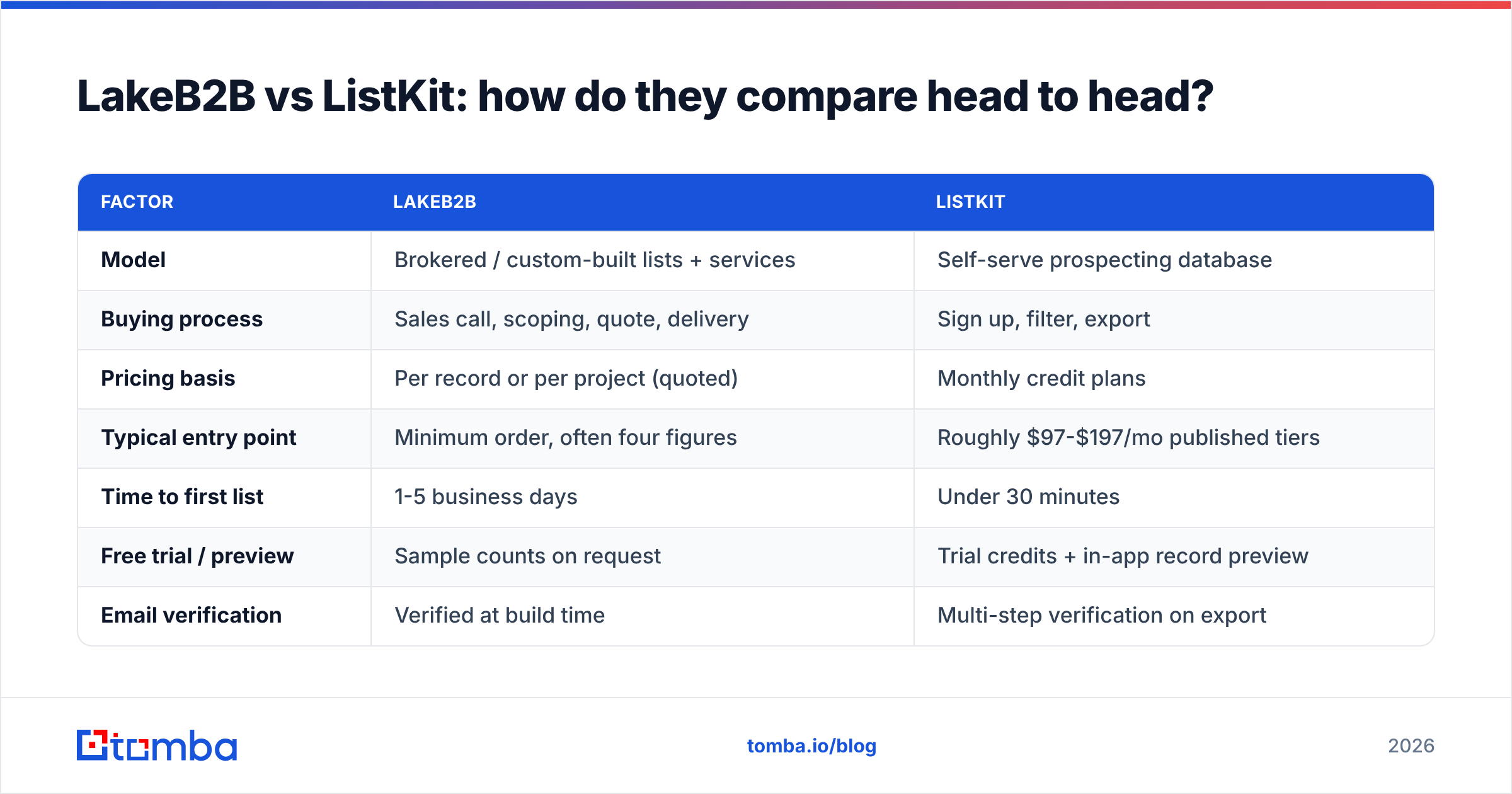
| Factor | LakeB2B | ListKit |
|---|---|---|
| Model | Brokered / custom-built lists + services | Self-serve prospecting database |
| Buying process | Sales call, scoping, quote, delivery | Sign up, filter, export |
| Pricing basis | Per record or per project (quoted) | Monthly credit plans |
| Typical entry point | Minimum order, often four figures | Roughly $97-$197/mo published tiers |
| Time to first list | 1-5 business days | Under 30 minutes |
| Free trial / preview | Sample counts on request | Trial credits + in-app record preview |
| Email verification | Verified at build time | Multi-step verification on export |
| Phone / mobile data | Yes, common in appends | Yes, on higher tiers |
| Niche coverage (healthcare, education, industrial) | Strong | Moderate |
| SaaS / agency / DTC coverage | Moderate | Strong |
| Native sequencer push | No (CSV / CRM handoff) | Yes (Smartlead, Instantly, others) |
| Data appending & cleansing | Core service | Not the focus |
| Intent data | Available as overlay | Limited |
| API access | Enterprise / project-based | Available on higher plans |
| Best for | Regulated niches, ABM lists, append projects | Volume cold email, fast iteration |
The table makes the split obvious. If your question is "can someone build me a list that doesn't exist in any self-serve tool?" — that's LakeB2B. If your question is "can I get 5,000 sendable contacts into Instantly before Thursday?" — that's ListKit.
Which one has better data accuracy?#
Wrong question. The right question is: how fresh is the record on the day you send it?
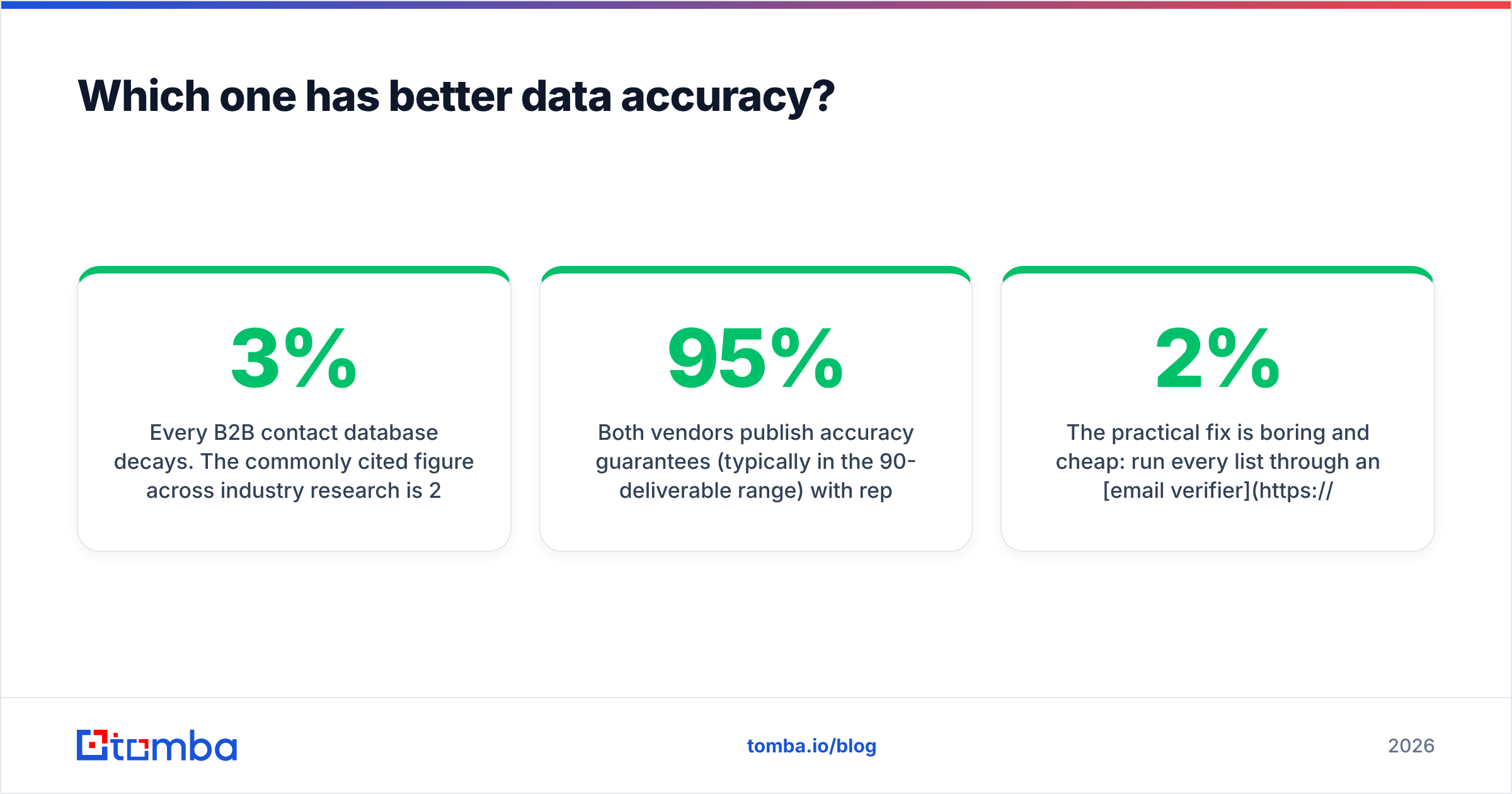
Every B2B contact database decays. The commonly cited figure across industry research is 2-3% per month, which compounds to roughly 25-30% annually. That decay is driven by job changes, domain migrations, mailbox deprovisioning, and company-level churn — none of which any vendor controls.
Here's how that plays out differently for each:
- ListKit verifies at export. Your record is fresh the day you pull it, which is why operator-heavy teams report low bounce rates on fresh exports. The risk is the list you exported three months ago and re-sent to.
- LakeB2B verifies at build. If you ordered in January and started sending in March, you've already absorbed two months of decay before the first email left your outbox — and on a large brokered file that's a meaningful chunk.
Both vendors publish accuracy guarantees (typically in the 90-95% deliverable range) with replacement or credit-back policies for hard bounces above threshold. Read the clause, not the headline. Most guarantees are measured against hard bounces only, exclude catch-all domains, and require a claim within a short window.
Independent user reviews on G2 are worth an hour of your time here. The pattern you'll see repeatedly: complaints about brokered data cluster around staleness and rigid refunds; complaints about self-serve data cluster around coverage gaps in specific verticals. Nobody escapes the physics.
The practical fix is boring and cheap: run every list through an email verifier immediately before send, regardless of who sold it to you. On a 10,000-record file, verification typically costs less than 2% of what you paid for the data and routinely prevents the bounce spike that torches a sending domain. If a chunk of your list sits on accept-all servers, a dedicated catch-all verifier is the difference between "unknown" and a usable send decision.
How much do they actually cost per usable contact?#
Cost per record is the wrong metric. Cost per usable record — a contact that is real, current, in-ICP, and reachable — is the one that maps to pipeline.
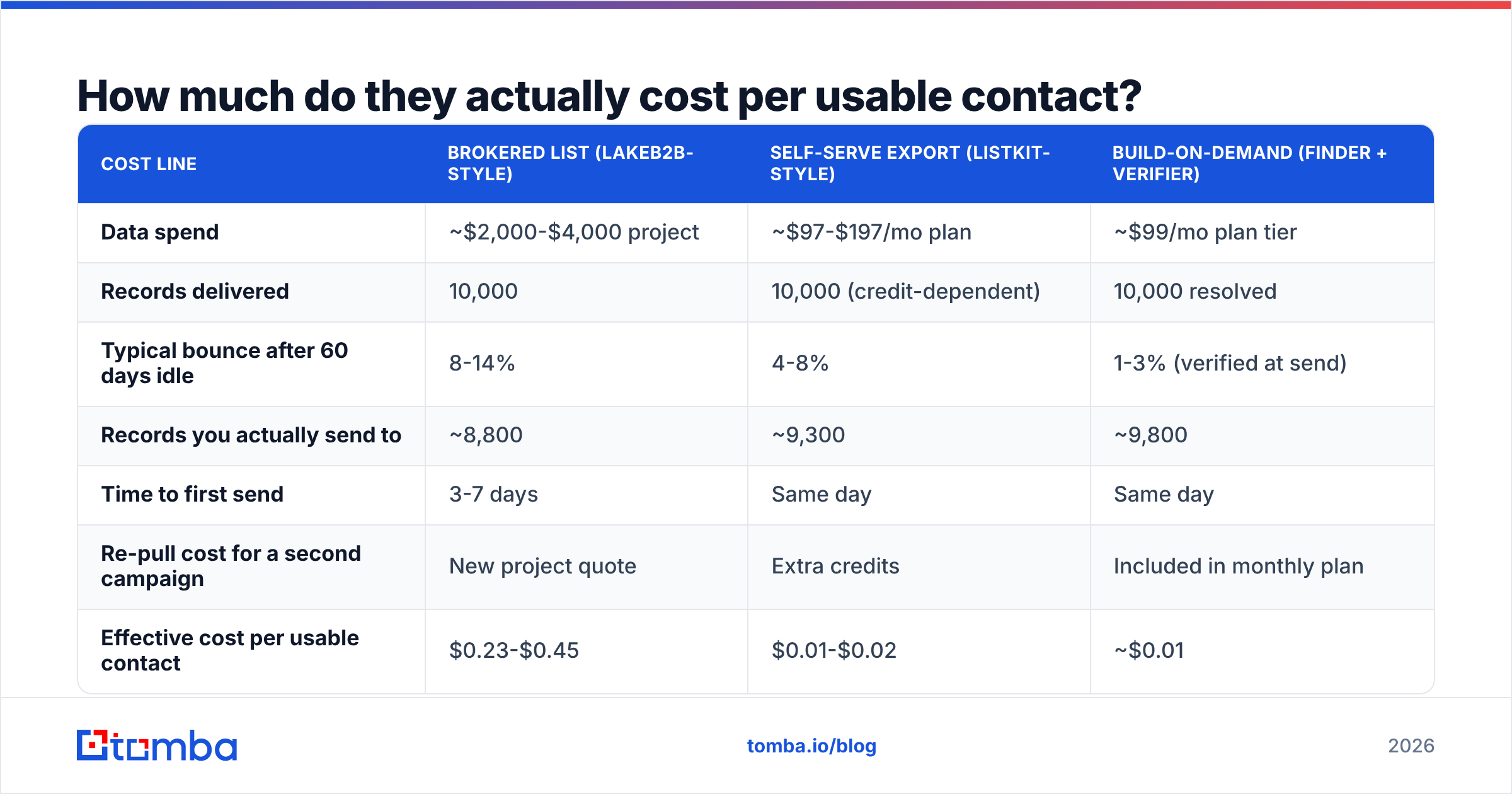
Here's a worked example using a 10,000-contact target. Numbers are illustrative modelling, not vendor quotes:
| Cost line | Brokered list (LakeB2B-style) | Self-serve export (ListKit-style) | Build-on-demand (finder + verifier) |
|---|---|---|---|
| Data spend | ~$2,000-$4,000 project | ~$97-$197/mo plan | ~$99/mo plan tier |
| Records delivered | 10,000 | 10,000 (credit-dependent) | 10,000 resolved |
| Typical bounce after 60 days idle | 8-14% | 4-8% | 1-3% (verified at send) |
| Records you actually send to | ~8,800 | ~9,300 | ~9,800 |
| Time to first send | 3-7 days | Same day | Same day |
| Re-pull cost for a second campaign | New project quote | Extra credits | Included in monthly plan |
| Effective cost per usable contact | $0.23-$0.45 | $0.01-$0.02 | ~$0.01 |
Two caveats before you take that last column as gospel. First, a build-on-demand workflow assumes you already have a target account list — domains and names — which brokered data supplies for you. Second, resolution rates are never 100%; expect to find deliverable contacts for a large majority of well-defined targets, not all of them.
That's why the honest answer isn't "buy the cheap one." It's: use the vendor for the thing only the vendor can do, and stop paying per record for the rest. Check Tomba pricing against your current per-record spend and the arithmetic usually resolves itself.
Who should pick LakeB2B?#
Pick LakeB2B when the list you need doesn't exist in a filter dropdown.
- Regulated or credential-based audiences. Healthcare practitioners, licensed professionals, education administrators. These segments live in licensed compilations that self-serve tools rarely index well.
- Append and cleansing projects. You have 60,000 CRM records with names and companies but no emails or phones. That's a services engagement, not a credit purchase.
- Offline-heavy industries. Manufacturing, logistics, construction, local services — sectors where decision-makers have thin LinkedIn footprints.
- Multi-channel campaigns needing postal and phone. Brokers have always sold across channels; self-serve cold email tools optimize for one.
- You need contractual accountability. Procurement wants an MSA, a DPA, and a named account manager. A $97/mo SaaS subscription won't satisfy that.
The trade-offs are real: slower cycles, a sales conversation before you learn the price, a minimum order, and the fact that you're buying a snapshot rather than a live feed.
Who should pick ListKit?#
Pick ListKit when speed and iteration beat exhaustiveness.
- You run cold email at volume and need records that flow into a sequencer without a CSV reformatting ritual.
- Your ICP is SaaS, agency, e-commerce, or professional services — the segments where contact graphs are densest.
- You test offers weekly. A fixed monthly credit budget lets you pull a new 2,000-contact segment on Monday without a purchase order.
- You're a small team without a data ops function. No scoping calls, no file specs, no waiting.
The trade-offs: coverage thins out in niche verticals, credit ceilings force prioritization, and you're limited to the filters the product exposes. If your ICP is "independent pharmacies in the Midwest with 3+ locations," you'll hit the wall fast.

What else should be on your shortlist?#
Neither of these two is the only route, and a proper evaluation includes at least one alternative from each category:
- BookYourData — pay-as-you-go B2B contacts with a strong accuracy guarantee and no subscription lock-in. A good middle option when you want brokered-grade targeting without a project minimum.
- General prospecting platforms (Apollo, ZoomInfo and peers) — broader databases bundled with sequencing, at correspondingly broader pricing. Worth comparing if you're consolidating tools rather than buying data.
- Finder-and-verifier stacks — instead of buying records, you resolve them. Give the system a domain and a name, get back a verified address. See our take on where each approach fits in the B2B database breakdown.
For most mid-market outbound teams in 2026, the winning configuration isn't one vendor. It's: a target account list (bought once, or built from firmographic filters), contacts resolved on demand, and verification immediately before send. That sequence keeps spend proportional to what you actually email, rather than to what sits unused in a CSV.
How should you run the evaluation?#
Don't compare feature pages. Run the same test against both.
- Define one narrow segment — 200 contacts, one title band, one industry, one geography. Narrow exposes coverage gaps that broad queries hide.
- Request the same 200 from each vendor. Trial credits on the self-serve side; a sample file on the brokered side.
- Verify both files with a neutral third-party tool. Not the vendor's own verification — you're testing their claim, not repeating it.
- Spot-check 20 records manually. Does the title match the person's current role? Is the company still operating under that domain?
- Send a small warm-up campaign to each and compare bounce rate, reply rate, and out-of-office/job-change signals side by side.
- Compute cost per positive reply, not cost per record. That's the only number that survives contact with your finance team.
This takes about a week and costs less than one wrong annual contract. Teams that skip it end up paying broker prices for data they could have resolved themselves, or self-serve prices for a vertical the tool doesn't actually cover.
The verdict#
ListKit wins for speed, price predictability, and cold-email-ready records in mainstream B2B verticals. LakeB2B wins for hard-to-reach, regulated, and offline-heavy audiences plus append and cleansing work that no self-serve tool performs. If your ICP is on LinkedIn, start with ListKit. If it isn't, start with a broker.
But make the third option your default infrastructure either way. Once you know which accounts matter, you don't need to keep buying contact records in bulk — you need to resolve and verify them at the moment of send.
That's exactly what the Tomba Email Finder does: give it a domain and a name and it returns a verified professional email with a confidence score and source attribution, so you know why the address is trusted. The free tier includes 25 searches a month to test it against a file you already own, Starter runs $49/mo, and Growth is $99/mo. Run your last purchased list through it, compare the bounce numbers against what the vendor promised, and let the result decide your data budget for 2026.
Related guides#
// get started
Find, verify and enrich your first contacts today
Start on the free plan with 25 searches a month, then scale when your team is ready.
Free plan · No credit card required · GDPR & CCPA
// about the author