LakeB2B vs Lusha (2026): Which B2B Data Provider Wins?
LakeB2B sells you a list. Lusha sells you a seat. Those two models fail in completely different ways — here is how they compare on accuracy, pricing, contracts, and what most teams actually end up buying instead.
TL;DR
- LakeB2B is a list vendor. Lusha is a contact-data tool. LakeB2B sells you a custom-built file (often with a minimum order and a sales call). Lusha sells per-seat credits you pull one record at a time from a Chrome extension or CRM.
- Pricing transparency is the biggest split. Lusha publishes plans you can buy with a card. LakeB2B quotes per project, which means your price depends on how well you negotiate.
- Neither is a verifier. LakeB2B claims file-level accuracy at delivery; Lusha's reveal rate varies by region and seniority. Both need a verification pass before you send.
- LakeB2B wins on niche/healthcare/geo list builds. Lusha wins on live, rep-driven prospecting inside LinkedIn and your CRM.
- If your real job is "get valid work emails at a predictable cost per record," a dedicated email-finder API like Tomba usually beats both on unit economics — and you can stack it on top of either.
If you are comparing LakeB2B vs Lusha, you are almost certainly comparing two things that do not do the same job. That mismatch is why so many of these evaluations end with a signed contract and a bounce rate nobody budgeted for. This breakdown covers what each one actually is, where the data comes from, what you will really pay, and which one fits your motion.
What are LakeB2B and Lusha, exactly?#
LakeB2B (lakeb2b.com) is a B2B data and demand-generation company that sells curated contact lists, appended datasets, and campaign services. You tell them the target — say, "materials managers at US hospitals with 200+ beds" — and they build and deliver a file, typically as a CSV, sometimes bundled with email or telemarketing services. Healthcare, education, and technology verticals are where they are best known.
Lusha (lusha.com) is a self-serve sales intelligence platform. Reps install a browser extension, open a LinkedIn profile or company site, and Lusha reveals a work email and (on paid plans) a direct dial. It also has a prospecting database, list-building UI, and CRM integrations for HubSpot, Salesforce, and Pipedrive.
The distinction that matters:
- Purchase model — LakeB2B is a project purchase (one file, one invoice). Lusha is a subscription with per-seat credits that reset monthly.
- Freshness model — A LakeB2B file is accurate as of delivery date and decays from there. Lusha reveals at the moment of lookup, which is fresher but non-deterministic (sometimes there is simply no record).
- Coverage model — LakeB2B can build lists for niches that self-serve databases barely index. Lusha's coverage skews toward tech, SaaS, and North America/Western Europe professionals with active LinkedIn presence.
- Failure model — LakeB2B fails as a stale file you already paid for. Lusha fails as a "no contact found" that still burns your rep's time (though not always a credit).
- Compliance posture — Both publish GDPR/CCPA positions; list purchases carry more scrutiny in the EU, where "legitimate interest" for cold B2B outreach is narrower than most US teams assume.

How do LakeB2B and Lusha compare feature by feature?#
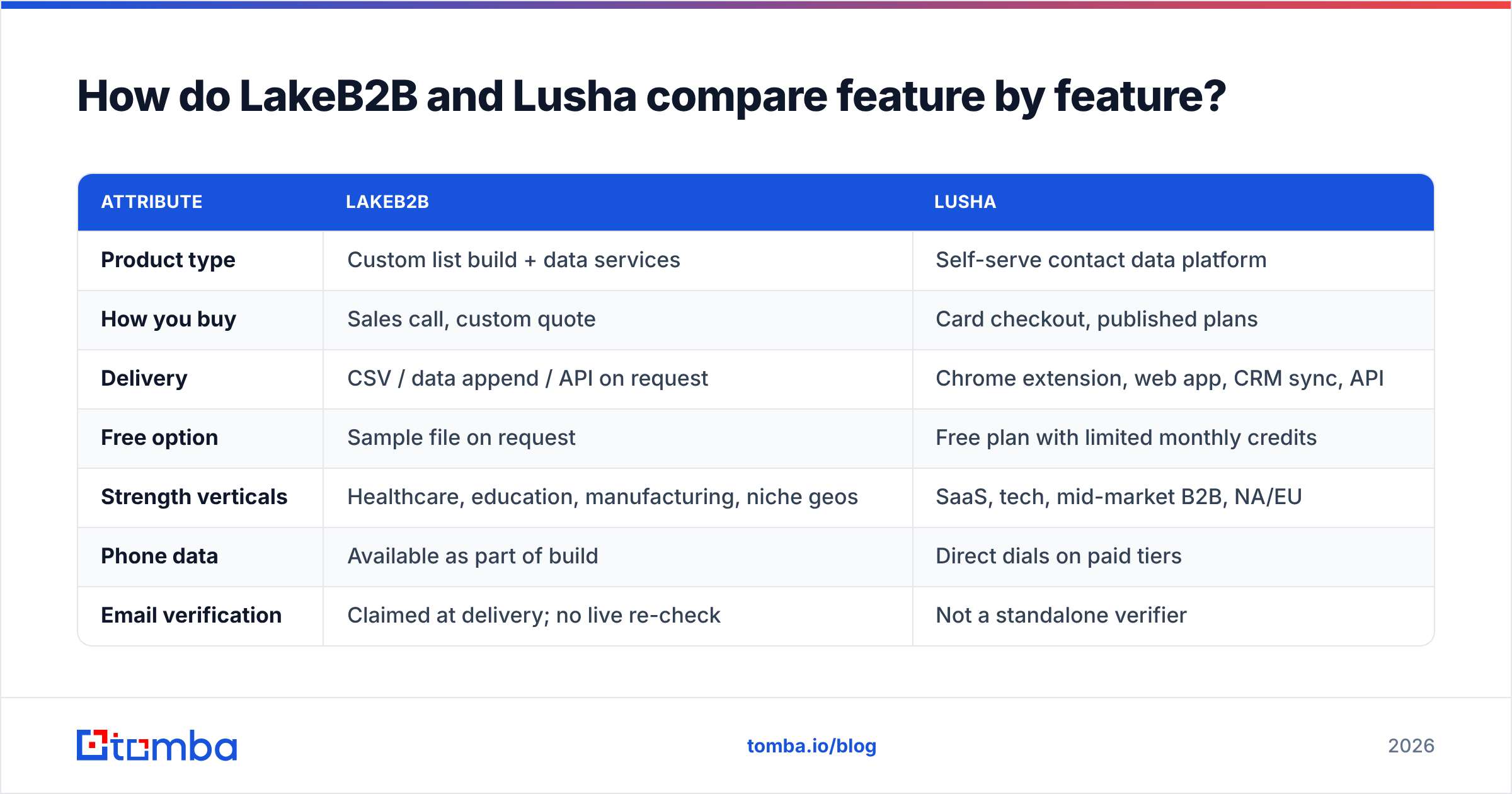
| Attribute | LakeB2B | Lusha |
|---|---|---|
| Product type | Custom list build + data services | Self-serve contact data platform |
| How you buy | Sales call, custom quote | Card checkout, published plans |
| Delivery | CSV / data append / API on request | Chrome extension, web app, CRM sync, API |
| Free option | Sample file on request | Free plan with limited monthly credits |
| Strength verticals | Healthcare, education, manufacturing, niche geos | SaaS, tech, mid-market B2B, NA/EU |
| Phone data | Available as part of build | Direct dials on paid tiers |
| Email verification | Claimed at delivery; no live re-check | Not a standalone verifier |
| Best for | One-off TAM builds, ABM list seeding | Daily rep prospecting, CRM enrichment |
| Worst for | Teams needing weekly freshness | Niche industries with thin LinkedIn presence |
The table exposes the real decision. If your buying committee sits on LinkedIn every day and your reps prospect account by account, Lusha's shape fits. If you need 40,000 verified contacts in a vertical that self-serve tools barely cover, a list build is the only realistic path — and LakeB2B is a legitimate option there.
Which one has better data accuracy?#
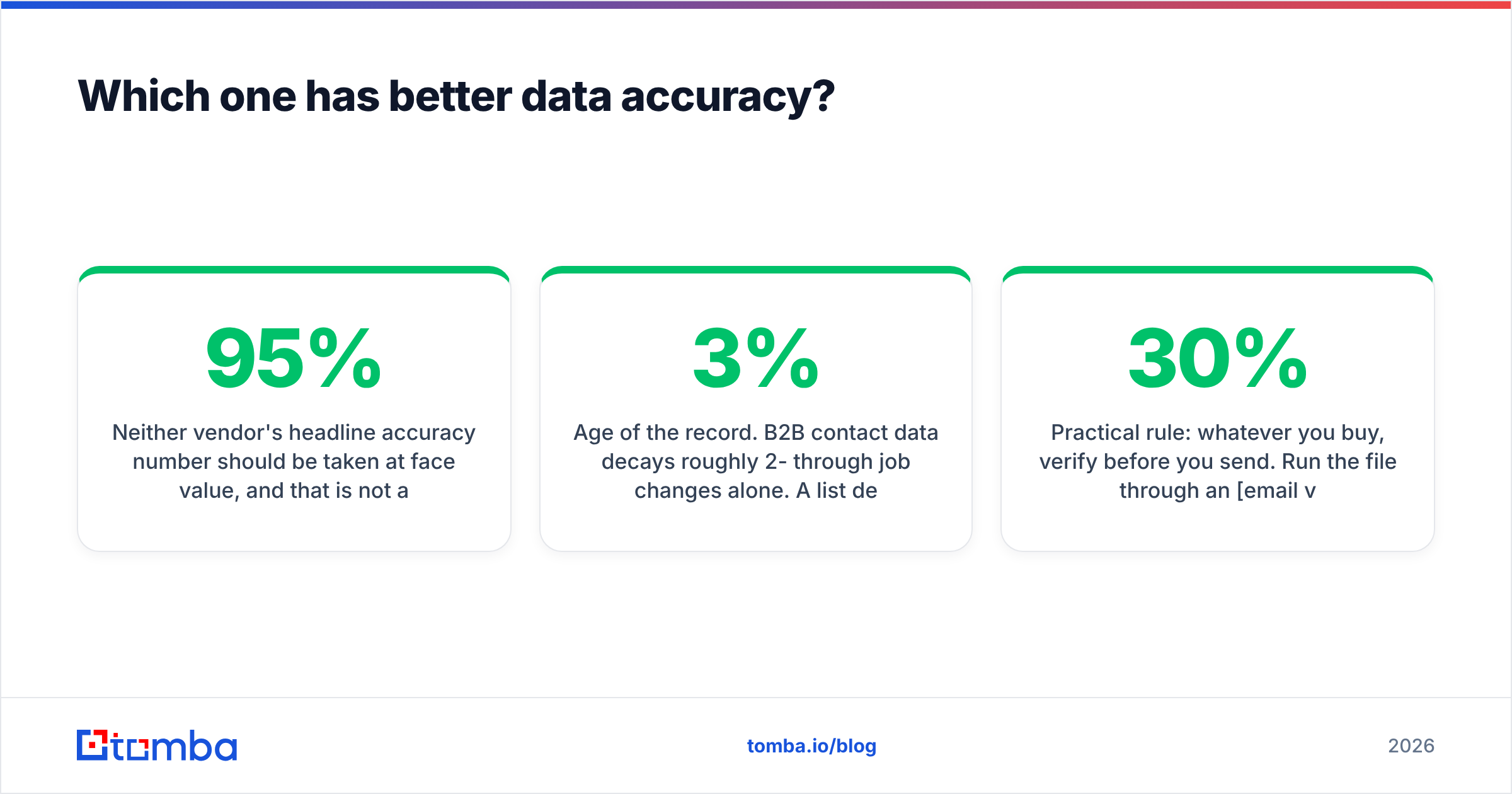
Neither vendor's headline accuracy number should be taken at face value, and that is not a knock on either of them — it is how the category works. "95% accurate" usually means syntactically valid and matched against a source at time of processing, not will land in an inbox today.

Here is what actually drives accuracy in practice:
- Age of the record. B2B contact data decays roughly 2-3% per month through job changes alone. A list delivered in January is materially worse in June. Lusha's just-in-time reveal has a structural advantage here; a static file does not.
- Catch-all domains. A large share of enterprise domains accept every address at the SMTP layer, so no provider can confirm the mailbox exists. Both vendors will hand you catch-all addresses labelled as valid. Running them through a catch-all verifier before sending is the only way to separate real mailboxes from the noise.
- Pattern-guessed vs sourced emails. Some records in any database are pattern derivations (first.last@domain) rather than observed addresses. They are often right and sometimes catastrophically wrong — especially at companies with multiple domains post-acquisition.
- Role vs personal addresses. info@, sales@, and contact@ inflate record counts and destroy reply rates.
Practical rule: whatever you buy, verify before you send. Run the file through an email verifier and cut anything that comes back risky. Teams that skip this step routinely discover 15-30% invalid rates on lists they were told were 95% clean — and by then the sender reputation damage is done.
Independent reviews on G2 are worth reading for both vendors, but read the 3-star reviews specifically. That is where coverage gaps and support experiences surface honestly.
What does LakeB2B vs Lusha actually cost?#
This is where the comparison gets uncomfortable, because the two vendors do not price on the same axis.
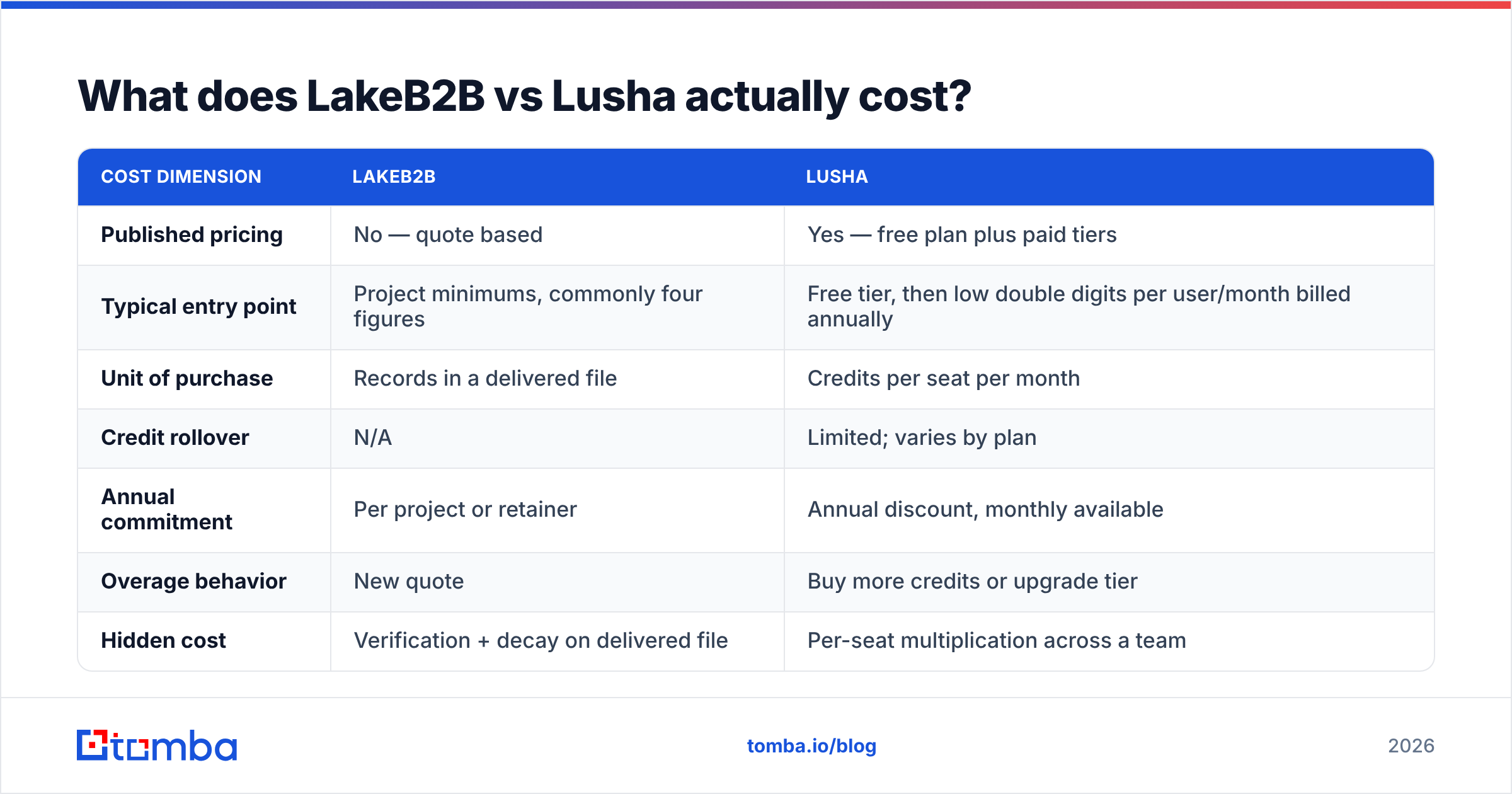
| Cost dimension | LakeB2B | Lusha |
|---|---|---|
| Published pricing | No — quote based | Yes — free plan plus paid tiers |
| Typical entry point | Project minimums, commonly four figures | Free tier, then low double digits per user/month billed annually |
| Unit of purchase | Records in a delivered file | Credits per seat per month |
| Credit rollover | N/A | Limited; varies by plan |
| Annual commitment | Per project or retainer | Annual discount, monthly available |
| Overage behavior | New quote | Buy more credits or upgrade tier |
| Hidden cost | Verification + decay on delivered file | Per-seat multiplication across a team |
Two warnings, one per vendor, and they are symmetrical.
On LakeB2B: quote-based pricing means your cost per record is a function of negotiation, not a rate card. Always ask for cost per verified, deliverable record, not cost per row. Always request a free sample of 100 records from the exact segment you intend to buy — not a generic sample — and verify it yourself before signing.
On Lusha: per-seat pricing scales linearly with headcount, and credits are seat-bound. Ten reps who each need 500 lookups a month is a very different invoice than one ops person pulling 5,000 records. Model the annual number before you fall in love with the extension.

Both vendors change pricing; check their current pages before you budget off this table.
Who should choose LakeB2B?#
Pick LakeB2B when:
- Your ICP is genuinely hard to index. Rural healthcare administrators, vocational education directors, regional industrial distributors — self-serve databases are thin here, and a human-assisted build wins.
- You need volume in one shot. Seeding an ABM program or a direct-mail campaign with 25,000 accounts is a file job, not a click-by-click job.
- You want appended fields, not just emails. Firmographics, technographics, NPI numbers in healthcare, install-base data — list vendors will build to spec.
- You have compliance review capacity. Purchased lists need documented provenance. Ask for it in writing.
Do not pick LakeB2B if you expect the file to stay accurate for a year, or if your team needs to prospect reactively as accounts come into play.
Who should choose Lusha?#
Pick Lusha when:
- Reps prospect inside LinkedIn daily. The extension is the product, and it is genuinely good at the reveal-while-browsing motion.
- You want CRM hygiene without an ops project. Enrichment into HubSpot or Salesforce is straightforward.
- Your ICP is tech-adjacent and NA/EU based. That is where reveal rates hold up best.
- You want to start today without a procurement cycle. The free tier plus a card gets a rep running in ten minutes.
Do not pick Lusha if you need tens of thousands of records per month, if your buyers are in industries with low LinkedIn density, or if your team is large enough that per-seat credits become the dominant line item in your data budget.
Where does a dedicated email finder fit in this comparison?#
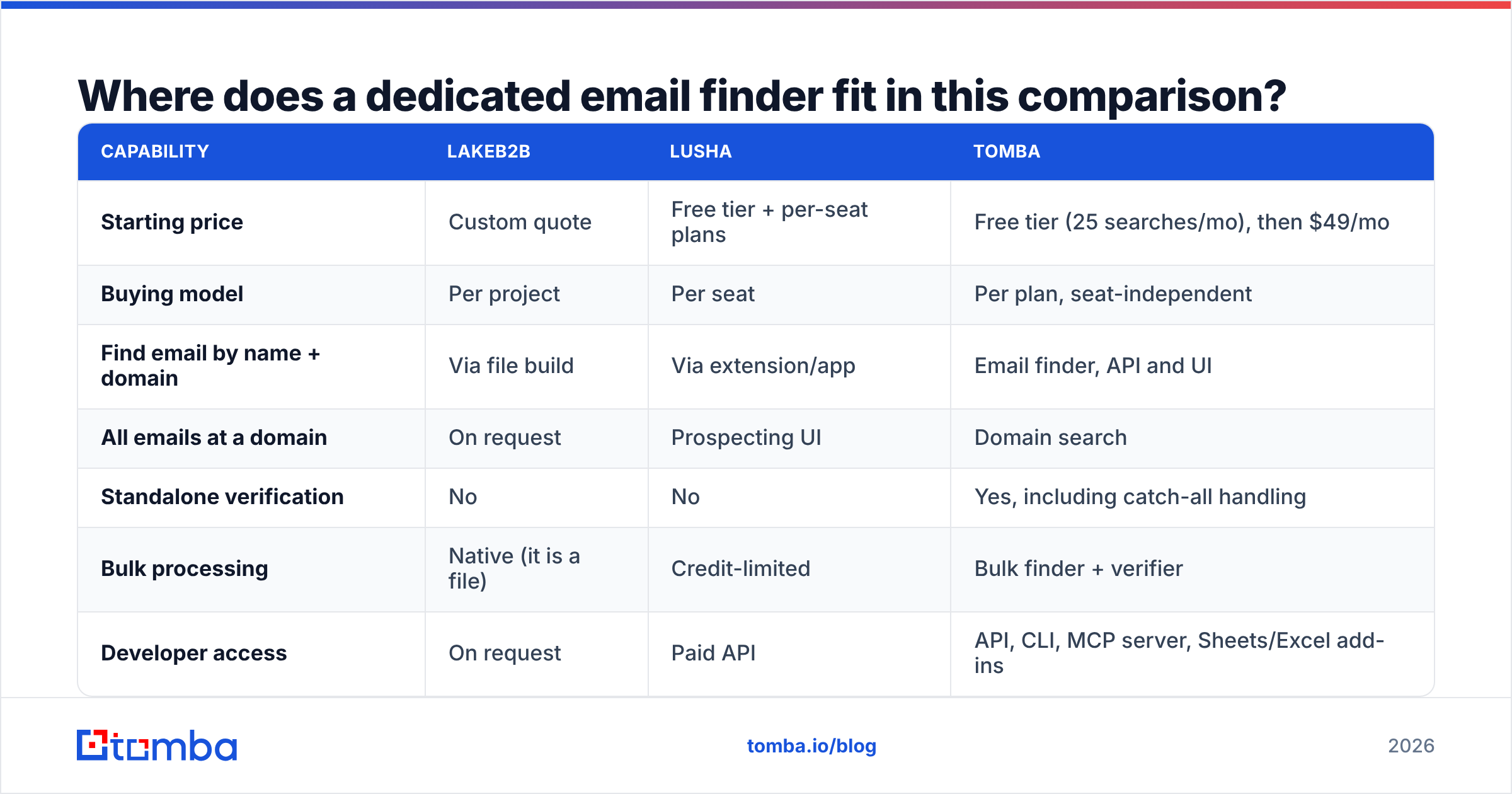
Most teams evaluating LakeB2B vs Lusha are solving a narrower problem than either product addresses: turn a known company and a known person into a valid work email at a predictable unit cost.
That is a different purchase. It is an API and a bulk workflow, not a list build or a per-seat extension.
| Capability | LakeB2B | Lusha | Tomba |
|---|---|---|---|
| Starting price | Custom quote | Free tier + per-seat plans | Free tier (25 searches/mo), then $49/mo |
| Buying model | Per project | Per seat | Per plan, seat-independent |
| Find email by name + domain | Via file build | Via extension/app | Email finder, API and UI |
| All emails at a domain | On request | Prospecting UI | Domain search |
| Standalone verification | No | No | Yes, including catch-all handling |
| Bulk processing | Native (it is a file) | Credit-limited | Bulk finder + verifier |
| Developer access | On request | Paid API | API, CLI, MCP server, Sheets/Excel add-ins |
| Phone data | Yes | Yes (paid tiers) | Phone finder available |
Tomba's model is deliberately different from both: $49/mo Starter, $99/mo Growth, $249/mo Pro, Enterprise custom, with a free tier to test coverage on your own domains before paying anything. See current Tomba pricing for the credit allocations per tier. Because it is not seat-priced, adding reps does not multiply the bill — a meaningful difference once your team passes about five users.
It is also worth naming the third path honestly: BookYourData is a solid option if you want a purchased-list model with transparent, pay-as-you-go pricing and a published accuracy guarantee — effectively the middle ground between LakeB2B's quote-driven builds and a self-serve API. Plenty of teams run a purchased list for TAM coverage and an API for just-in-time lookups, and that combination is usually cheaper than forcing one tool to do both jobs.
How should you test either vendor before you sign?#
Run the same five-step bake-off on every provider. It takes an afternoon and saves quarters.
- Build a golden set. Take 100 contacts you already know are valid — existing customers, past champions, people you have actually emailed. This is your ground truth.
- Ask each vendor to match it. Coverage rate (how many they return) and accuracy rate (how many match your known-good value) are two separate numbers. Vendors quote the second and hide the first.
- Verify everything independently. Do not accept the vendor's own validity flag. Push every returned address through a neutral email verification pass and record catch-all counts separately.
- Price the real unit. Divide total annual cost by verified deliverable records you will actually use. Unused seat credits and undeliverable rows are not records; they are waste.
- Send a 200-contact pilot. Bounce rate under 2% is healthy. Between 2% and 5% means fix your process before scaling. Above 5%, you have a data problem that no amount of copy testing will rescue.

Document the results in a shared sheet. When the renewal conversation happens eleven months later, you will have numbers instead of vibes.
What is the verdict on LakeB2B vs Lusha?#
Choose LakeB2B if you need a large, vertical-specific file built to spec and you have the budget and compliance process for a list purchase. Choose Lusha if you need individual reps pulling fresh contacts inside LinkedIn and your CRM, and your ICP lives where Lusha's coverage is strong.
But recognize the third answer, because it is the one most outbound teams land on after the first renewal: the expensive part of the stack is rarely the seat or the file — it is the undeliverable records that quietly erode your sender reputation. Solve that first, and the rest of the decision gets much cheaper.
Start with the free tier of the Tomba Email Finder — 25 searches a month, no card — and run it against the same golden set you plan to test LakeB2B and Lusha with. Find emails by name and domain, pull every address at a target company with domain search, and verify the results (catch-alls included) before a single message goes out. If the coverage holds on your accounts, $49/mo Starter is a very different budget conversation than a per-seat contract or a four-figure list minimum.
Related guides#
// get started
Find, verify and enrich your first contacts today
Start on the free plan with 25 searches a month, then scale when your team is ready.
Free plan · No credit card required · GDPR & CCPA
// about the author